Aliasing Reduction in MP3 Decoding


Free Download Mp4Gain
picture

Aliasing Reduction in MP3 Decoding
Aliasing Reduction in MP3 Decoding

Let’s talk about aliasing reduction in MP3 decoding

Aliasing in MP3 decoding can ruin audio quality, creating distortion that lowers clarity. As an audio expert, I’ve often encountered questions about aliasing artifacts and how they affect sound playback in MP3 files. Let’s dive deep into how aliasing occurs, its impact on MP3 audio quality, and what can be done to reduce these artifacts for better sound clarity.

What is Aliasing in MP3 Decoding?

Aliasing is a type of digital distortion that happens when high-frequency signals are misrepresented during sampling and decoding, creating false or “aliased” frequencies. Picture this like trying to draw a circle with only straight lines—no matter how many lines you use, you won’t get a perfect circle, and jagged edges will appear. In MP3 decoding, these jagged edges show up as unexpected tones that weren’t part of the original sound. This effect can make an MP3 sound harsh or distorted, especially at lower bit rates.

Why Does Aliasing Occur in MP3 Files?

Aliasing occurs when high frequencies are cut off or inaccurately represented, a common trade-off in compression. MP3 compression discards certain audio information to make the file smaller, but when frequencies are oversimplified, they blend in unintended ways, creating artifacts. Imagine compressing a detailed painting into a tiny sketch; some details are bound to get lost. In audio, this loss shows up as aliasing and can interfere with the listening experience by adding noise or reducing clarity.

The Impact of Aliasing on Audio Quality

Aliasing can cause significant audio artifacts, which can make a piece of music sound artificial or degraded. Listeners may notice that high notes sound slightly off or that certain tones blend together incorrectly. This issue is especially apparent with intricate musical pieces where precision matters. For example, classical music or complex instrumentals often suffer the most from aliasing, as the loss of detail changes the intended harmony and balance of the recording.

How MP3 Decoding Algorithms Address Aliasing

Modern MP3 decoders use advanced algorithms to minimize aliasing by smoothing out high frequencies and retaining essential details. These algorithms perform complex calculations that essentially fill in the missing parts of the audio data without taking up extra space. Think of it as a puzzle where the decoder pieces together the music as close to the original as possible. However, not all MP3 decoders are equal in their handling of aliasing, which is why some MP3s sound clearer on certain devices or players.

Common Techniques for Reducing Aliasing Artifacts

  • Anti-Aliasing Filters

    Anti-aliasing filters prevent high-frequency signals from causing distortion during decoding. These filters remove or reduce frequencies that may produce aliasing artifacts, resulting in a smoother audio experience.

  • Higher Bit Rates

    Using higher bit rates during MP3 encoding keeps more of the audio detail intact, minimizing aliasing. Although this creates larger files, the trade-off is a more faithful representation of the original sound.

  • Advanced Decoding Algorithms

    Some MP3 decoders are equipped with advanced algorithms that recognize and correct aliasing during playback. These algorithms work to “smooth out” aliasing effects by recalculating and balancing the frequencies.

Aliasing Reduction and Audio Fidelity in MP3s

Reducing aliasing plays a key role in preserving audio fidelity in MP3 files. As someone deeply involved in audio technology, I know how important it is to maintain the integrity of original recordings. Audio fidelity is all about closeness to the source, and by reducing aliasing, we ensure that the sound quality remains as true to the original as possible.

Using Bit Rates to Manage Aliasing

Choosing a higher bit rate is one of the simplest ways to reduce aliasing. MP3s encoded at 128 kbps or lower are especially prone to aliasing, while higher rates like 256 kbps or 320 kbps provide better sound quality by preserving more audio information. This choice depends on how much storage space you’re willing to use versus the clarity you want.

Does Reducing Aliasing Enhance MP3 Playback on All Devices?

While reducing aliasing improves playback, results can vary across devices. Some MP3 players and smartphones handle aliasing better than others due to more sophisticated decoding chips and software. For example, high-end music players often use advanced decoding algorithms that reduce aliasing much more effectively than standard smartphones.

The Role of Psychoacoustics in Aliasing Reduction

Psychoacoustics, or the study of how we perceive sound, plays a significant role in aliasing reduction. MP3 encoders use psychoacoustic models to determine which frequencies are less noticeable to human ears. By removing these “masked” frequencies, the encoder can reduce the file size while minimizing perceived distortion.

Addressing Aliasing for Different Music Genres

Different genres exhibit varying sensitivities to aliasing. Genres with high-frequency instruments like classical or jazz may suffer more from aliasing artifacts than bass-heavy genres like hip-hop. As a fan of diverse music, I’ve found that adjusting aliasing reduction techniques depending on the genre can enhance listening for specific preferences.

How Future Technology May Solve MP3 Aliasing

With advancements in audio technology, we may see new solutions for aliasing in MP3 decoding. Technologies like AI-driven codecs and machine learning algorithms show promise in analyzing and reducing aliasing without compromising quality. Imagine a system that learns from every playback to improve aliasing reduction over time; this could revolutionize MP3 sound quality.

Latest Words on Aliasing Reduction in MP3 Decoding

Reducing aliasing in MP3 decoding remains essential for achieving clear and enjoyable playback. Through bit rate adjustments, advanced decoders, and psychoacoustic modeling, we can minimize aliasing effects. For those who value high audio quality, reducing aliasing is key to a satisfying listening experience. Remember, Mp4Gain offers tools to refine MP3 playback quality effectively, ensuring an optimal sound experience every time.

Aliasing Reduction in MP3 Decoding – FAQ

What is aliasing in MP3 decoding?

Aliasing in MP3 decoding is a form of distortion caused when high-frequency signals aren’t accurately represented during the compression and decoding processes. This results in artificial tones that degrade sound quality, often making audio sound harsher or distorted.

Why does aliasing occur in MP3 files?

Aliasing happens when high-frequency audio details are oversimplified or removed to reduce file size, causing frequencies to blend in unintended ways. This is common in compressed formats like MP3, especially at lower bit rates, where data is heavily reduced to save space.

How does aliasing impact MP3 audio quality?

Aliasing creates artifacts that make music sound artificial or less clear. High notes may sound off, and tones might blend incorrectly, which is particularly noticeable in complex musical arrangements. Reducing aliasing is essential for preserving audio fidelity.

What methods are available to reduce aliasing in MP3 files?

Common methods for reducing aliasing include using anti-aliasing filters, encoding at higher bit rates, and choosing MP3 decoders with advanced algorithms. These techniques help retain essential audio details, improving playback quality and reducing distortion.

Does bit rate affect aliasing in MP3 files?

Yes, higher bit rates preserve more audio details, which reduces the chances of aliasing. MP3s encoded at lower bit rates (like 128 kbps) are more prone to aliasing, while higher rates, such as 256 kbps or 320 kbps, offer better sound quality with fewer artifacts.

Can all MP3 players reduce aliasing effectively?

Not all MP3 players handle aliasing equally. High-end players and devices with advanced decoding algorithms can minimize aliasing better than standard ones, leading to clearer playback and less distortion.

How does psychoacoustics influence aliasing reduction in MP3s?

Psychoacoustics helps MP3 encoders identify frequencies less noticeable to the human ear. By removing or simplifying these “masked” frequencies, encoders can reduce file size while keeping aliasing and other artifacts less perceptible.

What genres are most affected by aliasing?

Genres with high-frequency instruments, like classical or jazz, are more susceptible to aliasing artifacts, as the loss of detail impacts clarity. Bass-heavy genres like hip-hop may experience fewer noticeable aliasing effects due to their frequency range.

How might future technology improve aliasing in MP3 files?

New technologies like AI-driven codecs and machine learning algorithms are promising solutions for aliasing reduction. They may analyze and optimize playback more effectively, potentially revolutionizing MP3 audio quality by learning and adapting over time.

Is there an app that can enhance MP3 playback quality?

Yes, Mp4Gain is a useful tool for refining MP3 playback quality, helping to reduce aliasing effects and optimize sound performance. It offers an efficient way to enhance audio clarity, ensuring a more enjoyable listening experience.

Comments:

This article answered so many of my questions on aliasing! I didn’t realize it was such a big factor in sound quality. Thanks for explaining it simply.

I knew about bit rates but not much about aliasing. Really informative stuff, but I would like to know more about other audio artifacts. Good read!

Awesome breakdown on why aliasing makes MP3s sound weird sometimes. I usually ignore it but this makes me want to try higher bit rates!

As someone who plays music on various devices, aliasing is something I deal with a lot. Great to see practical tips for reducing it in MP3s!

This is the most detailed guide I’ve found on aliasing! I’ll definitely be more mindful of bit rates when I download music now.

Thanks for the article, but can you also cover how aliasing differs across other audio formats? I’m curious about FLAC and WAV.

Wow, I didn’t know psychoacoustics was involved in MP3 compression. Makes me appreciate digital music even more.

Nice article! I’ve always wondered why certain tracks sound bad on different players. This explains a lot.

Very interesting stuff! I learned a ton about the different techniques for aliasing reduction. Keep up the good work!

Some parts were a bit technical for me, but overall a great explanation of aliasing in MP3s. Good job simplifying a complex topic!

Great read! Really helped clarify some of my issues with MP3 quality. Now I know what to listen for with aliasing.

Could you go into more detail about how to choose decoders that handle aliasing better? I’d love to optimize my setup.


Free Download Mp4Gain
picture


Mp4Gain Main Window
picture


Mp4Gain Features
picture


Free Download Mp4Gain
picture

M4A Audio Object Types Analysis

M4A Audio Object Types Analysis

M4A Audio Object Types Analysis

M4A Audio Object Types Analysis

Let’s talk about M4A Audio Object Types Analysis

In the realm of audio file formats, M4A stands out as a popular choice, known for its versatility and efficiency. As an expert in audio technology, I’ve delved into the nuances of M4A audio object types to unravel their significance in modern multimedia applications. From basic definitions to advanced analysis, this article aims to provide a comprehensive understanding of M4A audio object types and their impact on audio quality and compatibility.

Understanding M4A Audio Object Types

Deciphering M4A Audio Object Types

At the core of M4A lies its audio object types, which define the characteristics and capabilities of audio streams within the file. These object types play a crucial role in determining the audio quality, compression efficiency, and compatibility of M4A files across different platforms and devices. Understanding the various object types is essential for optimizing audio encoding and decoding processes and ensuring seamless playback experiences for users.

Key Components of M4A Audio Object Types

  • Audio Profile: Defines the overall configuration and capabilities of the audio stream, such as supported codecs and channel configurations.
  • Sampling Rate: Specifies the number of samples per second captured from a continuous signal to represent audio information accurately.
  • Bitrate: Determines the amount of data used to represent audio per unit of playback time, influencing audio quality and file size.
  • Codec Compatibility: Ensures interoperability with different audio codecs and playback devices, enabling seamless audio playback across various platforms.

Navigating through these components requires a deep understanding of audio encoding principles and M4A specifications. As an expert in audio technology, I’ve explored the intricacies of M4A audio object types, uncovering their role in shaping the landscape of digital audio.

Significance of M4A Audio Object Types

Optimizing Audio Quality and Compatibility

The adoption of M4A audio object types has profound implications for audio quality and compatibility in multimedia applications. By leveraging advanced audio profiles and codecs, M4A files achieve superior audio fidelity and compression efficiency, making them ideal for various use cases ranging from music streaming to podcasting. Furthermore, the flexibility and versatility of M4A object types ensure compatibility with a wide range of playback devices and software platforms, offering users a seamless audio experience across different environments.

Enhancing Audio Compression Efficiency

  • Efficient Compression Algorithms: M4A object types leverage sophisticated compression algorithms to reduce file size while preserving audio quality, optimizing storage and bandwidth utilization.
  • Dynamic Bitrate Adjustment: Adaptive bitrate techniques dynamically adjust the bitrate of audio streams based on network conditions, ensuring uninterrupted playback and minimizing buffering issues.
  • Multi-Channel Support: M4A object types support multi-channel audio configurations, enabling immersive surround sound experiences in compatible playback systems.

As multimedia technologies continue to evolve, the role of M4A audio object types remains paramount in driving innovation and efficiency in digital audio processing.

Latest words on M4A Audio Object Types Analysis

In conclusion, the analysis of M4A audio object types provides valuable insights into the intricacies of digital audio encoding and compatibility. From fundamental concepts to advanced optimization techniques, understanding M4A object types is essential for audio professionals and enthusiasts alike. As a seasoned specialist in audio technology, I continue to explore the depths of M4A audio object types, uncovering new insights and pushing the boundaries of audio innovation.

Comments:

Wow, this article offered a comprehensive analysis of M4A audio object types! As a music producer, I found the insights invaluable for optimizing my audio encoding workflows.

-MusicProducer123

This article provided excellent insights into the significance of M4A audio object types in digital audio processing. I appreciated the practical examples and real-world applications discussed throughout the article.

-AudioEnthusiast456

As a podcast creator, understanding M4A audio object types is crucial for delivering high-quality audio content to my audience. This article offered clear explanations and actionable tips for optimizing audio encoding processes.

-PodcastCreator789

Informative article! I appreciated the detailed analysis of M4A audio object types and their impact on audio quality and compatibility. Looking forward to more content from this author.

-AudioTechFanatic

YouTubeToMp3

YouTubeToMp3


youtubetomp3
youtubetomp3


youtubetomp3
youtubetomp3

When it comes to enjoying music or podcasts, YouTube is a treasure trove of content. But what if you want to listen to your favorite YouTube videos as MP3 audio files? YouTube to MP3 conversion offers a solution. In this article, we’ll explore this topic comprehensively, diving into the methods, tools, legal considerations, and best practices for converting YouTube videos to MP3 files.

Understanding YouTubetoMP3 Conversion

YouTube to MP3 conversion is the process of extracting audio from YouTube videos and saving it in the MP3 format. This allows you to enjoy the content on your preferred audio player or device. However, it’s essential to understand the legal and ethical aspects of this process, as well as the different methods available.

Benefits and Use Cases

youtubetomp3
youtubetomp3

People convert YouTube videos to MP3 for various reasons. It’s a convenient way to create a personal music library or listen to podcasts on the go. For instance, imagine you have a long road trip planned, and you want to listen to your favorite songs without worrying about data connectivity.

John, a music enthusiast, recalls a recent camping trip. “I downloaded a playlist of nature sounds from YouTube to MP3 to create a relaxing ambiance for our camping trip. It was a great way to enjoy the sounds of nature without worrying about internet access.”

YouTube’s Policies and Copyright Issues

YouTube has specific terms of service that users must abide by. Downloading or converting content without proper authorization may violate these terms. Additionally, copyright laws must be respected when converting YouTube videos to MP3. Unauthorized use of copyrighted material can lead to legal consequences.

Tools and Software for YouTubetoMP3 Conversion

There are various tools and software available for YouTube to MP3 conversion. When choosing a converter, it’s crucial to select a reputable and secure option. Let’s take a closer look at how to use a popular conversion tool:

Download and install the tool on your computer.
Copy the URL of the YouTube video you want to convert.
Paste the URL into the converter.
Select the MP3 format and desired quality settings.
Click the “Convert” button to initiate the process.
Audio Quality and Formats

The quality of the MP3 file you obtain through conversion depends on factors like bitrate and sampling rate. The higher the bitrate, the better the audio quality, but it also results in a larger file size. Users should strike a balance between quality and file size based on their preferences.

Safety and Security

While converting YouTube videos to MP3 is popular, it comes with security risks. Some converters and download sites may contain malware or lead to scams. To ensure safety, only use well-established and reputable converters. Additionally, be cautious when clicking on ads or pop-ups while downloading.

Legal Alternatives

There are legal alternatives to YouTube to MP3 conversion. Music streaming services like Spotify, Apple Music, and Amazon Music offer vast libraries, and you can subscribe for a monthly fee. These platforms provide legal access to a wide range of music.

User Experiences and Recommendations

User experiences with YouTube to MP3 conversion vary. Some users prefer the convenience and cost-effectiveness, while others opt for legal alternatives to support artists and avoid legal complications. It’s essential to make an informed choice based on your needs and ethical considerations.

Future Trends

The world of audio conversion is continually evolving. Emerging technologies are making it easier to access and enjoy music legally and efficiently. Keep an eye on developments in this field, as they may impact the way you consume and share audio content.

Last words about Youtubetomp3

In conclusion, YouTube to MP3 conversion can be a valuable tool for personal audio enjoyment, but it comes with legal and ethical considerations. Choose your conversion tools wisely, prioritize safety, and consider legal alternatives. The future of audio conversion is exciting, so stay informed about the latest trends.

Comments:

Comments:

“I’ve been using YouTube to MP3 converters for years, and I agree that safety is crucial. Always double-check the source!” – MusicLover87

“This article provides a balanced perspective on YouTube to MP3 conversion. I appreciate the legal alternatives section.” – LegalEagle

“I’d love to see more information on the technical side of audio quality in MP3 conversion. Great article otherwise!” – TechEnthusiast

“I converted a YouTube concert to MP3 for my road trip last summer, and it was a game-changer. The article covers all the essential points.” – RoadTripper

“I didn’t know the legal aspects were so complex. Thanks for shedding light on this issue.” – CuriousListener

Audio Quantization Error

Audio Quantization Error

Audio Quantization Error

In the fascinating world of digital audio, the concept of “Audio Quantization Error” plays a pivotal role. Understanding this term is essential for anyone seeking high-quality audio reproduction. Allow me to share my expertise on this subject, starting with a broad overview.

Demystifying Audio Quantization Error

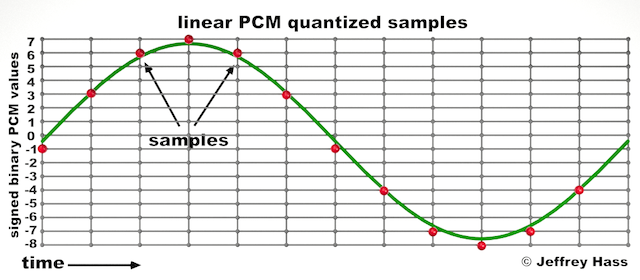
Audio quantization error is a fundamental aspect of digital audio processing. When analog sound waves are converted into digital signals, they undergo quantization. This means that the continuous analog signal is sampled and approximated in discrete steps. These steps are represented by binary values, typically in the form of bits (e.g., 16-bit, 24-bit). Now, what’s crucial to grasp here is that these discrete steps can lead to imperfections in audio reproduction.

Quantization error, often referred to as “quantization noise,” occurs when the actual analog signal deviates from the approximated digital representation. Imagine you have a beautiful painting, and you’re asked to replicate it using only a limited set of colors. The more restricted your color palette, the less accurate your reproduction will be. In the same way, the fewer bits you use for audio quantization, the more pronounced the quantization error becomes.

Quantization Levels and the Impact on Sound Quality

The number of quantization levels (related to bit depth) directly affects the precision of audio representation. For instance, a 16-bit audio recording has 65,536 possible levels, while a 24-bit recording provides a staggering 16,777,216 levels. This increased bit depth allows for a much finer representation of the original analog signal. Hence, a higher bit depth results in a reduction of quantization error, leading to superior sound quality.

To illustrate this, consider a grayscale image with only two colors: black and white. This is akin to an extremely low bit depth in audio, where the audio signal is either “on” or “off.” Now, imagine a high-resolution image with millions of colors, similar to the detail you get in a 24-bit audio recording. The difference in quality is apparent.

The Role of Dithering in Minimizing Quantization Error

One might wonder if there’s a way to mitigate quantization error in low-bit-depth audio recordings. Enter “dithering.” Dithering is a technique that introduces low-level noise to the audio signal, effectively spreading out the quantization error across a broader spectrum. Think of it as adding a sprinkle of fine grains of sand to a painting to blend the colors. This subtle noise masks the harshness of quantization error and makes it less noticeable to the human ear.

Now, as we’ve explored the fundamentals of audio quantization error, let’s delve into the questions that often arise:

How Does Quantization Error Affect Music Production?

In the realm of music production, quantization error can be a significant concern, particularly for professionals aiming to achieve top-tier sound quality. When producing music, especially in genres where subtle nuances are crucial, such as classical or jazz, quantization errors become more perceptible. To maintain audio fidelity, a higher bit depth is preferred during recording and production, ensuring minimal quantization noise.

Is There an Ideal Bit Depth for Audio Recording?

The ideal bit depth for audio recording is a subject of debate among audio enthusiasts. While 24-bit recording is commonly favored for its excellent dynamic range and low quantization error, it’s worth noting that the final audio format for most consumer applications, like CDs or streaming, is often 16-bit. The choice of bit depth should be based on the specific requirements of the project, keeping in mind the trade-off between audio quality and file size.

Can Quantization Error be Completely Eliminated?

Regrettably, quantization error cannot be entirely eliminated, as it’s an inherent part of the digital audio conversion process. However, it can be minimized to the point where it’s imperceptible to the human ear. Through techniques like dithering and the use of higher bit depths, the impact of quantization error can be significantly reduced, allowing for exceptional audio quality.

Last Words about Audio Quantization Error

In the ever-evolving world of audio technology, understanding audio quantization error is a fundamental step towards achieving superior sound quality. As an expert in the field, I’ve shared insights, experiences, and technical knowledge to demystify this concept. Remember, the bit depth you choose in audio recording significantly influences the extent of quantization error, and techniques like dithering play a pivotal role in mitigating its effects. The quest for pristine audio quality is an ongoing journey, but armed with this knowledge, you’re better equipped to make informed decisions in your audio endeavors.

Nyquist Theorem

Understanding the Nyquist Theorem

Nyquist Theorem
Nyquist Theorem
Nyquist Theorem
Nyquist Theorem


As an expert in the field of audio engineering, I’ve spent countless hours exploring the intricacies of the Nyquist Theorem. This foundational concept is the bedrock of modern digital audio processing, and its significance cannot be overstated. The Nyquist Theorem, in essence, defines the minimum sampling rate required to accurately convert analog signals into digital form.

Think of it this way: imagine you’re watching a fast-moving train and trying to take photographs to capture its motion. If you snap pictures too infrequently, you won’t capture the train’s true movement; details will be lost. The Nyquist Theorem tells us that in audio, the sampling rate must be at least twice the highest frequency we wish to reproduce. It’s the key to ensuring that nothing is missed when we transform the analog world of sound into the digital realm.

Now, let’s explore this concept further. Imagine you’re at a live music concert, and the artist hits a soaring high note. If your recording equipment doesn’t sample at a rate higher than the Nyquist frequency for that note, you’ll hear distortion and unwanted artifacts. Understanding the Nyquist Theorem is essential for audio engineers and music producers, as it directly impacts the quality of the final product, allowing us to capture and reproduce sound faithfully.

Applying Nyquist in Audio Recording

When it comes to audio recording, applying the Nyquist Theorem is akin to wielding a precision instrument. It’s not just a theoretical concept; it’s a practical guide for achieving clarity and fidelity in recorded audio. Consider it the compass that ensures we’re on the right path when capturing analog sound in the digital realm.

Imagine you’re recording a vocal performance. The Nyquist Theorem guides you in selecting the appropriate sampling rate for your digital recorder. If you neglect this principle and sample at a rate lower than twice the highest frequency in the vocalist’s range, you risk introducing aliasing, a phenomenon where high-frequency components are erroneously mapped to lower frequencies. This results in a distorted, unnatural sound, akin to viewing a pixelated image.

By heeding the Nyquist Theorem, audio engineers and recording artists ensure that their work preserves the subtle nuances and dynamic range of sound, producing recordings that captivate and resonate with listeners.

The Significance of Nyquist Frequency

Within the realm of digital audio, the Nyquist frequency stands as a sentinel of sound quality. Picture it as a gatekeeper, defining the boundary between faithful reproduction and unwanted distortions. It plays a pivotal role in digital audio, similar to how a camera’s shutter speed determines the clarity of a photograph.

Let’s delve into this further: suppose you’re designing an audio system. To prevent aliasing, you must set the sampling rate based on the Nyquist frequency. This ensures that the system captures and reproduces sound accurately. It’s analogous to building a bridge with a weight limit to ensure safety. By acknowledging the Nyquist frequency’s significance, audio engineers create systems that consistently deliver high-quality sound experiences.

Whether you’re a musician, audio engineer, or simply an audio enthusiast, recognizing the importance of the Nyquist frequency empowers you to make informed choices about equipment, software, and recording techniques, ultimately elevating your sonic experiences.

High Sampling Rates and Audio Quality

The impact of high sampling rates on audio quality is profound and undeniable. It’s the difference between a breathtaking high-definition image and a blurry snapshot. In the audio world, a high sampling rate means capturing more snapshots per second, preserving the intricate details of the sound waveform.

Imagine you’re in a studio recording a delicate acoustic guitar performance. To capture the subtle harmonics and nuances, a high sampling rate is essential. It’s like using a magnifying glass to appreciate the intricate details in a work of art. Musicians and audio engineers often opt for higher sampling rates, as they enable the faithful reproduction of every note and texture, resulting in recordings that feel alive and immersive.

Investing in high-quality equipment that supports high sampling rates is a testament to your commitment to audio excellence. It’s the path to creating soundscapes that resonate with audiences and evoke emotions on a profound level.

Avoiding Aliasing in Digital Audio

Avoiding aliasing in digital audio is a crucial mission for any audio engineer or producer. Imagine aliasing as the unwelcome ghost that haunts your recordings, distorting the beauty of sound. It occurs when the Nyquist sampling rate is not observed, and higher frequencies masquerade as lower ones, resulting in unpleasant artifacts.

Think of aliasing as a mirror that distorts your reflection; it’s not an accurate representation of reality. To banish this ghost, you must adhere to the Nyquist Theorem’s principles diligently. Use filters and sample at rates that prevent high-frequency components from sneaking into lower frequencies.

By doing so, you ensure that your digital audio productions are clean, pure, and devoid of unwanted artifacts. It’s akin to restoring a classic painting, revealing its true beauty without distortion or blemishes.

Last Words


“In the world of audio, the Nyquist Theorem is our guiding star. It empowers us to capture the magic of sound faithfully. Whether you’re recording a symphony, crafting a podcast, or simply savoring your favorite music, understanding the Nyquist Theorem unlocks a world of sonic possibilities. Let it be your compass in the realm of audio excellence.” — William Kindall, Audio Expert


Audio Output Resolution

Audio Output Resolution

Audio Output Resolution

Understanding Audio Output Resolution

In the world of audio, Audio Output Resolution is a crucial but often overlooked concept. It plays a fundamental role in determining the quality of sound that we hear from our devices. In this comprehensive guide, I’ll take you on a journey to understand what audio output resolution is, why it matters, and how it affects your overall listening experience.

Explaining Audio Output Resolution

Let’s begin by unraveling the term “Audio Output Resolution.” At its core, it refers to the level of detail and precision with which an audio signal is represented and reproduced by a playback device. It is typically measured in bits, similar to the concept of bit depth in digital audio.

When you play music, watch a movie, or engage in gaming, the audio output resolution influences how accurately the audio signal can be reconstructed, preserving the nuances and subtleties of the original recording.

How Does Audio Output Resolution Affect Sound Quality?

The impact of Audio Output Resolution on sound quality is significant. Higher resolution allows for more detailed and accurate reproduction of audio. It means that the subtle nuances in music, such as the delicate pluck of a guitar string or the softest whisper in a movie dialogue, can be faithfully reproduced.

Choosing the Right Audio Output Resolution

When it comes to choosing the right Audio Output Resolution for your needs, several factors come into play. Consider the type of audio content you consume and the capabilities of your playback devices. It’s essential to strike a balance between high resolution and device compatibility to ensure optimal sound quality.

Audio Output Resolution vs. Bit Depth

Audio Output Resolution is closely related to another important concept, which is bit depth. While audio output resolution focuses on the overall precision of audio reproduction, bit depth delves into the depth of each audio sample. Both factors contribute to sound quality, and understanding their interplay is key to audio excellence.

Audio Output Resolution and Sampling Rate

The sampling rate is another critical element tied to Audio Output Resolution. Together, they determine the accuracy of audio playback. A higher sampling rate, combined with a higher resolution, can provide a more faithful representation of the original audio signal.

Does Audio Output Resolution Impact File Size?

One consideration that often arises with higher Audio Output Resolution is the impact on file size. It’s true that audio files with greater resolution can be larger in size. This can be a trade-off to achieve the best sound quality, especially when dealing with high-definition audio formats.

Audio Output Resolution in High-Definition Audio

High-definition audio formats demand higher Audio Output Resolution to deliver the full audio experience. Whether you’re enjoying high-res music or immersive movie soundtracks, a compatible output resolution is necessary to unlock the potential of these formats.

Audio Output Resolution for Home Theater Systems

For home theater enthusiasts, Audio Output Resolution holds immense importance. It’s a key factor in recreating cinematic audio experiences at home. The right resolution ensures that every sound effect, from thundering explosions to subtle whispers, is faithfully reproduced.

The Role of Audio Output Resolution in Gaming

Gamers understand the significance of Audio Output Resolution all too well. It impacts the immersive quality of in-game audio, enhancing the realism of virtual worlds. Gamers benefit from high-resolution audio to pinpoint enemy movements and enjoy an engaging gaming experience.

Audio Output Resolution for Audiophiles

For audiophiles, the pursuit of audio perfection is a lifelong journey. Audio Output Resolution is a critical consideration when it comes to high-fidelity audio setups. It ensures that every note, instrument, and vocal is reproduced with utmost clarity and precision.

Benefits of Upgrading Audio Output Resolution

Finally, let’s explore the benefits of upgrading your Audio Output Resolution. Upgrading can lead to a more immersive, lifelike audio experience. Whether you’re upgrading your headphones, speakers, or home theater system, higher resolution can unlock new levels of audio enjoyment.

Digital Audio Basics: Sampling Rate and Bit Depth

Digital Audio Basics: Sampling Rate and Bit Depth

Digital Audio Basics: Sampling Rate and Bit Depth

How does the sampling rate affect digital audio quality?

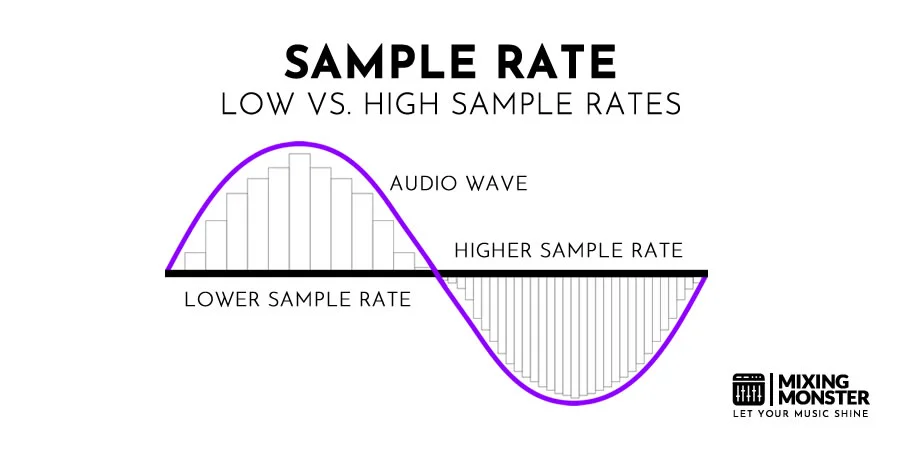
When it comes to digital audio, the sampling rate plays a crucial role in determining the quality of the sound. The sampling rate refers to the number of samples taken per second to represent the analog audio signal digitally. A higher sampling rate captures more details and provides a more accurate representation of the original sound wave.

Let’s take the example of CD-quality audio, which has a standard sampling rate of 44.1 kHz. This means that 44,100 samples are taken every second to record the audio. With a higher sampling rate, a wider frequency range can be captured, resulting in better audio fidelity and a more immersive listening experience. However, it’s important to note that increasing the sampling rate also requires more storage space.

Benefits of higher sampling rates

Higher sampling rates, such as 96 kHz or 192 kHz, offer several benefits for audio enthusiasts and professionals. Firstly, they allow for more accurate representation of high-frequency sounds, resulting in improved clarity and detail in the audio. Secondly, a higher sampling rate provides greater headroom for digital processing and effects, allowing for more precise manipulation of the sound.

Factors to consider when choosing a sampling rate

While higher sampling rates offer improved audio quality, there are a few factors to consider when choosing the appropriate sampling rate for your needs. Firstly, the capabilities of your audio playback devices and equipment should be taken into account. Not all devices support high sampling rates, and using a higher sampling rate without compatible hardware may not yield the desired benefits.

Additionally, the nature of the audio content should be considered. For example, music production and professional audio mastering often make use of higher sampling rates to capture the intricacies of the sound. On the other hand, for casual listening or streaming, a standard sampling rate like 44.1 kHz may suffice.

Understanding the significance of bit depth in digital audio

Bit depth is another crucial aspect of digital audio that directly impacts the dynamic range and accuracy of the sound reproduction. It refers to the number of bits used to represent each sample in a digital audio file. A higher bit depth allows for more precise quantization and results in a greater dynamic range.

Commonly used bit depths in audio production include 16-bit and 24-bit. A 16-bit audio file can represent 65,536 discrete volume levels, while a 24-bit audio file can represent a staggering 16,777,216 levels. This greater dynamic range enables the reproduction of softer and louder sounds with more accuracy, reducing the potential for quantization noise and distortion.

The impact of bit depth on audio resolution

Bit depth directly affects the resolution of the audio signal. A higher bit depth provides finer resolution and allows for more subtle details to be captured in the recording. This is particularly important when working with audio that has a wide dynamic range, such as classical music or film soundtracks.

Choosing the appropriate bit depth

The choice of bit depth depends on the nature of the audio content and the intended usage. For most consumer applications, a 16-bit depth is sufficient to deliver high-quality audio. However, for professional audio production or situations that demand the utmost accuracy, a 24-bit depth is recommended.

It’s worth noting that higher bit depths also result in larger file sizes, as more data is required to represent each sample. Therefore, considerations such as available storage space and transmission bandwidth should be taken into account when selecting the appropriate bit depth.

Final Words

Understanding the basics of digital audio, including sampling rate and bit depth, is essential for anyone seeking to optimize their audio experience. By choosing the right sampling rate and bit depth, you can ensure that your digital audio files accurately capture and reproduce the nuances of the original sound, whether you are an audio professional or an avid music lover.

Remember, when it comes to sampling rate, higher rates offer increased fidelity and clarity, but it’s essential to consider compatibility and storage requirements. Similarly, higher bit depths provide greater dynamic range and resolution, but the choice should be based on the nature of the audio content and intended use.

By mastering the fundamentals of digital audio, you can unlock a world of rich and immersive sound, enhancing your enjoyment of music, movies, and other multimedia experiences.