Digital Audio Basics: Sampling Rate and Bit Depth


Free Download Mp4Gain
picture

Digital Audio Basics: Sampling Rate and Bit Depth

Digital Audio Basics: Sampling Rate and Bit Depth

How does the sampling rate affect digital audio quality?

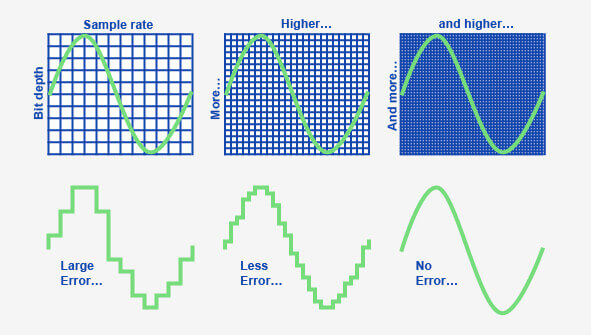
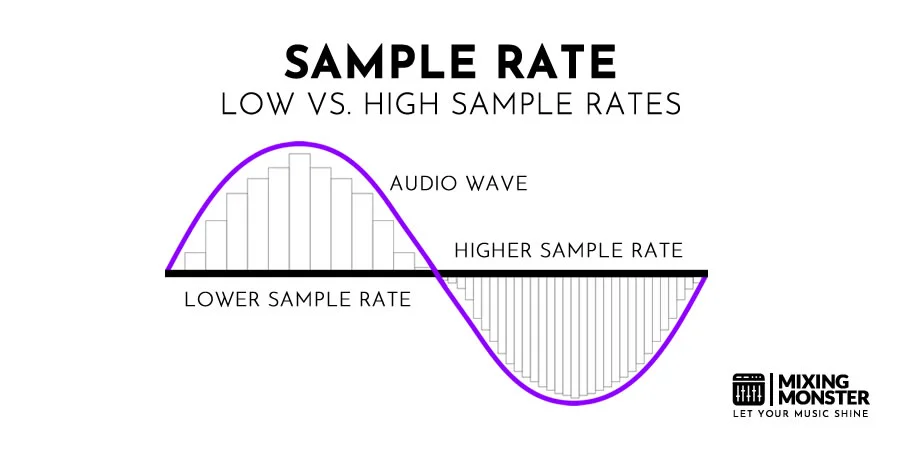
When it comes to digital audio, the sampling rate plays a crucial role in determining the quality of the sound. The sampling rate refers to the number of samples taken per second to represent the analog audio signal digitally. A higher sampling rate captures more details and provides a more accurate representation of the original sound wave.

Let’s take the example of CD-quality audio, which has a standard sampling rate of 44.1 kHz. This means that 44,100 samples are taken every second to record the audio. With a higher sampling rate, a wider frequency range can be captured, resulting in better audio fidelity and a more immersive listening experience. However, it’s important to note that increasing the sampling rate also requires more storage space.

Benefits of higher sampling rates

Higher sampling rates, such as 96 kHz or 192 kHz, offer several benefits for audio enthusiasts and professionals. Firstly, they allow for more accurate representation of high-frequency sounds, resulting in improved clarity and detail in the audio. Secondly, a higher sampling rate provides greater headroom for digital processing and effects, allowing for more precise manipulation of the sound.

Factors to consider when choosing a sampling rate

While higher sampling rates offer improved audio quality, there are a few factors to consider when choosing the appropriate sampling rate for your needs. Firstly, the capabilities of your audio playback devices and equipment should be taken into account. Not all devices support high sampling rates, and using a higher sampling rate without compatible hardware may not yield the desired benefits.

Additionally, the nature of the audio content should be considered. For example, music production and professional audio mastering often make use of higher sampling rates to capture the intricacies of the sound. On the other hand, for casual listening or streaming, a standard sampling rate like 44.1 kHz may suffice.

Understanding the significance of bit depth in digital audio

Bit depth is another crucial aspect of digital audio that directly impacts the dynamic range and accuracy of the sound reproduction. It refers to the number of bits used to represent each sample in a digital audio file. A higher bit depth allows for more precise quantization and results in a greater dynamic range.

Commonly used bit depths in audio production include 16-bit and 24-bit. A 16-bit audio file can represent 65,536 discrete volume levels, while a 24-bit audio file can represent a staggering 16,777,216 levels. This greater dynamic range enables the reproduction of softer and louder sounds with more accuracy, reducing the potential for quantization noise and distortion.

The impact of bit depth on audio resolution

Bit depth directly affects the resolution of the audio signal. A higher bit depth provides finer resolution and allows for more subtle details to be captured in the recording. This is particularly important when working with audio that has a wide dynamic range, such as classical music or film soundtracks.

Choosing the appropriate bit depth

The choice of bit depth depends on the nature of the audio content and the intended usage. For most consumer applications, a 16-bit depth is sufficient to deliver high-quality audio. However, for professional audio production or situations that demand the utmost accuracy, a 24-bit depth is recommended.

It’s worth noting that higher bit depths also result in larger file sizes, as more data is required to represent each sample. Therefore, considerations such as available storage space and transmission bandwidth should be taken into account when selecting the appropriate bit depth.

Final Words

Understanding the basics of digital audio, including sampling rate and bit depth, is essential for anyone seeking to optimize their audio experience. By choosing the right sampling rate and bit depth, you can ensure that your digital audio files accurately capture and reproduce the nuances of the original sound, whether you are an audio professional or an avid music lover.

Remember, when it comes to sampling rate, higher rates offer increased fidelity and clarity, but it’s essential to consider compatibility and storage requirements. Similarly, higher bit depths provide greater dynamic range and resolution, but the choice should be based on the nature of the audio content and intended use.

By mastering the fundamentals of digital audio, you can unlock a world of rich and immersive sound, enhancing your enjoyment of music, movies, and other multimedia experiences.


Free Download Mp4Gain
picture


Mp4Gain Main Window
picture


Mp4Gain Features
picture


Free Download Mp4Gain
picture

How Audio Sample Rate Affects Sound Quality

How Audio Sample Rate Affects Sound Quality

Audio Sample Rate
Audio Sample Rate
Audio Sample Rate
Audio Sample Rate

Audio Sample Rate Explained

When it comes to digital audio, sample rate refers to the number of samples of sound that are taken per second to create a digital representation of an analog signal. In other words, it’s the number of times per second that the analog sound wave is measured and converted to a digital signal. The higher the sample rate, the more accurately the sound can be represented in the digital domain.

Personally, I’ve noticed that when I’m working on a music production project and I choose a higher sample rate, the resulting audio files tend to sound clearer and more detailed. As an avid music listener, I also appreciate the difference in sound quality when listening to high sample rate audio files on my headphones or speakers.

According to Ethan Winer, author of “The Audio Expert”, “In general, using a higher sample rate than the minimum required for the material being recorded or processed is good practice. However, there is no benefit to using a higher rate than twice the highest frequency that needs to be captured or processed.”

The Relationship Between Audio Sample Rate and Sound Quality

As mentioned earlier, the higher the sample rate, the more accurately the sound can be represented in the digital domain. This means that a higher sample rate can lead to a higher quality sound, with more accurate representation of the original analog sound wave.

I’ve also found that the relationship between sample rate and sound quality is not always linear. That is, going from 44.1 kHz to 48 kHz may not make as much of a difference as going from 48 kHz to 96 kHz. This is because the higher sample rates allow for more accurate representation of the sound wave, even in the higher frequency ranges.

As Julian Dunn, author of “Mastering Digital Audio”, explains, “Higher sample rates…provide more ‘headroom’ in the recording, which means that the recording can capture more of the dynamic range of the original sound. This can result in a richer, more natural sound.”

Choosing the Right Sample Rate

When it comes to choosing the right sample rate, it’s important to consider the specific needs of your project. If you’re recording a podcast or a voiceover, a sample rate of 44.1 kHz may be sufficient. However, if you’re recording music or other complex audio, a higher sample rate may be necessary to capture all the nuances and details of the sound.

It’s also important to note that a higher sample rate means larger file sizes, which can impact storage and processing requirements. So, it’s important to find a balance between the sample rate and file size that works best for your specific needs.

As author and sound engineer Bob Katz explains, “The most important factor is not the numbers, but how the system sounds. Choose the sample rate that sounds best to you, taking into account the practical considerations of your production environment.”

Final Words:

In conclusion, the sample rate of digital audio plays a significant role in the quality of the resulting sound. By understanding the relationship between sample rate and sound quality, and choosing the right sample rate for your specific needs, you can ensure that your digital audio sounds as good as possible.

What Is Audio Sampling Rate: A Comprehensive Explanation

What Is Audio Sampling Rate: A Comprehensive Explanation

Sample Rate
Sample Rate

Introduction

Sample Rate
Sample Rate

Audio sampling rate is a fundamental concept in digital audio that refers to the number of samples per second used to represent an analog audio signal in digital form. In this article, we’ll explore the technical details of audio sampling rate, its importance in digital audio, and its impact on audio quality and file size.

Sampling Rate Fundamentals

The concept of audio sampling rate is based on the Nyquist-Shannon sampling theorem, which states that in order to accurately represent an analog signal in digital form, the sampling rate must be at least twice the highest frequency present in the signal. This means that a signal with a highest frequency of 20kHz (the upper limit of human hearing) must be sampled at a rate of at least 40kHz in order to be accurately represented.

Sampling rate is measured in Hertz (Hz), which refers to the number of samples per second. Common sampling rates in digital audio range from 44.1kHz (used in CDs) to 192kHz (used in some high-resolution audio formats).

Sample Rate Conversion

In some cases, it may be necessary to convert audio from one sampling rate to another. Sample rate conversion involves resampling the audio data to a different rate, which can be done using digital signal processing techniques. However, sample rate conversion can introduce artifacts and reduce audio quality, especially when downsampling from a higher rate to a lower rate.

There are various reasons why sample rate conversion may be necessary, such as when mixing audio tracks with different sampling rates, or when preparing audio for distribution on different platforms with varying requirements.

Audio Quality and Sampling Rate

The sampling rate has a significant impact on audio quality, with higher sampling rates generally resulting in better fidelity and more accurate representation of the original signal. However, the benefits of higher sampling rates are limited by the limitations of human hearing and the practical limitations of digital audio technology.

While there is debate about the benefits of “high-resolution audio” formats with sampling rates above 44.1kHz, it is generally accepted that sampling rates above 96kHz provide little additional benefit in terms of audio quality.

Bit Depth and Sampling Rate

The bit depth of an audio sample refers to the number of bits used to represent the amplitude of the signal at each sample point. Higher bit depths allow for more precise representation of the signal, but also result in larger file sizes. The bit depth and sampling rate are related, as increasing the bit depth requires more data to be stored for each sample.

There is a trade-off between sampling rate and bit depth, as higher sampling rates require more data to be stored per second, which can limit the maximum bit depth that can be used without exceeding practical file size limits. However, this trade-off can be mitigated by using efficient audio compression techniques.

Sample Rate in Practice

Common sampling rates in digital audio include 44.1kHz (used in CDs), 48kHz (used in digital video), 88.2kHz, 96kHz, 176.4kHz, and 192kHz. Streaming services such as Spotify and Apple Music typically use lower sampling rates for their audio streams, with 44.1kHz being a common choice.

The Nyquist Theorem, named after the Swedish-American physicist Harry Nyquist, states that the sampling rate should be at least twice the highest frequency component in the signal being sampled. This is why the standard CD quality sampling rate is 44.1 kHz, which is just above the upper limit of human hearing.

However, it is important to note that there are higher sampling rates available, such as 48 kHz, 96 kHz, and even 192 kHz. These higher sampling rates can provide more detail and accuracy in the digital representation of the analog signal. However, they also require more storage space and processing power.

Another important factor to consider is the bit depth, which is the number of bits used to represent each sample. The more bits used, the more accurate and detailed the representation of the analog signal. CD quality uses a bit depth of 16 bits, but higher bit depths such as 24 bits are also available.

It is worth noting that some argue that higher sampling rates and bit depths may not necessarily result in audible improvements in sound quality, especially when considering the limitations of human hearing. Additionally, some argue that the increased storage and processing requirements may not be worth the potential improvements.

In conclusion, the sampling rate is a crucial component in the digital representation of analog audio signals. A higher sampling rate can provide more detail and accuracy in the digital representation, but also requires more storage and processing power. The Nyquist Theorem provides a guideline for choosing the appropriate sampling rate based on the highest frequency component in the signal. Additionally, the bit depth is another factor to consider in the accuracy and detail of the digital representation. While higher sampling rates and bit depths are available, the potential improvements in sound quality must be balanced against the increased storage and processing requirements.

The higher the bitrate, the higher the sound quality and the larger the file size.

The higher the bitrate, the higher the sound quality and the larger the file size.

audio bit rate
audio bit rate

but the quality of the source file determines the final quality.

audio bit rate
audio bit rate

From highest to lowest, the sound quality will be worse, but from lowest to highest, the sound quality will remain unchanged at most, but the file will be larger.Many

General mp3 are good with bit rate around 128, and also 3-4 BM in size.

The bitrate, choosing it, directly affects the size of your mp3 file and the listening experience. High compression ratio has high distortion, and low compression ratio has low distortion, but how do we find a balance point that we can accept on both counts? This requires careful exploration in the experiment. Considering that the sound quality of low bitrate files is not suitable for playing music, the minimum set is 128kbps, and four fixed bitrate files of 128, 192, 256 and 320 are used for comparison. and try.

The compression ratio of 128 kbps is still relatively rough, and the high-frequency part is highly distorted after compression. It sounds hollow, wrinkled, rough, and there are often flickering sounds. Misunderstanding, the compressed volume of a 3 minute 39 piece of music is 3414 Kb. Although the volume is not large, the sound is not satisfactory, and there are relatively large defects.

192kbps bit rate compression effect is much better than 128. First of all, the sound is solid, at least there is no empty feeling, the high-frequency distortion is also much less, the sound is compact, the noise is small and clean, and achieve relatively ideal listening The sound effect, just because the compression is still relatively strong, the detail performance is still not very good, the texture of musical instruments, especially instruments of wind, it is still very hard, unreal and lacks musicality. The compressed size is 5123kb, and I think the compression ratio is 128~ It is better to use it in a mp3 player with a capacity of ~256m, which can not only satisfy the basic sense of hearing, but also is suitable in size.128m can store about 95 minutes of music, and 256m can double to 190 minutes of music.

The 256 kbps compression rate is naturally a step higher than 192 in terms of sound quality. Take the first 10 seconds of the track, the low frequency of the cello is obviously less grainy, and the sound is more smooth and natural, with texture and texture. It is also clearer, with much more detail, the rendering of the atmosphere is more prominent, the rotation of parts in the following songs is also more expressive, the clarity of large and small signals is also improved, and the sound is more detailed and lasting. But at the same time, the file size has also increased to 6831kb, which is still affordable for a 256m mp3 player. It is not difficult to know by calculation. According to the bit rate of 256, about 135 minutes of music can be stored. Generally speaking, it is enough, 128m is a bit less and can only support a little over an hour, so it is recommended to use 192 bitrate for 128m.

320 kbps is the maximum bitrate that lame can provide. The final file generated is 8592kb which is about 8.4M. Compared to the 37M of the wav file the compression ratio is basically 4.5:1 but the generated mp3 file sounds very distorted Now on Compared with other 320 bit rate, the natural advantage is obvious, the tone, details, etc. are very delicate, basically achieve the sound quality of the original CD copy, especially in the CD player with playback function from mp3, the basic No difference, but I use relatively high-end earplugs with high resolution, plus my experience and skill with music and equipment, I can still hear a lot of differences compared to wav files, first Instead, the compressed mp3 sounds a bit The crunch feeling is relatively dry on the whole. Without the wav file, it sounds fresh and dynamic. In terms of final details, nuances and sense of space, the separation is not as high as the quality of the wav file, but it is quite close in terms of timbre, but the performance is poor and the digital flavor is relatively strong. So if you are using a miniature hard drive player like an iPod, I recommend you use 320kbps compression ratio, which can get the best listening experience. Of course listening to wav directly is the best~

The bit rate directly affects the sound quality.

The bit rate directly affects the sound quality.

audio bit rate
audio bit rate

High bitrate is good and low bitrate is bad.

audio bit rate
audio bit rate

The code rate is the number of data bits transmitted per unit of time during data transmission. Generally, the unit we use is kbps, that is, kilobits per second.

The popular understanding is the sampling rate. The higher the sampling rate per unit time, the higher the precision, and the processed file is closer to the original file, but the file size is proportional to the sampling rate, so almost all encoding formats pay attention. It’s about how to use the lowest code rate to achieve the least distortion. The cbr (fixed code rate) and vbr (variable code rate) derived from this core are all articles in this regard, but things are not absolute, in terms of audio, the higher the bit rate, the lower the compressed ratio, the smaller the sound quality loss and the closer it is to the sound quality of the audio source.
The information in the computer is represented by binary 0 and 1, and each 0 or 1 is called a bit, which is represented by lowercase b, that is, bit (bit); uppercase B represents byte, ie byte, one byte = Eight bits, ie 1B=8b; the capital K in front stands for thousand, that is, thousand bits (Kb) or kilobytes (KB). Indicates the size of the file, usually using bytes (KB) to indicate the size of the file.

Kbps: The first thing to understand is that ps refers to /s, which is every second. Kbps refers to the speed of the network, that is, how many thousands of bits of information are transmitted per second (K means thousands of bits, Kb means how many thousands of bits), it is expressed in kb (kilobit), and in the case KBps means how many kilobytes are transferred per second. 1KBps = 8Kbps. The Internet speed of ADSL is 512 Kbps. If converted to bytes, it is 512/8 = 64 KBps (that is, 64 kilobytes per second).

A frame is a still image, and continuous frames form an animation, like a television image.
We normally say the number of frames. Simply put, it is the number of image frames transmitted in 1 second. It can also be understood that the graphics processor can update several times per second, usually expressed in fps (Frames Per Second). Each frame is a still image, and showing frames in rapid succession creates the illusion of movement. Higher frame rates result in smoother, more realistic animations. The more frames per second (fps), the smoother the motion is displayed.

What is the bitrate of the music?
It can also be called bit rate, which is nothing more than the amount of data reproduced per second by a type of music, the unit is expressed in bits, that is, binary bits. bps is the bit rate. b is bit, s is second, p is per, and one byte is equal to 8 binary bits. That is, the file size of a 4-minute song at 128bps is calculated as (128/8)*4*60=3840kB=3.8MB, which means that the same song with the same bit rate (bps) will not no matter what format (such as mp3 wma) The capacity is basically the same, which can only represent a transmission rate, not the sound quality. Due to different compression engines, the sound quality of different formats varies a lot. However, for the same format, the higher the bitrate, the larger the file and the better the sound quality.

What is the sample rate of the music?
Sampling rate refers to the number of samples per unit of time. The sampling rate is 44KHz, which means the number of samples per second is 44K, which means that 44,000 pieces of data are used to describe the sound waveform in 1 second. That is, the higher the sample rate, the better the sound quality. But he and bitrate are two completely different concepts.