Bit Depth: Understanding its Role in Audio Resolution
Bit DepthBit Depth
What is the importance of bit depth in audio resolution?
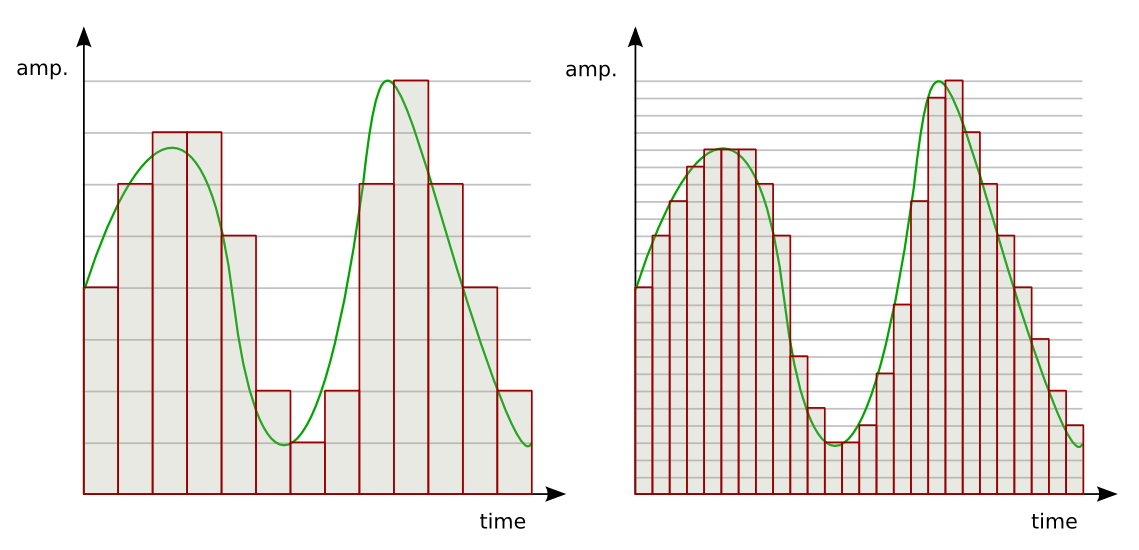
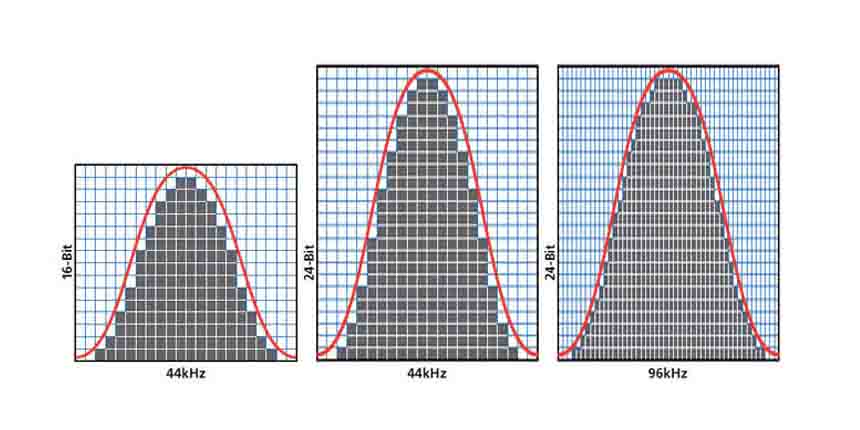
When it comes to audio resolution, bit depth plays a crucial role. Bit depth refers to the number of bits used to represent the amplitude of an audio signal. In simpler terms, it determines the level of detail and accuracy with which sound can be captured and reproduced. The higher the bit depth, the more precise the audio representation, resulting in greater dynamic range and fidelity. Higher bit depths enable a wider range of possible values, allowing for more nuanced audio reproduction. In digital audio, the most common bit depths are 16-bit and 24-bit. A 16-bit audio signal can represent 65,536 discrete amplitude levels, while a 24-bit signal can represent a staggering 16,777,216 levels. This significant increase in resolution allows for more accurate representation of subtle audio nuances, resulting in a more realistic and immersive listening experience.
Moreover, higher bit depths help reduce quantization noise, which can degrade the audio quality. Quantization noise is the distortion introduced when the continuous analog audio signal is converted into a discrete digital representation. By increasing the number of bits used for quantization, the quantization noise can be pushed to lower levels, effectively minimizing its impact on the audio signal. This reduction in noise contributes to improved audio fidelity and a cleaner sound.
The impact of bit depth on audio recording
The choice of bit depth during audio recording has a significant impact on the quality and flexibility of the recorded material. When capturing audio, it is crucial to select an appropriate bit depth based on the desired outcome and the dynamic range of the source material. For capturing music with a wide dynamic range or for critical recording applications, a higher bit depth, such as 24-bit, is preferred. This ensures that the delicate nuances and subtle variations in the performance are faithfully captured without losing detail. With a higher bit depth, there is ample headroom to accommodate sudden spikes in volume, preventing clipping and distortion.
On the other hand, for applications where the dynamic range is limited, such as voice recordings or podcasting, a lower bit depth, such as 16-bit, can be sufficient. Since these types of recordings typically have a smaller range between the softest and loudest sounds, the additional precision offered by higher bit depths may not be necessary. Using a lower bit depth can help conserve storage space and streamline the post-production process.
The benefits of higher bit depths in audio production
In audio production, working with higher bit depths offers several advantages that contribute to the overall quality of the final mix. Let’s explore some of these benefits: 1. Increased headroom: Higher bit depths provide more headroom, allowing audio engineers to work with greater flexibility during the mixing and mastering stages. This additional headroom ensures that any adjustments made to the audio levels or effects do not result in clipping or distortion.
2. Enhanced processing capabilities: Working with higher bit depths provides greater precision for applying audio processing effects, such as equalization, compression, and reverb. This precision allows for more accurate and transparent manipulation of the audio signal, resulting in a polished and professional sound.
The role of bit depth in audio playback
The bit depth of an audio file also impacts its playback quality. When playing back audio, it is important to ensure that the playback system supports the bit depth of the audio file. If the playback system is not capable of reproducing the full bit depth, the audio may be truncated or quantized, leading to a loss of detail and fidelity. Furthermore, downsampling or converting high-resolution audio files with a higher bit depth to a lower bit depth can result in a loss of information and audio quality. It is essential to carefully consider the bit depth compatibility between the source material and the playback system to ensure an accurate and faithful reproduction of the audio.
Final Words
Bit depth plays a fundamental role in audio resolution, influencing the accuracy, fidelity, and dynamic range of the sound. Understanding the importance of bit depth in audio recording, production, and playback allows for informed decisions to be made regarding the selection and handling of audio files. By leveraging higher bit depths, audio professionals can achieve higher quality recordings and deliver an exceptional listening experience to their audiences. Keywords (LSI): audio fidelity, dynamic range, quantization noise, recording quality, audio production, audio playback, higher resolution, audio nuances, digital representation, accurate reproduction, audio engineers, playback system, audio file compatibility.
Digital audio bit depth refers to the number of bits used to represent each sample in a digital audio signal. Bit depth is a crucial aspect of digital audio because it affects the accuracy and dynamic range of the signal.
In digital audio, sound is captured and processed as a series of discrete samples, with each sample representing the amplitude of the sound wave at a specific point in time. The bit depth determines the number of possible amplitude values that can be represented in each sample.
How Does Bit Depth Affect Audio Quality?
The higher the bit depth, the more accurately the digital audio signal can represent the original analog waveform. A higher bit depth allows for a greater dynamic range, which means that the quietest sounds can be represented with more accuracy, and the loudest sounds can be represented without distortion.
For example, a 16-bit audio signal can represent 65,536 possible amplitude values, while a 24-bit audio signal can represent 16,777,216 possible amplitude values. This means that a 24-bit audio signal can capture a wider range of dynamic levels and is capable of greater accuracy and detail than a 16-bit audio signal.
What is the Relationship Between Bit Depth and Signal-to-Noise Ratio?
As the bit depth increases, the signal-to-noise ratio (SNR) also increases. SNR is the ratio between the desired signal (the audio) and the background noise.
A higher bit depth means that there are more possible amplitude values for each sample, which reduces the amount of quantization noise in the signal. Quantization noise is a type of distortion that occurs when the analog signal is converted to digital.
How is Bit Depth Measured?
Bit depth is measured in bits per sample. Common bit depths in digital audio include 16-bit, 24-bit, and 32-bit.
What is Dithering?
Dithering is a process used to reduce the distortion caused by quantization error in digital audio. When an analog signal is digitized, the conversion process rounds the amplitude of each sample to the nearest possible value.
Dithering adds a small amount of random noise to the signal before it is quantized, which allows for a smoother transition between amplitude values and reduces the audible effects of quantization error.
What is the Difference Between Bit Depth and Sample Rate?
While bit depth determines the number of possible amplitude values in each sample, sample rate determines the number of samples taken per second. A higher sample rate allows for greater accuracy in capturing the original analog waveform, but it does not affect the dynamic range or accuracy of each individual sample.
What is the Ideal Bit Depth for Recording and Mixing?
The ideal bit depth for recording and mixing depends on the intended use of the final product. For most applications, a bit depth of 24 bits is considered to be sufficient, as it provides a wide dynamic range and high accuracy.
However, for applications that require extreme accuracy and detail, such as classical music recording, a higher bit depth may be necessary.
What is the Relationship Between Bit Depth and File Size?
As the bit depth increases, the file size of the digital audio also increases. This is because a higher bit depth requires more storage space to represent the additional amplitude values.
What is the Relationship Between Bit Depth and Processing Power?
Higher bit depths require more processing power to manipulate and process. This is because the additional amplitude values must be calculated and stored in memory.
What Happens When a High Bit-Depth Audio File is Converted to a Lower Bit-Depth Format?
When a high bit-depth audio file is converted to a lower bit-depth format, the result is a loss of some of the original audio data. This is because the lower bit-depth format has fewer bits to represent the audio data, which means that some of the information is lost in the conversion process.
For example, if a 24-bit audio file is converted to a 16-bit format, the conversion process will discard the least significant 8 bits of each sample. This can result in a loss of some of the subtle nuances and details in the audio, which can be particularly noticeable in quiet passages or when the audio is heavily processed.
It’s worth noting that some audio formats, such as MP3 and AAC, use lossy compression to reduce the file size. This means that even if the original file was at a high bit-depth, converting it to a lower bit-depth format such as MP3 will result in a further loss of data due to the compression algorithm.
What is Dithering and How Does it Help with Bit Depth Reduction?
Dithering is a technique used to reduce the impact of bit-depth reduction when converting high-resolution audio to a lower resolution format. It works by adding a small amount of random noise to the audio signal before it is truncated to the lower bit depth.
This noise effectively masks the truncation distortion, allowing the audio to retain some of its original detail and clarity. Dithering is particularly useful when converting from a higher bit-depth format to a lower bit-depth format, as it can help to mitigate the loss of information that would otherwise occur.
How Does Bit Depth Affect Audio Quality?
The bit depth of an audio file can have a significant impact on its perceived quality. Generally speaking, higher bit-depth files can capture more detail and nuance in the audio, resulting in a more accurate and realistic reproduction of the original recording.
For example, a 16-bit audio file has a maximum dynamic range of 96 dB, while a 24-bit file has a maximum dynamic range of 144 dB. This means that a 24-bit file can capture much quieter sounds and much louder sounds than a 16-bit file, resulting in a more accurate representation of the original recording.
That being said, the impact of bit depth on perceived audio quality can vary depending on a number of factors, including the quality of the recording equipment, the mastering process, and the listening environment.
What is the Difference Between Bit Depth and Sample Rate?
While bit depth and sample rate are both important aspects of digital audio, they refer to different things. Bit depth refers to the number of bits used to represent each sample in an audio file, while sample rate refers to the number of samples per second that are taken to create the audio file.
In other words, bit depth determines the level of detail captured in each sample, while sample rate determines the temporal resolution of the audio. Both bit depth and sample rate can have an impact on the perceived quality of an audio file, and both are important considerations when working with digital audio.
What is the Best Bit Depth for Audio Production?
The best bit depth for audio production depends on a number of factors, including the specific needs of the project and the available hardware and software. In general, however, a bit depth of 24 bits is considered to be a good choice for most recording and production purposes.
This is because a 24-bit depth provides a high level of detail and dynamic range, while also being widely supported by modern recording equipment and software. That being said, there may be situations where a lower bit depth may be sufficient. For example, if the final audio product will only be distributed online or through streaming services, a 16-bit depth may be acceptable as it will still provide decent quality while reducing file size and download times. Additionally, if the recording environment is not optimal and contains a high level of background noise, a lower bit depth may actually be preferable as it can help mask the noise.
How does bit depth affect audio quality?
Bit depth plays a critical role in determining the quality of digital audio recordings. The higher the bit depth, the greater the dynamic range and level of detail that can be captured in a recording. This results in a more accurate and faithful reproduction of the original sound source. In contrast, a lower bit depth may result in a loss of detail and accuracy, leading to a less faithful reproduction of the original sound.
Can bit depth be converted after recording?
While it is possible to convert the bit depth of a digital audio file after recording, it is generally not recommended. This is because bit depth conversion can result in a loss of information and a decrease in overall audio quality. If possible, it is best to record at the desired bit depth from the start to ensure the highest possible quality.
What are some common bit depths used in digital audio?
The most common bit depths used in digital audio are 16-bit, 24-bit, and 32-bit. 16-bit is the standard for CDs and is widely used in digital audio recording for distribution on streaming platforms. 24-bit is increasingly becoming the standard for professional recording due to its high level of detail and dynamic range. 32-bit is relatively new and provides an even greater level of detail and dynamic range, but is not yet widely supported by all recording equipment and software.
Does bit depth affect the final file size of an audio recording?
Yes, bit depth does affect the final file size of an audio recording. A higher bit depth requires more data to represent each sample, resulting in larger file sizes. For example, a 24-bit audio file will be larger than a 16-bit audio file of the same duration and sample rate.
What is dithering in relation to bit depth?
Dithering is a technique used to reduce the audible effects of quantization distortion when converting from a higher bit depth to a lower bit depth. When reducing the bit depth, some of the information from the original recording must be discarded. This can result in audible distortion and noise. Dithering adds a small amount of random noise to the audio signal to mask this distortion and make it less audible.
Can different bit depths be mixed in the same audio project?
Yes, different bit depths can be mixed in the same audio project. However, it is important to note that mixing different bit depths can result in a loss of quality for the higher bit depth audio. When mixing different bit depths, it is best to convert all audio to the same bit depth before mixing to ensure the highest possible quality.
What is the relationship between bit depth and sample rate?
Bit depth and sample rate are both important factors in determining the quality of digital audio recordings. Bit depth refers to the number of bits used to represent each sample, while sample rate refers to the number of samples taken per second. Higher bit depths and sample rates result in higher quality recordings with greater detail and accuracy.
Can bit depth affect the sound of analog audio recordings?
No, bit depth does not affect the sound of analog audio recordings. Bit depth only applies to digital audio recordings.
The higher the bitrate, the higher the sound quality and the larger the file size.
audio bit rate
but the quality of the source file determines the final quality.
audio bit rate
From highest to lowest, the sound quality will be worse, but from lowest to highest, the sound quality will remain unchanged at most, but the file will be larger.Many
General mp3 are good with bit rate around 128, and also 3-4 BM in size.
The bitrate, choosing it, directly affects the size of your mp3 file and the listening experience. High compression ratio has high distortion, and low compression ratio has low distortion, but how do we find a balance point that we can accept on both counts? This requires careful exploration in the experiment. Considering that the sound quality of low bitrate files is not suitable for playing music, the minimum set is 128kbps, and four fixed bitrate files of 128, 192, 256 and 320 are used for comparison. and try.
The compression ratio of 128 kbps is still relatively rough, and the high-frequency part is highly distorted after compression. It sounds hollow, wrinkled, rough, and there are often flickering sounds. Misunderstanding, the compressed volume of a 3 minute 39 piece of music is 3414 Kb. Although the volume is not large, the sound is not satisfactory, and there are relatively large defects.
192kbps bit rate compression effect is much better than 128. First of all, the sound is solid, at least there is no empty feeling, the high-frequency distortion is also much less, the sound is compact, the noise is small and clean, and achieve relatively ideal listening The sound effect, just because the compression is still relatively strong, the detail performance is still not very good, the texture of musical instruments, especially instruments of wind, it is still very hard, unreal and lacks musicality. The compressed size is 5123kb, and I think the compression ratio is 128~ It is better to use it in a mp3 player with a capacity of ~256m, which can not only satisfy the basic sense of hearing, but also is suitable in size.128m can store about 95 minutes of music, and 256m can double to 190 minutes of music.
The 256 kbps compression rate is naturally a step higher than 192 in terms of sound quality. Take the first 10 seconds of the track, the low frequency of the cello is obviously less grainy, and the sound is more smooth and natural, with texture and texture. It is also clearer, with much more detail, the rendering of the atmosphere is more prominent, the rotation of parts in the following songs is also more expressive, the clarity of large and small signals is also improved, and the sound is more detailed and lasting. But at the same time, the file size has also increased to 6831kb, which is still affordable for a 256m mp3 player. It is not difficult to know by calculation. According to the bit rate of 256, about 135 minutes of music can be stored. Generally speaking, it is enough, 128m is a bit less and can only support a little over an hour, so it is recommended to use 192 bitrate for 128m.
320 kbps is the maximum bitrate that lame can provide. The final file generated is 8592kb which is about 8.4M. Compared to the 37M of the wav file the compression ratio is basically 4.5:1 but the generated mp3 file sounds very distorted Now on Compared with other 320 bit rate, the natural advantage is obvious, the tone, details, etc. are very delicate, basically achieve the sound quality of the original CD copy, especially in the CD player with playback function from mp3, the basic No difference, but I use relatively high-end earplugs with high resolution, plus my experience and skill with music and equipment, I can still hear a lot of differences compared to wav files, first Instead, the compressed mp3 sounds a bit The crunch feeling is relatively dry on the whole. Without the wav file, it sounds fresh and dynamic. In terms of final details, nuances and sense of space, the separation is not as high as the quality of the wav file, but it is quite close in terms of timbre, but the performance is poor and the digital flavor is relatively strong. So if you are using a miniature hard drive player like an iPod, I recommend you use 320kbps compression ratio, which can get the best listening experience. Of course listening to wav directly is the best~
The code rate is the number of data bits transmitted per unit of time during data transmission. Generally, the unit we use is kbps, that is, kilobits per second.
The popular understanding is the sampling rate. The higher the sampling rate per unit time, the higher the precision, and the processed file is closer to the original file, but the file size is proportional to the sampling rate, so almost all encoding formats pay attention. It’s about how to use the lowest code rate to achieve the least distortion. The cbr (fixed code rate) and vbr (variable code rate) derived from this core are all articles in this regard, but things are not absolute, in terms of audio, the higher the bit rate, the lower the compressed ratio, the smaller the sound quality loss and the closer it is to the sound quality of the audio source.
The information in the computer is represented by binary 0 and 1, and each 0 or 1 is called a bit, which is represented by lowercase b, that is, bit (bit); uppercase B represents byte, ie byte, one byte = Eight bits, ie 1B=8b; the capital K in front stands for thousand, that is, thousand bits (Kb) or kilobytes (KB). Indicates the size of the file, usually using bytes (KB) to indicate the size of the file.
Kbps: The first thing to understand is that ps refers to /s, which is every second. Kbps refers to the speed of the network, that is, how many thousands of bits of information are transmitted per second (K means thousands of bits, Kb means how many thousands of bits), it is expressed in kb (kilobit), and in the case KBps means how many kilobytes are transferred per second. 1KBps = 8Kbps. The Internet speed of ADSL is 512 Kbps. If converted to bytes, it is 512/8 = 64 KBps (that is, 64 kilobytes per second).
A frame is a still image, and continuous frames form an animation, like a television image.
We normally say the number of frames. Simply put, it is the number of image frames transmitted in 1 second. It can also be understood that the graphics processor can update several times per second, usually expressed in fps (Frames Per Second). Each frame is a still image, and showing frames in rapid succession creates the illusion of movement. Higher frame rates result in smoother, more realistic animations. The more frames per second (fps), the smoother the motion is displayed.
What is the bitrate of the music?
It can also be called bit rate, which is nothing more than the amount of data reproduced per second by a type of music, the unit is expressed in bits, that is, binary bits. bps is the bit rate. b is bit, s is second, p is per, and one byte is equal to 8 binary bits. That is, the file size of a 4-minute song at 128bps is calculated as (128/8)*4*60=3840kB=3.8MB, which means that the same song with the same bit rate (bps) will not no matter what format (such as mp3 wma) The capacity is basically the same, which can only represent a transmission rate, not the sound quality. Due to different compression engines, the sound quality of different formats varies a lot. However, for the same format, the higher the bitrate, the larger the file and the better the sound quality.
What is the sample rate of the music?
Sampling rate refers to the number of samples per unit of time. The sampling rate is 44KHz, which means the number of samples per second is 44K, which means that 44,000 pieces of data are used to describe the sound waveform in 1 second. That is, the higher the sample rate, the better the sound quality. But he and bitrate are two completely different concepts.