Bit Depth: Understanding its Role in Audio Resolution


Free Download Mp4Gain
picture

Bit Depth: Understanding its Role in Audio Resolution
Bit Depth
Bit Depth
Bit Depth
Bit Depth

What is the importance of bit depth in audio resolution?

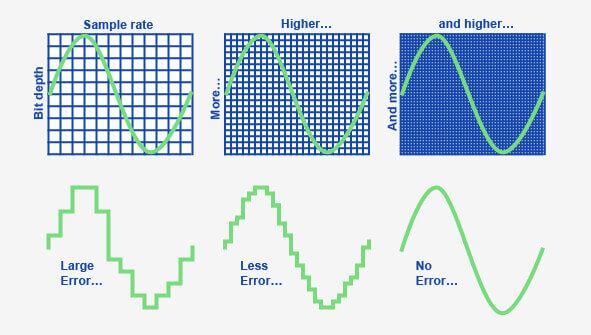
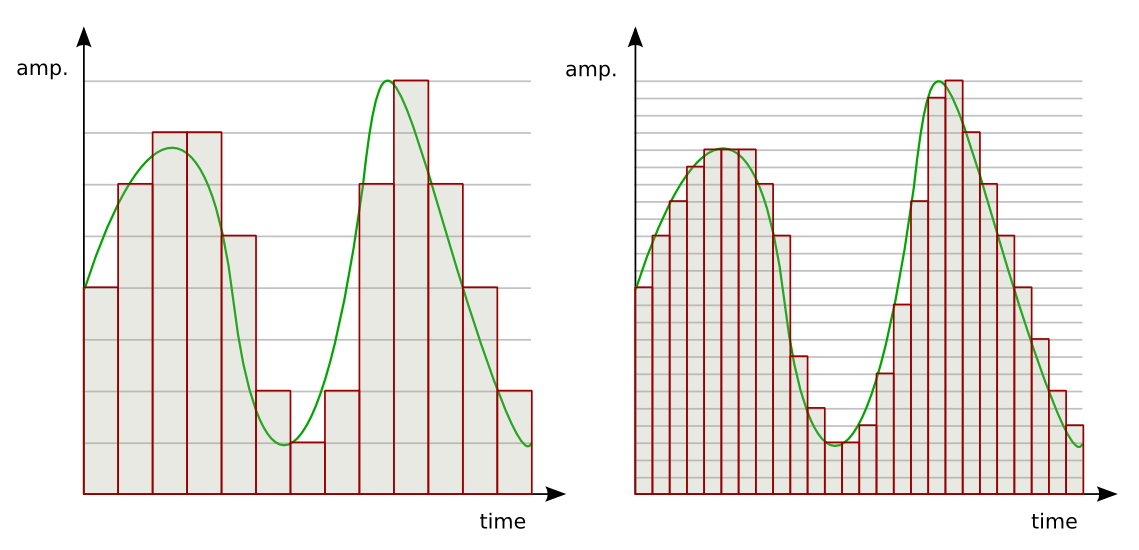
When it comes to audio resolution, bit depth plays a crucial role. Bit depth refers to the number of bits used to represent the amplitude of an audio signal. In simpler terms, it determines the level of detail and accuracy with which sound can be captured and reproduced. The higher the bit depth, the more precise the audio representation, resulting in greater dynamic range and fidelity.
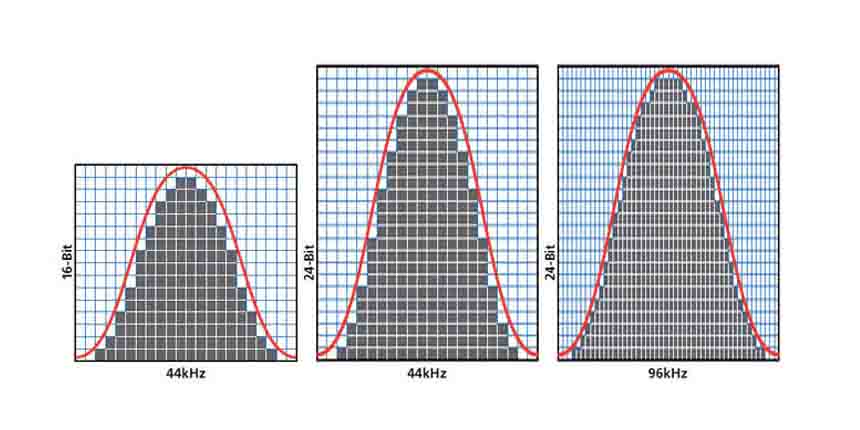
Higher bit depths enable a wider range of possible values, allowing for more nuanced audio reproduction. In digital audio, the most common bit depths are 16-bit and 24-bit. A 16-bit audio signal can represent 65,536 discrete amplitude levels, while a 24-bit signal can represent a staggering 16,777,216 levels. This significant increase in resolution allows for more accurate representation of subtle audio nuances, resulting in a more realistic and immersive listening experience.

Moreover, higher bit depths help reduce quantization noise, which can degrade the audio quality. Quantization noise is the distortion introduced when the continuous analog audio signal is converted into a discrete digital representation. By increasing the number of bits used for quantization, the quantization noise can be pushed to lower levels, effectively minimizing its impact on the audio signal. This reduction in noise contributes to improved audio fidelity and a cleaner sound.

The impact of bit depth on audio recording

The choice of bit depth during audio recording has a significant impact on the quality and flexibility of the recorded material. When capturing audio, it is crucial to select an appropriate bit depth based on the desired outcome and the dynamic range of the source material.
For capturing music with a wide dynamic range or for critical recording applications, a higher bit depth, such as 24-bit, is preferred. This ensures that the delicate nuances and subtle variations in the performance are faithfully captured without losing detail. With a higher bit depth, there is ample headroom to accommodate sudden spikes in volume, preventing clipping and distortion.

On the other hand, for applications where the dynamic range is limited, such as voice recordings or podcasting, a lower bit depth, such as 16-bit, can be sufficient. Since these types of recordings typically have a smaller range between the softest and loudest sounds, the additional precision offered by higher bit depths may not be necessary. Using a lower bit depth can help conserve storage space and streamline the post-production process.

The benefits of higher bit depths in audio production

In audio production, working with higher bit depths offers several advantages that contribute to the overall quality of the final mix. Let’s explore some of these benefits:
1. Increased headroom: Higher bit depths provide more headroom, allowing audio engineers to work with greater flexibility during the mixing and mastering stages. This additional headroom ensures that any adjustments made to the audio levels or effects do not result in clipping or distortion.

2. Enhanced processing capabilities: Working with higher bit depths provides greater precision for applying audio processing effects, such as equalization, compression, and reverb. This precision allows for more accurate and transparent manipulation of the audio signal, resulting in a polished and professional sound.

The role of bit depth in audio playback

The bit depth of an audio file also impacts its playback quality. When playing back audio, it is important to ensure that the playback system supports the bit depth of the audio file. If the playback system is not capable of reproducing the full bit depth, the audio may be truncated or quantized, leading to a loss of detail and fidelity.
Furthermore, downsampling or converting high-resolution audio files with a higher bit depth to a lower bit depth can result in a loss of information and audio quality. It is essential to carefully consider the bit depth compatibility between the source material and the playback system to ensure an accurate and faithful reproduction of the audio.

Final Words

Bit depth plays a fundamental role in audio resolution, influencing the accuracy, fidelity, and dynamic range of the sound. Understanding the importance of bit depth in audio recording, production, and playback allows for informed decisions to be made regarding the selection and handling of audio files. By leveraging higher bit depths, audio professionals can achieve higher quality recordings and deliver an exceptional listening experience to their audiences.
Keywords (LSI): audio fidelity, dynamic range, quantization noise, recording quality, audio production, audio playback, higher resolution, audio nuances, digital representation, accurate reproduction, audio engineers, playback system, audio file compatibility.


Free Download Mp4Gain
picture


Mp4Gain Main Window
picture


Mp4Gain Features
picture


Free Download Mp4Gain
picture

What is the difference between bit depth and bitrate?

What is the difference between bit depth and bitrate?

Bit Depth
Bit Depth
Bit depth
Bit Depth

Understanding Bit Depth and Bitrate

When it comes to audio and video files, there are two terms that are often used interchangeably: bit depth and bitrate. However, they are not the same thing. Bit depth refers to the number of bits used to represent each sample in an audio or video file, while bitrate refers to the amount of data transmitted per second.
Bit depth determines the number of possible values for each sample in a digital audio or video file. For example, an 8-bit audio file can have 256 possible values per sample, while a 16-bit file can have 65,536. The higher the bit depth, the more accurate the representation of the original sound or image.

On the other hand, bitrate refers to the amount of data transmitted per second in a digital file. In other words, it’s the rate at which data is encoded in a file. Higher bitrates typically mean higher quality files with more information, but also larger file sizes.

Audio Bit Depth vs Bitrate

When it comes to audio files, the bit depth and bitrate are both important factors in determining the quality of the sound. A higher bit depth means a more accurate representation of the original sound, while a higher bitrate means more data is transmitted per second, resulting in a higher quality sound.
However, it’s important to note that a higher bitrate does not necessarily mean a higher quality sound. If the original recording is of poor quality, increasing the bitrate will not improve the sound. In fact, it can actually result in larger file sizes with no improvement in sound quality.

Video Bit Depth vs Bitrate

Video files also have bit depth and bitrate, but they work slightly differently than in audio files. Bit depth determines the number of colors that can be represented in a video file, while bitrate determines the amount of data transmitted per second.
A higher bit depth means a wider range of colors can be represented in the video, resulting in a more accurate and vibrant image. However, a higher bitrate is also important for video files, as it determines the amount of detail that can be captured in each frame.

It’s important to find the right balance between bit depth and bitrate for video files, as increasing one can have a negative impact on the other. For example, a high bit depth with a low bitrate can result in a choppy or pixelated image, while a low bit depth with a high bitrate can result in a washed-out or blurry image.

Final Words

In conclusion, bit depth and bitrate are both important factors to consider when working with audio and video files. While they may seem similar, they serve different purposes and have different effects on the quality of the final product. It’s important to find the right balance between the two to ensure the best possible sound or image quality.
Keywords: audio bit depth, video bit depth, bit depth vs bitrate, bitrate definition, bitrate vs quality, audio quality, video quality, digital audio, digital video, file size, data transmission, accuracy, color representation, image quality, sound quality, audio recording, video recording, data encoding, pixelation, file format, media production, sound engineering, video editing, multimedia, digital media, technology, mp4gain, audio normalization, audio conversion, equalizer, windows, digital signal processing, dynamic

Audio Bit Depth Explained

Audio Bit Depth Explained


Audio Bit Depth Explained

Bit Depth

Audio Bit Depth Explained

When it comes to producing or enjoying high-quality audio, understanding bit depth is essential. This technical aspect of digital audio determines the level of precision and accuracy with which sound is captured and reproduced. For sound engineers and audiophiles alike, a deep understanding of bit depth is a must-have skill for creating and experiencing truly exceptional sound.

What is Bit Depth?

Bit depth refers to the number of bits used to represent each sample in a digital audio file. Each sample represents the amplitude of the audio signal at a specific point in time. The bit depth determines the range of values that can be used to represent the amplitude of each sample. A higher bit depth provides a larger range of possible values, resulting in a more accurate representation of the audio signal. This, in turn, leads to a higher-quality audio recording.

Common bit depths used in audio recording and production include 16-bit, 24-bit, and 32-bit. The most common bit depth used in consumer audio devices is 16-bit, while 24-bit and 32-bit are more commonly used in professional audio production.

How Does Bit Depth Affect Audio Quality?

The bit depth of an audio recording has a significant impact on its overall quality. A higher bit depth provides a more accurate representation of the audio signal, resulting in a more natural and lifelike sound. With a higher bit depth, the audio signal can be recorded and processed with greater precision and accuracy, allowing for a wider dynamic range and more nuanced expression.

On the other hand, a lower bit depth can result in quantization errors, which can introduce distortion and noise into the audio signal. This can result in a loss of detail and clarity, particularly in quiet or complex passages of music.

Bit Depth and Dynamic Range

The dynamic range of an audio recording refers to the difference between the loudest and softest parts of the recording. A higher bit depth allows for a wider dynamic range, as the signal can be recorded with greater accuracy and precision. This means that even the softest parts of the recording can be captured with a higher level of detail and clarity, resulting in a more natural and lifelike sound.

For example, a recording of a classical music performance with a wide dynamic range may require a higher bit depth to capture the full range of dynamics and expression. Without a sufficient bit depth, the softer parts of the performance may be lost, resulting in a less engaging and less satisfying listening experience.

Conclusion

Understanding bit depth is crucial for anyone involved in the production or enjoyment of high-quality audio. By providing a more accurate representation of the audio signal, a higher bit depth can result in a more natural and lifelike sound, with a wider dynamic range and more nuanced expression. While a lower bit depth can result in quantization errors and a loss of detail and clarity, particularly in quiet or complex passages of music.

Overall, it is important to choose the appropriate bit depth for each recording or production, based on the dynamic range and complexity of the audio signal. By doing so, sound engineers and audiophiles can ensure that the audio they create or enjoy is of the highest quality possible.

As a final recommendation, we suggest using MP4Gain to adjust the volume and equalization of your digital audio files, ensuring that they are optimized for playback on a variety of devices and systems.

Understanding Audio Bit Depth: 8-bit vs. 16-bit vs. 24-bit

Understanding Audio Bit Depth: 8-bit vs. 16-bit vs. 24-bit

Bit Depth
Bit Depth

When it comes to digital audio, one of the most critical factors in determining the quality of a recording is the audio bit depth. In this article, we’ll delve into the technical details of audio bit depth and explore the differences between 8-bit, 16-bit, and 24-bit audio recordings.

Bit Depth
Bit Depth

What is Audio Bit Depth?

In digital audio, sound waves are converted into a series of numerical values that can be stored and manipulated by computers. Audio bit depth refers to the number of bits of information used to represent each sample in a digital audio recording. Each sample represents the amplitude of the sound wave at a specific point in time.

The bit depth determines the range of possible values for each sample. For example, an 8-bit audio recording has 256 possible values, while a 16-bit recording has 65,536 possible values, and a 24-bit recording has over 16 million possible values. This increase in possible values provides greater resolution and accuracy, resulting in improved sound quality.

Dynamic Range

Another critical aspect of audio bit depth is dynamic range, which refers to the difference between the quietest and loudest sounds that can be recorded. With an increase in bit depth, the dynamic range of a recording also increases. For example, a 16-bit audio recording has a dynamic range of 96 dB, whereas a 24-bit recording has a dynamic range of 144 dB. This difference in dynamic range is quite significant and is one of the reasons why 24-bit audio is preferred for professional applications.

Quantization Noise

Quantization noise is an inherent part of digital audio and is introduced during the process of converting an analog audio signal to a digital representation. Quantization noise is essentially the difference between the actual analog signal and the closest quantized digital value. The more bits used for quantization, the lower the level of quantization noise.

However, as the bit depth increases, the noise introduced becomes less of an issue. At 16 bits, quantization noise is typically not audible, but it can become noticeable when processing audio. At 24 bits, quantization noise is virtually non-existent, even when processing audio.

Conclusion

In conclusion, audio bit depth plays a crucial role in the quality of digital audio recordings. Increasing the bit depth of an audio recording provides greater resolution and accuracy, resulting in improved sound quality. Professionals in the music industry typically prefer 24-bit audio due to its higher dynamic range and lower quantization noise. However, for most consumer applications, 16-bit audio is perfectly adequate and results in high-quality sound.

It is also important to note that bit depth is just one aspect of digital audio quality. Other factors such as sample rate and compression algorithms also play a significant role in determining the overall quality of a digital audio recording. Nonetheless, understanding audio bit depth is a crucial step in the journey to becoming a proficient audio engineer or producer.

MP3 file format

MP3 file format

MP3 file format
MP3 file format

The full name of MP3 is MPEG-1 or MPEG-2 Audio Layer III, which is a popular format for digital audio coding and lossy compression of minor parts, to achieve the purpose of compressing into smaller files.

MP3 file format
MP3 file format

source
The MP3 format was invented in the mid-1980s by a group of engineers at the Fraunhofer research organization in Erlangen, Germany, and standardized in 1991. The association is committed to research in low-rate, high-quality sound coding of data. Although MP3 is a lossy compression format, for the listening experience of most users, the sound quality of MP3 does not have a noticeable decrease compared to the original uncompressed audio.

Later, with the popularization of the MP3, it had an impact and influence in the music industry.

MPEG audio standard
MPEG (Motion Picture Experts Group) is a moving picture expert group under ISO, and the MPEG standard formulated by it is widely used in various multimedia. MPEG standards include video and audio standards, from which MPEG-1, MPEG-2, MPEG-2AAC, and MPEG-4 audio standards have been developed.

The MPEG-1 and MPEG-2 standards use the same family of audio codecs: Layer1, 2, 3. A new feature of MPEG-2 is the use of low sample rate expansion to reduce data traffic, and another feature is multi-channel expansion, which increases the number of main channels to five. The MPEG-2AAC (MPEG-2 Advanced Audio Coding) standard was launched by FraunhoferIIS and AT&T in 1997 to significantly reduce data traffic. The Modified Discrete Co2sine Transform (MDCT) algorithm adopted by MPEG22AAC, the sampling rate It can be between 8KHz and 96KHz, and the number of channels can be between 1-48.

All three layers of MPEG Audio Layer1, 2, and 3 use the same filter bank, bitstream structure, and header information, and the sample rate is either 32 KHz, 4411 KHz, or 48 KHz.

Layer1 is designed for DCC (DigitalCompactCassette) digital compression tape, with a data rate of 384kbps.
Layer2 balances complexity and performance, and data traffic drops to 256kbps-192kbps.
Layer3 was designed for low data traffic from the beginning, and the data traffic is 128Kbps-112Kbps. Layer3 adds MDCT transform, which makes its frequency resolution 18 times than Layer 2. Layer3 also uses EntropyCoding similar to MPEGVid2eo Redundant information is reduced.
Currently, most MP3s use the MPEG21 standard.

Change the bit rate of an MP3 file

Change the bit rate of an MP3 file

mp3 bit rate
mp3 bit rate

Do you want to change the bit rate of an MP3 file?

mp3 bit rate
mp3 bit rate

This can be useful, for example, if you need to reduce the size of an MP3 file. A 320 kbps MP3 file, the highest bit rate allowed for an MP3 file, can be lowered to 192 kbps to significantly reduce the size of the MP3 file.

There will be some loss in quality, but the difference will be negligible to most listeners using standard speakers or headphones. If you’re an audiophile, chances are you’ll never use the MP3 format outside of expensive audio equipment.

Most likely, you are using a lossless format, such as compressed or uncompressed PCM audio, WAV, AIFF, FLAC, ALAC, or APE. Uncompressed PCM audio files are approximately 10 times larger than CD-quality MP3 files.

The MP3 format is a lossy format, which means sacrificing audio quality to keep file sizes relatively small. Almost all sites will tell you that you shouldn’t convert lossless audio files to MP3 unless you can afford to lose some audio quality.

Almost all the time. The only time it might make sense is if you have a bitrate audio file in a low quality format like WAV. For example, it might make sense to convert a 96 kbps WAV file to MP3, but only if you choose a bit rate of 192 kbps or higher. A higher bit rate in an MP3 file will allow it to maintain the same quality as a WAV file even though it has a lower bit rate.
The second thing to read is that you should never switch to a lower bitrate. bitrate stream to a higher bitrate stream and hope it sounds better. You cannot gain quality by increasing the bit rate. This is absolutely true. If you try to convert the bitrate, it will actually reduce the quality of the MP3 file.

Bitrate vs. Video Resolution

Bitrate vs. Video Resolution

Bitrate vs. Video Resolution

which is more important for streaming video?

Bitrate vs. Video Resolution

Many people have this confusion because these two factors can have a profound effect on the encoder’s output.

How do you think it should be chosen?

Choose 1080p or 720p?

Choose 5mbps or 3mbps?

Choose 1080p@5mbps or 1080p@7mbps?

If you don’t know what to choose, great. That’s why I wrote this article: to explain the relationship between bitrate and resolution in simple terms, and to help you choose the right encoder settings.

Let’s start by understanding bitrate.

What is the bitrate of the video?

Video bitrate or bit rate refers to the number of bits transmitted per second of video information. The code rate unit is usually:

kbps or kilobits per second

mbps or megabits per second

When you are compressing video, you usually need to set the video compression software not to exceed a certain bit rate.

For example, if you set the video compression software’s bitrate to 3mbps, the software will compress the video at 3mb per second (on average) and stream it to the decoder or player. This is the code rate.

When you talk about bitrate, you’re really talking about: the relationship between video compression and video quality loss. The more you compress, the lower the quality of the video (and this is not always the case, as we will see later).

When compressing video, the following algorithms can be used for speed control, these are:

CBR (Constant Bitrate) – It is best to keep the bitrate constant if video quality is lost.

VBR (Variable Bitrate) – Maintains consistent video quality, allowing for bitrate fluctuations.

Capped VBR – Keep the video quality as constant as possible, allowing the bitrate to fluctuate within a set range.

This article will not discuss the above frequency control methods in detail. Friends who want to know more, welcome to read: Understanding Frequency Control Modes: What are CBR, VBR, CRF and Capped-CRF?

So when we talk about the bit rate, we should pay attention to the following points:

The quality of high bitrate video is usually higher than that of low bitrate video. I say generally, because the video quality reaches a certain point where it will no longer improve (no matter how much the bitrate increases).

The code rate refers to bits (bit) instead of bytes (byte).

The bit rate alone does not determine the quality of the video, you have to take into account factors like resolution, frame rate, screen size, etc.

Codecs for video compression: H.264/AVC, HEVC, VP9, ​​AV1? If you change the video codec and its settings (or encoding tools), the same bitrate will provide a very different video quality.

Audio Bitrate Calculation

Audio Bitrate Calculation

MP3 bit rate
MP3 bit rate

Generally, the files we read will know the following parameters:

MP3 bit rate
MP3 bit rate

Sampling frequency: the number of sampling points that pass one second; by
For example, the most common sample rate of 44.1k means that there are 44,100 sampled data points in one second;

Bit depth: Bit depth is also called sampling bit depth, and the bit depth of the audio determines the dynamic range.
Our common 16-bit (16-bit) can record a dynamic range of about 96 decibels. Well, roughly you can know that each bit can record about 6 decibels of sound. Similarly, the 20-bit recordable dynamic range is about 120 dB; 24 bits is about 144 dB.

If we define 0dB as the maximum value, then the amplitude of the sound is calculated by extending down, then the dynamic range of CD audio is “-96dB ~ 0dB”. And so on, the dynamic range of 24-bit HD-Audio is “-144dB~0dB”. It can be seen that at higher bit depths, a greater dynamic range is available and lower levels of detail can be recorded.

Number of channels: usually single channel or two channels

Through the above parameters, the bit rate of the audio can be calculated

\color{blue}{code rate = sample rate (44.1k) * bit depth (16) * number of channels (2) = 1411.2kbps}

Audio bitrate, also known as bitrate: Refers to the amount of data that can pass through an audio stream per second. For example, 128 kbps, where ps (per second) is per second and kb is thousand bits, then 128 kbps means that the amount of data that can be transmitted in one second is 128 thousand bits. For files of the same format, the higher the bitrate, the better the sound quality. But for audio files of different formats, the same bitrate does not mean the same sound quality.

CD quality sound, usually two channels, compressed at 128kbps MP3, one second of data is converted to 128kbits. Some details are lost, which saves a lot of disk space or bandwidth.

After knowing the audio code rate, you can get the size of the whole audio file = duration (300s) * code rate (1411.2)/1024/8=51.67M

3 Ways to Change Bitrate of MP3 Files Part 2

3 Ways to Change Bitrate of MP3 Files Part 2

mp3 bit rate
mp3 bit rate

The second thing you want to read is that you should never convert to a lower bitrate. bitrate to a higher bitrate stream and I hope it sounds better. You cannot gain quality by increasing the bit rate. This is absolutely correct. If you try to convert the bitrate, you will actually lower the quality of the MP3 file.

mp3 bit rate
mp3 bit rate

If you want an MP3 with a higher bitrate than it currently has, you’ll need to go back to the source (CD, etc.) and extract the audio at full quality. You can then convert that file to a higher bitrate MP3 file.

The last thing you need to know is that converting between lossy formats is not recommended as you will still lose quality. However, it is possible to convert between formats losslessly while preserving quality.

On the other hand, many tests done even with recording engineers or professional musicians have shown that less than 1% of the population can distinguish between an mp3 with good bitrate (196 for example) and a samplerate of 44100 or more.

There is a sector of puritanism that defends tooth and nail the use of losless formats, because in theory they seem to be better, but the limitations and peculiarities of human hatred mean that a loosy file with a high bitrate and a high samplerate is enough for the human ear.

Mp4Gain is the most professional and polished program to help you in all these matters and you can achieve the highest sound quality with any format.

3 Ways to Change the Bitrate of MP3 Files

3 Ways to Change the Bitrate of MP3 Files

Mp3 bitrate
Mp3 bitrate

Do you want to change the bitrate of an MP3 file?

Mp3 bitrate
Mp3 bitrate


This can be useful if, for example, you need to reduce the size of an MP3 file. A 320kbps MP3 file, the highest bit rate allowed for MP3 files, can be reduced to 192kbps to significantly reduce the size of the MP3 file.

There is a drop in quality, but the difference is negligible for most listeners using standard speakers or headphones. If you’re an audiophile, you’ll probably never use the MP3 format, except for expensive audio equipment.

You are most likely using a lossless format such as PCM, WAV, AIFF, FLAC, ALAC, or APE audio, compressed or uncompressed. Uncompressed PCM audio files are about 10 times larger than CD-quality MP3 files.

The MP3 format is a lossy format, which means sacrificing audio quality to keep the file size relatively small. Almost every site will tell you not to convert lossless audio files to MP3 unless you might lose some audio quality.

<Almost all the time. The only time it might make sense is if you have a high bitrate audio file in a low quality format like WAV. For example, it might make sense to convert a 96kbps WAV file to MP3, but only if you choose a bitrate of 192kbps or higher. A higher bitrate in an MP3 file will allow it to maintain the same quality as a WAV file, even if it has a lower bitrate.