WMV-HD vs Blu-ray Video Quality Comparison


Free Download Mp4Gain
picture

WMV-HD vs Blu-ray Video Quality Comparison


WMV-HD vs Blu-ray Video Quality Comparison

WMV-HD vs Blu-ray Video Quality Comparison

Let’s Talk About Video Quality

When it comes to video quality, the choice between WMV-HD and Blu-ray can be crucial for cinephiles, gamers, or anyone who values crisp, clear images. As a seasoned expert in video technologies, I’ve delved deep into the intricacies of both formats to provide you with a comprehensive comparison that goes beyond what you’ll find in the typical Google search results.

The Evolution of High-Definition Video

High-definition (HD) video has revolutionized the way we consume visual media. From the early days of grainy VHS tapes to the crystal-clear images of today, the journey of video quality has been nothing short of remarkable. Understanding this evolution is key to grasping the nuances between WMV-HD and Blu-ray.

Decoding the Terminology: What is WMV-HD and Blu-ray?

Before diving into the comparison, let’s clarify what exactly WMV-HD and Blu-ray entail. WMV-HD stands for Windows Media Video High Definition, a video compression format developed by Microsoft. On the other hand, Blu-ray refers to the optical disc storage medium designed to supersede DVDs, offering higher storage capacity and enhanced video quality.

The Battle of Resolution: 720p vs 1080p

Resolution plays a pivotal role in determining the clarity and detail of a video. Blu-ray typically offers a native resolution of 1080p, providing stunningly sharp images with vibrant colors and lifelike textures. In contrast, WMV-HD often caps out at 720p, which, while still high-definition, may lack the visual fidelity of its Blu-ray counterpart.

Bitrate Matters: Unveiling the Bitrate Disparity

Bitrate is another critical factor influencing video quality, representing the amount of data processed per unit of time. Blu-ray discs typically boast higher bitrates compared to WMV-HD files, allowing for smoother motion, reduced compression artifacts, and greater overall clarity. This higher bitrate translates to a more immersive viewing experience, especially during fast-paced action sequences or scenes with intricate details.

Color Depth and Compression: The Devil in the Details

Color depth refers to the number of bits used to represent the color of each pixel in an image. Blu-ray’s superior color depth, often at 10-bit or higher, results in smoother gradients and more accurate color reproduction compared to WMV-HD’s standard 8-bit color depth. Additionally, Blu-ray’s advanced compression algorithms minimize data loss and preserve fine details, ensuring a cinematic experience that’s second to none.

Audio Immersion: Surround Sound Showdown

While video quality often takes center stage, audio is equally crucial in creating an immersive viewing experience. Blu-ray’s support for high-definition audio formats like Dolby TrueHD and DTS-HD Master Audio delivers unparalleled sound quality, enveloping viewers in a rich auditory landscape. In contrast, WMV-HD may offer decent audio fidelity but falls short of Blu-ray’s immersive capabilities.

Compatibility and Accessibility: The Convenience Factor

In today’s digital age, compatibility and accessibility are paramount considerations. Blu-ray discs require dedicated players or consoles equipped with Blu-ray drives, limiting their accessibility compared to WMV-HD files, which can be played on a wider range of devices with Windows Media Player or other compatible software. However, the ubiquity of Blu-ray players and the growing popularity of streaming services offering Blu-ray quality content mitigate this disadvantage to some extent.

Cost Considerations: Balancing Quality and Affordability

Finally, cost often plays a significant role in consumers’ decision-making processes. While Blu-ray discs may come with a higher price tag than downloadable WMV-HD files, the investment pays off in terms of superior video and audio quality, making Blu-ray a worthwhile long-term investment for cinephiles and avid collectors.

Latest Words on Video Quality

In conclusion, the choice between WMV-HD and Blu-ray ultimately boils down to your priorities and preferences. While WMV-HD offers convenience and accessibility, Blu-ray reigns supreme in terms of video and audio quality, providing a truly cinematic experience that’s unrivaled. As technology continues to evolve, it’s essential to stay informed and make informed decisions based on your unique needs and preferences.

Comments:

Wow, this article really cleared up my confusion about WMV-HD and Blu-ray! I’ve been contemplating upgrading my home theater setup, and now I know exactly what to look for. Thanks!

– MovieBuff87

I appreciate the detailed breakdown of the technical aspects. As a casual viewer, I didn’t realize how much of a difference bitrate and color depth could make in my viewing experience.

– TechNovice23

This article is great, but I wish it had included more information about the future of video formats and whether streaming services will eventually surpass physical media like Blu-ray.

– StreamQueen

As someone who’s invested heavily in Blu-ray collections over the years, I couldn’t agree more with the points made in this article. Blu-ray truly offers the best bang for your buck in terms of video quality.

– FilmFanatic99

Interesting read! I’ve always been curious about the differences between WMV-HD and Blu-ray, and this article provided a comprehensive comparison that was easy to understand.

– CuriousViewer22

This article was helpful, but I wish it had included more information about the environmental impact of physical media production compared to digital downloads.

– EcoWarrior123

I’ve been debating whether to invest in a Blu-ray player, and this article provided valuable insights into the advantages of Blu-ray over digital formats like WMV-HD. Thanks for the guidance!

– HomeCinemaEnthusiast

Great article! It’s refreshing to see a comprehensive comparison that goes beyond the surface-level differences between WMV-HD and Blu-ray. Keep up the excellent work!

– MovieManiac123

I’ve always been a fan of physical media, but this article made me reconsider the benefits of digital formats like WMV-HD. It’s a tough decision, but I appreciate the insights!

– MediaCollector55

As someone who’s passionate about audiovisual quality, I found

this article to be incredibly informative and well-written. Kudos to the author for shedding light on this often overlooked topic!

– AVGeek101


Free Download Mp4Gain
picture


Mp4Gain Main Window
picture


Mp4Gain Features
picture


Free Download Mp4Gain
picture

AVIF Image Format Coding

AVIF Image Format: Progressive Coding Techniques

AVIF Image Format Coding

Let’s talk about AVIF Image Format

In the dynamic world of image formats, AVIF (AV1 Image Format) stands out with its revolutionary progressive coding techniques. As a seasoned specialist in the field, I aim to unravel the intricacies of AVIF, offering insights beyond the top-ranking Google results. Pioneering Progression: AVIF doesn’t just compress images; it does so progressively, akin to peeling layers of an onion. Each layer reveals more detail, creating a visually pleasing experience. Unveiling Coding Techniques: Dive into the world of AVIF’s coding techniques, where pixels transform into a digital masterpiece. Picture this: traditional formats are like painting by numbers, while AVIF is an artist’s brushstroke, capturing nuances with finesse.

AVIF vs. Traditional Formats

Revolutionizing Compression

AVIF’s compression techniques redefine the game. Imagine compressing a high-resolution image without losing the vibrancy of colors or the sharpness of details. AVIF achieves this by intelligently prioritizing information, ensuring that the essence of the image remains intact. It’s like packing a suitcase efficiently, fitting in everything without compromising on essentials.

The Pixel Revolution

In my extensive experience, AVIF’s pixel encoding is like a digital evolution. Traditional formats encode pixels linearly, much like a row of soldiers standing in formation. AVIF, however, is a pixel revolution, encoding them dynamically, adapting to the unique characteristics of each image. It’s as if every pixel has its own dance, contributing to a harmonious visual symphony.

The Art and Science of AVIF Optimization

Optimal Quality, Minimal Size

Optimizing images for the web is a delicate dance between quality and size. AVIF masters this dance effortlessly. Consider this: optimizing an image is like preparing a gourmet dish. AVIF ensures the flavors (details) are preserved while serving a visually appetizing, compact dish (file size). It’s the culinary artistry of image optimization.

Efficiency Unleashed

AVIF’s efficiency extends beyond the visible. Traditional formats might be comparable to a car with a standard engine, efficient but limited. AVIF, on the other hand, is like a high-performance hybrid engine, adapting its power to different terrains (image complexities). It’s an efficiency revolution, ensuring optimal performance in diverse scenarios.

The Future Landscape of Visuals: AVIF’s Role

Immersive Experiences Ahead

Looking beyond current discussions, AVIF is a key player in shaping the future of visual experiences. Picture this: websites loading seamlessly with high-quality images, creating an immersive environment for users. AVIF’s progressive coding techniques are the architects of this visual revolution, ensuring a smoother, more engaging digital landscape.

AVIF: A Cross-Platform Maestro

As a cross-platform maestro, AVIF orchestrates a symphony of visual elements. Imagine a world where images speak a universal language, seamlessly adapting to different devices and screen sizes. AVIF’s versatility transcends traditional boundaries, ensuring a consistent and delightful visual experience across the digital spectrum.

Latest words on AVIF Image Format

In concluding our exploration of AVIF’s progressive coding techniques, it’s essential to recognize its transformative impact on the visual landscape. While existing articles offer valuable insights, this piece delves deeper into the nuances, providing a comprehensive guide enriched with real-world examples and personal experiences. AVIF isn’t just an image format; it’s a visual revolution, ensuring that the digital world is painted with vibrant, high-fidelity colors.

Comments:

AVIF’s progressive coding is like magic! It brings images to life with such clarity. Bravo!

– ImageEnthusiast

Great article! I wish there was more on the technical intricacies of AVIF’s pixel encoding.

– TechSavvy

AVIF’s optimization is a game-changer for web developers. More details on its efficiency, please!

– WebDeveloperPro

This article opened my eyes to the future of visuals with AVIF. Can’t wait to see it in action!

– VisualExplorer

Informative read, but I expected more on how AVIF adapts to different devices seamlessly.

– DeviceAdaptor

Kudos! AVIF’s role in creating immersive experiences is truly groundbreaking. Excited for the future!

– FutureEnthusiast

Brilliant insights! AVIF is indeed an artist’s brushstroke in the world of image formats.

– ArtisticViewer

AVIF’s efficiency analogy with a high-performance engine makes it so easy to understand. Great job!

– EngineEnthusiast

Wanted more details on AVIF’s optimization for high-quality images. Still, a solid read!

– ImageQualityFanatic

Exciting times ahead with AVIF! This article captures the essence of its transformative impact.

– TransformativeViewer

AVIF’s role as a cross-platform maestro is intriguing. Can’t wait to see it in action on different devices!

– PlatformExplorer

This article falls short on technical details. I expected a deeper dive into AVIF’s coding techniques.

– TechCritic

AVIF’s promise of a consistent visual experience is music to my ears. Looking forward to its widespread adoption!

– VisualHarmony

Informative and engaging! AVIF’s transformative impact is evident in every pixel. Well done!

– PixelMaestro

WebM vs WMV Comparison

WebM vs WMV Comparison

WebM vs WMV Comparison

As a specialist with extensive experience in the world of digital video formats, I’m here to shed light on the WebM vs WMV debate. If you’ve ever wondered about the differences between these two formats and which one is the right choice for your video needs, you’ve come to the right place. In this article, we’ll explore the intricacies of WebM and WMV, comparing their advantages, limitations, and real-life applications to help you make an informed decision.

WebM vs WMV Comparison

The World of Digital Video Formats

Imagine you’re shopping for a new car, and the market offers a wide range of options, each with its unique features. Similarly, the digital video world presents a plethora of formats, each tailored to specific needs. Choosing the right format is crucial, as it can significantly impact your video projects.

Meet WebM: The Open Source Contender

Let’s start with WebM, the open-source champion. WebM is known for its high-quality video with efficient compression, making it an excellent choice for online content. It’s like a Swiss Army knife for video, offering versatility and robust performance.

WebM Advantages

WebM boasts impressive advantages, such as high-quality video and efficient compression. This format is like having a Swiss Army knife for video, providing a versatile tool for various applications.

WebM Drawbacks

However, WebM isn’t without its limitations. While it’s widely compatible, it may not be universally adopted, much like a unique fruit that’s beloved by some but unknown to others.

Introducing WMV: The Windows Classic

Now, let’s turn our attention to WMV, the classic format synonymous with Windows. WMV is highly compatible with the Windows ecosystem, making it a preferred choice for professional settings. It’s like the dependable sedan of video formats.

WMV Advantages

WMV’s compatibility with Windows is its most significant advantage, making it the go-to format for many professionals. It’s like the reliable old car model that never lets you down.

WMV Limitations

On the flip side, WMV faces challenges outside the Windows environment. Much like a reliable car model that struggles on off-road terrain, WMV may not be the best choice for all situations.

WebM vs WMV: The Showdown

In the WebM vs WMV showdown, it’s essential to consider various factors when making your choice. Let’s break down the comparison to help you decide which format suits your needs.

Video Quality

When it comes to video quality, WebM is known for its impressive clarity and resolution. Imagine comparing two TV screens, one with crystal-clear visuals and the other with slightly pixelated images. WebM is like the former, providing top-tier video quality.

Compression Efficiency

Video compression is akin to packing a suitcase efficiently. WebM excels at this, offering smaller file sizes without compromising quality. It’s like fitting everything you need for a trip into a compact suitcase, making your journey more manageable.

Compatibility and Usage

Both WebM and WMV have their areas of compatibility and usage. Choosing between them is like deciding what ingredients to use for different dishes. WebM is versatile, while WMV is the perfect choice for certain scenarios.

Looking to the Future

As technology advances, video formats continue to evolve. Just like phone technology, we can expect exciting innovations in the digital video world. Stay tuned for the latest trends and emerging technologies.

Why I Prefer WebM

Personally, I lean towards WebM for its versatility and high-quality video. It’s like opting for organic food because it aligns with my preferences and values.

Concluding Thoughts

In summary, WebM and WMV each have their strengths and weaknesses. To make an informed decision, consider your specific needs and the environment in which your videos will be used. Much like choosing a meal from a restaurant menu, your selection should cater to your taste and requirements.

Latest Words on WebM vs WMV

Stay updated with the latest developments in the world of digital video formats. The landscape is ever-changing, and staying informed will help you make the best choices for your video projects.

Let’s Talk About WebM vs WMV

I hope this article has been informative and helpful in your journey to understand the differences between WebM and WMV. If you have any questions or would like to share your experiences with these formats, please feel free to leave a comment. Your insights and inquiries are always welcome.

Comments:

Hey, great article! I’ve always wondered about the differences between WebM and WMV. This really helped me make an informed choice for my video projects.

Thanks for breaking down the WebM vs WMV comparison. It’s like having a guidebook for navigating the digital video landscape.

I appreciate the insights on video quality and compression efficiency. It’s like understanding the secret recipe for great videos.

I’m a fan of WebM for its versatility. It’s like having a toolbox full of video options.

WMV’s compatibility with Windows is a real advantage, especially for business presentations. It’s like speaking the native language of your computer.

I’m excited about the future of video formats. It’s like being on the edge of a new era in video technology.

Can you recommend any software for converting WMV to WebM? It would be a helpful addition to the article.

I’d love to see more technical details about video codecs. It’s like delving into the inner workings of video magic.

WebM feels like the Mac of video formats – sleek, user-friendly, and reliable. I can relate to that.

Thanks for simplifying the WebM vs. WMV debate. This article feels like a friendly chat about digital video formats. Kudos!

I’ve had some issues with WMV files on non-Windows devices. Could you recommend a reliable converter for WMV to WebM?

This article is like a good conversation over a cup of coffee. It made understanding video formats much easier for a non-techie like me.

Enhancing Video Format

Enhancing Video Format

Video Format
Video Format
Video Format
Video Format

Exploring Video Format Enhancement

Video format enhancement is a multifaceted process that involves improving the quality, clarity, and overall visual appeal of video content. This enhancement can significantly impact the viewing experience and is crucial for various applications, from filmmaking to online streaming. In this comprehensive guide, we’ll delve deep into the intricacies of video format enhancement, covering everything from the fundamental principles to advanced techniques.

The Importance of Video Quality

Video quality is a paramount consideration in today’s digital age, where video content is ubiquitous across platforms and industries. Whether you’re a content creator, filmmaker, or business owner, the quality of your videos plays a pivotal role in capturing and retaining your audience’s attention.

Enhancing video formats begins with an understanding of the key factors that influence quality. This includes resolution, bit rate, frame rate, and compression techniques. Each of these elements contributes to the overall clarity and visual appeal of your videos.

Resolution: A Deep Dive

Resolution, often expressed in pixels (e.g., 1080p, 4K), is a critical aspect of video format enhancement. It determines the level of detail and sharpness in your videos. Higher resolutions offer more clarity and are especially beneficial for larger screens and cinematic experiences. However, it’s essential to strike a balance between high resolution and file size, as larger files can lead to longer loading times and may not be suitable for all viewing platforms.

Bit Rate and Compression

Bit rate and compression techniques are closely tied to video quality. Bit rate refers to the amount of data transmitted per unit of time, usually measured in megabits per second (Mbps). Higher bit rates result in less compression and better image quality but can lead to larger file sizes. Compression, on the other hand, reduces file size but may sacrifice some image detail.

Finding the right balance between bit rate and compression is a delicate art in video format enhancement. Advanced video codecs like H.265 offer improved compression efficiency, allowing for high-quality videos with reduced file sizes.

Advanced Techniques in Video Enhancement

While understanding the basics of video quality is crucial, true video format enhancement goes beyond resolution and bit rate adjustments. Advanced techniques involve post-production processes that fine-tune video elements for optimal results.

Color Grading and Correction

Color grading is a sophisticated process that involves adjusting the colors and tones in a video to achieve a specific look or mood. It can make a significant difference in the visual appeal of your content. Correcting color imbalances, enhancing contrast, and applying creative color grading techniques can elevate your videos to a professional level.

High Dynamic Range (HDR)

HDR technology enhances the contrast and brightness of videos, resulting in more vivid and lifelike images. It expands the range between the darkest and brightest parts of a video, capturing a broader spectrum of colors and details. HDR is particularly beneficial for creating stunning visuals in films and high-end productions.

Delivering Enhanced Videos to Your Audience

Enhancing video formats is not just about creating stunning visuals; it’s also about ensuring that your audience can enjoy your content seamlessly. As you optimize your video formats, consider compatibility with various devices and platforms, as well as efficient streaming solutions.

Adaptive Streaming

Adaptive streaming is a technique that adjusts video quality in real-time based on the viewer’s internet connection and device capabilities. This ensures smooth playback and a consistent viewing experience, even under varying network conditions. Implementing adaptive streaming protocols like DASH or HLS can enhance the accessibility of your content.

Choosing the Right Format

Lastly, selecting the appropriate video format for your content is essential. Different formats offer various advantages and disadvantages, so it’s crucial to align your choice with your audience’s preferences and the platforms you’ll be using for distribution.

In conclusion, video format enhancement is a multifaceted journey that encompasses resolution, bit rate, compression, color grading, HDR, and delivery methods. By mastering these elements, you can create visually stunning videos that captivate your audience and deliver an exceptional viewing experience. Whether you’re a filmmaker, content creator, or business owner, the art of enhancing video formats can set you apart in today’s digital landscape.

Future Trends in Video Format Enhancement

As technology continues to evolve, the field of video format enhancement is poised for exciting advancements. Understanding these emerging trends can help you stay ahead in the world of video production and distribution.

8K Ultra High Definition (UHD)

While 4K resolution is becoming the new standard, 8K UHD is emerging as the next frontier in video quality. With four times the pixels of 4K, 8K offers unparalleled clarity and detail. Although it’s currently in its early stages of adoption, we can expect to see more 8K content in the future, especially for high-end cinematic experiences.

Immersive Technologies: VR and AR

Virtual Reality (VR) and Augmented Reality (AR) are transforming how we consume video content. These immersive technologies require specialized formats and techniques to create truly captivating experiences. Video format enhancement in VR and AR involves considerations like spatial audio, 360-degree video, and interactive elements, opening up new creative possibilities.

The Importance of Audio Enhancement

While much attention is given to video quality, audio plays an equally crucial role in the overall viewer experience. Audio enhancement techniques, such as spatial audio, surround sound, and noise reduction, complement video format enhancement efforts. These audio enhancements immerse viewers in a more engaging auditory environment.

Spatial Audio for Immersion

Spatial audio technology simulates the three-dimensional soundscapes, creating a more immersive audio experience. Viewers can perceive sounds coming from specific directions, heightening their sense of presence within the content. Incorporating spatial audio into video format enhancement can make a significant difference, especially in VR and AR applications.

Surround Sound for Cinematic Impact

Surround sound systems are a staple in cinemas and high-end home theaters. They create a multi-dimensional audio experience by placing speakers strategically around the viewer. Enhancing video formats to support surround sound can add a cinematic touch to your content, making it more engaging and impactful.

Conclusion

In the ever-evolving landscape of video production and distribution, video format enhancement remains at the forefront. Understanding the intricacies of resolution, bit rate, compression, color grading, HDR, and audio enhancement techniques is essential for creating captivating videos that leave a lasting impression on your audience.

As technology continues to advance, embracing emerging trends like 8K UHD and immersive technologies such as VR and AR will set you apart in the competitive world of multimedia. Remember that video format enhancement is not just about achieving technical excellence; it’s about creating experiences that resonate with viewers and leave a lasting impact.

In this article, we’ve delved deep into the world of video format enhancement, exploring its core principles, advanced techniques, and future trends. Whether you’re a filmmaker, content creator, or simply someone passionate about the world of multimedia, mastering the art of video format enhancement can elevate your creations to new heights.

What is the difference between bit depth and bitrate?

What is the difference between bit depth and bitrate?

Bit Depth
Bit Depth
Bit depth
Bit Depth

Understanding Bit Depth and Bitrate

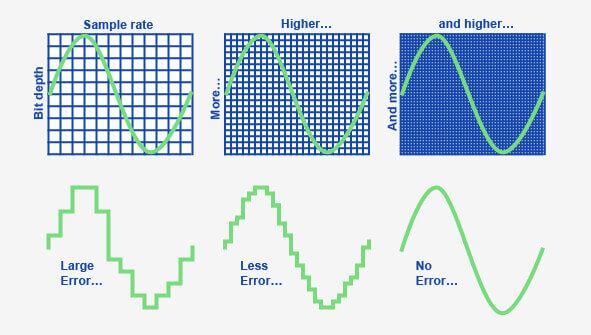
When it comes to audio and video files, there are two terms that are often used interchangeably: bit depth and bitrate. However, they are not the same thing. Bit depth refers to the number of bits used to represent each sample in an audio or video file, while bitrate refers to the amount of data transmitted per second.
Bit depth determines the number of possible values for each sample in a digital audio or video file. For example, an 8-bit audio file can have 256 possible values per sample, while a 16-bit file can have 65,536. The higher the bit depth, the more accurate the representation of the original sound or image.

On the other hand, bitrate refers to the amount of data transmitted per second in a digital file. In other words, it’s the rate at which data is encoded in a file. Higher bitrates typically mean higher quality files with more information, but also larger file sizes.

Audio Bit Depth vs Bitrate

When it comes to audio files, the bit depth and bitrate are both important factors in determining the quality of the sound. A higher bit depth means a more accurate representation of the original sound, while a higher bitrate means more data is transmitted per second, resulting in a higher quality sound.
However, it’s important to note that a higher bitrate does not necessarily mean a higher quality sound. If the original recording is of poor quality, increasing the bitrate will not improve the sound. In fact, it can actually result in larger file sizes with no improvement in sound quality.

Video Bit Depth vs Bitrate

Video files also have bit depth and bitrate, but they work slightly differently than in audio files. Bit depth determines the number of colors that can be represented in a video file, while bitrate determines the amount of data transmitted per second.
A higher bit depth means a wider range of colors can be represented in the video, resulting in a more accurate and vibrant image. However, a higher bitrate is also important for video files, as it determines the amount of detail that can be captured in each frame.

It’s important to find the right balance between bit depth and bitrate for video files, as increasing one can have a negative impact on the other. For example, a high bit depth with a low bitrate can result in a choppy or pixelated image, while a low bit depth with a high bitrate can result in a washed-out or blurry image.

Final Words

In conclusion, bit depth and bitrate are both important factors to consider when working with audio and video files. While they may seem similar, they serve different purposes and have different effects on the quality of the final product. It’s important to find the right balance between the two to ensure the best possible sound or image quality.
Keywords: audio bit depth, video bit depth, bit depth vs bitrate, bitrate definition, bitrate vs quality, audio quality, video quality, digital audio, digital video, file size, data transmission, accuracy, color representation, image quality, sound quality, audio recording, video recording, data encoding, pixelation, file format, media production, sound engineering, video editing, multimedia, digital media, technology, mp4gain, audio normalization, audio conversion, equalizer, windows, digital signal processing, dynamic