MP3-to-MP4 Transcoding Quality Loss


Free Download Mp4Gain
picture

MP3-to-MP4 Transcoding Quality Loss
MP3-to-MP4 Transcoding Quality Loss

Let’s talk about MP3-to-MP4 transcoding quality loss

When you convert MP3 files to MP4, you might wonder what happens to the audio quality. Transcoding between formats can lead to loss of fidelity if you’re not careful. I’ve spent years working with digital audio, and one thing is clear: understanding how these formats work is essential to minimizing quality loss. Think of it like making a photocopy of a photo—you might get a usable result, but it won’t capture every detail of the original.

MP3 files are already compressed using lossy algorithms, which means some audio data has been permanently removed to reduce file size. When you transcode an MP3 to MP4, which can contain audio and video, you’re essentially re-encoding an already compressed file. This process can amplify artifacts such as muffled sounds, reduced clarity, or background noise.

Why transcoding can cause quality loss

Transcoding quality loss happens because the original MP3 compression removes data, and the MP4 re-encoding process adds its own layer of compression. Each step reduces the amount of audio information available. Imagine shrinking a high-resolution image twice—it may still look good, but the fine details will blur.

MP4 files are designed to handle audio and video streams, often optimized for compatibility with different devices and platforms. However, their compression methods might not preserve the nuances of the original MP3, especially if the settings aren’t properly adjusted.

Factors influencing audio quality during transcoding

Several factors determine how much quality is lost during MP3-to-MP4 transcoding. Understanding these can help you make better decisions.

  • Original MP3 quality: Lower bitrates in the source MP3 file leave less data to preserve during transcoding.
  • Target MP4 settings: Using low bitrates or incompatible codecs in the MP4 can degrade the sound further.
  • Transcoding tools: Some software programs handle compression better than others, reducing artifact buildup.

How to minimize quality loss

Reducing quality loss during MP3-to-MP4 transcoding is possible with the right approach. Over the years, I’ve learned some simple yet effective techniques to preserve audio fidelity.

Start with the highest-quality MP3 you have. If your MP3 file is already heavily compressed, transcoding will magnify the flaws. Aim for bitrates of 256 kbps or higher to ensure there’s enough data to work with.

Choose the right MP4 settings. Use a high audio bitrate (at least 192 kbps) to maintain quality. Selecting a lossless codec like AAC-LC instead of HE-AAC can also make a big difference.

Avoid transcoding more than once. Each conversion strips away more audio data, so working directly with the original file format whenever possible is ideal.

When transcoding is unavoidable

Sometimes, transcoding from MP3 to MP4 is necessary, like when you need to combine audio with video or adapt files for specific devices. In these cases, using the best tools and settings becomes even more critical.

Look for transcoding software that supports advanced settings for both MP3 and MP4. These tools often provide options to adjust bitrates, sample rates, and codecs, giving you greater control over the output quality.

Real-world applications of MP3-to-MP4 transcoding

In my experience, most people need MP3-to-MP4 transcoding for multimedia projects. For example, if you’re creating a slideshow or video montage, you might need to combine audio tracks with visual content. Choosing the right settings ensures your audience hears crisp, clear sound.

Another common use is optimizing files for streaming. MP4’s flexibility with audio and video streams makes it an excellent choice for platforms like YouTube or social media. However, understanding how transcoding affects your audio ensures the final product sounds professional.

Latest words on MP3-to-MP4 transcoding quality loss

Transcoding MP3 to MP4 doesn’t have to mean sacrificing quality if you take the right precautions. Always start with the best source material, select compatible codecs, and adjust settings to suit your needs. With these steps, you can preserve audio fidelity while benefiting from MP4’s versatility. If you need reliable tools for handling transcoding, Mp4Gain offers a simple and effective solution for professional results.

What causes quality loss in MP3-to-MP4 transcoding?

Quality loss occurs because MP3 is already a lossy format. When re-encoded into MP4, additional compression artifacts may appear, further degrading the sound.

Can you avoid quality loss when transcoding?

While complete preservation isn’t possible, you can minimize loss by starting with high-quality MP3s and using appropriate MP4 settings, such as high bitrates and compatible codecs.

What MP4 audio codec is best for preserving quality?

AAC-LC is the best codec for maintaining quality in MP4 files, offering a good balance between efficiency and fidelity.

Does transcoding multiple times worsen audio quality?

Yes, each transcoding pass removes more audio data, compounding quality loss. Avoid multiple conversions whenever possible.

What bitrate should I use for MP4 audio?

For most applications, use at least 192 kbps to maintain quality. Higher bitrates, like 256 kbps, are ideal for professional use.

Can MP4 files use lossless audio?

Yes, MP4 can include lossless audio codecs like ALAC or FLAC, although these increase file size significantly.

How does the sample rate affect transcoding?

Sample rates determine how accurately audio is captured. Mismatched rates between MP3 and MP4 can cause noticeable artifacts.

Should I convert MP3 to MP4 for video projects?

Yes, if combining audio with video. Ensure proper settings to avoid degrading the MP3 audio during conversion.

What are the best tools for MP3-to-MP4 transcoding?

Look for software that allows custom settings for bitrates, codecs, and sample rates, ensuring maximum control over the output.

Can transcoding improve the audio quality of an MP3?

No, transcoding cannot improve quality. Once data is lost during MP3 compression, it cannot be restored.

Comments:

Why does this always seem more complicated than it should be? I tried converting some old MP3s to MP4, and the sound got worse. Thanks for explaining why!

This article is packed with useful information. I didn’t know that using high bitrates could make such a difference. Definitely going to try that next time.

Honestly, I wish you’d go even deeper into the settings part. Which exact MP4 codecs should we avoid?

I work with audio editing, and I can confirm this advice is solid. Transcoding quality loss is a real problem if you don’t use the right settings.

Super helpful! I didn’t realize that re-encoding multiple times would keep degrading the quality. Makes total sense now.

Thanks for this breakdown. It’s good to know about AAC-LC—I’ve been using HE-AAC and wondering why it sounded off.

Wow, I’ve been doing this wrong for years. Thanks for shedding light on how MP3 quality affects the final MP4 output.

I used Mp4Gain for a recent project, and it worked like a charm! Didn’t expect such a difference in sound quality.


Free Download Mp4Gain
picture


Mp4Gain Main Window
picture


Mp4Gain Features
picture


Free Download Mp4Gain
picture

Bit allocation in MP3 layers

Bit allocation in MP3 layers}

Bit allocation in MP3 layers

Let’s talk about bit allocation in MP3 layers

Bit allocation in MP3 layers is the backbone of its efficient audio compression. It determines how data is distributed across frequency bands based on psychoacoustic principles. Imagine trying to pack a suitcase for a long trip; you focus on essentials while minimizing space for less critical items. MP3 compression works similarly, focusing bits on sounds most critical to human hearing and economizing elsewhere.

Understanding this concept helps explain why MP3s are smaller yet still deliver good audio quality. Let’s delve into how MP3 layers allocate bits, why it matters, and what sets this process apart.

How MP3 layers handle bit allocation

Each MP3 layer—Layer I, Layer II, and Layer III—uses unique bit allocation strategies. These layers aim to optimize sound quality while keeping file sizes manageable. The focus is on perceptually important data while discarding redundant information.

Layer I employs a straightforward bit allocation technique suitable for simpler audio applications. Layer II enhances compression by refining bit distribution, focusing on more complex audio signals. Layer III, commonly known as MP3, uses the most advanced algorithms, including Huffman coding, to achieve the highest compression levels.

Role of psychoacoustic models in bit allocation

Psychoacoustic models guide MP3 layers in deciding which sounds matter most to the human ear. These models predict auditory masking, where louder sounds drown out softer ones. This allows MP3 encoders to allocate fewer bits to less audible components.

For example, if a loud drum beat overshadows a faint whisper in a song, the encoder prioritizes the drum while economizing on the whisper. This smart allocation ensures efficient compression without noticeable quality loss.

Challenges in balancing quality and size

Balancing audio quality and file size is a complex task in MP3 bit allocation. Too few bits lead to distortion, while excessive bits waste space. Engineers developed sophisticated algorithms to tackle this trade-off.

Imagine juggling priorities with a limited budget. You focus on high-priority expenses while trimming unnecessary costs. MP3 encoders do the same with sound data, ensuring a balance between fidelity and efficiency.

Advanced techniques in Layer III

Layer III takes bit allocation to the next level with features like variable bit rate (VBR) encoding. VBR adjusts bit allocation dynamically, dedicating more bits to complex audio passages and fewer to simpler ones. This results in a more efficient and adaptable compression process.

For instance, during a quiet piano solo, fewer bits are needed, while a dynamic orchestra demands more. This adaptability is why MP3s often sound so natural despite their compact size.

Real-life examples of bit allocation in action

Think of bit allocation as organizing your grocery shopping. You might spend more on high-quality items like fresh produce while saving on less critical products. Similarly, MP3 layers allocate more bits to crucial audio frequencies and economize elsewhere.

This approach ensures the listener perceives the audio as clear and full, even though much of the original data has been removed.

Comparing bit allocation across MP3 layers

Each MP3 layer has a distinct approach to bit allocation. Layer I uses fixed bit rates, prioritizing simplicity over flexibility. Layer II improves compression with more efficient allocation across multiple channels. Layer III stands out with its advanced algorithms and support for both fixed and variable bit rates.

This progression reflects the evolution of audio compression technology, catering to diverse needs from basic to high-fidelity applications.

Impact of bit allocation on audio quality

Bit allocation directly affects how we perceive audio quality. Proper allocation ensures clarity and depth, while poor allocation results in artifacts like distortion or muffled sound. Understanding this is crucial for audio engineers and enthusiasts.

Imagine watching a blurry video. The lack of clarity frustrates and distracts. Similarly, improper bit allocation undermines the listening experience, emphasizing the importance of getting it right.

How MP3 encoders use bit allocation algorithms

MP3 encoders analyze audio data to determine bit distribution. They consider factors like frequency range, masking effects, and dynamic complexity. These decisions are guided by psychoacoustic models and implemented through precise algorithms.

It’s like designing a custom suit. The tailor assesses measurements and fabric requirements to create a perfect fit. MP3 encoders tailor bit allocation to fit the audio data optimally.

Bit allocation and modern MP3 applications

In today’s digital landscape, MP3 bit allocation remains critical for applications like streaming, podcasts, and portable audio devices. Compact files with good sound quality are essential for bandwidth efficiency and user satisfaction.

For example, streaming platforms rely on MP3’s efficient bit allocation to deliver high-quality audio over varying internet speeds. This balance keeps users engaged without overwhelming network resources.

Future innovations in bit allocation

As technology advances, bit allocation techniques continue to evolve. Emerging audio formats and AI-driven algorithms promise even greater efficiency and quality. These innovations aim to push the boundaries of what MP3 compression can achieve.

Think of it as upgrading from a manual typewriter to a smart word processor. The principles remain, but the tools are more sophisticated and capable, offering exciting possibilities for the future.

Latest words on bit allocation in MP3 layers

Bit allocation in MP3 layers is a fascinating interplay of science, art, and engineering. It reflects decades of innovation aimed at delivering compact, high-quality audio. By understanding its principles, we gain a deeper appreciation for the technology that powers our favorite tunes.

If you’re working with MP3 files and want to optimize their quality, consider tools like Mp4Gain to achieve the best results. It offers practical solutions for enhancing your audio experience.

}

FAQs about Bit Allocation in MP3 Layers

What is bit allocation in MP3 layers?

Bit allocation in MP3 layers is the process of distributing bits across frequency bands based on psychoacoustic models. This ensures that more bits are assigned to sounds most critical to human hearing, while less significant sounds receive fewer bits, optimizing audio quality and file size.

Why is bit allocation important in MP3 compression?

Bit allocation is vital because it balances audio quality and file size. By prioritizing perceptually important sounds and reducing redundancy, MP3 files can maintain good sound quality while remaining compact and efficient for storage and streaming.

How does psychoacoustic modeling influence bit allocation?

Psychoacoustic modeling predicts what sounds the human ear is less likely to perceive, such as softer sounds masked by louder ones. This information guides bit allocation, allowing the MP3 encoder to focus on audible frequencies and save space on less noticeable details.

What is the difference between Layer I, II, and III in MP3 compression?

Layer I uses simpler bit allocation techniques and is suitable for basic audio compression. Layer II improves efficiency by refining bit distribution, making it better for more complex signals. Layer III, or MP3, employs advanced algorithms, including variable bit rate encoding and Huffman coding, for the highest compression efficiency and audio quality.

How does variable bit rate (VBR) affect bit allocation?

Variable bit rate adjusts the bit allocation dynamically based on the complexity of the audio. This means more bits are used for complex sections, like orchestral music, and fewer for simpler parts, such as silence or steady tones, resulting in more efficient compression and better sound quality.

Can improper bit allocation affect audio quality?

Yes, improper bit allocation can lead to artifacts like distortion, muffled sounds, or loss of detail in audio. Accurate allocation is critical to maintain a balance between compact file sizes and clear, high-quality sound.

Why is MP3 Layer III widely used compared to Layers I and II?

MP3 Layer III is preferred because it provides the best compression efficiency and audio quality. Its advanced algorithms, like psychoacoustic modeling, variable bit rate, and Huffman coding, make it ideal for streaming, portable devices, and storage applications where size and quality are critical.

How does bit allocation impact streaming services?

Streaming services rely on efficient bit allocation to deliver high-quality audio over varying bandwidths. By optimizing file sizes and maintaining fidelity, MP3 compression ensures seamless playback, even on slower internet connections.

Comments:

I didn’t know bit allocation was so complex! This article broke it down really well, thanks for that.

Interesting read! I wonder if there’s more detail on how these psychoacoustic models are developed.

This was super helpful for my project. I’ve always wondered why MP3s sound so good for their size.

The grocery shopping analogy really hit home for me. Makes it so much easier to understand how bit allocation works.

I’d love to see a deeper dive into variable bit rate encoding. That part is still a bit confusing for me.

Great explanation! Now I finally understand why Layer III is so popular for music streaming.

This helped me a lot! But I wish there were more technical diagrams to visualize the process better.

The comparison across layers was eye-opening. I didn’t realize how much they differ in complexity.

Very informative article! Made me curious about how future formats will handle compression.

I feel like I learned more from this article than some of the college lectures I’ve attended!

The future innovations section got me excited. AI-driven compression sounds like a game-changer.

Bit allocation makes so much sense now. Thanks for breaking it down in a relatable way!

I’ve always been curious about the science behind MP3 compression. This answered so many of my questions.

Wow, I didn’t realize how advanced Layer III is compared to the others. Makes me appreciate MP3s more.

This was great, but I’d love a follow-up article about how other audio formats compare to MP3.

Energy Compaction Techniques in MP3

Energy Compaction Techniques in MP3

Energy Compaction Techniques in MP3

Let’s Talk About Energy Compaction Techniques in MP3

Energy compaction techniques are the secret behind MP3’s ability to shrink audio files while preserving quality. When you listen to MP3s, what you might not realize is how much data gets compressed in ways that keep the sound clear and rich. As a specialist in audio encoding, I’ve worked with these techniques and seen how they save file space and bandwidth, making them essential in the world of digital audio. Through my years of experience, I’ve learned that these techniques rely on psychology and sound science to deliver that high quality in smaller file sizes. Let’s dig into how these strategies work and why they’re so effective.

Understanding Energy Compaction in Audio Compression

Energy compaction in audio means capturing the most “energy” or impactful parts of sound, then efficiently storing them. Think of a box you want to pack tightly. The idea is to keep the essential items while ditching things you won’t need. In audio, it’s similar, focusing on the frequencies that impact what we hear. Techniques like psychoacoustics and frequency masking help, concentrating on sounds our brains pick up easily while discarding what we won’t miss. This process is why MP3s retain such quality despite reduced data size.

The Science Behind Psychoacoustic Models

The psychoacoustic model is the backbone of MP3 compression, utilizing how humans perceive sound. I’ve noticed that this model’s core is auditory masking, where certain sounds cover others, allowing us to filter out less noticeable audio details. For example, in a crowded room, a loud voice drowns out quieter conversations. MP3s apply this by omitting audio frequencies masked by louder ones. This trimming down is barely perceptible but makes the file lighter without compromising the listening experience.

Frequency Masking: A Key to Efficient Compression

Frequency masking is a fascinating aspect that mimics how the human ear naturally filters sound. In audio compression, this technique reduces the data of sounds that are “hidden” by others. Imagine two musical notes, one high-pitched and soft, and the other low-pitched and loud. You’re more likely to notice the loud, low-pitched sound, while the softer one fades. MP3 compression leverages this concept to retain sounds that our ears will register while cutting those masked sounds, effectively reducing file size.

Bit Allocation and Its Role in MP3 Compression

Bit allocation is all about efficiency, deciding where to place the “energy” in an audio file. I see this as budgeting – you allocate more bits to essential areas and fewer bits to less noticeable parts. High-energy, dynamic sounds get more bits to ensure clarity, while low-energy areas get fewer. This smart allocation is a big reason MP3 files maintain quality even when compressed. It’s like highlighting the main points in a presentation, so you communicate the essentials without overloading the file.

Transform Coding: Breaking Down Sound Frequencies

Transform coding breaks audio into frequency components, simplifying the compression process. If you’ve ever used packing cubes in a suitcase, you know how they allow you to fit more while keeping things organized. Similarly, transform coding organizes sound into manageable “blocks” or frequencies. This process, usually through the Modified Discrete Cosine Transform (MDCT), rearranges and compacts data, fitting it more neatly and reducing the file size while keeping audio integrity.

The Role of Critical Band Analysis in Energy Compaction

Critical band analysis divides audio into “bands” or sections that our brains process separately. In MP3, it enhances compression by adjusting each band’s clarity. Think of critical bands as different instruments in a band, each with its role in the song. MP3 encoding uses this band separation to focus on parts of sound that we process most. The result? It delivers higher quality where our ears will notice it most, effectively maximizing audio impact while saving data.

Transform-Based Coding and MDCT in Depth

Transform-based coding through MDCT is a powerful compaction tool. It breaks down complex audio into smaller, easily encoded parts, making compression possible without losing clarity. I often think of this as slicing a pie – it’s easier to manage in sections. MP3 uses MDCT because it’s efficient for complex sounds, keeping the file size small without losing the richness. This efficiency is why MP3s perform so well, even for intricate audio like music.

Perceptual Coding: Focusing on Auditory Importance

Perceptual coding aligns with how our minds interpret sound by storing what’s essential and leaving out the rest. When I encode audio, I consider how perceptual coding can reduce unnecessary data. It’s like summarizing an article with only the main points. MP3s use this to keep files light and easy to store. By storing sounds our ears register best, perceptual coding delivers that “full” listening experience we crave.

Analyzing the Harmonic Structure in MP3 Compression

Harmonic structure in audio compression focuses on how sounds layer and interact. When encoding, MP3s maintain harmonics to keep that natural tone. Imagine hearing a piano piece: the melody and harmony intertwine to create that “piano” sound. Harmonic preservation means MP3s keep this intact, ensuring our ears enjoy the full, layered quality, even if data is reduced.

Spectral Compression for Efficient Data Reduction

Spectral compression reduces the bits used on lower-priority frequencies, focusing energy on what’s essential. This method is especially handy for music or sound with consistent tones. It’s similar to focusing a flashlight beam on a specific spot, illuminating it while dimming the rest. By emphasizing critical frequencies, MP3 compression keeps the audio’s richness intact, ensuring you don’t miss out on the sound’s fullness.

Handling Compression Artifacts in MP3

Compression artifacts can impact MP3 quality if not managed. When compressing audio, you might get “blurring” or “ringing” sounds. These occur if we go too far with reduction. Through trial and error, I’ve learned how to avoid these issues, balancing data reduction with sound quality. Techniques like noise shaping help smooth over these artifacts, keeping the listening experience pleasant.

Using Auditory Masking in MP3 Encoding

Auditory masking is an ingenious trick that capitalizes on how our brains ignore certain sounds. In MP3, we use masking to drop frequencies that softer sounds would cover. For instance, in a busy city, we focus on a friend’s voice, tuning out car engines and chatter. MP3s do this by saving on data for sounds that we wouldn’t consciously perceive, giving us high quality without the extra bits.

Bit Rate Reduction Without Quality Loss

Bit rate reduction aims to minimize data without compromising sound. It’s like trimming the fat off a steak: you keep the flavor but lose what’s unnecessary. MP3s apply this by reducing bits used on lower-priority sounds. Over the years, I’ve learned that careful tuning during compression ensures we retain sound depth and fidelity, even with a lower bit rate.

The Importance of Spectral Band Replication

Spectral band replication (SBR) helps MP3s reproduce high frequencies efficiently. Picture adjusting an equalizer to enhance treble – SBR does this, adding detail to compressed files. It’s particularly useful in improving quality for lower-bitrate files, giving us that crispness in sound that’s often missed. This technique is essential in maximizing audio output, especially in files with limited data capacity.

Practical Applications of Energy Compaction in MP3s

Energy compaction is all around us in music, podcasts, and online streaming. Each of these applications uses MP3’s compaction techniques to deliver high-quality audio with less data. It’s how we enjoy hours of music without maxing out storage space. Whether you’re listening on your phone or streaming online, energy compaction keeps things light and efficient, a real advantage for today’s digital lifestyle.

Maximizing MP3 Efficiency for Storage and Streaming

MP3 efficiency ensures we store more audio with less space. When I work on audio files, I focus on optimizing bit rate and frequency masking to ensure sound quality remains high. This balance lets us store extensive music libraries or stream smoothly on minimal bandwidth. It’s why MP3s remain a go-to choice for audio – they provide storage-friendly options without sacrificing quality.

Latest Words on Energy Compaction Techniques in MP3

Energy compaction techniques make MP3 a reliable format, giving us quality sound in a compact form. I’ve seen how these methods blend technology and psychology, creating a unique space in digital audio. By understanding the science behind compression and focusing on the parts we truly hear, MP3s continue to thrive. If you’re looking for efficient audio solutions, tools like Mp4Gain provide the tweaks and control needed to make the most of these compression techniques, enhancing your audio experience further.

Comments:

Man, this article opened my eyes about MP3! Never thought about how much goes into making files sound good even after they’re compressed. Awesome stuff!

I wish they’d gone even deeper on critical band analysis. It’s such a cool topic and super important for anyone making music or audio files.

Totally agree, learned so much. MP3s feel different now knowing how they work. Big thanks to whoever wrote this!

Could you go more in-depth about spectral band replication? Still kinda unclear on how it adds to quality on low bitrate files.

Impressive breakdown! Now I see why MP3 still rules. It’s like the ultimate file format for music. Thanks for the clarity!

This article made me realize how MP3s have stayed relevant. All those compaction techniques really make sense now. Nice!

I’m a DJ and always wondered why my MP3s sound great despite being compressed. Loved learning about frequency masking and bit allocation.

Good stuff, I only knew the basics but now understand the real tech behind MP3s. So useful, appreciate the article!

Wow, didn’t expect this much detail. Honestly makes me look at MP3s with a whole new level of respect. Solid info!

This breakdown makes MP3 compression so clear! Was just looking to understand the basics, but learned a ton.

Bit Depth: Understanding its Role in Audio Resolution

Bit Depth: Understanding its Role in Audio Resolution

Bit Depth
Bit Depth
Bit Depth
Bit Depth

What is the importance of bit depth in audio resolution?

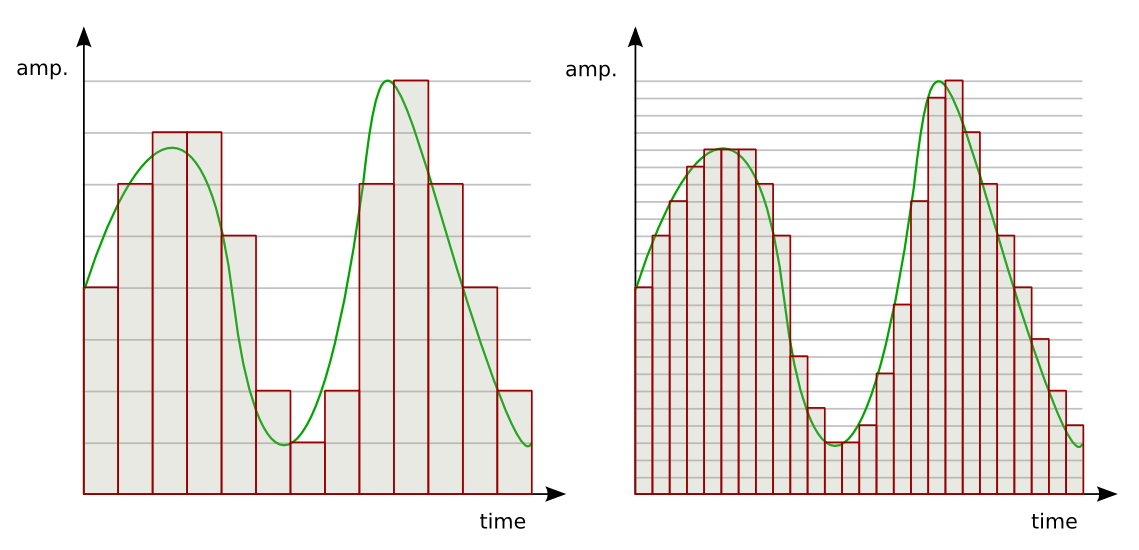
When it comes to audio resolution, bit depth plays a crucial role. Bit depth refers to the number of bits used to represent the amplitude of an audio signal. In simpler terms, it determines the level of detail and accuracy with which sound can be captured and reproduced. The higher the bit depth, the more precise the audio representation, resulting in greater dynamic range and fidelity.
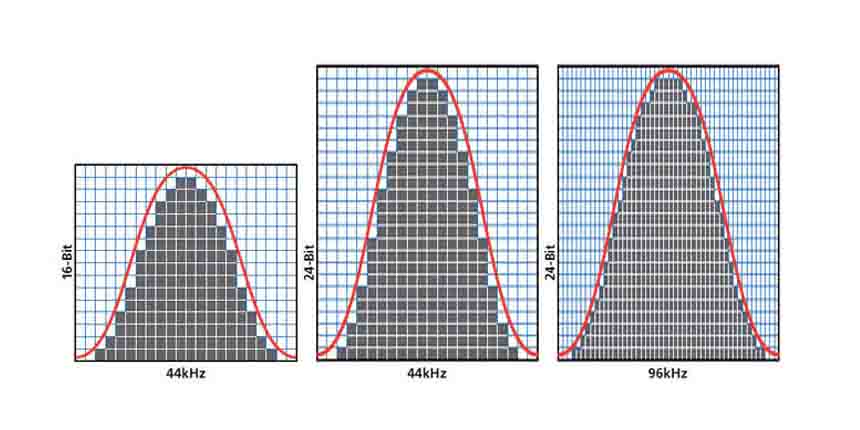
Higher bit depths enable a wider range of possible values, allowing for more nuanced audio reproduction. In digital audio, the most common bit depths are 16-bit and 24-bit. A 16-bit audio signal can represent 65,536 discrete amplitude levels, while a 24-bit signal can represent a staggering 16,777,216 levels. This significant increase in resolution allows for more accurate representation of subtle audio nuances, resulting in a more realistic and immersive listening experience.

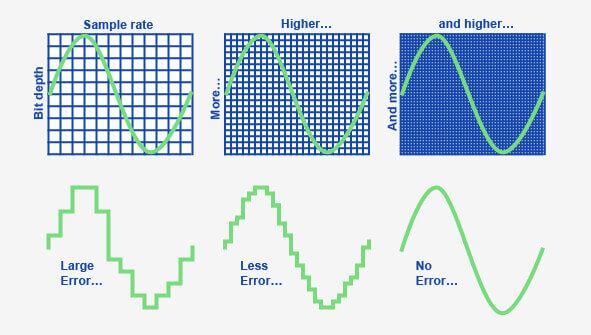
Moreover, higher bit depths help reduce quantization noise, which can degrade the audio quality. Quantization noise is the distortion introduced when the continuous analog audio signal is converted into a discrete digital representation. By increasing the number of bits used for quantization, the quantization noise can be pushed to lower levels, effectively minimizing its impact on the audio signal. This reduction in noise contributes to improved audio fidelity and a cleaner sound.

The impact of bit depth on audio recording

The choice of bit depth during audio recording has a significant impact on the quality and flexibility of the recorded material. When capturing audio, it is crucial to select an appropriate bit depth based on the desired outcome and the dynamic range of the source material.
For capturing music with a wide dynamic range or for critical recording applications, a higher bit depth, such as 24-bit, is preferred. This ensures that the delicate nuances and subtle variations in the performance are faithfully captured without losing detail. With a higher bit depth, there is ample headroom to accommodate sudden spikes in volume, preventing clipping and distortion.

On the other hand, for applications where the dynamic range is limited, such as voice recordings or podcasting, a lower bit depth, such as 16-bit, can be sufficient. Since these types of recordings typically have a smaller range between the softest and loudest sounds, the additional precision offered by higher bit depths may not be necessary. Using a lower bit depth can help conserve storage space and streamline the post-production process.

The benefits of higher bit depths in audio production

In audio production, working with higher bit depths offers several advantages that contribute to the overall quality of the final mix. Let’s explore some of these benefits:
1. Increased headroom: Higher bit depths provide more headroom, allowing audio engineers to work with greater flexibility during the mixing and mastering stages. This additional headroom ensures that any adjustments made to the audio levels or effects do not result in clipping or distortion.

2. Enhanced processing capabilities: Working with higher bit depths provides greater precision for applying audio processing effects, such as equalization, compression, and reverb. This precision allows for more accurate and transparent manipulation of the audio signal, resulting in a polished and professional sound.

The role of bit depth in audio playback

The bit depth of an audio file also impacts its playback quality. When playing back audio, it is important to ensure that the playback system supports the bit depth of the audio file. If the playback system is not capable of reproducing the full bit depth, the audio may be truncated or quantized, leading to a loss of detail and fidelity.
Furthermore, downsampling or converting high-resolution audio files with a higher bit depth to a lower bit depth can result in a loss of information and audio quality. It is essential to carefully consider the bit depth compatibility between the source material and the playback system to ensure an accurate and faithful reproduction of the audio.

Final Words

Bit depth plays a fundamental role in audio resolution, influencing the accuracy, fidelity, and dynamic range of the sound. Understanding the importance of bit depth in audio recording, production, and playback allows for informed decisions to be made regarding the selection and handling of audio files. By leveraging higher bit depths, audio professionals can achieve higher quality recordings and deliver an exceptional listening experience to their audiences.
Keywords (LSI): audio fidelity, dynamic range, quantization noise, recording quality, audio production, audio playback, higher resolution, audio nuances, digital representation, accurate reproduction, audio engineers, playback system, audio file compatibility.

What is the difference between bit depth and bitrate?

What is the difference between bit depth and bitrate?

Bit Depth
Bit Depth
Bit depth
Bit Depth

Understanding Bit Depth and Bitrate

When it comes to audio and video files, there are two terms that are often used interchangeably: bit depth and bitrate. However, they are not the same thing. Bit depth refers to the number of bits used to represent each sample in an audio or video file, while bitrate refers to the amount of data transmitted per second.
Bit depth determines the number of possible values for each sample in a digital audio or video file. For example, an 8-bit audio file can have 256 possible values per sample, while a 16-bit file can have 65,536. The higher the bit depth, the more accurate the representation of the original sound or image.

On the other hand, bitrate refers to the amount of data transmitted per second in a digital file. In other words, it’s the rate at which data is encoded in a file. Higher bitrates typically mean higher quality files with more information, but also larger file sizes.

Audio Bit Depth vs Bitrate

When it comes to audio files, the bit depth and bitrate are both important factors in determining the quality of the sound. A higher bit depth means a more accurate representation of the original sound, while a higher bitrate means more data is transmitted per second, resulting in a higher quality sound.
However, it’s important to note that a higher bitrate does not necessarily mean a higher quality sound. If the original recording is of poor quality, increasing the bitrate will not improve the sound. In fact, it can actually result in larger file sizes with no improvement in sound quality.

Video Bit Depth vs Bitrate

Video files also have bit depth and bitrate, but they work slightly differently than in audio files. Bit depth determines the number of colors that can be represented in a video file, while bitrate determines the amount of data transmitted per second.
A higher bit depth means a wider range of colors can be represented in the video, resulting in a more accurate and vibrant image. However, a higher bitrate is also important for video files, as it determines the amount of detail that can be captured in each frame.

It’s important to find the right balance between bit depth and bitrate for video files, as increasing one can have a negative impact on the other. For example, a high bit depth with a low bitrate can result in a choppy or pixelated image, while a low bit depth with a high bitrate can result in a washed-out or blurry image.

Final Words

In conclusion, bit depth and bitrate are both important factors to consider when working with audio and video files. While they may seem similar, they serve different purposes and have different effects on the quality of the final product. It’s important to find the right balance between the two to ensure the best possible sound or image quality.
Keywords: audio bit depth, video bit depth, bit depth vs bitrate, bitrate definition, bitrate vs quality, audio quality, video quality, digital audio, digital video, file size, data transmission, accuracy, color representation, image quality, sound quality, audio recording, video recording, data encoding, pixelation, file format, media production, sound engineering, video editing, multimedia, digital media, technology, mp4gain, audio normalization, audio conversion, equalizer, windows, digital signal processing, dynamic

Audio Bit Depth Explained

Audio Bit Depth Explained


Audio Bit Depth Explained

Bit Depth

Audio Bit Depth Explained

When it comes to producing or enjoying high-quality audio, understanding bit depth is essential. This technical aspect of digital audio determines the level of precision and accuracy with which sound is captured and reproduced. For sound engineers and audiophiles alike, a deep understanding of bit depth is a must-have skill for creating and experiencing truly exceptional sound.

What is Bit Depth?

Bit depth refers to the number of bits used to represent each sample in a digital audio file. Each sample represents the amplitude of the audio signal at a specific point in time. The bit depth determines the range of values that can be used to represent the amplitude of each sample. A higher bit depth provides a larger range of possible values, resulting in a more accurate representation of the audio signal. This, in turn, leads to a higher-quality audio recording.

Common bit depths used in audio recording and production include 16-bit, 24-bit, and 32-bit. The most common bit depth used in consumer audio devices is 16-bit, while 24-bit and 32-bit are more commonly used in professional audio production.

How Does Bit Depth Affect Audio Quality?

The bit depth of an audio recording has a significant impact on its overall quality. A higher bit depth provides a more accurate representation of the audio signal, resulting in a more natural and lifelike sound. With a higher bit depth, the audio signal can be recorded and processed with greater precision and accuracy, allowing for a wider dynamic range and more nuanced expression.

On the other hand, a lower bit depth can result in quantization errors, which can introduce distortion and noise into the audio signal. This can result in a loss of detail and clarity, particularly in quiet or complex passages of music.

Bit Depth and Dynamic Range

The dynamic range of an audio recording refers to the difference between the loudest and softest parts of the recording. A higher bit depth allows for a wider dynamic range, as the signal can be recorded with greater accuracy and precision. This means that even the softest parts of the recording can be captured with a higher level of detail and clarity, resulting in a more natural and lifelike sound.

For example, a recording of a classical music performance with a wide dynamic range may require a higher bit depth to capture the full range of dynamics and expression. Without a sufficient bit depth, the softer parts of the performance may be lost, resulting in a less engaging and less satisfying listening experience.

Conclusion

Understanding bit depth is crucial for anyone involved in the production or enjoyment of high-quality audio. By providing a more accurate representation of the audio signal, a higher bit depth can result in a more natural and lifelike sound, with a wider dynamic range and more nuanced expression. While a lower bit depth can result in quantization errors and a loss of detail and clarity, particularly in quiet or complex passages of music.

Overall, it is important to choose the appropriate bit depth for each recording or production, based on the dynamic range and complexity of the audio signal. By doing so, sound engineers and audiophiles can ensure that the audio they create or enjoy is of the highest quality possible.

As a final recommendation, we suggest using MP4Gain to adjust the volume and equalization of your digital audio files, ensuring that they are optimized for playback on a variety of devices and systems.

Understanding Audio Bit Depth: 8-bit vs. 16-bit vs. 24-bit

Understanding Audio Bit Depth: 8-bit vs. 16-bit vs. 24-bit

Bit Depth
Bit Depth

When it comes to digital audio, one of the most critical factors in determining the quality of a recording is the audio bit depth. In this article, we’ll delve into the technical details of audio bit depth and explore the differences between 8-bit, 16-bit, and 24-bit audio recordings.

Bit Depth
Bit Depth

What is Audio Bit Depth?

In digital audio, sound waves are converted into a series of numerical values that can be stored and manipulated by computers. Audio bit depth refers to the number of bits of information used to represent each sample in a digital audio recording. Each sample represents the amplitude of the sound wave at a specific point in time.

The bit depth determines the range of possible values for each sample. For example, an 8-bit audio recording has 256 possible values, while a 16-bit recording has 65,536 possible values, and a 24-bit recording has over 16 million possible values. This increase in possible values provides greater resolution and accuracy, resulting in improved sound quality.

Dynamic Range

Another critical aspect of audio bit depth is dynamic range, which refers to the difference between the quietest and loudest sounds that can be recorded. With an increase in bit depth, the dynamic range of a recording also increases. For example, a 16-bit audio recording has a dynamic range of 96 dB, whereas a 24-bit recording has a dynamic range of 144 dB. This difference in dynamic range is quite significant and is one of the reasons why 24-bit audio is preferred for professional applications.

Quantization Noise

Quantization noise is an inherent part of digital audio and is introduced during the process of converting an analog audio signal to a digital representation. Quantization noise is essentially the difference between the actual analog signal and the closest quantized digital value. The more bits used for quantization, the lower the level of quantization noise.

However, as the bit depth increases, the noise introduced becomes less of an issue. At 16 bits, quantization noise is typically not audible, but it can become noticeable when processing audio. At 24 bits, quantization noise is virtually non-existent, even when processing audio.

Conclusion

In conclusion, audio bit depth plays a crucial role in the quality of digital audio recordings. Increasing the bit depth of an audio recording provides greater resolution and accuracy, resulting in improved sound quality. Professionals in the music industry typically prefer 24-bit audio due to its higher dynamic range and lower quantization noise. However, for most consumer applications, 16-bit audio is perfectly adequate and results in high-quality sound.

It is also important to note that bit depth is just one aspect of digital audio quality. Other factors such as sample rate and compression algorithms also play a significant role in determining the overall quality of a digital audio recording. Nonetheless, understanding audio bit depth is a crucial step in the journey to becoming a proficient audio engineer or producer.