Bit Depth: Understanding its Role in Audio Resolution


Free Download Mp4Gain
picture

Bit Depth: Understanding its Role in Audio Resolution
Bit Depth
Bit Depth
Bit Depth
Bit Depth

What is the importance of bit depth in audio resolution?

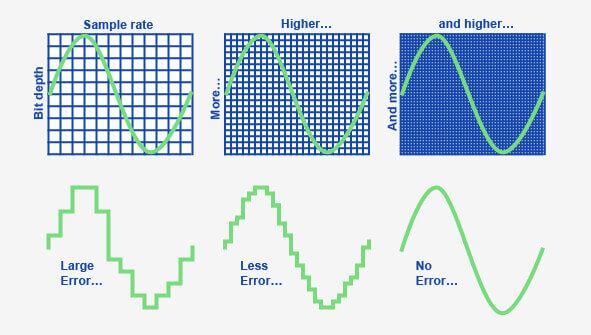
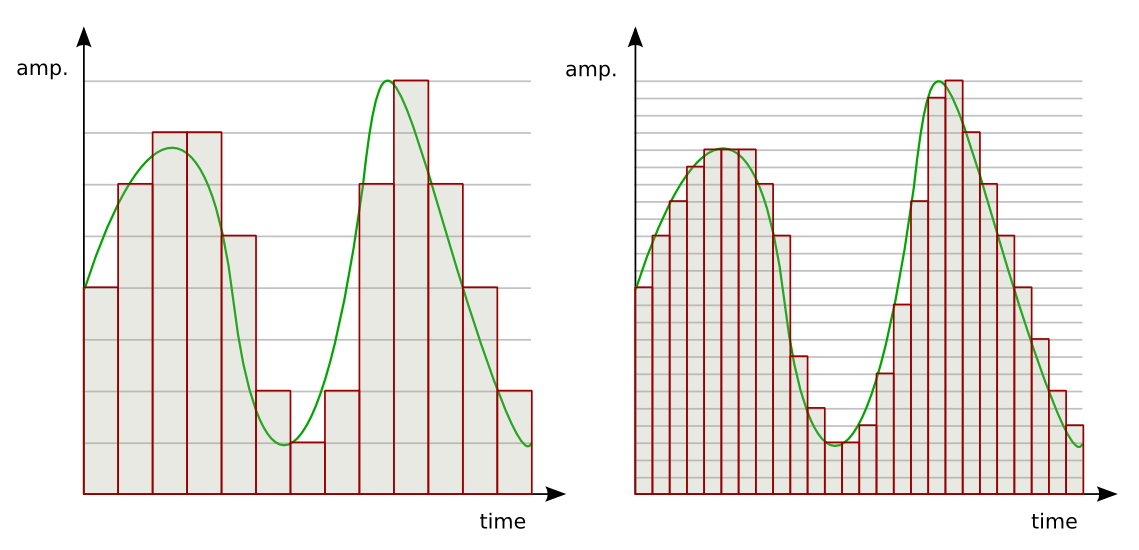
When it comes to audio resolution, bit depth plays a crucial role. Bit depth refers to the number of bits used to represent the amplitude of an audio signal. In simpler terms, it determines the level of detail and accuracy with which sound can be captured and reproduced. The higher the bit depth, the more precise the audio representation, resulting in greater dynamic range and fidelity.
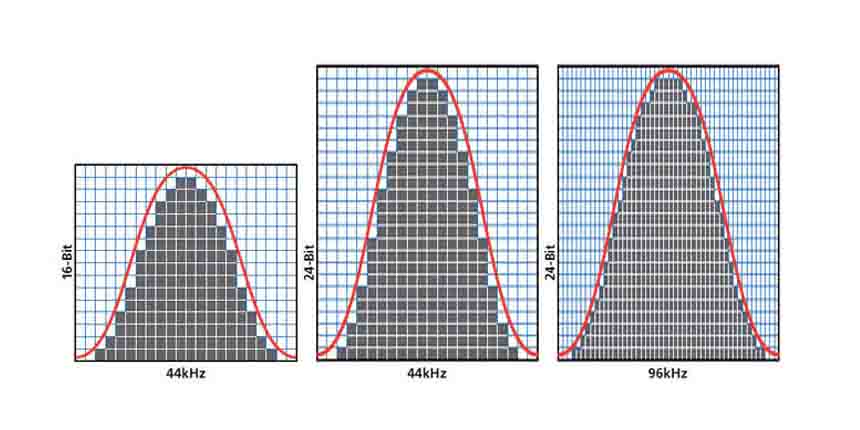
Higher bit depths enable a wider range of possible values, allowing for more nuanced audio reproduction. In digital audio, the most common bit depths are 16-bit and 24-bit. A 16-bit audio signal can represent 65,536 discrete amplitude levels, while a 24-bit signal can represent a staggering 16,777,216 levels. This significant increase in resolution allows for more accurate representation of subtle audio nuances, resulting in a more realistic and immersive listening experience.

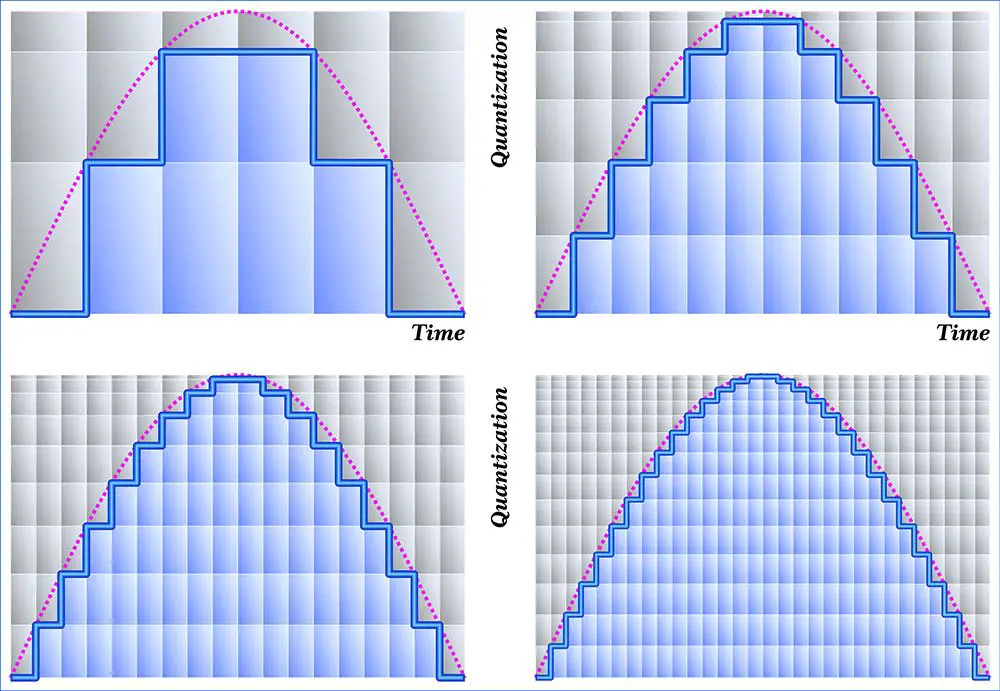
Moreover, higher bit depths help reduce quantization noise, which can degrade the audio quality. Quantization noise is the distortion introduced when the continuous analog audio signal is converted into a discrete digital representation. By increasing the number of bits used for quantization, the quantization noise can be pushed to lower levels, effectively minimizing its impact on the audio signal. This reduction in noise contributes to improved audio fidelity and a cleaner sound.

The impact of bit depth on audio recording

The choice of bit depth during audio recording has a significant impact on the quality and flexibility of the recorded material. When capturing audio, it is crucial to select an appropriate bit depth based on the desired outcome and the dynamic range of the source material.
For capturing music with a wide dynamic range or for critical recording applications, a higher bit depth, such as 24-bit, is preferred. This ensures that the delicate nuances and subtle variations in the performance are faithfully captured without losing detail. With a higher bit depth, there is ample headroom to accommodate sudden spikes in volume, preventing clipping and distortion.

On the other hand, for applications where the dynamic range is limited, such as voice recordings or podcasting, a lower bit depth, such as 16-bit, can be sufficient. Since these types of recordings typically have a smaller range between the softest and loudest sounds, the additional precision offered by higher bit depths may not be necessary. Using a lower bit depth can help conserve storage space and streamline the post-production process.

The benefits of higher bit depths in audio production

In audio production, working with higher bit depths offers several advantages that contribute to the overall quality of the final mix. Let’s explore some of these benefits:
1. Increased headroom: Higher bit depths provide more headroom, allowing audio engineers to work with greater flexibility during the mixing and mastering stages. This additional headroom ensures that any adjustments made to the audio levels or effects do not result in clipping or distortion.

2. Enhanced processing capabilities: Working with higher bit depths provides greater precision for applying audio processing effects, such as equalization, compression, and reverb. This precision allows for more accurate and transparent manipulation of the audio signal, resulting in a polished and professional sound.

The role of bit depth in audio playback

The bit depth of an audio file also impacts its playback quality. When playing back audio, it is important to ensure that the playback system supports the bit depth of the audio file. If the playback system is not capable of reproducing the full bit depth, the audio may be truncated or quantized, leading to a loss of detail and fidelity.
Furthermore, downsampling or converting high-resolution audio files with a higher bit depth to a lower bit depth can result in a loss of information and audio quality. It is essential to carefully consider the bit depth compatibility between the source material and the playback system to ensure an accurate and faithful reproduction of the audio.

Final Words

Bit depth plays a fundamental role in audio resolution, influencing the accuracy, fidelity, and dynamic range of the sound. Understanding the importance of bit depth in audio recording, production, and playback allows for informed decisions to be made regarding the selection and handling of audio files. By leveraging higher bit depths, audio professionals can achieve higher quality recordings and deliver an exceptional listening experience to their audiences.
Keywords (LSI): audio fidelity, dynamic range, quantization noise, recording quality, audio production, audio playback, higher resolution, audio nuances, digital representation, accurate reproduction, audio engineers, playback system, audio file compatibility.


Free Download Mp4Gain
picture


Mp4Gain Main Window
picture


Mp4Gain Features
picture


Free Download Mp4Gain
picture

What is the difference between bit depth and bitrate?

What is the difference between bit depth and bitrate?

Bit Depth
Bit Depth
Bit depth
Bit Depth

Understanding Bit Depth and Bitrate

When it comes to audio and video files, there are two terms that are often used interchangeably: bit depth and bitrate. However, they are not the same thing. Bit depth refers to the number of bits used to represent each sample in an audio or video file, while bitrate refers to the amount of data transmitted per second.
Bit depth determines the number of possible values for each sample in a digital audio or video file. For example, an 8-bit audio file can have 256 possible values per sample, while a 16-bit file can have 65,536. The higher the bit depth, the more accurate the representation of the original sound or image.

On the other hand, bitrate refers to the amount of data transmitted per second in a digital file. In other words, it’s the rate at which data is encoded in a file. Higher bitrates typically mean higher quality files with more information, but also larger file sizes.

Audio Bit Depth vs Bitrate

When it comes to audio files, the bit depth and bitrate are both important factors in determining the quality of the sound. A higher bit depth means a more accurate representation of the original sound, while a higher bitrate means more data is transmitted per second, resulting in a higher quality sound.
However, it’s important to note that a higher bitrate does not necessarily mean a higher quality sound. If the original recording is of poor quality, increasing the bitrate will not improve the sound. In fact, it can actually result in larger file sizes with no improvement in sound quality.

Video Bit Depth vs Bitrate

Video files also have bit depth and bitrate, but they work slightly differently than in audio files. Bit depth determines the number of colors that can be represented in a video file, while bitrate determines the amount of data transmitted per second.
A higher bit depth means a wider range of colors can be represented in the video, resulting in a more accurate and vibrant image. However, a higher bitrate is also important for video files, as it determines the amount of detail that can be captured in each frame.

It’s important to find the right balance between bit depth and bitrate for video files, as increasing one can have a negative impact on the other. For example, a high bit depth with a low bitrate can result in a choppy or pixelated image, while a low bit depth with a high bitrate can result in a washed-out or blurry image.

Final Words

In conclusion, bit depth and bitrate are both important factors to consider when working with audio and video files. While they may seem similar, they serve different purposes and have different effects on the quality of the final product. It’s important to find the right balance between the two to ensure the best possible sound or image quality.
Keywords: audio bit depth, video bit depth, bit depth vs bitrate, bitrate definition, bitrate vs quality, audio quality, video quality, digital audio, digital video, file size, data transmission, accuracy, color representation, image quality, sound quality, audio recording, video recording, data encoding, pixelation, file format, media production, sound engineering, video editing, multimedia, digital media, technology, mp4gain, audio normalization, audio conversion, equalizer, windows, digital signal processing, dynamic

Audio Bit Depth Explained

Audio Bit Depth Explained


Audio Bit Depth Explained

Bit Depth

Audio Bit Depth Explained

When it comes to producing or enjoying high-quality audio, understanding bit depth is essential. This technical aspect of digital audio determines the level of precision and accuracy with which sound is captured and reproduced. For sound engineers and audiophiles alike, a deep understanding of bit depth is a must-have skill for creating and experiencing truly exceptional sound.

What is Bit Depth?

Bit depth refers to the number of bits used to represent each sample in a digital audio file. Each sample represents the amplitude of the audio signal at a specific point in time. The bit depth determines the range of values that can be used to represent the amplitude of each sample. A higher bit depth provides a larger range of possible values, resulting in a more accurate representation of the audio signal. This, in turn, leads to a higher-quality audio recording.

Common bit depths used in audio recording and production include 16-bit, 24-bit, and 32-bit. The most common bit depth used in consumer audio devices is 16-bit, while 24-bit and 32-bit are more commonly used in professional audio production.

How Does Bit Depth Affect Audio Quality?

The bit depth of an audio recording has a significant impact on its overall quality. A higher bit depth provides a more accurate representation of the audio signal, resulting in a more natural and lifelike sound. With a higher bit depth, the audio signal can be recorded and processed with greater precision and accuracy, allowing for a wider dynamic range and more nuanced expression.

On the other hand, a lower bit depth can result in quantization errors, which can introduce distortion and noise into the audio signal. This can result in a loss of detail and clarity, particularly in quiet or complex passages of music.

Bit Depth and Dynamic Range

The dynamic range of an audio recording refers to the difference between the loudest and softest parts of the recording. A higher bit depth allows for a wider dynamic range, as the signal can be recorded with greater accuracy and precision. This means that even the softest parts of the recording can be captured with a higher level of detail and clarity, resulting in a more natural and lifelike sound.

For example, a recording of a classical music performance with a wide dynamic range may require a higher bit depth to capture the full range of dynamics and expression. Without a sufficient bit depth, the softer parts of the performance may be lost, resulting in a less engaging and less satisfying listening experience.

Conclusion

Understanding bit depth is crucial for anyone involved in the production or enjoyment of high-quality audio. By providing a more accurate representation of the audio signal, a higher bit depth can result in a more natural and lifelike sound, with a wider dynamic range and more nuanced expression. While a lower bit depth can result in quantization errors and a loss of detail and clarity, particularly in quiet or complex passages of music.

Overall, it is important to choose the appropriate bit depth for each recording or production, based on the dynamic range and complexity of the audio signal. By doing so, sound engineers and audiophiles can ensure that the audio they create or enjoy is of the highest quality possible.

As a final recommendation, we suggest using MP4Gain to adjust the volume and equalization of your digital audio files, ensuring that they are optimized for playback on a variety of devices and systems.

What Is Audio Sampling Rate: A Comprehensive Explanation

What Is Audio Sampling Rate: A Comprehensive Explanation

Sample Rate
Sample Rate

Introduction

Sample Rate
Sample Rate

Audio sampling rate is a fundamental concept in digital audio that refers to the number of samples per second used to represent an analog audio signal in digital form. In this article, we’ll explore the technical details of audio sampling rate, its importance in digital audio, and its impact on audio quality and file size.

Sampling Rate Fundamentals

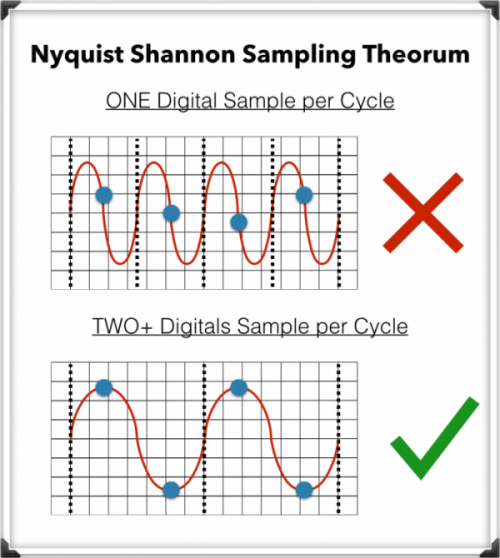
The concept of audio sampling rate is based on the Nyquist-Shannon sampling theorem, which states that in order to accurately represent an analog signal in digital form, the sampling rate must be at least twice the highest frequency present in the signal. This means that a signal with a highest frequency of 20kHz (the upper limit of human hearing) must be sampled at a rate of at least 40kHz in order to be accurately represented.

Sampling rate is measured in Hertz (Hz), which refers to the number of samples per second. Common sampling rates in digital audio range from 44.1kHz (used in CDs) to 192kHz (used in some high-resolution audio formats).

Sample Rate Conversion

In some cases, it may be necessary to convert audio from one sampling rate to another. Sample rate conversion involves resampling the audio data to a different rate, which can be done using digital signal processing techniques. However, sample rate conversion can introduce artifacts and reduce audio quality, especially when downsampling from a higher rate to a lower rate.

There are various reasons why sample rate conversion may be necessary, such as when mixing audio tracks with different sampling rates, or when preparing audio for distribution on different platforms with varying requirements.

Audio Quality and Sampling Rate

The sampling rate has a significant impact on audio quality, with higher sampling rates generally resulting in better fidelity and more accurate representation of the original signal. However, the benefits of higher sampling rates are limited by the limitations of human hearing and the practical limitations of digital audio technology.

While there is debate about the benefits of “high-resolution audio” formats with sampling rates above 44.1kHz, it is generally accepted that sampling rates above 96kHz provide little additional benefit in terms of audio quality.

Bit Depth and Sampling Rate

The bit depth of an audio sample refers to the number of bits used to represent the amplitude of the signal at each sample point. Higher bit depths allow for more precise representation of the signal, but also result in larger file sizes. The bit depth and sampling rate are related, as increasing the bit depth requires more data to be stored for each sample.

There is a trade-off between sampling rate and bit depth, as higher sampling rates require more data to be stored per second, which can limit the maximum bit depth that can be used without exceeding practical file size limits. However, this trade-off can be mitigated by using efficient audio compression techniques.

Sample Rate in Practice

Common sampling rates in digital audio include 44.1kHz (used in CDs), 48kHz (used in digital video), 88.2kHz, 96kHz, 176.4kHz, and 192kHz. Streaming services such as Spotify and Apple Music typically use lower sampling rates for their audio streams, with 44.1kHz being a common choice.

The Nyquist Theorem, named after the Swedish-American physicist Harry Nyquist, states that the sampling rate should be at least twice the highest frequency component in the signal being sampled. This is why the standard CD quality sampling rate is 44.1 kHz, which is just above the upper limit of human hearing.

However, it is important to note that there are higher sampling rates available, such as 48 kHz, 96 kHz, and even 192 kHz. These higher sampling rates can provide more detail and accuracy in the digital representation of the analog signal. However, they also require more storage space and processing power.

Another important factor to consider is the bit depth, which is the number of bits used to represent each sample. The more bits used, the more accurate and detailed the representation of the analog signal. CD quality uses a bit depth of 16 bits, but higher bit depths such as 24 bits are also available.

It is worth noting that some argue that higher sampling rates and bit depths may not necessarily result in audible improvements in sound quality, especially when considering the limitations of human hearing. Additionally, some argue that the increased storage and processing requirements may not be worth the potential improvements.

In conclusion, the sampling rate is a crucial component in the digital representation of analog audio signals. A higher sampling rate can provide more detail and accuracy in the digital representation, but also requires more storage and processing power. The Nyquist Theorem provides a guideline for choosing the appropriate sampling rate based on the highest frequency component in the signal. Additionally, the bit depth is another factor to consider in the accuracy and detail of the digital representation. While higher sampling rates and bit depths are available, the potential improvements in sound quality must be balanced against the increased storage and processing requirements.

Understanding Audio Bit Depth: 8-bit vs. 16-bit vs. 24-bit

Understanding Audio Bit Depth: 8-bit vs. 16-bit vs. 24-bit

Bit Depth
Bit Depth

When it comes to digital audio, one of the most critical factors in determining the quality of a recording is the audio bit depth. In this article, we’ll delve into the technical details of audio bit depth and explore the differences between 8-bit, 16-bit, and 24-bit audio recordings.

Bit Depth
Bit Depth

What is Audio Bit Depth?

In digital audio, sound waves are converted into a series of numerical values that can be stored and manipulated by computers. Audio bit depth refers to the number of bits of information used to represent each sample in a digital audio recording. Each sample represents the amplitude of the sound wave at a specific point in time.

The bit depth determines the range of possible values for each sample. For example, an 8-bit audio recording has 256 possible values, while a 16-bit recording has 65,536 possible values, and a 24-bit recording has over 16 million possible values. This increase in possible values provides greater resolution and accuracy, resulting in improved sound quality.

Dynamic Range

Another critical aspect of audio bit depth is dynamic range, which refers to the difference between the quietest and loudest sounds that can be recorded. With an increase in bit depth, the dynamic range of a recording also increases. For example, a 16-bit audio recording has a dynamic range of 96 dB, whereas a 24-bit recording has a dynamic range of 144 dB. This difference in dynamic range is quite significant and is one of the reasons why 24-bit audio is preferred for professional applications.

Quantization Noise

Quantization noise is an inherent part of digital audio and is introduced during the process of converting an analog audio signal to a digital representation. Quantization noise is essentially the difference between the actual analog signal and the closest quantized digital value. The more bits used for quantization, the lower the level of quantization noise.

However, as the bit depth increases, the noise introduced becomes less of an issue. At 16 bits, quantization noise is typically not audible, but it can become noticeable when processing audio. At 24 bits, quantization noise is virtually non-existent, even when processing audio.

Conclusion

In conclusion, audio bit depth plays a crucial role in the quality of digital audio recordings. Increasing the bit depth of an audio recording provides greater resolution and accuracy, resulting in improved sound quality. Professionals in the music industry typically prefer 24-bit audio due to its higher dynamic range and lower quantization noise. However, for most consumer applications, 16-bit audio is perfectly adequate and results in high-quality sound.

It is also important to note that bit depth is just one aspect of digital audio quality. Other factors such as sample rate and compression algorithms also play a significant role in determining the overall quality of a digital audio recording. Nonetheless, understanding audio bit depth is a crucial step in the journey to becoming a proficient audio engineer or producer.

What is 16-bit MQA?

What is 16-bit MQA?

Sample Rate

Explain how MQA “origami” folds recorded audio into a more efficient format, we often take high sample rates, such as 192 kHz, as an example.

Sample Rate

But the strengths of the comprehensive MQA system are just as important, even when the sample rate is low.

Music catalogs are important because many masters were originally recorded at 44.1 kHz and most of them were recorded only at 44.1 kHz 16b (“Red Book”).

For the 1977-2010 era catalogs, MQA is much closer to the original studio sound, to the actual sound, than most remastered releases (adding effects rather than reducing bugs). Allows you to “go back”. In many cases, the clear sound provided by MQA is deep.

In the early days of digital audio, recording and production equipment was much less sophisticated than it is today. On some level, this can be an advantage. It keeps it clean because you don’t have to mess with the sound between production and release in the studio. But early digital technology also introduced systematic flaws that we were able to perceive and correct. (A part of this is described in the author’s AES treatise [1])

What is MQA 16b?

There are three ways to create a 16-bit MQA file:
1) 16b 44.1 (or 48) kHz master encoding.
2) Derivatives for 24b MQA encoding.
3) Custom MQA-CD encoding.
In all three cases, MQA files can provide audible dynamic range greater than 16b.

For each type

1. When MQA encodes a 16b 44.1 kHz master, the entire encoded MQA file is also 44.1 kHz / 16b. Despite being 16b, this file contains all the decoding and playback information. This MQA encoding also includes all the information that can be accessed while playing the original master, and in some cases even more.
2. If the original source is 44.1 kHz / 24b or the sampling frequency is 88.2, 176.4, 352, 8 kHz or DSD, the standard MQA file will be 44.1 kHz / 24b. This file contains decoding, “display” and rendering information. If this 24b MQA file encounters a “16-bit bottleneck” during delivery (for example, in a wireless or automotive environment), the 16-bit information in the header will be clipped to maximize downstream sound quality. Organized as such, display and reproduction are still possible. See [2].
So encoding a high-speed master and truncating the 24-bit to 16-bit MQA will give you the best possible sound quality (with or without a decoder). This MQA file can be sent to a streaming service via any 16-bit distribution system, for example as an alternative to Redbook and, interestingly, on a CD. Importantly, this 16-bit version of the MQA replay can be heard as a certified and studio approved replay.
For this reason, some record companies no longer create Redbook files and choose the high quality and certification that MQA 16b files provide.
3. In 2) above, the 16-bit MQA file was created by first optimizing the encoding to 24-bit and then removing the lower 8 bits. However, if the file is for MQA-CD, the encoder uses a different approach to further optimize the data on the CD.

What about the sound quality of music distribution subscriptions?

What about the sound quality of music distribution subscriptions?

Sample Rate

Times have gone further and as of 2020, listening to music on music distribution subscription services (abbreviation: subscription) is not uncommon.

Sample Rate

Since subscription to music distribution is a service that always connects to the Internet or downloads and listens to music, some people may be concerned about the sound quality.

In this article, we will introduce how to enjoy music with the sound quality of music distribution subscriptions and good sound quality.

There is a high-quality music distribution subscription.
There is a setting to improve the sound quality.
If you want to listen to music distribution subscriptions with good sound quality, consider using good quality headphones.
About the sound quality of the subscription
Table of Contents

About the sound quality of the subscription
About the Bitrate and Audio Codec of Top Subscriptions
How to enjoy the subscription with better sound quality
abstract
About the sound quality of the subscription
How is the sound quality of a music distribution subscription determined?

Sound quality depends on bit rate and type of audio codec.

I will explain the bit rate and the audio codec.

What is a bit rate?
It is a value (unit: bps) that expresses the amount of data per second after compressing music data.

For music files with the same compression format, files with higher bitrate values ​​are said to have better sound quality.

What is an audio codec?
A function that compresses or decompresses music files.

There are two types of compression methods for music file codecs: lossy and lossless.

Lossy codec
Data compression in which the data before compression and the data after decompression do not match.

The advantage is that the size of the music file can be reduced, but the disadvantage is that the sound quality deteriorates.

The types of lossy codecs are listed below as an example.

■ Lossy codec types
・ MP3
・ AAC
・ WMA
・ Vorbis

Lossless codec
Data compression in which the data before compression and the data after decompression are the same.

The compression ratio of the music file size is small, but the advantage is that there is no deterioration in sound quality compared to before compression.

Lossless codec types are listed below as an example.

■ Lossless codec types
· A THE C
・ FLAC
・ TAK
・ Lossless WMA
・ Monkey’s Audio

What do the audio sample rates and sample sizes mean?

What do the audio sample rates and sample sizes mean?

Sample Rate

You can see that MP3 audio files have audio in the number of bits (in seconds) that the player uses, that is, the bit rate that indicates the quality of the audio.

sample rate

But I am confused with the terms sample rate and sample size. Are they not dependent on bit rate or sound quality? Or can it be explained in understandable terms?

Audio
Bit rate

This is a great article on the three terms you are asking. In summary, here are three definitions.

Bit rate: the amount of data per second. This can be different in the file (variable bit rate) and can have static values.
Sample Rate – The rate at which audio is measured per second. It is usually measured in kilohertz (kHz). The usual number you can see is 44.1 kHz. This is directly related to the bit depth or the number of bits measured in each cycle.
So at this point you need to do some math and you can see that the bitrate is in bits per second (usually measured in megabits per second). Therefore, bit rate = sample rate x bit depth. As far as I know, your sample size is just one of these 1-second chunks of data.

If you run pure math, you will find that these files are very large, but there are some compression algorithms that have been adopted to keep the files low without a significant loss of quality.

Receive your personal cloud storage with 2 Gb of free space
The sample size or bit depth is included, which is a measure of the number of bits in the sample, which is a direct quality measure. However, this only applies to PCM sampling. For irreversible formats like mp3, the sample size doesn’t really define the quality.

See Audio Bit Depth for more information.

Sample rate = No sample rate. Of audio samples transported per second

Sample size = The sample size determines the maximum dynamic range of a digitized sound. Dynamic range is the ratio of the maximum amplitude to the minimum non-zero amplitude of a signal, generally expressed in decibels (dB).

The sampling frequency affects the quality of the recorded sound. Therefore, a higher sample rate will improve the quality as the number of bits increases, but will require more data and result in larger files. The bit rate used to store the samples used to store the sampled data also affects the quality of the recording. Bit rate is the amount of space that can be used to store sampled data per second. The higher the bitrate, the better the sound, but more space is required to store the file.

The difference between 44,100 Hz (music industry) and 48,000 Hz (video industry)

The difference between 44,100 Hz (music industry) and 48,000 Hz (video industry)

44100 vs 48000 sample rate

In video production, record the frame rate for shooting and the sample rate for recording. Remember this is one of the basics for shooting and recording.

SAMPLE RATE

First, about the difference in sampling frequency. Generally speaking

44,100Hz (44.1kHz) is the standard in the music industry

48,000Hz (48kHz) is the sound standard in the video industry

The difference between the two sample rates is just that. I talked about the sample rate as
the frame rate in video in another article, “Sound Principles Required for Video Production,” Sample Rate and Bit Depth. ”
In other words, the higher the sample rate in Hz, the softer the sound will be.

There are several theories about the historical background of 44,100Hz.
I would like to introduce you to one of the most logical.

First, when sampling sound, you need a sample rate that is at least twice the highest frequency you are recording. This is the sample rate necessary to obtain a minimum of the waveform. This is because it is not possible to record a sound that has the character of a wave if there is only one place to take a sample. Most people say that the audible range is 50 Hz to 16,000 Hz. Double is 32 kHz, but it seems that the harmonic components that make up the tone need to be recorded in order to record the voice correctly. Only when this is taken into account does it appear that up to 44,100Hz is required. Click here for more details.

Sound Processing “I want to hear my voice clearly” (link outside of Vook’s site)

What happens when the sample rate is low?
When digitizing analog information, if the sampling rate is not high, the high-frequency information will be hidden in the low-frequency information.
Then the high-frequency sound will be recorded as low-frequency sound.

In any case, by definition, 48,000 Hz has better sound quality than 44,100 Hz. The video industry has introduced 48,000 Hz.

One problem that sometimes occurs is that “I was recording 48 kHz video and the separately recorded microphone was set to 44.1 kHz.” At first I thought that different sample rates would be a big deal, but it doesn’t really seem to be the case.

Sound recorded at a small sample rate just has a small number of samples per second, but since there is almost no difference between 44.1 kHz and 48 kHz, I think you can barely tell the difference when you listen to the sound normally. At 96 kHz, the sound quality is even higher, but the number of samples is so large that ordinary people cannot hear it at all.

In some cases, the sample rate is really important.

1) By writing the audio actually recorded with a different sample number as a video file. This is because the sample rate must be converted to a video sample rate that is different from the conventional 44.1 kHz and 96 kHz sample rates, that is, 48 ​​kHz. Software that specializes in video editing seems to have sound distortion at this point.

2) When recording a 48 kHz music video to match the music played at 44.1 kHz on the site. In this case, it can be very difficult to match performance lips to post-production due to the different sample rates of the sound being played. It’s called sink drift.

3) Another point It seems that this is a problem that occurs at the time of recording, but there is a problem that the sound changes gradually when the sound recorded separately using a cheap recorder is synchronized with the sound recorded in the reference of the video. it seems that there are moments. In this case, it seems that you need to manually fast-forward the video a little and match it to the audio file, or extract a few frames at the important points in the audio and sync it up. It seems that this has nothing to do with the sample rate, so I will describe it so as not to cause misunderstandings.

Why upsampling? Part 2

Why upsampling? Part 2

Upsampling

For every doubling of the sampling frequency, the spectral density of the noise is reduced by half and the signal-to-noise ratio increases by 3 dB. Since the resolution limit for the pressure level is approximately 1 dB, these decibels are unlikely to have a noticeable effect on sound perception in the high-frequency region. Based on these numbers, it is absolutely impossible to draw tentative conclusions about the change in sound quality.

In order to relate the spectrum of quantization errors, sampling frequency and sound quality, in this article it is proposed to use a tonal signal as a music model, as is usual to evaluate the quality of sound paths. This approach relies heavily on materials published in the “Sound Engineer” magazine.

The results can be summarized as follows. Unlike analog audio, digital audio is the product of amplitude modulation. This is manifested in a rigid functional dependence of the quantization error spectrum of the frequency multiplicity factor of the audio signal F and the sampling frequency fs, represented as the ratio of prime numbers y and x (k = fs / F = y / x). The frequency spectrum of quantization errors is always discrete and is determined solely by the multiplicity factor; the components of this spectrum are also determined solely by the amplitude of the audio signal, expressed in quanta. This means that the mechanism for shaping the quantization error spectrum does not depend on the number of bits used. With an increase in the quantization bit depth, the spectrum does not change in shape and composition, but only changes in level by 6 dB with each additional digit. (There are situations where a change in bit depth leads to a change in spectrum, – Ed.) The auditory perception of the quantization error spectrum is largely determined by the frequency response of hearing, which, in turn, it depends largely on the sound pressure level.

The frequencies of digital sound are divided into multiples when x = 1 and submultiples when x> 1. At multiple frequencies, the spectrum of quantization errors is harmonic and the main pitch is the frequency of the audio signal. If y is an even number, then the spectrum contains only odd harmonics. If y is an odd number, then the odd and even harmonics of the audio signal are present in the spectrum.

At multiple sub-frequencies in the quantization error spectrum, the components appear below the frequency of the audio signal, down to zero, and the lower limit of the spectrum Fn (x) is determined by the formula x – Fn (x) = F / X. In this case, the frequency Fn (x) becomes the fundamental pitch of the sound for quantization errors, and all other components, including the frequency of the sound signal, are converted to its harmonics. If the number is even at the submultiple frequency yskr, then the spectrum contains only odd harmonics of the frequency Fn (x). If yskr is an odd number, then the spectrum contains odd and even harmonics of this frequency. Low-frequency components in the quantization error spectrum lead to the appearance of harmonics in the form of pitch or consonance. They are especially noticeable at high frequencies in the audio signal when there is no frequency masking effect.

To clarify, we will give an example of a quantization error spectrum at an audio signal level of minus 30 dB with 8-bit quantization. Let fs = 48 kHz and F = 12800 Hz, then the multiplicity factor k skr = y / x = 48000/12800 = 15/4 and therefore the lower cutoff frequency Fn (x) = F / x = 3200 Hz, and the spectrum consists of odd and even harmonics of this frequency.

1.jpg

Figure 1. Quantization error spectra at submultiple frequency deviation

When the frequency of an audio signal deviates from a submultiple value by a small amount, sidebands appear around all harmonics of the spectrum, including zero (Fig. 1a), the number of spectrum components increases dramatically, and the limit bottom of the spectrum decreases, since the current value of x increases a lot.

Suppose, for example, that the frequency increment of the audio signal is 1 Hz, then the value of the multiplicity factor k = y / x = 48000/12801 = 16000/4267 and the lower limit frequency of the deviation spectrum becomes Fno = 12801/4267 = 3 Hz, and the interval between the components of the spectrum decreases to 6 Hz (Fig. 1b).