Why upsampling? Part 2


Free Download Mp4Gain
picture

Why upsampling? Part 2
Upsampling

For every doubling of the sampling frequency, the spectral density of the noise is reduced by half and the signal-to-noise ratio increases by 3 dB. Since the resolution limit for the pressure level is approximately 1 dB, these decibels are unlikely to have a noticeable effect on sound perception in the high-frequency region. Based on these numbers, it is absolutely impossible to draw tentative conclusions about the change in sound quality.

In order to relate the spectrum of quantization errors, sampling frequency and sound quality, in this article it is proposed to use a tonal signal as a music model, as is usual to evaluate the quality of sound paths. This approach relies heavily on materials published in the “Sound Engineer” magazine.

The results can be summarized as follows. Unlike analog audio, digital audio is the product of amplitude modulation. This is manifested in a rigid functional dependence of the quantization error spectrum of the frequency multiplicity factor of the audio signal F and the sampling frequency fs, represented as the ratio of prime numbers y and x (k = fs / F = y / x). The frequency spectrum of quantization errors is always discrete and is determined solely by the multiplicity factor; the components of this spectrum are also determined solely by the amplitude of the audio signal, expressed in quanta. This means that the mechanism for shaping the quantization error spectrum does not depend on the number of bits used. With an increase in the quantization bit depth, the spectrum does not change in shape and composition, but only changes in level by 6 dB with each additional digit. (There are situations where a change in bit depth leads to a change in spectrum, – Ed.) The auditory perception of the quantization error spectrum is largely determined by the frequency response of hearing, which, in turn, it depends largely on the sound pressure level.

The frequencies of digital sound are divided into multiples when x = 1 and submultiples when x> 1. At multiple frequencies, the spectrum of quantization errors is harmonic and the main pitch is the frequency of the audio signal. If y is an even number, then the spectrum contains only odd harmonics. If y is an odd number, then the odd and even harmonics of the audio signal are present in the spectrum.

At multiple sub-frequencies in the quantization error spectrum, the components appear below the frequency of the audio signal, down to zero, and the lower limit of the spectrum Fn (x) is determined by the formula x – Fn (x) = F / X. In this case, the frequency Fn (x) becomes the fundamental pitch of the sound for quantization errors, and all other components, including the frequency of the sound signal, are converted to its harmonics. If the number is even at the submultiple frequency yskr, then the spectrum contains only odd harmonics of the frequency Fn (x). If yskr is an odd number, then the spectrum contains odd and even harmonics of this frequency. Low-frequency components in the quantization error spectrum lead to the appearance of harmonics in the form of pitch or consonance. They are especially noticeable at high frequencies in the audio signal when there is no frequency masking effect.

To clarify, we will give an example of a quantization error spectrum at an audio signal level of minus 30 dB with 8-bit quantization. Let fs = 48 kHz and F = 12800 Hz, then the multiplicity factor k skr = y / x = 48000/12800 = 15/4 and therefore the lower cutoff frequency Fn (x) = F / x = 3200 Hz, and the spectrum consists of odd and even harmonics of this frequency.

1.jpg

Figure 1. Quantization error spectra at submultiple frequency deviation

When the frequency of an audio signal deviates from a submultiple value by a small amount, sidebands appear around all harmonics of the spectrum, including zero (Fig. 1a), the number of spectrum components increases dramatically, and the limit bottom of the spectrum decreases, since the current value of x increases a lot.

Suppose, for example, that the frequency increment of the audio signal is 1 Hz, then the value of the multiplicity factor k = y / x = 48000/12801 = 16000/4267 and the lower limit frequency of the deviation spectrum becomes Fno = 12801/4267 = 3 Hz, and the interval between the components of the spectrum decreases to 6 Hz (Fig. 1b).


Free Download Mp4Gain
picture


Mp4Gain Main Window
picture


Mp4Gain Features
picture


Free Download Mp4Gain
picture

Why upsampling?

Why upsampling?

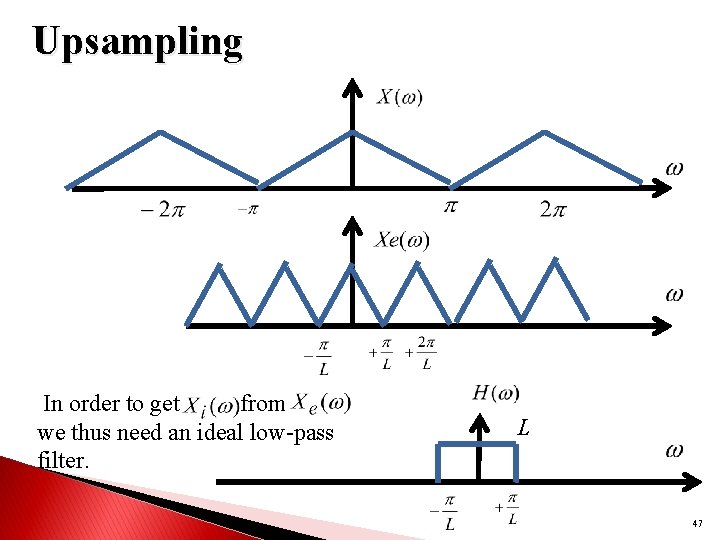
Upsampling

When it comes to improving digital sound quality, experts in this field agree on only one thing: with an increase in sample rate, sound quality improves dramatically.

Why upsampling?
When it comes to improving digital sound quality, experts in this field agree on only one thing: As the sample rate increases, the sound quality improves dramatically. Also, under the word “improvement”, everyone already understands something for himself. All the variety of opinions on this topic boils down to the following: the sound becomes clearer, softer, more natural, the low frequencies are perceived more clearly.

However, these nuances are only noticed by listeners trained with a good ear for music on specially selected sound material and using technically advanced equipment.

There are many hypotheses that explain why sound quality is improved by higher sampling. Many technicians are inclined to believe that this relationship is due to distortions that arise from filtering and interpolation during audio signal reconstruction.

On a modern technical level, high-quality interpolators may be practically impossible to implement, therefore, instead of improving them, manufacturers simply increase the sample rate. Maybe it’s not about them at all.

Another version, which many music lovers adhere to, is that at a low sampling frequency, for example 44100 Hz, digital sound is completely devoid of nuances of high sounds, the main frequencies of which are above 7 kHz. , and at lower frequencies there are very few harmonics for a high quality perception of music.

In fact, many musical instruments generate vibrations of up to 100 kHz. It is true that the fraction of energy that falls in the frequency band above 20 kHz is 0.01 to 2% for sounds of a harmonic nature and 0.02 to 68% for sounds created by a cymbal, triangle or striking the metal edge of a drum (hoop shot – editor’s note).

Even the frequency range of speech in hissing-hissing sounds extends up to 40 kHz. Supporters of this version are not ashamed that a person cannot perceive sounds with a frequency higher than 20 kHz. Ultrasound is assumed to be perceived bypassing the auditory system, for example through bone conduction.

Discussions that harmonics above 20 kHz make a significant contribution to sounding have culminated in the creation and widespread introduction of analog-to-digital converters using 96 kHz and 192 kHz sample rates; The sample rate is expected to increase to 384 kHz.

Based on modern knowledge of human perception of sound, it must be assumed that the relationship between digital sound quality and sampling frequency is due to the transformation of the quantization error spectrum in the audio frequency range.

In technical literature, this topic is considered only for a particular mathematical model, when music is represented by a signal with a uniform distribution in level and frequency. In this case, the quantization errors are converted to noise with a uniform spectral density from 0 Hz to the Nyquist frequency.

Relationship between sound quality and sample rate

Relationship between sound quality and sample rate

SAMPLE RATE

The conversion of an analog signal to digital consists of two steps: sampling in time and quantization in amplitude.

sample rate

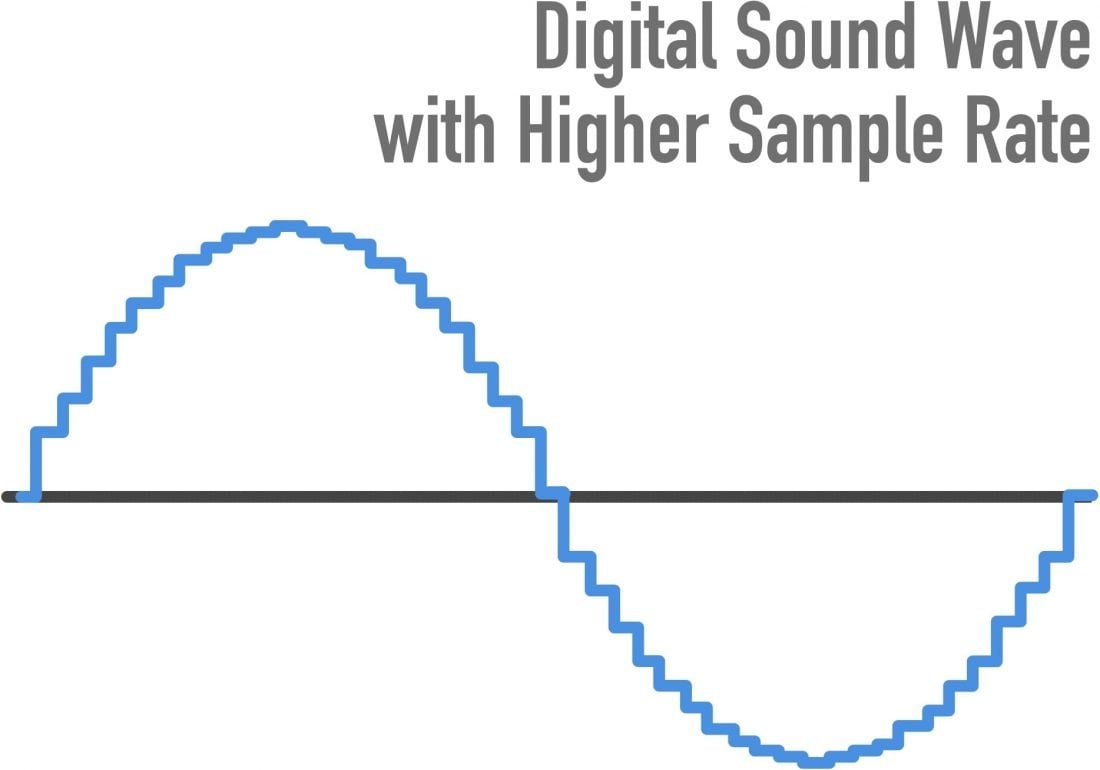
Time sampling means that the signal is represented by a series of samples (samples) taken at regular intervals. For example, when we say that the sample rate is 44.1 kHz, this means that the signal is measured 44 100 times in one second.

The main problem in the first stage of converting an analog to digital signal (digitization) is the choice of the sampling frequency of the analog signal. The higher the frequency, the closer the digital signal is to the analog. However, in proportion to the increase in frequency, they increase:

The intensity of the digital data flow and the bandwidth of the interfaces are not unlimited, especially if several channels are recorded / played simultaneously;
The computational load on digital processors and their computing capabilities are also limited;
The amount of memory required to store the digital signal is increased.
Obviously, a compromise is needed. The choice of the sampling frequency affects the frequency range of the received digital sound and the maximum frequency of the analog signal, correctly represented in the digital one. It is believed that a person hears frequencies in the range of 20 to 20,000 Hz. According to the well-known Kotelnikov theorem, in order for an analog signal (continuous in time) to be accurately reconstructed from its samples, the sampling frequency must be at least twice the maximum audio frequency.

An audio frequency equal to half the sampling frequency is called the Nyquist frequency and is the maximum frequency that a given digital system can store and reproduce correctly. Therefore, if the actual analog signal that we are going to convert to digital format contains frequency components from 0 to 20 kHz, then the sampling frequency of that signal must be at least 40 kHz. The most common sample rates today are 44.1 kHz (CD) and 48 kHz (DAT).

Basics of digital sound theory Part 4

Basics of digital sound theory Part 4

Sample Rate

The MP3 algorithm allows you to compress the sound 20 to 30 times while maintaining good quality.

Sample Rate

The full quality of the CD is believed to be preserved at a bit rate of approximately 160 Kbps (the concepts of “sample rate” and “sample bit depth” do not apply to MP3 files). However, in most cases, much more compressed audio is quite acceptable. Therefore, in Flash animations, MP3 compression is usually used, which gives a bit rate of the order of 16-32 Kbps. The Flash player supports a range of bit rates ranging from 16 to 160 Kbps. You must select the most suitable based on film size and sound quality requirements. It is often worth leaving the MP3 file at the same quality as imported (therefore, the Use imported mp3 quality setting is on by default). If the quality changes, then the change should be in the direction of decreasing quality, but not increasing.

If the sound is processed in an external editor, you can take into account the fact that the Flash player supports not only the MP3 algorithm, which is part of the MPEG1 Layer 3 standard, but also newer algorithms (MPEG2 and MPEG2.5), that provide better sound quality when bit depth is low. In addition, the player supports MP3 encoding with both constant and variable bit depth (in the latter case, the best compression ratio is achieved).

The MP3 format is optimal for rash projects. Therefore, in practice, it is practically only used. Furthermore, MP3 files can be loaded dynamically, and they also have very useful ID3 tags with information about this sound.

• Nellymoser. A relatively new compression algorithm developed by Nellymoser Inc. Designed to compress human speech. His main idea is that a human voice can include vibrations with frequencies in a fairly narrow range. The upper and lower components can be discarded. Very low amplitude harmonics are also eliminated. The result is compression comparable to MP3 compression, but the sound quality is higher. More details about the Nellymoser algorithm can be found on the developer’s website http://www.nellymoser.com/.

The Nellymoser algorithm codec is included in the player only in Flash MX.

In the Flash IDE, Nellymoser compression is called Speech. You can adjust the quality / size ratio when using Nellymoser compression by changing the sample rate.

You can also include uncompressed audio in your SWF movie. In the development environment, this mode is called Raw. In this case, you can change the bit depth and sample rate. In theory, you can use uncompressed audio if sound quality is significantly more important than movie size (or, even less likely, if you need to save computing resources). In practice, however, it is better to use MP3 compression with a high bit rate (more than 120 Kbps).

Storage formats
There are quite a few audio formats. By default, Flash only allows you to import two of them.

• WAV. The main format for storing uncompressed audio on the Windows platform. Supports mono and stereo audio, various samples, and bit depths. Usually it is WAV where the analog signal is digitized, and only then is one of the compression algorithms applied. WAV files are extremely large, which is why this format has been significantly replaced by MP3. However, WAV is still the main format for professional sound editors like SoundForge.

• MP3. Audio format using the compression algorithm described above. The main format in the case of Flash, as it perfectly combines good sound quality and a small file size. Also, sound files in this format, unlike WAV files, can be dynamically loaded into a movie using the loadSound () method of the Sound class.

If you have QuickTime 4 or higher installed, you can import files in AIFF, QuickTime, Sun AU formats additionally.

Basics of digital sound theory Part 3

Basics of digital sound theory Part 3

Sample Rate

Compression algorithms

Sample Rate

Let’s try to calculate how much disk space an average CD-quality digitized music composition will occupy. Obviously, for this it is necessary to use the formula t KBF size ⋅ ⋅ ⋅ = where F is the sampling frequency, B is the sample capacity, K is the number of strings, t is the time.

Assuming 44.1 kHz herbal, B = 2 bytes, K = 2 channels, and t = 300 seconds, we get that the digitized song will occupy approximately 50MB.

This means that only about 10 uncompressed songs can be burned to CD. Since every second of digitized CD quality sound takes up almost 200 Kb, this sound will be very problematic to use on telephony, radio or the Internet. Even if you digitize the sound as a single channel with a sample rate of 11.05 kHz and a bit depth of 8 bits, each second will occupy 11 KB.

For ordinary telephone networks, this is too much for sound to be transmitted in a continuous stream. A problem arises: somehow it is necessary to reduce the size of the sound files.

It is solved quite effectively by using various compression algorithms.
Flash Player supports the following types of compression.

• ADPCM (Adaptive Differential Pulse Code Modulation – Adaptive Difference Pulse Code Modulation). This type of compression is based on two ideas. First, it was found that in the vast majority of sounds we perceive, slowly changing low-frequency components prevail. From this fact it follows that the difference between adjacent samples is often small (or rather, significantly less than the absolute value of the samples themselves).

This means that the digitized audio signal can be represented not by the samples themselves, but by the differences between them, which are smaller in magnitude and therefore require fewer bits for description. Second, the coding of the difference between adjacent samples is done taking into account the magnitude of the amplitude and frequency composition, since the human ear has sensitivity limits (the so-called adaptation).

The ADPCM algorithm is actively used in IP telephony. It is poorly suited for streaming music due to the significant distortions it introduces into sound (distortions, of course, get into speech, but are hardly noticeable in speech). The compression ratio for ADPCM is typically low, ranging from 8: 1 to 3: 1. The ADPCM Flash Player codec allows 2, 3.4, or 5 bits to represent the difference between samples. Actually, you can achieve acceptable sound quality with a bit rate (bit rate, that is, the “weight” of a second of sound) of 16 Kbit.

The ADPCM algorithm is significantly inferior to MP3, so it is not worth using such compression in principle. MP3 compression will provide an order of magnitude better quality with the same bit depth. The presence of the corresponding codec is explained by the principles of backward compatibility: the MP3 codec is built into the player only in Flash 4. Before that, only the ADPCM codec was used, which is probably due to the free distribution of this algorithm. The reason ADPCM is still used in IP telephony is that it does not require as extensive math calculations as MP3, so compression can be done on the fly.

• MP3. One of the first and most common compression algorithms based on the so-called psychoacoustic compression. It uses the following characteristics of the human ear:

or if a soft sound follows a very strong one, then we don’t hear it. Therefore, it can be discarded;

or a sound component with a large amplitude masks components close to it in frequency, but with smaller amplitudes. Therefore, they can be slaughtered without noticeable loss of quality;

or the ear’s sensitivity to frequency distortion is low, therefore, if the components are close, they can be considered the same;

o We misperceive very low and very loud sounds, so fewer bits can be allocated for their encoding than for sounds with an average frequency.

Technically, the MP3 algorithm is implemented as follows. The sound is divided into chunks of a certain length called frames, and a forward Fourier transform is applied to each set of samples. Its result is the decomposition of a sound wave into elementary sinusoids of different frequencies: harmonics. The harmonic coefficient determines its contribution to the resulting wave. Harmonic coefficients are compared and the least significant are discarded.

Basics of Digital Sound Theory Part 2

Basics of Digital Sound Theory Part 2

Sample rate

A sample rate of 44.1 kHz is not always ideal.

Samplerate

When transmitting data over a low-bandwidth network, the quality of the sound must be sacrificed in favor of its size, in practice sampling frequencies two, four and eight times lower than 44.1 kHz are usually used:

• 22.05 kHz: the so-called radio quality. Used when encoding the sound of FM radio stations. In the case of Flash, it is good for creating background music and event sounds. For the transmission of a human voice, it is even somewhat redundant;

• 11.025 kHz – telephone quality. A sample rate more suitable for the human voice. Used in 1P telephony;

• 5.5 kHz: sound about to lose the information component. This sample rate can be used to transmit low sounds as well as speech (albeit with mediocre quality).

Flash Player supports sample rates 44.1: 22.05; 11,025; 5.5 kHz. The choice of frequency should be determined by the type of sound, as well as the importance of maintaining the size of the SWF file. However, it should be remembered that there is no point in increasing the sample rate of the audio fragment compared to the initial one. This will not increase the quality, but will only unnecessarily increase the size of the movie.

Bit depth of samples
Bit depth determines how many different amplitude values ​​can be captured during digitizing. If the bit width is 4 bits, then the range of the amplitude value from zero to the maximum will be divided into only 16 bins. Naturally, the error when rebuilding the analog signal will be very high. This bit depth is suitable for representing very simple sounds as well as speech (its quality will be low).

The 8-bit width allows 256 amplitude values ​​to be represented. This is the bit depth used by FM radio stations. It is enough to present any sound in satisfactory quality. 16-bit encoding is optimal. At the same time, it can work with 65,536 amplitude options, which is enough to cover the entire audible range.

The 16-bit format is used for CD recording. Higher quality quantization is only justified in the case of studio sound processing.

Flash Player supports 8-bit and 16-bit quantization for uncompressed formats (for example, WAV) and only 16-bit for compressed formats (MP3 belongs to them). Keep this in mind when importing a sound file into a movie.

Number of channels The
Stereo sound is designed to give the playback sound a natural dimension. This is achieved due to the fact that a different component of sound is reproduced from each speaker. In general, the sound of each channel is a separate sound file, so the size of the stereo sound is proportional to the number of channels supported.

Conventional non-professional sound cards work with two-channel audio. The Flash player also supports the same number of channels. With ActionScript, you can mix the sound of the channels by playing the left channel on the right speaker and the right channel on the left. How this is done, we will talk a bit below.

If the sound is encoded in MP3 format, you can choose one of three stereo formats.

• Dual channel. Each channel receives half of the stream and is separately encoded as mono. It is mainly recommended in cases where different channels contain a fundamentally different signal, for example text in different languages.

• Stereo. The channels are scrambled separately, but the scrambler program can give one channel more space than the other if necessary. Most standard format.

• Joint stereo. The stereo signal is divided into two new channels. One is the average of the original channels and the other is the difference between the channels. In this mode, the sound quality is obtained more frequently than in others.

Unfortunately, in the Flash development environment, you cannot specify which stereo format is used. Therefore, if sound quality is of paramount importance, then the creation of MP3 files with the required parameters should be done using one of the specialized programs.

Basic concepts of digital sound theory

Basic concepts of digital sound theory

Sample Rate

Sound is, in general, the vibrations of an elastic medium.

sample rate

The sound is caused by mechanical vibrations of some object (this can be a string, vocal cords, etc.) in contact with the environment. The frequency of vibration (measured in Hertz) determines the pitch. The higher the frequency, the louder the sound. The human ear can perceive sound vibrations from the air with a frequency of 20 Hz to 20 kHz. The ear perceives the amplitude of the vibration as volume. The higher the amplitude, the louder the sound.

Electromagnetic waves are a direct analog of sound waves. The latter are less susceptible to dispersal by the environment, the information they carry is easier to store and process. Electromagnetic waves are the most important secondary carrier of sound. The transformation of acoustic waves into electromagnetic waves (as well as the reverse operation) is carried out due to the usual induction effect, which consists in the appearance of a current in a conductor when it is placed in an alternating magnetic field.

Simply put, the oscillation of the loudspeaker membrane magnet near the coil induces an alternating current in it. If this current is applied to another speaker, then the magnet on its membrane will move, creating a corresponding sound.

This is how the telephone and the radio work.

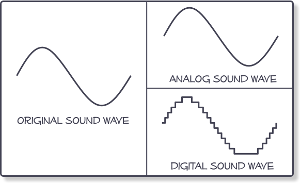
Sound converted to electromagnetic waves can be easily stored. For this, some parameter of the carrier must be compared (the depth of the plate track or the degree of magnetization of the film) with the amplitude of the oscillations (that is, the strength of the induced current in the speaker coil) . Sound converted directly to electromagnetic waves is called analog sound. Its main characteristic is the direct correspondence of the electromagnetic waves transmitted or recorded with the acoustic ones.

Digital sound is relatively new. Its main difference from analog is discretion. When digitizing, a special device, an analog-to-digital converter (ADC), measures at regular intervals (approximately 0.001-0.0001 seconds) the magnitude of the amplitude of an electromagnetic wave corresponding to an analog sound form and writes its value to a file with a specified precision. This value is generally called sample, or in jargon, sample (of the sample in English, sample). The same digitization is often called sampling or sampling.

By converting sound from digital to analog (this is done by a device called a digital-to-analog converter (DAC)).

The interpolation (approximation) of the intermediate values ​​of the amplitude is carried out according to the known ones. Since the sampling frequency is usually high, this operation allows you to fairly accurately reconstruct the original analog signal.

The digital form of sound is characterized by five parameters.

1. The sampling rate;
2. Bit size of the samples.
3. The number of channels or tracks.
4. Compression / decompression algorithm (codec).
5. Storage format.

Since each of these parameters is quite specific, we will consider them separately.

Sampling rate
The sample rate determines how many samples per second will be taken when digitizing. If we compare digital sound with digital images, then the sample rate will correspond to the resolution (a more “realistic” analogy is the frame rate in cinema). The higher the sampling frequency, the better it is possible to reconstruct the analog signal based on the digital form of the sound (more precisely, the higher the sampling frequency, the broader the spectrum of frequencies that can be recorded during digitization).
The famous Nyquist-Kotelnikov theorem states that for the correct reconstruction of an analog signal from its digital recording, it is necessary that the sampling frequency be at least twice the maximum sound frequency.

Since the upper listening limit is 20 kHz, ideally the sample rate should be at least 40 kHz. This is why the standard sampling frequency used for recording CDs is 44.1 kHz (so-called CD quality). However, the sample rate can be higher, but this sound quality is only used by recording studios and especially demanding music lovers.