Importance of Video Samplerate


Free Download Mp4Gain
picture

Importance of Video Samplerate
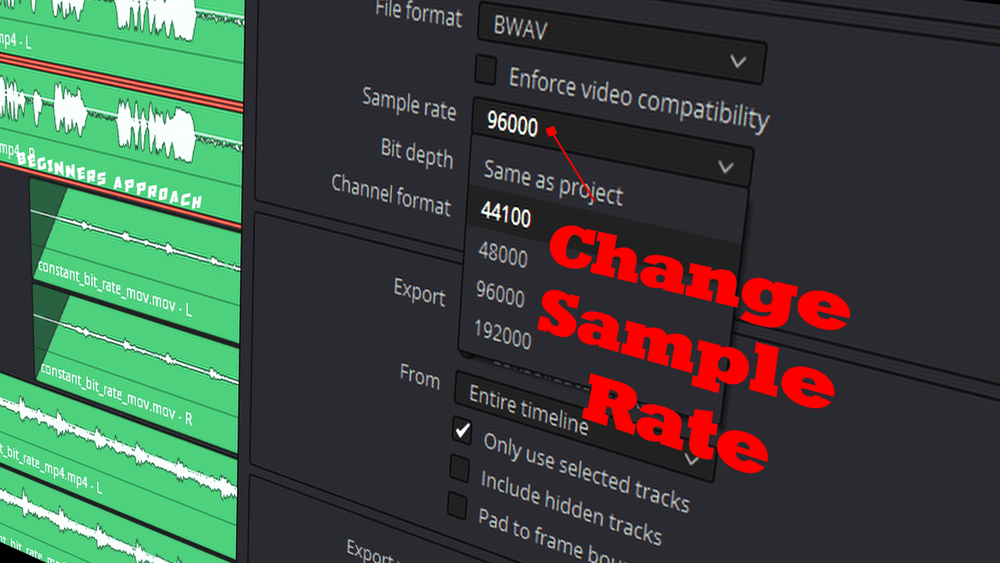
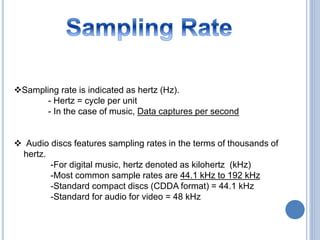
Importance of Video Samplerate

Let’s talk about the importance of video samplerate. You might be wondering what this technical term really means and why it matters. Well, think of it as the secret ingredient that makes your favorite recipe taste just right. Just as a pinch of salt can transform a dish, the samplerate in a video plays a crucial role in delivering high-quality audio. Imagine watching a movie with poor audio quality—it’s like trying to enjoy a gourmet meal with bland flavors. The samplerate ensures that you savor every note, word, and sound in your video, enhancing your overall viewing experience.

Consider samplerate as the rhythm of a song. You’ve probably tapped your foot to a catchy beat before, right? Well, the samplerate sets the tempo for the audio in your video. Too slow, and it feels like a drag; too fast, and it becomes chaotic. Just like a well-paced song, the right samplerate ensures that the audio elements in your video sync perfectly, creating a harmonious blend of visuals and sound that engages your senses.

Another way to understand the importance of video samplerate is by comparing it to a jigsaw puzzle. Imagine putting together a puzzle, and some pieces don’t quite fit—it’s frustrating and ruins the picture. Similarly, a mismatched samplerate can result in audio that doesn’t align with the video, creating a disjointed and unpleasant viewing experience. When the samplerate matches, it’s like every puzzle piece fitting perfectly, revealing a beautiful image that captivates your attention.

Why Does Video Samplerate Affect Audio Quality?

  • Let’s dive deeper into why video samplerate matters for audio quality. Think of it as a recipe for your favorite dessert. The ingredients need to be precisely measured, or the taste won’t be right. Similarly, if the samplerate is off in a video, it affects how audio elements are “measured” and presented to your ears, potentially distorting the sound.
  • Imagine you’re in a quiet room, listening to a friend tell a story. If they suddenly start whispering or shouting, it disrupts the flow and understanding of the narrative. In a video, the samplerate ensures that the audio remains consistent, preventing sudden shifts in volume or clarity that could distract or confuse the viewer.
  • Consider a symphony orchestra where each instrument plays its part in harmony. If one instrument falls out of tune or plays at a different tempo, it can create dissonance in the music. Similarly, in a video, a mismatched samplerate can introduce dissonance in the audio, causing discomfort for the audience.

Understanding the importance of video samplerate is like mastering the art of cooking. Just as a chef carefully selects the right ingredients and techniques to create a delightful dish, video creators must pay attention to samplerate to ensure that every audio element in their videos harmonizes, delivering an enjoyable and immersive viewer experience.

Optimizing Video Samplerate for Professional Results

Now, let’s explore how to optimize video samplerate for professional-grade results. Think of this as the final touch that transforms an ordinary dish into a gourmet masterpiece. In the world of video production, achieving the best samplerate ensures that your audio is crisp, clear, and captivating.

Imagine you’re a photographer capturing a breathtaking landscape. To do justice to the scene, you carefully select the right lens, adjust the exposure, and frame the shot perfectly. In video production, optimizing samplerate is just as critical—it’s like choosing the ideal camera settings to capture the essence of your subject. It ensures that your audio is captured with precision, allowing viewers to hear every detail, whether it’s the rustling leaves in a forest or the gentle whisper of a character’s dialogue.

Consider samplerate as the conductor of an orchestra. The conductor guides each musician to play their part at the right tempo and intensity, resulting in a harmonious performance. In video production, optimizing the samplerate is akin to being the conductor of your audio elements. It ensures that every sound, from the background music to the actors’ voices, blends seamlessly to create a symphony of audio that captivates your audience.

Think of optimizing samplerate as the final brushstroke on a masterpiece painting. Each brushstroke adds depth and detail to the artwork, making it come alive. Similarly, in video production, the right samplerate adds the finishing touch to your audio, making it vibrant and engaging. It’s the difference between a video that feels amateur and one that exudes professionalism.

Common Questions About Video Samplerate

    • 1. What happens if the video samplerate doesn’t match the audio samplerate?

If the video samplerate doesn’t match the audio samplerate, you can encounter synchronization issues, resulting in audio that doesn’t align with the video properly. This mismatch can lead to distorted sound and a jarring viewing experience.

    • 2. How can I check the samplerate of a video?

You can check the samplerate of a video using various software tools or video editing programs. Simply import the video, and the samplerate information should be visible in the video’s properties or settings.

    • 3. Is a higher samplerate always better for video quality?

Not necessarily. While a higher samplerate can capture more detail, it also results in larger file sizes. The choice of samplerate depends on your specific needs and the platform where the video will be played. It’s important to strike a balance between audio quality and file size.

In the world of video production, attention to detail, especially when it comes to samplerate, can make all the difference in delivering a captivating and professional viewer experience. Just as a chef refines their culinary skills to create exquisite dishes, mastering the art of optimizing samplerate elevates your video content to a new level of excellence.

Video Samplerate and Audio Bit Depth: The Dynamic Duo

Let’s explore the dynamic duo of video samplerate and audio bit depth—a partnership that can truly transform your audiovisual creations. Think of them as the Batman and Robin of the audio world, working together to ensure audio quality that’s nothing short of heroic.

Consider audio bit depth as the resolution of a photograph. Just as a high-resolution image captures more detail, a higher bit depth in audio allows for a broader range of tones and subtleties to be recorded. When combined with an appropriate video samplerate, it’s like having a high-definition canvas for your audio, allowing you to paint with a richer palette of sounds and nuances.

Imagine you’re a filmmaker crafting a suspenseful scene. The audio bit depth and video samplerate are your tools for building tension. A deep audio bit depth captures the quiet whispers and the thunderous roars, while the video samplerate sets the pace, ensuring that every heartbeat and every footstep are in perfect sync with the visuals. It’s this synchronization that keeps viewers on the edge of their seats, fully immersed in the story.

Think of video samplerate and audio bit depth as the architects of a magnificent building. The samplerate determines the rhythm and tempo of the construction, while the bit depth defines the intricate details and textures of the structure. Together, they create an audiovisual masterpiece that captivates the senses.

The Future of Video Samplerate: Innovations and Trends

  • As technology continues to advance, we can expect innovations in video samplerate that push the boundaries of audio quality. Imagine a world where videos offer audio experiences so immersive that you feel like you’re part of the story. These innovations will rely on higher samplerates and bit depths to deliver audio that’s as realistic as the world around us.
  • With the rise of virtual reality and augmented reality, video samplerate will play a pivotal role in creating immersive environments. Picture yourself in a virtual world where every sound is so lifelike that you forget you’re wearing a headset. This level of immersion is achievable through advancements in samplerate technology.
  • As content creators seek to differentiate themselves in a crowded digital landscape, the importance of video samplerate will become even more pronounced. Viewers will gravitate toward content that offers superior audio quality, making samplerate optimization a key competitive advantage.

Just as the world of audio and video production continues to evolve, so does the significance of video samplerate. It’s not just a technical detail—it’s the heartbeat of audiovisual storytelling. As we embrace these innovations and trends, we’re ushering in an era where video samplerate isn’t just important; it’s transformative.

Mastering Video Samplerate for Cinematic Sound

Now, let’s delve into the art of mastering video samplerate for cinematic sound. Picture yourself in a movie theater, surrounded by the mesmerizing sounds of a blockbuster film. The thunderous explosions, the delicate whispers, and the sweeping orchestral scores—all brought to life by impeccable audio quality.

Consider video samplerate as the conductor of this cinematic symphony. It sets the tempo, ensuring that every audio element is in perfect harmony with the visuals. Just as a skilled conductor guides an orchestra to create an unforgettable performance, mastering video samplerate elevates your videos to cinematic heights.

Imagine you’re a director crafting a pivotal scene in your movie. The dialogue between the characters is crucial, and every word carries emotional weight. Video samplerate allows you to capture the nuances of their voices—the tremor in a nervous whisper, the intensity of a heated argument. It’s these subtleties that make the scene resonate with the audience, drawing them deeper into the story.

  • Let’s take a closer look at the technical aspects of mastering video samplerate. Think of it as tuning a musical instrument. Just as a musician tunes their instrument to achieve the perfect pitch, video creators must select the appropriate samplerate to achieve the desired audio quality. This involves considering factors like the source of the audio and the platform where the video will be played.
  • Consider video samplerate as the frame rate in filmmaking. While the frame rate determines the smoothness of motion, the samplerate dictates the clarity and fidelity of sound. Imagine watching a movie with stunning visuals but muffled audio—it’s a jarring experience. Mastering samplerate ensures that your videos offer a complete sensory experience.
  • Now, think of video samplerate as the brush strokes in a painting. Each brush stroke adds depth and texture to the artwork, just as each sample in the samplerate contributes to the richness of audio. The mastery lies in selecting the right brush strokes—or samples—to create an audiovisual masterpiece.

As you embark on your journey of mastering video samplerate, remember that it’s not just a technical skill; it’s an art form. It’s the magic that makes your videos come alive, captivating your audience and immersing them in the world you’ve created.

Common Misconceptions About Video Samplerate

    • Misconception 1: Higher samplerate always means better quality.

While a higher samplerate can capture more detail, it doesn’t always equate to better quality. The choice of samplerate depends on various factors, including the content’s intended use and the capabilities of playback devices. Sometimes, a lower samplerate may suffice without sacrificing quality.

    • Misconception 2: Samplerate doesn’t affect audio clarity.

This is a common misconception. Samplerate plays a significant role in audio clarity, as it determines how accurately sound is sampled and reproduced. Mismatched samplerates can result in distorted or unclear audio.

    • Misconception 3: All audio needs a high samplerate.

Not every audio source requires a high samplerate. For example, speech recordings may not benefit significantly from extremely high samplerates. It’s essential to consider the specific needs of your project and balance audio quality with file size and compatibility.

Mastering video samplerate is a journey that combines technical expertise with artistic sensibility. Just as a chef creates a culinary masterpiece with precision and passion, video creators can craft audiovisual wonders by mastering the intricacies of samplerate. It’s a skill that transforms videos into immersive experiences, leaving a lasting impact on the audience.


Free Download Mp4Gain
picture


Mp4Gain Main Window
picture


Mp4Gain Features
picture


Free Download Mp4Gain
picture

Sampling Rate in Digital Audio

Digital Audio: What is the Sampling Rate in Digital Audio?

Sampling Rate in Digital Audio

Introduction

As an audio enthusiast, I have always been interested in the technical aspects of digital audio. One of the most important factors that affect the quality of digital audio is the sampling rate. In this article, we will discuss what the sampling rate is in digital audio and how it affects the quality of the audio signal.

What is Sampling Rate?

Sampling rate is the number of times per second that a digital audio signal is measured or sampled. It is measured in Hertz (Hz) and is also known as the sampling frequency. The higher the sampling rate, the more accurately the audio signal is represented in the digital domain.

Audio Quality and Sampling Rate

The sampling rate has a direct impact on the quality of the digital audio signal. A higher sampling rate means that more samples are taken per second, resulting in a more accurate representation of the original analog audio signal. This leads to a higher audio resolution and a more natural and detailed sound.
On the other hand, a lower sampling rate can result in a loss of audio quality, especially in the high-frequency range. This can lead to a loss of detail and clarity in the audio signal, resulting in a less natural and less enjoyable listening experience.

Sampling Rate and Audio Processing

The sampling rate also affects the way that digital audio is processed. For example, when audio is compressed using lossy compression algorithms such as MP3, the sampling rate can affect the quality of the compressed audio. A lower sampling rate can result in a higher degree of compression, which can lead to a loss of audio quality.
In addition, the sampling rate can also affect the way that audio is processed in digital audio workstations (DAWs) and other audio software. A higher sampling rate can result in more accurate processing and mixing of audio, leading to a better final mix.

Final Words

In conclusion, the sampling rate is an important factor that affects the quality of digital audio. A higher sampling rate can result in a more accurate representation of the original analog audio signal, leading to a higher audio resolution and a more natural and detailed sound. On the other hand, a lower sampling rate can result in a loss of audio quality, especially in the high-frequency range. It is important to consider the sampling rate when working with digital audio, and to choose a sampling rate that is appropriate for the specific application.
As the famous musician Bob Dylan once said, “The times they are a-changin’.” And with the advancements in digital audio technology, we can enjoy high-quality audio like never before.
Digital audio, sampling rate, audio quality, audio resolution, audio frequency, audio signal, audio processing, audio technology, Hertz, analog audio, lossy compression, MP3, audio compression, audio software, digital audio workstations, DAWs, mixing, final mix, high-frequency range, natural sound, detailed sound, listening experience, accuracy, representation, technical aspects, sound quality, music production, audio engineering, audio enthusiasts, audio equipment, audio gear, audio formats, audio codecs, audio standards, audio specifications, audio performance, audio fidelity, audio reproduction, audio artifacts, audio distortion, audio mastering, audio mixing,

How Audio Sample Rate Affects Sound Quality

How Audio Sample Rate Affects Sound Quality

Audio Sample Rate
Audio Sample Rate
Audio Sample Rate
Audio Sample Rate

Audio Sample Rate Explained

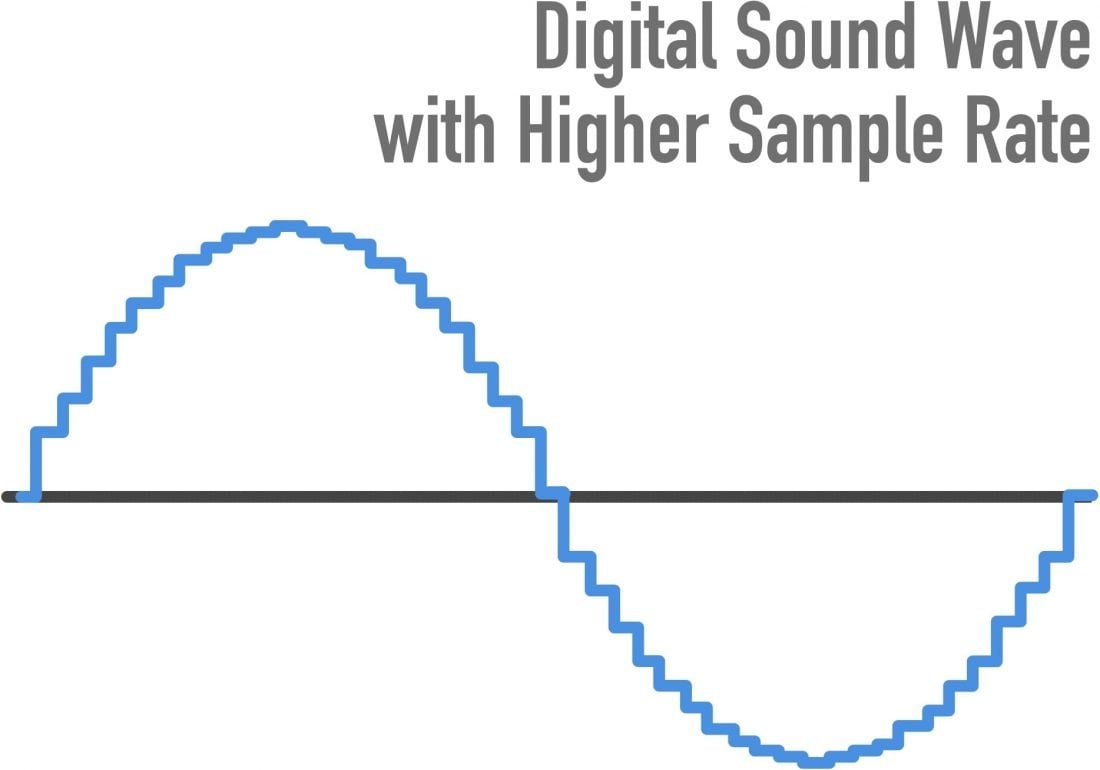
When it comes to digital audio, sample rate refers to the number of samples of sound that are taken per second to create a digital representation of an analog signal. In other words, it’s the number of times per second that the analog sound wave is measured and converted to a digital signal. The higher the sample rate, the more accurately the sound can be represented in the digital domain.

Personally, I’ve noticed that when I’m working on a music production project and I choose a higher sample rate, the resulting audio files tend to sound clearer and more detailed. As an avid music listener, I also appreciate the difference in sound quality when listening to high sample rate audio files on my headphones or speakers.

According to Ethan Winer, author of “The Audio Expert”, “In general, using a higher sample rate than the minimum required for the material being recorded or processed is good practice. However, there is no benefit to using a higher rate than twice the highest frequency that needs to be captured or processed.”

The Relationship Between Audio Sample Rate and Sound Quality

As mentioned earlier, the higher the sample rate, the more accurately the sound can be represented in the digital domain. This means that a higher sample rate can lead to a higher quality sound, with more accurate representation of the original analog sound wave.

I’ve also found that the relationship between sample rate and sound quality is not always linear. That is, going from 44.1 kHz to 48 kHz may not make as much of a difference as going from 48 kHz to 96 kHz. This is because the higher sample rates allow for more accurate representation of the sound wave, even in the higher frequency ranges.

As Julian Dunn, author of “Mastering Digital Audio”, explains, “Higher sample rates…provide more ‘headroom’ in the recording, which means that the recording can capture more of the dynamic range of the original sound. This can result in a richer, more natural sound.”

Choosing the Right Sample Rate

When it comes to choosing the right sample rate, it’s important to consider the specific needs of your project. If you’re recording a podcast or a voiceover, a sample rate of 44.1 kHz may be sufficient. However, if you’re recording music or other complex audio, a higher sample rate may be necessary to capture all the nuances and details of the sound.

It’s also important to note that a higher sample rate means larger file sizes, which can impact storage and processing requirements. So, it’s important to find a balance between the sample rate and file size that works best for your specific needs.

As author and sound engineer Bob Katz explains, “The most important factor is not the numbers, but how the system sounds. Choose the sample rate that sounds best to you, taking into account the practical considerations of your production environment.”

Final Words:

In conclusion, the sample rate of digital audio plays a significant role in the quality of the resulting sound. By understanding the relationship between sample rate and sound quality, and choosing the right sample rate for your specific needs, you can ensure that your digital audio sounds as good as possible.

What Is Audio Sampling Rate: A Comprehensive Explanation

What Is Audio Sampling Rate: A Comprehensive Explanation

Sample Rate
Sample Rate

Introduction

Sample Rate
Sample Rate

Audio sampling rate is a fundamental concept in digital audio that refers to the number of samples per second used to represent an analog audio signal in digital form. In this article, we’ll explore the technical details of audio sampling rate, its importance in digital audio, and its impact on audio quality and file size.

Sampling Rate Fundamentals

The concept of audio sampling rate is based on the Nyquist-Shannon sampling theorem, which states that in order to accurately represent an analog signal in digital form, the sampling rate must be at least twice the highest frequency present in the signal. This means that a signal with a highest frequency of 20kHz (the upper limit of human hearing) must be sampled at a rate of at least 40kHz in order to be accurately represented.

Sampling rate is measured in Hertz (Hz), which refers to the number of samples per second. Common sampling rates in digital audio range from 44.1kHz (used in CDs) to 192kHz (used in some high-resolution audio formats).

Sample Rate Conversion

In some cases, it may be necessary to convert audio from one sampling rate to another. Sample rate conversion involves resampling the audio data to a different rate, which can be done using digital signal processing techniques. However, sample rate conversion can introduce artifacts and reduce audio quality, especially when downsampling from a higher rate to a lower rate.

There are various reasons why sample rate conversion may be necessary, such as when mixing audio tracks with different sampling rates, or when preparing audio for distribution on different platforms with varying requirements.

Audio Quality and Sampling Rate

The sampling rate has a significant impact on audio quality, with higher sampling rates generally resulting in better fidelity and more accurate representation of the original signal. However, the benefits of higher sampling rates are limited by the limitations of human hearing and the practical limitations of digital audio technology.

While there is debate about the benefits of “high-resolution audio” formats with sampling rates above 44.1kHz, it is generally accepted that sampling rates above 96kHz provide little additional benefit in terms of audio quality.

Bit Depth and Sampling Rate

The bit depth of an audio sample refers to the number of bits used to represent the amplitude of the signal at each sample point. Higher bit depths allow for more precise representation of the signal, but also result in larger file sizes. The bit depth and sampling rate are related, as increasing the bit depth requires more data to be stored for each sample.

There is a trade-off between sampling rate and bit depth, as higher sampling rates require more data to be stored per second, which can limit the maximum bit depth that can be used without exceeding practical file size limits. However, this trade-off can be mitigated by using efficient audio compression techniques.

Sample Rate in Practice

Common sampling rates in digital audio include 44.1kHz (used in CDs), 48kHz (used in digital video), 88.2kHz, 96kHz, 176.4kHz, and 192kHz. Streaming services such as Spotify and Apple Music typically use lower sampling rates for their audio streams, with 44.1kHz being a common choice.

The Nyquist Theorem, named after the Swedish-American physicist Harry Nyquist, states that the sampling rate should be at least twice the highest frequency component in the signal being sampled. This is why the standard CD quality sampling rate is 44.1 kHz, which is just above the upper limit of human hearing.

However, it is important to note that there are higher sampling rates available, such as 48 kHz, 96 kHz, and even 192 kHz. These higher sampling rates can provide more detail and accuracy in the digital representation of the analog signal. However, they also require more storage space and processing power.

Another important factor to consider is the bit depth, which is the number of bits used to represent each sample. The more bits used, the more accurate and detailed the representation of the analog signal. CD quality uses a bit depth of 16 bits, but higher bit depths such as 24 bits are also available.

It is worth noting that some argue that higher sampling rates and bit depths may not necessarily result in audible improvements in sound quality, especially when considering the limitations of human hearing. Additionally, some argue that the increased storage and processing requirements may not be worth the potential improvements.

In conclusion, the sampling rate is a crucial component in the digital representation of analog audio signals. A higher sampling rate can provide more detail and accuracy in the digital representation, but also requires more storage and processing power. The Nyquist Theorem provides a guideline for choosing the appropriate sampling rate based on the highest frequency component in the signal. Additionally, the bit depth is another factor to consider in the accuracy and detail of the digital representation. While higher sampling rates and bit depths are available, the potential improvements in sound quality must be balanced against the increased storage and processing requirements.

The difference between 44,100 Hz (music industry) and 48,000 Hz (video industry)

The difference between 44,100 Hz (music industry) and 48,000 Hz (video industry)

44100 vs 48000 sample rate

In video production, record the frame rate for shooting and the sample rate for recording. Remember this is one of the basics for shooting and recording.

SAMPLE RATE

First, about the difference in sampling frequency. Generally speaking

44,100Hz (44.1kHz) is the standard in the music industry

48,000Hz (48kHz) is the sound standard in the video industry

The difference between the two sample rates is just that. I talked about the sample rate as
the frame rate in video in another article, “Sound Principles Required for Video Production,” Sample Rate and Bit Depth. ”
In other words, the higher the sample rate in Hz, the softer the sound will be.

There are several theories about the historical background of 44,100Hz.
I would like to introduce you to one of the most logical.

First, when sampling sound, you need a sample rate that is at least twice the highest frequency you are recording. This is the sample rate necessary to obtain a minimum of the waveform. This is because it is not possible to record a sound that has the character of a wave if there is only one place to take a sample. Most people say that the audible range is 50 Hz to 16,000 Hz. Double is 32 kHz, but it seems that the harmonic components that make up the tone need to be recorded in order to record the voice correctly. Only when this is taken into account does it appear that up to 44,100Hz is required. Click here for more details.

Sound Processing “I want to hear my voice clearly” (link outside of Vook’s site)

What happens when the sample rate is low?
When digitizing analog information, if the sampling rate is not high, the high-frequency information will be hidden in the low-frequency information.
Then the high-frequency sound will be recorded as low-frequency sound.

In any case, by definition, 48,000 Hz has better sound quality than 44,100 Hz. The video industry has introduced 48,000 Hz.

One problem that sometimes occurs is that “I was recording 48 kHz video and the separately recorded microphone was set to 44.1 kHz.” At first I thought that different sample rates would be a big deal, but it doesn’t really seem to be the case.

Sound recorded at a small sample rate just has a small number of samples per second, but since there is almost no difference between 44.1 kHz and 48 kHz, I think you can barely tell the difference when you listen to the sound normally. At 96 kHz, the sound quality is even higher, but the number of samples is so large that ordinary people cannot hear it at all.

In some cases, the sample rate is really important.

1) By writing the audio actually recorded with a different sample number as a video file. This is because the sample rate must be converted to a video sample rate that is different from the conventional 44.1 kHz and 96 kHz sample rates, that is, 48 ​​kHz. Software that specializes in video editing seems to have sound distortion at this point.

2) When recording a 48 kHz music video to match the music played at 44.1 kHz on the site. In this case, it can be very difficult to match performance lips to post-production due to the different sample rates of the sound being played. It’s called sink drift.

3) Another point It seems that this is a problem that occurs at the time of recording, but there is a problem that the sound changes gradually when the sound recorded separately using a cheap recorder is synchronized with the sound recorded in the reference of the video. it seems that there are moments. In this case, it seems that you need to manually fast-forward the video a little and match it to the audio file, or extract a few frames at the important points in the audio and sync it up. It seems that this has nothing to do with the sample rate, so I will describe it so as not to cause misunderstandings.

Basics of digital sound theory Part 4

Basics of digital sound theory Part 4

Sample Rate

The MP3 algorithm allows you to compress the sound 20 to 30 times while maintaining good quality.

Sample Rate

The full quality of the CD is believed to be preserved at a bit rate of approximately 160 Kbps (the concepts of “sample rate” and “sample bit depth” do not apply to MP3 files). However, in most cases, much more compressed audio is quite acceptable. Therefore, in Flash animations, MP3 compression is usually used, which gives a bit rate of the order of 16-32 Kbps. The Flash player supports a range of bit rates ranging from 16 to 160 Kbps. You must select the most suitable based on film size and sound quality requirements. It is often worth leaving the MP3 file at the same quality as imported (therefore, the Use imported mp3 quality setting is on by default). If the quality changes, then the change should be in the direction of decreasing quality, but not increasing.

If the sound is processed in an external editor, you can take into account the fact that the Flash player supports not only the MP3 algorithm, which is part of the MPEG1 Layer 3 standard, but also newer algorithms (MPEG2 and MPEG2.5), that provide better sound quality when bit depth is low. In addition, the player supports MP3 encoding with both constant and variable bit depth (in the latter case, the best compression ratio is achieved).

The MP3 format is optimal for rash projects. Therefore, in practice, it is practically only used. Furthermore, MP3 files can be loaded dynamically, and they also have very useful ID3 tags with information about this sound.

• Nellymoser. A relatively new compression algorithm developed by Nellymoser Inc. Designed to compress human speech. His main idea is that a human voice can include vibrations with frequencies in a fairly narrow range. The upper and lower components can be discarded. Very low amplitude harmonics are also eliminated. The result is compression comparable to MP3 compression, but the sound quality is higher. More details about the Nellymoser algorithm can be found on the developer’s website http://www.nellymoser.com/.

The Nellymoser algorithm codec is included in the player only in Flash MX.

In the Flash IDE, Nellymoser compression is called Speech. You can adjust the quality / size ratio when using Nellymoser compression by changing the sample rate.

You can also include uncompressed audio in your SWF movie. In the development environment, this mode is called Raw. In this case, you can change the bit depth and sample rate. In theory, you can use uncompressed audio if sound quality is significantly more important than movie size (or, even less likely, if you need to save computing resources). In practice, however, it is better to use MP3 compression with a high bit rate (more than 120 Kbps).

Storage formats
There are quite a few audio formats. By default, Flash only allows you to import two of them.

• WAV. The main format for storing uncompressed audio on the Windows platform. Supports mono and stereo audio, various samples, and bit depths. Usually it is WAV where the analog signal is digitized, and only then is one of the compression algorithms applied. WAV files are extremely large, which is why this format has been significantly replaced by MP3. However, WAV is still the main format for professional sound editors like SoundForge.

• MP3. Audio format using the compression algorithm described above. The main format in the case of Flash, as it perfectly combines good sound quality and a small file size. Also, sound files in this format, unlike WAV files, can be dynamically loaded into a movie using the loadSound () method of the Sound class.

If you have QuickTime 4 or higher installed, you can import files in AIFF, QuickTime, Sun AU formats additionally.

Basics of digital sound theory Part 3

Basics of digital sound theory Part 3

Sample Rate

Compression algorithms

Sample Rate

Let’s try to calculate how much disk space an average CD-quality digitized music composition will occupy. Obviously, for this it is necessary to use the formula t KBF size ⋅ ⋅ ⋅ = where F is the sampling frequency, B is the sample capacity, K is the number of strings, t is the time.

Assuming 44.1 kHz herbal, B = 2 bytes, K = 2 channels, and t = 300 seconds, we get that the digitized song will occupy approximately 50MB.

This means that only about 10 uncompressed songs can be burned to CD. Since every second of digitized CD quality sound takes up almost 200 Kb, this sound will be very problematic to use on telephony, radio or the Internet. Even if you digitize the sound as a single channel with a sample rate of 11.05 kHz and a bit depth of 8 bits, each second will occupy 11 KB.

For ordinary telephone networks, this is too much for sound to be transmitted in a continuous stream. A problem arises: somehow it is necessary to reduce the size of the sound files.

It is solved quite effectively by using various compression algorithms.
Flash Player supports the following types of compression.

• ADPCM (Adaptive Differential Pulse Code Modulation – Adaptive Difference Pulse Code Modulation). This type of compression is based on two ideas. First, it was found that in the vast majority of sounds we perceive, slowly changing low-frequency components prevail. From this fact it follows that the difference between adjacent samples is often small (or rather, significantly less than the absolute value of the samples themselves).

This means that the digitized audio signal can be represented not by the samples themselves, but by the differences between them, which are smaller in magnitude and therefore require fewer bits for description. Second, the coding of the difference between adjacent samples is done taking into account the magnitude of the amplitude and frequency composition, since the human ear has sensitivity limits (the so-called adaptation).

The ADPCM algorithm is actively used in IP telephony. It is poorly suited for streaming music due to the significant distortions it introduces into sound (distortions, of course, get into speech, but are hardly noticeable in speech). The compression ratio for ADPCM is typically low, ranging from 8: 1 to 3: 1. The ADPCM Flash Player codec allows 2, 3.4, or 5 bits to represent the difference between samples. Actually, you can achieve acceptable sound quality with a bit rate (bit rate, that is, the “weight” of a second of sound) of 16 Kbit.

The ADPCM algorithm is significantly inferior to MP3, so it is not worth using such compression in principle. MP3 compression will provide an order of magnitude better quality with the same bit depth. The presence of the corresponding codec is explained by the principles of backward compatibility: the MP3 codec is built into the player only in Flash 4. Before that, only the ADPCM codec was used, which is probably due to the free distribution of this algorithm. The reason ADPCM is still used in IP telephony is that it does not require as extensive math calculations as MP3, so compression can be done on the fly.

• MP3. One of the first and most common compression algorithms based on the so-called psychoacoustic compression. It uses the following characteristics of the human ear:

or if a soft sound follows a very strong one, then we don’t hear it. Therefore, it can be discarded;

or a sound component with a large amplitude masks components close to it in frequency, but with smaller amplitudes. Therefore, they can be slaughtered without noticeable loss of quality;

or the ear’s sensitivity to frequency distortion is low, therefore, if the components are close, they can be considered the same;

o We misperceive very low and very loud sounds, so fewer bits can be allocated for their encoding than for sounds with an average frequency.

Technically, the MP3 algorithm is implemented as follows. The sound is divided into chunks of a certain length called frames, and a forward Fourier transform is applied to each set of samples. Its result is the decomposition of a sound wave into elementary sinusoids of different frequencies: harmonics. The harmonic coefficient determines its contribution to the resulting wave. Harmonic coefficients are compared and the least significant are discarded.

Basics of Digital Sound Theory Part 2

Basics of Digital Sound Theory Part 2

Sample rate

A sample rate of 44.1 kHz is not always ideal.

Samplerate

When transmitting data over a low-bandwidth network, the quality of the sound must be sacrificed in favor of its size, in practice sampling frequencies two, four and eight times lower than 44.1 kHz are usually used:

• 22.05 kHz: the so-called radio quality. Used when encoding the sound of FM radio stations. In the case of Flash, it is good for creating background music and event sounds. For the transmission of a human voice, it is even somewhat redundant;

• 11.025 kHz – telephone quality. A sample rate more suitable for the human voice. Used in 1P telephony;

• 5.5 kHz: sound about to lose the information component. This sample rate can be used to transmit low sounds as well as speech (albeit with mediocre quality).

Flash Player supports sample rates 44.1: 22.05; 11,025; 5.5 kHz. The choice of frequency should be determined by the type of sound, as well as the importance of maintaining the size of the SWF file. However, it should be remembered that there is no point in increasing the sample rate of the audio fragment compared to the initial one. This will not increase the quality, but will only unnecessarily increase the size of the movie.

Bit depth of samples
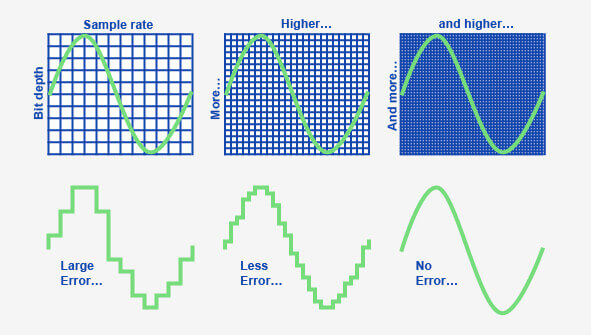
Bit depth determines how many different amplitude values ​​can be captured during digitizing. If the bit width is 4 bits, then the range of the amplitude value from zero to the maximum will be divided into only 16 bins. Naturally, the error when rebuilding the analog signal will be very high. This bit depth is suitable for representing very simple sounds as well as speech (its quality will be low).

The 8-bit width allows 256 amplitude values ​​to be represented. This is the bit depth used by FM radio stations. It is enough to present any sound in satisfactory quality. 16-bit encoding is optimal. At the same time, it can work with 65,536 amplitude options, which is enough to cover the entire audible range.

The 16-bit format is used for CD recording. Higher quality quantization is only justified in the case of studio sound processing.

Flash Player supports 8-bit and 16-bit quantization for uncompressed formats (for example, WAV) and only 16-bit for compressed formats (MP3 belongs to them). Keep this in mind when importing a sound file into a movie.

Number of channels The
Stereo sound is designed to give the playback sound a natural dimension. This is achieved due to the fact that a different component of sound is reproduced from each speaker. In general, the sound of each channel is a separate sound file, so the size of the stereo sound is proportional to the number of channels supported.

Conventional non-professional sound cards work with two-channel audio. The Flash player also supports the same number of channels. With ActionScript, you can mix the sound of the channels by playing the left channel on the right speaker and the right channel on the left. How this is done, we will talk a bit below.

If the sound is encoded in MP3 format, you can choose one of three stereo formats.

• Dual channel. Each channel receives half of the stream and is separately encoded as mono. It is mainly recommended in cases where different channels contain a fundamentally different signal, for example text in different languages.

• Stereo. The channels are scrambled separately, but the scrambler program can give one channel more space than the other if necessary. Most standard format.

• Joint stereo. The stereo signal is divided into two new channels. One is the average of the original channels and the other is the difference between the channels. In this mode, the sound quality is obtained more frequently than in others.

Unfortunately, in the Flash development environment, you cannot specify which stereo format is used. Therefore, if sound quality is of paramount importance, then the creation of MP3 files with the required parameters should be done using one of the specialized programs.

Basic concepts of digital sound theory

Basic concepts of digital sound theory

Sample Rate

Sound is, in general, the vibrations of an elastic medium.

sample rate

The sound is caused by mechanical vibrations of some object (this can be a string, vocal cords, etc.) in contact with the environment. The frequency of vibration (measured in Hertz) determines the pitch. The higher the frequency, the louder the sound. The human ear can perceive sound vibrations from the air with a frequency of 20 Hz to 20 kHz. The ear perceives the amplitude of the vibration as volume. The higher the amplitude, the louder the sound.

Electromagnetic waves are a direct analog of sound waves. The latter are less susceptible to dispersal by the environment, the information they carry is easier to store and process. Electromagnetic waves are the most important secondary carrier of sound. The transformation of acoustic waves into electromagnetic waves (as well as the reverse operation) is carried out due to the usual induction effect, which consists in the appearance of a current in a conductor when it is placed in an alternating magnetic field.

Simply put, the oscillation of the loudspeaker membrane magnet near the coil induces an alternating current in it. If this current is applied to another speaker, then the magnet on its membrane will move, creating a corresponding sound.

This is how the telephone and the radio work.

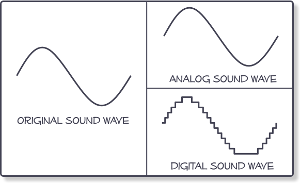
Sound converted to electromagnetic waves can be easily stored. For this, some parameter of the carrier must be compared (the depth of the plate track or the degree of magnetization of the film) with the amplitude of the oscillations (that is, the strength of the induced current in the speaker coil) . Sound converted directly to electromagnetic waves is called analog sound. Its main characteristic is the direct correspondence of the electromagnetic waves transmitted or recorded with the acoustic ones.

Digital sound is relatively new. Its main difference from analog is discretion. When digitizing, a special device, an analog-to-digital converter (ADC), measures at regular intervals (approximately 0.001-0.0001 seconds) the magnitude of the amplitude of an electromagnetic wave corresponding to an analog sound form and writes its value to a file with a specified precision. This value is generally called sample, or in jargon, sample (of the sample in English, sample). The same digitization is often called sampling or sampling.

By converting sound from digital to analog (this is done by a device called a digital-to-analog converter (DAC)).

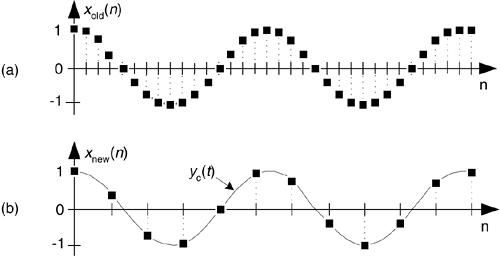
The interpolation (approximation) of the intermediate values ​​of the amplitude is carried out according to the known ones. Since the sampling frequency is usually high, this operation allows you to fairly accurately reconstruct the original analog signal.

The digital form of sound is characterized by five parameters.

1. The sampling rate;
2. Bit size of the samples.
3. The number of channels or tracks.
4. Compression / decompression algorithm (codec).
5. Storage format.

Since each of these parameters is quite specific, we will consider them separately.

Sampling rate
The sample rate determines how many samples per second will be taken when digitizing. If we compare digital sound with digital images, then the sample rate will correspond to the resolution (a more “realistic” analogy is the frame rate in cinema). The higher the sampling frequency, the better it is possible to reconstruct the analog signal based on the digital form of the sound (more precisely, the higher the sampling frequency, the broader the spectrum of frequencies that can be recorded during digitization).
The famous Nyquist-Kotelnikov theorem states that for the correct reconstruction of an analog signal from its digital recording, it is necessary that the sampling frequency be at least twice the maximum sound frequency.

Since the upper listening limit is 20 kHz, ideally the sample rate should be at least 40 kHz. This is why the standard sampling frequency used for recording CDs is 44.1 kHz (so-called CD quality). However, the sample rate can be higher, but this sound quality is only used by recording studios and especially demanding music lovers.

What is the sample rate and bit rate?

What is the sample rate?

Sample Rate

Frequency is defined as the number of cycles of periodic motion per unit of time. The SI unit of frequency is called hertz (Hz, after its inventor Heinrich Hertz). One hertz corresponds to one cycle (or complete oscillation) per second.

Sample Rate

Example. Sound waves have a frequency in the range of approximately 20 to 20,000 Hz. This means that at any point along the path of the sound wave, the pressure will fluctuate from high to low, 20 to 20,000 times per second.

In digital audio, the maximum frequency that can be successfully recreated is half the sample rate. Therefore, with a sample rate of 44.1 kHz, frequencies up to 22.05 kHz can be recreated. Wave frequency refers to how many times per second a wave moves from its highest point to its lowest point and vice versa. It is usually measured in hertz (Hz) or cycles per second. The frequency of the wave determines its height. High-frequency waves have a high pitch, while lower frequencies have a lower pitch. The average person can hear frequencies from 15 or 20 Hz to about 20,000 Hz (20 kHz).

Analog wave The wave amplitude refers to half the distance between the highest point of the wave and the lowest point. The greater the amplitude of the wave, the greater its volume, which is generally measured in decibels (dB). The decibel range for human hearing is complex and depends on the frequency of the sound in question, the age of the person and the listening environment, but varies from approximately 0 to 120 dB, with each 10 dB change corresponding to a doubling of the perceived volume.

Absolute Threshold: ATH is the volume level at which a certain sound can be detected 50% of the time.

What is the bit rate?

Bit rate refers to the data transfer rate (that is, how many bits are transmitted in a given time), generally expressed in bits per second. Common units of bit rate are kilobits per second (Kbps) and megabits per second (Mbps). The term is also commonly used when talking about digital sampling and sample rates. For example, the MP3 audio compression algorithm is often configured to output files at a bit rate of 128 kbps. This means that the file contains an average of 128 kilobits for every second of audio (960 KB per minute). This is in contrast to CD audio, which is encoded as 44,100 16-bit stereo samples per second: 1411.2 kbps (16-bit x 44100 Hz x 2ch).

Often times, bytes are written in uppercase and are multipliers (for example, “KB” for kilobytes) and lowercase factors are bits (for example, “kb” for kilobytes). All modern computers use 8-bit bytes.

MP3 bit rate
The MP3 bit rate can be misleading. For example, an MP3 “constant bit rate” (CBR) of 128 kbps will use approximately 128 kilobits for every second of encoded audio (so the file size in bits divided by the length of the audio is approximately 128,000), and Your frame headers will appear at regular intervals, but internally, frame-by-frame, you can encode audio at bit rates higher or lower than 128 kbps by using a bit pool (the ability of a frame to use spare bits from a previous block). However, the size of this bucket, and thus the amount of variability, is limited, so 128 kbps will be very close to the effective bit rate throughout the file.

See also: 8D surround sound and how to do it
As another example, “128 kbps VBR MP3” is often incorrect, as the purpose of VBR is to allow each of the internal MP3 sectors to have its own bit rate. When people refer to the VBR MP3 bit rate, they are generally referring to the actual average bit rate of their frames. If the length of the encoded audio is known, then the “bit rate” can be the data size of the file divided by its duration, which will be fairly close to the same number. However, the length of an MP3 VBR cannot be accurately determined without scanning all the frames.