Lossless vs. lossy audio compression in MP4


Free Download Mp4Gain
picture

Lossless vs. lossy audio compression in MP4
Lossless vs. lossy audio compression in MP4

Let’s talk about lossless vs. lossy audio compression in MP4

When we talk about MP4 audio compression, understanding the difference between lossless and lossy formats is crucial. These two types of compression determine the quality and size of your audio files. I’ve spent years working with audio encoding, and the choice between these two methods often depends on the purpose and the limitations you’re dealing with.

Lossy compression, like AAC or MP3, removes audio data deemed less important to human hearing to reduce file size. Think of it like packing a suitcase: you leave behind items you believe you won’t need. On the other hand, lossless compression preserves every bit of the original audio data. Imagine vacuum-sealing your belongings so everything fits without removing anything.

Both methods have their place in MP4 files, which can handle both. If you’re streaming music, lossy compression is more practical, while for archival purposes, lossless compression is non-negotiable.

What is lossy audio compression in MP4?

Lossy audio compression in MP4 focuses on saving space by reducing audio fidelity. The result is smaller files with slightly degraded audio quality, often imperceptible to the average listener.

Take AAC, for example. It uses perceptual encoding, which means it targets audio frequencies that our ears are less sensitive to. It’s like when you’re talking to someone in a noisy room and can tune out the background chatter—it prioritizes what’s important. This efficiency makes lossy formats ideal for streaming services, where bandwidth is at a premium.

However, lossy compression isn’t perfect. If you’ve ever listened to old MP3 files with a “hollow” sound, that’s compression at work. For high-fidelity audiophiles, this trade-off is unacceptable, but for everyday listening, it’s a compromise most can live with.

What is lossless audio compression in MP4?

Lossless audio compression retains every detail of the original audio file, offering perfect reproduction. It’s like photocopying a document without losing a single word or letter. Formats like ALAC (Apple Lossless) or FLAC can compress audio without sacrificing quality.

In MP4, lossless compression plays a significant role for users who demand pristine sound. This is particularly important in professional audio production, where every nuance matters. When I work with lossless audio, I always marvel at how every subtlety—like the resonance of a piano or the breath of a vocalist—remains intact.

The drawback? Lossless files are significantly larger than their lossy counterparts. For casual listeners, these files might not justify their size. However, for archivists or professionals, the trade-off is worthwhile.

Key differences between lossless and lossy audio compression

When comparing lossless and lossy audio compression, several key differences stand out. These distinctions can help you choose the right approach for your MP4 audio files.

  • Lossless retains every bit of original data; lossy sacrifices data for smaller file sizes.
  • Lossless formats are larger and require more storage space.
  • Lossy formats are more compatible with streaming and mobile devices.
  • Lossless is ideal for professional use; lossy suits casual listening.
  • Lossy compression may result in artifacts at lower bitrates.

Each option serves a purpose, but understanding the trade-offs is essential to making an informed decision. If you’re creating an MP4 for streaming, lossy is often sufficient. However, for a music archive or studio project, lossless is a must.

How MP4 supports both lossless and lossy audio

The MP4 container format is incredibly versatile, allowing you to mix and match audio types. This adaptability is one reason MP4 remains a go-to choice for multimedia.

In practical terms, MP4 can house lossy audio like AAC alongside lossless formats like ALAC. I’ve worked on projects where this flexibility saved time and effort. For instance, you can include high-quality audio for critical segments while using compressed audio for less important parts. It’s like creating a multi-layered cake where each layer serves a specific purpose.

This versatility also simplifies streaming and playback compatibility, making MP4 an excellent format for diverse needs.

Why lossy compression dominates streaming platforms

Streaming platforms rely heavily on lossy compression to deliver content efficiently. Without this, services like Spotify or YouTube would struggle to stream millions of songs and videos daily.

Lossy formats like AAC are highly optimized for streaming. They strike a balance between quality and file size, ensuring smooth playback even on slower connections. Think of it like condensing a story into a summary—still enjoyable but quicker to read.

However, the trade-off is noticeable for high-end audio equipment. I’ve tested tracks on studio monitors, and the difference is clear. Lossy formats sometimes lack the depth and richness that lossless files deliver.

When to use lossless compression in MP4

Lossless compression is essential when quality cannot be compromised. This is often the case in professional settings, such as music production or archival purposes.

For example, I once worked on an audio restoration project where every detail mattered. Lossy compression would have destroyed the integrity of the original recording. Lossless formats allowed us to preserve the audio while reducing file size just enough for practical use.

If you’re creating MP4 files for personal enjoyment and have storage space to spare, lossless is a great choice. For casual sharing or streaming, however, lossy remains more practical.

Advanced considerations in audio compression

Choosing between lossless and lossy formats often requires a deeper understanding of encoding techniques. The choice isn’t just about quality but also efficiency and compatibility.

Variable bitrate (VBR) encoding is one example of how lossy formats can optimize performance. It adjusts the bitrate depending on the complexity of the audio, like saving money by turning off lights in unused rooms. Meanwhile, constant bitrate (CBR) ensures consistent quality, which some users prefer for predictability.

With lossless compression, understanding bit depth and sampling rates becomes critical. A higher sampling rate captures more detail, much like using a high-resolution camera.

Latest words on lossless vs. lossy audio compression in MP4

The choice between lossless and lossy audio compression in MP4 ultimately depends on your needs. Both methods have their strengths and weaknesses, and understanding these can guide your decisions.

Whether you’re streaming music or archiving your favorite tracks, MP4’s ability to handle both lossless and lossy audio makes it a versatile choice. For a balanced solution that ensures consistency and quality, tools like Mp4Gain can help optimize your audio for any scenario.

FAQ about Lossless vs. lossy audio compression in MP4

What is the difference between lossless and lossy audio compression?

Lossless compression preserves all original audio data, while lossy removes some data to reduce file size.

Why is lossy compression used in MP4 files?

Lossy compression reduces file size, making it ideal for streaming and mobile devices with limited storage.

Which formats in MP4 support lossless audio?

Formats like ALAC and FLAC are common for lossless audio in MP4 files.

Can MP4 files combine lossless and lossy audio?

Yes, MP4 supports mixing both lossless and lossy audio streams within a single file.

How does AAC differ from ALAC in MP4?

AAC is a lossy format optimized for streaming, while ALAC is a lossless format designed for high-fidelity playback.

Why is lossless audio important in MP4 for professionals?

Professionals require lossless audio to preserve every nuance and detail in recordings and productions.

What are common use cases for lossy audio in MP4?

Lossy audio is widely used for streaming, casual listening, and mobile device playback.

Is lossless audio always better than lossy audio?

Not necessarily. Lossless audio offers better quality, but lossy audio is sufficient for many casual listening scenarios.

Comments:

I’ve always wondered about this! Thanks for explaining

the difference so clearly. I never realized why streaming services prefer lossy compression.

Lossless is the way to go for my home audio system. You can really tell the difference with high-quality headphones.

This is super helpful. I didn’t know MP4 could support both types of audio. It’s good to know I can mix them depending on what I need.

I don’t get why anyone would bother with lossless for everyday listening. Storage space is too expensive!

I found the part about variable bitrate interesting. Would love to know more about how that works in MP4 files.

Honestly, I’ve been using lossy compression for years, and it sounds fine to me. Maybe I just don’t have the ears for lossless quality.

Great article! This really helped me understand why lossy is better for streaming but lossless is better for archival purposes.

This makes me think I should start converting my collection to lossless. Any advice on what software to use?


Free Download Mp4Gain
picture


Mp4Gain Main Window
picture


Mp4Gain Features
picture


Free Download Mp4Gain
picture

AAC Format

AAC Format

AAC Format
AAC Format
AAC Format
AAC Format

What is AAC Format?

The Advanced Audio Codec, commonly abbreviated as ACC, is a standardized digital audio compression scheme. It has been designed to achieve better sound quality than MP3 at similar bit rates. Born out of the necessity to enhance audio quality in the era of digital technology, ACC has since become a prominent format in various multimedia applications.
Every format has its unique attributes, and ACC stands out for its efficiency and versatility. Its architecture allows it to retain more sound detail, thereby promising richer audio experiences.

Audio formats play a crucial role in defining the essence of digital media. Choosing the right format can determine the balance between quality and size, a factor paramount to the digital age.
“In the realm of sound, ACC shines bright amidst the myriad of formats.” – The Sound Almanac

Benefits of using ACC audio.

The superiority of ACC over some other traditional formats lies in its myriad advantages. Firstly, it offers a wider frequency range, meaning listeners can hear more details in both the low and high ends of the audio spectrum.
Moreover, it provides a more efficient compression algorithm, allowing for smaller file sizes without sacrificing quality. This makes ACC an excellent choice for streaming services and other platforms where bandwidth and storage are of concern.

Lastly, ACC’s adaptability ensures it can be used across various platforms, ensuring consistent audio quality regardless of the device.
“A great audio format is like a symphony; it brings out the best in every note.” – Digital Media Chronicles

How does AAC compare to MP3?

When one draws a comparison between ACC and MP3, the former often comes out on top in terms of technical prowess. While MP3 revolutionized the music industry in the 90s, ACC has taken the reins in the 21st century by providing enhanced audio clarity.
A key distinction lies in their bit rates. ACC can deliver similar or even better quality than MP3 at a reduced bit rate, making it more efficient and versatile.

However, it’s essential to understand that while ACC might hold technical advantages, MP3’s widespread adoption ensures its presence in most audio applications.
“While MP3 paved the way, ACC refined the path.” – Echoes of the Digital Age

Historical background of AAC format.

Delving into the history, ACC was introduced in 1997 as part of the MPEG-2 standard. Designed to be the successor of MP3, its development was driven by the goal of surpassing the existing audio formats in quality and efficiency.
Throughout its journey, ACC has undergone various enhancements. Each iteration aimed at refining its performance, making it a stalwart in the realm of digital audio.

Today, it stands as a testament to the advancements in audio technology, bridging the past and the present.
“History isn’t just about dates; it’s about innovation, especially in the digital world.” – Auditory Odyssey

Technical specifications of AAC.

ACC’s brilliance is underscored by its technical underpinnings. It supports up to 48 channels, as opposed to MP3’s two channels. Additionally, it boasts a wider frequency range, extending from 8Hz to 96kHz.
Its sampling rates and enhanced compression algorithms ensure a superior audio experience, setting ACC apart from its counterparts.

It’s these technical attributes that allow ACC to retain audio fidelity even at lower bit rates, a hallmark of its design.
“In technology, the devil is in the details, and ACC mastered them all.” – The Digital Revolution

How is AAC used in the modern era?

Today, ACC is ubiquitous. From streaming services to podcasts, its presence can be felt across various multimedia platforms. Its efficiency makes it ideal for applications where bandwidth is paramount, ensuring listeners receive top-tier audio quality.
Moreover, as devices evolve, ACC’s adaptability ensures its seamless integration, cementing its position in the digital realm.

The digital landscape is ever-evolving, and ACC continues to remain at its forefront, owing to its versatility and excellence.
“Modern challenges require modern solutions, and ACC is the answer to today’s audio challenges.” – Tales of the Technological Era

What devices support AAC playback?

Most modern devices, ranging from smartphones to home entertainment systems, support ACC playback. Its widespread acceptance is a testament to its superiority and the industry’s confidence in its capabilities.
Manufacturers realize the importance of sound quality for consumers. By incorporating ACC compatibility, they ensure that listeners get the best audio experience possible, regardless of the device they use.

As technology marches forward, the list of devices that support ACC is only expected to grow.
“In a world filled with noise, it’s the clarity of ACC that shines through.” – Rhythms of the Modern World

Future prospects of AAC technology.

The trajectory of ACC appears promising. As audio requirements become more demanding and listeners more discerning, AAC’s attributes position it as the format of the future.
Developments in audio technology might bring about new formats, but the foundational principles of ACC will likely remain relevant. Its adaptability ensures it can evolve with the times, making it a lasting presence in the audio world.
“The future is but a canvas, and ACC has already painted its masterpiece.” – Soundscapes of Tomorrow

Is AAC the best audio format?

While it’s tempting to label AAC as the best, it’s essential to understand that the “best” is subjective. AAC holds undeniable advantages in terms of efficiency and quality. However, the right format often depends on specific use cases and personal preferences.
That said, in many scenarios, ACC does emerge as the top contender, balancing quality with efficiency like few other formats can.
“Perfection isn’t an end but a journey, and ACC’s journey is nothing short of remarkable.” – The Audio Anthology

Potential drawbacks of AAC.

No technology is without its shortcomings. Some critics argue that while AAC is efficient, it may not always deliver the best quality for audiophiles at higher bit rates compared to other lossless formats.
Additionally, older devices might not support ACC, leading to compatibility issues.

Despite these drawbacks, AAC’s merits often outweigh its limitations, making it a favorite in many applications.
“Every coin has two sides, but it’s the shine that often catches the eye.” – Digital Dilemmas

Final words

The AAC format, with its rich history and technical brilliance, stands as a beacon in the realm of audio technology. Its journey from its inception to its widespread adoption today underscores its significance. As we continue to evolve in the digital age, ACC’s role in shaping our auditory experiences cannot be overstated.

Sampling Rate in Digital Audio

Digital Audio: What is the Sampling Rate in Digital Audio?

Sampling Rate in Digital Audio

Introduction

As an audio enthusiast, I have always been interested in the technical aspects of digital audio. One of the most important factors that affect the quality of digital audio is the sampling rate. In this article, we will discuss what the sampling rate is in digital audio and how it affects the quality of the audio signal.

What is Sampling Rate?

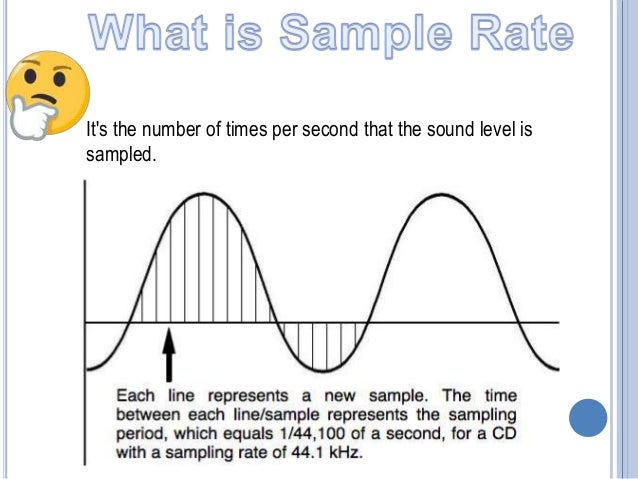
Sampling rate is the number of times per second that a digital audio signal is measured or sampled. It is measured in Hertz (Hz) and is also known as the sampling frequency. The higher the sampling rate, the more accurately the audio signal is represented in the digital domain.

Audio Quality and Sampling Rate

The sampling rate has a direct impact on the quality of the digital audio signal. A higher sampling rate means that more samples are taken per second, resulting in a more accurate representation of the original analog audio signal. This leads to a higher audio resolution and a more natural and detailed sound.
On the other hand, a lower sampling rate can result in a loss of audio quality, especially in the high-frequency range. This can lead to a loss of detail and clarity in the audio signal, resulting in a less natural and less enjoyable listening experience.

Sampling Rate and Audio Processing

The sampling rate also affects the way that digital audio is processed. For example, when audio is compressed using lossy compression algorithms such as MP3, the sampling rate can affect the quality of the compressed audio. A lower sampling rate can result in a higher degree of compression, which can lead to a loss of audio quality.
In addition, the sampling rate can also affect the way that audio is processed in digital audio workstations (DAWs) and other audio software. A higher sampling rate can result in more accurate processing and mixing of audio, leading to a better final mix.

Final Words

In conclusion, the sampling rate is an important factor that affects the quality of digital audio. A higher sampling rate can result in a more accurate representation of the original analog audio signal, leading to a higher audio resolution and a more natural and detailed sound. On the other hand, a lower sampling rate can result in a loss of audio quality, especially in the high-frequency range. It is important to consider the sampling rate when working with digital audio, and to choose a sampling rate that is appropriate for the specific application.
As the famous musician Bob Dylan once said, “The times they are a-changin’.” And with the advancements in digital audio technology, we can enjoy high-quality audio like never before.
Digital audio, sampling rate, audio quality, audio resolution, audio frequency, audio signal, audio processing, audio technology, Hertz, analog audio, lossy compression, MP3, audio compression, audio software, digital audio workstations, DAWs, mixing, final mix, high-frequency range, natural sound, detailed sound, listening experience, accuracy, representation, technical aspects, sound quality, music production, audio engineering, audio enthusiasts, audio equipment, audio gear, audio formats, audio codecs, audio standards, audio specifications, audio performance, audio fidelity, audio reproduction, audio artifacts, audio distortion, audio mastering, audio mixing,

Sampling rate (sampling)

Sampling rate (sampling)

Sample Rates

A higher sample rate describes sound more precisely, but at the same time describes those frequencies that the human ear can no longer hear, although changes in sound in the inaudible frequency range can still affect audible frequencies, so that studio recording is performed at a higher sample rate.

Sample rate

Since consumer equipment is primarily designed to reproduce sound with a sample rate of 44.1 kHz, when the recording is ready, it is re-encoded to a generally accepted standard. If the difference in sound quality between 32 and 44.1 kHz is obvious, then the higher the sampling frequency, the less perceptible or not at all perceptible to the ear the difference in quality between the two different frequencies will be. A higher sample rate describes sound more precisely, but at the same time describes those frequencies that the human ear can no longer hear, although changes in sound in the inaudible frequency range can still affect audible frequencies, so that studio recording is performed at a higher sample rate. Since consumer equipment is primarily designed to reproduce sound with a sample rate of 44.1 kHz, when the recording is ready, it is re-encoded to a generally accepted standard. If the difference in sound quality between 32 and 44.1 kHz is obvious, then the higher the sampling frequency, the less perceptible or not at all perceptible to the ear the difference in quality between the two different frequencies will be. A higher sample rate describes sound more precisely, but at the same time describes those frequencies that the human ear can no longer hear, although changes in sound in the inaudible frequency range can still affect audible frequencies, so that studio recording is performed at a higher sample rate. Since consumer equipment is primarily designed to reproduce sound with a sample rate of 44.1 kHz, when the recording is ready, it is recoded to a generally accepted standard. the difference in quality between two different frequencies is less noticeable or not at all noticeable to the ear. A higher sample rate describes sound more precisely, but at the same time describes those frequencies that the human ear can no longer hear, although changes in sound in the inaudible frequency range can still affect audible frequencies, so that studio recording is performed at a higher sample rate. Since consumer equipment is primarily designed to reproduce sound with a sample rate of 44.1 kHz, when the recording is ready, it is recoded to a generally accepted standard. the difference in quality between two different frequencies is less noticeable or not at all noticeable to the ear. A higher sample rate describes sound more precisely, but at the same time describes those frequencies that the human ear can no longer hear, although changes in sound in the inaudible frequency range can still affect audible frequencies, so that studio recording is performed at a higher sample rate. Since consumer equipment is primarily designed to reproduce sound with a sample rate of 44.1 kHz, when the recording is ready, it is recoded to a generally accepted standard. Although changes in sound in the inaudible frequency range can still affect audible frequencies, studio recordings are made at a higher sample rate. Since consumer equipment is primarily designed to reproduce sound with a sample rate of 44.1 kHz, when the recording is ready, it is recoded to a generally accepted standard. Although changes in sound in the inaudible frequency range can still affect audible frequencies, studio recordings are made at a higher sample rate. Since consumer equipment is primarily designed to reproduce sound with a sample rate of 44.1 kHz, when the recording is ready, it is recoded to a generally accepted standard.

Recording at a sampling rate of 8 kHz

If you watch the sound recording at a low sample rate of 8 kHz, you will notice that its waveform has sharp edges. After all, to smooth out the wave, you would need more precision in your description and a larger number of samples, as in the example below with a sample rate of 44.1 kHz.