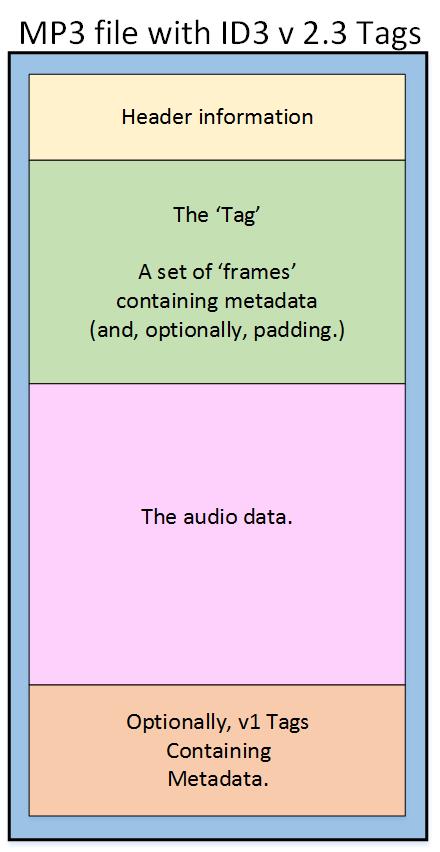
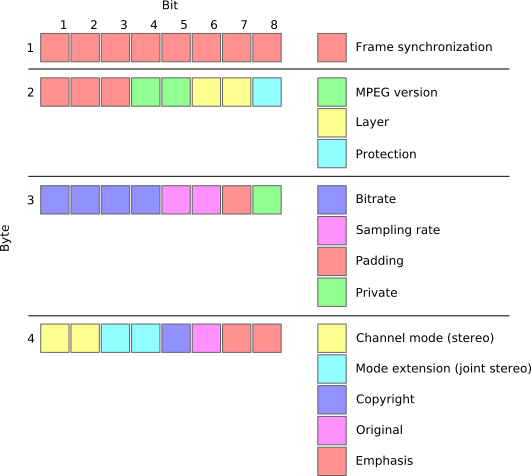
In this section, we will delve into the intricate details of the MP3 file format’s header. The MP3 file header is a critical component that holds essential information about the audio file. It precedes the actual audio data and contains various parameters that influence the decoding process. Understanding the structure and significance of the MP3 file header is crucial for anyone dealing with audio compression and playback.
How does the MP3 file header impact audio quality?
The MP3 file header plays a vital role in determining the audio quality of an MP3 file. It holds crucial information about the audio, such as the bit rate, sample rate, and channel mode, which directly affect the compression and decompression processes. For instance, the bit rate represents the amount of audio data encoded per unit of time, and a higher bit rate generally results in better audio quality but larger file sizes. On the other hand, a lower bit rate reduces the file size but may lead to a loss of audio fidelity.
What are the key elements of an MP3 file header?
The MP3 file header consists of several key elements that provide essential information to the decoding software. Some of these elements include the sync word, version, layer, protection bit, bit rate index, sample rate index, padding bit, private bit, channel mode, and the mode extension. Each element serves a specific purpose and contributes to the accurate decoding of the audio data. Understanding these elements is essential for analyzing and manipulating MP3 files effectively.
Can manipulating the MP3 file header cause issues with playback?
While manipulating the MP3 file header can be done for various purposes, such as changing the bit rate or sample rate, it can also lead to playback issues if not done correctly. Altering critical parameters within the header may cause compatibility problems with different audio players and devices. It is essential to have a deep understanding of the file header’s structure and its impact on the decoding process to avoid playback issues and ensure a seamless audio experience.
Quoting a Movie on Digital Audio Compression
“In digital audio compression, as in life, we must strike a balance between size and quality. Much like a diamond, audio data can be cut and shaped to reveal its brilliance, but too much cutting might result in losing its essence.” – *The Sound Explorer*
Conclusion
In conclusion, understanding the intricacies of the MP3 file header is crucial for anyone working with digital audio and compression. The header contains vital information that impacts audio quality, file size, and compatibility with various devices and players. By comprehending the structure and significance of the MP3 file header, users can make informed decisions when encoding, decoding, or manipulating MP3 files. Striking the right balance between audio quality and file size ensures an optimal listening experience for music enthusiasts and audiophiles alike.
As an audio enthusiast, I have always been fascinated by the technology behind digital audio. One of the most popular audio formats today is the MP3, which has revolutionized the way we listen to music. In this article, I will explain the basics of MP3 file structure, frames, and sync words, and how they work together to compress audio data.
What is MP3 Audio Compression?
MP3 is a digital audio format that uses lossy compression to reduce the size of audio files. This means that some of the audio data is discarded during the compression process, resulting in a smaller file size. The MP3 format was developed by the Fraunhofer Institute in Germany in the late 1980s and has since become the de facto standard for digital audio.
Understanding MP3 File Structure
MP3 files are made up of a series of frames, each of which contains a small portion of the audio data. The frames are synchronized using sync words, which are unique patterns of bits that indicate the start of a new frame. The sync words are used by the MP3 decoder to identify the beginning of each frame and to synchronize the audio data.
How Frames and Sync Words Work Together
Frames and sync words are the building blocks of the MP3 file format. The frames contain the compressed audio data, while the sync words are used to identify the beginning of each frame. The sync words are also used to ensure that the frames are decoded in the correct order. Without sync words, the MP3 decoder would not be able to properly decode the audio data.
In conclusion, understanding the basics of MP3 file structure, frames, and sync words is essential for anyone who wants to work with digital audio. As an audio enthusiast, I have found that knowing how MP3 compression works has helped me to appreciate the technology behind digital audio. If you are looking for a reliable and efficient way to normalize and convert your audio files, I highly recommend MP4Gain. It is a powerful tool that can help you get the most out of your digital audio collection.
Final Words:
In this article, we have explored the basics of MP3 file structure, frames, and sync words. We have learned how MP3 compression works and how frames and sync words are used to compress and decompress audio data. If you have any questions or comments, please feel free to leave them below. Thank you for reading!
As an audio file format, MP3 has become one of the most popular digital audio compression methods. The MP3 file structure consists of header and data blocks. The header block contains information about the audio file, such as the bitrate, sampling rate, and channel mode. The data block contains the compressed audio data.
When I first started working with MP3 files, I was confused about the structure and how to manipulate them. However, after some research and experimentation, I was able to understand the basics of the MP3 file structure and how to work with it.
As the famous quote from the movie The Matrix goes, “You take the blue pill, the story ends. You wake up in your bed and believe whatever you want to believe. You take the red pill, you stay in Wonderland, and I show you how deep the rabbit hole goes.” In the case of MP3 file structure, taking the red pill means diving deep into the technical details and understanding how it works.
Header Blocks
The header block is the first part of an MP3 file. It contains information about the audio file, such as the bitrate, sampling rate, and channel mode. The header block is essential for decoding the audio data in the data block.
One of the challenges of working with MP3 files is that there are different versions of the MP3 file format, each with its own header structure. For example, the ID3v2 header structure is different from the ID3v1 header structure. Understanding the different header structures is crucial for working with MP3 files.
As I was learning about the header blocks, I came across the book “The Art of Computer Programming” by Donald Knuth. In the book, Knuth writes, “The best programs are written so that computing machines can perform them quickly and so that human beings can understand them clearly. A programmer is ideally an essayist who works with traditional aesthetic and literary forms as well as mathematical concepts, to communicate the way that an algorithm works and to convince a reader that the results will be correct.”
Data Blocks
The data block contains the compressed audio data. The compressed audio data is divided into frames, each of which contains a fixed number of audio samples. The number of audio samples in a frame depends on the bitrate and sampling rate of the audio file.
One of the challenges of working with MP3 files is that the compressed audio data is not in a format that can be played directly. The compressed audio data needs to be decoded before it can be played. Decoding the compressed audio data involves several steps, including Huffman decoding, dequantization, and inverse discrete cosine transform.
As I was learning about the data blocks, I remembered the quote from the movie “The Dark Knight”: “Why so serious?” Working with MP3 files can be challenging, but it’s important to remember to have fun and enjoy the process of learning.
Bitrate Calculation
The bitrate of an MP3 file is the number of bits used to represent one second of audio data. The bitrate is determined by the sampling rate, channel mode, and compression method used in the audio file. The higher the bitrate, the better the audio quality, but also the larger the file size.
Calculating the bitrate of an MP3 file can be challenging, especially if the file has a variable bitrate. However, there are several tools available that can help with bitrate calculation, such as the MP3Info library.
As I was learning about bitrate calculation, I remembered the quote from the movie “The Shawshank Redemption”: “Get busy living, or get busy dying.” Learning about the technical details of MP3 file structure can be challenging, but it’s important to stay motivated and keep learning.
Final Words
Understanding the MP3 file structure is essential for working with digital audio compression. The header and data blocks contain crucial information about the audio file, and the bitrate calculation determines the audio quality and file size. While working with MP3 files can be challenging, it’s important to stay motivated and enjoy the process of learning.
At MP4Gain, we understand the importance of audio quality and file size. Our software is designed to normalize and convert audio files to the most popular formats, with an integrated equalizer for fine-tuning the audio. If you’re looking for a solution to your audio needs, give MP4Gain a try.
The MP3 music format (MPEG-1 Layer 3) is one of the most widely used digital audio formats in the world. It is compatible with all portable and stationary audio devices. In May 2017, the developers of the format announced his “death”.
On April 23, 2017, the Technicolor and Fraunhofer IIS licensed commercial program was canceled: the last patent included in the program expired, making the format standard in the public domain. Can we say that the days of the most popular format are numbered? MP3 development began in the late 1980s at the Fraunhofer Institute for Integrated Circuits (IIS).
In 1987, the University of Erlangen-Nuremberg and Fraunhofer IIS teamed up to work on the EU147 EUREKA Digital Audio Broadcasting (DAB) project. The first result of the alliance’s work was the LC-ATC codec, which made it possible to encode stereo music in real time. The next step was the development of an optimal frequency domain (OCF) coding algorithm, which already had some of the characteristics of the future MP3 codec. For the first time, it is possible to encode music in good quality at 64 kbps for a mono signal. OCF was the beginning of the path towards the standardization of MPEG (Moving Picture Expert), an organization, responsible for the development and implementation of international standards for the compression and transmission of digital video and audio content.
In 1989, MPEG received 14 proposals for the implementation of an audio coding standard, so participants were invited to combine their developments. This led to the emergence of four potential candidates, including MUSICAM from the Institute of Broadcasting Technology IRT and Philips and ASPEC (Adaptive Spectral Perceptual Entropy Coding), which is the result of further enhancements to OCF Fraunhofer IIS, as well as contributions from the University of Hannover in collaboration with AT&T and Thomson. After extensive testing, MPEG proposed combining MUSICAM and ASPEC to create a family of three encoding methods: Level 1: a low-complexity version of MUSICAM; level 2 – MUSICAM codec; Level 3 (later called MP3): based on ASPEC.
Technical development of the MPEG-1 standard was completed in December 1991. In 1994, Fraunhofer IIS introduced the world’s first MP3 encoder, the L3enc, and in 1995 the Fraunhofer researchers unanimously accepted “.mp3” as the file extension for MPEG Layer 3 [1]. Thanks to the compression algorithm used in the MP3 audio format, the size of the data required to reproduce the recording and ensure the quality of sound reproduction is significantly reduced to 10-12 times the original, depending on the recording bit rate. . Bit rate refers to the encoding / decoding rate of a digital audio stream; sound quality improves with increasing bit rate. The MP3 format has the following bit rates: 32 kbps (very low quality, acceptable only for voice), 96 kbps, 128 kbps (medium quality), 160 kbps, 192 kbps, 256 kbps, 320 kbps (highest best quality). The principle of the compression algorithm is as follows: during the compression process, the audio codecs analyze the signals, focusing on the audible fragments, which are saved for later playback or transmission.
This rules out sounds beyond the perception range of the human ear (20 to 20,000 Hz). That is why MP3 is called lossy. There are three ways to encode MP3 files: constant bit rate (CBR), variable bit rate (VBR), and medium bit rate (ABR). CBR is the default encryption mode. In this mode, the bit rate is constant for the entire file. This means that each part of the MP3 file uses the same number of bits. Regardless of the complexity of a piece of music, the encoder uses the same bit rate, so the quality of the final file is variable. Complex parts will be of lower quality than simpler ones. The main advantage of this mode is that the size of the final files does not change and can be accurately predicted.
When encoding in VBR mode, the user selects the desired quality on a scale of 9 (lowest quality, highest distortion) to 0 (highest quality / lowest distortion). The codec then tries to maintain a certain quality throughout the file by choosing the optimal number of bits for each part of the audio recording. The main advantage is the ability to specify the level of quality to be achieved, but a significant disadvantage is the unpredictability of the final file size. In ABR mode, the user sets the bit rate and the encoder tries to keep the average bit rate constantly while using higher bit rates for the parts of the music that require more bits. The
The MP3 file format is an “open format” supported by most manufacturers.
The MP3 format is one of the most common digital audio encoding formats. One feature of MP3 audio encoding is lossy encoding. However, the coding is based on a special model that takes into account the peculiarities of auditory perception. Therefore, the presence of losses does not lead to catastrophic sound degradation.
MP3 files have become a de facto standard and are compatible with the most popular operating systems, many CD and DVD players, and other devices.
Interestingly, the standard describes the actual storage format and not the way the sound is encoded. As a result, there are many tools available to play MP3 audio.
Special codecs are used to encode audio in MP3 format.
An audio codec can be of two types: hardware codec and software codec.
Hardware coding is done by special microcircuits.
Software coding is done using special computer programs.
Audio quality in MP3 format (all other things being equal) depends on the compression ratio (read the amount of loss) and the encoding program. That is why brand name players using well-known brand codecs and audio signal processing systems are significantly superior in playback quality to conventional devices assembled from standard assemblies.
The quality of actual playback depends on the size of the media data stream. The amount of data stream is sometimes called the stream width. There is a special term: bit rate. The data flow rate is defined in kilobits per second and is denoted kbs, kbps, kb / s. Recording can be encoded in several ways: constant bit rate and variable bit rate. Variable bit rate helps preserve details by increasing the amount of data.
Not all bit rates are suitable for high-quality music playback