Variable Bitrate Encoding in M4A


Free Download Mp4Gain
picture

Variable Bitrate Encoding in M4A

Variable Bitrate Encoding in M4A

Let’s Talk About Variable Bitrate Encoding in M4A

When it comes to audio quality and storage efficiency, variable bitrate (VBR) encoding in M4A is one of the smartest choices for creating digital music files that sound great and don’t take up much space. The idea is simple: instead of keeping the data rate constant, VBR adjusts to match the complexity of the audio. That way, simpler segments require less data while detailed sections use more. It’s like packing a suitcase—use only what you need to fit everything in! This article will dive into the hows and whys of VBR in M4A, exploring how it can improve listening experiences, make storage more efficient, and maintain high-quality sound without hogging memory.

Understanding Variable Bitrate (VBR) in M4A Format

VBR encoding is different from constant bitrate (CBR) encoding because it lets the bitrate shift based on the needs of each part of the audio. For example, in a song with quiet and loud sections, CBR would use the same amount of data regardless of whether it’s a whisper or a blast of sound. VBR, on the other hand, adapts, giving more data to complex parts and less to simpler ones. M4A files, often used for iTunes and Apple Music, support VBR and are excellent for keeping audio files both compact and high-quality. This flexibility is especially helpful for streaming services or mobile devices where storage is a premium.

How VBR Works in Digital Audio

VBR encoding analyzes each segment of a track and determines how much data to allocate. Here’s how it usually breaks down:

  • Silence or low-complexity segments

    These don’t need much data, so VBR saves space by using a lower bitrate.

  • High-complexity segments

    Here, VBR allocates more data to capture intricate sounds like a symphony’s crescendo or a guitar solo.

  • Middle-complexity segments

    In these, VBR finds a balance, applying just enough bitrate to keep the audio quality consistent without overloading it.

This approach makes VBR encoding ideal for M4A, especially when you want music that sounds as good as possible without taking up more space than necessary.

Advantages of Using VBR Encoding in M4A

VBR in M4A offers several key benefits:

  • High-quality sound with efficient file size

    VBR ensures that sound quality remains consistent, especially in complex musical pieces, while keeping file sizes down.

  • Efficient storage

    Since VBR allocates data based on necessity, you get an optimized file that doesn’t waste storage.

  • Better for streaming

    VBR allows for smoother streaming, especially in low-bandwidth situations, because the file adapts dynamically.

For anyone looking to optimize their digital music library, VBR in M4A is a clear choice, offering more control over both quality and storage.

Comparing VBR and CBR Encoding in M4A

When deciding between VBR and CBR encoding for M4A files, there are some clear distinctions:

  • Constant Bitrate (CBR)

    As the name implies, CBR keeps the same bitrate throughout, which is good for predictable file sizes but can result in wasted space on simple audio sections.

  • Variable Bitrate (VBR)

    VBR adapts based on the complexity of each segment, making it more efficient for file size and quality.

For example, if you have a song with a lot of silent or quiet parts, CBR would use the same amount of data as it would for loud, complex parts. VBR only uses data as necessary, making it a better choice for quality and efficiency in most cases.

Choosing the Right Bitrate Settings for M4A VBR Encoding

Selecting the best bitrate settings can feel like balancing a scale. Too low, and you lose sound quality; too high, and file sizes increase without much benefit. Typically, 128 kbps to 192 kbps is optimal for M4A VBR, but for high-quality audio, 256 kbps might be worth it. Just like deciding how much memory to put in a computer, there’s a sweet spot where you get the best of both worlds.

Real-Life Scenarios: When to Use VBR in M4A

Some situations make VBR the perfect choice:

  • Music with mixed complexity

    Songs that shift between quiet and intense parts benefit greatly from VBR, as the bitrate can adjust dynamically.

  • Audiobooks

    Audiobooks, with long stretches of consistent speech, don’t need high bitrates constantly. VBR keeps file size low without sacrificing voice clarity.

  • Podcasts

    Similar to audiobooks, podcasts have segments where the bitrate can drop during less complex sections.

In each case, VBR helps make the audio experience more efficient without losing the quality of important parts.

File Size and Storage Benefits of VBR in M4A

VBR in M4A files can save quite a bit of storage over time. While it varies depending on the complexity of each audio track, VBR encoding generally results in smaller file sizes than CBR encoding without compromising on sound quality. For anyone with a large audio library or limited storage on their devices, VBR encoding in M4A is a wise choice.

Optimizing VBR Encoding for Streaming

For streaming, VBR offers a unique advantage: it can adapt to bandwidth limitations, providing a smoother experience even with fluctuating internet speeds. Many streaming platforms now prefer VBR for its ability to offer consistent quality without sacrificing efficiency. For example, when listening to a song on a lower-speed connection, VBR encoding allows the quality to adjust rather than stalling playback. This adaptability makes it ideal for music streaming services that rely on efficient data transfer.

How M4A VBR Encoding Impacts Sound Quality

Sound quality in M4A files can benefit greatly from VBR encoding. Since VBR allocates bitrate based on the audio complexity, it can make music sound rich and full without using more data than necessary. This means that even on lower storage devices, you can enjoy a high-quality audio experience.

Latest Words on Variable Bitrate Encoding in M4A

Variable bitrate encoding in M4A is a powerful tool for managing audio quality and file size effectively. By adjusting to the complexity of the audio, VBR keeps storage needs low while delivering top-notch sound. Whether it’s for streaming, podcasts, or simply optimizing your music library, VBR in M4A strikes the right balance between quality and efficiency. When you’re ready to manage your audio files with the same balance of quality and file size, using a tool like Mp4Gain can help you set and fine-tune these settings to suit your needs.

Comments:

Never thought M4A could sound so good with variable bitrate. I’ve been using CBR forever and didn’t realize what I was missing out on.

This article breaks down bitrate so well. I’ve been trying to understand why my music files take so much space, and this explained it clearly!

VBR sounds like it could be a game-changer for my music collection. I’ve got limited storage on my phone, so every bit saved counts.

Great info here. Been wondering why some files are bigger than others even when they’re the same length. Now I know it’s the bitrate differences!

I need help setting up my audio files to use VBR. Anyone know how to change from CBR to VBR in existing M4A files?

This explained things better than other articles I read. I actually understand why VBR would save space now. Thanks!

So helpful! I never knew about VBR for podcasts—definitely going to try it out since I’m always tight on space.

Does VBR affect battery life when streaming music? I’ve heard mixed things.

My phone is always full of music files, so this might help me a lot. But how do I make sure VBR doesn’t hurt quality?

Wish I’d known about VBR sooner! Definitely switching to it for my playlists, especially for my workout mixes that are long but don’t need crazy high quality.

Was skeptical about VBR at first, but this really changed my mind. Thanks for explaining the pros and cons clearly!

Variable bitrate makes a lot of sense now. I’ll be converting my whole library to M4A VBR from now on.

For podcasts, this really does seem useful. Anyone tried it for audiobooks?

This info was super useful for someone like me who’s always on the road. Lower file sizes mean more songs on my phone.


Free Download Mp4Gain
picture


Mp4Gain Main Window
picture


Mp4Gain Features
picture


Free Download Mp4Gain
picture

Exploring the World of Bitrate in Digital Video

Exploring the World of Bitrate in Digital Video

Exploring the World of Bitrate in Digital Video


In the dynamic landscape of digital video, Bitrate stands as a linchpin of quality and performance. In this comprehensive guide, we embark on a meticulous journey to unravel the intricacies of Bitrate, unveiling its significance and multifaceted dimensions.

Video Bitrate Essentials

Video Bitrate

Video Bitrate is the pulse of digital video. It signifies the pace at which data flows per unit of time within a video. Picture it as the guardian of video fidelity, affecting every second of your viewing experience.

Bitrate in Digital Video

Bitrate in digital video wields the scepter of influence over the quality and performance of video content. Content creators and streaming platforms navigate its realm with care.

Video Encoding Bitrate

Understanding Video Encoding Bitrate is akin to grasping the intricacies of preserving video quality while managing file sizes efficiently. It’s a crucial element of the video production process.

Bitrate for Video Streaming

For online audiences, Bitrate for Video Streaming is the guardian of a buffer-free and high-quality viewing experience. This parameter is the bridge between content providers and viewers.

Optimal Bitrate for Video

Unlocking the secret of the Optimal Bitrate for Video is a quest for balance. It’s the equilibrium between video quality and storage efficiency, a key decision in content creation.

Decoding the Bitrate-Quality Nexus

Video Quality Bitrate

Video Quality Bitrate is the canvas upon which visual excellence is painted. Elevating the bitrate enhances not only clarity but also detail and motion fluidity—a hallmark of superb video quality.

Bitrate in Video Compression

Bitrate and video compression dance a delicate tango. Adjusting the bitrate influences not just quality but also file sizes. It’s a tightrope act content creators perform with finesse.

Variable Bitrate vs. Constant Bitrate

Variable Bitrate (VBR) and Constant Bitrate (CBR) represent two divergent paths. One adapts to the complexity of video content, while the other maintains a steady course. Knowing when to use each is an art.

Cracking the Bitrate Code

How does Bitrate affect video quality?

Bitrate’s role in shaping video quality is akin to the conductor of an orchestra. It orchestrates the symphony of pixels, ensuring each note is crisp and harmonious.

What is the difference between Bitrate and Resolution?

While Bitrate influences the flow of data, video resolution determines the canvas size. These two pillars of video quality work in tandem, each with its own significance.

How to calculate Bitrate for video streaming?

Calculating the ideal Bitrate for video streaming involves a mix of science and art. Factors like resolution, frame rate, and desired quality come together in a formula that ensures a smooth viewing experience.

Can a higher Bitrate improve low-light video?

Low-light situations challenge video quality, and Bitrate plays a role in addressing this challenge. Explore how increasing Bitrate can illuminate the darkest corners of your footage.

Does Bitrate impact file size?

Bitrate and file size share a symbiotic relationship. As Bitrate climbs, so does the appetite for storage. This understanding is pivotal in managing your video library efficiently.

What is the relationship between Bitrate and compression?

Bitrate and compression are the yin and yang of video storage. One influences quality, the other conserves space. Dive into their intricate relationship and its impact on your videos.

Is there a recommended Bitrate for 4K video?

4K video demands a bit more of everything, including Bitrate. Delve into the recommended Bitrate standards for the ultra-high-definition realm.

How do I choose the right Bitrate for live streaming?

Live streaming introduces real-time dynamics. The right Bitrate choice ensures your audience experiences your broadcast without hiccups. It’s a delicate balancing act.

What happens if my Bitrate is too low for my video?

A low Bitrate can mar the viewing experience, leading to pixelation and buffering. Explore the repercussions and strategies to remedy the situation.

Are there Bitrate standards for different video formats?

Different video formats have unique appetites for Bitrate. Familiarize yourself with the standards for common formats to ensure compatibility and optimal quality.

Navigating the Bitrate Seas

Diversity in Standards

Video formats march to their own drumbeat, each with its Bitrate requirements. Explore these standards to keep your content in harmony with different platforms and devices.

Adapting to Format Demands

Efficiency in video production and streaming comes from aligning with specific Bitrate standards. Embrace the versatility of Bitrate adjustments for an enhanced video journey.
As we conclude our voyage through the world of Bitrate in digital video, remember that mastering this element empowers content creators, streaming platforms, and viewers alike. Bitrate is the silent architect of video quality, and its nuances are yours to explore and leverage.

Adaptive Bitrate Streaming

A Formula for Viewer Satisfaction

Adaptive Bitrate Streaming is the secret sauce behind viewer satisfaction. It dynamically adjusts the video’s Bitrate in real-time to match the viewer’s internet connection speed. This means smoother playback, fewer interruptions, and a superior experience for your audience.

Enhancing User Experience

Imagine a scenario where a viewer with a slow internet connection tries to watch your video. Without adaptive streaming, they might experience constant buffering and frustration. Adaptive Bitrate Streaming, however, steps in to provide the best possible quality that their connection can handle. It’s the difference between a viewer hitting the “close” button in frustration and enjoying your content to the fullest.

Bitrate in Low-Light Video

The Role of Bitrate in Challenging Conditions

Low-light video situations can be tricky. When light is scarce, your camera sensor struggles to capture details. Bitrate becomes critical in these conditions because it determines how much data is allocated to represent the limited visual information. Higher Bitrates can help salvage some detail in low-light scenes.

Enhancing Low-Light Video

To enhance low-light video, you can make adjustments both in terms of hardware and software. Upgrading to a camera with better low-light performance is a hardware solution. On the software side, you can increase the Bitrate to capture more information. It’s all about finding the right balance to produce clear and engaging content even in challenging lighting situations.

Bitrate and File Size

The Trade-Off

Bitrate and file size share an interesting trade-off. As you increase the Bitrate to improve video quality, you simultaneously increase the file size. This can be a double-edged sword. While viewers get to enjoy higher quality, it also means your videos consume more storage space.

Video Compression and Bitrate

Video compression techniques come to the rescue when dealing with large file sizes. They are responsible for reducing the amount of data needed to represent a video while maintaining an acceptable level of quality. Bitrate and compression work hand in hand, allowing you to find the perfect balance between quality and storage efficiency.

Recommended Bitrate for 4K Video

Meeting the 4K Standard

Producing and streaming 4K video is a different ball game. It demands a significantly higher Bitrate compared to lower resolutions like 1080p. The recommended Bitrate ensures that your 4K content retains its stunning clarity and detail.

Variable vs. Constant Bitrate

When working with 4K video, you might consider using Variable Bitrate (VBR) instead of Constant Bitrate (CBR). VBR adapts to the complexity of the content, allocating more data to visually intricate scenes and less to simpler ones. This results in better quality for your 4K videos.

Choosing the Right Bitrate for Live Streaming

Live Streaming Dynamics

Live streaming introduces its own set of dynamics. Unlike pre-recorded content, you have no control over what’s coming next. Choosing the right Bitrate is crucial to ensure a smooth and uninterrupted live broadcast.

Failures and Solutions

In the world of live streaming, hiccups can occur. If your chosen Bitrate is too high for your available bandwidth, viewers may experience buffering. On the other hand, if it’s too low, the quality might suffer. This section explores common issues and provides solutions to keep your live stream running flawlessly.

Bitrate Standards for Different Video Formats

Diversity in Standards

Different video formats have unique Bitrate standards. H.264, H.265, VP9, and others each have their own requirements. Understanding and adhering to these standards is crucial to ensure your videos are compatible with various devices and platforms.

Adapting to Format Demands

To optimize your video content for different formats, you’ll need to adapt your Bitrate settings accordingly. By doing so, you can reach a wider audience and provide a superior viewing experience, regardless of the device or format your viewers choose.
As we conclude this in-depth exploration of Bitrate in digital video, you now possess a comprehensive understanding of its significance and the various factors that influence its utilization. Whether you’re a content creator aiming for the highest quality, a streaming platform seeking seamless viewer experiences, or a viewer looking for the best content, Bitrate is the silent maestro that shapes your digital video journey.

MP3 File Structure

MP3 File Structure

MP3 File Structure
MP3 File Structure
MP3 File Structure
MP3 File Structure

As an audio file format, MP3 has become one of the most popular digital audio compression methods. The MP3 file structure consists of header and data blocks. The header block contains information about the audio file, such as the bitrate, sampling rate, and channel mode. The data block contains the compressed audio data.

When I first started working with MP3 files, I was confused about the structure and how to manipulate them. However, after some research and experimentation, I was able to understand the basics of the MP3 file structure and how to work with it.

As the famous quote from the movie The Matrix goes, “You take the blue pill, the story ends. You wake up in your bed and believe whatever you want to believe. You take the red pill, you stay in Wonderland, and I show you how deep the rabbit hole goes.” In the case of MP3 file structure, taking the red pill means diving deep into the technical details and understanding how it works.

Header Blocks

The header block is the first part of an MP3 file. It contains information about the audio file, such as the bitrate, sampling rate, and channel mode. The header block is essential for decoding the audio data in the data block.

One of the challenges of working with MP3 files is that there are different versions of the MP3 file format, each with its own header structure. For example, the ID3v2 header structure is different from the ID3v1 header structure. Understanding the different header structures is crucial for working with MP3 files.

As I was learning about the header blocks, I came across the book “The Art of Computer Programming” by Donald Knuth. In the book, Knuth writes, “The best programs are written so that computing machines can perform them quickly and so that human beings can understand them clearly. A programmer is ideally an essayist who works with traditional aesthetic and literary forms as well as mathematical concepts, to communicate the way that an algorithm works and to convince a reader that the results will be correct.”

Data Blocks

The data block contains the compressed audio data. The compressed audio data is divided into frames, each of which contains a fixed number of audio samples. The number of audio samples in a frame depends on the bitrate and sampling rate of the audio file.

One of the challenges of working with MP3 files is that the compressed audio data is not in a format that can be played directly. The compressed audio data needs to be decoded before it can be played. Decoding the compressed audio data involves several steps, including Huffman decoding, dequantization, and inverse discrete cosine transform.

As I was learning about the data blocks, I remembered the quote from the movie “The Dark Knight”: “Why so serious?” Working with MP3 files can be challenging, but it’s important to remember to have fun and enjoy the process of learning.

Bitrate Calculation

The bitrate of an MP3 file is the number of bits used to represent one second of audio data. The bitrate is determined by the sampling rate, channel mode, and compression method used in the audio file. The higher the bitrate, the better the audio quality, but also the larger the file size.

Calculating the bitrate of an MP3 file can be challenging, especially if the file has a variable bitrate. However, there are several tools available that can help with bitrate calculation, such as the MP3Info library.

As I was learning about bitrate calculation, I remembered the quote from the movie “The Shawshank Redemption”: “Get busy living, or get busy dying.” Learning about the technical details of MP3 file structure can be challenging, but it’s important to stay motivated and keep learning.

Final Words

Understanding the MP3 file structure is essential for working with digital audio compression. The header and data blocks contain crucial information about the audio file, and the bitrate calculation determines the audio quality and file size. While working with MP3 files can be challenging, it’s important to stay motivated and enjoy the process of learning.

At MP4Gain, we understand the importance of audio quality and file size. Our software is designed to normalize and convert audio files to the most popular formats, with an integrated equalizer for fine-tuning the audio. If you’re looking for a solution to your audio needs, give MP4Gain a try.

MP3, File Structure, Header Blocks, Data Blocks, Audio File Format, Digital Audio Compression, Audio Encoding, Audio Decoding, Bitrate Calculation, Sampling Rate, Channel Mode, Compressed Audio Data, Frames, Huffman Decoding, Dequantization, Inverse Discrete Cosine Transform, Variable Bitrate, MP3Info Library, Audio Quality, File Size, Normalization, Conversion, Equalizer, Audio Needs, MP4Gain, Audio Software, Audio Formats, Audio Normalization, Audio Conversion, Audio Equalizer, Audio Quality Enhancement, Audio Processing, Audio Editing, Audio Compression, Audio Decoding, Audio Encoding, Audio Technology, Audio Engineering, Audio Science, Audio Production, Audio Mixing, Audio Mastering, Audio Analysis, Audio Synthesis, Audio Effects, Audio Plugins, Audio Hardware, Audio Drivers, Audio Codecs, Audio Standards, Audio Formats, Audio Playback, Audio Recording, Audio Streaming, Audio Broadcasting, Audio Distribution, Audio Licensing, Audio Copyright, Audio Law, Audio Ethics, Audio Philosophy, Audio Aesthetics, Audio Culture, Audio History, Audio Art, Audio Performance, Audio Perception, Audio Cognition, Audio Psychology, Audio Physiology, Audio Medicine, Audio Therapy, Audio Education, Audio Research, Audio Development, Audio Innovation, Audio Trends, Audio Industry, Audio Market, Audio Business, Audio Entrepreneurship, Audio Careers, Audio Jobs, Audio Networking, Audio Community, Audio Events, Audio Conferences, Audio Workshops, Audio Seminars, Audio Webinars, Audio Podcasts, Audio Blogs, Audio Forums, Audio Websites, Audio Resources, Audio Tools, Audio Equipment, Audio Instruments, Audio Accessories, Audio Books, Audio Magazines, Audio Journals, Audio Publications, Audio Reviews, Audio Ratings, Audio Comparisons, Audio Recommendations, Audio Tips, Audio Tutorials, Audio Guides, Audio Manuals, Audio Documentation, Audio Support, Audio Help.

What is the optimal bit rate?

What is the optimal bit rate?

Optimal Bitrate

To decide what the flow can be, it is necessary to understand how it works, at least in the first approximation.

BitRate

In the H.264 codec (MPEG-4 Part 10), the construction of the video image is as follows: the camera creates a reference frame (I-frame) and, based on it (therefore, it is called a frame of reference), subtract the still parts of the picture from the frame – a P- frame. The third of this second frame is then subtracted and a modified P-frame is also created. Thus, a series of P-frames is created, which only carry changes between two adjacent frames. Since in the process of “subtracting” frames, errors may occur leading to artifacts, then after a certain number of frames the scheme is repeated, a reference frame is sent again, and then a series is sent of frames with changes across the network. The resulting keyframes and modified P-frames are sent over the LAN to recreate a series of full frames on the display device. It does this by “appending” or “superimposing” P-frames to a reference frame and sending the resulting series of frames to the monitor. This is how codecs work with interframe compression. Of course, in practice everything is more complicated by an order of magnitude (there are also B-frames, which, based on the analysis of a large set of frames, predict where a particular object will move in the field of view of the camera, which allows to significantly reduce the flow when observing the translational movement, for example, that -to the mechanisms).

With a slight change in the observed scene, the changes between adjacent frames will also be minimal, respectively, and the traffic on the network will be minimal. The reverse is also true: if the scene changes significantly, the changes between frames will be significant, consequently affecting the network load.

Do not forget about the peculiarities of codecs with interframe compression, they introduce quite a noticeable delay between the moment of the event itself and the moment it is displayed on the screen. This is due to the work of the codec itself, as the camera needs to receive both frames, then subtract one from the other, send it to the image output device, and overlay it on the reference frame, which takes time and therefore introduces a delay.

There is no point in talking about optimal resolutions without referring to the observed scene, since, for example, when observing an empty corridor at a quality of 1080p / 25 fps, the transmission can be approximately 1 Mbps, and when observing a station of meter at rush hour, an image in the 720p / 25 fps format may take up to 20-30 Mbps

What is the bit rate?

What is the bit rate?

Bitrate

Bitrate, or as they say the width of the sequence

Bitrate

It is the amount of data transmitted or processed in 1 second. The concept mainly applies to multimedia content, for example, video bit rate is nothing more than the amount of video information that is displayed on the screen in one second. To measure the bit rate, the designation “Kbit / s (kbps)” is used, that is, kilobits per second, less frequently Mbit / s, and so on. The more information that is transmitted during a specific period of time, the higher the quality of the image.

When people say “low bit rate video” they are generally referring to low quality video. Blur, opacity, and pixelation are characteristic of such video, while high-bit-rate video has a detailed image with rich colors. Like video, audio also comes with low and high bit rates. Music with a low bit rate loses in the frequency range, words and chords become less distinguishable, and itself takes on an unnatural sound, as if it were an electronic sound.

Bit rate types
When compressing video, you have 3 modes to choose from: constant, variable, and average. Let’s start in order:

Constant Bit Rate (CBR). Sets the desired value and does not change throughout the video. The advantage of this option is that you know in advance what the size of the final file will be. But there is also a downside, especially in relation to sound. It may grow during playback, which may require changing the bit rate. Since you don’t get what you want, quality suffers.
Changes in sound level

Variable (VBR). In this case, you are working in conjunction with a codec. Your task is to set the maximum bitrate and programs must select the required value for each scene. Thus, the “minus” of the previous regime has been eliminated. Also, the file size may be even smaller than expected, but the outcome is impossible to predict.
Average (ABR). From the name it is clear: this is a cross between the first and second mode. Here you set not only the maximum, but also the minimum bitrate, and the codec itself selects it within these limits, based on the dynamics of the video. Its quality is better than that of the variable option, because the bit rate does not fall below the set value.
YI 4K video bit rate increase
Although action cameras have been in our lives for a long time, not everyone understands their true purpose. More than once I have come across the fact that people see them as a compact analog of ordinary consumer camcorders and make corresponding demands on them. First of all, it comes down to the quality of the footage shot. “I just want to take the camera out of my pocket, start recording, and get a picture like on film.”

… This is impossible in principle. And it is doubly impossible in an action camera, since it is a compromise between “action” (a set of characteristics for operation in extreme conditions) and the quality of the shot: improving one thing, the other will deteriorate proportionally.

However, you can do something. For example, replace the lens or increase the video bit rate. What will increase the bit rate? Some improvement in image quality. It should be understood that although the camera shoots at a fairly high bit rate (up to 60 Mbps), the built-in codec uses a fast profile. In other words, video recorded with a 60 Mbps camera will be worse than video recorded on a computer with the same bit rate. First of all, areas of almost uniform color and “jerky” undergo such coding. For example, grass, ripples in the water, or foliage. Increasing the bitrate is not a panacea here, but a tangible step forward. It is true that you need to understand that the developer set a limit of 60 Mbit / s for a reason and that increasing the bit rate is done at your own risk and risk. Also, this increases the requirements for the memory card used and the writing speed on it.

If you use a camera, for example, for video blogs with video uploading to YouTube, you don’t need to change anything, as the video host will recode your video by itself, regardless of the initial parameters. If you’re post-processing the footage, it makes sense to give it a try as there is minimal body movement.
DISCLAIMER OF LIABILITY
In many respects, this article expresses the subjective opinion of the author. Furthermore, the author is not responsible for possible damage to the camera.

What is bit rate and why is it important?

What is bit rate and why is it important?

What is bitrate?

With today’s technology, we can expect high speed and quality in everything we do on our computers, our smartphones, and any other newer devices. However, although this increase in speed and quality has several factors, many of them have to do with what is called the bit rate.

Bit rate

What bitrate means depends on the context you’re using it in, but it’s very important to know what it is and what benefits it might bring you (or what to expect instead).

What is the bit rate?

Bit rate is a term used to describe the amount of data that is transferred over a period of time. Depending on the context, common bitrate measures include kbps and Mbps, respectively, which means kilobits per second and megabits per second. Regardless of which drives are used, a higher number is usually good, indicating high speed or high quality.

However, it is also important to understand that smaller numbers can reduce the load on your hardware, which can be important for devices such as smartphones and netbooks.

When it comes to internet speed, a higher bit rate is always desirable – it doesn’t overload your own hardware, it just sends you the content you want faster. With higher bit rates, you can do more with an Internet connection – stream HD movies, play online games with minimal latency, and download large files in just seconds.

You can find out what bitrate you are getting by visiting a website like speedtest.net and running your tests. The numbers are good to compare with others, but generally don’t expect the expected number (other than the number your ISP announced). Certain parts of the world and Google Fiber users can get speeds of up to 1 Gbps (1000 Mbps), while typical cable broadband users in the US can get as low as 10 Mbps.

There has been a lot of discussion in online communities like Reddit about high internet prices in the US due to how slow speeds are, and initiatives like Google Fiber are starting to pay off.

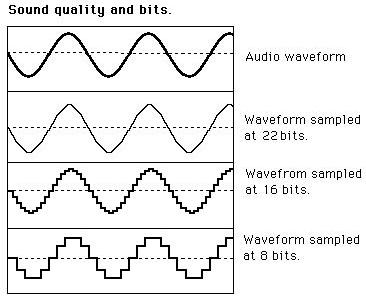
When it comes to audio and video, bit rates take on a different definition. In this context, bit rates refer to the amount of data stored per second of multimedia playback. For example, a 320 kbps MP3 audio file has a higher quality than the same file at just 128 kbps, as long as both files were created from the same ideal source. You will have to remember that you cannot improve an audio file that sounds bad by copying it to an audio file with a higher bit rate, as the source was bad from the beginning. So a higher bit rate is a general rule of thumb, but it is not 100% correct.

The same is true for video: a higher bitrate will have a higher quality when comparing the same video with the same resolution. The bit rate is expected to increase as the resolution increases as more data is processed. Consequently, high bit rates for audio and video can provide superior quality, but can also put a lot of pressure on your hardware, which can lead to stuttering.

Also, keep in mind that different file formats use different compression algorithms, which can result in lower bit rates and higher quality. However, for these algorithms, the processing load tends to increase.