What is VBR MP3 Bitrate?


Free Download Mp4Gain
picture

What is VBR MP3 Bitrate?
VBR Bitrate
VBR Bitrate
VBR Bitrate
VBR Bitrate

The Basics of VBR MP3 Bitrate

When it comes to music and audio files, bitrate is an important factor to consider. Bitrate refers to the amount of data that is transmitted per second in a digital audio file. The higher the bitrate, the more data is transmitted and the better the audio quality.
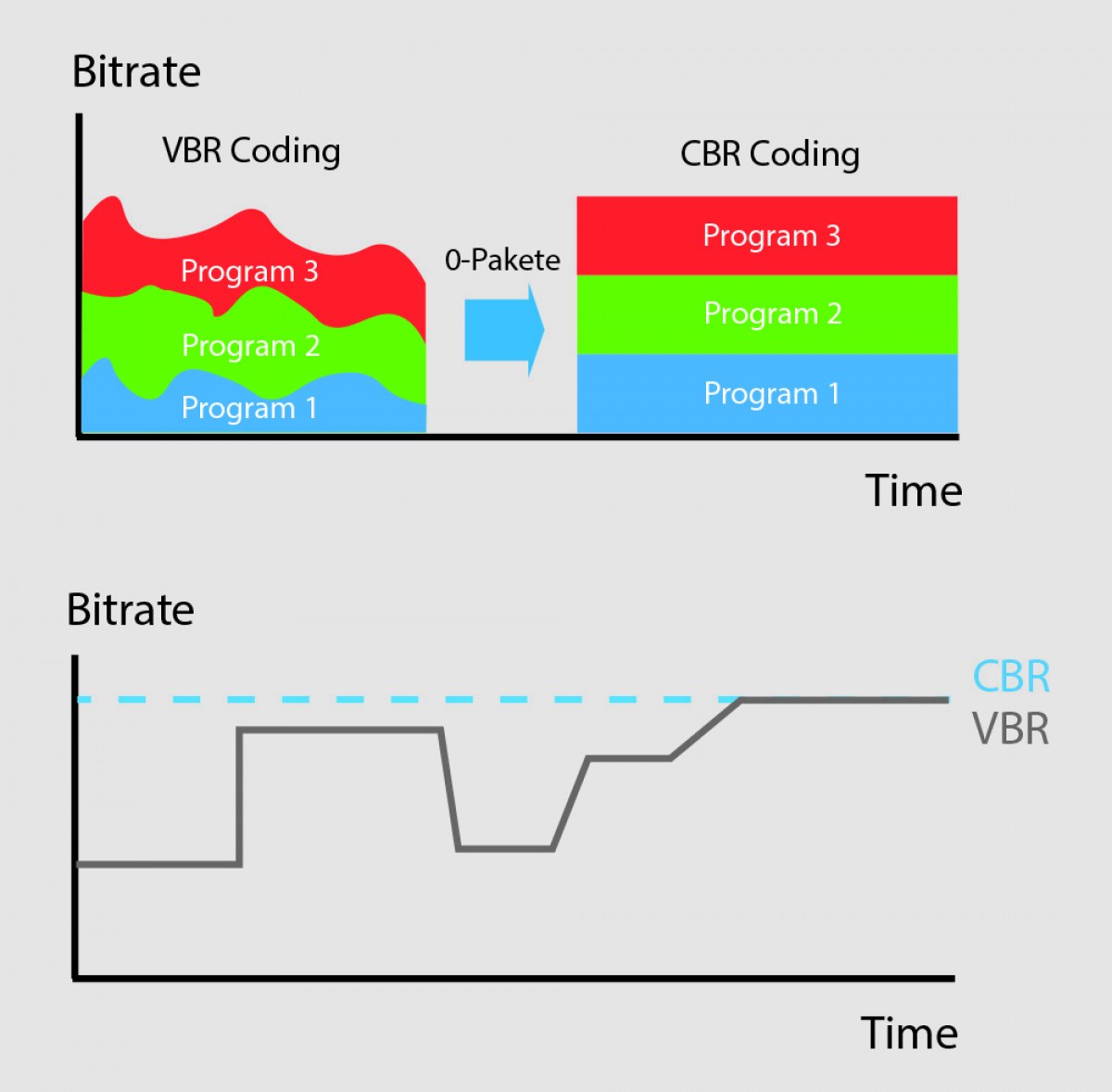
VBR, or variable bitrate, is a type of MP3 encoding that uses a variable bitrate rather than a constant bitrate. This means that the bitrate will vary depending on the complexity of the audio being encoded. For example, a simple audio passage with few instruments and no vocals may have a lower bitrate than a complex audio passage with many instruments and vocals.

VBR MP3 bitrate offers a number of advantages over constant bitrate encoding, including better audio quality, smaller file sizes, and more efficient use of storage space.

How to Choose the Right VBR MP3 Bitrate

When choosing the right VBR MP3 bitrate for your audio files, there are a number of factors to consider. These include the type of audio being encoded, the intended use of the audio, and the storage space available.
For example, if you are encoding audio for use on a mobile device with limited storage space, you may want to use a lower bitrate to minimize file size. On the other hand, if you are encoding audio for use in a high-quality home theater system, you may want to use a higher bitrate to ensure the best possible audio quality.

Ultimately, the right VBR MP3 bitrate will depend on your specific needs and preferences. Experimenting with different bitrates and listening to the resulting audio can help you determine the best option for your particular situation.

The Future of VBR MP3 Bitrate

As technology continues to advance and storage space becomes more abundant, VBR MP3 bitrate is likely to become even more popular in the future. With its ability to offer high-quality audio in a compact and efficient format, VBR MP3 encoding is sure to remain a popular choice for music lovers and audio enthusiasts alike.
In the words of music legend Bob Marley, “One good thing about music, when it hits you, you feel no pain.” With VBR MP3 bitrate, music lovers can experience high-quality audio that hits them right where it counts, without the pain of bloated file sizes or compromised sound quality.

Conclusion: The Benefits of VBR MP3 Bitrate

In conclusion, VBR MP3 bitrate is a powerful tool for encoding high-quality digital audio files. By using a variable bitrate that adapts to the complexity of the audio being encoded, VBR MP3 encoding offers superior sound quality, smaller file sizes, and more efficient use of storage space.
As technology continues to evolve and storage space becomes more abundant, VBR MP3 encoding is sure to become even more popular in the future. So the next time you’re encoding digital audio files, consider using VBR MP3 encoding to experience the benefits of variable bitrate technology for yourself.

In the words of writer Kurt Vonnegut, “The only proof he needed for the existence of God was music.” With VBR MP3 bitrate, the beauty of music can be captured in all its glory, providing an experience that is truly transcendent.


Free Download Mp4Gain
picture


Mp4Gain Main Window
picture


Mp4Gain Features
picture


Free Download Mp4Gain
picture

What is CBR? (constant bit rate)

What is CBR? (constant bit rate)

CBR (Constant Bit Rate)

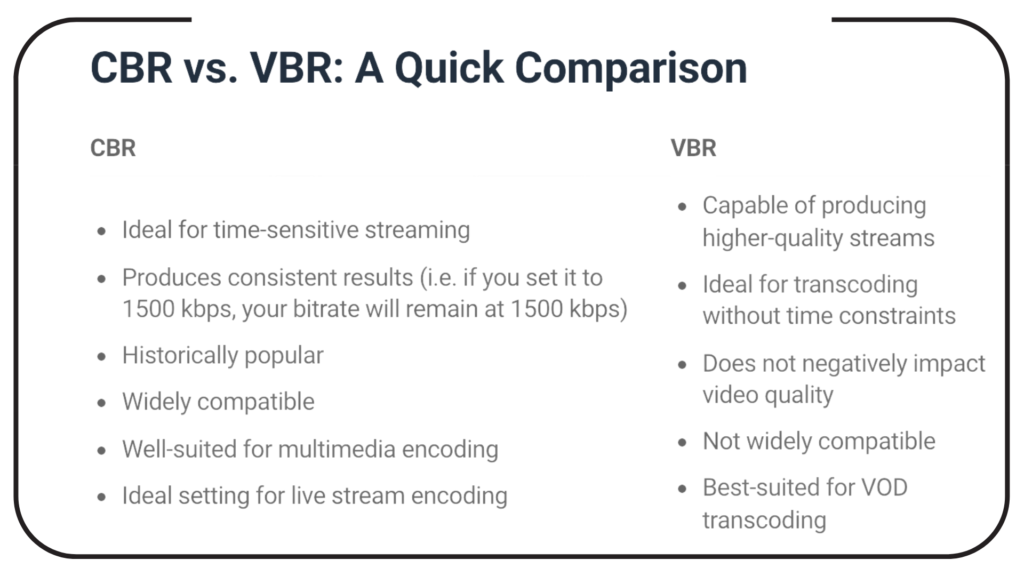
CBR is an encoder to convert (compress) an audio file to mp3 format. In CBR encoding, the bit rate is kept constant throughout the file: the same number of bits are allocated to encode every second of audio, and within frames of the audio data they occur at regular and predictable intervals, thus that the full file size for a given audio length is predictable.

CBR


Therefore, CBR is the “opposite” of VBR. However, in some formats there may be some variability in the number of bits that contain the actual audio information from frame to frame.

This concept manifests itself in the MP3 bit repository. In MP3 CBR, even if the frames are of a fixed size, the audio data is not necessarily sequentially distributed among them; the audio for a frame may use fewer bits than the frame has, so this frame “adds” spare bits to a “bucket” that can fill in the allocated bits for the next block.

So the effective bit rate may vary slightly in CBR MP3, although there is a fixed number of frames in all audio. The degree of variability in the entire MP3 file is not as great as that of the VBR, but it is not negligible; a CBR encoder using repository inefficiently is more likely to produce a lower quality file than a VBR. Unlike VBR, the perceived quality of decoded audio will vary depending on the CBR file.

This is because CBR encoding is similar to the ABR form of VBR encoding in that it is typically based solely on the target bit rate and analysis of the input audio; often no attempt is made to use the lowest possible bit rate that will maintain a certain level of output quality. Technically, CBR implementations always involve predicting product quality, but they rely on fixed algorithms, rather than trial and error verification of results, as is done in VBR. Who should use this encoder: CBR is useful for people interested in maintaining maximum compatibility, especially with some streaming applications and some hardware decoders that do not support VBR.

CBR is also useful for people who want to be able to get accurate estimates of the bit rate or approximate length of a decoded audio file without scanning and partially decoding the entire file. VBR advocates are very vocal against CBR and often say that no one should use CBR when given a choice. Some reasonably argue that the goal of using a compression algorithm, especially in a lossy codec like MP3, is to store as many bits as possible while maintaining a certain level of quality, so CBR tends to use more bits than necessary. on simple passages, and using too little for complex passages is wasteful and should lead to worse results (at least in complex comps) than VBR.

However, these arguments need to be carefully refined and it would be incorrect to conclude that there are quality differences between CBR and VBR. In general, for most types of compression, considering identical input, encoding techniques, and reasonable goals for VBR quality and bit rate limits, VBR will almost always produce results of equal perceived quality. or better than CBR for files of the same size. This has been shown in numerous hearing tests.

CBR may exceed the quality of VBR if the comparison is not limited to the average bit rate or if the VBR encoding method does not take into account the actual output quality. For example, a 256 kbps CBR MP3 containing moderately complex audio is likely to sound noticeably better than a similarly encoded VBR, which averages 128 kbps, although VBR can use up to 320 kbps in some frames.

And even when VBR measures the quality of the output signal, there is a margin of error, especially when using psychoacoustic models of perception, so the encoder (even the highly respected LAME) can accidentally compress some segments, depending on the characteristics. audio, placing restrictions on quality and bit rate. At high bitrates, the quality difference between typical CBR and VBR files is close to zero, so for some CBR users it is quite acceptable, especially if the maximum savings in accommodation or hard drive space is not important. At low average bit rates, the quality difference between CBR and VBR is more pronounced with the same input signal, so VBR is often more desirable. At high bit rates, the quality difference between typical CBR and VBR files is close to zero, so for some CBR users it is quite acceptable.

What is the optimal bit rate?

What is the optimal bit rate?

Optimal Bitrate

To decide what the flow can be, it is necessary to understand how it works, at least in the first approximation.

BitRate

In the H.264 codec (MPEG-4 Part 10), the construction of the video image is as follows: the camera creates a reference frame (I-frame) and, based on it (therefore, it is called a frame of reference), subtract the still parts of the picture from the frame – a P- frame. The third of this second frame is then subtracted and a modified P-frame is also created. Thus, a series of P-frames is created, which only carry changes between two adjacent frames. Since in the process of “subtracting” frames, errors may occur leading to artifacts, then after a certain number of frames the scheme is repeated, a reference frame is sent again, and then a series is sent of frames with changes across the network. The resulting keyframes and modified P-frames are sent over the LAN to recreate a series of full frames on the display device. It does this by “appending” or “superimposing” P-frames to a reference frame and sending the resulting series of frames to the monitor. This is how codecs work with interframe compression. Of course, in practice everything is more complicated by an order of magnitude (there are also B-frames, which, based on the analysis of a large set of frames, predict where a particular object will move in the field of view of the camera, which allows to significantly reduce the flow when observing the translational movement, for example, that -to the mechanisms).

With a slight change in the observed scene, the changes between adjacent frames will also be minimal, respectively, and the traffic on the network will be minimal. The reverse is also true: if the scene changes significantly, the changes between frames will be significant, consequently affecting the network load.

Do not forget about the peculiarities of codecs with interframe compression, they introduce quite a noticeable delay between the moment of the event itself and the moment it is displayed on the screen. This is due to the work of the codec itself, as the camera needs to receive both frames, then subtract one from the other, send it to the image output device, and overlay it on the reference frame, which takes time and therefore introduces a delay.

There is no point in talking about optimal resolutions without referring to the observed scene, since, for example, when observing an empty corridor at a quality of 1080p / 25 fps, the transmission can be approximately 1 Mbps, and when observing a station of meter at rush hour, an image in the 720p / 25 fps format may take up to 20-30 Mbps

What is the bit rate?

What is the bit rate?

Bitrate

Bitrate, or as they say the width of the sequence

Bitrate

It is the amount of data transmitted or processed in 1 second. The concept mainly applies to multimedia content, for example, video bit rate is nothing more than the amount of video information that is displayed on the screen in one second. To measure the bit rate, the designation “Kbit / s (kbps)” is used, that is, kilobits per second, less frequently Mbit / s, and so on. The more information that is transmitted during a specific period of time, the higher the quality of the image.

When people say “low bit rate video” they are generally referring to low quality video. Blur, opacity, and pixelation are characteristic of such video, while high-bit-rate video has a detailed image with rich colors. Like video, audio also comes with low and high bit rates. Music with a low bit rate loses in the frequency range, words and chords become less distinguishable, and itself takes on an unnatural sound, as if it were an electronic sound.

Bit rate types
When compressing video, you have 3 modes to choose from: constant, variable, and average. Let’s start in order:

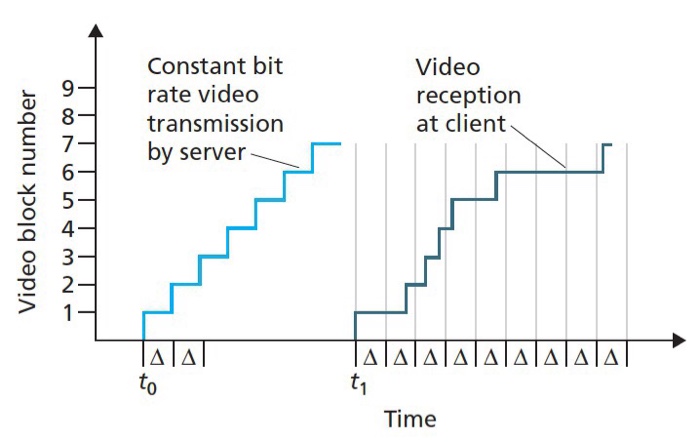
Constant Bit Rate (CBR). Sets the desired value and does not change throughout the video. The advantage of this option is that you know in advance what the size of the final file will be. But there is also a downside, especially in relation to sound. It may grow during playback, which may require changing the bit rate. Since you don’t get what you want, quality suffers.
Changes in sound level

Variable (VBR). In this case, you are working in conjunction with a codec. Your task is to set the maximum bitrate and programs must select the required value for each scene. Thus, the “minus” of the previous regime has been eliminated. Also, the file size may be even smaller than expected, but the outcome is impossible to predict.
Average (ABR). From the name it is clear: this is a cross between the first and second mode. Here you set not only the maximum, but also the minimum bitrate, and the codec itself selects it within these limits, based on the dynamics of the video. Its quality is better than that of the variable option, because the bit rate does not fall below the set value.
YI 4K video bit rate increase
Although action cameras have been in our lives for a long time, not everyone understands their true purpose. More than once I have come across the fact that people see them as a compact analog of ordinary consumer camcorders and make corresponding demands on them. First of all, it comes down to the quality of the footage shot. “I just want to take the camera out of my pocket, start recording, and get a picture like on film.”

… This is impossible in principle. And it is doubly impossible in an action camera, since it is a compromise between “action” (a set of characteristics for operation in extreme conditions) and the quality of the shot: improving one thing, the other will deteriorate proportionally.

However, you can do something. For example, replace the lens or increase the video bit rate. What will increase the bit rate? Some improvement in image quality. It should be understood that although the camera shoots at a fairly high bit rate (up to 60 Mbps), the built-in codec uses a fast profile. In other words, video recorded with a 60 Mbps camera will be worse than video recorded on a computer with the same bit rate. First of all, areas of almost uniform color and “jerky” undergo such coding. For example, grass, ripples in the water, or foliage. Increasing the bitrate is not a panacea here, but a tangible step forward. It is true that you need to understand that the developer set a limit of 60 Mbit / s for a reason and that increasing the bit rate is done at your own risk and risk. Also, this increases the requirements for the memory card used and the writing speed on it.

If you use a camera, for example, for video blogs with video uploading to YouTube, you don’t need to change anything, as the video host will recode your video by itself, regardless of the initial parameters. If you’re post-processing the footage, it makes sense to give it a try as there is minimal body movement.
DISCLAIMER OF LIABILITY
In many respects, this article expresses the subjective opinion of the author. Furthermore, the author is not responsible for possible damage to the camera.

What is bit rate and why is it important?

What is bit rate and why is it important?

What is bitrate?

With today’s technology, we can expect high speed and quality in everything we do on our computers, our smartphones, and any other newer devices. However, although this increase in speed and quality has several factors, many of them have to do with what is called the bit rate.

Bit rate

What bitrate means depends on the context you’re using it in, but it’s very important to know what it is and what benefits it might bring you (or what to expect instead).

What is the bit rate?

Bit rate is a term used to describe the amount of data that is transferred over a period of time. Depending on the context, common bitrate measures include kbps and Mbps, respectively, which means kilobits per second and megabits per second. Regardless of which drives are used, a higher number is usually good, indicating high speed or high quality.

However, it is also important to understand that smaller numbers can reduce the load on your hardware, which can be important for devices such as smartphones and netbooks.

When it comes to internet speed, a higher bit rate is always desirable – it doesn’t overload your own hardware, it just sends you the content you want faster. With higher bit rates, you can do more with an Internet connection – stream HD movies, play online games with minimal latency, and download large files in just seconds.

You can find out what bitrate you are getting by visiting a website like speedtest.net and running your tests. The numbers are good to compare with others, but generally don’t expect the expected number (other than the number your ISP announced). Certain parts of the world and Google Fiber users can get speeds of up to 1 Gbps (1000 Mbps), while typical cable broadband users in the US can get as low as 10 Mbps.

There has been a lot of discussion in online communities like Reddit about high internet prices in the US due to how slow speeds are, and initiatives like Google Fiber are starting to pay off.

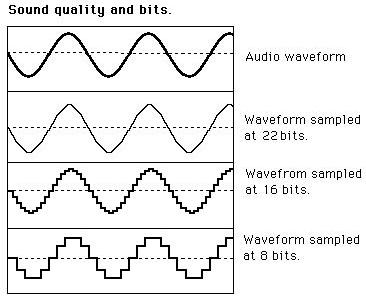
When it comes to audio and video, bit rates take on a different definition. In this context, bit rates refer to the amount of data stored per second of multimedia playback. For example, a 320 kbps MP3 audio file has a higher quality than the same file at just 128 kbps, as long as both files were created from the same ideal source. You will have to remember that you cannot improve an audio file that sounds bad by copying it to an audio file with a higher bit rate, as the source was bad from the beginning. So a higher bit rate is a general rule of thumb, but it is not 100% correct.

The same is true for video: a higher bitrate will have a higher quality when comparing the same video with the same resolution. The bit rate is expected to increase as the resolution increases as more data is processed. Consequently, high bit rates for audio and video can provide superior quality, but can also put a lot of pressure on your hardware, which can lead to stuttering.

Also, keep in mind that different file formats use different compression algorithms, which can result in lower bit rates and higher quality. However, for these algorithms, the processing load tends to increase.