What is VBR MP3 Bitrate?


Free Download Mp4Gain
picture

What is VBR MP3 Bitrate?
VBR Bitrate
VBR Bitrate
VBR Bitrate
VBR Bitrate

The Basics of VBR MP3 Bitrate

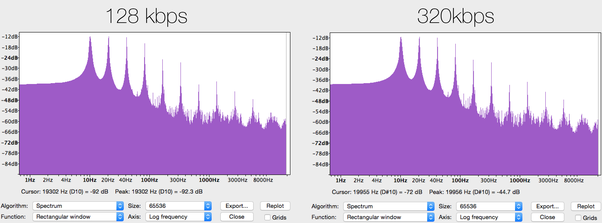
When it comes to music and audio files, bitrate is an important factor to consider. Bitrate refers to the amount of data that is transmitted per second in a digital audio file. The higher the bitrate, the more data is transmitted and the better the audio quality.
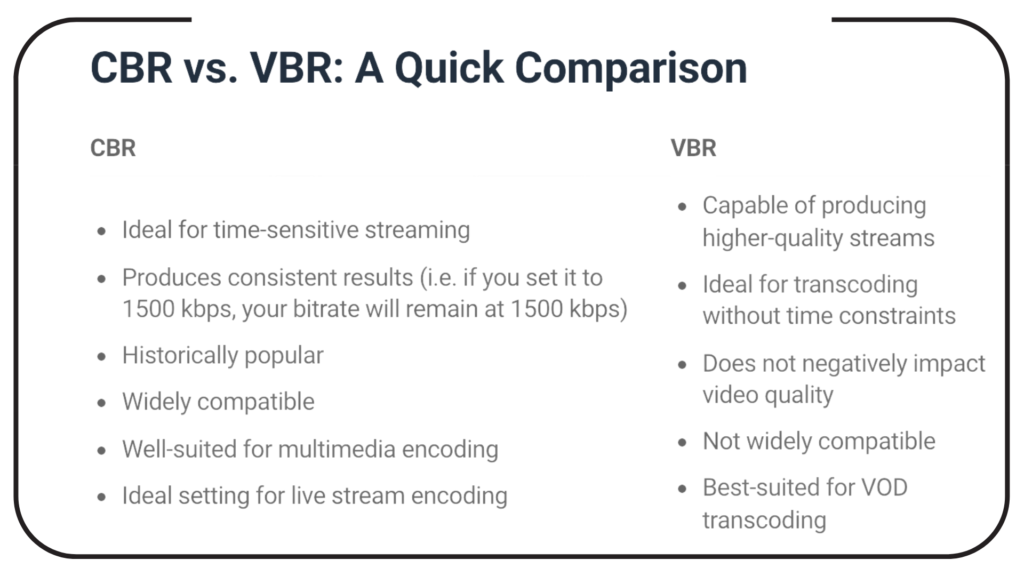
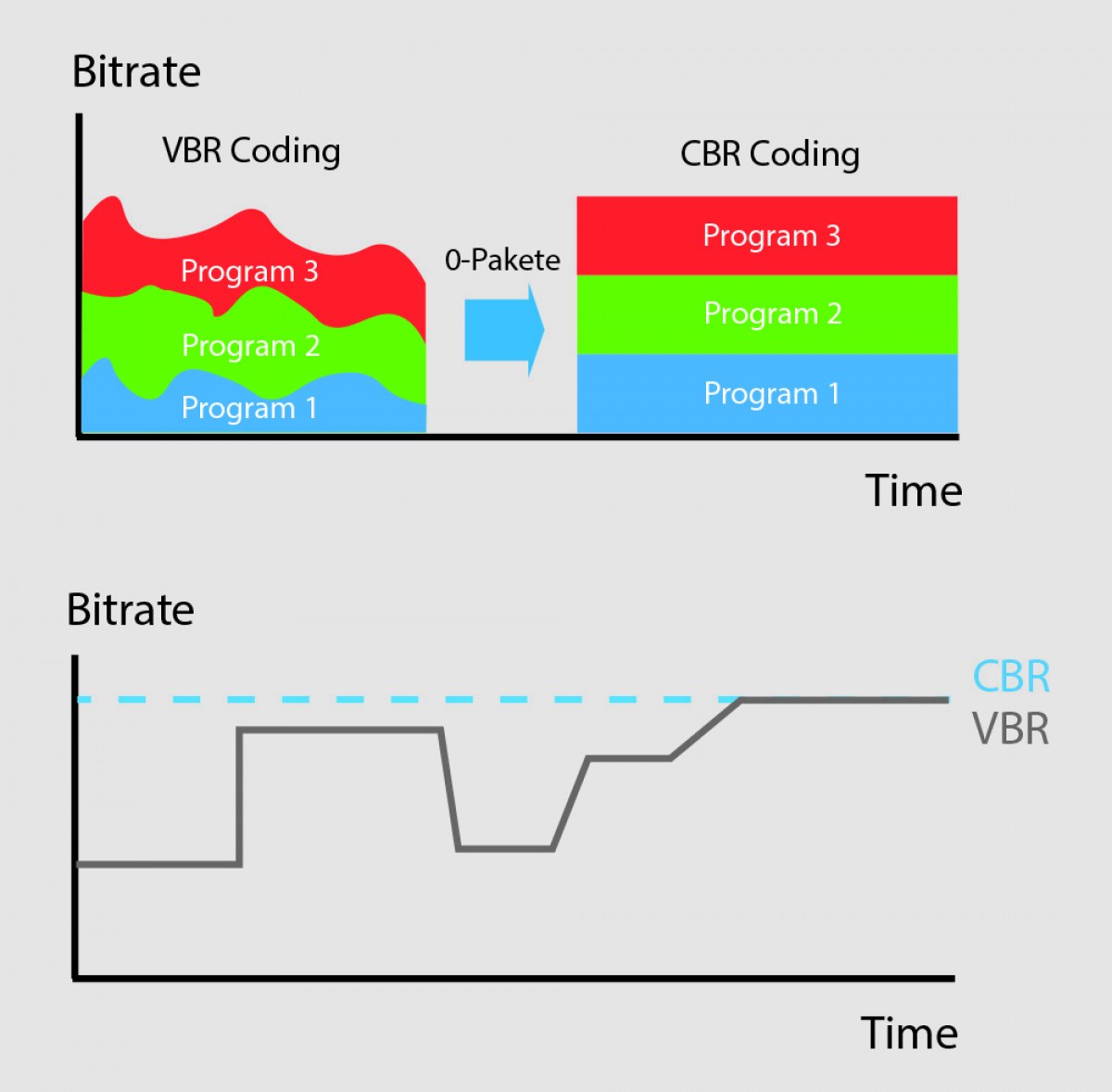
VBR, or variable bitrate, is a type of MP3 encoding that uses a variable bitrate rather than a constant bitrate. This means that the bitrate will vary depending on the complexity of the audio being encoded. For example, a simple audio passage with few instruments and no vocals may have a lower bitrate than a complex audio passage with many instruments and vocals.

VBR MP3 bitrate offers a number of advantages over constant bitrate encoding, including better audio quality, smaller file sizes, and more efficient use of storage space.

How to Choose the Right VBR MP3 Bitrate

When choosing the right VBR MP3 bitrate for your audio files, there are a number of factors to consider. These include the type of audio being encoded, the intended use of the audio, and the storage space available.
For example, if you are encoding audio for use on a mobile device with limited storage space, you may want to use a lower bitrate to minimize file size. On the other hand, if you are encoding audio for use in a high-quality home theater system, you may want to use a higher bitrate to ensure the best possible audio quality.

Ultimately, the right VBR MP3 bitrate will depend on your specific needs and preferences. Experimenting with different bitrates and listening to the resulting audio can help you determine the best option for your particular situation.

The Future of VBR MP3 Bitrate

As technology continues to advance and storage space becomes more abundant, VBR MP3 bitrate is likely to become even more popular in the future. With its ability to offer high-quality audio in a compact and efficient format, VBR MP3 encoding is sure to remain a popular choice for music lovers and audio enthusiasts alike.
In the words of music legend Bob Marley, “One good thing about music, when it hits you, you feel no pain.” With VBR MP3 bitrate, music lovers can experience high-quality audio that hits them right where it counts, without the pain of bloated file sizes or compromised sound quality.

Conclusion: The Benefits of VBR MP3 Bitrate

In conclusion, VBR MP3 bitrate is a powerful tool for encoding high-quality digital audio files. By using a variable bitrate that adapts to the complexity of the audio being encoded, VBR MP3 encoding offers superior sound quality, smaller file sizes, and more efficient use of storage space.
As technology continues to evolve and storage space becomes more abundant, VBR MP3 encoding is sure to become even more popular in the future. So the next time you’re encoding digital audio files, consider using VBR MP3 encoding to experience the benefits of variable bitrate technology for yourself.

In the words of writer Kurt Vonnegut, “The only proof he needed for the existence of God was music.” With VBR MP3 bitrate, the beauty of music can be captured in all its glory, providing an experience that is truly transcendent.


Free Download Mp4Gain
picture


Mp4Gain Main Window
picture


Mp4Gain Features
picture


Free Download Mp4Gain
picture

The adaptive transmission bit rate. Part 2

The adaptive transmission bit rate. Part 2

Adaptive Bitrate

Current usage
Post-production buildings, content delivery networks, and studios use adaptive bitrate technology to provide consumers with higher-quality video using less manpower and fewer resources.

Adaptive Bitrate

Creating multiple video outputs, especially for adaptive bit rate streaming, adds a lot of value to consumers. Whether the technology works as designed, it must be completely unknown to the end user or consumer. Therefore, even though adaptive bit rate technology has been actively used by media companies for many years, and it has essentially become common practice for today’s high-end providers, mainstream consumers are relatively ignorant. of your need.

Adaptive Bleed Bitrate Benefits
Adaptive streaming bitrate provides streaming media consumers with the best possible experience as the media server automatically adjusts to any changes in the network and the playback conditions of each user.

The media and entertainment industry also benefits from adaptive streaming bitrate. As the video space grows, content marketing networks and video providers can provide customers with a superior viewing experience. Adaptive bit rate technology requires additional coding, but it simplifies the overall workflow and produces better results.

Scalable CDN is used to deliver streaming media to an Internet audience. The CDN receives the stream from one source on its origin server and then copies it to many or all of its edge cache servers. The end user requests a transmission and is redirected to the “closest” end server. This can be verified using libdash and the Distributed DASH (D-DASH) dataset, which has multiple mirrors in Europe, Asia, and the US Using HTTP-based adaptive streaming allows Edge Server to run server software Simple HTTP that is cheap or free to license, reducing software licensing costs compared to expensive media server licenses (such as Adobe Flash Media Streaming Server).

History
Adaptive Bitrate was created by the DVD Forum at the WG1 Special Current Group in October 2002. The group was co-chaired by Toshiba and Phoenix Technologies, a group of experts in collaboration with Microsoft, Apple Computer, DTS Inc., Warner Brothers, 20th Century Fox, Digital Deluxe, Disney, Macromedia and Akamai … The technology was originally called DVDoverIP and was a composite effort from the DVD ENAV book. The concept came from storing DVD TS Sector MPEG-1 and MPEG-2 in small 2KB files to be served using an HTTP server for the player. MPEG-1 segments provided a lower bit rate stream, while MPEG-2 provided a higher bit rate. The original XML schema provided a simple playlist of bit rates, languages, and URL servers. The first working prototype was presented at the Phoenix Technologies DVD Forum at the Harman Kardon laboratory in Willingen, Germany.

Implementation
Traffic Networks introduced adaptive bit rate streaming and it is now being developed and used by Adobe Systems, Apple, Microsoft, and Octoshape. In September 2010, Traffic Networks received a patent for its adaptive bit rate transmission.

The adaptive transmission bit rate.

The adaptive transmission bit rate.

Adaptive bitrate

Adaptive streaming bitrate is a technique used in streaming multimedia over computer networks.

Adaptive bitrate

While much of video is in the past, current technologies are used by current protocols such as RTP with RTSP, today’s adaptive technologies are almost exclusively based on HTTP and designed to work efficiently over large, distributed HTTP networks. like the internet.

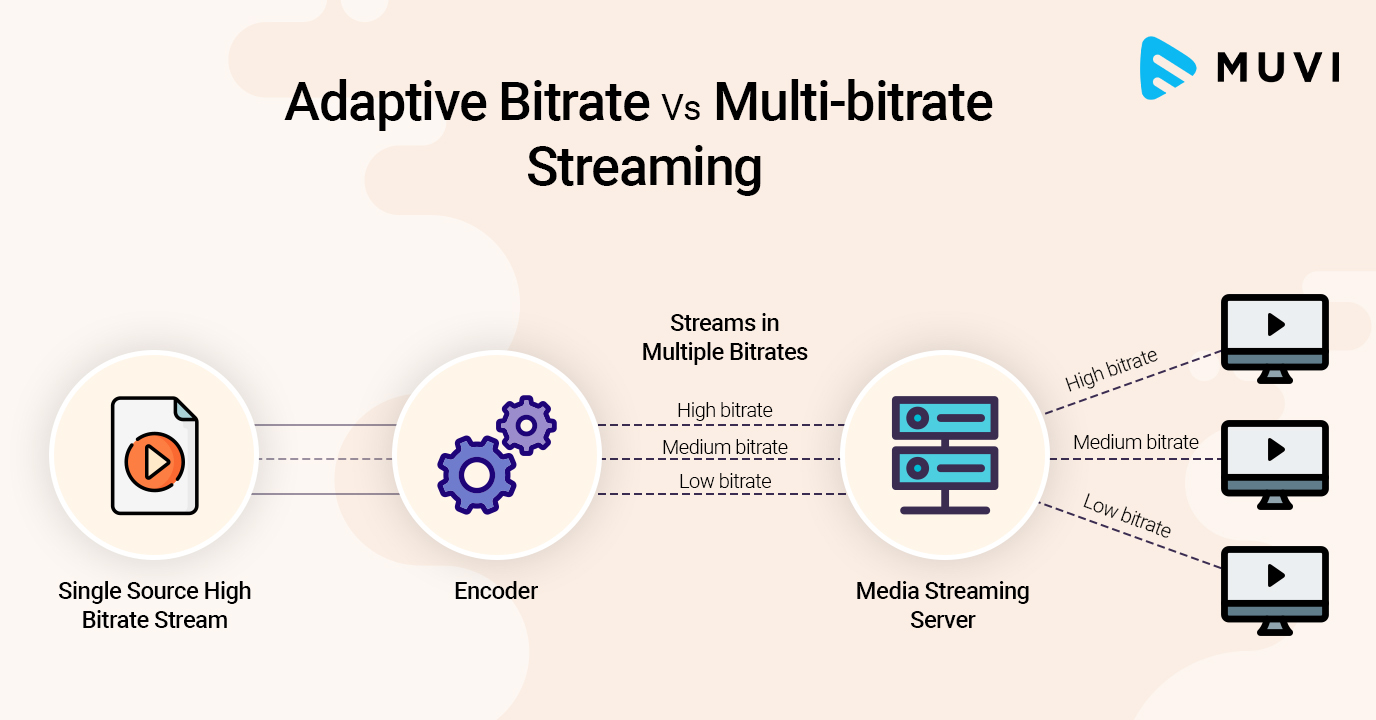
It works by detecting user bandwidth and CPU capacity in real time and adjusting the quality of the video stream accordingly. This requires the use of an encoder that can encode single source video at multiple bit rates. The player client switches between streaming different encodings based on available resources. “The result: very little buffering, fast startup times, and a good experience for both high- and low-level communications.”

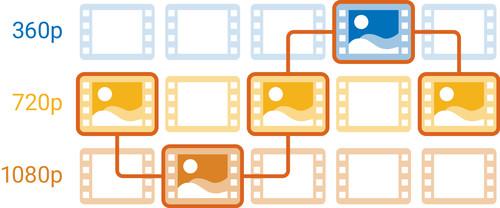
More specifically, and as implementations are in use today, adaptive streaming bitrate is a method of streaming video over HTTP where the original content is encoded at multiple bit rates, then each of the different bit rates. Bit rate transmissions are segmented into small parts of several seconds. Today’s customer is aware of streams available at different bit rates and stream segments by explicit file. Starting, the client requests segments of the lowest bit rate stream. If the client finds that the download speed is higher than the bit rate of the downloaded segment, then it will ask for the next higher bit rate segments. Later, if the client finds that the download speed of the segment is lower than the bit rate of the segment and therefore the network bandwidth has deteriorated, then it will request a lower segment of the bit rate .

Bit Rate – Fixed Quality

Bit Rate – Fixed Quality

Bitrate

A VBR encoder repaired by quantizer or fix quality.

bit rate

This is usually a single pass encoding. The user determines a given subjective quality value and the encoder allocates bits as necessary to achieve a given quality level. This ensures that the product flow is of constant quality at all times. The quality score usually has a bit rate range associated with it. The downside to this encoding method is that the average bit rate (and thus the file size) will not be known in advance, and reaching a certain average bit rate requires trial and error. In general, this is more of a concern for video than audio, as file sizes are much larger and encoding can take much longer.

Bit rate row
This VBR encoding method allows the user to specify a bitrate range: the minimum and / or maximum bitrate allowed. Some encoders extend this method with an average bit rate. The minimum and maximum bit rate allowed sets the limits over which the bit rate can change. The downside to this method is that the average bit rate (and thus the file size) will not be known beforehand. Bitrate range is also used in some fixed quality encoding methods, but generally without permission to change the particular bitrate.

Average bit rate
The average bit rate (ABR) that encoding can be used to ensure that the output stream achieves a predictable average bit rate over the long term. This is typically accomplished by multi-pass encoding, where one or more initial passes are used to collect data about the stream, and the final pass uses that data to achieve uniform quality at a specified average bit rate.

Alternatively, periodic averaging can be used, either by performing ABR on smaller chunks of output or responding to fluctuations in ABR, increasing or decreasing overall quality. They can achieve ABR in a single pass, but they do not produce the same degree of uniformity as a multi-pass ABR. Some encoders use “ABR encoding” and “multi-pass encoding” to refer to single and multi-stream ABR encoding, respectively.

Some encoders also allow the user to specify the maximum allowable bit rate or the maximum quality cost. This is sometimes called a variable constrained bit rate (CVBR) and is generally applied to ABR algorithms.

The downside of a single pass ABR encoding (with or without CVBR) is the opposite of a fixed VBR quantizer: the size of the output is known in advance, but the resulting quality is unknown, although it is even better than CBR. Specifying a higher average or maximum can simply make the file larger without noticeable quality effect, and an increased maximum bitrate can introduce stuttering when the file is filtered. However, reducing these criteria to too low a level will ultimately lead to rather drastic quality losses. The effect on video is usually squared because the textures are no longer fully detailed in their rendering.

Multi-pass ABR encoding is more similar to fixed VBR quantizer because higher average will increase quality.

There is no one ideal “one size fits all” setting for ABR in video encoding. For low resolution video (320 or 640 lines) encoded with MPEG-1 or MPEG-2, the average bit rate can be as low as 1,000 kbps and still achieve acceptable results. For high definition video like 1080, this average may need to be 6,000 kbps or more. The main factor in determining the minimum video bitrate is the efficiency with which the video can be encoded. Using more efficient video encodings like MPEG-4 will help promote a lower bit rate, while a significant amount of movement or white noise will require a higher bit rate to encode without visible artifacts. In the end, the user may have to use trial and error to reach the minimum file size for a given video stream, encode at a given bit rate, and then review the results.

File size
VBR encoding that uses a file size setting is typically multi-pass encoding. This allows the user to define a specific size for the final file. In the first pass, the encoder analyzes the input file and automatically calculates the possible bit rate range and / or the average bit rate. In the last pass, the encoder distributes the available bits throughout the video to achieve uniform quality.