Understanding Video Bitrates and Codecs


Free Download Mp4Gain
picture

Understanding Video Bitrates and Codecs
Video Bitrates and Codecs

Video bitrate and codec are two important concepts that every video creator should understand. In this article, I will explain what they are, how they work together, and how to choose the right settings for your videos.

What is Video Bitrate?

Video bitrate is the amount of data that is encoded per second in a video file. It is measured in bits per second (bps), or kilobits per second (kbps) or megabits per second (Mbps).

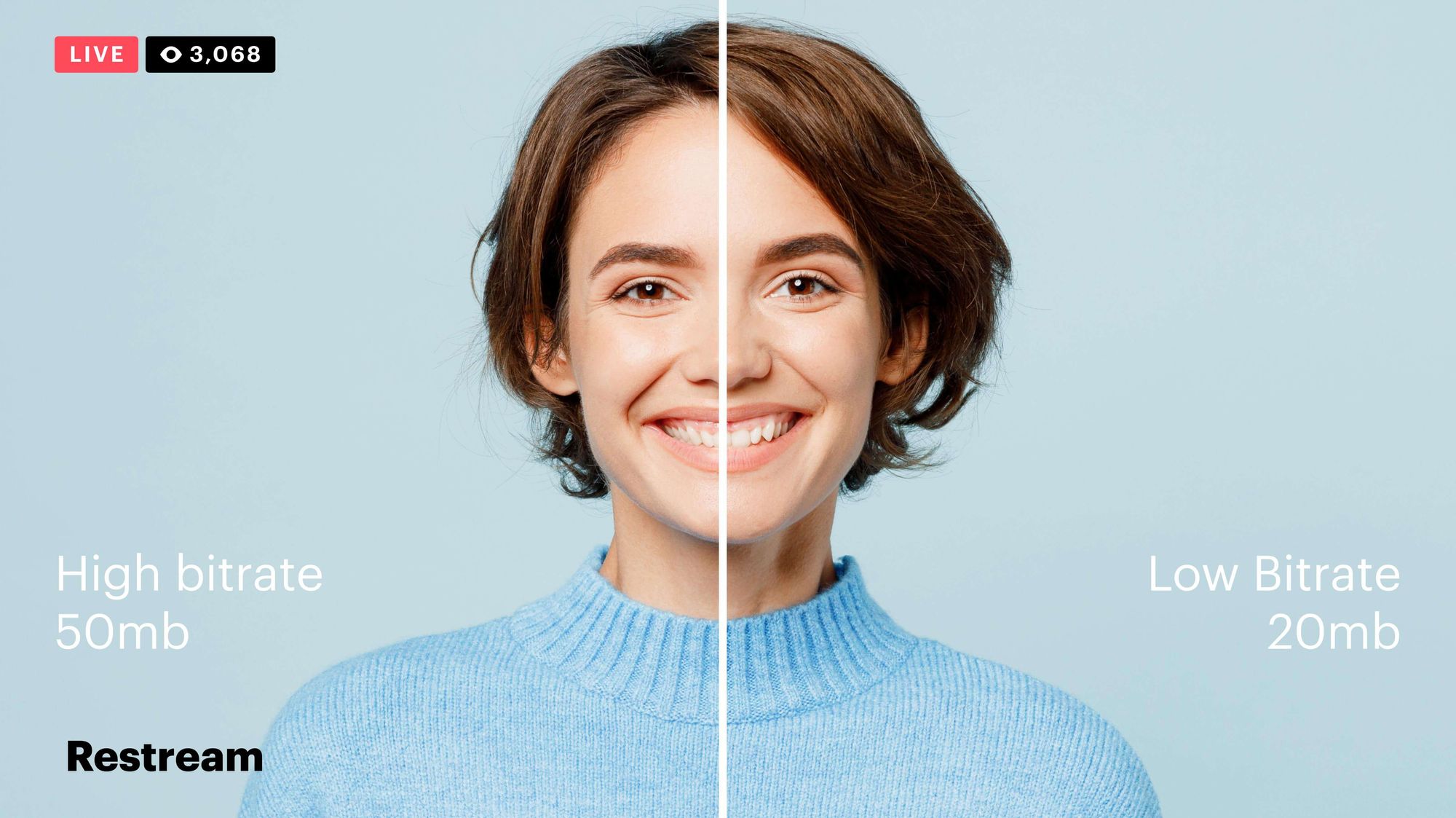
The higher the bitrate, the more data is encoded, and the higher the quality of the video will be. However, a higher bitrate also means a larger file size.

What is a Video Codec?

A video codec is a software program that compresses and decompresses video data. It is responsible for encoding the video data into a format that can be stored or streamed, and then decoding it back into its original form when it is played back.

There are many different video codecs available, each with its own strengths and weaknesses. Some of the most popular video codecs include:

H.264: This is the most widely used video codec. It is a lossy codec, which means that some data is lost during the compression process. However, H.264 is very efficient, and it can produce high-quality video with a relatively small file size.
H.265: This is a newer codec that is designed to be more efficient than H.264. It can produce the same quality of video with a smaller file size.
VP9: This is a free and open-source video codec that is developed by Google. It is similar to H.265 in terms of efficiency, but it is not as widely supported.

How Do Bitrate and Codecs Work Together?

Bitrate and codec work together to determine the quality and file size of a video. The higher the bitrate, the more data is encoded, and the higher the quality of the video will be. However, a higher bitrate also means a larger file size.

The codec determines how the video data is compressed. Some codecs are more efficient than others, and they can produce the same quality of video with a smaller file size.

How to Choose the Right Bitrate and Codec for Your Videos

The right bitrate and codec for your videos will depend on a number of factors, including:

The intended use of the video. If you are uploading your video to YouTube, you will need to choose a bitrate that is compatible with YouTube’s streaming requirements.
The target audience. If you are creating a video for mobile devices, you will need to choose a lower bitrate than if you are creating a video for high-definition televisions.
The file size. If you are limited by the file size, you will need to choose a lower bitrate.

Final Words About Video Bitrates and Codecs

Video bitrate and codec are two important concepts that every video creator should understand. By understanding how they work together, you can choose the right settings for your videos to ensure that they are both high quality and have a reasonable file size.

I hope this article has been helpful. If you have any questions, please feel free to leave a comment below.

Bonus Tips

If you are not sure what bitrate or codec to use, you can always start with a high bitrate and then lower it until you find a balance between quality and file size that you are happy with.
You can use a video bitrate calculator to help you determine the right bitrate for your videos.
There are many different video codecs available, so it is important to do some research to find the best codec for your needs.


Free Download Mp4Gain
picture


Mp4Gain Main Window
picture


Mp4Gain Features
picture


Free Download Mp4Gain
picture

What is VBR MP3 Bitrate?

What is VBR MP3 Bitrate?

VBR Bitrate
VBR Bitrate
VBR Bitrate
VBR Bitrate

The Basics of VBR MP3 Bitrate

When it comes to music and audio files, bitrate is an important factor to consider. Bitrate refers to the amount of data that is transmitted per second in a digital audio file. The higher the bitrate, the more data is transmitted and the better the audio quality.
VBR, or variable bitrate, is a type of MP3 encoding that uses a variable bitrate rather than a constant bitrate. This means that the bitrate will vary depending on the complexity of the audio being encoded. For example, a simple audio passage with few instruments and no vocals may have a lower bitrate than a complex audio passage with many instruments and vocals.

VBR MP3 bitrate offers a number of advantages over constant bitrate encoding, including better audio quality, smaller file sizes, and more efficient use of storage space.

How to Choose the Right VBR MP3 Bitrate

When choosing the right VBR MP3 bitrate for your audio files, there are a number of factors to consider. These include the type of audio being encoded, the intended use of the audio, and the storage space available.
For example, if you are encoding audio for use on a mobile device with limited storage space, you may want to use a lower bitrate to minimize file size. On the other hand, if you are encoding audio for use in a high-quality home theater system, you may want to use a higher bitrate to ensure the best possible audio quality.

Ultimately, the right VBR MP3 bitrate will depend on your specific needs and preferences. Experimenting with different bitrates and listening to the resulting audio can help you determine the best option for your particular situation.

The Future of VBR MP3 Bitrate

As technology continues to advance and storage space becomes more abundant, VBR MP3 bitrate is likely to become even more popular in the future. With its ability to offer high-quality audio in a compact and efficient format, VBR MP3 encoding is sure to remain a popular choice for music lovers and audio enthusiasts alike.
In the words of music legend Bob Marley, “One good thing about music, when it hits you, you feel no pain.” With VBR MP3 bitrate, music lovers can experience high-quality audio that hits them right where it counts, without the pain of bloated file sizes or compromised sound quality.

Conclusion: The Benefits of VBR MP3 Bitrate

In conclusion, VBR MP3 bitrate is a powerful tool for encoding high-quality digital audio files. By using a variable bitrate that adapts to the complexity of the audio being encoded, VBR MP3 encoding offers superior sound quality, smaller file sizes, and more efficient use of storage space.
As technology continues to evolve and storage space becomes more abundant, VBR MP3 encoding is sure to become even more popular in the future. So the next time you’re encoding digital audio files, consider using VBR MP3 encoding to experience the benefits of variable bitrate technology for yourself.

In the words of writer Kurt Vonnegut, “The only proof he needed for the existence of God was music.” With VBR MP3 bitrate, the beauty of music can be captured in all its glory, providing an experience that is truly transcendent.

MP4 Bitrate

MP4 Bitrate

MP4 Bitrate
MP4 Bitrate
MP4 Bitrate
MP4 Bitrate

What is MP4 Bitrate?

MP4 is a popular video format that is widely used in digital media. It uses a specific compression algorithm to compress video files to make them smaller and easier to share. The bitrate of an MP4 video refers to the amount of data that is used to represent each second of the video. It is typically measured in kilobits per second (kbps) or megabits per second (Mbps). A higher bitrate means that the video will have more data and will be of higher quality, but the file size will also be larger.

Why is MP4 Bitrate Important?

The bitrate of an MP4 video is important because it affects the quality and size of the video file. If the bitrate is too low, the video may appear pixelated or blurry. On the other hand, if the bitrate is too high, the file size will be larger, and it may take longer to upload or download the video. In addition, a higher bitrate requires more bandwidth to stream the video, which may be an issue for viewers with slower internet connections.

How to Choose the Right MP4 Bitrate

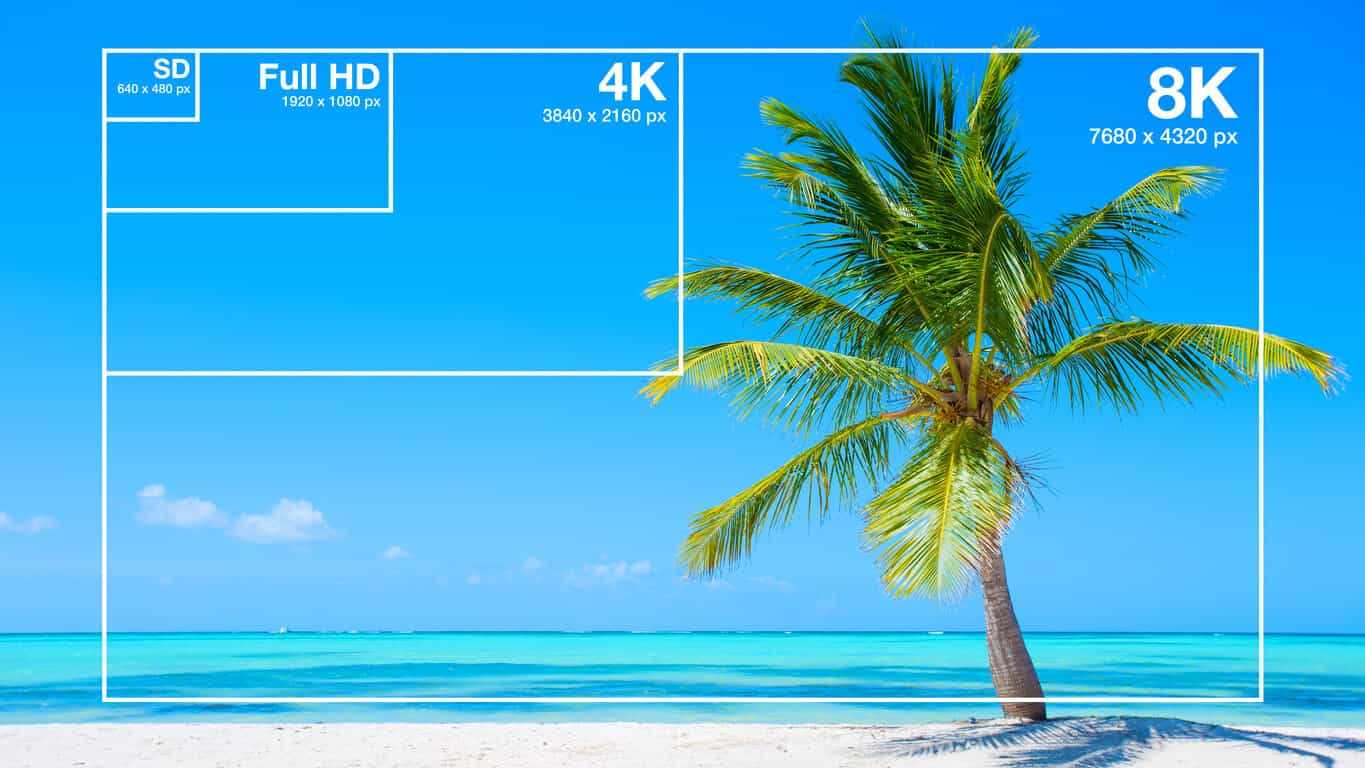
When choosing the bitrate for your MP4 video, you should consider the intended use of the video, the resolution of the video, and the file size. For example, a video that is intended to be viewed on a large screen should have a higher bitrate than a video that will be viewed on a smaller screen. Similarly, a video that has a higher resolution will require a higher bitrate to maintain the same quality as a lower resolution video.

As a general rule of thumb, a bitrate of 5-10 Mbps is suitable for 1080p HD video, while a bitrate of 2-5 Mbps is suitable for 720p HD video. For lower resolution videos, such as 480p or 360p, a bitrate of 1-2 Mbps may be sufficient. It’s also important to consider the file size of the video, as larger files will take longer to upload or download and may be more difficult to share.

How to Change MP4 Bitrate

To change the bitrate of an MP4 video, you will need to use video editing software that allows you to adjust the bitrate settings. There are many different video editing software options available, including Adobe Premiere Pro, Final Cut Pro, and Handbrake. These programs allow you to adjust the bitrate settings and other video parameters to optimize the video for your specific needs.

MP4 Bitrate FAQ

What is the maximum bitrate for MP4 videos?

The maximum bitrate for MP4 videos is 10 Mbps. However, this may vary depending on the specific device or platform where the video will be played.

What is the minimum bitrate for MP4 videos?

The minimum bitrate for MP4 videos will depend on the intended use of the video and the resolution of the video. In general, a bitrate of at least 1 Mbps is recommended for standard definition video, while a bitrate of at least 2 Mbps is recommended for high definition video.

What is the recommended bitrate for streaming MP4 videos?

The recommended bitrate for streaming MP4 videos will depend on the resolution of the video and the available bandwidth. As a general rule of thumb, a bitrate of 5-10 Mbps is suitable for 1080p HD video, while a bitrate of 2-5 Mbps is suitable for 720p HD video. For lower resolution videos, such as 480p or 360p, a bitrate of 1-2 Mbps may be sufficient.

However, it’s important to note that these are just general guidelines, and the optimal bitrate will also depend on factors such as the complexity of the video content, the encoding settings used, and the target audience’s viewing preferences.

For example, videos with fast-moving scenes or complex visual effects may require a higher bitrate to maintain a high level of image quality and avoid compression artifacts, while simpler videos with less motion may be able to use a lower bitrate without sacrificing quality.

Additionally, the target audience’s internet connection speed will also affect the recommended bitrate. For viewers with slower internet connections, a lower bitrate may be necessary to ensure that the video plays smoothly without buffering or interruptions.

What are the advantages of using a higher bitrate?

Using a higher bitrate can result in higher quality video with more detail and fewer compression artifacts. This is because a higher bitrate allows for more data to be transmitted and encoded per second, resulting in a more faithful representation of the original video source.

A higher bitrate can also be beneficial for videos with a lot of movement or detail, as it allows the encoding algorithm to capture more information and produce a more detailed image.

However, it’s important to note that using a higher bitrate will also result in larger file sizes and require more bandwidth to stream or download. This can be a disadvantage for viewers with slower internet connections or limited data plans.

What are the disadvantages of using a lower bitrate?

Using a lower bitrate can result in lower quality video with more compression artifacts, such as blurring or pixelation. This is because a lower bitrate means that less data is being transmitted and encoded per second, resulting in a loss of detail and fidelity.

Lower bitrates may also result in a lower overall resolution or frame rate, which can further degrade the quality of the video.

However, using a lower bitrate can also have benefits, such as smaller file sizes and reduced bandwidth requirements. This can be advantageous for viewers with slower internet connections or limited data plans.

Can the bitrate of an MP4 video be adjusted after it’s been encoded?

Yes, it is possible to adjust the bitrate of an MP4 video after it has been encoded. This can be done using video editing software or specialized tools designed for this purpose, such as MP4Gain.

However, it’s important to note that changing the bitrate of a video after it has been encoded can result in a loss of quality or introduce additional compression artifacts. For best results, it’s recommended to encode the video at the desired bitrate from the beginning.

Conclusion

In summary, the bitrate of an MP4 video is an important factor that can affect its quality, file size, and streaming performance. The optimal bitrate will depend on factors such as the resolution of the video, the complexity of the content, and the available bandwidth.

Using a higher bitrate can result in higher quality video with more detail and fewer compression artifacts, while using a lower bitrate can result in smaller file sizes and reduced bandwidth requirements.

If you need to adjust the bitrate of an MP4 video, it is possible to do so using specialized tools such as MP4Gain. However, it’s recommended to encode the video at the desired bitrate from the beginning for best results.

Overall, understanding how bitrate affects MP4 video quality can help you create and deliver video content that meets your needs and those of your audience.

What video bitrate is appropriate for video?

What video bitrate is appropriate for video?

Video Bit Rate
Video Bit Rate

At present, 720p video recommended minimum bitrate is above, h.264 encoding 2M bitrate is adequate, 1080p is 4M enough
to get a high-quality video, convert it with different bitrates, and then compare the image quality.

Video Bit Rate
Video Bit Rate

The most commonly used are: h.264 encoding, 1080P, 2.5M bit rate or more.
Summary: [h.264 encoding, 2.5M bitrate (up to 4M), maximum 4M bitrate (add 2M to target), most platforms are Blu-ray. 】

1. If the bitrate is higher than the original video, it will not be a bit higher than the original video. When you move, you’ll pick a lower point to compress the file a bit.
2. 1080P 1M bitrate has distortion feeling to watch on computer, and 2M can’t see distortion, you can adjust the bitrate to 4M to get the best.
The following are the bitrate upload requirements for a platform:

How much video bitrate is appropriate (above H.264 bitrate, 720P, 1080P output bitrate setting)

How much video bitrate is appropriate (above H.264 bitrate, 720P, 1080P output bitrate setting)

***Normal 240p, 320p SD, 480p HD, 720p Ultra HD, 1080p Full HD (Blu-ray), 2K, 4k Ultra HD ***
Normal 240P (320×240 standard resolution, it was 3GP, this is basically nobody used)
SD 270P<0.8M (360×270 standard resolution, was 3GP, rarely used) [140M when storing 422 materials]

High definition 480P (360P)>=0.8M (standard resolution of 640 × 480, minimum 480 * 360, was 3GP) [480 re-advertising is called high definition, but the normative statement can only be regarded as standard definition]

Bit rate

Bit rate

Bitrate

Bit rate refers to the number of bits (bit) transmitted per unit of time, in bps (bit per second).

bit rate

Bit rate is also known as “binary bit rate”, commonly known as “code rate”. Indicates the number of bits transmitted per unit of time. It is used to measure the transmission speed of digital information, often written as bit/sec. According to the number of bits occupied by each image storage frame and the transmission bit rate, the digital image information transmission speed can be calculated [1].
In modern digital communication, the transmission volume of digitized video and other information is large, so it is often measured in kilobits per second or megabits per second, which are written as kbit/sec (or kbps) and Mbit/sec. (or Mbps respectively). ). For example, the amount of information digitized from an ordinary color TV signal can reach 216 Mbit/sec. A good digital broadcast channel can transmit dozens of color TV programs, and its capacity can reach several gigabits or gigabits per second (written as Gbit/sec or Gbps) [1] .
Bitrate is often used to measure the quality of video files.
flexibility edit stream
Because each network is unique and each access line has different conditions (such as length, attenuation, crosstalk environment, etc.), access lines from different telephone companies must support different data rates. For ADSL and VDSL modems, it is best to set the data rate to one of many possible data rates. For example, DMT-based ADSL and VDSL can theoretically change the tariff at fine intervals, and CAP-based RADSL (Rate Adaptive ADSL) also provides some flexibility in tariff configuration [2].
However, telephone companies may want to limit xDSL service to a small set of rates sufficient to provide a variety of services. If a limited set of tariffs can be adapted to a wide range of services, then the management of the services in this case is simpler than in the case of variable tariffs. Telephone companies want the choice of modem speed to be under the control of the network, not the user [2] .
In this mode, the selection of the transmission rate set of the xDSL network must be prudent. In this case, there is a possibility that two adjacent systems receive traffic at very different rates and the system must be able to handle such a situation. The other model, the “best match” approach using adaptive rate ADSL (similar to a voiceband modem), is more beneficial to new network operators and Internet Service Providers (ISPs) [2] .
Transmission control method
Most bit rate control schemes consist of two parts. Part of the encoded bit stream output by the encoder is fed into a buffer. For a constant bitrate channel, the data in the buffer is fetched at a constant rate, and if the buffer is large enough, the bitrate variation caused by the MPEG picture type, etc. can be smoothed out. This is necessary for both constant bit rate transmission and variable bit rate transmission in general. However, in practice, the buffer size is always limited. The buffering process will bring a delay to the system, and this delay is proportional to the size of the buffer. Latency is often a serious issue for real-time image communication, so buffers should be kept as small as possible. That is, long-term fluctuations in bitrate due to changes in scene content or changes, etc. they cannot be softened in this way, so another part is needed. This is to send some measure of the output bitrate to the encoder to control the encoding process, thus changing the output bitrate [3] .

What does MP3 bitrate mean?

What does MP3 bitrate mean?

MP3 bitrate

Bit rate

mp3 bit rate

The rate at which a digital channel transmits digital signals is called the data transfer rate or bit rate.
The word bitrate has many translations, such as bitrate, etc., which indicates how many bits per second the encoded (compressed) audio data should be represented, and a bit is the smallest binary unit, either 0 or 0. 1. The relationship between bitrate and audio and video compression is simply that the higher the bitrate, the better the quality of the audio and video, but the larger the encoded file; if the bitrate is lower, the situation is reversed.

For example: encode audio and video at 500 Kbps.
where bps are bits 1K = 1010 = 1024
b is little
s is the second
p is for (for)
Therefore, encoding at 500 kbps means that the encoded audio and video data must be represented at 500 K bits per second.
In the baseband transmission system, the bit rate is used to represent the code rate of transmitted information.
The bit rate Rb refers to the unit of time
The number of binary bits transmitted within the unit, the unit is b/s. For example, the transmission speed of a computer serial port is up to 115200b/s.
The symbol rate or baud rate Rs refers to the number of modulation symbols transmitted per unit of time, that is, ternary and ternary
The information transmission rate of the multivariate digital code stream in the

In M-ary modulation, the relationship between the bit rate Rb and the baud rate Rs is:
Rb=Rslog2M
The sampling rate refers to the ratio of the sampling samples to the total number of samples, and the sampling rate refers to the number of samples per unit of time. If it is an instrument, the sampling rate is 40MSa/s, which indicates that the number of samples per second is 40M, but it cannot be represented by 40MHz.

The process of converting analog audio to digital audio is called sampling. In a nutshell, how much data is needed to record a 1 second duration of sound via waveform sampling. A sound with a sample rate of 44 KHz requires 44,000 data points to describe a 1-second sound waveform. In principle, the higher the sample rate, the better the sound quality.

Quality (bit rate)

Quality (bit rate)

Bit Rate

In multimedia technology, quality is often used to judge the effect of audio, and quality here is actually bitrate.

Bit Rate

1. Introduction
2 sound control
3 encoding mode
Introductionedit transmission
The term quality is widely used.
In multimedia technology, quality is often used to judge the effect of audio, and quality here is actually bitrate.
On WINDOWS it is called “bit rate” and on some players it is described as ” bit rate “.
Quality refers to the bit rate at which digital sound is converted from analog to digital format. The higher the bitrate, the better the quality of the restored sound.
sound control edit stream
16 Kbps = phone quality
24 Kbps = increase phone quality, shortwave transmission, longwave transmission, European standard medium wave transmission
40 Kbps = American standard medium wave transmission
56Kbps=Voice
64 Kbps = boost voice (best bitrate setting for cell phone ringtones, best setting for cell phone mono MP3 players)
112 Kbps = FM stereo broadcast FM 128 Kbps = tape (best setting for mobile phone stereo MP3 player, best setting for low-end MP3 player)
160 Kbps = HIFI high fidelity (best setting for mid to high end MP3 players)
192Kbps=CD (best setting for high-end MP3 players)
256Kbps=Studio Music Studio (for music enthusiasts)
In fact, with the advancement of technology, the quality of music is also getting higher and higher, the highest quality of MP3 is 320Kbps, but some formats can achieve higher sound quality.
For example, the emerging APE audio format can provide real audiophile level lossless sound quality and smaller volume than WAV format, and its quality is usually 550kbps-950kbps.
encoding modeedit stream
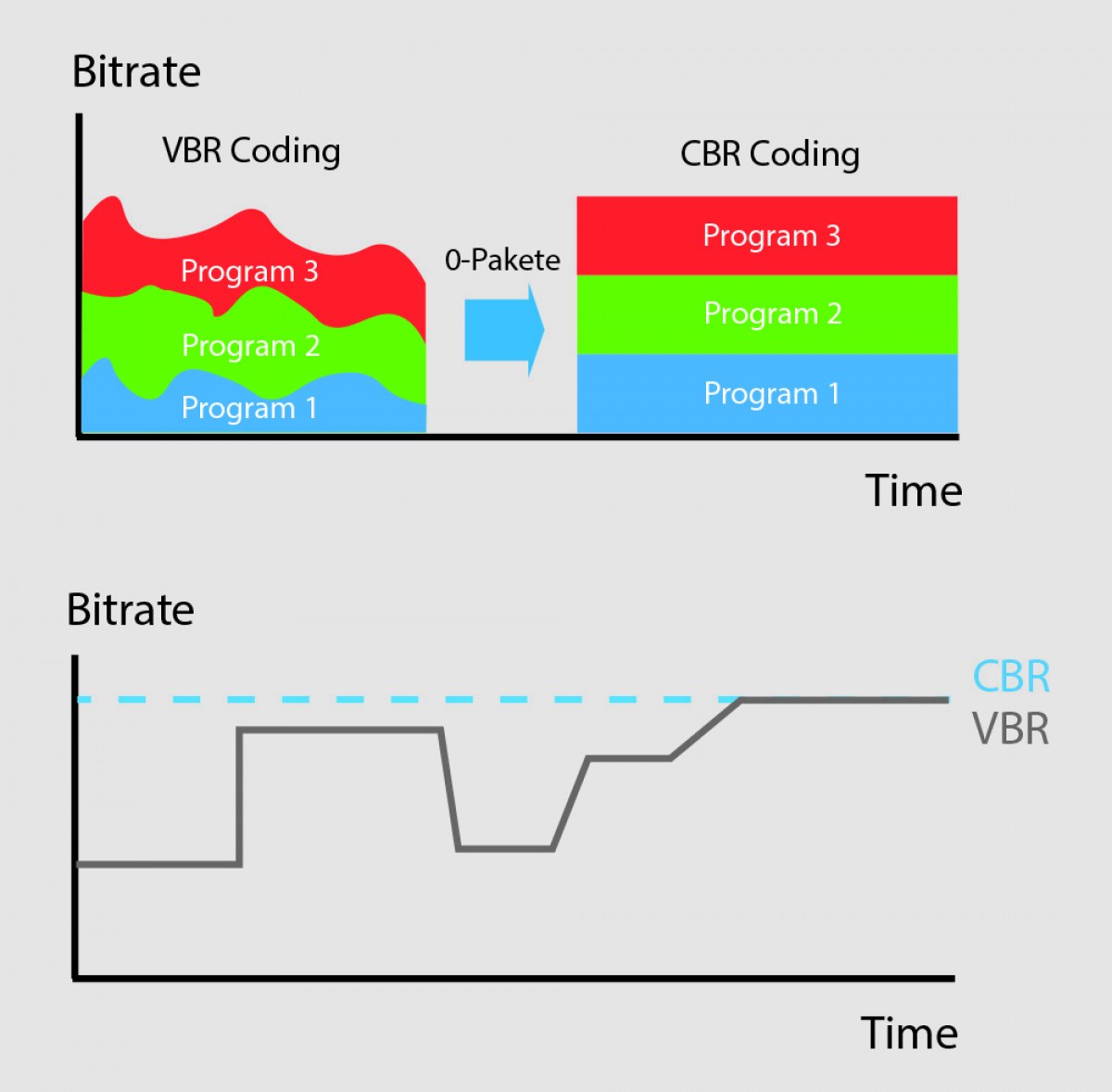
VBR (Variable Bitrate) Dynamic Bitrate means there is no fixed bitrate. The compression software immediately determines which bitrate to use based on the audio data being compressed. This is a method that takes quality as a premise and takes file size into account The recommended encoding mode;
ABR Average Bit Rate (Average Bit Rate) is an interpolation parameter of VBR. LAME created this encoding mode in response to the low file volume ratio of CBR and the variable size of files generated by VBR. Within the specified file size, ABR takes every 50 frames (about 1 second for 30 frames) as a segment. High-frequency and insensitive frequencies use relatively low traffic, and low-frequency and large dynamic performance use high traffic, which can be used as VBR and CBR, a compromise option.
CBR (constant bitrate), constant bitrate means the file has one bitrate from start to finish. Compared to VBR and ABR, the compressed file size is very large and the sound quality will not improve significantly compared to VBR and ABR.

What is bit rate? Knowledge of the MP3 audio format.

What is bit rate? Knowledge of the MP3 audio format.

mp3 bit rate

Digital audio formats are audio signals that are recorded, processed, and reproduced in digital form.

Mp3 bit rate

The emergence of digital audio formats is to meet the needs of high-fidelity playback, storage and transmission. Simply put, early analog audio formats had issues with playback distortion and glitches due to media wear. Since the advent of CD discs, audio files in digital format have become popular, but another problem has arisen: the limitation of storage volume and the phenomenon of CD disc wear is still present. Saving to a hard drive (in connection with longer storage time) is also not a good solution when storage media (mainly hard drives) are still expensive at the time. The rise of the Internet has created a requirement for long-distance file transmission. Under the restriction of bandwidth, the demand to reduce file size has become more intense. All this has led to the generation of lossy compressed digital audio formats from external factors!

In terms of internal factors, with the improvement of computing and coding capabilities, the progress of various acoustic psychological models has promoted the emergence of various lossy compressed digital audio formats. Some of the most commonly used audio formats in MP3 players are briefly introduced below: MP3 (CBR, VBR, ABR), WMA, WAV, ADPCM, and the emerging audio formats AAC, ASF, and OGG.

Before introducing various digital audio formats, let’s clarify one concept: bitrate.

In the field of computing, all information is digitized. Bit is the smallest unit of data in a computer, it refers to a number of 0 or 1, which is a mathematical binary number, a “0” or “1” , is a bit. For example, when we say a 2-digit number, it means that it is a two-digit binary number, and there are 4 combinations of “00”, “01”, “10” and “11”, which represent 0, “11” in decimal respectively. 1, 2 and 3 are four numbers.

What is the best bit rate for video and sound and what is it?

What is the best bit rate for video and sound and what is it?

Bitrate

Common characteristics of video and audio recordings include the so-called bit rate. Some users do not know how important this figure plays when playing files, along with their size and resolution.

BitRate

What is the bit rate? The bitrate is the number of bits that are used to process and transmit data during a certain period of time. This measurement is used to measure the effective transmission rate on a data stream channel. In other words, this is the minimum value of the channel capable of passing the flow without delay. The measure of video bit rate is bits per second and its derivatives (kbps, Mbps, etc.). In audio and video transmissions that use degrading compression, this term refers to the degree of compression of the transmission. Consequently, it indicates the size of the channel within which compression took place. Compression modes In practice, there are three modes of stream compression that cause quality loss: Constant Bit Rate (or CBR).

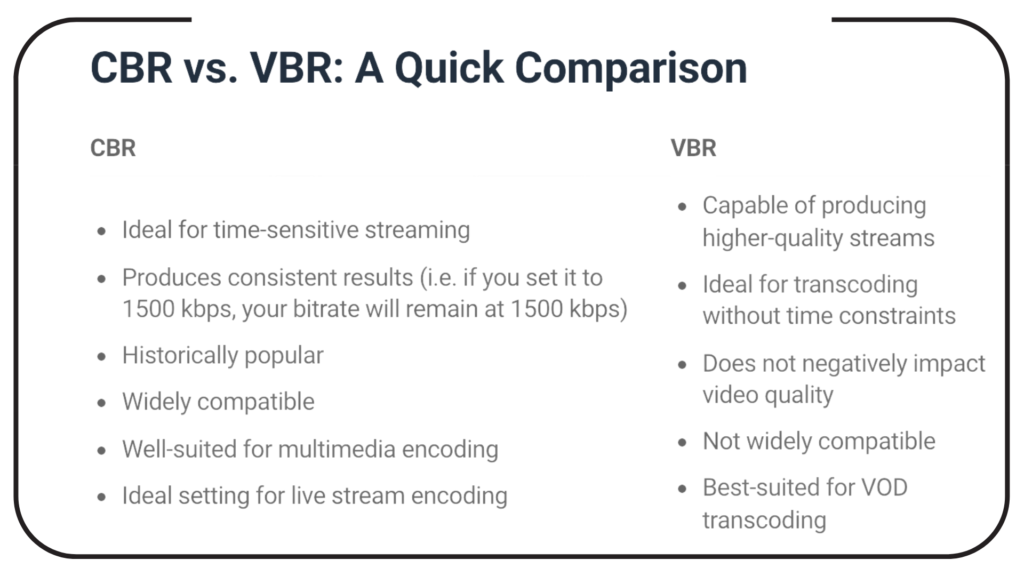
In this encoding option, the initial bit rate is set by the user and then does not change for the entire duration of the audio or video. Its advantage is that it is quite easy to calculate the size of the final file. However, this encoding is not very suitable for audio files that have dynamically changing sound, as it does not provide a good size / quality ratio. Variable bit rate (or VBR). The bitrate value is selected by the codec, depending on the parameters (the expected quality level). During the encoded fragment, the value of the bit rate may change. When audio is compressed, the required bit rate is set based on the psychoacoustic model. This encoding achieves the best sound quality ratio, but it is difficult to calculate the exact size of an audio or video recording. It can be very different. Average Bit Rate (or ABR). This is a hybrid of the first two modes.

The initial value of the bit rate is set by the user, but then independently changed by the program within certain limits. At the same time, the difference with VBR is that the codec uses the maximum and minimum values ​​within the limits set by the user, and does not exceed them. This encoding allows you to set the processing speed in the most flexible way and allows you to determine the file size with greater precision. What is the Getcontact application and how to use it

What and how is it measured? When quantifying high data rates, metric or decimal prefixes are used. It looks like this: Speed ​​1000 bps = 1 kbps (one kilobit or one thousand bits per second). Speed ​​1,000,000 bps = 1 Mbps (one megabit or one million bits per second). Speed ​​1,000,000,000 bps = 1 Gbps (one gigabit or one billion bits per second). What bit rate should I choose? In terms of the common MP3 audio format, it is the audio compression that results in data loss. The higher the bit rate, the better the sound quality. Speaking of the choice of the bit rate for this format, we can say the following: 32 kbps: very low quality sound (valid only for voice recording); 96 – May be applicable for low quality audio transmission or voice recording; 128 and 160: allows you to encode music recordings at an entry level; 192 – music encoding in acceptable quality; 256: high quality music recording; 320 is the highest quality you can get in MP3 format. In video formats, this value is calculated differently. For example, for videos on YouTube, a bit rate of 10-16 Mbps at 720p is sufficient. This will achieve a clear image and a small file size.

If better image quality is required, this value can be increased to 18-25 Mbps. The highest image quality will be achieved at 50 Mbps and 1080i resolution. In general, the effect of bitrate on video quality is expressed as follows: Yandex.Direct18 + Make money building websites! SITE.ONLINESCHOOL-PROFI.RU Make money writing articles COPYWRITING.ARTUR-GRANT.RU 400 kbps: low quality video at 240p; 750 kbps, 1 Mbps: can be used for some YouTube videos at 360p and 480p, respectively; up to 1.15 Mbps – compressed video in VCD format; 2.5 and 3.8 are compressed videos for YouTube, recorded at 720p; 4.5 and 6.8 are sharper YouTube videos but still compressed at 1080p resolution. 9.8 – DVD video recordings; 8-15 – high definition video recording using compression; 19 and 25 are HDV (high definition) recordings created at 720p and 1080i, respectively; 29.4 – high quality HD DVD video; 40 – Blu-Ray Disc recorded at 1080p; 250 – DCP format; 4Gbps: Uncompressed 1080p video recording.