What is VBR MP3 Bitrate?


Free Download Mp4Gain
picture

What is VBR MP3 Bitrate?
VBR Bitrate
VBR Bitrate
VBR Bitrate
VBR Bitrate

The Basics of VBR MP3 Bitrate

When it comes to music and audio files, bitrate is an important factor to consider. Bitrate refers to the amount of data that is transmitted per second in a digital audio file. The higher the bitrate, the more data is transmitted and the better the audio quality.
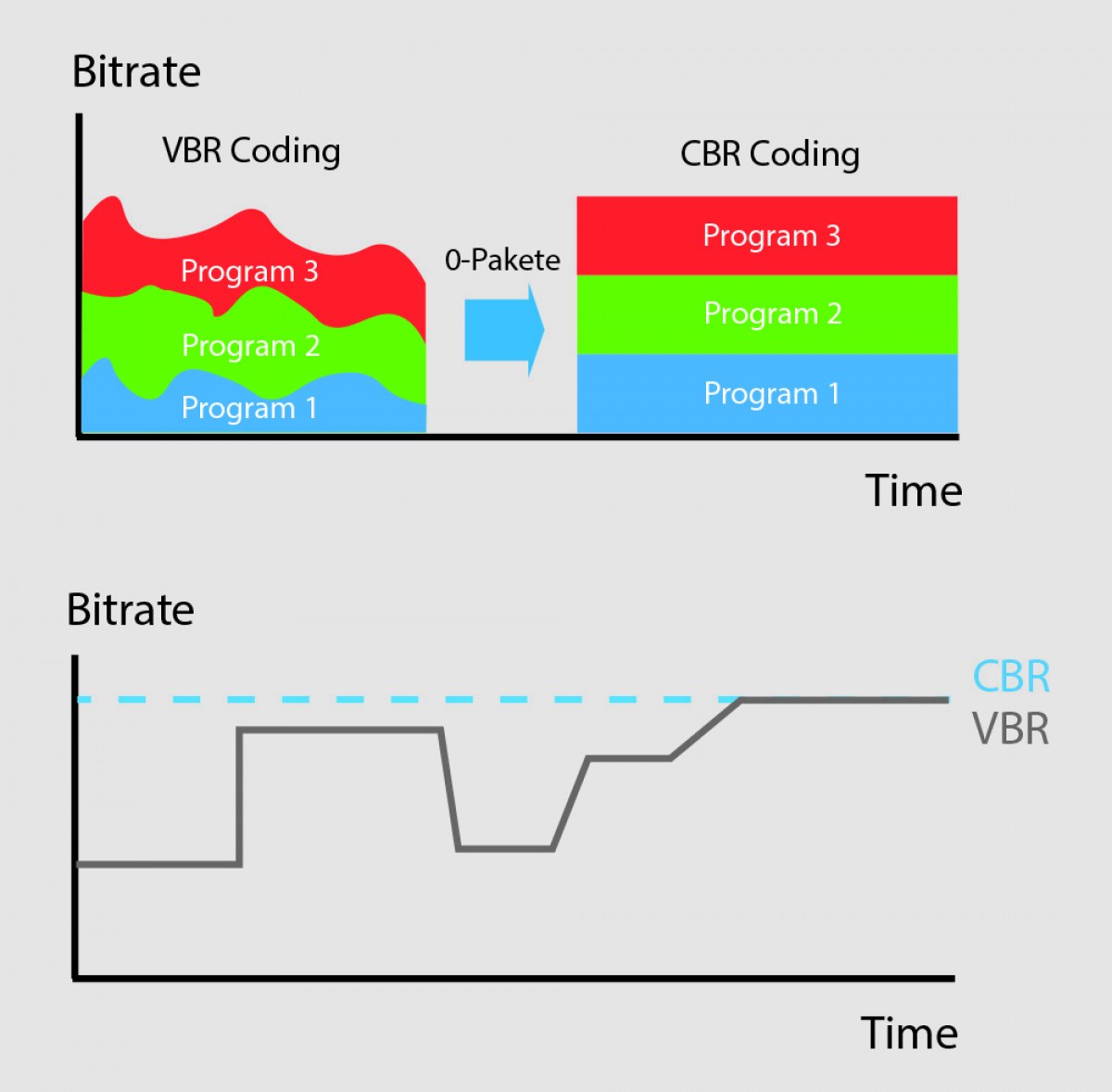
VBR, or variable bitrate, is a type of MP3 encoding that uses a variable bitrate rather than a constant bitrate. This means that the bitrate will vary depending on the complexity of the audio being encoded. For example, a simple audio passage with few instruments and no vocals may have a lower bitrate than a complex audio passage with many instruments and vocals.

VBR MP3 bitrate offers a number of advantages over constant bitrate encoding, including better audio quality, smaller file sizes, and more efficient use of storage space.

How to Choose the Right VBR MP3 Bitrate

When choosing the right VBR MP3 bitrate for your audio files, there are a number of factors to consider. These include the type of audio being encoded, the intended use of the audio, and the storage space available.
For example, if you are encoding audio for use on a mobile device with limited storage space, you may want to use a lower bitrate to minimize file size. On the other hand, if you are encoding audio for use in a high-quality home theater system, you may want to use a higher bitrate to ensure the best possible audio quality.

Ultimately, the right VBR MP3 bitrate will depend on your specific needs and preferences. Experimenting with different bitrates and listening to the resulting audio can help you determine the best option for your particular situation.

The Future of VBR MP3 Bitrate

As technology continues to advance and storage space becomes more abundant, VBR MP3 bitrate is likely to become even more popular in the future. With its ability to offer high-quality audio in a compact and efficient format, VBR MP3 encoding is sure to remain a popular choice for music lovers and audio enthusiasts alike.
In the words of music legend Bob Marley, “One good thing about music, when it hits you, you feel no pain.” With VBR MP3 bitrate, music lovers can experience high-quality audio that hits them right where it counts, without the pain of bloated file sizes or compromised sound quality.

Conclusion: The Benefits of VBR MP3 Bitrate

In conclusion, VBR MP3 bitrate is a powerful tool for encoding high-quality digital audio files. By using a variable bitrate that adapts to the complexity of the audio being encoded, VBR MP3 encoding offers superior sound quality, smaller file sizes, and more efficient use of storage space.
As technology continues to evolve and storage space becomes more abundant, VBR MP3 encoding is sure to become even more popular in the future. So the next time you’re encoding digital audio files, consider using VBR MP3 encoding to experience the benefits of variable bitrate technology for yourself.

In the words of writer Kurt Vonnegut, “The only proof he needed for the existence of God was music.” With VBR MP3 bitrate, the beauty of music can be captured in all its glory, providing an experience that is truly transcendent.


Free Download Mp4Gain
picture


Mp4Gain Main Window
picture


Mp4Gain Features
picture


Free Download Mp4Gain
picture

Audio Bitrate Calculation

Audio Bitrate Calculation

MP3 bit rate
MP3 bit rate

Generally, the files we read will know the following parameters:

MP3 bit rate
MP3 bit rate

Sampling frequency: the number of sampling points that pass one second; by
For example, the most common sample rate of 44.1k means that there are 44,100 sampled data points in one second;

Bit depth: Bit depth is also called sampling bit depth, and the bit depth of the audio determines the dynamic range.
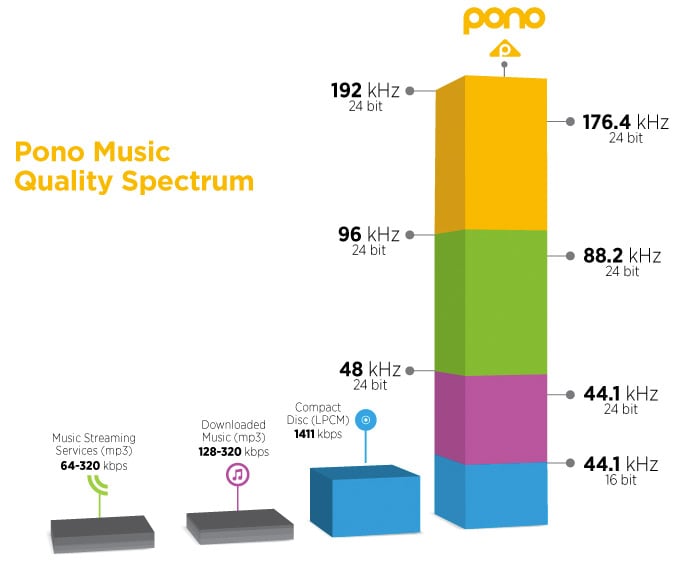
Our common 16-bit (16-bit) can record a dynamic range of about 96 decibels. Well, roughly you can know that each bit can record about 6 decibels of sound. Similarly, the 20-bit recordable dynamic range is about 120 dB; 24 bits is about 144 dB.

If we define 0dB as the maximum value, then the amplitude of the sound is calculated by extending down, then the dynamic range of CD audio is “-96dB ~ 0dB”. And so on, the dynamic range of 24-bit HD-Audio is “-144dB~0dB”. It can be seen that at higher bit depths, a greater dynamic range is available and lower levels of detail can be recorded.

Number of channels: usually single channel or two channels

Through the above parameters, the bit rate of the audio can be calculated

\color{blue}{code rate = sample rate (44.1k) * bit depth (16) * number of channels (2) = 1411.2kbps}

Audio bitrate, also known as bitrate: Refers to the amount of data that can pass through an audio stream per second. For example, 128 kbps, where ps (per second) is per second and kb is thousand bits, then 128 kbps means that the amount of data that can be transmitted in one second is 128 thousand bits. For files of the same format, the higher the bitrate, the better the sound quality. But for audio files of different formats, the same bitrate does not mean the same sound quality.

CD quality sound, usually two channels, compressed at 128kbps MP3, one second of data is converted to 128kbits. Some details are lost, which saves a lot of disk space or bandwidth.

After knowing the audio code rate, you can get the size of the whole audio file = duration (300s) * code rate (1411.2)/1024/8=51.67M

3 Ways to Change Bitrate of MP3 Files Part 2

3 Ways to Change Bitrate of MP3 Files Part 2

mp3 bit rate
mp3 bit rate

The second thing you want to read is that you should never convert to a lower bitrate. bitrate to a higher bitrate stream and I hope it sounds better. You cannot gain quality by increasing the bit rate. This is absolutely correct. If you try to convert the bitrate, you will actually lower the quality of the MP3 file.

mp3 bit rate
mp3 bit rate

If you want an MP3 with a higher bitrate than it currently has, you’ll need to go back to the source (CD, etc.) and extract the audio at full quality. You can then convert that file to a higher bitrate MP3 file.

The last thing you need to know is that converting between lossy formats is not recommended as you will still lose quality. However, it is possible to convert between formats losslessly while preserving quality.

On the other hand, many tests done even with recording engineers or professional musicians have shown that less than 1% of the population can distinguish between an mp3 with good bitrate (196 for example) and a samplerate of 44100 or more.

There is a sector of puritanism that defends tooth and nail the use of losless formats, because in theory they seem to be better, but the limitations and peculiarities of human hatred mean that a loosy file with a high bitrate and a high samplerate is enough for the human ear.

Mp4Gain is the most professional and polished program to help you in all these matters and you can achieve the highest sound quality with any format.

3 Ways to Change the Bitrate of MP3 Files

3 Ways to Change the Bitrate of MP3 Files

Mp3 bitrate
Mp3 bitrate

Do you want to change the bitrate of an MP3 file?

Mp3 bitrate
Mp3 bitrate


This can be useful if, for example, you need to reduce the size of an MP3 file. A 320kbps MP3 file, the highest bit rate allowed for MP3 files, can be reduced to 192kbps to significantly reduce the size of the MP3 file.

There is a drop in quality, but the difference is negligible for most listeners using standard speakers or headphones. If you’re an audiophile, you’ll probably never use the MP3 format, except for expensive audio equipment.

You are most likely using a lossless format such as PCM, WAV, AIFF, FLAC, ALAC, or APE audio, compressed or uncompressed. Uncompressed PCM audio files are about 10 times larger than CD-quality MP3 files.

The MP3 format is a lossy format, which means sacrificing audio quality to keep the file size relatively small. Almost every site will tell you not to convert lossless audio files to MP3 unless you might lose some audio quality.

<Almost all the time. The only time it might make sense is if you have a high bitrate audio file in a low quality format like WAV. For example, it might make sense to convert a 96kbps WAV file to MP3, but only if you choose a bitrate of 192kbps or higher. A higher bitrate in an MP3 file will allow it to maintain the same quality as a WAV file, even if it has a lower bitrate.

Audio Bitrate: What is the Bitrate of Music Part 3

Audio Bitrate: What is the Bitrate of Music Part 3

Audio Bitrate
Audio Bitrate

How should bitrate be interpreted in an audio file?

Audio Bitrate
Audio Bitrate

That is, the higher the bitrate, the better the audio and video quality, but the larger the encoded file, the lower the bitrate, the situation is reversed. For example: encode audio and video at 500 Kbps. Where bps is bit 1K=1010=1024 b is bit (bit) s is second (second) p is per (per) So encoding with 500kbps means that audio data and video encoded need to use 500K bits per second to Indicates that the bit rate is used to represent the code rate of information transmitted in the baseband transmission system. The bit rate Rb refers to the number of binary bits transmitted per unit of time, and the unit is b/s. For example, the transmission code rate of a computer serial port is up to 115200b/s. The symbol rate or baud rate Rs refers to the number of modulation symbols transmitted per unit of time, that is, the information transmission rate of ternary and more than ternary digital code streams, and the unit is baud/s In M-ary modulation, bit The relationship between the rate Rb and the baud rate Rs is: Rb=Rslog2M In a word, the bit rate indicates the amount of data transmitted per second.

What is the proper bit rate for mp3 music files?
Bitrate is simply the number of bits per second transmitted by the media file and the unit is Kbp/s. The default bit rate of compressed MP3 files is 128 Kbp/s and the sound quality is similar to that of a CD. However, the bit rate of MP3 downloaded from the Internet is usually 192Kbp/s, the sound quality of 192Kbp/s is better than that of 128Kbp/s, and the space occupied by the file is not too large, so which is widely used. . However, if you want to get better sound quality, the bit rate should be higher than 320Kbp/s, and the sound quality can be really comparable to CD quality. However, the price you pay for doing this is that one song will take up about 10M of hard drive space. Generally speaking, the higher the bitrate, the better the sound quality, but it will take up more disk space.

What does “bitrate” mean in audio?
For example, 128kbps MP3 means that the amount of information per second is 128kb converted into bytes is 16KB 320kbps MP3, so the quality does not improve, on the contrary, it may decrease. There are also lossy compression formats such as MP3, wma, ogg .. These are lossy compression formats, which means that there will be loss in the compression process, but each compression algorithm is different, and the quality of the compressed sound is different. For example, when comparing the same bit rate, the sound quality of different formats is different. Hope it can help you.

Audio Bitrate: What is the Bitrate of Music Part 2

Audio Bitrate: What is the Bitrate of Music Part 2

Audio Bitrate
Audio Bitrate

What do sample rate and bit rate mean in a song?

Audio Bitrate
Audio Bitrate


Bit rate Bit rate refers to the sampling rate at which digital sound is converted from analog to digital format. The higher the sampling rate, the better the quality of the restored sound. The bit rate value is compared with the actual audio: 16 KBPS = phone sound quality 24 KBPS = increase phone sound quality, shortwave transmission, longwave transmission, European standard medium wave transmission 40 KBPS = American standard medium wave transmission 56 KBPS = voice 64 KBPS = voice boost (best bit rate for mobile phone ringtones) Setting value, the best mobile phone mono MP3 player setting value) 112 KBPS = FM radio stereo FM 128 KBPS = tape (best setting value of mobile phone stereo MP3 player, best setting value of low-end MP3 player) 160KBPS= HIFI HIFI (best setting for MP3 players mid- to high-end) 192KBPS=CD (best setting for high-end MP3 players) 256KBPS=Studio Music Studio (for music enthusiasts) The sample rate is when the analog signal is ca is converted to a digital signal The sampling rate is related to the quality of the sound. The higher the sample rate, the better the high-frequency restoration of the sound file. The following is the different quality corresponding to different sampling rates 1.11,025Hz The sound of this sampling rate is similar to the sound quality of AM radio 2.22,050Hz The sound of this sampling rate is similar to the sound quality of FM radio, but less than 3.32 000 Hz This sample The sound of this frequency is higher than the sound quality of FM broadcast 4.44 100 Hz The sound of this sampling frequency reaches the sound quality of the CD audio 5.48000 Hz Sound at this sampling rate reaches DAT audio sound quality 6.96000 Hz Sound at this sampling rate reaches DAT audio sound quality The higher the sampling rate sound quality of the DVD audio, the more disk space the final sound file will take up. Usually we can choose 44.1KHZ sampling rate.

Audio Bitrate: What is the bitrate of music

Audio Bitrate: What is the bitrate of music

Audio Bitrate
Audio Bitrate

Bit rate refers to the amount of binary data per unit of time after converting an analog sound signal to a digital sound signal.

Audio Bitrate
Audio Bitrate

The higher the bitrate, the better the sound quality (under the same encoding format, different formats cannot be compared). audio bitrate. Bit rate is a benchmark of digital music compression efficiency. Bit rate indicates the rate of the number of bits bps (bit per second, bits per second) transmitted in a unit of time (1 second). Kbps (in layman’s terms is 1000 bits per second) is usually used as the unit. The bit rate of digital music on the CD is 1411.2 kbps (i.e. to burn 1 second of CD music, 1411.2 × 1000 data bits are required), the high bit rate of the music file means that the data must be processed in a unit of time (1 second) The amount (BIT) is large, that is, the sound quality of the music file is good. However, when the BITRATE is high, the file size increases, which will occupy a large amount of memory capacity. ranges in this sense, most of them are 32-256 Kbps. Of course, the wider the index, the better, but 320 Kbps is the highest level for the moment.

Audio Coding Part5

Audio Coding Part5

VBR


About VBR

VBR Encoding

VBR: An interesting feature of MP3 files is that they can be read and played, which is also in line with the most basic features of streaming media. That is, the player can play without first reading the entire content of the file and play where it reads, even if the file is partially damaged. Although mp3 can have a file header, it is not very important for mp3 format files. Because of this feature, each frame of an MP3 file can have a separate average data rate without a special decoding scheme. That is why there is a technology called VBR (Variable bitrate, dynamic data rate), which allows each segment or even each frame of an MP3 file to have a separate bitrate, the advantage of this is that the sound quality is guaranteed to the maximum. . File size is limited. The advantages of this technology are obvious, but it is really difficult to use, because it requires the encoder to know how to assign the bitrate to each segment, which is like a dummy for encoders without waveform analysis. As such, VBR technology didn’t seem glamorous as soon as it appeared.
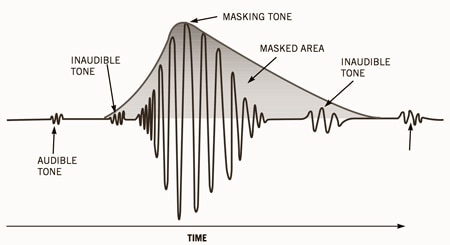
Experts have found that the human ear has a protective effect through long-term acoustic research. The sound signal is actually a type of energy wave, which propagates in air or other media. The most direct response of the human ear to the amount of sound energy, that is, the volume or pressure of the sound, is to hear the size of the sound. We call it the volume, which means the volume. The unit of energy is the decibel (dB). Even sounds of the same volume can be perceived by people as different in size due to their different frequencies. The 500 Hz frequency is most easily heard by the human ear. No matter whether the frequency is increased or decreased, even if the volume is the same, everyone will feel the sound become smaller. But when the volume drops to a certain level, the human ear cannot hear it, and each frequency has a different value.
You can see that this curve basically forms a V. When the frequency exceeds 15000 Hz, the human ear will feel that the sound is very small. Many people who are not very good at hearing cannot hear the frequency of 20000 Hz at all, no matter how loud it is… When the human ear hears two sounds with different frequencies and different volume at the same time, the one with the lower volume will also be ignored. For example, it is hard to hear the sound of the computer cooling fan during the day, but it becomes a noise source at night. According to this principle, the encoder can filter out many inaudible sounds to simplify information complexity and increase the compression ratio without significantly reducing sound quality. This shading is called the simultaneous shading effect. However, sound A is protected by sound B. If A is within the protection range centered on B, the protection will be more obvious. This range is called the critical bandwidth. The critical bandwidth of each frequency is different and the higher the frequency, the larger the critical bandwidth.
Frequency (Hz) Critical Bandwidth (Hz) Frequency (Hz) Critical Bandwidth (Hz)
Based on this effect, the experts designed a mental model of human hearing. After this model was imported into mp3 encoding, it led to a momentous revolution in sound quality. gradually eluted. At this point, the VBR technology, which has been buried for a long time, shines brightly, and with the use of the psychological model, it can perform powerful temptation and lethality.
For a long time, many people have a bad impression of MP3. More and more people think that the best sound quality of WMA is better than MP3. This statement is not correct. At medium and high bit rates, properly encoded MP3 is much better than WMA. It’s close to CD quality, with not-so-great hardware support, not many people can tell the difference between the two, it’s not a fairy tale, though you used to be able to easily tell the difference between MP3 and CD blindly. listening, but now cannot guarantee that it can distinguish correctly. Because MP3 is an excellent codec that was buried before.

MP3 and knowledge of the effects of possible settings

The MP3 audio compression method (also called MPEG-1 Layer 3) uses the properties of the human ear to save storage space. Frequencies inaudible to humans are filtered out of musical pieces. Depending on the degree of compression (so-called bit rates), this leads to no or severe loss of quality.
Music CDs use a constant bit rate (consumption of storage space / unit of time) of 1.4 Mbit per second for a stereo audio signal.

mp3

In comparison, a data rate of 192 kBit / s is sufficient with MP3 for almost CD quality music. It follows that the memory requirement is also significantly lower. There is about 10MB per minute of music on a music CD, good quality MP3 files only occupy about one eighth of this memory; So you can put around 8 hours of music on an MP3 CD.

MT Podcast | Motor Transport

A distinction is made between:

VBR – variable bit rate (variable bit rate)

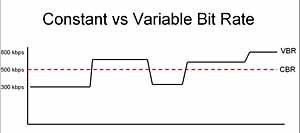
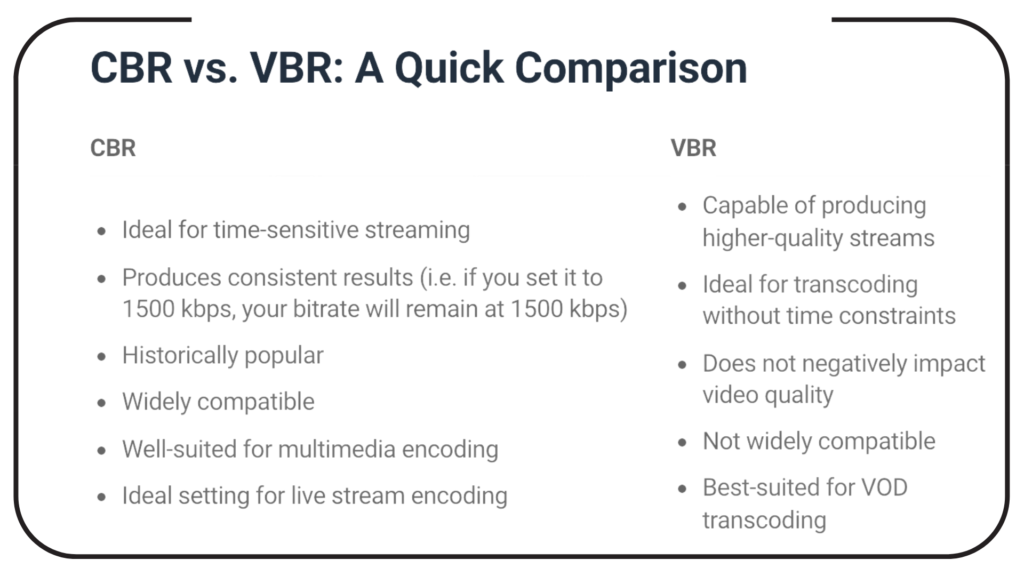
With VBR, the bitrate constantly adapts to the music. Fewer bits are used in more “quiet” places (for example, few instruments or quiet passages), so the bit rate is lowered, while in more complex places the bit rate is increased as much as is necessary for the specified quality level is maintained at all times. Therefore, the MP3 file created in this way requires less storage space than MP3 files of comparable quality. The size of the final file is of course unpredictable and can vary greatly depending on the song and its genre. (is better than ABR and CBR)

ABR: average bit rate

ABR makes it possible to use variable bit rates but still meet the given average bit rate very precisely. In this way, the encoder saves bits in quiet places, which are then available to more complex places. The quality of this mode is between CBR and VBR, since the disadvantages of the CBR mode are eliminated, but the advantages of VBR mode only partially come into play, since the higher bit rates are used less frequently so as not to exceed the specified average bit rate. (is better than CBR)

CBR – constant bit rate

In “old-fashioned” CBR mode, a certain bit rate is used, regardless of what bit rate is actually required. As a result, higher bit rates are not available for complex locations, which is at the expense of quality, while bits are wasted in quiet locations, which is at the expense of file size.

Conclusion: the best method is VBR.

The only exception is the CBR bit rate (320 kbit / s), but this no longer makes sense.
other technical terms:

Joint Stereo

Joint stereo, also known as MS stereo, is a lossless encoding of the two audio channels. The great similarity of the channels is exploited by creating two new channels. The sum of the left and right channels is stored in the middle channel (M); the difference between the original channels is encoded in the side channel (S). Therefore, the middle channel contains most of the information, while in the side channel there is only a small amount of information available. Both channels are quantized separately and relatively good compression is achieved.

However, this trick does not work for songs with strong channel separation, that is, if the left and right are almost not similar. Logically mid / side stereo is also not possible with mono.