The bitrate and its relationship with the audio quality in an MP3

The bitrate is a measure of the amount of audio information that is encoded per second in a compressed audio file, such as an MP3. Bit rate is measured in kilobits per second (kbps).

The higher the bitrate, the higher the audio quality. However, a larger file size will also be required to store the same amount of audio time. Therefore, it is important to choose a suitable bitrate to balance quality and file size.
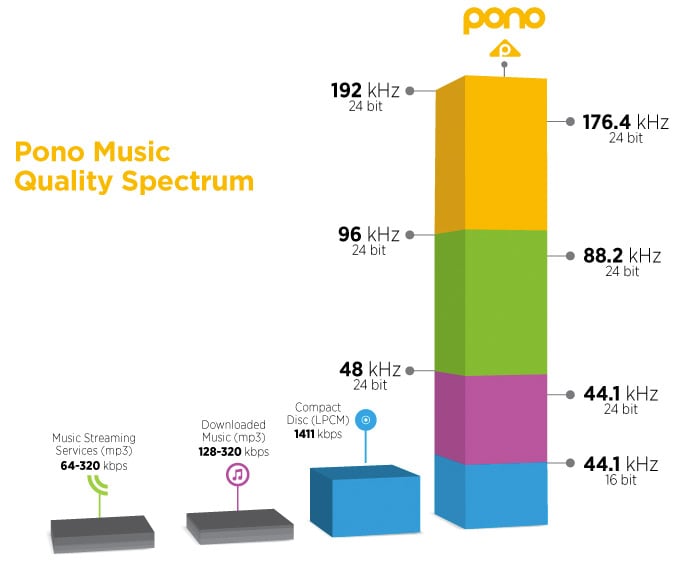
For music files, a bitrate of at least 128 kbps is recommended for decent sound quality. However, if you want higher sound quality, you can go for a higher bitrate, such as 256 kbps or even 320 kbps.
For voice audio files, a bit rate of 64 kbps is sufficient for clear sound quality. However, if you want higher sound quality, you can go for a higher bitrate, such as 96 kbps or 128 kbps.
In short, bitrate is an important factor in the audio quality of an MP3 file. It is important to choose a suitable bitrate to balance quality and file size.
Also, it’s important to note that bitrate isn’t the only factor that affects the audio quality of an MP3. Other important factors include the sample rate and the number of channels. The sample rate refers to the number of times the sound is measured per second, while the number of channels refers to the number of audio channels in the file.
For example, an audio file with a bit rate of 128 kbps and a sample rate of 44.1 kHz and 2 audio channels will have higher sound quality than a file with the same bit rate but a sample rate of 22 kHz and 1 audio channel.
In conclusion, if you want to get the best audio quality from an MP3 file, it’s important not only to choose a suitable bitrate, but also to consider the sample rate and number of channels. It is advisable to choose an optimal combination of these factors to obtain the best sound quality.
In addition, it is important to mention that there are other audio formats, such as WAV, FLAC, AIFF, which, unlike MP3, are not compressed, which means that they do not lose audio quality to the compression process. However, these formats often have much larger file sizes than compressed formats like MP3.
So, if you want the best audio quality, it’s recommended to use uncompressed formats like WAV or FLAC, but it’s also important to consider storage space and compatibility with different devices and audio players. In case of opting for compressed formats, it is important to choose an appropriate bitrate and take into account other factors such as the sampling frequency and the number of channels.
In summary, bitrate is an important factor in the audio quality of an MP3 file, but it is not the only factor to consider. It is important to choose a suitable bitrate, as well as take into account the sample rate and the number of channels to obtain the best sound quality. In addition, there are other uncompressed audio formats that offer higher sound quality, but also have a larger file size.