MP3 Bitrate Calculation Methods


Free Download Mp4Gain
picture

MP3 Bitrate Calculation Methods

MP3 Bitrate
MP3 Bitrate
MP3 Bitrate
MP3 Bitrate

What is MP3 Bitrate?

MP3 bitrate is the amount of data that is used to encode an MP3 audio file. The higher the bitrate, the higher the quality of the audio file. However, higher bitrates also result in larger file sizes.

How is MP3 Bitrate Calculated?

MP3 bitrate is calculated using a variety of factors, including the complexity of the audio signal, the desired quality of the audio file, and the target file size.

What are the Different Types of MP3 Bitrate Calculation Methods?

There are two main types of MP3 bitrate calculation methods:

  • Constant bitrate (CBR): This method uses a constant bitrate for the entire audio file. This results in a consistent audio quality throughout the file, but it can also result in larger file sizes for complex audio signals.
  • Variable bitrate (VBR): This method uses a variable bitrate, which means that the bitrate changes depending on the complexity of the audio signal. This results in smaller file sizes for complex audio signals, but it can also result in a slight variation in audio quality.

Which MP3 Bitrate Calculation Method is Best?

The best MP3 bitrate calculation method depends on your needs. If you need a consistent audio quality throughout the file, then CBR is the best option. If you are more concerned about file size, then VBR is the best option.

How to Choose the Right MP3 Bitrate for Your Needs

When choosing the right MP3 bitrate for your needs, you should consider the following factors:

  • The type of audio signal: Complex audio signals, such as those that contain a lot of high-frequency content, require a higher bitrate than simple audio signals.
  • The desired quality of the audio file: If you want the highest possible quality, then you should use a higher bitrate. If you are more concerned about file size, then you can use a lower bitrate.
  • The target file size: If you have a specific file size in mind, then you can use a bitrate calculator to determine the bitrate that you need.

Conclusion

MP3 bitrate is an important factor to consider when encoding audio files. By understanding the different types of MP3 bitrate calculation methods and how to choose the right bitrate for your needs, you can ensure that your audio files sound great and have a reasonable file size.

Here are some additional details about the different types of MP3 bitrate calculation methods:

  • Constant bitrate (CBR): This method is the simplest to understand and implement. It is also the most reliable, as it ensures that the audio quality is consistent throughout the file. However, it can result in larger file sizes for complex audio signals.
  • Variable bitrate (VBR): This method is more complex than CBR, but it can result in smaller file sizes for complex audio signals. This is because VBR allows the encoder to use a lower bitrate for less complex parts of the audio signal, and a higher bitrate for more complex parts of the audio signal. However, VBR can result in a slight variation in audio quality, depending on the complexity of the audio signal.

Ultimately, the best MP3 bitrate calculation method for you depends on your specific needs. If you need a consistent audio quality throughout the file, then CBR is the best option. If you are more concerned about file size, then VBR is the best option.


Free Download Mp4Gain
picture


Mp4Gain Main Window
picture


Mp4Gain Features
picture


Free Download Mp4Gain
picture

The bitrate and its relationship with the audio quality in an MP3

The bitrate and its relationship with the audio quality in an MP3

The bitrate and its relationship with the audio quality in an MP3

The bitrate is a measure of the amount of audio information that is encoded per second in a compressed audio file, such as an MP3. Bit rate is measured in kilobits per second (kbps).

The bitrate and its relationship with the audio quality in an MP3

The higher the bitrate, the higher the audio quality. However, a larger file size will also be required to store the same amount of audio time. Therefore, it is important to choose a suitable bitrate to balance quality and file size.

For music files, a bitrate of at least 128 kbps is recommended for decent sound quality. However, if you want higher sound quality, you can go for a higher bitrate, such as 256 kbps or even 320 kbps.

For voice audio files, a bit rate of 64 kbps is sufficient for clear sound quality. However, if you want higher sound quality, you can go for a higher bitrate, such as 96 kbps or 128 kbps.

In short, bitrate is an important factor in the audio quality of an MP3 file. It is important to choose a suitable bitrate to balance quality and file size.

Also, it’s important to note that bitrate isn’t the only factor that affects the audio quality of an MP3. Other important factors include the sample rate and the number of channels. The sample rate refers to the number of times the sound is measured per second, while the number of channels refers to the number of audio channels in the file.

For example, an audio file with a bit rate of 128 kbps and a sample rate of 44.1 kHz and 2 audio channels will have higher sound quality than a file with the same bit rate but a sample rate of 22 kHz and 1 audio channel.

In conclusion, if you want to get the best audio quality from an MP3 file, it’s important not only to choose a suitable bitrate, but also to consider the sample rate and number of channels. It is advisable to choose an optimal combination of these factors to obtain the best sound quality.

In addition, it is important to mention that there are other audio formats, such as WAV, FLAC, AIFF, which, unlike MP3, are not compressed, which means that they do not lose audio quality to the compression process. However, these formats often have much larger file sizes than compressed formats like MP3.

So, if you want the best audio quality, it’s recommended to use uncompressed formats like WAV or FLAC, but it’s also important to consider storage space and compatibility with different devices and audio players. In case of opting for compressed formats, it is important to choose an appropriate bitrate and take into account other factors such as the sampling frequency and the number of channels.

In summary, bitrate is an important factor in the audio quality of an MP3 file, but it is not the only factor to consider. It is important to choose a suitable bitrate, as well as take into account the sample rate and the number of channels to obtain the best sound quality. In addition, there are other uncompressed audio formats that offer higher sound quality, but also have a larger file size.

Encoding an mp3

Encoding an mp3

encoding mp3

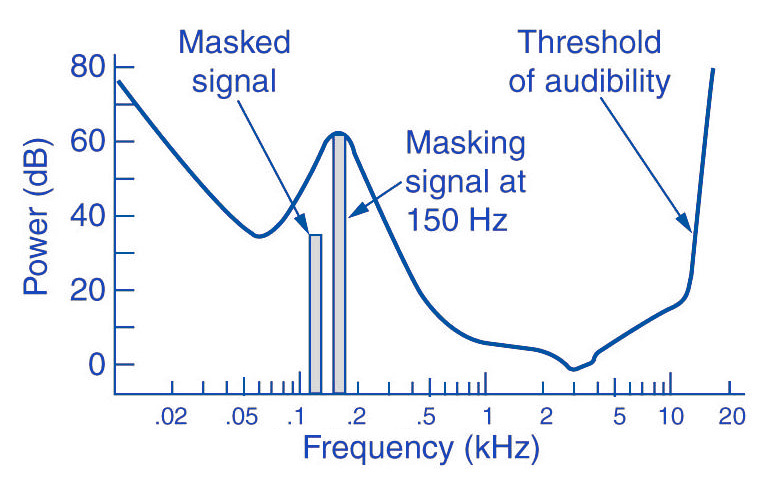
What is masking

mp3 encoding

The lossy MP3 audio compression algorithm uses a limitation of human hearing perception called auditory masking. In 1894, the American physicist Alfred M. Mayer reported that a tone could be made inaudible by another tone of a lower frequency. In 1959, Richard Amer described a complete set of auditory curves related to this phenomenon. Between 1967 and 1974, Eberhard Zwicker worked on tuning and masking critical frequency bands, which in turn built on the fundamental research of Harvey Fletcher and his collaborators at Bell Labs in this area. Perceptual coding was first used to compress speech coding with Linear Prediction Coding (LPC), which has its origins in the works Fuminada Itakura (Nagoya University) and Shuji Saito (from Nippon Telegraph and Telephone) in 1966. In 1978, Bishnu S. Atal and Manfred R. Schroeder of Bell Labs proposed an LPC speech codec called adaptive predictive coding. , which used a psychoacoustic coding algorithm using the masking properties of the human ear. Schroeder and Atal’s further optimization with J.L. Hall was later described in a 1979 article. In the same year M.A. Krasner proposed a psychoacoustic masking codec, which published and produced hardware for speech (not used to compress musical bits), but the publication of its results in a relatively obscure technical report from the Lincoln Laboratory did not immediately influence the mainstream of the development of psychoacoustic codecs. The Discrete Cosine Transform (DCT), a type of transform coding for lossy compression, proposed by Nasir Ahmed in 1972, was developed by Ahmed with T. Natarajan and KR Rao in 1973; published their results in 1974. This led to the development of the Modified Discrete Cosine Transform (MDCT) proposed by JP Princen, AW Johnson, and AB Bradley in 1987 after earlier work by Princen and Bradley in 1986. MDCT later became the main body of the MP3 algorithm. Ernst Terhardt et al. Built an algorithm that describes auditory masking with high precision in 1982. This work adds to many reports by authors dating back to Fletcher, as well as work that originally defined critical ratios and critical bandwidth. In 1985, Atal and Schroeder introduced Code Excited Linear Prediction (CELP), an LPC-based perceptual speech coding auditory masking algorithm that achieved a significant degree of data compression for its time. IEEE peer-reviewed journal “Favorite Communications” reported on a wide variety of audio compression algorithms (mainly perceptual) in 1988. The February 1988 issue of Voice Coding for Communication reported on a wide range of audio compression algorithms bit-based established and operational. technologies, some of which use auditory masking as part of their core design, and some of which show real-time hardware implementations. – https://ru.qaz.wiki/wiki/MP3