MP3 Bitrate Calculation Methods


Free Download Mp4Gain
picture

MP3 Bitrate Calculation Methods

MP3 Bitrate
MP3 Bitrate
MP3 Bitrate
MP3 Bitrate

What is MP3 Bitrate?

MP3 bitrate is the amount of data that is used to encode an MP3 audio file. The higher the bitrate, the higher the quality of the audio file. However, higher bitrates also result in larger file sizes.

How is MP3 Bitrate Calculated?

MP3 bitrate is calculated using a variety of factors, including the complexity of the audio signal, the desired quality of the audio file, and the target file size.

What are the Different Types of MP3 Bitrate Calculation Methods?

There are two main types of MP3 bitrate calculation methods:

  • Constant bitrate (CBR): This method uses a constant bitrate for the entire audio file. This results in a consistent audio quality throughout the file, but it can also result in larger file sizes for complex audio signals.
  • Variable bitrate (VBR): This method uses a variable bitrate, which means that the bitrate changes depending on the complexity of the audio signal. This results in smaller file sizes for complex audio signals, but it can also result in a slight variation in audio quality.

Which MP3 Bitrate Calculation Method is Best?

The best MP3 bitrate calculation method depends on your needs. If you need a consistent audio quality throughout the file, then CBR is the best option. If you are more concerned about file size, then VBR is the best option.

How to Choose the Right MP3 Bitrate for Your Needs

When choosing the right MP3 bitrate for your needs, you should consider the following factors:

  • The type of audio signal: Complex audio signals, such as those that contain a lot of high-frequency content, require a higher bitrate than simple audio signals.
  • The desired quality of the audio file: If you want the highest possible quality, then you should use a higher bitrate. If you are more concerned about file size, then you can use a lower bitrate.
  • The target file size: If you have a specific file size in mind, then you can use a bitrate calculator to determine the bitrate that you need.

Conclusion

MP3 bitrate is an important factor to consider when encoding audio files. By understanding the different types of MP3 bitrate calculation methods and how to choose the right bitrate for your needs, you can ensure that your audio files sound great and have a reasonable file size.

Here are some additional details about the different types of MP3 bitrate calculation methods:

  • Constant bitrate (CBR): This method is the simplest to understand and implement. It is also the most reliable, as it ensures that the audio quality is consistent throughout the file. However, it can result in larger file sizes for complex audio signals.
  • Variable bitrate (VBR): This method is more complex than CBR, but it can result in smaller file sizes for complex audio signals. This is because VBR allows the encoder to use a lower bitrate for less complex parts of the audio signal, and a higher bitrate for more complex parts of the audio signal. However, VBR can result in a slight variation in audio quality, depending on the complexity of the audio signal.

Ultimately, the best MP3 bitrate calculation method for you depends on your specific needs. If you need a consistent audio quality throughout the file, then CBR is the best option. If you are more concerned about file size, then VBR is the best option.


Free Download Mp4Gain
picture


Mp4Gain Main Window
picture


Mp4Gain Features
picture


Free Download Mp4Gain
picture

The bitrate and its relationship with the audio quality in an MP3

The bitrate and its relationship with the audio quality in an MP3

The bitrate and its relationship with the audio quality in an MP3

The bitrate is a measure of the amount of audio information that is encoded per second in a compressed audio file, such as an MP3. Bit rate is measured in kilobits per second (kbps).

The bitrate and its relationship with the audio quality in an MP3

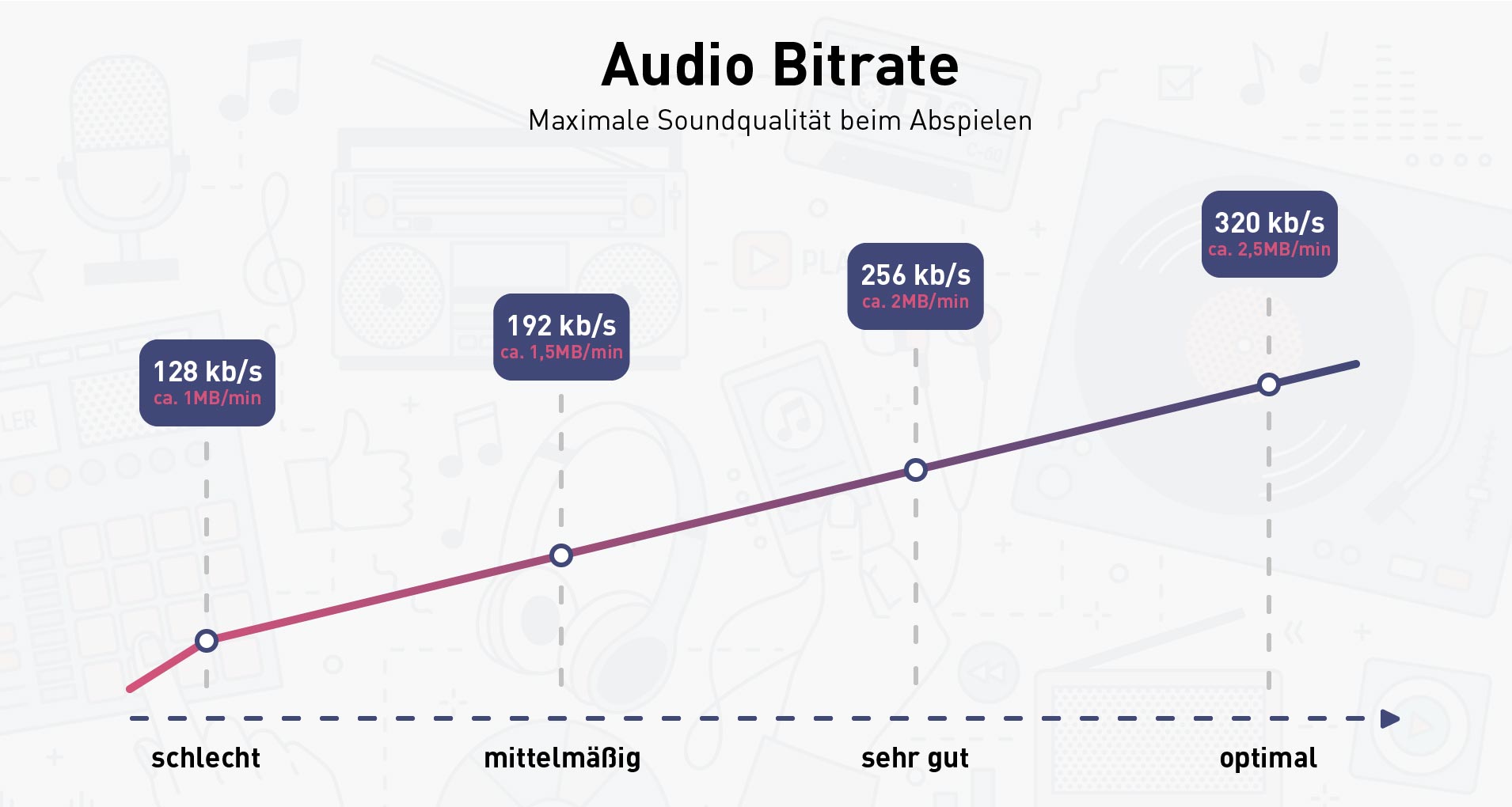
The higher the bitrate, the higher the audio quality. However, a larger file size will also be required to store the same amount of audio time. Therefore, it is important to choose a suitable bitrate to balance quality and file size.

For music files, a bitrate of at least 128 kbps is recommended for decent sound quality. However, if you want higher sound quality, you can go for a higher bitrate, such as 256 kbps or even 320 kbps.

For voice audio files, a bit rate of 64 kbps is sufficient for clear sound quality. However, if you want higher sound quality, you can go for a higher bitrate, such as 96 kbps or 128 kbps.

In short, bitrate is an important factor in the audio quality of an MP3 file. It is important to choose a suitable bitrate to balance quality and file size.

Also, it’s important to note that bitrate isn’t the only factor that affects the audio quality of an MP3. Other important factors include the sample rate and the number of channels. The sample rate refers to the number of times the sound is measured per second, while the number of channels refers to the number of audio channels in the file.

For example, an audio file with a bit rate of 128 kbps and a sample rate of 44.1 kHz and 2 audio channels will have higher sound quality than a file with the same bit rate but a sample rate of 22 kHz and 1 audio channel.

In conclusion, if you want to get the best audio quality from an MP3 file, it’s important not only to choose a suitable bitrate, but also to consider the sample rate and number of channels. It is advisable to choose an optimal combination of these factors to obtain the best sound quality.

In addition, it is important to mention that there are other audio formats, such as WAV, FLAC, AIFF, which, unlike MP3, are not compressed, which means that they do not lose audio quality to the compression process. However, these formats often have much larger file sizes than compressed formats like MP3.

So, if you want the best audio quality, it’s recommended to use uncompressed formats like WAV or FLAC, but it’s also important to consider storage space and compatibility with different devices and audio players. In case of opting for compressed formats, it is important to choose an appropriate bitrate and take into account other factors such as the sampling frequency and the number of channels.

In summary, bitrate is an important factor in the audio quality of an MP3 file, but it is not the only factor to consider. It is important to choose a suitable bitrate, as well as take into account the sample rate and the number of channels to obtain the best sound quality. In addition, there are other uncompressed audio formats that offer higher sound quality, but also have a larger file size.

Why are MP3 bitrates often multiples of 32? (power of 2)

Why are MP3 bitrates often multiples of 32? (power of 2)

MP3 Bitrate
MP3 Bitrate

Some people say:

MP3 Bitrate
MP3 Bitrate

I understand why multiples of 2 often show up on computers since they are binary, but I can’t figure out how the most common mp3 bitrates (64kbps, 128kbps, 160kbps, 192kbps, 256kbps, 320kbps, etc.) also tend to follow this rule.

Since MP3 is just a sequential encoding of sound waves, why is it important to represent each second in kilobits divisible by 2?
Does a music player like iTunes continue to read the file and play the encoded sound regardless of the second limit, or does it read the file every second?
In the latter case, reading a 256kbps file requires reading slightly fewer memory pages than a 257kbps file, but the player can always read 256KB chunks, regardless of their bitrate, and just process them automatically. incremental, right, Bar?
Are 128kbps MP3 songs popular simply because it’s a generally accepted bitrate, or do they really have any advantages over 126kbps and 131kbps files, apart from a very slight difference in quality/file size?

For constant bit rate (CBR) encoding, the MPEG-1 Audio Layer III standard specifies standard bit rates of 32, 40, 48, 56, 64, 80, 96, 112, 128, 160, 192, 224, 256 and 320 kbit/second. There are a few others defined in the MPEG-2 standard, but they are also multiples of 2 (actually all multiples of 8 in the range 8 to 160 – see the table called “Bitrate Index” in the link above) .

Technically, there is nothing that limits the MP3 bitrate to a multiple of 2, since variable bitrate encoding can be used, or a custom bitrate can be achieved using some flags not used in the MPEG specification ( although this must be implemented manually). . In order for MP3 to be MPEG-compliant, and therefore compatible with most MP3 decoders, it must have a bitrate defined by the specification, so all CBR-encoded MP3 files have a bitrate of two.

What is a good bitrate guide for mp3 files?

What is a good bitrate guide for mp3 files?

Mp3 Bit Rate
Mp3 Bit Rate

(a good bitrate guideline for mp3 files?)

Mp3 Bit Rate
Mp3 Bit Rate

MP3 files are compressed audio files created from audio formats such as wave (.wav). Wave files replicate analog recordings and digital sound files at the expense of large file size, while MP3 files sacrifice some quality for a smaller footprint. There are several factors that mitigate the quality sacrifice during the conversion process. With the correct bitrate and settings, MP3 files can provide very high quality results, making them very close to the original wave files when played on portable audio players.

An mp3 player.

The balance between file size and quality is somewhat subjective. For audiophiles, any difference is noticeable. Others may simply not be able to tell the difference between a high quality MP3 file and a raw wave source. In many cases, the nuances of the sound environment will only become clearer when played through a high-quality stereo system.

MP3s are compressed digital music files that sacrifice quality for file size.
MP3 files are primarily targeted at portable audio players. In this field, high-quality MP3 files are played with incredible sound due to their small file size. With the limited memory of portable players, it makes sense that one would want MP3 files to be as small as possible while maintaining the highest possible quality.

For this, one of the most important factors when creating MP3 files is the bit rate. In general, the more bits per second that are preserved from the original file, the higher the quality of the MP3 and the larger the file size. Lower bit rates reduce size and quality. The idea is to use the bitrate for maximum realism without saving unnecessary data, which just creates larger files with no noticeable difference to the ear.

For voice recordings such as lectures or language lessons saved to waveforms, a bit rate of 32 kilobits per second (kbps) is acceptable, although 64 kbps may offer better quality, depending on the source. At 32 kbps, the sound may sound “flat”, but that’s understandable. A 64 kbps MP3 file created from a voice recording should sound nearly identical to the original.

Desaturated acoustic music with simple arrangements should work fine at 192kbps bitrate. You can choose 256 kbps if the music will be played on a high quality device. Music that falls into this category includes folk, boy band songs, easy listening, and folk music. There are also works by many classic artists such as James Taylor, Linda Longstadt, Jonny Mitchell, and Simon Garfunkel.

What is bit rate? Knowledge of the MP3 audio format.

What is bit rate? Knowledge of the MP3 audio format.


bit rate
bit rate

Digital audio formats are audio signals that are recorded, processed, and reproduced in digital form.

bit rate
bit rate

The emergence of digital audio formats is to meet the needs of high-fidelity playback, storage and transmission. Simply put, early analog audio formats had issues with playback distortion and glitches due to media wear. Since the advent of the CD, digital format audio files have become popular, but another problem has arisen: the limitation of the storage volume, and the CD still has the phenomenon of wear. Saving to hard drive (relatively longer storage time) is not a good solution when storage media (mainly hard drives) are still expensive at the time. The rise of the Internet has created a requirement for long-distance file transmission. Under the restriction of bandwidth, the demand to reduce file size has become more intense. All this has led to the generation of lossy compressed digital audio formats from external factors!

In terms of internal factors, with the improvement of computing and coding capabilities, the progress of various acoustic psychological models has promoted the emergence of various lossy compressed digital audio formats. Some of the most commonly used audio formats in MP3 players are briefly introduced below: MP3 (CBR, VBR, ABR), WMA, WAV, ADPCM, and the emerging audio formats AAC, ASF, and OGG.

Before introducing various digital audio formats, let’s clarify one concept: bitrate.

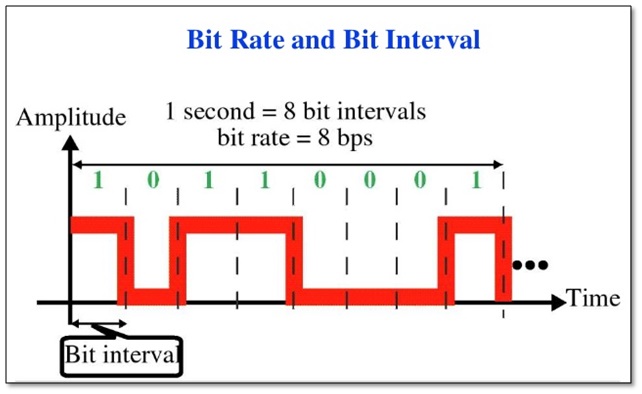
In the field of computing, all information is digitized. Bit is the smallest unit of data in a computer, it refers to a number of 0 or 1, which is a mathematical binary number, a “0” or “1” , is a bit. For example, when we say a 2-digit number, it means that it is a two-digit binary number, and there are 4 combinations of “00”, “01”, “10” and “11”, which represent 0, 1, 2 and 3 is four numbers.

What does MP3 bitrate mean?

What does MP3 bitrate mean?

MP3 bitrate

Bit rate

mp3 bit rate

The rate at which a digital channel transmits digital signals is called the data transfer rate or bit rate.
The word bitrate has many translations, such as bitrate, etc., which indicates how many bits per second the encoded (compressed) audio data should be represented, and a bit is the smallest binary unit, either 0 or 0. 1. The relationship between bitrate and audio and video compression is simply that the higher the bitrate, the better the quality of the audio and video, but the larger the encoded file; if the bitrate is lower, the situation is reversed.

For example: encode audio and video at 500 Kbps.
where bps are bits 1K = 1010 = 1024
b is little
s is the second
p is for (for)
Therefore, encoding at 500 kbps means that the encoded audio and video data must be represented at 500 K bits per second.
In the baseband transmission system, the bit rate is used to represent the code rate of transmitted information.
The bit rate Rb refers to the unit of time
The number of binary bits transmitted within the unit, the unit is b/s. For example, the transmission speed of a computer serial port is up to 115200b/s.
The symbol rate or baud rate Rs refers to the number of modulation symbols transmitted per unit of time, that is, ternary and ternary
The information transmission rate of the multivariate digital code stream in the

In M-ary modulation, the relationship between the bit rate Rb and the baud rate Rs is:
Rb=Rslog2M
The sampling rate refers to the ratio of the sampling samples to the total number of samples, and the sampling rate refers to the number of samples per unit of time. If it is an instrument, the sampling rate is 40MSa/s, which indicates that the number of samples per second is 40M, but it cannot be represented by 40MHz.

The process of converting analog audio to digital audio is called sampling. In a nutshell, how much data is needed to record a 1 second duration of sound via waveform sampling. A sound with a sample rate of 44 KHz requires 44,000 data points to describe a 1-second sound waveform. In principle, the higher the sample rate, the better the sound quality.

What is bit rate? Knowledge of the MP3 audio format.

What is bit rate? Knowledge of the MP3 audio format.

mp3 bit rate

Digital audio formats are audio signals that are recorded, processed, and reproduced in digital form.

Mp3 bit rate

The emergence of digital audio formats is to meet the needs of high-fidelity playback, storage and transmission. Simply put, early analog audio formats had issues with playback distortion and glitches due to media wear. Since the advent of CD discs, audio files in digital format have become popular, but another problem has arisen: the limitation of storage volume and the phenomenon of CD disc wear is still present. Saving to a hard drive (in connection with longer storage time) is also not a good solution when storage media (mainly hard drives) are still expensive at the time. The rise of the Internet has created a requirement for long-distance file transmission. Under the restriction of bandwidth, the demand to reduce file size has become more intense. All this has led to the generation of lossy compressed digital audio formats from external factors!

In terms of internal factors, with the improvement of computing and coding capabilities, the progress of various acoustic psychological models has promoted the emergence of various lossy compressed digital audio formats. Some of the most commonly used audio formats in MP3 players are briefly introduced below: MP3 (CBR, VBR, ABR), WMA, WAV, ADPCM, and the emerging audio formats AAC, ASF, and OGG.

Before introducing various digital audio formats, let’s clarify one concept: bitrate.

In the field of computing, all information is digitized. Bit is the smallest unit of data in a computer, it refers to a number of 0 or 1, which is a mathematical binary number, a “0” or “1” , is a bit. For example, when we say a 2-digit number, it means that it is a two-digit binary number, and there are 4 combinations of “00”, “01”, “10” and “11”, which represent 0, “11” in decimal respectively. 1, 2 and 3 are four numbers.

What sound quality is better than 320 or 128?

What sound quality is better than 320 or 128?

Bit Rate

What are bit rates? How do they affect the quality of music and video? Optimal bit rate for various musical styles

Bit Rate

There is a lot of talk these days that we have lost real music with the advent of compressed audio formats like MP3, AAC and the like. Is it really so? Will lossless music save music? Can an inexperienced listener tell the difference between MP3 and FLAC music? Let’s take a look at this problem.

What is Bitrate?

You’ve probably heard the term “bitrate” before, and you probably have a basic idea of ​​what it means, but it might be a good idea to familiarize yourself with its official definition to find out how it all works.

Bit rate is the number of bits or the amount of data that is processed over a period of time. In audio, this generally means kilobits per second. For example, the music you buy from iTunes is 256 kilobytes per second, which means that every second of the song

The higher the bit rate of the track, the more space it will take up on your computer. Audio CDs typically take up quite a bit of space, so it has become common practice to compress these files so that you can burn more music to your hard drive (or iPod, Dropbox or whatever). This is where the “lossy” and “lossy” formats conflict.

Lossless and Lossy formats: what’s the difference?

When we say lossless, we mean that we haven’t really changed the original file. That is, we copy a track from the CD to our hard drive, but we do not compress it to the point of losing data. Essentially the same as the original CD track.

However, most of the time, you will probably extract your music in Lossy format. That is, you took a CD, copied it to your hard drive, and compressed the tracks so they don’t take up a lot of space. A typical album is probably about 100MB. The same lossless album as (aka Apple Lossless) will be about 300MB in size, so it has become common practice to use lossy formats for faster boot times and more hard drive savings.

The problem is that when you compress a file to save space, you are removing chunks of data. Just like when you take a high-quality image and compress it to JPEG, your computer grabs the raw data and “tricks” certain parts of the image into being basically the same, but with some loss of clarity and quality.