What is the difference between 128k and 320k music?


Free Download Mp4Gain
picture

What is the difference between 128k and 320k music?

Mp3 Bit Rate
Mp3 Bit Rate

192k is a turning point. Below 192K, the sound quality is relatively damaged, especially the high-frequency part above 16Khz will be cut off.

Mp3 Bit Rate
Mp3 Bit Rate

In short, mp3 above 192k, ordinary home equipment can no longer hear the difference in CD sound quality, except for golden ears and hi-fi equipment. Of course, these data are not 100% reliable. There are always people on the internet sharing fake mp3 above 192K. In fact, they are converting low bitrate music to high bitrate through software, but the sound quality will not improve. Windows Media Player compresses the resulting mp3 is absolutely wonderful. No matter how high the compressed bitrate is, it will cut perfectly at around 16K, so if you want to compress MP3 yourself, don’t use Windows Media Player.


Well, in fact, the bit rate should be said to be another dimension, it is a compression of audio files.

Nowadays, most of the audio formats that we use regularly are based on the original “WAV” file of the audio CD (44.1khz sampling rate, 16bit sampling precision, 2ch). The original recorded sound data is stored in an array, which is in PCM format, while WAV format is an encoding format developed by Microsoft, and its function is to play the PCM format data through encoding.

Since the data in WAV basically completely restores the PCM data, MP3, AAC and other lossless encoding formats are basically recompressed based on the WAV files. Therefore, we can simply think that WAV is the original audio format and other audio formats are compressed formats.

When it comes to compression, storage and transmission are inseparable. The purpose of compression is to improve storage and transmission. Therefore, before we talk about compression, we need to understand the basic units of computers.

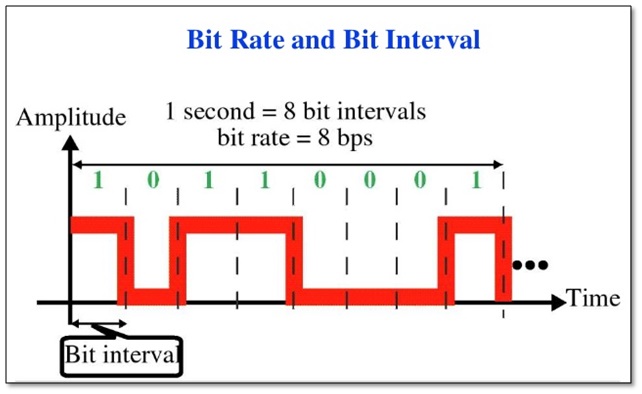
We all know that the computer is a binary number system, and the files stored by the computer are made up of two numbers, 0 and 1. Therefore, the computer’s transmission is based on each number, and each number is called 1 ” bit”. For example, for an audio piece, its basic data is “0,1,1,1,0,1, 1 ,0”, and when transmitting, these numbers are transmitted one by one. The sampling precision mentioned above is this unit.


Free Download Mp4Gain
picture


Mp4Gain Main Window
picture


Mp4Gain Features
picture


Free Download Mp4Gain
picture

Why are MP3 bitrates often multiples of 32?

Why are MP3 bitrates often multiples of 32?

MP3 bitrate
MP3 bitrate

I understand why multiples of 2 are often found on computers due to their binary nature, but I can’t figure out that the most common mp3 bitrates (64kbps, 128kbps, 160kbps, 192kbps, 256kbps, 320 kbps, etc.) also tend to follow this rule.

MP3 bitrate
MP3 bitrate

Since MP3 is just a sequential encoding of sound waves, why does it matter that each second is represented by thousands of digits per second that are divisible by 2?
Do music players like iTunes continue to read the file and play the encoded sound regardless of where the second limit is, or will they read the file every second?
In the latter case, reading a 256kbps file requires slightly fewer memory pages than reading a 257kbps file, but the player can always read 256kbit chunks, regardless of their bitrate, and process them incrementally , it is right?
Is MP3 popular at 128kbps because it’s a generally accepted bitrate, or does it really have some advantages over 126kbps and 131kbps files? Very slight difference in quality/file size?


For constant bit rate (CBR) encoding, the MPEG-1 Audio Layer III standard specifies standard bit rates of 32, 40, 48, 56, 64, 80, 96, 112, 128, 160, 192, 224, 256 and 320 kbit/s. There are other definitions in the MPEG-2 standard, but they’re also all multiples of 2 (actually all multiples of 8 are in the range 8 to 160 – see the table called “Bitrate Index” at the link above ).

What sound quality is better than 320 or 128?

What sound quality is better than 320 or 128?

Bit Rate

What are bit rates? How do they affect the quality of music and video? Optimal bit rate for various musical styles

Bit Rate

There is a lot of talk these days that we have lost real music with the advent of compressed audio formats like MP3, AAC and the like. Is it really so? Will lossless music save music? Can an inexperienced listener tell the difference between MP3 and FLAC music? Let’s take a look at this problem.

What is Bitrate?

You’ve probably heard the term “bitrate” before, and you probably have a basic idea of ​​what it means, but it might be a good idea to familiarize yourself with its official definition to find out how it all works.

Bit rate is the number of bits or the amount of data that is processed over a period of time. In audio, this generally means kilobits per second. For example, the music you buy from iTunes is 256 kilobytes per second, which means that every second of the song

The higher the bit rate of the track, the more space it will take up on your computer. Audio CDs typically take up quite a bit of space, so it has become common practice to compress these files so that you can burn more music to your hard drive (or iPod, Dropbox or whatever). This is where the “lossy” and “lossy” formats conflict.

Lossless and Lossy formats: what’s the difference?

When we say lossless, we mean that we haven’t really changed the original file. That is, we copy a track from the CD to our hard drive, but we do not compress it to the point of losing data. Essentially the same as the original CD track.

However, most of the time, you will probably extract your music in Lossy format. That is, you took a CD, copied it to your hard drive, and compressed the tracks so they don’t take up a lot of space. A typical album is probably about 100MB. The same lossless album as (aka Apple Lossless) will be about 300MB in size, so it has become common practice to use lossy formats for faster boot times and more hard drive savings.

The problem is that when you compress a file to save space, you are removing chunks of data. Just like when you take a high-quality image and compress it to JPEG, your computer grabs the raw data and “tricks” certain parts of the image into being basically the same, but with some loss of clarity and quality.

MP3 and knowledge of the effects of possible settings

The MP3 audio compression method (also called MPEG-1 Layer 3) uses the properties of the human ear to save storage space. Frequencies inaudible to humans are filtered out of musical pieces. Depending on the degree of compression (so-called bit rates), this leads to no or severe loss of quality.
Music CDs use a constant bit rate (consumption of storage space / unit of time) of 1.4 Mbit per second for a stereo audio signal.

mp3

In comparison, a data rate of 192 kBit / s is sufficient with MP3 for almost CD quality music. It follows that the memory requirement is also significantly lower. There is about 10MB per minute of music on a music CD, good quality MP3 files only occupy about one eighth of this memory; So you can put around 8 hours of music on an MP3 CD.

MT Podcast | Motor Transport

A distinction is made between:

VBR – variable bit rate (variable bit rate)

With VBR, the bitrate constantly adapts to the music. Fewer bits are used in more “quiet” places (for example, few instruments or quiet passages), so the bit rate is lowered, while in more complex places the bit rate is increased as much as is necessary for the specified quality level is maintained at all times. Therefore, the MP3 file created in this way requires less storage space than MP3 files of comparable quality. The size of the final file is of course unpredictable and can vary greatly depending on the song and its genre. (is better than ABR and CBR)

ABR: average bit rate

ABR makes it possible to use variable bit rates but still meet the given average bit rate very precisely. In this way, the encoder saves bits in quiet places, which are then available to more complex places. The quality of this mode is between CBR and VBR, since the disadvantages of the CBR mode are eliminated, but the advantages of VBR mode only partially come into play, since the higher bit rates are used less frequently so as not to exceed the specified average bit rate. (is better than CBR)

CBR – constant bit rate

In “old-fashioned” CBR mode, a certain bit rate is used, regardless of what bit rate is actually required. As a result, higher bit rates are not available for complex locations, which is at the expense of quality, while bits are wasted in quiet locations, which is at the expense of file size.

Conclusion: the best method is VBR.

The only exception is the CBR bit rate (320 kbit / s), but this no longer makes sense.
other technical terms:

Joint Stereo

Joint stereo, also known as MS stereo, is a lossless encoding of the two audio channels. The great similarity of the channels is exploited by creating two new channels. The sum of the left and right channels is stored in the middle channel (M); the difference between the original channels is encoded in the side channel (S). Therefore, the middle channel contains most of the information, while in the side channel there is only a small amount of information available. Both channels are quantized separately and relatively good compression is achieved.

However, this trick does not work for songs with strong channel separation, that is, if the left and right are almost not similar. Logically mid / side stereo is also not possible with mono.

MP3: the ideal sampling frequency according to each use.

Bitrate mp3

With MP3 and other audio formats, it is important to use the same sample rate from recording to playback whenever possible. While you can convert the sample rate at any time, sample rate converters almost always produce artifacts. The following sample rates are ideal for various applications:
To convert music CDs to MP3, for example, using our media player instructions, it is better to use the original 44100 Hz sample rate.

Mp3 Bitrate

DVD and BluRay sound is generally stored and played at 48,000 samples per second. So here you should stick to the 48 kHz sample rate. When converting 96 kHz audio to MP3, 48 kHz often sounds better than 44.1 kHz.

For pure voice recordings using a sound recorder or other software, a sampling rate of 8 to 9 kHz is sufficient, since small microphones above 4 to 5 kHz contain little sound energy.

If the sound quality of radio plays and audiobooks is not that important to you, because you want to carry as many stories as possible on an MP3 player, for example, use a sampling rate of 22050 Hz, although it is quite low. With half the sample rate, you can also cut the MP3 bit rate in half without losing quality.
If you digitize your old cassettes, 32 kHz was sufficient as the sample rate, because the tapes barely register frequencies above 16 kHz anyway. In other words, it would be unnecessary to use a higher sample rate.

What is the sample rate?

It is the speed with which “photographs” are taken (actually samples, in this case sound) and the more they are taken per second, the higher quality will be obtained. Think that the sound is represented by curves, and a curve will draw better the more detail or more dots it contains. It is impossible to represent well a curve with 3 segments, even with 10. The more segments it has, the more faithful it will be and the more similar it is to the original.

Because the quality is exactly that: how similar is the encoding to the original version. And there are two factors that count a lot: Sample rate and bitrate. Of course, the higher the sample rate and the higher the bitrate we will find a greater utilization of the disk space, which at this point is not usually a priority.

The size it occupies on the hard disk

Recall that the mp3 emerged precisely as a solution to save space on the hard disk. It was unmanageable to pretend to have a large music collection in WAV format (original format, without compression) on one of those small hard drives from a few years ago.

On the other hand, trying to download a complete WAV of a song from the internet or transfer it from one computer to another was also unmanageable, since they took up too much disk space.

Then the mp3 and later all the other compression formats, sought to achieve a good audio quality occupying perhaps 10 times the space that a WAV occupied.

VBR vs CBR

At the beginning of 2002 other compressed audio formats such as Windows Media Audio and Ogg Vorbis began to be massively included in programs, operating systems and autonomous players, which made it anticipate that the MP3 was gradually falling into disuse, in favor of other formats, such as those mentioned, of much better quality.

One of the factors that influences the decline of MP3 is that it has a patent. Technically it does not mean that its quality is inferior or superior, but it prevents the community from continuing to improve it and may force you to pay for the use of some codec, this is what happens with MP3 players.

New formats, such as OGG Vorbis, are not licensed, but are free SOFTWARE. That is why they can be used and improved without conditions. Even so, at the beginning of 2008, the mp3 format continues to be the most used and the one that enjoys the most success.


Mp3 – The psychoactive model and masking threshold

The psychoacoustic model and masking threshold

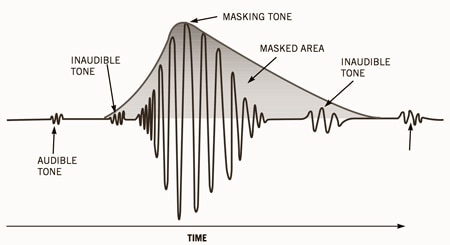
Compression is based on the reduction of irrelevant dynamic range, that is, on the inability of the auditory system to detect quantification errors under masking conditions.

The human ear has a perceptual masking threshold for its characteristics. If an airplane passes by us while we speak, the sound it produces is able to “cover” our voice. The same happens if a very strong DO note, on a trumpet, sounds at the same time as a pianisimo DO note on a violin: the DO of the trumpet, masks the DO of the violin, which is not heard.

This is due to the anatomy of the human auditory system: if two sounds of equal frequency are emitted, one with greater amplitude (volume) than the other, the sound of greater amplitude will mask that of amplitude (volume) than the other.

The psychoacoustic model is an average standard that divides the signal into approaching frequency bands, and then quantifies each subband based on the threshold of noise detection within that band. This model analyzes the audio signal and calculates the amount of noise that can be introduced based on the frequency, that is, calculates the “amount of masking” or
masking threshold as a function of frequency. Then, the encoder uses this information to decide the best way to spend the available bits.

Studies show that the distortion generated is imperceptible to the ear experienced in an optimal environment from 256 kbps and under normal conditions. For the non-experienced ear, or common, with 128 kbps or up to 96 kbps it is enough for it to be heard “well” (unless you have a high-quality audio equipment where the lack of bass is noticeably noticed and the sound is highlighted of “frying” in the treble).

In people who listen to a lot of music or who have experience in the auditory part, from 192 or 256 kbps it is enough to hear well. The music that circulates on the Internet is mostly encoded between 128 and 192 kbps.

MP3 – BItrate, CBR and VBR

CONSTANT AND VARIABLE BITRATE

CBR (constant bit rate)

It encodes the entire entire file with a single bit rate.

This method is the most common, and it becomes more predictable, always according to a file size and bandwidth. The file will be compressed to weigh a number of bits per second.

The bitrate is then measured in kbps (kilobites per second), the quality being better as much more bits per second weigh the file. In general, the most basic quality is
Around 128kbps, and the highest (for more educated ears) around 320kbps.

VBR (variable bit rate)

It encodes with a higher bit rate when the material is more complex, and a smaller amount of bits for simpler materials. By relying not only on the statistical references of the threshold of
average masking, but also of the source material, the .mp3 files compressed with VBR tend to be smaller than those compressed with the CBR method (they are the same quality) to have a more variable weight,

The quality is therefore no longer measured in kbps, but in levels (100 for the best quality – highest quality – and decreasing in the number for lower quality 10- lowest quality,)