Bit rate variability in VBR MP3


Free Download Mp4Gain
picture

Bit rate variability in VBR MP3
Bit rate variability in VBR MP3

Let’s talk about bit rate variability in VBR MP3

Bit rate variability in VBR (Variable Bit Rate) MP3 is a fascinating topic. It’s something I’ve worked on extensively, and it directly impacts the quality of audio we enjoy every day. Unlike constant bit rate (CBR) MP3s, where each second of audio is compressed uniformly, VBR dynamically adjusts the bit rate based on the complexity of the audio. For example, imagine recording a quiet conversation versus a rock concert. The quiet parts need fewer bits, while the complex sections demand more, allowing VBR to optimize file size and quality simultaneously. This optimization is key to understanding why VBR MP3s often sound better than their CBR counterparts.

What makes VBR MP3s unique?

Variable bit rate encoding revolutionized how we think about audio compression. By tailoring the bit rate to the audio’s needs, VBR reduces redundancy and prioritizes quality. For instance, think of it like packing a suitcase. If you’re packing for a weekend, you wouldn’t use the same amount of space as a two-week vacation. Similarly, VBR allocates just enough bits for each audio section.

  • High-complexity passages, such as orchestral music, use higher bit rates.
  • Low-complexity sections, like silence or steady tones, use fewer bits.
  • This variability makes VBR MP3s efficient without sacrificing sound fidelity.

How does VBR affect audio quality?

In my experience, the beauty of VBR lies in its adaptability. I once compared a classical piano piece encoded in both CBR and VBR. The VBR file captured subtle nuances, like the soft resonance of the strings, far better than the CBR file, even at the same average bit rate. VBR ensures audio quality is preserved where it matters most, making it ideal for dynamic music genres or spoken word recordings.

Why does bit rate variability matter?

Bit rate variability in VBR MP3s isn’t just a technical detail; it’s a practical advantage. Imagine streaming music on a limited data plan. VBR uses fewer bits during simple parts, saving bandwidth while maintaining quality during complex sections. This efficiency not only benefits listeners but also reduces storage demands, especially for extensive audio libraries.

Challenges of using VBR encoding

While VBR has many advantages, it isn’t without challenges. I remember encountering compatibility issues with older MP3 players. These devices often struggled to handle variable bit rates, leading to playback errors. Thankfully, modern devices and software now support VBR seamlessly, but it’s a reminder of how technology evolves.

  • Legacy devices may not fully support VBR encoding.
  • Bit rate spikes in highly complex audio can cause buffering during streaming.
  • File size predictability is reduced compared to CBR encoding.

VBR versus CBR: Key differences

The debate between VBR and CBR MP3s is like comparing tailored clothing to off-the-rack outfits. While CBR ensures uniformity, VBR adapts to fit the specific requirements of the audio. I’ve often found that VBR produces richer and more detailed soundscapes, especially in genres with wide dynamic ranges, such as jazz or classical music.

  • VBR optimizes quality by adjusting the bit rate dynamically.
  • CBR maintains a consistent bit rate throughout the track.
  • VBR often results in smaller file sizes without compromising sound.

How does VBR impact MP3 file sizes?

VBR’s dynamic approach means file sizes can vary significantly. I’ve seen VBR files of the same song range in size depending on the encoder settings and audio complexity. While this can make storage planning trickier, the payoff in quality is worth it, especially for audiophiles or critical listeners.

Bit rate variability and streaming

Streaming platforms benefit immensely from VBR MP3s. I’ve worked on projects where we compared data usage between VBR and CBR streams. VBR consistently delivered superior quality with lower data consumption. This efficiency is crucial for platforms catering to mobile users or those with limited internet bandwidth.

What settings influence VBR encoding?

Encoding settings play a pivotal role in VBR MP3 quality. I always recommend experimenting with presets to find the perfect balance between file size and sound fidelity. For example, higher-quality VBR settings prioritize sound but increase file size, while lower settings save space at the cost of detail.

  • Choosing a higher VBR quality level improves sound but increases size.
  • Lower VBR settings prioritize compression, ideal for podcasts or audiobooks.
  • Customizing settings allows for precise control over the encoding process.

Future of VBR MP3s

As audio technology advances, I believe VBR will remain a cornerstone of MP3 encoding. With the growing demand for high-quality, data-efficient audio, VBR strikes the perfect balance. Emerging codecs may challenge MP3, but VBR’s adaptability ensures its relevance in diverse applications.

Latest words on bit rate variability in VBR MP3

Bit rate variability in VBR MP3s is a testament to the power of adaptive technology. It maximizes quality while minimizing waste, making it a favorite for music lovers and tech enthusiasts alike. Whether you’re optimizing a music library or streaming on the go, VBR MP3s offer unmatched efficiency and sound fidelity. For those looking to refine their audio files, Mp4Gain provides the perfect solution for achieving consistent quality across all formats.

FAQ about Bit Rate Variability in VBR MP3

What is bit rate variability in VBR MP3?

Bit rate variability in VBR MP3 refers to the dynamic adjustment of the bit rate during audio encoding based on the complexity of the audio. This ensures that simpler audio sections use fewer bits, while complex sections receive higher bit rates, optimizing both quality and file size.

How does VBR improve audio quality?

VBR improves audio quality by allocating more bits to complex sections of audio, such as dynamic music or layered tracks, and fewer bits to simple or silent parts. This dynamic approach ensures that the audio maintains fidelity without unnecessary data usage.

Why do VBR MP3 file sizes vary?

VBR MP3 file sizes vary because the encoding process adjusts the bit rate based on the audio’s complexity. Sections with high complexity require more bits, increasing the size, while simpler parts use fewer bits, reducing the overall file size.

What are the advantages of using VBR MP3?

VBR MP3 offers several advantages, including optimized audio quality, smaller file sizes, and efficient data usage during streaming. It’s particularly beneficial for genres with wide dynamic ranges, such as classical music or live recordings.

Are there any drawbacks to VBR encoding?

One potential drawback of VBR encoding is compatibility issues with older MP3 players, which may not support variable bit rates. Additionally, file size predictability can be a challenge for those with limited storage capacity.

How does VBR affect streaming performance?

VBR improves streaming performance by reducing data usage during simpler audio sections, allowing for faster loading times and better quality. However, high bit rate spikes in complex sections can occasionally cause buffering on slower connections.

Which settings should I use for VBR encoding?

The best VBR settings depend on your needs. Higher quality settings prioritize sound fidelity, making them ideal for music, while lower settings reduce file size and are better suited for podcasts or audiobooks. Experimenting with presets can help you find the optimal balance.

Comments:

I’ve always wondered why some MP3s sound so much better than others. This article really cleared things up for me. Thanks for explaining it so clearly!

I used VBR for some of my music tracks and noticed a huge difference. But now I get why the file sizes vary so much!

This was super helpful, but I still have questions about specific settings for encoding. Can you dive deeper into that in a future post?

I didn’t know VBR saved bandwidth during streaming. That explains why some songs load faster than others on my phone.

Great explanation! I’ve been trying to figure out the best way to encode my podcasts, and this really helped me understand VBR better.

Wow, I never realized how much thought goes into audio compression. This article makes me appreciate my music library even more!

Could you compare VBR with newer formats like AAC? I’ve heard AAC is better, but I’d love your take on it.

Thanks for breaking this down so clearly! I always saw the VBR option but didn’t know what it meant until now.

I love VBR for my classical music collection. The dynamic range sounds amazing, but I wish it worked better on older devices.

Some of the terms here were a bit technical for me, but I learned a lot! It would be great to have simpler examples next time.

Interesting read! I always wondered why my MP3 player struggled with certain files. Now I know it’s a compatibility issue with VBR.

This was very informative. I’m planning to re-encode my entire library in VBR now!


Free Download Mp4Gain
picture


Mp4Gain Main Window
picture


Mp4Gain Features
picture


Free Download Mp4Gain
picture

Enhancing Audio Efficiency with Variable Bitrates

Enhancing Audio Efficiency with Variable Bitrates

Variable Bitrates
Variable Bitrates
Variable Bitrates
Variable Bitrates

What are variable bitrates in audio compression?

When it comes to audio compression, variable bitrates (VBR) play a crucial role in optimizing file sizes without compromising audio quality. Unlike constant bitrates (CBR), where the bitrate remains consistent throughout the audio file, VBR adjusts the bitrate dynamically based on the complexity of the audio content.

With VBR, the audio encoder allocates a higher bitrate to more intricate and demanding parts of the audio, such as music or sound effects, and a lower bitrate to simpler sections, such as silence or quiet passages. This flexibility allows for efficient compression, reducing the overall file size while maintaining excellent audio quality.

By utilizing VBR, audio files can achieve significant compression ratios without perceptible loss in audio fidelity. This makes VBR an ideal choice for various applications, including streaming services, podcasts, music distribution, and more.

Optimizing audio quality with variable bitrates

To enhance audio efficiency and deliver optimal quality, utilizing variable bitrates is essential. Let’s explore how VBR contributes to audio optimization and its benefits in different contexts.

Streaming services: With the increasing popularity of music and video streaming platforms, efficient audio compression is crucial to provide seamless playback while conserving bandwidth. VBR ensures that audio files are compressed intelligently, allocating more bits to complex audio segments and fewer bits to simpler parts. This optimization results in high-quality audio streaming with minimal buffering and bandwidth consumption.

Podcasts and spoken-word content: Variable bitrates are particularly advantageous for podcasts and other spoken-word content. These formats often contain long stretches of silence or low-intensity speech, which can be compressed efficiently with lower bitrates. However, when music or sound effects are introduced, VBR allocates a higher bitrate to ensure the clarity and fidelity of those elements, enhancing the overall listening experience.

In summary, variable bitrates offer a versatile approach to audio compression, delivering excellent audio quality while optimizing file sizes. By dynamically allocating bitrates based on the complexity of the audio content, VBR ensures efficient compression for various applications, including streaming services and spoken-word content.

How do variable bitrates impact audio file sizes?

The use of variable bitrates (VBR) in audio compression significantly impacts the file sizes of audio recordings. Let’s explore how VBR affects file sizes and the factors to consider when using this technique.

When compared to constant bitrates (CBR), which maintain a consistent bitrate throughout the audio file, VBR can produce smaller file sizes without compromising audio quality. This is because VBR allocates higher bitrates to more complex parts of the audio and lower bitrates to simpler sections, resulting in a more efficient use of data.

The actual impact on file sizes depends on the nature of the audio content. For audio recordings with a lot of silence or low-intensity passages, VBR can significantly reduce the file size by allocating fewer bits to those sections. However, when the audio contains highly dynamic or complex elements, such as music or sound effects, VBR increases the bitrate to preserve the quality and detail of those components.

It’s important to note that the specific VBR settings chosen during the compression process can also affect file sizes. Higher VBR settings generally result in larger file sizes, as the encoder allocates more bits to maintain higher audio quality throughout the recording. Lower VBR settings, on the other hand, can lead to smaller file sizes but may sacrifice some audio fidelity in more complex sections.

When determining the appropriate VBR settings for a particular audio recording, it’s essential to consider the desired balance between file size and audio quality. For applications where file size is a significant concern, such as streaming services or limited storage environments, lower VBR settings may be preferred. However, for situations that prioritize audio fidelity, such as music production or high-quality audio distribution, higher VBR settings are recommended.

In conclusion, variable bitrates have a significant impact on audio file sizes. By dynamically adjusting the bitrate based on the complexity of the audio content, VBR allows for efficient compression, resulting in smaller file sizes while maintaining audio quality. The specific VBR settings chosen during compression should align with the intended purpose and priorities of the audio recording.

Optimizing audio file storage with variable bitrates

Efficient storage of audio files is essential for various applications, including music libraries, sound libraries, and multimedia production. Variable bitrates (VBR) offer an effective solution for optimizing audio file storage. Let’s explore some considerations and benefits of using VBR for storage optimization.

Smaller file sizes: VBR allows for more efficient compression of audio files by allocating fewer bits to simpler sections, resulting in smaller overall file sizes. This is particularly advantageous for applications with limited storage capacities or when transferring files over networks with limited bandwidth.

Preserving audio quality: Despite the reduction in file sizes, VBR maintains excellent audio quality by allocating higher bitrates to complex sections, such as music or sound effects. This ensures that the integrity and fidelity of the audio content are preserved, even in compressed formats.

Compatibility: VBR-encoded audio files are compatible with a wide range of devices and software players. Whether it’s music playback on mobile devices, media editing on computers, or streaming on various platforms, VBR-encoded files can be seamlessly utilized across different environments.

By utilizing VBR for audio file storage, organizations and individuals can optimize their storage capacities, reduce bandwidth requirements, and ensure high-quality audio playback. Whether it’s managing extensive music libraries or distributing sound effects, VBR offers a practical solution for efficient storage and retrieval of audio content.

LSI keywords: audio compression, audio optimization, file size reduction, bandwidth consumption, storage efficiency, streaming quality, music distribution, podcast production, multimedia storage, storage optimization.

MP3 and knowledge of the effects of possible settings

The MP3 audio compression method (also called MPEG-1 Layer 3) uses the properties of the human ear to save storage space. Frequencies inaudible to humans are filtered out of musical pieces. Depending on the degree of compression (so-called bit rates), this leads to no or severe loss of quality.
Music CDs use a constant bit rate (consumption of storage space / unit of time) of 1.4 Mbit per second for a stereo audio signal.

mp3

In comparison, a data rate of 192 kBit / s is sufficient with MP3 for almost CD quality music. It follows that the memory requirement is also significantly lower. There is about 10MB per minute of music on a music CD, good quality MP3 files only occupy about one eighth of this memory; So you can put around 8 hours of music on an MP3 CD.

MT Podcast | Motor Transport

A distinction is made between:

VBR – variable bit rate (variable bit rate)

With VBR, the bitrate constantly adapts to the music. Fewer bits are used in more “quiet” places (for example, few instruments or quiet passages), so the bit rate is lowered, while in more complex places the bit rate is increased as much as is necessary for the specified quality level is maintained at all times. Therefore, the MP3 file created in this way requires less storage space than MP3 files of comparable quality. The size of the final file is of course unpredictable and can vary greatly depending on the song and its genre. (is better than ABR and CBR)

ABR: average bit rate

ABR makes it possible to use variable bit rates but still meet the given average bit rate very precisely. In this way, the encoder saves bits in quiet places, which are then available to more complex places. The quality of this mode is between CBR and VBR, since the disadvantages of the CBR mode are eliminated, but the advantages of VBR mode only partially come into play, since the higher bit rates are used less frequently so as not to exceed the specified average bit rate. (is better than CBR)

CBR – constant bit rate

In “old-fashioned” CBR mode, a certain bit rate is used, regardless of what bit rate is actually required. As a result, higher bit rates are not available for complex locations, which is at the expense of quality, while bits are wasted in quiet locations, which is at the expense of file size.

Conclusion: the best method is VBR.

The only exception is the CBR bit rate (320 kbit / s), but this no longer makes sense.
other technical terms:

Joint Stereo

Joint stereo, also known as MS stereo, is a lossless encoding of the two audio channels. The great similarity of the channels is exploited by creating two new channels. The sum of the left and right channels is stored in the middle channel (M); the difference between the original channels is encoded in the side channel (S). Therefore, the middle channel contains most of the information, while in the side channel there is only a small amount of information available. Both channels are quantized separately and relatively good compression is achieved.

However, this trick does not work for songs with strong channel separation, that is, if the left and right are almost not similar. Logically mid / side stereo is also not possible with mono.

Definition and explanation of the term bit rate

What is bitrate

Bit rate denotes a unit in which the relationship between the amount of data and time occurs. It is measured in the unit of bits per second. Common abbreviations for bit rate are bit / s or bps. The output quantity of information units in relation to digital multimedia formats limited by a constant output time is designated on a timeline.

Bit rate

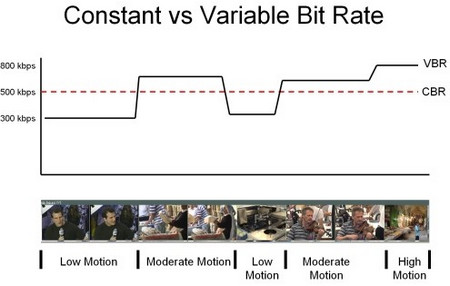
Bit rate is used in video and audio compression. Encoding is possible with constant (short CBR) and variable (short VBR) bit rate. The variable bit rate aligns the encoding with the content of the multimedia content. In the case of a predominantly quiet scene in a movie, for example, fewer units of information are required relative to time. However, in scenes with a lot of movement, the bit rate increases. This is intended to allow optimal use of storage space with high image quality at the same time when compressing with a codec. Often times the required memory space is also less when encoding with a variable bit rate compared to a fixed rate.

Constant bit rate

Constant bit rate describes a compression method for video and audio content during storage and transmission. A constant data rate is used, regardless of the complexity of the respective signal. The same amount of data is always produced per unit of time.

Constant bit rate is often used in multimedia broadcasts. The reason for this is the limited streaming capabilities. By using constant bit rate, optimal quality is achieved with the same data throughput. In some cases, however, it may also happen that amounts of data are “given away”. This is the case when the content to be encoded requires a lower rate than specified. This is especially true for videos with quiet scenes or very quiet audio files. The constant bit rate is used, for example, for video CDs or Internet radio.

Variable bit rate

In addition to the constant bit rate, encoding with a variable bit rate is also possible. Here is audio and video content in constant quality at different bit rates depending on the content stored or transmitted.

This solution has established itself in the media storage field as it offers higher quality with less memory consumption at the same time. When encoding with a variable bit rate, individual sections of a medium receive different compressions depending on the complexity of the content. This enables the highest possible quality to be achieved with low memory consumption.

For a long time, encoding with the help of variable bit rates was considered insecure. In the meantime, however, the technology has matured, so good results can also be achieved by converting a medium with a variable bit rate. The downside of this method is that you cannot predict before conversion how big the file will be in the end. In most cases, only a minimum and maximum bit rate can be set. Individual encoders also offer the option of specifying how large the file should be before converting it.

Average bit rate

A third compression method is the definition of an average bit rate. A medium is converted at a variable bit rate. This enables a fixed file size to be achieved while maintaining high quality. For this variant of media compression, some codecs offer the option to compress in two passes. This allows the average bit rate to be reached very precisely.

In the first pass, the material is analyzed and then compressed in the second. Basically the method corresponds to that of variable bit rate, but an average bit rate allows you to calculate the size of a file. A deviation tolerance can be specified for individual programs.

Nominal bit rate

Nominal bit rate indicates the average bit rate that is achieved by encoding with a variable bit rate. Despite the possible fluctuations that arise in the various VBR modes, a quality assessment can be made.

The nominal bitrate concept was introduced by the developers of the OggVorbis codec. This should make it easier for MP3 users to start using variable bit rate. Many Mp3 codec users were only used to compressing an audio file with a fixed bit rate.