Enhancing Audio Efficiency with Variable Bitrates


Free Download Mp4Gain
picture

Enhancing Audio Efficiency with Variable Bitrates
Variable Bitrates
Variable Bitrates
Variable Bitrates
Variable Bitrates

What are variable bitrates in audio compression?

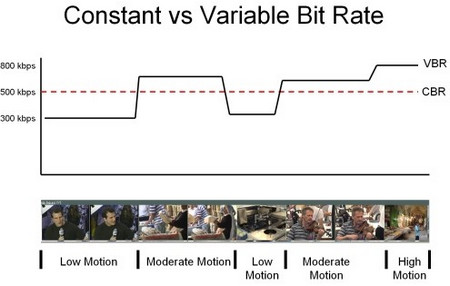
When it comes to audio compression, variable bitrates (VBR) play a crucial role in optimizing file sizes without compromising audio quality. Unlike constant bitrates (CBR), where the bitrate remains consistent throughout the audio file, VBR adjusts the bitrate dynamically based on the complexity of the audio content.

With VBR, the audio encoder allocates a higher bitrate to more intricate and demanding parts of the audio, such as music or sound effects, and a lower bitrate to simpler sections, such as silence or quiet passages. This flexibility allows for efficient compression, reducing the overall file size while maintaining excellent audio quality.

By utilizing VBR, audio files can achieve significant compression ratios without perceptible loss in audio fidelity. This makes VBR an ideal choice for various applications, including streaming services, podcasts, music distribution, and more.

Optimizing audio quality with variable bitrates

To enhance audio efficiency and deliver optimal quality, utilizing variable bitrates is essential. Let’s explore how VBR contributes to audio optimization and its benefits in different contexts.

Streaming services: With the increasing popularity of music and video streaming platforms, efficient audio compression is crucial to provide seamless playback while conserving bandwidth. VBR ensures that audio files are compressed intelligently, allocating more bits to complex audio segments and fewer bits to simpler parts. This optimization results in high-quality audio streaming with minimal buffering and bandwidth consumption.

Podcasts and spoken-word content: Variable bitrates are particularly advantageous for podcasts and other spoken-word content. These formats often contain long stretches of silence or low-intensity speech, which can be compressed efficiently with lower bitrates. However, when music or sound effects are introduced, VBR allocates a higher bitrate to ensure the clarity and fidelity of those elements, enhancing the overall listening experience.

In summary, variable bitrates offer a versatile approach to audio compression, delivering excellent audio quality while optimizing file sizes. By dynamically allocating bitrates based on the complexity of the audio content, VBR ensures efficient compression for various applications, including streaming services and spoken-word content.

How do variable bitrates impact audio file sizes?

The use of variable bitrates (VBR) in audio compression significantly impacts the file sizes of audio recordings. Let’s explore how VBR affects file sizes and the factors to consider when using this technique.

When compared to constant bitrates (CBR), which maintain a consistent bitrate throughout the audio file, VBR can produce smaller file sizes without compromising audio quality. This is because VBR allocates higher bitrates to more complex parts of the audio and lower bitrates to simpler sections, resulting in a more efficient use of data.

The actual impact on file sizes depends on the nature of the audio content. For audio recordings with a lot of silence or low-intensity passages, VBR can significantly reduce the file size by allocating fewer bits to those sections. However, when the audio contains highly dynamic or complex elements, such as music or sound effects, VBR increases the bitrate to preserve the quality and detail of those components.

It’s important to note that the specific VBR settings chosen during the compression process can also affect file sizes. Higher VBR settings generally result in larger file sizes, as the encoder allocates more bits to maintain higher audio quality throughout the recording. Lower VBR settings, on the other hand, can lead to smaller file sizes but may sacrifice some audio fidelity in more complex sections.

When determining the appropriate VBR settings for a particular audio recording, it’s essential to consider the desired balance between file size and audio quality. For applications where file size is a significant concern, such as streaming services or limited storage environments, lower VBR settings may be preferred. However, for situations that prioritize audio fidelity, such as music production or high-quality audio distribution, higher VBR settings are recommended.

In conclusion, variable bitrates have a significant impact on audio file sizes. By dynamically adjusting the bitrate based on the complexity of the audio content, VBR allows for efficient compression, resulting in smaller file sizes while maintaining audio quality. The specific VBR settings chosen during compression should align with the intended purpose and priorities of the audio recording.

Optimizing audio file storage with variable bitrates

Efficient storage of audio files is essential for various applications, including music libraries, sound libraries, and multimedia production. Variable bitrates (VBR) offer an effective solution for optimizing audio file storage. Let’s explore some considerations and benefits of using VBR for storage optimization.

Smaller file sizes: VBR allows for more efficient compression of audio files by allocating fewer bits to simpler sections, resulting in smaller overall file sizes. This is particularly advantageous for applications with limited storage capacities or when transferring files over networks with limited bandwidth.

Preserving audio quality: Despite the reduction in file sizes, VBR maintains excellent audio quality by allocating higher bitrates to complex sections, such as music or sound effects. This ensures that the integrity and fidelity of the audio content are preserved, even in compressed formats.

Compatibility: VBR-encoded audio files are compatible with a wide range of devices and software players. Whether it’s music playback on mobile devices, media editing on computers, or streaming on various platforms, VBR-encoded files can be seamlessly utilized across different environments.

By utilizing VBR for audio file storage, organizations and individuals can optimize their storage capacities, reduce bandwidth requirements, and ensure high-quality audio playback. Whether it’s managing extensive music libraries or distributing sound effects, VBR offers a practical solution for efficient storage and retrieval of audio content.

LSI keywords: audio compression, audio optimization, file size reduction, bandwidth consumption, storage efficiency, streaming quality, music distribution, podcast production, multimedia storage, storage optimization.


Free Download Mp4Gain
picture


Mp4Gain Main Window
picture


Mp4Gain Features
picture


Free Download Mp4Gain
picture

What does MP3 bitrate mean?

What does MP3 bitrate mean?

MP3 bitrate

Bit rate

mp3 bit rate

The rate at which a digital channel transmits digital signals is called the data transfer rate or bit rate.
The word bitrate has many translations, such as bitrate, etc., which indicates how many bits per second the encoded (compressed) audio data should be represented, and a bit is the smallest binary unit, either 0 or 0. 1. The relationship between bitrate and audio and video compression is simply that the higher the bitrate, the better the quality of the audio and video, but the larger the encoded file; if the bitrate is lower, the situation is reversed.

For example: encode audio and video at 500 Kbps.
where bps are bits 1K = 1010 = 1024
b is little
s is the second
p is for (for)
Therefore, encoding at 500 kbps means that the encoded audio and video data must be represented at 500 K bits per second.
In the baseband transmission system, the bit rate is used to represent the code rate of transmitted information.
The bit rate Rb refers to the unit of time
The number of binary bits transmitted within the unit, the unit is b/s. For example, the transmission speed of a computer serial port is up to 115200b/s.
The symbol rate or baud rate Rs refers to the number of modulation symbols transmitted per unit of time, that is, ternary and ternary
The information transmission rate of the multivariate digital code stream in the

In M-ary modulation, the relationship between the bit rate Rb and the baud rate Rs is:
Rb=Rslog2M
The sampling rate refers to the ratio of the sampling samples to the total number of samples, and the sampling rate refers to the number of samples per unit of time. If it is an instrument, the sampling rate is 40MSa/s, which indicates that the number of samples per second is 40M, but it cannot be represented by 40MHz.

The process of converting analog audio to digital audio is called sampling. In a nutshell, how much data is needed to record a 1 second duration of sound via waveform sampling. A sound with a sample rate of 44 KHz requires 44,000 data points to describe a 1-second sound waveform. In principle, the higher the sample rate, the better the sound quality.

What is bit rate? Knowledge of the MP3 audio format. Part 2

What is bit rate? Knowledge of the MP3 audio format. Part 2

mp3 bit rate

Bitrate is a benchmark indicator of the efficiency of digital music compression.

mp3 bitrate

The bit rate represents the number of bits bps (bit per second, bits per second) transmitted per unit of time (1 second). We usually use kbps (in simple terms, it is per second) clock 1000 bits) as the unit. The bit rate of digital music on CD is 1411.2 kbps (ie recording 1 second of CD music requires 1411.2 Ɨ 1024 bits of data). The higher the bit rate of the music file, the more data (Bit) must be processed in a unit of time (1 second), and the better the sound quality of the music file. However, when the bit rate is high, the file size increases, which will occupy a large amount of storage capacity. 8 to 320 kbps.

1. WMA (Windows Media Audio, Windows Media Audio)

As a Microsoft media compression method, it is a part of the technology that compresses only audio data in Windows Media Technologies. The sound quality is similar to MP3 and can be compressed with half the technology of MP3. It has the copyrighted Windows Media Rights Manager, which can be played by installing in WMP (Windows Media Player, Windows Media Player). Due to the strong influence of Microsoft and Windows, as well as major copyright reasons, the major American record companies EMI and BMG have officially confirmed that they use the WMA method developed and produced by Microsoft. It is believed that this advanced method will become even more popular in the future.

2. MP3 (CBR, VBR, ABR)

MP3 is currently the most widely used and widely used lossy compressed digital audio format, which has been explained above and will not be repeated here.

CBR (constant bit rate)

CBR is the oldest and simplest MP3 encoding (compression) method. When this method is used for encoding, the bit rate of the entire file is the same, in other words, the bit rate used by the MP3 file per second is the same. Although the music file has sections of varying complexity, the encoder always keeps the bit rate constant, unless you use the highest sound quality, otherwise the sound quality of the different sections of the MP3 file will vary. The more complex the passage, the worse the sound quality. Its biggest advantage is that the file size is fixed, which is convenient for calculating storage space.

What is bit rate? Knowledge of the MP3 audio format.

What is bit rate? Knowledge of the MP3 audio format.

mp3 bit rate

Digital audio formats are audio signals that are recorded, processed, and reproduced in digital form.

Mp3 bit rate

The emergence of digital audio formats is to meet the needs of high-fidelity playback, storage and transmission. Simply put, early analog audio formats had issues with playback distortion and glitches due to media wear. Since the advent of CD discs, audio files in digital format have become popular, but another problem has arisen: the limitation of storage volume and the phenomenon of CD disc wear is still present. Saving to a hard drive (in connection with longer storage time) is also not a good solution when storage media (mainly hard drives) are still expensive at the time. The rise of the Internet has created a requirement for long-distance file transmission. Under the restriction of bandwidth, the demand to reduce file size has become more intense. All this has led to the generation of lossy compressed digital audio formats from external factors!

In terms of internal factors, with the improvement of computing and coding capabilities, the progress of various acoustic psychological models has promoted the emergence of various lossy compressed digital audio formats. Some of the most commonly used audio formats in MP3 players are briefly introduced below: MP3 (CBR, VBR, ABR), WMA, WAV, ADPCM, and the emerging audio formats AAC, ASF, and OGG.

Before introducing various digital audio formats, let’s clarify one concept: bitrate.

In the field of computing, all information is digitized. Bit is the smallest unit of data in a computer, it refers to a number of 0 or 1, which is a mathematical binary number, a “0” or “1” , is a bit. For example, when we say a 2-digit number, it means that it is a two-digit binary number, and there are 4 combinations of “00”, “01”, “10” and “11”, which represent 0, “11” in decimal respectively. 1, 2 and 3 are four numbers.

What is a constant bit rate? CBR

Constant bit rate is a tool used in digital telecommunication signals, for example, when transferring audio files from the Internet. A constant bit rate file is encoded to produce a file that plays at exactly the same bit rate throughout its duration. The biggest advantage of a constant file bit rate type is that it allows for constant playback of the media stream, as the bit rate will never fluctuate, reducing any delay and jitter from the end of the server stream. Although this file type is ideal in such circumstances, it is disadvantageous for storing more complex file types, as the constant bit rate can be overloaded or underused depending on file variations.

Constant bit rate (CBR)

A constant bit rate file is like a trickle of sand through an hourglass – it will always go exactly the same speed. Counter this with an opposite file type, the variable bit rate file. In a variable bit rate file, the “sand” is uncomfortable, resulting in sometimes small information flows and sometimes larger, more complex blocks.

CBR and VBR

As mentioned, one of the best uses for a constant bit rate stream is when playing a media file. Compressing the entire content of the video or audio file into a single playback ensures consistency across the file, forcing images and tones to become substantially similar to each other. In a multimedia file encoded in a variable bit rate format, the quality of the file can change dramatically from one moment to the next as the bit rate peaks and slows like a roller coaster. Although a file using a constant bit rate does not always have the optimal image quality, as some images may have to be reduced in appearance to “adapt” the selected bit rate, at least the entire presentation will be smooth and fluid for the user.

It may seem that a file with a constant bit rate is always preferable, but this is not always the case. Some circumstances tend to favor the ability to model the bit rate within a specific range of values. Consider archiving a multimedia repository of popular paintings. While some paintings in the collection are hopelessly complex, requiring a high bitrate to capture their true essence, others are much simpler, requiring a much lower bitrate to keep the overall file size low. In cases like this, files that use a bit rate that remains constant would normally provide too much or too little storage space for each virtual drawing image.

Although a solution could be to increase the bit rate “ceiling”, allowing even the most complex paintings to be preserved with impunity, but this is not optimal from a programming point of view. Files with a higher bitrate require more storage space on the hard drive, as each item in the file has more room to “breathe” with the higher bitrate. The greater the space wasted by files whose complexity is not justified by the chosen high bit rate, the more inefficient the solution becomes.