Everything You Need to Know About Audio Quality


Free Download Mp4Gain
picture

Everything You Need to Know About Audio Quality
Audio Quality
Audio Quality
Audio Quality
Audio Quality

Audio Quality Explained

As an audio enthusiast, I understand how crucial audio quality is for enjoying music or movies. In simple terms, audio quality refers to how good the sound is. But what makes a sound “good”? It’s a combination of factors like bit rate, sample rate, dynamic range, and compression.
In digital audio, bit rate refers to the number of bits of data that are processed per second. The higher the bit rate, the more information is transmitted, resulting in better sound quality. Sample rate, on the other hand, refers to the number of samples per second. A higher sample rate means more data is being captured, leading to a more accurate representation of sound.

When it comes to audio compression, there are two types: lossless and lossy. Lossless compression reduces file size without losing any audio quality, while lossy compression sacrifices some audio quality to achieve smaller file sizes.

“Audio quality is not just about the equipment you use, but also about how the audio is recorded and produced,” as Ken Pohlmann states in his book “Principles of Digital Audio”. It’s essential to consider the recording and mixing process to ensure high-quality audio output.

Analog vs Digital Audio

Analog audio refers to sound that is recorded and transmitted as an electrical signal. It’s been around for decades and is still used in some recording studios today. However, digital audio has taken over in recent years, as it’s more accurate and offers better sound quality.
Digital audio uses a binary code to represent sound, which is then converted back into an analog signal for playback. This process results in a more accurate representation of sound, and the digital format makes it easier to edit and manipulate audio.

As filmmaker George Lucas once said, “sound is 50% of the movie experience.” The switch from analog to digital audio has allowed for more immersive and realistic audio in movies and music.

Dynamic Range and Equalization

Dynamic range refers to the difference between the loudest and softest parts of an audio recording. It’s an essential aspect of audio quality, as a higher dynamic range means a more natural and realistic sound. However, too much dynamic range can cause distortion or clipping, so it’s crucial to find the right balance.
Equalization, or EQ, is the process of adjusting the balance between different frequencies in an audio recording. It’s used to enhance certain aspects of the sound, such as boosting the bass or adding clarity to the vocals. However, overuse of EQ can lead to unnatural or distorted audio.

As composer Hans Zimmer once said, “the music is never the problem, the music is the solution.” By understanding dynamic range and equalization, you can achieve the perfect sound for your music or movie.

Lossless vs Lossy Audio Compression

As mentioned earlier, lossless compression retains all the original audio quality while reducing file size. Lossy compression, on the other hand, sacrifices some audio quality to achieve smaller file sizes.
When it comes to music, many audiophiles prefer lossless formats like FLAC or ALAC, as they offer the best possible sound quality. However, these formats result in larger file sizes, which can be inconvenient for some users. Lossy formats like MP3 and AAC are more widely used, as they provide good sound quality while keeping file sizes small.

As filmmaker Quentin Tarantino once said, “When you’re watching a movie, you’re watching over the filmmaker’s shoulder.” The quality of the audio and video can greatly affect the overall viewing experience of a film. In this article, we’ll explore everything you need to know about audio quality, including bit rate, sample rate, and other related topics.

What is Audio Quality?

Audio quality refers to the overall fidelity, clarity, and richness of the sound in a recording. In other words, it’s how well the sound reproduces the original performance or source material. A high-quality audio recording will accurately capture the nuances of the original performance, while a low-quality recording will distort or lose some of these details.

Why is Audio Quality Important?

Audio quality is important because it directly affects the overall experience of listening to music or watching a film. Poor audio quality can distract from the content of the recording and make it difficult to understand what’s being said or played. In contrast, high-quality audio can make the recording more engaging and enjoyable to listen to.

As musician Brian Eno once said, “The quality of the sound is essential to the success of the music.” The same can be said for any audio recording, whether it’s a song, a podcast, or a movie soundtrack.

Understanding Bit Rate and Sample Rate

Two key factors that determine the quality of digital audio recordings are bit rate and sample rate. Bit rate refers to the amount of data used to represent each second of audio, while sample rate refers to the number of times per second that the audio is measured and recorded.

In general, higher bit rates and sample rates result in higher-quality audio recordings. For example, a CD-quality audio recording has a bit rate of 1,411 kbps and a sample rate of 44.1 kHz, while an MP3 file typically has a bit rate of 128 kbps and a sample rate of 44.1 kHz or lower.

Other Factors Affecting Audio Quality

In addition to bit rate and sample rate, there are other factors that can affect the quality of digital audio recordings. For example, the type of compression used can have a significant impact on the overall sound quality. Lossless compression algorithms, which preserve all of the original audio data, generally result in higher-quality recordings than lossy compression algorithms, which discard some of the original data to achieve higher levels of compression.

Other factors that can affect audio quality include the type of microphone or recording equipment used, the acoustics of the recording space, and the mixing and mastering process.

Conclusion: Why Audio Quality Matters

In conclusion, audio quality is a critical factor in any recording, whether it’s a song, a podcast, or a movie soundtrack. Understanding bit rate, sample rate, and other related topics can help you make informed decisions about how to record, edit, and distribute your audio content. By paying attention to audio quality, you can ensure that your recordings are engaging, enjoyable, and of the highest possible quality.



Free Download Mp4Gain
picture


Mp4Gain Main Window
picture


Mp4Gain Features
picture


Free Download Mp4Gain
picture

What is the Bitrate for DVD Quality Video?

What is the Bitrate for DVD Quality Video?

DVD Bit Rate
DVD Bit Rate
DVD Bit Rate
DVD Bit Rate


DVD Quality Video Bitrate Explained

As a video enthusiast, I’m sure you’ve come across the term “bitrate” before. Bitrate refers to the amount of data being transmitted in a given amount of time, typically measured in bits per second (bps). When it comes to DVD quality video, the bitrate plays a crucial role in determining the video’s overall quality.
In order to achieve DVD quality video, the optimal bitrate for video compression is typically between 4-9 Mbps. This ensures that the video remains clear and smooth throughout playback without any pixelation or lagging. However, the bitrate can also vary depending on the specific codec being used and the length of the video.

As author and filmmaker J.D. Lasica once said, “Bitrate is like the resolution of your camera – the higher it is, the more detail and quality you’ll get.” So, if you’re looking to produce high-quality DVD videos, it’s important to understand the role of bitrate and how it can impact the final product.

Choosing the Optimal Bitrate for DVD Video

When it comes to choosing the optimal bitrate for your DVD video, there are a few factors to consider. These include the length of the video, the codec being used, and the amount of available storage space.
In general, longer videos with higher resolutions will require a higher bitrate to maintain the desired level of quality. On the other hand, shorter videos with lower resolutions can get away with a lower bitrate without compromising on quality.

It’s also worth noting that different codecs have different compression efficiencies, which can affect the required bitrate. For example, H.264 is a popular codec for DVD video because it offers high compression efficiency without sacrificing quality.

In my experience, choosing the optimal bitrate for DVD video often requires some trial and error. By experimenting with different bitrates and codecs, you can find the sweet spot that delivers the quality you want while keeping the file size manageable.

The Importance of Bitrate for DVD Video Quality

When it comes to producing high-quality DVD videos, bitrate is a crucial factor that cannot be overlooked. A higher bitrate typically results in better video quality, while a lower bitrate can lead to pixelation, lagging, and other visual issues.
As filmmaker Steven Soderbergh once said, “The final product is all about the quality of the information going in.” By understanding the role of bitrate in DVD video quality, you can ensure that your videos are of the highest possible standard.

In my experience, investing in a quality video encoder and taking the time to experiment with different bitrates and codecs can make all the difference when it comes to producing professional-grade DVD videos. With a little patience and dedication, you can achieve stunning results that are sure to impress your audience.

Final Words:
In conclusion, understanding bitrate is crucial when it comes to producing high-quality DVD videos. By choosing the optimal bitrate for your video and experimenting with different codecs, you can achieve the level of quality you desire. And remember, when it comes to DVD video quality, bitrate is king.

What is the Best Bitrate for Audio Recording?

What is the Best Bitrate for Audio Recording?

Bit Rate Audio Recording


Bit Rate Audio Recording


The Importance of Bitrate for Audio Recording Quality

As a musician and audio engineer, I’ve learned that bitrate is crucial to achieving high-quality audio recordings. The bitrate determines the amount of data that is processed and transmitted for each second of audio recording. A higher bitrate means more data is being processed, resulting in better audio quality.

In my experience, the optimal bitrate for professional audio recording is 24-bit/96kHz. This allows for a wide dynamic range and captures every detail of the sound. As filmmaker Christopher Nolan once said, “The sound and music are 50% of the entertainment in a movie.” This applies to music recording as well. Without proper audio recording settings, even the most talented musician’s performance can fall flat.

When recording music, it’s important to remember that bitrate isn’t the only factor that affects audio quality. Other factors like microphone placement, room acoustics, and instrument quality can also have a significant impact on the final recording. However, by starting with the right bitrate, you’re setting yourself up for success.

How to Choose the Best Bitrate for Your Audio Recording

When choosing the best bitrate for your audio recording, it’s important to consider your specific needs and goals. If you’re recording for personal use, a lower bitrate may be sufficient. However, if you’re recording professionally, it’s worth investing in higher-quality equipment and choosing a higher bitrate.

In addition to considering the purpose of your recording, you should also consider the file format you’ll be using. Different file formats have different requirements for bitrate and other audio settings. For example, WAV files require a higher bitrate than MP3 files to maintain the same level of audio quality.

Ultimately, the best bitrate for your audio recording will depend on your individual needs and preferences. Don’t be afraid to experiment with different settings and seek advice from other audio professionals. With the right bitrate and equipment, you can capture every detail of your sound and create high-quality audio recordings that stand the test of time.

The Benefits of Using an Audio Normalizer and Converter

As someone who has recorded and produced music for years, I know firsthand how frustrating it can be when audio levels are inconsistent across different tracks. This is where an audio normalizer and converter can come in handy.

An audio normalizer like MP4Gain can analyze and adjust the volume of your audio tracks to ensure they’re consistent and balanced. This can save you time and effort in post-production and help you achieve a more professional sound.

Additionally, an audio converter can help you convert your audio files to different formats, making them compatible with a wider range of devices and software. MP4Gain is a powerful audio converter that supports a variety of formats, including MP3, WAV, FLAC, and more.

By using an audio normalizer and converter like MP4Gain, you can streamline your audio production workflow and achieve higher-quality results with less effort. It’s just one more tool in your arsenal as an audio professional or enthusiast.

best bitrate for audio recording, optimal audio recording bitrate, audio recording quality, bitrate for professional audio recording, recording audio with high quality, improve audio recording bitrate, audio bitrate for music recording, ideal audio recording settings, audio engineering, audio quality, dynamic range, high-quality audio recordings, microphone placement, room acoustics, instrument quality,

How to Calculate Audio Bitrate: A Comprehensive Guide

How to Calculate Audio Bitrate: A Comprehensive Guide

Audio Bitrate
Audio Bitrate

Calculating audio bitrate is an essential skill for anyone working with digital audio files. Bitrate is the amount of data used to encode one second of audio, and it plays a significant role in the quality of audio files. In this comprehensive guide, we will discuss everything you need to know about audio bitrate and how to calculate it.


Audio Bitrate
Audio Bitrate

What is Audio Bitrate?

Bitrate is the number of bits used to encode one second of audio. It is typically measured in kilobits per second (kbps) and determines the audio file’s size and quality. The higher the bitrate, the larger the audio file’s size and the better the audio quality.

Audio bitrate is determined by several factors, including:

  • The audio format
  • The audio codec
  • The audio signal characteristics

Audio Format and Codec

The audio format and codec are two critical factors that determine audio bitrate. Audio format refers to the type of audio file, such as MP3, WAV, or FLAC. Each audio format has its own advantages and disadvantages, including file size, compatibility, and audio quality.

The audio codec, on the other hand, is the software used to compress and decompress audio data. Codecs determine how efficiently audio data is compressed and how much data is used to encode one second of audio.

It is essential to choose the right audio format and codec for your needs, as they can significantly impact the audio bitrate and quality. For example, MP3 files are smaller in size but lower in quality than WAV or FLAC files.

Audio Signal Characteristics

The characteristics of the audio signal, such as its frequency range and amplitude, can also affect the effectiveness of audio compression and the resulting audio bitrate. Higher frequencies and amplitudes require more data to encode accurately, resulting in a higher bitrate.

Other factors that can affect audio bitrate include the number of audio channels and the audio’s dynamic range. Stereo audio files require more data than mono audio files, while audio files with a wide dynamic range require more data than those with a narrow dynamic range.

Calculating Audio Bitrate

Calculating audio bitrate requires you to know the audio file’s duration, size, and format. Once you have this information, you can use the following formula to calculate audio bitrate:

Bitrate = (File size in bits / Duration in seconds) / 1000

For example, if you have a 3-minute MP3 audio file with a size of 4,320,000 bytes:

  1. Convert the file size to bits: 4,320,000 x 8 = 34,560,000 bits
  2. Convert the duration to seconds: 3 x 60 = 180 seconds
  3. Calculate the bitrate: (34,560,000 / 180) / 1000 = 192 kbps

In this example, the audio file has a bitrate of 192 kbps.

Conclusion

Calculating audio bitrate is an essential skill for anyone working with digital audio files. Understanding audio format, codec, and signal characteristics can help you choose the right audio settings for your needs and ensure the best audio quality possible. By following the formula above, you can easily calculate the required bitrate for your audio files and adjust the settings accordingly. Keep in mind that bitrate is not the only factor that affects audio quality, so be sure to consider other factors such as the audio format, codec, and signal characteristics when selecting your settings.

When working with audio, it’s important to strike a balance between file size and audio quality. Higher bitrates generally result in better audio quality, but also larger file sizes. It’s up to you to determine the optimal balance for your specific needs and use case.

Final Thoughts

Calculating audio bitrate may seem like a daunting task, but with the right tools and knowledge, it can be a straightforward process. By understanding the different factors that affect audio quality and file size, you can make informed decisions when selecting your audio settings.

Remember, bitrate is just one of many factors that affect audio quality. Other factors, such as the audio format and codec, can also have a significant impact. By taking these factors into consideration and making informed decisions, you can achieve the best possible audio quality for your needs.

Whether you’re an audio professional or simply someone who enjoys working with digital audio files, understanding how to calculate audio bitrate is an important skill to have. By following the guidelines outlined in this article, you can ensure that your audio files are optimized for the best possible quality and file size.

References

Note: The information provided in this article is for educational purposes only and should not be construed as professional advice. Always consult a professional audio engineer or other qualified expert for advice on specific audio projects or issues.

Why Audio Quality Matters: A Comprehensive Guide

Why Audio Quality Matters: A Comprehensive Guide

Audio Quality
Audio Quality

When it comes to creating video content, audio quality is often overlooked. Many content creators focus solely on the visuals and neglect the importance of high-quality audio. However, audio quality is just as important as video quality when it comes to creating engaging content. In this comprehensive guide, we’ll explore the importance of audio quality, the factors that affect it, and how to improve it to keep your viewers engaged and satisfied.

1. Defining Audio Quality

Before we dive into the specifics of audio quality, it’s important to define what we mean by “audio quality.” Audio quality refers to the clarity, richness, and overall sound of the audio content. This includes factors such as volume, tone, and background noise. The higher the quality of the audio, the more enjoyable the listening experience for the audience.

2. The Importance of Audio Quality

2.1 Improving User Experience

High-quality audio is crucial for a good user experience. Viewers are more likely to engage with video content that has clear and crisp audio. Poor audio quality can lead to frustration and disappointment, causing viewers to lose interest in the content.

For example, imagine watching a video with muffled or low-quality audio. You may struggle to understand what is being said, or you may become distracted by background noise. This can take away from the overall viewing experience and make it difficult to stay engaged with the content.

On the other hand, high-quality audio can enhance the viewing experience, making it more enjoyable and engaging. Clear and crisp audio can help to create a more immersive experience, drawing viewers into the content and keeping them engaged from beginning to end.

Long-tail keyword: “Why good audio is important in video content”

2.2 Impact on Perceived Video Quality

Audio quality also affects the perceived quality of the video content. If the audio quality is poor, viewers may assume that the overall video quality is also low. This can lead to negative perceptions of the content and discourage viewers from watching more videos from the same creator.

For example, imagine watching a high-quality video with poor audio. Even though the video quality may be excellent, the poor audio quality can make the content seem amateurish or low-budget. This can negatively impact the viewer’s perception of the content and the creator.

On the other hand, high-quality audio can enhance the perceived quality of the video content, making it seem more professional and engaging. When the audio quality matches the video quality, viewers are more likely to perceive the content as high-quality and engaging.

Long-tail keyword: “The effects of poor audio quality on viewer engagement”

2.3 Impact on Viewer Engagement

In addition to affecting the perceived quality of video content, audio quality can also have a significant impact on viewer engagement. When audio quality is poor, viewers may quickly lose interest and stop watching. This can result in lower audience retention, decreased watch time, and lower engagement rates.

Conversely, high-quality audio can help to keep viewers engaged and enhance the emotional impact of video content. Clear dialogue, well-balanced music and sound effects, and a lack of distracting background noise can all contribute to a more engaging and immersive experience for the viewer.

Studies have shown that high-quality audio can have a direct impact on viewer engagement and audience retention. For example, a study conducted by Dolby Laboratories found that viewers were more likely to remember and engage with content that featured high-quality audio. The study also found that viewers were more likely to share content that had good audio quality, indicating that high-quality audio can also have a positive impact on social sharing and virality.

2.4 Sound Design and Audio Quality

Sound design is an important aspect of audio quality in video content. It involves the use of music, sound effects, and other audio elements to enhance the emotional impact of video content and create a more immersive viewing experience. Effective sound design can help to establish the mood and tone of a video, convey important information, and create a sense of continuity between different scenes.

Music is a particularly important element of sound design, as it can evoke specific emotions and create a memorable experience for the viewer. For example, a fast-paced, upbeat soundtrack can create a sense of excitement and energy, while a slow, melancholy melody can convey a sense of sadness or reflection.

Sound effects are another important aspect of sound design, as they can help to create a more immersive and realistic viewing experience. For example, the sound of footsteps, doors opening and closing, and other ambient noises can help to create a sense of presence and realism in a video.

2.4.1 Music and Audio Quality

When it comes to music in video content, it’s important to use high-quality recordings that are well-mixed and balanced. Poorly-mixed music can be distracting and detract from the overall quality of the video, while well-mixed music can create a more immersive and engaging experience.

In addition to the quality of the recording, it’s also important to consider the musical style and genre. The music should complement the tone and mood of the video, and should be appropriate for the target audience. For example, a video aimed at children might feature bright, cheerful music, while a video aimed at adults might feature more mature or sophisticated music.

2.4.2 Sound Effects and Audio Quality

Like music, sound effects should be of high quality and well-mixed to ensure that they don’t detract from the overall quality of the video. When choosing sound effects, it’s important to consider their appropriateness for the scene and the emotional impact that they will have on the viewer.

For example, a video that features a dramatic car chase scene might use sound effects such as screeching tires, engine revving, and crashes to create a sense of excitement and danger. In contrast, a video that features a quiet, introspective moment might use sound effects such as birds chirping, leaves rustling, or a soft breeze to create a more peaceful and reflective atmosphere.

3. Conclusion

In conclusion, high-quality audio is a crucial element in producing engaging and impactful video content. Investing in the right equipment, such as a high-quality microphone, and optimizing the recording environment can greatly improve the overall audio quality.

Not only does good audio quality impact the perceived quality of the video, but it also plays a significant role in audience engagement and retention. Poor audio quality can result in viewer frustration and disinterest, ultimately impacting the success of the content.

By understanding the importance of audio quality and taking steps to optimize it, content creators can create a better experience for their viewers and increase the overall impact of their content. Additionally, sound design and music can further enhance the quality of the audio and create a more immersive and emotional experience for the audience.

It’s important to remember that good audio quality is not just important for video content, but it also plays a crucial role in other contexts such as in education, entertainment, and advertising. The use of audio has evolved over time, and platforms have adapted to the preferences of users.

Overall, by recognizing the impact of high-quality audio and taking steps to improve it, content creators can enhance the experience of their audience and increase the success of their content.

Note 1: Types of Microphones

There are several types of microphones that content creators can choose from to achieve high-quality audio. Understanding the differences between each type can help creators make an informed decision about which microphone is best for their needs:

1. Dynamic Microphones

Dynamic microphones are the most durable and versatile type of microphone. They are ideal for recording vocals and instruments with a high sound pressure level, such as drums and electric guitars. They are also less sensitive to background noise, making them a good choice for recording in noisy environments.

2. Condenser Microphones

Condenser microphones are known for their high sensitivity and clear sound quality. They are ideal for capturing the nuances of acoustic instruments and vocals, making them a popular choice for recording studios and podcasting. However, they are more delicate than dynamic microphones and require phantom power to operate, which may not be available on all recording devices.

3. Ribbon Microphones

Ribbon microphones are a specialized type of dynamic microphone that use a thin strip Hf metal suspended in a magnetic field to capture sound. They are known for their warm and natural sound quality, making them a popular choice for recording vocals and acoustic instruments, such as guitars and strings.

When choosing a microphone, it’s important to consider the specific needs of the recording environment and the type of content being produced. With the right microphone and proper techniques, creators can achieve high-quality audio that enhances the overall user experience.

How Noise Reduction Software Works

How Noise Reduction Software Works: Noise reduction software is a type of audio processing tool that analyzes an audio signal and removes unwanted noise or interference. It works by detecting patterns in the noise that are different from the patterns in the desired audio signal, and then subtracting those patterns from the overall signal.

One common approach is to use a technique called spectral subtraction, which works by taking a short-term Fourier transform of the audio signal to identify the frequency spectrum of the noise. The software can then create a filter that selectively removes those frequencies from the signal, leaving the desired audio intact.

Another approach is to use machine learning algorithms to train the software to recognize different types of noise and automatically remove them. This can be particularly effective for complex or variable noise sources, such as the sound of traffic or wind.

While noise reduction software can be effective, it’s important to note that it’s not a silver bullet. Some types of noise may be difficult or impossible to remove without degrading the quality of the desired audio signal.

Nota 3: Understanding Decibels

Understanding Decibels: Decibels are a unit of measurement that is used to express the intensity of a sound. The decibel scale is logarithmic, which means that a small change in decibel level represents a large change in actual sound intensity.

The threshold of human hearing is generally considered to be around 0 decibels, while the threshold of pain is around 120 decibels. Common sounds like conversation or music may be around 60-70 decibels, while a rock concert or chainsaw can easily exceed 100 decibels.

The reason for the logarithmic scale is that the human ear is not equally sensitive to all frequencies of sound. By using a logarithmic scale, we can better represent the way that the human ear perceives changes in sound intensity across different frequency ranges.

It’s important to be aware of the decibel levels in your environment, as exposure to loud sounds over time can cause permanent hearing damage. This is particularly important for people who work in loud environments, such as construction or music production.

Can you really hear the difference in the sound quality of music?

Can you really hear the difference in the sound quality of music?

difference in the sound quality of music

A brief discussion of the principle of audio compression

difference in the sound quality of music


grade headphones – performance, equipment – can you really hear the difference in music quality? A brief discussion of the principle of audio compression
When you listen to music, most of the time the format being played is MP3 or AAC.

Both formats are smaller formats in which the audio is processed and compressed. To reduce size and save space, they actually remove a portion of the sound signal compared to the original audio. But can you hear it?

In this article, we will introduce the principles of music compression and discuss a question: Does music compression really affect the music you listen to?

The principle of musical compression.
Most of the digital audio we receive every day, whether played online or stored as a file, uses the principle of lossy compression. Lossy compression not only compresses the data, but also deletes the original data, and with lossy compression, some data is gone forever.

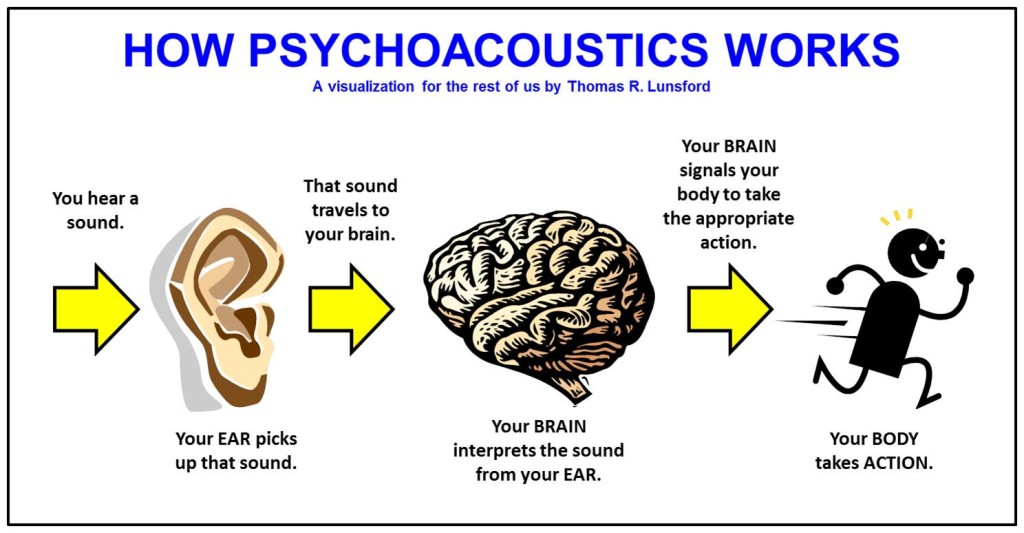
But keep in mind that this censored data is not randomly selected. Audio compression formats apply psychoacoustics to remove sounds that are beyond our hearing range and that we are not aware of.

audio compression – operation, equipment – can you really hear the difference in music quality? A brief discussion of the principle of audio compression
The human ear has a hearing range of about 20 Hz to 20 kHz, and sound signals beyond this range cannot be detected even if they are removed. And as we age, the range of hearing decreases. Therefore, it can be said that the sounds that everyone hears are not really absolutely the same, even if they come from the same sound source.

The audio below can help you find your hearing range, you can listen to it with headphones to see how far away you can hear the sound signal. Be careful to control the volume at any time during the listening process, otherwise it may damage your hearing.

Also, when high-frequency sounds and low-frequency sounds are present at the same time, high-frequency sounds will be more difficult to hear clearly. For example, the constant drumbeats in the music can cause you to ignore the slight differences between the melodies.

This phenomenon is called “shadowing” and is used in the principle of compression. If there are louder low-frequency sounds, it can mask the sonic loss of high-frequency sounds. High and low here are relative, so this principle can be applied globally. But sounds above 15 kHz are more susceptible to masking, so that’s also a prime issue for compression.

Although it is obvious that the sound signal removed by lossy compression should be mostly useless data, there are still people who believe that these “ambient sounds” being removed will affect the three-dimensionality of the sound and flatten it.

In general, the key to lossy compression is finding a balance between reducing size and preserving sound quality.

How many KB is the best sound quality for mp3?

How many KB is the best sound quality for mp3?

Mp3 Quality
Mp3 Quality

Four Factors That Determine MP3 Sound Quality

Mp3 Quality
Mp3 Quality

Today’s mp3 market can be described as a hundred flowers in bloom, and the competition between the major manufacturers is splendid. In order to take the lead and gain the most market share, various manufacturers, especially those with strength, have their own unique tricks. In terms of appearance, mpio’s fl200 has won the award with its mini round cake design. unique pendant. The latest mp3 title, Truly’s mp379, also created the trend of big screen mp3, and Samsung also released its sports mp3 concept, which is absolutely stunning in the market. Some small manufacturers have also adopted imitation methods, making the market of all kinds of mp3 like a sky full of countless stars. Simple repeat, record and fm functions can also meet the needs of the market. Line-in, features, e-book reading, gaming, and colorful backlights are slowly creeping into the new mp3 design. However, the author believes that no matter how cool it looks and how perfect its functions are, the mp3 is used to enjoy music in the final analysis. An mp3 without good sound quality is at least not a qualified mp3. If you just go for looks and function (actually, we rarely use some functions), and ignore its sound quality performance, you will feel a bit like buying a scorpion.
A decoder chip inherent in mp3
The decoder chip used by the Mp3 itself is the key to its sound quality. The sound quality displayed by high quality decoder chips is unmatched by those of the poorest. Friends who have listened to the famous iriver series of mp3s will know that its sound quality characteristics are very obvious, the bass is strong and powerful, the vocals are restored to truth, the high-frequency field is wide, and the increase is enough, which is very pleasing to the ears. This series mp3 adopts Philips SAA7750, the most advanced decoder chip in the market, and its quality and performance are excellent. The major Korean manufacturer MPIPO (Dewei Technology) also uses this decoder chip. The reputation and market feedback of these two mp3 sound quality brands are very good, and they are highly praised by the industry and outside the industry. It proves that mp3 sound quality is better than md’s ace gun. Due to the relatively high cost of the chip and the control chip, it is rarely used except for some brands. The cost is high, and the price is of course expensive. This is also the threshold that restricts many mp3 lovers from enjoying the beautiful sound quality.

Mp3 ape flac What is the difference between the three music formats?

Mp3 ape flac What is the difference between the three music formats?

When we often download songs, we want to download some of the best sound quality, and we are also confused about which sound quality is the best.

If you ask the friends around you, they will definitely all say that you want to download lossless files, but how good is the sound quality of lossless files?

First of all, the first impression is that the volume of lossless files is obviously different from normal MP3 files. Normally, the size of normal MP3 music file is only 2-5M, but the volume of lossless APE files of the same version is about 30M, a difference of 10M times more.

In the case of the same playback time, why is there such a big volume difference?

Here to talk about a term – bitrate It is a data factor that determines whether the quality of a song file is good or bad, bitrate refers to the number of bits transmitted per second (bit). The unit is bps (bits per second). The higher the bit rate, the higher the data transmission speed. The bit rate in sound refers to the amount of binary data per unit of time after converting an analog sound signal (a signal with sound properties such as amplitude and frequency) into a digital sound signal (i.e., a binary signal such as 010101 stored on a computer’s hard drive) is an indirect measure of audio quality. The principle of bit rate (bit rate) in video is the same as in sound, which refers to the amount of binary data per unit of time after the analog signal is converted to a digital signal.

Bitrate Property for Lossless Files

Bitrate Properties for High Quality MP3

The bit rate of MP3 files with ordinary sound quality is generally 128 kbps, the bit rate of high-quality MP3 files is generally 320 kbps, and the bit rate of lossless files is generally 960 kbps. kbps or even more. The difference in bit rate can be understood as the vibration frequency of the sound decoded by the decoder at the same time. The higher the bit rate, the higher the vibration frequency and the better the corresponding sound. Good timbre means that the restoration of sound details is relatively complete, that is, the sound quality is good. However, this is also the reason for the large size of the lossless files.

What does MP3 bitrate mean?

What does MP3 bitrate mean?

MP3 bitrate

Bit rate

mp3 bit rate

The rate at which a digital channel transmits digital signals is called the data transfer rate or bit rate.
The word bitrate has many translations, such as bitrate, etc., which indicates how many bits per second the encoded (compressed) audio data should be represented, and a bit is the smallest binary unit, either 0 or 0. 1. The relationship between bitrate and audio and video compression is simply that the higher the bitrate, the better the quality of the audio and video, but the larger the encoded file; if the bitrate is lower, the situation is reversed.

For example: encode audio and video at 500 Kbps.
where bps are bits 1K = 1010 = 1024
b is little
s is the second
p is for (for)
Therefore, encoding at 500 kbps means that the encoded audio and video data must be represented at 500 K bits per second.
In the baseband transmission system, the bit rate is used to represent the code rate of transmitted information.
The bit rate Rb refers to the unit of time
The number of binary bits transmitted within the unit, the unit is b/s. For example, the transmission speed of a computer serial port is up to 115200b/s.
The symbol rate or baud rate Rs refers to the number of modulation symbols transmitted per unit of time, that is, ternary and ternary
The information transmission rate of the multivariate digital code stream in the

In M-ary modulation, the relationship between the bit rate Rb and the baud rate Rs is:
Rb=Rslog2M
The sampling rate refers to the ratio of the sampling samples to the total number of samples, and the sampling rate refers to the number of samples per unit of time. If it is an instrument, the sampling rate is 40MSa/s, which indicates that the number of samples per second is 40M, but it cannot be represented by 40MHz.

The process of converting analog audio to digital audio is called sampling. In a nutshell, how much data is needed to record a 1 second duration of sound via waveform sampling. A sound with a sample rate of 44 KHz requires 44,000 data points to describe a 1-second sound waveform. In principle, the higher the sample rate, the better the sound quality.

What is bit rate? Knowledge of the MP3 audio format.

What is bit rate? Knowledge of the MP3 audio format.

mp3 bit rate

Digital audio formats are audio signals that are recorded, processed, and reproduced in digital form.

Mp3 bit rate

The emergence of digital audio formats is to meet the needs of high-fidelity playback, storage and transmission. Simply put, early analog audio formats had issues with playback distortion and glitches due to media wear. Since the advent of CD discs, audio files in digital format have become popular, but another problem has arisen: the limitation of storage volume and the phenomenon of CD disc wear is still present. Saving to a hard drive (in connection with longer storage time) is also not a good solution when storage media (mainly hard drives) are still expensive at the time. The rise of the Internet has created a requirement for long-distance file transmission. Under the restriction of bandwidth, the demand to reduce file size has become more intense. All this has led to the generation of lossy compressed digital audio formats from external factors!

In terms of internal factors, with the improvement of computing and coding capabilities, the progress of various acoustic psychological models has promoted the emergence of various lossy compressed digital audio formats. Some of the most commonly used audio formats in MP3 players are briefly introduced below: MP3 (CBR, VBR, ABR), WMA, WAV, ADPCM, and the emerging audio formats AAC, ASF, and OGG.

Before introducing various digital audio formats, let’s clarify one concept: bitrate.

In the field of computing, all information is digitized. Bit is the smallest unit of data in a computer, it refers to a number of 0 or 1, which is a mathematical binary number, a “0” or “1” , is a bit. For example, when we say a 2-digit number, it means that it is a two-digit binary number, and there are 4 combinations of “00”, “01”, “10” and “11”, which represent 0, “11” in decimal respectively. 1, 2 and 3 are four numbers.