Why is important bitrate in audio quality?


Free Download Mp4Gain
picture

Why is important bitrate in audio quality?
Why is important bitrate in audio quality?

Bitrate

Bitrate is a crucial factor when it comes to audio quality. It refers to the amount of data processed per unit of time in an audio file.

Audio Quality

Audio quality is directly influenced by the bitrate of an audio file. Higher bitrates result in better sound reproduction and a more accurate representation of the original sound.

Sound Reproduction

The level of detail and accuracy in sound reproduction is determined by the bitrate of an audio file. A higher bitrate allows for more information to be captured and preserved, resulting in a clearer and more immersive listening experience.

Data Compression

Bitrate and data compression go hand in hand. Lower bitrates often involve more aggressive compression techniques, which can lead to a loss of audio data and a reduction in audio quality.

File Size

The bitrate of an audio file directly affects its file size. Higher bitrates require more data to be stored, resulting in larger file sizes. It’s important to strike a balance between audio quality and file size, especially when considering storage limitations or bandwidth constraints.

Streaming Services

Streaming services rely on efficient compression techniques to deliver audio files over the internet. Bitrate plays a crucial role in determining the streaming quality. Higher bitrates result in better audio fidelity but require more bandwidth.

Internet Bandwidth

The choice of bitrate for streaming or downloading audio files depends on the available internet bandwidth. Higher bitrates require more bandwidth to ensure a smooth streaming experience without interruptions or buffering.

Audio Formats

Different audio formats support varying levels of bitrate and, consequently, audio quality. Lossless formats like FLAC and WAV offer the highest audio fidelity as they preserve all the original data. Lossy formats like MP3 and AAC sacrifice some audio data to reduce file size.

Lossless

Lossless audio formats preserve all the original data, resulting in the highest audio fidelity. They are ideal for audiophiles and professionals who require the utmost accuracy in sound reproduction.

Lossy

Lossy audio formats use compression algorithms to reduce file size by sacrificing some audio data. They offer a good balance between audio quality and file size, making them suitable for everyday listening and storage purposes.

Listening Environment

The listening environment can significantly impact the perception of audio quality. Factors such as background noise, acoustics, and speaker quality can affect our ability to discern subtle differences in bitrate.

Background Noise

In a noisy environment, a lower bitrate may be sufficient as the background noise masks some of the audio details. However, in a quiet and controlled environment, a higher bitrate becomes more noticeable, providing a more immersive and enjoyable listening experience.

Acoustics

The acoustics of a room or space can influence the way audio is perceived. Proper acoustic treatment can enhance the overall audio quality, allowing for better sound reproduction and minimizing unwanted reflections or distortions.

Speaker Quality

The quality of speakers or headphones used for audio playback also plays a significant role in the overall audio experience. Higher quality speakers can better reproduce the nuances and details captured in high-bitrate audio files.

Music

Bitrate is particularly important when it comes to music. Higher bitrates allow for a more accurate representation of the original recording, resulting in a richer and more immersive musical experience.

Podcasts

Podcasts, like music, can greatly benefit from higher bitrates. Clearer and more detailed audio reproduction enhances the listening experience, making it easier to follow conversations and understand the content being discussed.

Audio Content

Whether it’s music, podcasts, audiobooks, or other forms of audio content, bitrate plays a crucial role in delivering a high-quality listening experience. Choosing the right bitrate ensures that the audio is faithfully reproduced and enjoyed to its fullest potential.


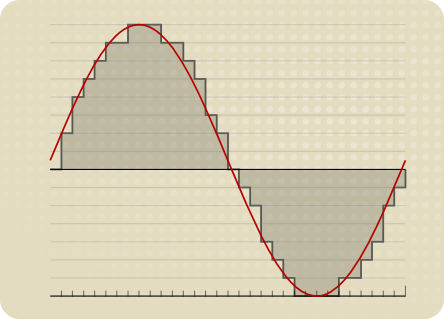
Free Download Mp4Gain
picture


Mp4Gain Main Window
picture


Mp4Gain Features
picture


Free Download Mp4Gain
picture

Exploring Audio Bitrates: Technical Deep Dive

Exploring Audio Bitrates: Technical Deep Dive

Audio Bitrates
Audio Bitrates
Audio Bitrates
Audio Bitrates

In this article, we will explore the technical aspects of audio bitrates. We will discuss what a bitrate is, how it affects audio quality, and how to choose the right bitrate for your needs.

What is a bitrate?

A bitrate is the number of bits per second that are used to encode an audio file. The higher the bitrate, the more data is used to encode the file, and the higher the quality of the audio will be. However, higher bitrates also result in larger file sizes.

How does bitrate affect audio quality?

Bitrate affects audio quality by determining how much data is used to represent the original sound waves. Higher bitrates allow for more data to be used, which results in more accurate representations of the original sound waves. This results in better audio quality, such as increased clarity and reduced noise.

How to choose the right bitrate

The right bitrate for you will depend on a number of factors, including:

  • The type of audio you are listening to. For example, music and speech have different requirements.
  • The quality of your audio equipment. Higher-quality equipment can reproduce higher bitrates without introducing any noticeable distortion.
  • Your personal preferences. Some people may prefer the sound of higher bitrates, while others may not notice a difference.

General bitrate recommendations

Here are some general bitrate recommendations for different types of audio:

  • Speech: 32 kbps to 96 kbps
  • Music: 128 kbps to 320 kbps
  • High-quality audio: 256 kbps to 512 kbps or higher

It is important to note that these are just general recommendations. The best way to determine the right bitrate for you is to experiment and see what sounds best to your ears.

Final words about audio bitrates

Audio bitrate is an important factor to consider when choosing an audio file format or when setting up an audio streaming service. By understanding how bitrate affects audio quality, you can choose the right bitrate for your needs and get the best possible listening experience.


Mp4Gain

Mp4Gain

Why FLAC bit rate is typically around 1000 kbps?

Why FLAC bit rate is typically around 1000 kbps?

FLAC bit rate
FLAC bit rate
FLAC bit rate
FLAC bit rate

The Basics of FLAC

FLAC, or Free Lossless Audio Codec, is a popular format for high-quality digital audio. It uses lossless compression, which means that the audio is compressed without losing any of the original data. This is in contrast to lossy compression, which compresses the audio by removing data that is considered unnecessary. FLAC files typically have a high bit rate, often around 1000 kbps, which allows for the preservation of more audio information.

Why the High Bit Rate?

The reason why FLAC has a high bit rate is that it uses lossless compression. This means that all the audio data is preserved, and the file size is not reduced as much as it would be with lossy compression. While a lossy format like MP3 might have a bit rate of 128 kbps or even lower, FLAC can have a bit rate of up to 5000 kbps or more, depending on the audio content. This high bit rate ensures that the audio is of the highest quality possible.

The Benefits of FLAC

One of the biggest benefits of FLAC is that it offers high-quality audio without sacrificing any of the original data. This means that the audio is reproduced exactly as it was recorded, with no loss of quality. Additionally, FLAC files can be compressed to a smaller size without any loss in quality, which makes them easier to store and share.

The Drawbacks of FLAC

The main drawback of FLAC is that it has a larger file size compared to lossy formats like MP3. This can make it more difficult to store and share, especially when dealing with large collections of audio files. Additionally, not all devices and media players support FLAC playback, which can limit its usefulness in certain situations.

Final Words

In conclusion, the high bit rate of FLAC is a result of its lossless compression, which preserves all the original audio data. While this makes FLAC files larger in size, it also ensures that the audio is of the highest quality possible. Despite its drawbacks, FLAC remains a popular format among audiophiles and music enthusiasts who demand the best possible audio experience.

What is the Bitrate for DVD Quality Video?

What is the Bitrate for DVD Quality Video?

DVD Bit Rate
DVD Bit Rate
DVD Bit Rate
DVD Bit Rate


DVD Quality Video Bitrate Explained

As a video enthusiast, I’m sure you’ve come across the term “bitrate” before. Bitrate refers to the amount of data being transmitted in a given amount of time, typically measured in bits per second (bps). When it comes to DVD quality video, the bitrate plays a crucial role in determining the video’s overall quality.
In order to achieve DVD quality video, the optimal bitrate for video compression is typically between 4-9 Mbps. This ensures that the video remains clear and smooth throughout playback without any pixelation or lagging. However, the bitrate can also vary depending on the specific codec being used and the length of the video.

As author and filmmaker J.D. Lasica once said, “Bitrate is like the resolution of your camera – the higher it is, the more detail and quality you’ll get.” So, if you’re looking to produce high-quality DVD videos, it’s important to understand the role of bitrate and how it can impact the final product.

Choosing the Optimal Bitrate for DVD Video

When it comes to choosing the optimal bitrate for your DVD video, there are a few factors to consider. These include the length of the video, the codec being used, and the amount of available storage space.
In general, longer videos with higher resolutions will require a higher bitrate to maintain the desired level of quality. On the other hand, shorter videos with lower resolutions can get away with a lower bitrate without compromising on quality.

It’s also worth noting that different codecs have different compression efficiencies, which can affect the required bitrate. For example, H.264 is a popular codec for DVD video because it offers high compression efficiency without sacrificing quality.

In my experience, choosing the optimal bitrate for DVD video often requires some trial and error. By experimenting with different bitrates and codecs, you can find the sweet spot that delivers the quality you want while keeping the file size manageable.

The Importance of Bitrate for DVD Video Quality

When it comes to producing high-quality DVD videos, bitrate is a crucial factor that cannot be overlooked. A higher bitrate typically results in better video quality, while a lower bitrate can lead to pixelation, lagging, and other visual issues.
As filmmaker Steven Soderbergh once said, “The final product is all about the quality of the information going in.” By understanding the role of bitrate in DVD video quality, you can ensure that your videos are of the highest possible standard.

In my experience, investing in a quality video encoder and taking the time to experiment with different bitrates and codecs can make all the difference when it comes to producing professional-grade DVD videos. With a little patience and dedication, you can achieve stunning results that are sure to impress your audience.

Final Words:
In conclusion, understanding bitrate is crucial when it comes to producing high-quality DVD videos. By choosing the optimal bitrate for your video and experimenting with different codecs, you can achieve the level of quality you desire. And remember, when it comes to DVD video quality, bitrate is king.

What is the Best Bitrate for Audio Recording?

What is the Best Bitrate for Audio Recording?

Bit Rate Audio Recording


Bit Rate Audio Recording


The Importance of Bitrate for Audio Recording Quality

As a musician and audio engineer, I’ve learned that bitrate is crucial to achieving high-quality audio recordings. The bitrate determines the amount of data that is processed and transmitted for each second of audio recording. A higher bitrate means more data is being processed, resulting in better audio quality.

In my experience, the optimal bitrate for professional audio recording is 24-bit/96kHz. This allows for a wide dynamic range and captures every detail of the sound. As filmmaker Christopher Nolan once said, “The sound and music are 50% of the entertainment in a movie.” This applies to music recording as well. Without proper audio recording settings, even the most talented musician’s performance can fall flat.

When recording music, it’s important to remember that bitrate isn’t the only factor that affects audio quality. Other factors like microphone placement, room acoustics, and instrument quality can also have a significant impact on the final recording. However, by starting with the right bitrate, you’re setting yourself up for success.

How to Choose the Best Bitrate for Your Audio Recording

When choosing the best bitrate for your audio recording, it’s important to consider your specific needs and goals. If you’re recording for personal use, a lower bitrate may be sufficient. However, if you’re recording professionally, it’s worth investing in higher-quality equipment and choosing a higher bitrate.

In addition to considering the purpose of your recording, you should also consider the file format you’ll be using. Different file formats have different requirements for bitrate and other audio settings. For example, WAV files require a higher bitrate than MP3 files to maintain the same level of audio quality.

Ultimately, the best bitrate for your audio recording will depend on your individual needs and preferences. Don’t be afraid to experiment with different settings and seek advice from other audio professionals. With the right bitrate and equipment, you can capture every detail of your sound and create high-quality audio recordings that stand the test of time.

The Benefits of Using an Audio Normalizer and Converter

As someone who has recorded and produced music for years, I know firsthand how frustrating it can be when audio levels are inconsistent across different tracks. This is where an audio normalizer and converter can come in handy.

An audio normalizer like MP4Gain can analyze and adjust the volume of your audio tracks to ensure they’re consistent and balanced. This can save you time and effort in post-production and help you achieve a more professional sound.

Additionally, an audio converter can help you convert your audio files to different formats, making them compatible with a wider range of devices and software. MP4Gain is a powerful audio converter that supports a variety of formats, including MP3, WAV, FLAC, and more.

By using an audio normalizer and converter like MP4Gain, you can streamline your audio production workflow and achieve higher-quality results with less effort. It’s just one more tool in your arsenal as an audio professional or enthusiast.

best bitrate for audio recording, optimal audio recording bitrate, audio recording quality, bitrate for professional audio recording, recording audio with high quality, improve audio recording bitrate, audio bitrate for music recording, ideal audio recording settings, audio engineering, audio quality, dynamic range, high-quality audio recordings, microphone placement, room acoustics, instrument quality,

How to Calculate Audio Bitrate: A Comprehensive Guide

How to Calculate Audio Bitrate: A Comprehensive Guide

Audio Bitrate
Audio Bitrate

Calculating audio bitrate is an essential skill for anyone working with digital audio files. Bitrate is the amount of data used to encode one second of audio, and it plays a significant role in the quality of audio files. In this comprehensive guide, we will discuss everything you need to know about audio bitrate and how to calculate it.


Audio Bitrate
Audio Bitrate

What is Audio Bitrate?

Bitrate is the number of bits used to encode one second of audio. It is typically measured in kilobits per second (kbps) and determines the audio file’s size and quality. The higher the bitrate, the larger the audio file’s size and the better the audio quality.

Audio bitrate is determined by several factors, including:

  • The audio format
  • The audio codec
  • The audio signal characteristics

Audio Format and Codec

The audio format and codec are two critical factors that determine audio bitrate. Audio format refers to the type of audio file, such as MP3, WAV, or FLAC. Each audio format has its own advantages and disadvantages, including file size, compatibility, and audio quality.

The audio codec, on the other hand, is the software used to compress and decompress audio data. Codecs determine how efficiently audio data is compressed and how much data is used to encode one second of audio.

It is essential to choose the right audio format and codec for your needs, as they can significantly impact the audio bitrate and quality. For example, MP3 files are smaller in size but lower in quality than WAV or FLAC files.

Audio Signal Characteristics

The characteristics of the audio signal, such as its frequency range and amplitude, can also affect the effectiveness of audio compression and the resulting audio bitrate. Higher frequencies and amplitudes require more data to encode accurately, resulting in a higher bitrate.

Other factors that can affect audio bitrate include the number of audio channels and the audio’s dynamic range. Stereo audio files require more data than mono audio files, while audio files with a wide dynamic range require more data than those with a narrow dynamic range.

Calculating Audio Bitrate

Calculating audio bitrate requires you to know the audio file’s duration, size, and format. Once you have this information, you can use the following formula to calculate audio bitrate:

Bitrate = (File size in bits / Duration in seconds) / 1000

For example, if you have a 3-minute MP3 audio file with a size of 4,320,000 bytes:

  1. Convert the file size to bits: 4,320,000 x 8 = 34,560,000 bits
  2. Convert the duration to seconds: 3 x 60 = 180 seconds
  3. Calculate the bitrate: (34,560,000 / 180) / 1000 = 192 kbps

In this example, the audio file has a bitrate of 192 kbps.

Conclusion

Calculating audio bitrate is an essential skill for anyone working with digital audio files. Understanding audio format, codec, and signal characteristics can help you choose the right audio settings for your needs and ensure the best audio quality possible. By following the formula above, you can easily calculate the required bitrate for your audio files and adjust the settings accordingly. Keep in mind that bitrate is not the only factor that affects audio quality, so be sure to consider other factors such as the audio format, codec, and signal characteristics when selecting your settings.

When working with audio, it’s important to strike a balance between file size and audio quality. Higher bitrates generally result in better audio quality, but also larger file sizes. It’s up to you to determine the optimal balance for your specific needs and use case.

Final Thoughts

Calculating audio bitrate may seem like a daunting task, but with the right tools and knowledge, it can be a straightforward process. By understanding the different factors that affect audio quality and file size, you can make informed decisions when selecting your audio settings.

Remember, bitrate is just one of many factors that affect audio quality. Other factors, such as the audio format and codec, can also have a significant impact. By taking these factors into consideration and making informed decisions, you can achieve the best possible audio quality for your needs.

Whether you’re an audio professional or simply someone who enjoys working with digital audio files, understanding how to calculate audio bitrate is an important skill to have. By following the guidelines outlined in this article, you can ensure that your audio files are optimized for the best possible quality and file size.

References

Note: The information provided in this article is for educational purposes only and should not be construed as professional advice. Always consult a professional audio engineer or other qualified expert for advice on specific audio projects or issues.

The Importance of Bitrate in Digital Audio and Video

The Importance of Bitrate in Digital Audio and Video

The Importance of Bitrate in Digital Audio and Video

Have you ever watched a video that was all glitchy and the sound was all messed up? Or listened to a song and it sounded like it was being played on a scratched record? Well, that’s because of something called the bitrate.

The Importance of Bitrate in Digital Audio and Video

What is Bitrate?

Bitrate is the number of bits of information that are processed in a certain amount of time. In digital audio and video, it determines the quality of the sound and video. The higher the bitrate, the better the quality, and the more information is processed.

Why is Bitrate Important?

When you watch a video or listen to a song, the bitrate helps to determine the quality of the sound and video. The higher the bitrate, the more information is processed, and the better the quality. If the bitrate is low, then the quality will be poor and you might miss out on important details.

For example, if you’re watching a video of a concert and the bitrate is low, then you might not be able to hear the singer’s voice clearly or see the instruments being played. This can be really frustrating and ruin the whole experience for you.

How Does Bitrate Affect Digital Audio and Video?

Bitrate affects digital audio and video in several ways. For one, it affects the file size. If the bitrate is high, then the file size will be large, and if the bitrate is low, then the file size will be small.

Another way that bitrate affects digital audio and video is by affecting the quality. If the bitrate is high, then the quality will be good, and if the bitrate is low, then the quality will be poor. This can be especially noticeable when you’re watching a video with a lot of movement, like a sports game or a music video.

Finally, bitrate can also affect how long it takes to download or upload a video or audio file. If the bitrate is high, then it will take longer to download or upload, and if the bitrate is low, then it will take less time.

How to Choose the Right Bitrate for Your Digital Audio and Video

When it comes to choosing the right bitrate for your digital audio and video, there are a few things to keep in mind. First, think about what you’re using the video or audio for. If it’s for personal use, then a lower bitrate might be okay, but if it’s for professional use, then a higher bitrate is probably better.

Another thing to consider is the quality of the video or audio. If you want the best quality possible, then a higher bitrate is the way to go. But if you don’t need the best quality and just want something that’s good enough, then a lower bitrate might be fine.

Finally, think about the file size. If you don’t have a lot of storage space, then a lower bitrate might be a good choice, but if you have plenty of storage space, then a higher bitrate might be the way to go.

Can you really hear the difference in the sound quality of music?

Can you really hear the difference in the sound quality of music?

difference in the sound quality of music

A brief discussion of the principle of audio compression

difference in the sound quality of music


grade headphones – performance, equipment – can you really hear the difference in music quality? A brief discussion of the principle of audio compression
When you listen to music, most of the time the format being played is MP3 or AAC.

Both formats are smaller formats in which the audio is processed and compressed. To reduce size and save space, they actually remove a portion of the sound signal compared to the original audio. But can you hear it?

In this article, we will introduce the principles of music compression and discuss a question: Does music compression really affect the music you listen to?

The principle of musical compression.
Most of the digital audio we receive every day, whether played online or stored as a file, uses the principle of lossy compression. Lossy compression not only compresses the data, but also deletes the original data, and with lossy compression, some data is gone forever.

But keep in mind that this censored data is not randomly selected. Audio compression formats apply psychoacoustics to remove sounds that are beyond our hearing range and that we are not aware of.

audio compression – operation, equipment – can you really hear the difference in music quality? A brief discussion of the principle of audio compression
The human ear has a hearing range of about 20 Hz to 20 kHz, and sound signals beyond this range cannot be detected even if they are removed. And as we age, the range of hearing decreases. Therefore, it can be said that the sounds that everyone hears are not really absolutely the same, even if they come from the same sound source.

The audio below can help you find your hearing range, you can listen to it with headphones to see how far away you can hear the sound signal. Be careful to control the volume at any time during the listening process, otherwise it may damage your hearing.

Also, when high-frequency sounds and low-frequency sounds are present at the same time, high-frequency sounds will be more difficult to hear clearly. For example, the constant drumbeats in the music can cause you to ignore the slight differences between the melodies.

This phenomenon is called “shadowing” and is used in the principle of compression. If there are louder low-frequency sounds, it can mask the sonic loss of high-frequency sounds. High and low here are relative, so this principle can be applied globally. But sounds above 15 kHz are more susceptible to masking, so that’s also a prime issue for compression.

Although it is obvious that the sound signal removed by lossy compression should be mostly useless data, there are still people who believe that these “ambient sounds” being removed will affect the three-dimensionality of the sound and flatten it.

In general, the key to lossy compression is finding a balance between reducing size and preserving sound quality.

The higher the recording bitrate the better, and the higher the audio bitrate the better? Part 2

The higher the recording bitrate the better, and the higher the audio bitrate the better? Part 2

Sample Rate

Re-do supplements and corrections:

Sample Rate


to
Correction: Frame count is just the number of frames in the image, and frame rate is what they call it. How much
the higher the frame rate, the smoother it will be, but after a certain number, the human eye can’t see it –
-.
It’s harder to see the difference above 150fps.
Generally the video frame rate should be less than 50, maybe 36, 24 or other bit rates
b
. Some people say that it is the number of bits transmitted per second. Let’s add that the bit rate does not determine the quality of the image. The video bitrate is the resolution of the image, the number of frames, the video’s sound bitrate, its sound bits, and the sampling rate. These elements together determine the total bitrate of the video. The relationship between bitrate and video quality is that bitrate reflects video quality, rather than the general thought that bitrate determines or affects video quality. The concept of
c resolution.
However, it can also reflect the size of the screen, as long as the number of pixels displayed on the video screen is equal to the original effective pixel value, that is, when displayed at 100% scale, it can be considered as the resolution that determines the size of the screen. And the premise of high-resolution pixels is also the same, and it must be played at 100% scale. For example, after the image size of 800 x 600 is reduced to 640 x 480, it may not look any clearer than the image quality that is born with 640 x 480. Due to the compressed pixels, the first will be less than the last.
Therefore, the important premise of these resolutions is to show the original scale
.
The above are only personal opinions and may be arbitrarily criticized or referenced.

What is the bitrate? The bigger the better?

It’s just a unit, the bigger the film that
you see online
, the film effect is better, but it is easily affected by network speed and easy to get stuck.
Internet speed is calculated in bits, 1M ADSL is actually 1Mb/s
1 megabit
per second
The actual download limit is 1024/8 = 128 KB/s (1 byte = 8 bits
The computer calculates in bytes
and the bandwidth of
network
is marked in bits)

Articles, images, audio, video, and other items on the “Bidding.com” news page are all published or reprinted by proprietary media persons and third party organizations. If the manuscript involves copyright and other issues, please contact us to remove or deal with it, customer service email [email protected], the content of the manuscript is only to convey more information, does not represent the views of this website, nor means that this website agrees with your views or confirms the authenticity of its content.

The higher the recording bitrate the better, and the higher the audio bitrate the better?

The higher the recording bitrate the better, and the higher the audio bitrate the better?

Sample Rate

Are higher audio bitrates better?

Sample Rate

It is logical that yes, the premise is the lossy format. The higher the bitrate, the better the sound quality. Common lossy formats like mp3
aac (m4a)
ogg
wma etc, the most common are the first two, and the one above is wrong, aac is a lossy encoding, audio with aac as an extension is not common now, most of them are m4a
lossless without looking at the bitrate, because the displayed bitrate is also multiplied by a compression ratio, the bitrate of the wav captured on CD is 1411.2 kbps. Since wav is not compressed, it will compress the
general flac of the monkey, there is no point in seeing the rate
bits Show bit rate (kbps)
=
bit rate (bit)
*
sample rate (khz)
*
number of channels
*
compression rate (%)
Also, set the value low. It is possible to convert audio quality files at high bit rate or even lossless, so it is more reliable to look at the spectrum.

Is a higher bitrate better?

The higher the bitrate, the better the sound quality. The highest bit rate is 320 Kb, the middle is 192 Kb, and the second is 128 Kb. If you want to guarantee sound quality, 128 Kb is the most important.

The higher the music bitrate, the better?

In terms of theory, of course, the higher the bitrate, the better. Relatively more complete data and more details, MP3 encoding audio bitrate can only reach up to 320KBPS, which belongs to the category of lossy audio. MP3 audio above 192 KBPS is really very good. WAV is lossless The size of audio and audio files are bitrate dependent, so high bitrate WAV files are understood to be much larger than MP3. It can convert MP3 to WAV except volume. When a bucket is full of water, it is WAV. You cut half the bucket and the rest is MP3. Of course, the water in it is also less than half. Here, you pour the water into a new bucket, even though it’s a full bucket (WAV). ) But the inner content is different. The sound quality of converted MP3 WAV may not improve due to loss in the conversion process. The same is true for video transcoding, so when transcoding video, low bitrate is forced to high bitrate.

In the case of the same resolution, is the video bitrate higher?