Audio Phase


Free Download Mp4Gain
picture

Audio Phase: Unraveling the Mysteries of Sound
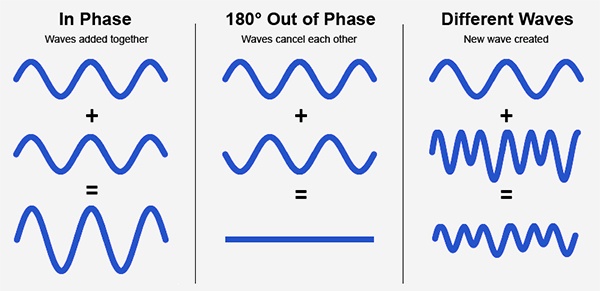
Audio Phase
Audio Phase

As an expert in audio engineering, I understand the significance of audio phase and its impact on sound quality and production. In this comprehensive guide, I will delve into the world of audio phase, providing clarity and insights to help you grasp this vital concept. Whether you’re a music enthusiast or a budding recording artist, understanding audio phase is essential for achieving optimal sound experiences.

Demystifying Audio Phase

Audio phase is a fundamental aspect of sound that relates to the timing of sound waves. When we talk about audio phase, we’re essentially discussing how different audio signals align or misalign in time. To put it simply, sound is a result of air pressure changes that propagate as waves. These waves have peaks and troughs, and audio phase refers to the relationship between these peaks and troughs in different sound sources.

Think of audio phase as a group of musicians playing in perfect harmony. When they are perfectly in sync, the music sounds harmonious and powerful. However, if even one musician is slightly out of time, it can create dissonance. Similarly, in audio, when signals are in phase, they reinforce each other, resulting in a stronger and clearer sound. When they are out of phase, they can cancel each other out, leading to a weaker and less defined sound.

Audio Phase in Music Production

Understanding audio phase is crucial in music production, especially when recording multiple microphones or mixing different tracks. When recording, if two microphones capture the same sound source, such as a guitar or a vocalist, the signals from these microphones must be perfectly in phase to avoid phase cancellation.

Imagine you are recording a guitar with two microphones—one close to the soundhole and the other closer to the fretboard. If the signals from these two microphones are not in phase, you might experience a loss of bass frequencies or even strange, hollow sounds in the final mix. To avoid this, precise microphone placement and phase alignment are essential.

Correcting Audio Phase Issues

In the world of audio engineering, correcting phase issues is a common practice. Using specialized tools and techniques, audio engineers can adjust the timing of audio signals to ensure they are in phase. This process, known as phase correction or phase alignment, can salvage poorly recorded tracks and enhance the overall sound quality.

Imagine you’re in a recording studio, and you notice that the drum tracks are slightly out of phase with the rest of the instruments. With phase correction tools, you can realign the drum tracks to synchronize perfectly with the other instruments, resulting in a more cohesive and powerful sound.

Audio Phase and Sound Quality: Key Considerations

Now, let’s address some common questions related to audio phase:

How Does Audio Phase Affect Sound Quality?

Audio phase has a direct impact on sound quality. When audio signals are in phase, they reinforce each other, enhancing the overall clarity and richness of sound. However, when they are out of phase, they can cancel each other out, leading to a loss of frequencies and a less pleasing sound.

What Are the Common Phase Issues in Music Production?

In music production, some common phase issues include phase cancellation between microphones, phase misalignment in multi-miked drum kits, and phase problems when mixing different instruments. Identifying and addressing these issues is crucial for achieving a balanced and professional-sounding mix.

How Can I Prevent Phase Issues When Recording?

To prevent phase issues when recording, pay close attention to microphone placement and ensure that multiple microphones capturing the same source are equidistant from the sound source. Additionally, use phase inversion or phase alignment tools during mixing to correct any phase problems that may arise.

Audio Phase: A Symphony of Sound Precision

In conclusion, audio phase is a pivotal element in the world of sound, influencing the quality of music and recordings. Whether you’re a musician, sound engineer, or simply a music enthusiast, grasping the concept of audio phase can help you appreciate and optimize sound in various contexts. Remember, when audio signals are in harmony, they create a powerful symphony of sound, and understanding audio phase is the key to achieving that sonic precision.

Last Words

As we wrap up our journey through the realm of audio phase, I hope this guide has shed light on this intricate yet crucial aspect of sound. Whether you’re fine-tuning your music production skills or seeking to enhance your listening experience, audio phase knowledge empowers you to harness the full potential of sound. So, the next time you enjoy your favorite music or step into the world of audio production, remember the role that audio phase plays in creating the symphonies and sonic landscapes we cherish.


Free Download Mp4Gain
picture


Mp4Gain Main Window
picture


Mp4Gain Features
picture


Free Download Mp4Gain
picture

Video Volume Booster

Video Volume Booster

Video Volume Booster

Audio Enhancements for Videos

When it comes to creating engaging video content, audio quality plays a crucial role. Whether you’re a YouTuber, filmmaker, or just sharing videos with friends and family, ensuring that your audience can hear the content clearly is essential. This is where a “Video Volume Booster” comes into play. In this article, I’ll delve into various techniques and tips for enhancing the audio in your videos.

Increase Video Audio

One of the most common reasons people search for a “Video Volume Booster” is to increase the audio in their videos. Low audio volume can be frustrating for viewers, leading to them clicking away from your content. To address this, you can use video editing software to adjust the audio levels. Look for the audio volume control in your editing program and increase it to a suitable level. Be careful not to make it too loud, as it can result in distortion.

Enhance Video Sound

Enhancing the sound quality of your videos involves more than just increasing the volume. You should also focus on improving the overall audio clarity. This can be achieved by reducing background noise, such as wind or background chatter, during the recording process. Additionally, you can apply equalization to balance out frequencies and make voices and music more distinct.

Volume Adjustment for Videos

Adjusting the volume of your video can be done using various software tools. Some video editing software offers automatic audio normalization features that can balance audio levels across your video. This is particularly helpful if you have different audio sources in your video, such as interviews and background music.

Audio Enhancement Software

To simplify the process of boosting video volume and enhancing audio quality, you can explore audio enhancement software. These programs often come with a range of tools to improve audio, including volume adjustment, noise reduction, and equalization. Research and choose the software that best suits your needs.

Improve Video Audio Clarity

Clarity in audio is essential for effective communication in your videos. When viewers can hear every word clearly, they are more likely to engage with your content and stay engaged. In addition to adjusting volume, consider using subtitles or captions, especially if your video has important dialogue.

Audio Volume Boost Techniques

Beyond software solutions, there are physical techniques to boost audio volume during recording. Invest in a quality microphone and learn how to position it correctly to capture the best audio. You can also use external audio recorders to capture high-quality sound separately from your video and then synchronize it during editing.

Video Sound Amplification

Amplifying video sound involves careful consideration of the balance between voice, music, and other audio elements. Experiment with different audio levels to find the perfect mix for your content. Remember that what sounds good to you might not sound the same to your audience, so seeking feedback can be valuable.

Boosting Audio in Videos

When you’re looking to boost audio in your videos, don’t forget to listen critically to the results. Test your video on different devices and with various headphones or speakers to ensure that the audio quality meets your expectations.

Audio Enhancement Tips

To wrap it up, here are some quick tips for enhancing audio in your videos:

Record in a quiet environment to minimize background noise.
Use a high-quality microphone.
Experiment with audio editing software to find the right settings.
Seek feedback from viewers to fine-tune your audio.
Final Words

Enhancing the audio in your videos is essential for creating engaging and professional content. Whether you’re a beginner or an experienced creator, these techniques and tips can help you boost your video’s audio quality. Remember that clear audio enhances the overall viewing experience and keeps your audience coming back for more.

What is the Best Bitrate for Audio Recording?

What is the Best Bitrate for Audio Recording?

Bit Rate Audio Recording


Bit Rate Audio Recording


The Importance of Bitrate for Audio Recording Quality

As a musician and audio engineer, I’ve learned that bitrate is crucial to achieving high-quality audio recordings. The bitrate determines the amount of data that is processed and transmitted for each second of audio recording. A higher bitrate means more data is being processed, resulting in better audio quality.

In my experience, the optimal bitrate for professional audio recording is 24-bit/96kHz. This allows for a wide dynamic range and captures every detail of the sound. As filmmaker Christopher Nolan once said, “The sound and music are 50% of the entertainment in a movie.” This applies to music recording as well. Without proper audio recording settings, even the most talented musician’s performance can fall flat.

When recording music, it’s important to remember that bitrate isn’t the only factor that affects audio quality. Other factors like microphone placement, room acoustics, and instrument quality can also have a significant impact on the final recording. However, by starting with the right bitrate, you’re setting yourself up for success.

How to Choose the Best Bitrate for Your Audio Recording

When choosing the best bitrate for your audio recording, it’s important to consider your specific needs and goals. If you’re recording for personal use, a lower bitrate may be sufficient. However, if you’re recording professionally, it’s worth investing in higher-quality equipment and choosing a higher bitrate.

In addition to considering the purpose of your recording, you should also consider the file format you’ll be using. Different file formats have different requirements for bitrate and other audio settings. For example, WAV files require a higher bitrate than MP3 files to maintain the same level of audio quality.

Ultimately, the best bitrate for your audio recording will depend on your individual needs and preferences. Don’t be afraid to experiment with different settings and seek advice from other audio professionals. With the right bitrate and equipment, you can capture every detail of your sound and create high-quality audio recordings that stand the test of time.

The Benefits of Using an Audio Normalizer and Converter

As someone who has recorded and produced music for years, I know firsthand how frustrating it can be when audio levels are inconsistent across different tracks. This is where an audio normalizer and converter can come in handy.

An audio normalizer like MP4Gain can analyze and adjust the volume of your audio tracks to ensure they’re consistent and balanced. This can save you time and effort in post-production and help you achieve a more professional sound.

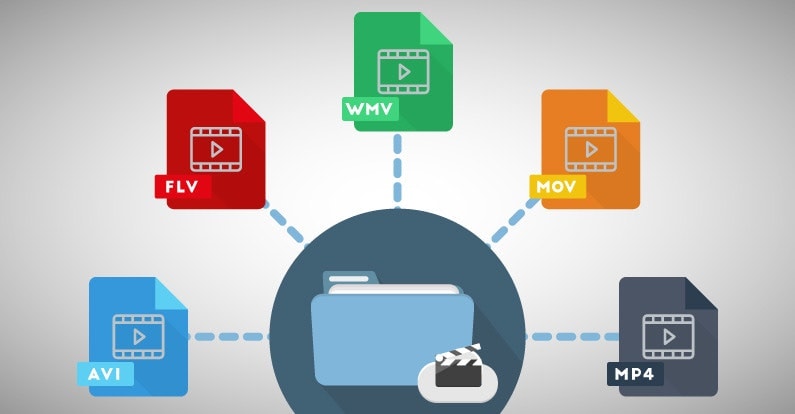
Additionally, an audio converter can help you convert your audio files to different formats, making them compatible with a wider range of devices and software. MP4Gain is a powerful audio converter that supports a variety of formats, including MP3, WAV, FLAC, and more.

By using an audio normalizer and converter like MP4Gain, you can streamline your audio production workflow and achieve higher-quality results with less effort. It’s just one more tool in your arsenal as an audio professional or enthusiast.

best bitrate for audio recording, optimal audio recording bitrate, audio recording quality, bitrate for professional audio recording, recording audio with high quality, improve audio recording bitrate, audio bitrate for music recording, ideal audio recording settings, audio engineering, audio quality, dynamic range, high-quality audio recordings, microphone placement, room acoustics, instrument quality,