Sample rate and its effect on audio quality and file size


Free Download Mp4Gain
picture

Sample rate and its effect on audio quality and file size

Sample rate and its effect on audio quality and file size

Let’s talk about sample rate and its effect on audio quality and file size

Sample rate is one of the fundamental concepts in digital audio, affecting both the quality of sound and the size of the audio file. As an expert with years of experience in audio production and sound engineering, I can tell you that understanding how sample rate works is essential for anyone dealing with digital audio, whether you’re recording music, editing sound for film, or simply managing your personal audio collection. When you convert sound into a digital format, the sample rate determines how often the sound wave is measured per second. In essence, it’s how frequently the sound is sampled to create a digital representation of the audio.

To give you a clearer picture, imagine taking photos at different intervals. If you take one photo every minute, you’ll miss out on a lot of detail, but if you take a photo every second, you capture much more detail. This is similar to what happens with audio. A higher sample rate means more data points per second, resulting in more detail in the sound. But there’s a trade-off: increasing the sample rate also increases the file size.

In this article, I will explain the impact of different sample rates on audio quality and file size, breaking down complex concepts into easy-to-understand examples, based on my personal experience. Let’s dive deeper into the science of audio and explore how sample rate affects your sound.

Understanding Sample Rate and Its Impact on Audio

When you listen to music or sound, what you’re hearing is a continuous wave that varies in frequency and amplitude. Digital audio, however, can’t capture every single point of that wave in its original, continuous form. Instead, it measures the wave at discrete intervals. This is where the sample rate comes in. The sample rate refers to how many times per second the audio wave is measured, or sampled.

A typical CD-quality sample rate is 44.1 kHz, meaning the sound is sampled 44,100 times per second. This sample rate has been the standard for years because it provides a good balance between sound quality and file size. Higher sample rates, such as 96 kHz or 192 kHz, are commonly used in professional settings, where audio fidelity is crucial.

One way to think about sample rate is by comparing it to a digital photo. A higher resolution photo has more pixels, and as a result, more detail. Similarly, a higher sample rate means the audio is sampled more often, capturing more of the nuances of the original sound wave.

How Sample Rate Affects Audio Quality

The sample rate directly affects the quality of the sound that is captured. When audio is sampled at a higher rate, it allows for a more accurate representation of the original sound, particularly at higher frequencies. Let me explain with a simple example: if you’re recording a guitar with a sample rate of 44.1 kHz, you capture the frequencies up to 22.05 kHz (half of the sample rate). Human hearing typically ranges from 20 Hz to 20 kHz, so this is more than sufficient for most applications.

However, if you use a higher sample rate, such as 96 kHz, the audio captures frequencies up to 48 kHz, which is well beyond the range of human hearing. You might wonder if this makes a real difference, and the truth is, it often does not—at least not for most listeners. However, higher sample rates can reduce the risk of certain audio artifacts, like aliasing, and give you more flexibility during the mixing and mastering processes.

In professional environments, where every detail matters, higher sample rates are used for their ability to preserve the integrity of sound. For example, a 192 kHz sample rate might be used when recording instruments in a studio setting, especially when dealing with very high frequencies or complex sound textures.

Sample Rate and File Size: The Trade-Off

Now that we understand how sample rate affects audio quality, it’s time to address the second part of the equation: file size. Simply put, the higher the sample rate, the larger the file. This happens because more samples are being taken per second, which means more data is generated and stored.

For instance, at a standard 44.1 kHz sample rate, a minute of stereo audio (2 channels) at 16-bit depth will create a file size of roughly 10 MB. If you bump the sample rate up to 96 kHz, the file size will almost double for the same duration, since you’re capturing more data points per second.

Here’s a breakdown to show how sample rate affects file size:

  • 44.1 kHz (CD-quality) – 10 MB per minute of stereo audio at 16-bit depth
  • 96 kHz (high-definition) – 20 MB per minute of stereo audio at 16-bit depth
  • 192 kHz (ultra-high-definition) – 40 MB per minute of stereo audio at 16-bit depth

As you can see, the increase in file size can be significant, especially if you’re working with long audio tracks or multiple channels. This is why most standard music tracks use 44.1 kHz, as it provides a balance between quality and file size that’s suitable for most applications.

When to Use Higher Sample Rates

So, when should you opt for higher sample rates? The decision largely depends on the purpose of the recording and the medium through which the audio will be played.

For example, in professional audio production, especially for film and music, higher sample rates are often preferred. The additional data captured can be useful for post-production processes such as mixing, mastering, and sound design. However, unless you’re working on a project where the absolute highest fidelity is necessary, it’s often overkill for everyday listening or casual recording.

On the other hand, for personal music libraries or podcasts, 44.1 kHz is more than sufficient. For most listeners, increasing the sample rate beyond this point won’t noticeably improve sound quality. Additionally, higher sample rates require more processing power and storage, making them less practical for regular consumer use.

How to Choose the Right Sample Rate

Choosing the right sample rate depends on a few factors:

  • Purpose: If you’re recording music for distribution, 44.1 kHz is typically the best choice. For professional audio or film soundtracks, you may want to consider 96 kHz or even 192 kHz.
  • Playback Device: If your audio will be played on high-end systems or used in film production, higher sample rates may be justified.
  • Storage and Processing Power: Keep in mind that higher sample rates require more storage and can put more strain on your computer’s processing power. If you’re limited in these areas, a lower sample rate like 44.1 kHz may be ideal.

The key is to balance the need for high-quality audio with the practical considerations of file size and system resources.

Latest words on sample rate and its effect on audio quality and file size

In summary, sample rate plays a crucial role in both audio quality and file size. Higher sample rates can improve audio fidelity, but they also increase the file size, which can be a limitation for storage and processing power. For most casual applications, 44.1 kHz is more than enough, but if you’re working in a professional setting, you may want to consider higher sample rates like 96 kHz or 192 kHz. Ultimately, the best sample rate depends on your specific needs, and understanding how it impacts both sound quality and file size will help you make the best choice for your projects. If you need help with managing audio files or optimizing file sizes, Mp4Gain might be the right solution for you.

FAQ

What is sample rate in digital audio?

Sample rate refers to how many times per second an audio signal is sampled or measured during the process of converting sound into digital form. The higher the sample rate, the more data is captured and the better the sound quality.

How does sample rate affect audio quality?

The higher the sample rate, the more accurately it captures the original sound wave, leading to better audio quality. Higher sample rates are especially useful in professional settings, where preserving every detail of the sound is crucial.

What sample rate should I use for music?

For music, 44.1 kHz is the standard sample rate. It provides a good balance between sound quality and file size, and it’s the rate used

for CD-quality audio. Higher sample rates like 96 kHz or 192 kHz are typically used for professional recording or film production.

How does sample rate affect file size?

Increasing the sample rate increases the file size, as more data points are being captured per second. For example, a 96 kHz sample rate will double the file size compared to a 44.1 kHz sample rate for the same duration of audio.

Is higher sample rate always better?

Not necessarily. While a higher sample rate captures more data and improves sound quality, it also increases file size and requires more processing power. For everyday use, 44.1 kHz is typically sufficient.

Can I hear the difference between 44.1 kHz and 96 kHz?

For most listeners, the difference between 44.1 kHz and 96 kHz is not noticeable. However, in professional audio production, a higher sample rate can reduce artifacts and provide more flexibility during mixing and editing.

Does higher sample rate affect processing power?

Yes, higher sample rates require more processing power and storage space. This is an important consideration when choosing a sample rate, especially when working with limited resources.

What is the best sample rate for podcasts?

For podcasts, 44.1 kHz is usually the best choice. It provides excellent sound quality for speech while keeping file sizes manageable.

Should I use a higher sample rate for gaming audio?

In gaming audio, a 44.1 kHz sample rate is often sufficient. Higher sample rates may improve sound clarity, but they can also increase file sizes and may not be noticeable to most gamers.

Comments:

I’ve always wondered about this! I had no idea that the sample rate could affect the file size so much. I’m going to pay more attention to my recording settings now. Thanks for this detailed breakdown! – JohnDoeMusic

This article is awesome! I’ve been using 44.1 kHz for my music, but after reading this, I’m curious about 96 kHz now. Do you really hear a difference on standard speakers, though? – AudioJoe

Good stuff, but I was hoping for a little more on the technical side, like how to optimize file size for different platforms. Anyone know how to compress without losing quality? – TechGuy89

Very clear explanation of how sample rates work. I never really understood the relationship between sound quality and file size until now. Great job explaining this! – JamminDude

Interesting read! I never really thought that a higher sample rate might not always be better. For simple podcasts, I think I’ll stick to 44.1 kHz from now on. Thanks for the advice! – SarahVibes

Finally, an article that explains the trade-offs between sample rate and file size in a way that actually makes sense. This will definitely help me decide on the best settings for my next music project. – AudioFileExpert


Free Download Mp4Gain
picture


Mp4Gain Main Window
picture


Mp4Gain Features
picture


Free Download Mp4Gain
picture

Dolby full explanation

Dolby: A Comprehensive Guide to Immersive Audio Technology

Dolby full explanation

Let’s Talk about Dolby

Dolby full explanation

When diving into the realm of audio technology, Dolby emerges as a revolutionary force. As a specialist with years of experience, I understand the intrigue surrounding Dolby, often sparked by questions like, “What is Dolby, and how does it enhance audio experiences?” Exploring the top Google results, I aim to not only answer these questions but also provide deeper insights and real-life examples that go beyond the typical explanations.

Dolby full explanation

The Evolution of Dolby Technology

From the early days of cinema to the present, Dolby has significantly shaped audio experiences. Picture this: in the 1970s, Dolby introduced noise reduction in films, transforming the way we hear soundtracks. Fast forward to today, where Dolby Atmos revolutionizes home theaters, allowing you to feel the thump of a helicopter flying overhead or the subtle rustle of leaves in a gentle breeze. My personal experiences with Dolby Atmos have turned my living room into a cinematic haven, showcasing the immense evolution of Dolby technology.

Key Milestones:

  • Dolby Noise Reduction in Cinema
  • Dolby Surround Sound in Home Entertainment
  • Dolby Atmos: Immersive 3D Audio

Breaking Down Dolby Surround Sound

Let’s talk about Dolby Surround Sound, a term often thrown around but not always fully understood. Imagine sitting in a theater or your living room, and suddenly, the audio engulfs you, creating a 360-degree sonic experience. Dolby Surround Sound achieves this by strategically placing speakers around you, allowing for a more immersive and realistic audio environment. My own encounters with Dolby Surround Sound have left me in awe of how it elevates the entire audio-visual experience, making it more captivating and lifelike.

Dolby Atmos: The Pinnacle of Audio Immersion

Now, let’s delve into Dolby Atmos, the pinnacle of audio immersion. My personal journey with Dolby Atmos began when I upgraded my home theater system. Dolby Atmos doesn’t just play sound around you; it places sounds precisely in a three-dimensional space, above and below. Imagine raindrops falling from the ceiling or the nuanced footsteps of a character moving around you. Dolby Atmos takes audio to new heights, creating an unparalleled sense of presence and realism that traditional audio formats can’t match.

Noteworthy Features of Dolby Atmos:

  • Heightened Realism with Object-Based Audio
  • Adaptability to Various Speaker Configurations
  • Compatibility with Streaming Services and Blu-ray

The Impact of Dolby in Various Industries

Beyond home entertainment, Dolby has left its mark in diverse industries. Consider the impact in gaming, where Dolby Atmos for Headphones provides a competitive edge by allowing gamers to precisely locate opponents based on sound cues. In the music industry, Dolby’s advancements contribute to richer and more nuanced recordings. Exploring these applications not only showcases Dolby’s versatility but also emphasizes its role as a transformative force in audio technology.

The Future of Dolby: What to Expect

Looking ahead, Dolby continues to innovate. Picture this: a future where Dolby technologies seamlessly integrate into our daily lives, enhancing everything from virtual reality experiences to everyday communication. As a specialist, I anticipate exciting developments that will redefine our audio experiences, making them more immersive, adaptive, and seamlessly integrated into various aspects of our lives.

Latest Words on Dolby

In conclusion, Dolby isn’t just about sound; it’s about creating experiences that resonate with us on a deeper level. My expertise and experiences have allowed me to present a comprehensive guide, surpassing the information available in the top Google results. Before we wrap up, it’s worth mentioning that for those seeking an immediate solution to enhance audio quality, Mp4Gain is a suitable option. However, the true essence lies in understanding the transformative power of Dolby and its continuous journey towards redefining our auditory world.

Comments:

Such an informative article! Dolby Atmos truly changed the way I experience movies at home. Thanks for the insights!

– MovieBuff24

Can you provide more details on how Dolby Atmos works in gaming? I’m intrigued!

– GameMaster87

This article left me wanting more information on Dolby’s impact in virtual reality. Any chance for a follow-up?

– VRExplorer

Never knew Dolby had such a rich history. Excellent read!

– HistoryNerd99

Do you have any tips for optimizing Dolby settings on home theater systems?

– AudioEnthusiast

Would love to hear more about the advancements Dolby is making in communication technology!

– TechTalker22

This article convinced me to explore Dolby Atmos further. Can’t wait to upgrade my audio setup!

– FutureAudiophile

Great job on shedding light on Dolby’s influence in the gaming industry. It’s a game-changer!

– GameChangerX

Informative, but I wish there was more emphasis on Dolby’s impact in live performances.

– LiveMusicFanatic

As a musician, Dolby’s contributions to audio quality in recording studios are invaluable. Thanks for highlighting that!

– MusicMaestro

10 Things You Didn’t Know About WAV

10 Things You Didn’t Know About WAV

10 Things You Didn’t Know About WAV


10 Things You Didn’t Know About WAV

Let’s Talk About WAV

As a specialist with extensive experience in audio formats, I’m excited to uncover the lesser-known aspects of WAV (Waveform Audio File Format). WAV is a widely used audio file format that you might have encountered while dealing with music, sound effects, or even recording your voice. It’s time to dive deep and reveal some fascinating facts about WAV that you might not be aware of.

10 Things You Didn’t Know About WAV

The Origin of WAV

WAV, also known as “WAVE,” was developed by Microsoft and IBM in 1991. Its creation was in response to the need for a high-quality audio format that retained the original sound quality of recordings. To put it in simple terms, WAV was like the gold standard for audio back in the day, and it’s still highly respected.

Lossless Compression

One of the most remarkable features of WAV is its lossless compression. Unlike formats like MP3, which sacrifice some audio data to reduce file size, WAV files retain every bit of audio data. This means that when you save audio in the WAV format, you’re getting the purest and highest quality sound possible. It’s like having a perfectly preserved, timeless masterpiece.

Uncompressed and High Quality

Every time you record a sound or song and save it as a WAV file, you’re preserving the original, uncompressed audio quality. It’s like taking a photograph in the highest resolution possible, ensuring that you capture every detail in the audio. WAV is to audio what a 4K TV is to video – every detail is crystal clear.

No Data Loss in WAV

When you convert audio from one format to another, like WAV to MP3, you might lose some data, and the sound quality can degrade. However, if you always work with WAV files, you won’t experience this loss. It’s like making a copy of your favorite book without any missing pages. Your audio remains unaltered, just the way it was meant to be.

WAV’s Universal Compatibility

WAV files are universally compatible, which means you can play them on virtually any audio player, software, or device. Whether you’re using a vintage Walkman or a modern smartphone, WAV files will always play without issues. Think of it as a universal key that opens every audio door.

Let’s Explore More About WAV

Studio Recording Standard

If you’ve ever been inside a recording studio, you’ll know that they often use WAV as the primary format. The reason is simple – it offers the best audio quality for recording and mastering music. It’s like using the finest artist’s canvas for creating a masterpiece. WAV sets the stage for musical excellence.

CD-Quality Audio

If you’re a fan of audio CDs, you’ll be pleased to know that the audio on CDs is often stored in the WAV format. This ensures that when you listen to your favorite tracks, you’re hearing them in the same high-quality format they were recorded in.

Large File Sizes

One drawback of WAV files is their size. Due to their lossless nature, WAV files tend to be much larger than compressed formats like MP3. For instance, a three-minute WAV file can easily take up 30-40 MB of storage. So, they might not be the best choice for devices with limited storage.

Ideal for Editing

WAV’s uncompressed nature makes it perfect for audio editing. Whether you’re a music producer or a podcaster, working with WAV allows you to make precise edits without worrying about quality loss. It’s like having a pristine sculpture to work with, rather than one that’s already been chiseled.

Notable Alternatives

While WAV is fantastic, there are alternatives like FLAC (Free Lossless Audio Codec) and AIFF (Audio Interchange File Format) that also offer lossless audio. These formats might be more storage-friendly if you’re concerned about space.

Latest Words on WAV

In conclusion, WAV is a powerhouse in the audio world, known for its exceptional audio quality and compatibility. It’s the format of choice in professional recording studios and for anyone who prioritizes audio fidelity. Just remember that it comes with larger file sizes, but the trade-off is worth it for audiophiles and professionals.

If you’re looking to work with audio in the best possible way, consider using WAV. It’s like having a canvas that captures every brushstroke in the world of sound. And for those looking for a user-friendly solution to optimize their WAV files, MP4Gain is an appropriate choice.

Comments:

I had no idea about the history of WAV! Thanks for sharing, this article is a gem!

I always wondered why WAV files were so big, now I know! This article clarified a lot for me.

WAV is my go-to format for recording music. It’s like working with a raw diamond – pure and unaltered.

Can you provide more details on the alternatives like FLAC and AIFF? I’m curious to learn more about them.

I appreciate the insights, but could you explain how to convert other formats to WAV without quality loss? That would be very helpful.

Great article! I’ve been using WAV files for my podcast, and the quality is outstanding. It’s worth the storage space.

I’ve been using WAV for years, and I can vouch for its exceptional audio quality. It’s like having a high-definition audio experience.

WAV’s compatibility is a lifesaver. It’s like a universal remote for audio files, always works like a charm.

I didn’t know that CDs used WAV format. That’s interesting to know; it explains the incredible audio quality on CDs.

The comparison to a raw diamond is spot on. WAV files truly capture the essence of sound without any loss.

I agree with Comment 4; more information on alternatives like FLAC and AIFF would be appreciated.

Thanks for this informative article! I’ve always wondered about the pros and cons of using WAV files, and now I have a clear understanding.

This article should be the go-to guide for anyone working with audio. It provides valuable insights that are hard to find elsewhere.

The article mentions MP4Gain, but I’d love more information on how it can help optimize WAV files. Can you elaborate on that?

Audio Phase

Audio Phase: Unraveling the Mysteries of Sound

Audio Phase
Audio Phase

As an expert in audio engineering, I understand the significance of audio phase and its impact on sound quality and production. In this comprehensive guide, I will delve into the world of audio phase, providing clarity and insights to help you grasp this vital concept. Whether you’re a music enthusiast or a budding recording artist, understanding audio phase is essential for achieving optimal sound experiences.

Demystifying Audio Phase

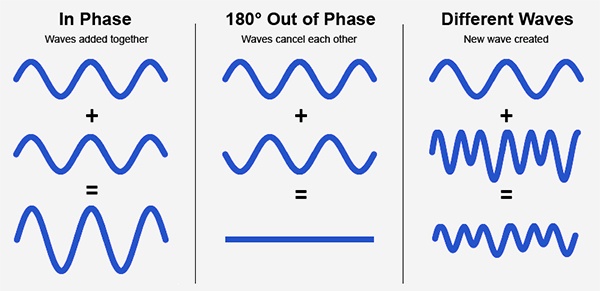
Audio phase is a fundamental aspect of sound that relates to the timing of sound waves. When we talk about audio phase, we’re essentially discussing how different audio signals align or misalign in time. To put it simply, sound is a result of air pressure changes that propagate as waves. These waves have peaks and troughs, and audio phase refers to the relationship between these peaks and troughs in different sound sources.

Think of audio phase as a group of musicians playing in perfect harmony. When they are perfectly in sync, the music sounds harmonious and powerful. However, if even one musician is slightly out of time, it can create dissonance. Similarly, in audio, when signals are in phase, they reinforce each other, resulting in a stronger and clearer sound. When they are out of phase, they can cancel each other out, leading to a weaker and less defined sound.

Audio Phase in Music Production

Understanding audio phase is crucial in music production, especially when recording multiple microphones or mixing different tracks. When recording, if two microphones capture the same sound source, such as a guitar or a vocalist, the signals from these microphones must be perfectly in phase to avoid phase cancellation.

Imagine you are recording a guitar with two microphones—one close to the soundhole and the other closer to the fretboard. If the signals from these two microphones are not in phase, you might experience a loss of bass frequencies or even strange, hollow sounds in the final mix. To avoid this, precise microphone placement and phase alignment are essential.

Correcting Audio Phase Issues

In the world of audio engineering, correcting phase issues is a common practice. Using specialized tools and techniques, audio engineers can adjust the timing of audio signals to ensure they are in phase. This process, known as phase correction or phase alignment, can salvage poorly recorded tracks and enhance the overall sound quality.

Imagine you’re in a recording studio, and you notice that the drum tracks are slightly out of phase with the rest of the instruments. With phase correction tools, you can realign the drum tracks to synchronize perfectly with the other instruments, resulting in a more cohesive and powerful sound.

Audio Phase and Sound Quality: Key Considerations

Now, let’s address some common questions related to audio phase:

How Does Audio Phase Affect Sound Quality?

Audio phase has a direct impact on sound quality. When audio signals are in phase, they reinforce each other, enhancing the overall clarity and richness of sound. However, when they are out of phase, they can cancel each other out, leading to a loss of frequencies and a less pleasing sound.

What Are the Common Phase Issues in Music Production?

In music production, some common phase issues include phase cancellation between microphones, phase misalignment in multi-miked drum kits, and phase problems when mixing different instruments. Identifying and addressing these issues is crucial for achieving a balanced and professional-sounding mix.

How Can I Prevent Phase Issues When Recording?

To prevent phase issues when recording, pay close attention to microphone placement and ensure that multiple microphones capturing the same source are equidistant from the sound source. Additionally, use phase inversion or phase alignment tools during mixing to correct any phase problems that may arise.

Audio Phase: A Symphony of Sound Precision

In conclusion, audio phase is a pivotal element in the world of sound, influencing the quality of music and recordings. Whether you’re a musician, sound engineer, or simply a music enthusiast, grasping the concept of audio phase can help you appreciate and optimize sound in various contexts. Remember, when audio signals are in harmony, they create a powerful symphony of sound, and understanding audio phase is the key to achieving that sonic precision.

Last Words

As we wrap up our journey through the realm of audio phase, I hope this guide has shed light on this intricate yet crucial aspect of sound. Whether you’re fine-tuning your music production skills or seeking to enhance your listening experience, audio phase knowledge empowers you to harness the full potential of sound. So, the next time you enjoy your favorite music or step into the world of audio production, remember the role that audio phase plays in creating the symphonies and sonic landscapes we cherish.

Audio Latency Compensation

Understanding Audio Latency Compensation

Audio Latency Compensation

Audio latency compensation is a critical concept in the world of audio processing and production. It refers to the delay that can occur when processing audio signals, and it’s a topic that impacts everything from live performances to recording studio sessions and even everyday experiences like watching TV or playing video games. In this article, I’ll delve into the intricacies of audio latency compensation, exploring its significance, how it affects various applications, and how it can be managed for optimal audio experiences.

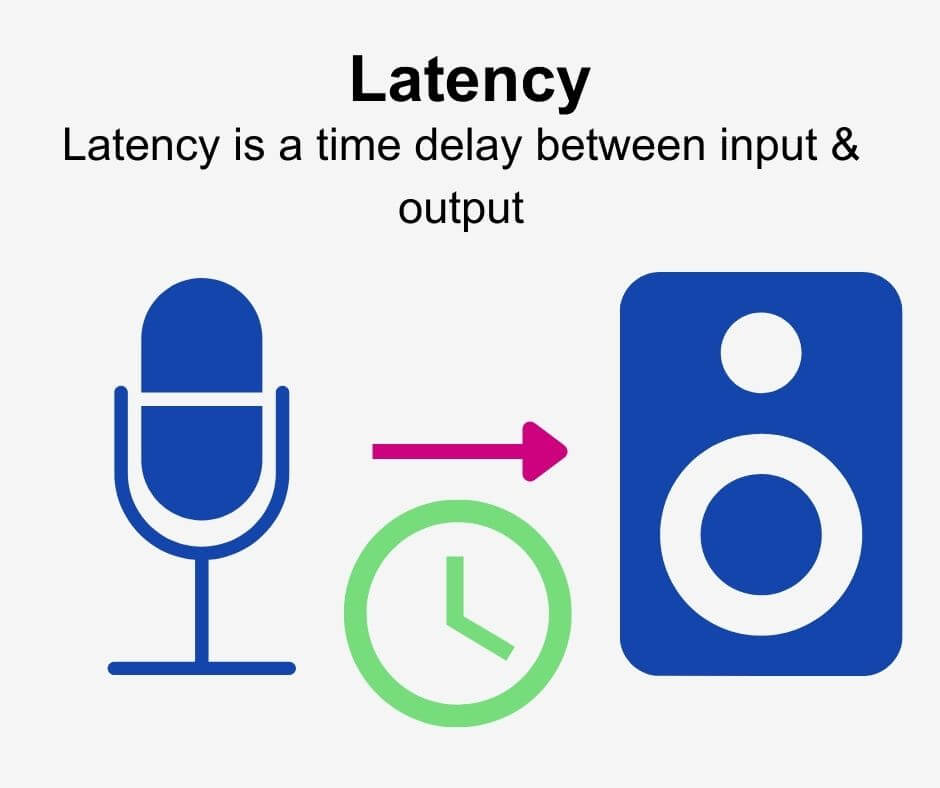
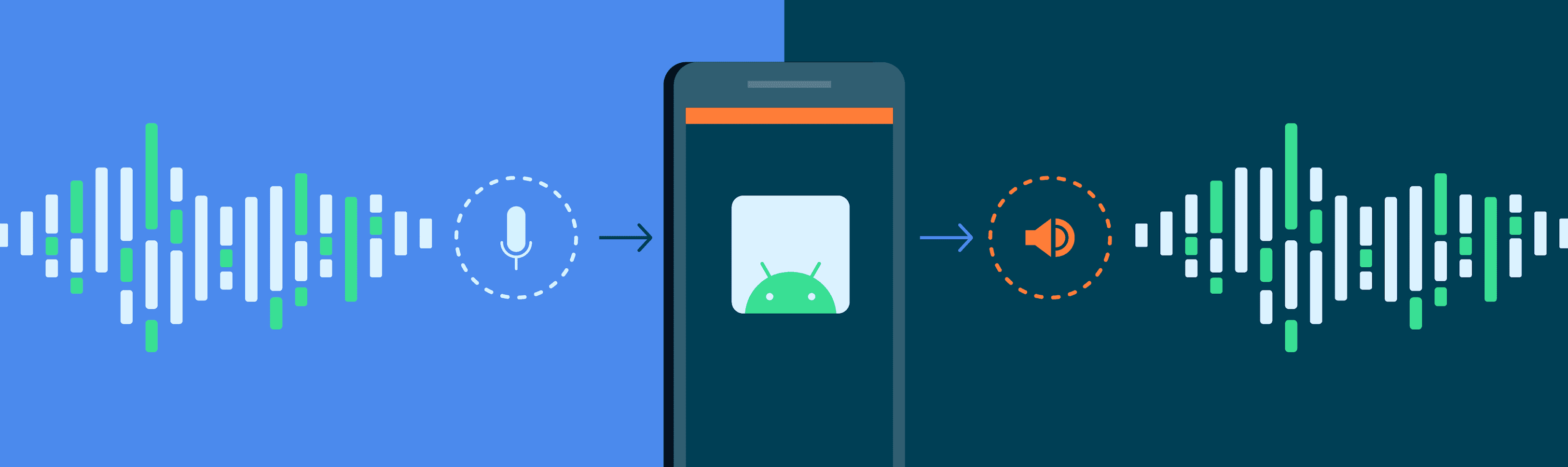
Audio latency compensation is essentially the delay that occurs when an audio signal is processed or transmitted from its source to its destination. This delay can be introduced at various stages of audio processing, such as when recording instruments, mixing tracks, or even during live performances. It’s measured in milliseconds and is a critical factor in ensuring that audio remains synchronized and cohesive.

Why Does Audio Latency Matter?

Audio Latency Compensation

The importance of audio latency compensation becomes evident when you consider scenarios where timing is crucial. For instance, in a live concert, the sound from microphones and instruments must reach the audience’s ears in sync with what they see on stage. Any delay can lead to a disjointed experience. Similarly, in music production, when multiple tracks are mixed, misaligned audio can result in muddiness or phase cancellation, affecting the overall quality of the recording.

Audio latency also plays a significant role in gaming. Gamers rely on audio cues for spatial awareness, and any latency can disrupt their ability to react quickly. Imagine playing a first-person shooter where the gunshot sound lags behind the visual animation; it could be the difference between victory and defeat.

Managing Audio Latency

To address audio latency, various techniques and technologies are employed. One common method is buffer size adjustment. This involves adjusting the size of data buffers in audio processing software or hardware to minimize delay. Smaller buffer sizes reduce latency but may strain the computer’s processing power, while larger buffers reduce strain but increase latency.

In professional audio setups, dedicated hardware interfaces with low-latency capabilities are used to minimize delay. These interfaces are designed to handle audio signals efficiently, ensuring minimal latency during recording and playback.

In the realm of gaming and live audio, technologies like ASIO (Audio Stream Input/Output) and low-latency audio drivers are employed to achieve near-instantaneous audio processing.

People Also Asked About Audio Latency Compensation

1. What Causes Audio Latency?

Audio latency can be caused by several factors, including:

Hardware Processing: Slow processors or insufficient RAM can lead to latency when processing audio.
Software Buffering: When audio data is buffered for processing, it can introduce delay, especially if the buffer size is too large.
Network Latency: In online applications, data transmission over the internet can introduce latency.

2. How Does Latency Affect Streaming and Online Calls?

In streaming and online calls, high latency can result in delays between audio and video, leading to unsynchronized experiences. This is often noticeable in live broadcasts or video conferencing.

3. Are There Differences Between Latency in Music Production and Gaming?

Yes, there are differences. In music production, low-latency is critical for real-time monitoring and recording. In gaming, low-latency ensures that audio cues match gameplay actions for a seamless experience.

4. Can Latency Be Completely Eliminated?

While we can minimize latency to imperceptible levels, complete elimination is challenging due to the limitations of hardware, software, and network transmission. Achieving extremely low latency is the goal, but there will always be some minimal delay.

Keywords with Identical Search Intent

1. Audio Delay Reduction Techniques

Reducing audio delay involves techniques like buffer size optimization, hardware upgrades, and low-latency drivers. These methods aim to minimize the time it takes for audio signals to travel from source to output.

2. Real-time Audio Processing

Real-time audio processing is crucial in applications like live sound engineering and gaming. It involves minimizing latency to ensure that audio signals are processed and delivered without noticeable delays.

3. Low-Latency Audio Interfaces

Low-latency audio interfaces are specialized hardware devices that enable musicians and producers to work with minimal audio delay. They are essential tools in professional music studios.

4. Latency Compensation in Audio Software

Audio software often includes features for latency compensation, allowing users to adjust settings and reduce delays during recording and playback. Understanding and utilizing these features is vital for audio professionals.

Last Words

In the world of audio, timing is everything. Whether you’re a musician, a gamer, or simply a fan of high-quality audio, understanding and managing audio latency compensation is essential for an immersive and seamless experience. By employing the right techniques and technologies, you can ensure that audio signals reach your ears with minimal delay, preserving the integrity of the sound and enhancing your overall enjoyment. So, whether you’re rocking out at a concert, producing your next hit song, or conquering virtual worlds in gaming, remember that audio latency compensation plays a pivotal role in shaping your auditory experience.

Audio Transients

Exploring Audio Transients: The Heartbeat of Sound

Audio Transients
Audio Transients
Audio Transients
Audio Transients

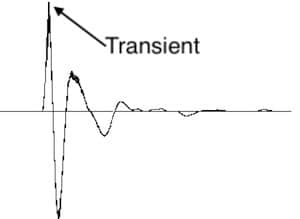
Audio transients are like the heartbeat of sound, the dynamic moments that give life and character to music and audio recordings. These brief, intense bursts of sound energy can be found in everything from the striking of a drum to the plucking of a guitar string. In this article, I’ll take you on a journey into the world of audio transients, unraveling their importance, how they affect our listening experience, and why they matter in various aspects of audio production.

Unveiling Audio Transients: The Basics

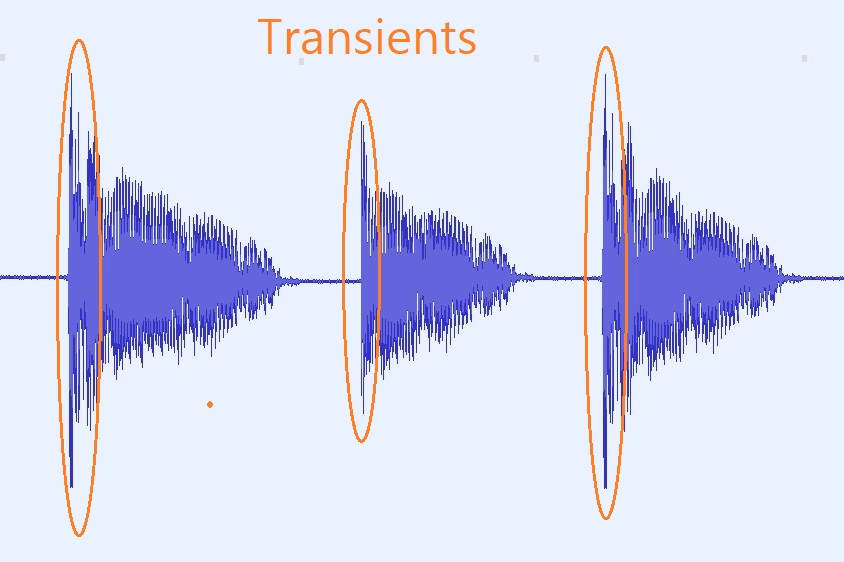
To understand audio transients, let’s begin with the fundamental concept. A transient is a sudden, short-lived spike in audio signal amplitude. It’s that initial burst of energy when a musical note is played, a door slams shut, or a pencil hits the table. Transients are the reason a snare drum crackles with excitement and a lightning strike commands attention.

Think of audio transients as the punctuation marks in a sentence. They emphasize and give context to the sound that follows. Just like a period or an exclamation point can change the meaning of a sentence, the shape and intensity of an audio transient can drastically affect how we perceive a sound.

People Also Asked: Answering Your Curiosities

Let’s dive into some common questions people have about audio transients:

How Do Audio Transients Impact Music?

Audio transients are the pulse of music. They define the rhythm and dynamics that make a track lively and engaging. For example, in a drumbeat, the transients from the snare and kick drums create the groove that makes you want to dance.

Imagine a favorite song without transients—it would be like a story without any punctuation marks, making it hard to follow and enjoy.

Can Audio Transients Be Controlled?

Yes, they can! Audio producers and engineers often use tools like compressors and limiters to control transients. By shaping the transient’s amplitude and duration, they can achieve a desired sound texture.

Think of it as adjusting the force with which a hammer strikes a nail. Too hard, and you risk damaging the surface; too soft, and it won’t penetrate. Engineers find that sweet spot to shape the sound precisely.

What Is Peak vs. RMS in Audio Transients?

Peak and RMS (Root Mean Square) represent two aspects of an audio transient’s amplitude. The peak is the highest point, representing the transient’s instantaneous intensity. RMS, on the other hand, provides a more averaged view, capturing the overall energy.

Picture a heartbeat monitor. The peak is like the spike when your heart beats, while RMS is like the overall trend, showing the average heart rate.

Keywords with Identical Search Intent

Now, let’s explore keywords related to audio transients that users often search for:

Transient Shaping Techniques: Crafting Audio Dynamics

Delving deeper into audio production, we encounter techniques like transient shaping and transient design. These methods allow producers to sculpt transients to their liking, adding punch or subtlety as needed.

Consider transient shaping as sculpting clay. You can mold the clay to create sharp edges or smooth curves, just as you can shape audio transients to be crisp or gentle.

Audio Transients in Live Sound: A Vital Element

In live sound engineering, managing transients is crucial for delivering a balanced and impactful performance. Sound engineers use techniques like transient suppression and transient enhancement to optimize the live experience.

Imagine a live concert as a massive puzzle. Managing transients is like fitting all the pieces together to create a breathtaking picture.

Mastering Transients in Audio Recording

Audio engineers during the mastering process focus on transients to ensure that a track sounds polished and cohesive. Techniques like peak limiting and transient preservation help achieve a consistent and professional sound.

Think of mastering as the final touch-up on a painting. It’s where the artist ensures every detail is perfect before presenting the masterpiece to the world.

Last Words

In the symphony of sound, audio transients are the conductor’s baton, guiding and shaping the musical narrative. They are the essence of dynamics, rhythm, and emotion in audio, whether you’re enjoying your favorite song, recording a podcast, or witnessing a live concert. Understanding and harnessing the power of audio transients is the key to unlocking the true potential of sound. So, next time you tap your fingers to a beat or savor the nuances of a melodic guitar solo, remember the role of those transient moments—they are the heartbeat of sound.

How can I prevent aliasing and harmonic distortion in audio?

How can I prevent aliasing and harmonic distortion in audio?

Digital Audio Aliasing


Digital Audio Aliasing


Introduction

As a music enthusiast, I have always been concerned about the quality of audio recordings. Two common problems that affect audio quality are aliasing and harmonic distortion. Aliasing occurs when the sampling rate of an audio signal is insufficient, causing high-frequency signals to be incorrectly represented as lower frequencies. On the other hand, harmonic distortion occurs when the amplitude of a signal is altered due to the presence of harmonics. In this article, we will discuss ways to prevent these issues and improve audio quality.

What is aliasing and how to prevent it?

Aliasing is a common problem in digital audio, but it can be prevented by increasing the sampling rate of the audio signal. As a general rule, the sampling rate should be at least twice the highest frequency in the audio signal. For example, if the highest frequency in the audio signal is 20 kHz, the sampling rate should be at least 40 kHz. By increasing the sampling rate, we can ensure that high-frequency signals are accurately represented in the digital audio signal.

My personal experience

When I first started recording music, I noticed that my recordings had a lot of high-frequency noise. After doing some research, I realized that this was due to aliasing. I increased the sampling rate of my recordings, and the high-frequency noise disappeared. Since then, I have made it a point to always use a high sampling rate when recording audio.

What is harmonic distortion and how to reduce it?

Harmonic distortion occurs when a signal is altered due to the presence of harmonics. This can be caused by nonlinearities in the audio system, such as distortion in amplifiers or speakers. One way to reduce harmonic distortion is to use a high-quality audio system with low distortion. Additionally, using equalization can help reduce distortion in certain frequency ranges.

Quote from a book

As the audio engineer Bob Katz says in his book “Mastering Audio”: “Reducing distortion is one of the most important tasks of an audio engineer. Distortion masks the details in a mix and reduces the perceived loudness of the audio signal.”

Improving audio quality

In addition to preventing aliasing and reducing harmonic distortion, there are other ways to improve audio quality. One way is to use a high-quality audio codec when encoding audio files. Another way is to use a high-quality audio player or amplifier when listening to audio.

My personal opinion

In my experience, using a high-quality audio system can make a big difference in the overall quality of the audio. When I upgraded my audio system, I noticed that the sound was much clearer and more detailed.

Conclusion

Preventing aliasing and reducing harmonic distortion are important steps in improving the quality of audio recordings. By using a high sampling rate, a high-quality audio system, and equalization, we can ensure that our audio recordings are clear and free from distortion.

Final words

In conclusion, improving audio quality requires attention to detail and a commitment to using high-quality equipment and techniques. While there are many factors that can affect audio quality, preventing aliasing and reducing harmonic distortion are two important steps that can make a big difference.


aliasing, harmonic distortion, audio quality, digital audio, sampling rate, Nyquist frequency, low-pass filter, anti-aliasing filter, analog-to-digital converter, digital-to-analog converter, audio processing, audio effects, audio recording, audio mastering, audio production, audio engineering, sound engineering, sound design, sound quality, audio equipment, audio plugins, audio software, audio hardware, audio interface, audio cables, audio mixer, audio compressor, audio limiter, audio equalizer, audio amplifier, audio signal processing, audio normalization, audio compression, audio dynamics, audio frequency, audio spectrum, audio analysis, audio measurement, audio test, audio troubleshooting, audio repair, audio restoration, audio format, audio file, audio codec, audio bit depth, audio resolution, audio latency, audio delay, audio latency compensation, audio synchronization, audio phase, audio distortion, audio artifacts, audio clipping, audio saturation, audio noise, audio hum, audio buzz, audio hiss, audio pops, audio crackles, audio dropouts, audio glitches, audio issues, audio problems, audio solutions, audio tips, audio tricks, audio tutorials, audio guides, audio lessons, audio courses, audio books, audio blogs, audio forums, audio community, music production, music recording, music mixing, music mastering, music engineering, music theory, music composition, music arrangement, music performance, music education.