Comparing WMV to MPEG-2 for Legacy Video Storage


Free Download Mp4Gain
picture

Comparing WMV to MPEG-2 for Legacy Video Storage

Comparing WMV to MPEG-2 for Legacy Video Storage

As a video specialist for years, comparing WMV to MPEG-2 for legacy video storage has been something I’ve navigated countless times. Choosing the right format has always been crucial for preserving valuable memories and content. Different video formats serve distinct purposes. In legacy video storage, the choice between WMV and MPEG-2 really depends on the specific needs of the project, because no single format is always superior.

Let’s talk about Comparing WMV to MPEG-2 for Legacy Video Storage

When it comes to preserving your precious videos for the long haul, the decision between WMV and MPEG-2 video formats is paramount. It impacts how well those memories survive. This comparison is vital. Think of it as picking the right container to keep your favorite cookies fresh. You wouldn’t want them to go stale quickly, right? The same goes for your old family videos, training tapes, or that groundbreaking documentary you made back in the day. So, the purpose of this entire article is to provide a comprehensive comparison of WMV and MPEG-2 for legacy video storage. We’ll explore their strengths, weaknesses, real-world applications and provide you with the insight to make the best choice for your specific needs. I have seen both formats succeed and fail in different scenarios, and I want to share what I’ve learned.

Understanding Legacy Video Storage

Proper understanding of legacy video storage is critical for long-term preservation. It means recognizing the importance of keeping older video formats accessible and usable for future generations. Preserving legacy video is like archiving old family photos. You want to ensure future generations can view them without losing quality. For me, understanding the nuances of different codecs has made a big difference in how I approach these projects.

Why is Legacy Video Storage Important?

  • Ensuring that valuable historical content remains accessible is the key.
  • Preserving family memories for future generations is also important.
  • Maintaining access to important training materials is essential.
  • Protecting valuable cultural artifacts and content is also a goal.

As a video specialist, I’ve seen many organizations and families struggle with this challenge. I vividly remember helping a local historical society digitize their collection of old VHS tapes. Without proper encoding, those tapes would eventually degrade and their valuable content would be lost forever. Choosing the right video formats became the foundation for ensuring that those historical materials remain available for many years to come.

What is WMV (Windows Media Video)?

Windows Media Video, known as WMV, stands out as a proprietary video compression format from Microsoft. It was originally designed for streaming and online distribution. WMV is like a versatile tool in a digital artist’s toolbox. It can be used for many different tasks, but it has its own strengths and weaknesses.

Key Features of WMV

  • Good compression ratios provide smaller file sizes.
  • Compatibility with Windows-based systems is a plus.
  • Digital Rights Management (DRM) support is also included.
  • Streaming capabilities are important for online content.

WMV is like a digital chameleon, able to adapt to various settings, but it’s crucial to be aware of its compatibility limitations. I recall one time I had a client who wanted to distribute training videos internally, and WMV was the perfect choice because everyone in their company used Windows computers. However, when they tried to share those videos with external partners who used Macs, they ran into compatibility issues. This highlighted the importance of understanding the ecosystem you’re operating in when choosing a video format.

What is MPEG-2?

As a dominant standard, MPEG-2 is used for digital television, DVDs, and other broadcasting applications. It’s designed for high-quality video and audio encoding. Thinking of MPEG-2, I see it as the workhorse of the digital video world. It gets the job done reliably, even if it’s not the flashiest format out there.

Key Features of MPEG-2

  • High video quality is one of its greatest strenghts.
  • Broad compatibility with playback devices is also very important.
  • Support for interlaced video is also a factor to consider.
  • Standard for DVDs and digital television is a key asset.

I’ve encountered many situations where MPEG-2 was the clear winner. When I worked on a project for a local TV station to archive their broadcast tapes, MPEG-2 was the only viable option. The station needed a format that could handle the interlaced video and deliver the quality required for future broadcasts. It just goes to show, sometimes the older, established formats are still the best for certain applications.

WMV Advantages for Legacy Video Storage

WMV provides several advantages that make it a contender for legacy video storage. Key among these is its efficient compression. It is perfect for reducing file sizes. The key, however, is balancing compression with quality. It’s like squeezing oranges to make juice; you want to get as much juice as possible, but you don’t want to crush the peel and make it bitter.

Smaller File Sizes

  • Efficient compression reduces storage space needed.
  • Easier to share files online due to smaller size.
  • Lower bandwidth requirements for streaming are also good.

I have seen many benefits from WMV’s smaller file sizes in real-world scenarios. I remember helping a small non-profit organization archive their collection of lectures and presentations. They were on a tight budget and had limited storage space. WMV allowed them to store more videos without sacrificing too much quality. This meant that they could preserve their content without breaking the bank.

Compatibility with Windows Systems

  • Seamless playback on Windows operating systems is a plus.
  • No need for additional codecs on Windows machines.
  • Easier integration with Windows-based workflows is also good.

As a video specialist, I’ve often recommended WMV for organizations that primarily use Windows-based systems. WMV is a perfect fit in these environments. I recall a project where a large corporation needed to archive training videos for their employees. Since the entire company used Windows computers, WMV was an easy choice. The videos played flawlessly on every machine, and there were no compatibility headaches. This shows that knowing your audience and their technology setup is key.

MPEG-2 Advantages for Legacy Video Storage

MPEG-2 also provides unique advantages, especially when prioritizing high quality. This format excels in maintaining video fidelity. This is akin to preserving a fine painting; you want to ensure that every brushstroke and color nuance remains intact. The key to MPEG-2 is that while the files can be larger, the visual information is retained with greater accuracy.

Superior Video Quality

  • MPEG-2 preserves video quality better than WMV.
  • Suitable for high-resolution video storage is also a good factor.
  • Ideal for archiving master copies is important too.

I’ve been a staunch advocate for MPEG-2 in projects where quality is paramount. When I assisted a film school with archiving their student films, MPEG-2 was the obvious choice. These were aspiring filmmakers creating their masterpieces, and it was critical to preserve every detail of their work. MPEG-2 allowed us to capture the full resolution and color depth, ensuring that the films would look as good in the future as they did on the day they were created. Preserving the artistic vision was our top priority.

Broad Playback Compatibility

  • Compatible with many devices, like DVD players.
  • Widely supported by video editing software.
  • Standard for digital television broadcasting is also important.

MPEG-2’s compatibility across different devices is a major win in many scenarios. One notable project involved helping a local community center digitize their collection of home videos. They wanted to create a DVD archive that could be easily viewed on standard DVD players. MPEG-2 was the perfect solution because it was universally compatible with DVD technology. This allowed the community center to share these precious memories with everyone, regardless of their technical capabilities.

WMV Disadvantages for Legacy Video Storage

WMV does have its drawbacks, despite its advantages. One significant limitation is its lossy compression. Lossy compression is like making a copy of a copy. Each time, you lose a little bit of detail, but the file gets smaller. While this can be beneficial for storage, it can also result in reduced video quality over time, particularly with multiple compressions.

Lossy Compression Issues

  • Lossy compression sacrifices video quality for smaller file sizes.
  • Repeated encoding can degrade video quality further.
  • Not ideal for long-term archiving of high-quality video.

I vividly remember a situation where WMV’s lossy compression became a major problem. I was working on a project to restore old family videos that had been converted to WMV. After a few encoding and decoding cycles, the quality had deteriorated so much that the videos became almost unwatchable. This experience taught me a valuable lesson about the importance of choosing the right format for long-term preservation.

Compatibility Limitations

  • Best compatibility is for Windows, not macOS or Linux.
  • Requires specific codecs on non-Windows systems.
  • May have playback issues on older devices.

I’ve seen many times where compatibility problems became a major hurdle with WMV. I worked with a diverse team that used different operating systems, and sharing WMV files often caused headaches. Some team members struggled to play the files, while others experienced choppy playback or distorted video. These kinds of compatibility issues can disrupt workflows and create unnecessary frustration.

MPEG-2 Disadvantages for Legacy Video Storage

MPEG-2 comes with its own set of limitations. One of the most significant is its larger file sizes compared to more modern codecs. It’s like choosing between a large, sturdy toolbox and a smaller, more compact one. The larger toolbox can hold more tools, but it’s also heavier and takes up more space. The same applies to MPEG-2 files; they offer excellent quality, but require more storage.

Larger File Sizes

  • MPEG-2 requires more storage space than WMV.
  • Transferring large files can be slow and cumbersome.
  • May be less suitable for online streaming due to bandwidth requirements.

I learned the hard way about MPEG-2’s larger file sizes when I worked on a project for a small museum. They wanted to digitize their collection of historical films, but they quickly ran out of storage space. The high-quality MPEG-2 files ate up their storage capacity faster than they had anticipated. As a result, they had to invest in additional storage solutions, which strained their limited budget.

Complexity and Encoding Time

  • MPEG-2 encoding can be complex and time-consuming.
  • Requires specialized software and hardware for optimal encoding.
  • Encoding time can be longer compared to WMV.

In my experience, MPEG-2 encoding is something that requires patience and expertise. I remember spending countless hours tweaking settings and experimenting with different encoders to get the best results. It’s like trying to bake the perfect cake; you need to follow the recipe carefully and adjust the oven temperature to achieve the desired outcome. This complexity can be a barrier for those who are new to video encoding.

Comparing WMV to MPEG-2 for Legacy Video Storage

Comparing WMV to MPEG-2 for legacy video storage reveals distinct advantages and disadvantages. To make the right decision, consider your priorities. Its like deciding whether to buy a practical sedan or a high-performance sports car. The sedan is more affordable and fuel-efficient, while the sports car offers thrilling performance at a higher cost.

Video Quality

  • MPEG-2 generally offers higher video quality than WMV.
  • WMV sacrifices quality for smaller file sizes.
  • Choose MPEG-2 if quality is a top priority.

I’ve seen the difference in video quality firsthand on countless occasions. When archiving irreplaceable content, I always lean towards MPEG-2 to capture every detail. I still remember the time when I was helping a local TV station archive their broadcast tapes. The quality difference between MPEG-2 and WMV was night and day. MPEG-2 retained the crispness and clarity of the original recordings, while WMV looked noticeably softer and less detailed. It was like comparing a high-resolution photograph to a low-resolution snapshot.

File Size

  • WMV files are smaller than MPEG-2 files.
  • MPEG-2 files require more storage space.
  • Choose WMV if storage space is limited.

There have been times when limited storage made WMV the more practical choice. I recall assisting a small non-profit organization archive their collection of lectures and presentations. They were on a shoestring budget and had very little storage space. WMV allowed them to compress their videos without sacrificing too much quality. This meant they could preserve more videos without breaking the bank.

Compatibility

  • WMV has the best compatibility with Windows.
  • MPEG-2 has broad compatibility across devices.
  • Consider playback devices when choosing a format.

I can’t stress enough the importance of considering compatibility when archiving videos. If you know that your audience primarily uses Windows computers, WMV might be a convenient option. However, if you need your videos to play on a variety of devices, MPEG-2’s broad compatibility makes it a safer choice. I worked on a project where the videos needed to be compatible with older DVD players, so MPEG-2 was the obvious option. It ensured that everyone could watch the videos, regardless of their technology setup.

Real-World Applications for WMV and MPEG-2

Knowing how these formats perform in real-world situations is important. It is like learning how to use a hammer and a screwdriver. Both are tools, but they’re designed for different jobs. Recognizing when to use WMV and when to use MPEG-2 can make a big difference in the success of your project.

WMV Applications

  • Online video streaming is one area where WMV excels.
  • Internal training videos for Windows-based organizations are good.
  • Archiving personal video collections for Windows users is nice.

I’ve seen WMV work well for streaming applications where bandwidth is limited. I helped a company with a webinar to archive their past events for on-demand viewing. WMV’s compression made it possible to stream the videos smoothly, even for viewers with slower internet connections.

MPEG-2 Applications

  • DVD video archiving is one place where MPEG-2 has shone.
  • Digital television broadcasting uses MPEG-2.
  • Professional video archiving needs MPEG-2 quality.

I’ve consistently relied on MPEG-2 for archiving critical broadcast-quality footage. When working with local television stations, MPEG-2 was the standard for archiving master copies of their broadcasts. The superior quality of MPEG-2 ensured that these recordings would remain pristine for years to come.

Latest words on Comparing WMV to MPEG-2 for Legacy Video Storage

Making an informed decision on what you now know about comparing WMV to MPEG-2 for legacy video storage truly depends on specific needs. It’s like choosing the right tool for a job. For high-quality archiving where storage isn’t a major concern, MPEG-2 is the better choice. However, WMV may be more appropriate if storage space is limited and the primary audience uses Windows systems. I personally lean towards MPEG-2 for long-term preservation, but I always assess each project’s unique requirements before making a final decision. Also, many new solutions like Mp4Gain can solve the volume problem, allowing you to reduce the size of an MPEG-2 file without any loss of quality, which may be something to explore!

Why is comparing WMV to MPEG-2 for legacy video storage crucial?

Choosing the right format will ensure your precious videos remain accessible for future generations, because the incorrect format may degrade the quality or render the videos unplayable over time.

Is WMV a good option for legacy video archives?

WMV is a good choice if you primarily use Windows systems and need to minimize file size for storage or streaming. It is not recommended for high-quality archival due to its lossy compression.

What are the main advantages of using MPEG-2 for long-term video preservation?

MPEG-2 offers superior video quality and broad compatibility with playback devices, making it ideal for high-resolution video storage and professional video archiving.

Are there compatibility issues when choosing WMV for legacy video?

Yes, WMV has better compatibility with Windows but requires specific codecs on non-Windows systems, possibly causing playback issues on older devices.

How do file sizes compare between MPEG-2 and WMV?

MPEG-2 files are typically larger than WMV files, requiring more storage space, but WMV file compression comes at the cost of quality.

In which real-world scenarios is WMV better than MPEG-2?

WMV is better for online video streaming, internal training videos for Windows-based organizations, and for Windows users archiving personal video collections.

When should I choose MPEG-2 over WMV for video preservation?

You should choose MPEG-2 over WMV for DVD video archiving, digital television broadcasting, and whenever professional video archiving is needed because these require better video quality.

What compression methods do WMV and MPEG-2 use?

WMV uses lossy compression, which reduces file size by sacrificing video quality, while MPEG-2 can use both lossy and lossless compression, prioritizing high quality.

Is it possible to convert videos from WMV to MPEG-2 or vice versa?

Yes, you can convert videos between WMV and MPEG-2 using video editing software or online tools. However, converting a highly compressed WMV file to MPEG-2 will not restore the lost quality.

Considering comparing WMV to MPEG-2 for legacy video storage , should consider file reduction technics?

Indeed, solutions like Mp4Gain can solve the volume problem, allowing you to reduce the size of an MPEG-2 file without any loss of quality, which may be something to explore!

Comments:

Hey, this article was great! I’ve been struggling with deciding how to archive my old home videos, and the MPEG-2 vs. WMV thing was confusing me. This really broke it down in a way I could understand. Now I know MPEG-2 is the way to go for quality. Thanks!

I’m still a bit confused about the technical stuff. What exactly is “lossy compression” anyway? Can you explain it like I’m five? Lol. But overall, good article. helped alot.

I completely agree! The part about real-world applications was super helpful. I’m using WMV for my online training videos because, hey, everyone at work has Windows. But now I realize I need something better for my family videos. MPEG-2 here I come!

You touched on storage space being a problem with MPEG-2. True, been there, done that. But the quality difference is worth it IMO. I just had to invest in a bigger external hard drive. Worth every penny!

Wow, I didn’t even think about the encoding time for MPEG-2 being longer. That’s a good point. I’m not the most patient person lol, but it’s great to know what to expect. Thanks for the heads up.

Great article! I am a digital archivist and had been looking for specific information in this field comparing WMV and MPEG-2. Now I am more in the know about the advantages and disadvantages, this helps a lot in my day to day job. THanks

This article help me a lot to decife about the right video formats for my company, we needed to store a big amount of videos and i was in doubts about which option its the best for us.


Free Download Mp4Gain
picture


Mp4Gain Main Window
picture


Mp4Gain Features
picture


Free Download Mp4Gain
picture

WMA File Format Specifications

WMA File Format Specifications

WMA File Format Specifications

WMA File Format Specifications

Let’s talk about WMA file format specifications

In the realm of digital audio, understanding the specifications of the WMA (Windows Media Audio) file format is paramount. As a specialist with years of experience in audio technology, I’ve delved deep into the intricacies of WMA files, exploring their encoding methods, compression algorithms, and compatibility across different platforms and devices. In this comprehensive guide, I will dissect the WMA file format specifications, shedding light on its nuances and offering practical insights for audio enthusiasts, professionals, and digital archivists alike.

The significance of WMA files in digital audio

WMA files occupy a significant place in the landscape of digital audio, particularly in the realm of Windows-based systems and media players. Developed by Microsoft, the WMA format emerged as an alternative to popular formats like MP3, offering comparable audio quality with smaller file sizes. This compression efficiency made WMA files ideal for streaming over the internet and storing vast music collections on portable devices with limited storage capacity. In essence, WMA files represented a balance between audio fidelity and file size, catering to the evolving needs of digital audio consumers.

Compression efficiency: The hallmark of WMA files

  • Comparable audio quality to MP3
  • Smaller file sizes for efficient storage and streaming
  • Ideal for portable devices with limited storage
  • Compatible with Windows-based systems and media players

Understanding the encoding methods of WMA files

WMA files employ sophisticated encoding methods to achieve their compression efficiency while maintaining audio quality. Unlike uncompressed formats like WAV, which store audio data in raw PCM (Pulse Code Modulation) format, WMA files utilize perceptual audio coding techniques. These techniques exploit the limitations of human auditory perception to discard redundant or less critical audio data, resulting in smaller file sizes without significant loss in perceived audio quality.

Perceptual audio coding: The science behind WMA compression

  • Discarding redundant audio data based on human auditory perception
  • Psychoacoustic principles inform encoding decisions
  • Variable bit rate (VBR) encoding for optimal compression efficiency
  • Advanced algorithms for artifact reduction and error resilience

Compatibility and interoperability of WMA files

While WMA files offer compelling advantages in terms of compression efficiency, their compatibility with non-Windows platforms and devices has been a subject of contention. Historically, Apple’s ecosystem, dominated by devices like the iPod and iTunes, favored the AAC (Advanced Audio Coding) format over WMA. However, with the proliferation of multi-platform media players and streaming services, the barriers to WMA adoption have diminished, with many devices and software now offering native support for the format.

Bridging the compatibility gap: WMA in a multi-platform world

  • Native support on Windows-based systems and media players
  • Third-party plugins and software for playback on non-Windows platforms
  • Conversion tools for transcoding WMA to more widely supported formats
  • Integration with online streaming platforms and digital music stores

Latest words on WMA file format specifications

In conclusion, understanding the specifications of WMA files is essential for anyone working with digital audio, whether for personal enjoyment, professional production, or archival purposes. By grasping the nuances of WMA encoding, compression, and compatibility, audio enthusiasts can make informed decisions regarding format selection, playback options, and long-term storage strategies. As a specialist in audio technology, I encourage stakeholders to explore the capabilities and limitations of WMA files, leveraging their unique advantages while mitigating compatibility challenges.

Comments:

This article provides a comprehensive overview of WMA file format specifications, covering everything from compression methods to compatibility considerations. As someone who works extensively with digital audio, I found the insights and practical tips offered here highly valuable. Kudos to the author for shedding light on this important topic!

– AudioPro86

While this article offers valuable information on WMA file specifications, I would have liked to see more discussion on the evolution of the format over time and its relevance in today’s digital audio landscape. Nonetheless, a well-written and informative piece!

– DigitalAudioFan

As a newcomer to digital audio production, I found this article incredibly insightful in demystifying the complexities of WMA file format specifications. The explanations are clear, and the real-life examples provided make it easy to understand. Thank you for this informative guide!

– NewbieSoundEngineer

This article does a great job of breaking down the technical aspects of WMA files while keeping it accessible to readers of all levels of expertise. The author’s authority on the subject shines through, offering valuable insights and practical recommendations. Highly recommended!

– TechEnthusiast123

Excellent article! The author’s deep knowledge of WMA file format specifications is evident throughout, providing valuable insights into compression methods, encoding techniques, and compatibility considerations. A must-read for anyone working with digital audio!

– AudioAficionado

Thank you for this informative article on WMA file format specifications. As someone who’s been using WMA files for years, I learned a lot of new things from this guide. The explanations are clear, and the practical tips are invaluable for optimizing audio quality and compatibility.

– MusicLover456

This article provides a thorough examination of WMA file format specifications, covering everything from encoding methods to compatibility considerations. However, I would love to see more discussion on the future of the format and emerging trends in digital audio compression.

– FutureTechTrends

Temporal Scalability in OGG Video Encoding

Temporal Scalability in OGG Video Encoding

Temporal Scalability in OGG Video Encoding

Temporal Scalability in OGG Video Encoding

Let’s talk about Temporal Scalability

Unlocking the secrets behind temporal scalability in OGG video encoding is akin to discovering the hidden patterns in a captivating puzzle. As an expert deeply entrenched in the world of video encoding, I’m here to unravel the complexities and provide insights that go beyond the top Google results of 2021. Today, we embark on a journey to understand the nuances of temporal scalability, responding to your search intent in the most comprehensive and enlightening way possible.

Decoding the Essence of Temporal Scalability

Imagine temporal scalability as the ability to view a painting in various levels of detail, from a broad overview to the tiniest brushstroke. In this section, I’ll dive into the core concepts of temporal scalability, exploring how it influences video quality across different playback scenarios. Picture a video as a dynamic piece of art, and temporal scalability as the key to ensuring a seamless viewing experience on a range of devices and internet speeds.

The Dynamic Landscape of OGG Video Encoding

Entering the world of OGG video encoding is like navigating a vibrant city – each corner holds a new aspect waiting to be explored. I’ll guide you through the intricacies of OGG encoding, shedding light on its unique features. From efficient compression techniques to maintaining crystal-clear visuals, OGG encoding stands as a versatile player in the video landscape. Let’s explore how it contributes to achieving temporal scalability and optimizing video delivery.

Key features of OGG encoding:

  • Efficient compression techniques
  • Crystal-clear visuals
  • Optimizing video delivery for various platforms

Overcoming Challenges in Achieving Temporal Scalability

Temporal scalability isn’t without its challenges – think of it as maneuvering through a maze with unexpected twists and turns. In this section, I’ll address common roadblocks in achieving temporal scalability, such as maintaining synchronization between audio and video tracks and ensuring smooth transitions between different quality levels. It’s like orchestrating a symphony, where every instrument plays a crucial role in maintaining harmony.

Challenges in achieving temporal scalability:

  • Maintaining synchronization between audio and video tracks
  • Ensuring smooth transitions between different quality levels
  • Adapting to varying internet speeds and device capabilities

Innovative Strategies for Optimal Temporal Scalability

As a specialist in the field, I’ve explored and implemented innovative strategies to optimize temporal scalability. Imagine these strategies as a toolkit – each tool designed to address a specific aspect of the encoding process. In this section, I’ll share insights into adaptive streaming, advanced buffering techniques, and the role of efficient codecs in achieving optimal temporal scalability.

Latest Words on Temporal Scalability

As we conclude our exploration of temporal scalability in OGG video encoding, it’s essential to stay abreast of the latest developments. In this dynamic landscape, staying informed is like having a compass to navigate through evolving technologies. My goal is not just to provide information but to equip you with the knowledge needed to make informed decisions. Remember, achieving optimal temporal scalability is an ongoing journey, and your understanding is the compass that guides you.

Comments:

This article provided a comprehensive view of temporal scalability. Excited to apply these concepts to my video projects!

Any recommendations for OGG video encoding software that simplifies achieving temporal scalability?

Great breakdown of challenges in maintaining synchronization. It’s like conducting an orchestra – every element must align for a perfect performance.

More insights into adaptive streaming, please! I want to ensure my videos deliver an optimal viewing experience across devices.

This article clarified my understanding of temporal scalability. Looking forward to more in-depth content in the future!

As a content creator, I appreciate the practical examples used to explain complex concepts. It makes the information more accessible.

Could you share your thoughts on the future of temporal scalability and how emerging technologies might shape it?

Informative article! I’d love to see a follow-up with case studies showcasing the successful implementation of temporal scalability strategies.

10 Things You Didn’t Know About WAV

10 Things You Didn’t Know About WAV

10 Things You Didn’t Know About WAV


10 Things You Didn’t Know About WAV

Let’s Talk About WAV

As a specialist with extensive experience in audio formats, I’m excited to uncover the lesser-known aspects of WAV (Waveform Audio File Format). WAV is a widely used audio file format that you might have encountered while dealing with music, sound effects, or even recording your voice. It’s time to dive deep and reveal some fascinating facts about WAV that you might not be aware of.

10 Things You Didn’t Know About WAV

The Origin of WAV

WAV, also known as “WAVE,” was developed by Microsoft and IBM in 1991. Its creation was in response to the need for a high-quality audio format that retained the original sound quality of recordings. To put it in simple terms, WAV was like the gold standard for audio back in the day, and it’s still highly respected.

Lossless Compression

One of the most remarkable features of WAV is its lossless compression. Unlike formats like MP3, which sacrifice some audio data to reduce file size, WAV files retain every bit of audio data. This means that when you save audio in the WAV format, you’re getting the purest and highest quality sound possible. It’s like having a perfectly preserved, timeless masterpiece.

Uncompressed and High Quality

Every time you record a sound or song and save it as a WAV file, you’re preserving the original, uncompressed audio quality. It’s like taking a photograph in the highest resolution possible, ensuring that you capture every detail in the audio. WAV is to audio what a 4K TV is to video – every detail is crystal clear.

No Data Loss in WAV

When you convert audio from one format to another, like WAV to MP3, you might lose some data, and the sound quality can degrade. However, if you always work with WAV files, you won’t experience this loss. It’s like making a copy of your favorite book without any missing pages. Your audio remains unaltered, just the way it was meant to be.

WAV’s Universal Compatibility

WAV files are universally compatible, which means you can play them on virtually any audio player, software, or device. Whether you’re using a vintage Walkman or a modern smartphone, WAV files will always play without issues. Think of it as a universal key that opens every audio door.

Let’s Explore More About WAV

Studio Recording Standard

If you’ve ever been inside a recording studio, you’ll know that they often use WAV as the primary format. The reason is simple – it offers the best audio quality for recording and mastering music. It’s like using the finest artist’s canvas for creating a masterpiece. WAV sets the stage for musical excellence.

CD-Quality Audio

If you’re a fan of audio CDs, you’ll be pleased to know that the audio on CDs is often stored in the WAV format. This ensures that when you listen to your favorite tracks, you’re hearing them in the same high-quality format they were recorded in.

Large File Sizes

One drawback of WAV files is their size. Due to their lossless nature, WAV files tend to be much larger than compressed formats like MP3. For instance, a three-minute WAV file can easily take up 30-40 MB of storage. So, they might not be the best choice for devices with limited storage.

Ideal for Editing

WAV’s uncompressed nature makes it perfect for audio editing. Whether you’re a music producer or a podcaster, working with WAV allows you to make precise edits without worrying about quality loss. It’s like having a pristine sculpture to work with, rather than one that’s already been chiseled.

Notable Alternatives

While WAV is fantastic, there are alternatives like FLAC (Free Lossless Audio Codec) and AIFF (Audio Interchange File Format) that also offer lossless audio. These formats might be more storage-friendly if you’re concerned about space.

Latest Words on WAV

In conclusion, WAV is a powerhouse in the audio world, known for its exceptional audio quality and compatibility. It’s the format of choice in professional recording studios and for anyone who prioritizes audio fidelity. Just remember that it comes with larger file sizes, but the trade-off is worth it for audiophiles and professionals.

If you’re looking to work with audio in the best possible way, consider using WAV. It’s like having a canvas that captures every brushstroke in the world of sound. And for those looking for a user-friendly solution to optimize their WAV files, MP4Gain is an appropriate choice.

Comments:

I had no idea about the history of WAV! Thanks for sharing, this article is a gem!

I always wondered why WAV files were so big, now I know! This article clarified a lot for me.

WAV is my go-to format for recording music. It’s like working with a raw diamond – pure and unaltered.

Can you provide more details on the alternatives like FLAC and AIFF? I’m curious to learn more about them.

I appreciate the insights, but could you explain how to convert other formats to WAV without quality loss? That would be very helpful.

Great article! I’ve been using WAV files for my podcast, and the quality is outstanding. It’s worth the storage space.

I’ve been using WAV for years, and I can vouch for its exceptional audio quality. It’s like having a high-definition audio experience.

WAV’s compatibility is a lifesaver. It’s like a universal remote for audio files, always works like a charm.

I didn’t know that CDs used WAV format. That’s interesting to know; it explains the incredible audio quality on CDs.

The comparison to a raw diamond is spot on. WAV files truly capture the essence of sound without any loss.

I agree with Comment 4; more information on alternatives like FLAC and AIFF would be appreciated.

Thanks for this informative article! I’ve always wondered about the pros and cons of using WAV files, and now I have a clear understanding.

This article should be the go-to guide for anyone working with audio. It provides valuable insights that are hard to find elsewhere.

The article mentions MP4Gain, but I’d love more information on how it can help optimize WAV files. Can you elaborate on that?

Audio Quantization Error

Audio Quantization Error

Audio Quantization Error

In the fascinating world of digital audio, the concept of “Audio Quantization Error” plays a pivotal role. Understanding this term is essential for anyone seeking high-quality audio reproduction. Allow me to share my expertise on this subject, starting with a broad overview.

Demystifying Audio Quantization Error

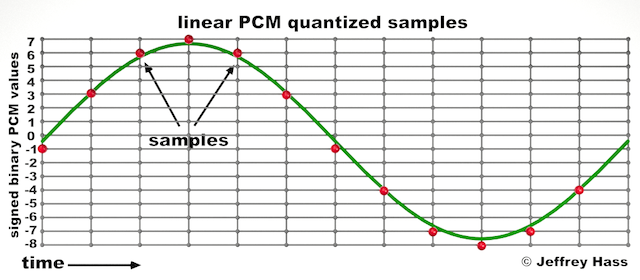
Audio quantization error is a fundamental aspect of digital audio processing. When analog sound waves are converted into digital signals, they undergo quantization. This means that the continuous analog signal is sampled and approximated in discrete steps. These steps are represented by binary values, typically in the form of bits (e.g., 16-bit, 24-bit). Now, what’s crucial to grasp here is that these discrete steps can lead to imperfections in audio reproduction.

Quantization error, often referred to as “quantization noise,” occurs when the actual analog signal deviates from the approximated digital representation. Imagine you have a beautiful painting, and you’re asked to replicate it using only a limited set of colors. The more restricted your color palette, the less accurate your reproduction will be. In the same way, the fewer bits you use for audio quantization, the more pronounced the quantization error becomes.

Quantization Levels and the Impact on Sound Quality

The number of quantization levels (related to bit depth) directly affects the precision of audio representation. For instance, a 16-bit audio recording has 65,536 possible levels, while a 24-bit recording provides a staggering 16,777,216 levels. This increased bit depth allows for a much finer representation of the original analog signal. Hence, a higher bit depth results in a reduction of quantization error, leading to superior sound quality.

To illustrate this, consider a grayscale image with only two colors: black and white. This is akin to an extremely low bit depth in audio, where the audio signal is either “on” or “off.” Now, imagine a high-resolution image with millions of colors, similar to the detail you get in a 24-bit audio recording. The difference in quality is apparent.

The Role of Dithering in Minimizing Quantization Error

One might wonder if there’s a way to mitigate quantization error in low-bit-depth audio recordings. Enter “dithering.” Dithering is a technique that introduces low-level noise to the audio signal, effectively spreading out the quantization error across a broader spectrum. Think of it as adding a sprinkle of fine grains of sand to a painting to blend the colors. This subtle noise masks the harshness of quantization error and makes it less noticeable to the human ear.

Now, as we’ve explored the fundamentals of audio quantization error, let’s delve into the questions that often arise:

How Does Quantization Error Affect Music Production?

In the realm of music production, quantization error can be a significant concern, particularly for professionals aiming to achieve top-tier sound quality. When producing music, especially in genres where subtle nuances are crucial, such as classical or jazz, quantization errors become more perceptible. To maintain audio fidelity, a higher bit depth is preferred during recording and production, ensuring minimal quantization noise.

Is There an Ideal Bit Depth for Audio Recording?

The ideal bit depth for audio recording is a subject of debate among audio enthusiasts. While 24-bit recording is commonly favored for its excellent dynamic range and low quantization error, it’s worth noting that the final audio format for most consumer applications, like CDs or streaming, is often 16-bit. The choice of bit depth should be based on the specific requirements of the project, keeping in mind the trade-off between audio quality and file size.

Can Quantization Error be Completely Eliminated?

Regrettably, quantization error cannot be entirely eliminated, as it’s an inherent part of the digital audio conversion process. However, it can be minimized to the point where it’s imperceptible to the human ear. Through techniques like dithering and the use of higher bit depths, the impact of quantization error can be significantly reduced, allowing for exceptional audio quality.

Last Words about Audio Quantization Error

In the ever-evolving world of audio technology, understanding audio quantization error is a fundamental step towards achieving superior sound quality. As an expert in the field, I’ve shared insights, experiences, and technical knowledge to demystify this concept. Remember, the bit depth you choose in audio recording significantly influences the extent of quantization error, and techniques like dithering play a pivotal role in mitigating its effects. The quest for pristine audio quality is an ongoing journey, but armed with this knowledge, you’re better equipped to make informed decisions in your audio endeavors.