Quantization Noise in MP3 Compression


Free Download Mp4Gain
picture

Quantization Noise in MP3 Compression
Quantization Noise in MP3 Compression

Let’s talk about Quantization Noise in MP3 Compression

When I first delved into MP3 compression, the term “quantization noise” fascinated me. Imagine packing a suitcase for a long trip but only being allowed to take half your belongings. Quantization noise is the audio equivalent of the compromises you make. In MP3 compression, it’s the unintended artifact introduced when we reduce the precision of sound data to achieve smaller file sizes. This process happens during audio quantization, which determines how audio signals are represented as digital values.

Quantization noise results from rounding or truncating these values, effectively discarding some audio information. The key is ensuring that the noise introduced is less noticeable to human ears. Over my years of studying audio technology, I’ve seen how clever psychoacoustic models in MP3 compression manage this. By focusing on what we *don’t* hear, compression algorithms minimize perceived noise.

Understanding How Quantization Works

Quantization in MP3 compression is a simplification process. Think of it like converting a high-definition photograph into a pixelated image. Each color pixel represents a range of original tones, just as audio quantization maps a range of sound amplitudes into discrete levels. But instead of affecting our eyes, it affects our ears.

To make this efficient, MP3 uses variable quantization levels across frequency bands. Higher precision is reserved for frequencies more noticeable to humans, while less critical bands are treated with coarser quantization. It’s like putting more effort into cooking a main course than a side dish—you focus resources where they matter most.

The Role of Psychoacoustics in Minimizing Quantization Noise

MP3 compression relies heavily on psychoacoustics to hide quantization noise. Our brains are surprisingly forgiving with sound, especially when louder frequencies mask quieter ones. This phenomenon, called “auditory masking,” allows MP3 encoders to allocate fewer bits to frequencies hidden under dominant sounds.

For example, if you’re at a concert with loud drums, you might not hear someone snapping their fingers nearby. Encoders exploit this by prioritizing the drums and reducing data for the snaps. I’ve tested files where masking thresholds were pushed to the limit, and it’s astonishing how well our ears adapt, even though technical imperfections are present.

How Bitrate Affects Quantization Noise

Bitrate is a critical factor in MP3 compression. Higher bitrates mean more data for each second of audio, resulting in finer quantization and less noise. At lower bitrates, sacrifices are necessary, leading to more noticeable quantization artifacts.

I recall comparing a 320 kbps MP3 to a 128 kbps version of the same song. The higher bitrate felt richer, with clearer details, especially in complex sections like orchestras. Lower bitrates often introduced a “swishy” sound, particularly in cymbals or high-pitched vocals, where quantization noise became more apparent.

Quantization Noise and Complex Audio Tracks

Complex tracks, like symphonies or live recordings, highlight the limitations of MP3 compression. These tracks have a broad dynamic range and intricate harmonics, making it harder to mask quantization noise. I’ve worked with live concert recordings where even small quantization errors stood out, especially in quiet passages.

To address this, advanced encoders use adaptive quantization. This technique analyzes the audio in real time, allocating resources dynamically. Think of it as adjusting a camera’s focus based on the subject’s distance, ensuring clarity where it’s needed most.

Real-Life Examples of Quantization Noise

Quantization noise becomes evident in low-quality MP3s or poorly encoded files. One memorable example for me was an audiobook. The narrator’s voice sounded slightly robotic, especially on the “S” sounds. This artifact occurred because the compression algorithm couldn’t adequately represent the subtle frequencies in human speech.

Another example is in old pop songs with prominent cymbals. On lower-bitrate MP3s, the cymbals often sound like static instead of a crisp shimmer. It’s a stark reminder of how sensitive our ears are to high frequencies and how challenging it is to maintain their integrity during compression.

Reducing Quantization Noise in MP3 Files

To reduce quantization noise, higher bitrates or lossless formats like FLAC are the best solutions. But within MP3, some tricks can help:

  • Using a higher-quality encoder ensures better psychoacoustic modeling.
  • Encoding with variable bitrate (VBR) adjusts the bitrate dynamically, reducing noise in complex sections.
  • Applying noise shaping techniques during encoding can push noise into less noticeable frequency ranges.

These strategies significantly improve perceived audio quality, even at lower file sizes.

Advanced Techniques for Handling Quantization Noise

Modern MP3 encoders employ sophisticated methods to mitigate quantization noise. Temporal noise shaping, for instance, redistributes noise across time to make it less perceptible. Picture spreading a tablespoon of salt evenly over a meal instead of dumping it all in one bite. The overall effect is much less jarring.

Another approach is perceptual noise substitution, where the encoder replaces certain noise patterns with psychoacoustically similar ones. This trick works surprisingly well and often makes the noise seem intentional or musical.

When Quantization Noise Becomes a Problem

Quantization noise becomes problematic when it interferes with the listening experience. If you’ve ever heard a garbled podcast or a distorted song, you’ve experienced this firsthand. It’s especially noticeable in quiet sections of a track, where masking effects are minimal.

In my experience, quantization noise is most distracting in solo instrument recordings or acapella tracks. These genres lack the masking benefits of complex, layered sounds, making artifacts painfully obvious.

Latest Words on Quantization Noise in MP3 Compression

Quantization noise in MP3 compression is an inevitable trade-off for smaller file sizes, but it doesn’t have to ruin your audio experience. By understanding how it works and choosing the right encoding settings, you can minimize its impact. For anyone dealing with MP3 files, Mp4Gain offers an excellent way to optimize and enhance audio quality effortlessly.

What is quantization noise in MP3 compression?

Quantization noise is the unintended distortion introduced during MP3 compression when audio data is rounded or truncated to reduce file size. It’s most noticeable in low-quality MP3s.

How does psychoacoustics reduce quantization noise?

Psychoacoustics minimizes quantization noise by exploiting auditory masking, focusing encoding precision on frequencies that are most noticeable to human ears.

What are the best settings to reduce quantization noise?

Use higher bitrates, variable bitrate encoding, and high-quality encoders. These settings prioritize audio fidelity and reduce noticeable artifacts.

Why is quantization noise more noticeable in low-bitrate MP3s?

Low-bitrate MP3s allocate fewer data bits to represent audio, resulting in coarser quantization and more audible noise, especially in complex or high-frequency sounds.

Comments:

Wow, this really breaks down the technical side of MP3 compression. I never knew how much work went into reducing quantization noise. Thanks for explaining it so clearly!

Very interesting article! I’ve always wondered why some MP3s sound worse than others, and now I get it. The explanation about bitrates was super helpful.

I still don’t fully understand how psychoacoustics works. Could you maybe go deeper into that? It’s fascinating but still confusing to me.

This is great info. I’ve noticed the “swishy” sound in cymbals you mentioned in my older MP3s. I’ll definitely look into encoding with higher bitrates now.

Honestly, I think MP3 compression is outdated with all the lossless options available now. But this article made me appreciate how clever the process actually is.


Free Download Mp4Gain
picture


Mp4Gain Main Window
picture


Mp4Gain Features
picture


Free Download Mp4Gain
picture

Dequantization in MP3 Decoding

Dequantization in MP3 Decoding

Dequantization in MP3 Decoding

Let’s talk about Dequantization in MP3 Decoding

Dequantization in MP3 decoding is one of those steps that makes an enormous difference in audio quality. Every time we listen to an MP3, dequantization brings back some of the original sound detail that was lost during compression. In simple terms, it’s the process of transforming the compressed data in MP3 files into something our ears recognize as rich, layered audio. With dequantization, the MP3 decoder works hard to reconstruct these audio layers, giving us the best listening experience possible from a compact file.

Understanding MP3 Compression and Quantization

Compression in MP3 files is about reducing file size without losing too much sound quality. This involves a process called quantization, where certain sound details are minimized to save space. Imagine trying to draw a detailed landscape with just a few crayons; you’d have to leave out some details. Quantization does something similar with audio data, simplifying it so the file takes up less room. Dequantization, then, becomes necessary to fill in those gaps, recreating as much of the original sound as possible.

The Role of Psychoacoustics in MP3 Compression

Psychoacoustics is crucial in MP3 compression because it focuses on what we actually hear and don’t hear. By understanding the way human hearing works, especially our thresholds for different sound frequencies, MP3 encoding can cut out “inaudible” sounds. Think of it as noise reduction—if you’re in a busy cafe, your brain filters out certain background sounds. Psychoacoustics in MP3 compression applies similar principles to save space, and during dequantization, the decoder brings back as much detail as possible within the file’s limits.

How Dequantization Works in MP3 Decoding

Dequantization is all about reversing quantization. When an MP3 is played, the decoder uses algorithms to reassign values to the compressed data. Imagine reading a book where words are replaced with abbreviations to save space. As you read, you mentally “fill in” the missing words. Similarly, dequantization works to “fill in” sound details, making the music sound fuller and closer to the original recording.

Steps in the MP3 Decoding Process

MP3 decoding involves a series of steps that transform compressed data into audible sound. Here’s a simplified breakdown:

  • Parsing the file structure: Identifying data frames and headers in the MP3 file.
  • Decompression: Expanding the data to make it usable for audio playback.
  • Dequantization: Applying algorithms to approximate the original sound frequencies.
  • Reconstruction of frequency bands: Grouping frequencies to recreate the audio spectrum.
  • Output as audible sound: Sending the reconstructed sound data to your speakers or headphones.

Each of these steps, especially dequantization, plays a key role in delivering a recognizable and pleasant sound experience.

Challenges in Dequantization

One of the biggest challenges in dequantization is balancing quality and efficiency. High-quality dequantization demands advanced algorithms that require more processing power. Think of it like zooming into a photo and seeing pixel details; more clarity requires more resources. Dequantization has to work within the limitations of MP3’s compact size and bitrate, which limits how precisely it can reconstruct the original sound.

Dequantization and Bitrate: What’s the Connection?

The bitrate of an MP3 affects dequantization because it determines the level of detail in the compressed data. Higher bitrates mean more detailed data, allowing the dequantization process to restore sound more accurately. A higher bitrate is like taking a high-resolution photo; you get more clarity and detail. Lower bitrates make dequantization harder, as there’s less information to work with, similar to trying to make a low-res image look sharp.

Frequency Bands and Dequantization

Dequantization often focuses on specific frequency bands to bring back detail. MP3 files divide sound into frequency bands, allowing the decoder to prioritize certain ranges. Low frequencies, like bass, are typically easier to reconstruct, while high frequencies might lose more detail. The dequantization process restores these bands to make the sound feel richer and fuller, even within the constraints of MP3 compression.

Impact of Dequantization on Audio Quality

The impact of dequantization is clear when you compare MP3s at different bitrates. Low-quality MP3s sound “flat” because they lack the dequantization power to restore full sound detail. Higher-bitrate MP3s benefit from a more effective dequantization process, resulting in clearer, more vibrant audio. So, dequantization doesn’t just enhance sound; it’s essential for making MP3 files enjoyable to listen to.

Advantages of Effective Dequantization

Effective dequantization enhances the MP3 listening experience significantly. Here’s what it brings:

  • Improved sound clarity: Bringing out details lost during compression.
  • Enhanced depth in audio: Creating a more layered sound experience.
  • Better frequency balance: Ensuring bass, mid, and treble are well represented.

Dequantization is a small but powerful step that makes MP3s sound closer to the original recording, even in a compressed format.

Limitations of Dequantization in MP3 Decoding

Dequantization has its limitations, especially at low bitrates. When there’s minimal data to work with, even the best algorithms can’t fully restore sound detail. Think of it as trying to “un-squash” a squashed item—the original shape is partly lost. For audiophiles, these limitations mean that MP3s may never quite match the quality of lossless formats, although high-bitrate MP3s come close.

How Modern Technology Improves Dequantization

Advancements in digital processing have allowed for improved dequantization techniques. Some newer MP3 decoders use machine learning to predict and restore lost sound detail. Imagine having a super-advanced “spell checker” for audio, which can fill in the gaps more accurately. These developments help bring MP3s closer to CD-quality sound, which is great news for casual listeners and audiophiles alike.

Choosing the Right Bitrate for Optimal Dequantization

Selecting the right bitrate is crucial for effective dequantization. A higher bitrate allows for more detailed restoration of sound quality. Here’s a quick guide:

  • 128 kbps: Basic quality, less effective dequantization, noticeable quality loss.
  • 192 kbps: Better quality, sufficient for most listeners.
  • 320 kbps: Excellent quality, near-CD quality with high dequantization detail.

For the best balance of file size and sound quality, I recommend 192 kbps or higher, especially for music.

Dequantization in Comparison with Lossless Formats

MP3s rely on dequantization, but lossless formats like WAV don’t require it. With a lossless format, all original sound data is preserved, so there’s no need to reconstruct details. Think of it as the difference between a high-quality print and an original painting. Dequantization works to make MP3s as close to lossless as possible, but there’s always some quality trade-off in compressed formats.

Common Myths About Dequantization in MP3s

There’s a lot of misinformation about dequantization and MP3s. Let’s clear up a few myths:

  • MP3s always sound bad: High-bitrate MP3s with good dequantization can sound excellent.
  • Dequantization makes MP3s lossless: Dequantization restores detail, but MP3s are still lossy.
  • Low-bitrate MP3s are fine for any use: They’re best for casual listening, not critical audio work.

Understanding these myths helps set realistic expectations about MP3 quality and dequantization.

Latest words on Dequantization in MP3 Decoding

Dequantization is essential in MP3 decoding, turning compressed data into the sounds we recognize and enjoy. Through this process, MP3s can offer a high-quality listening experience that’s also efficient in terms of file size. While MP3s will never be completely lossless, a well-chosen bitrate and effective dequantization can bring them surprisingly close. For anyone looking to maximize their audio experience, understanding dequantization and choosing the right bitrate makes a world of difference. To further improve MP3 quality, Mp4Gain offers tools that help in optimizing audio clarity and balance, making it a solid choice for enhancing your MP3 files.

Frequently Asked Questions about Dequantization in MP3 Decoding

What is dequantization in MP3 decoding?

Dequantization is a crucial step in MP3 decoding, where the compressed audio data is processed to approximate the original sound. During compression, some audio details are minimized to save space; dequantization aims to restore as much of this lost detail as possible, enhancing audio quality for the listener.

How does dequantization affect sound quality in MP3s?

Dequantization plays a key role in MP3 sound quality by recreating some of the audio layers that were lost during compression. This process can make the audio sound clearer and more vibrant, especially at higher bitrates, where there is more data for the dequantization algorithm to work with.

Why is quantization used in MP3 encoding?

Quantization in MP3 encoding is used to reduce the file size by simplifying some audio details that are less likely to be noticed by human ears. This helps keep MP3s compact, allowing more storage and faster streaming, but it also means that dequantization is necessary during playback to attempt to recreate some of the lost audio depth.

Does a higher bitrate improve dequantization quality?

Yes, a higher bitrate generally leads to better dequantization results because there is more audio data available to work with. Higher bitrates provide more detailed information, allowing the dequantization process to recreate a fuller, more detailed sound. For best results, bitrates of 192 kbps or higher are recommended.

What role does psychoacoustics play in MP3 compression?

Psychoacoustics is used in MP3 compression to identify and remove audio details that are less perceivable to human ears. By focusing on what listeners actually notice, MP3 encoding saves space without drastically impacting perceived quality. Dequantization later works to restore as much of the audible range as possible during playback.

Can dequantization make MP3 files sound like lossless audio?

While dequantization significantly improves MP3 sound quality, it does not make MP3s equivalent to lossless audio formats. MP3s remain “lossy” by nature, meaning that some audio data is permanently discarded. Dequantization helps MP3s sound closer to the original recording, but for the most accurate sound, lossless formats like WAV or FLAC are preferred.

What bitrate should I use to ensure good dequantization quality in my MP3s?

To achieve the best dequantization results, a bitrate of 192 kbps or higher is recommended. Higher bitrates provide more data for the dequantization process, resulting in clearer and more detailed audio. Lower bitrates may lead to noticeable quality loss, particularly in complex music tracks.

Comments:

I always wondered what dequantization really meant in MP3 files. Super interesting, I feel like I can really hear the difference now!

This article cleared up a lot for me! Still, I’d like to understand more about how dequantization differs between audio formats.

Great read! Never thought so much work goes into decoding an MP3. This explains why higher

bitrates sound way better!

Wow, didn’t know dequantization had such an impact. Can you explain more about how frequency bands affect it?

I knew MP3s were lossy, but this article gave me a new appreciation for how much detail they can actually retain. Thanks for breaking it down!

Finally an article that explains this stuff in a way that’s easy to understand! I’m definitely switching to 320 kbps MP3s after this.

I’m still a little confused about the difference between MP3s and lossless files after dequantization. Could you go into that a bit more?

Been listening to MP3s for years and never thought about this. It’s amazing how much detail goes into decoding. Loved the real-life examples!

This info on psychoacoustics was a game-changer for me. Makes so much sense why we can’t hear the difference sometimes. Great article!

Good explanation but still think there’s more depth to cover on MP3 artifacts. Would love to read about it in future articles!

Really good breakdown of dequantization. Feels like I learned a lot more than I expected from this. Thanks for making it so understandable!

I never thought about choosing bitrate based on dequantization! Switching my whole library to 320 kbps now.

This article was amazing! Not many go into dequantization like this. I still wonder if it could be better than lossless someday though.

Audio Quantization Error

Audio Quantization Error

Audio Quantization Error

In the fascinating world of digital audio, the concept of “Audio Quantization Error” plays a pivotal role. Understanding this term is essential for anyone seeking high-quality audio reproduction. Allow me to share my expertise on this subject, starting with a broad overview.

Demystifying Audio Quantization Error

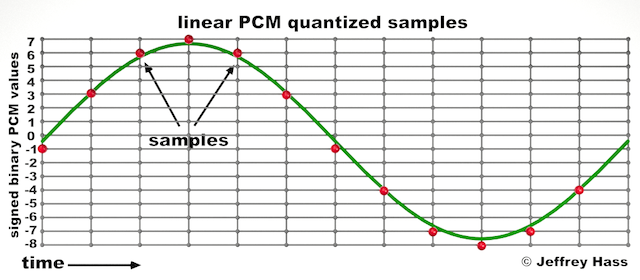
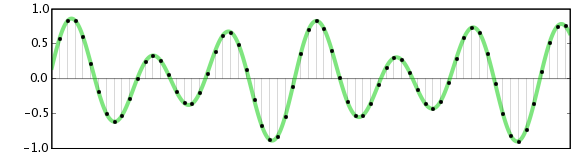
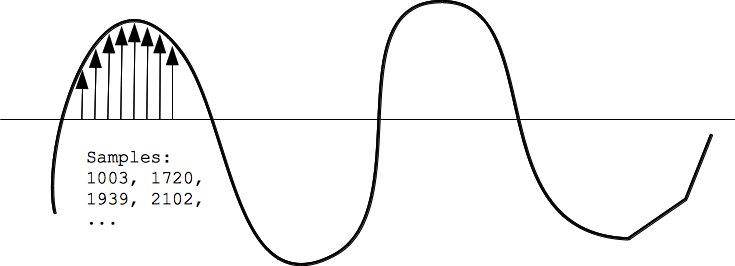
Audio quantization error is a fundamental aspect of digital audio processing. When analog sound waves are converted into digital signals, they undergo quantization. This means that the continuous analog signal is sampled and approximated in discrete steps. These steps are represented by binary values, typically in the form of bits (e.g., 16-bit, 24-bit). Now, what’s crucial to grasp here is that these discrete steps can lead to imperfections in audio reproduction.

Quantization error, often referred to as “quantization noise,” occurs when the actual analog signal deviates from the approximated digital representation. Imagine you have a beautiful painting, and you’re asked to replicate it using only a limited set of colors. The more restricted your color palette, the less accurate your reproduction will be. In the same way, the fewer bits you use for audio quantization, the more pronounced the quantization error becomes.

Quantization Levels and the Impact on Sound Quality

The number of quantization levels (related to bit depth) directly affects the precision of audio representation. For instance, a 16-bit audio recording has 65,536 possible levels, while a 24-bit recording provides a staggering 16,777,216 levels. This increased bit depth allows for a much finer representation of the original analog signal. Hence, a higher bit depth results in a reduction of quantization error, leading to superior sound quality.

To illustrate this, consider a grayscale image with only two colors: black and white. This is akin to an extremely low bit depth in audio, where the audio signal is either “on” or “off.” Now, imagine a high-resolution image with millions of colors, similar to the detail you get in a 24-bit audio recording. The difference in quality is apparent.

The Role of Dithering in Minimizing Quantization Error

One might wonder if there’s a way to mitigate quantization error in low-bit-depth audio recordings. Enter “dithering.” Dithering is a technique that introduces low-level noise to the audio signal, effectively spreading out the quantization error across a broader spectrum. Think of it as adding a sprinkle of fine grains of sand to a painting to blend the colors. This subtle noise masks the harshness of quantization error and makes it less noticeable to the human ear.

Now, as we’ve explored the fundamentals of audio quantization error, let’s delve into the questions that often arise:

How Does Quantization Error Affect Music Production?

In the realm of music production, quantization error can be a significant concern, particularly for professionals aiming to achieve top-tier sound quality. When producing music, especially in genres where subtle nuances are crucial, such as classical or jazz, quantization errors become more perceptible. To maintain audio fidelity, a higher bit depth is preferred during recording and production, ensuring minimal quantization noise.

Is There an Ideal Bit Depth for Audio Recording?

The ideal bit depth for audio recording is a subject of debate among audio enthusiasts. While 24-bit recording is commonly favored for its excellent dynamic range and low quantization error, it’s worth noting that the final audio format for most consumer applications, like CDs or streaming, is often 16-bit. The choice of bit depth should be based on the specific requirements of the project, keeping in mind the trade-off between audio quality and file size.

Can Quantization Error be Completely Eliminated?

Regrettably, quantization error cannot be entirely eliminated, as it’s an inherent part of the digital audio conversion process. However, it can be minimized to the point where it’s imperceptible to the human ear. Through techniques like dithering and the use of higher bit depths, the impact of quantization error can be significantly reduced, allowing for exceptional audio quality.

Last Words about Audio Quantization Error

In the ever-evolving world of audio technology, understanding audio quantization error is a fundamental step towards achieving superior sound quality. As an expert in the field, I’ve shared insights, experiences, and technical knowledge to demystify this concept. Remember, the bit depth you choose in audio recording significantly influences the extent of quantization error, and techniques like dithering play a pivotal role in mitigating its effects. The quest for pristine audio quality is an ongoing journey, but armed with this knowledge, you’re better equipped to make informed decisions in your audio endeavors.

Digital Bit Depth in Audio

Digital Bit Depth in Audio

Digital Bit Depth in Audio

Digital bit depth in audio is a fundamental concept that impacts the quality and fidelity of digital sound. Bit depth, also known as audio resolution, refers to the number of bits used to represent the amplitude of an audio signal at a specific point in time. It essentially quantifies how finely audio samples are taken in the digital domain.

To put it simply, the bit depth determines the precision with which sound is captured and stored digitally. Common bit depths in digital audio are 16-bit, 24-bit, and 32-bit, with higher numbers providing greater precision.

Audio Bit Depth Explained

Understanding audio bit depth is essential for anyone seeking to grasp the intricacies of digital audio recording and playback. At its core, audio bit depth is a measure of how accurately an analog sound wave’s amplitude is captured and converted into a digital signal.

In practical terms, a higher bit depth signifies that the digital representation of an audio waveform closely mirrors the original analog signal, resulting in reduced quantization error or “noise.” Quantization error occurs when an analog value is approximated to the nearest digital value, and lower bit depths can make this error more noticeable, especially in quieter sections of audio.

Bit Depth and Audio Quality

Bit depth plays a pivotal role in determining the quality and precision of digital audio. The relationship between bit depth and audio quality is akin to an artist’s palette of colors. A higher bit depth provides a broader spectrum of shades and nuances, making the digital representation of sound more faithful to the original analog source.

For example, a 16-bit system offers 65,536 discrete amplitude levels, whereas a 24-bit system provides an astonishing 16,777,216 levels. This heightened precision results in smoother and more detailed audio representation, particularly in the subtle and quiet passages of a recording.

Digital Audio Resolution

Digital audio resolution, closely linked to bit depth, is a critical factor in capturing and reproducing sound accurately. It refers to the level of detail and clarity in digital audio. The greater the bit depth, the higher the resolution, and the finer the nuances that can be captured.

In the realm of audio production, higher digital audio resolution means that the subtle nuances, such as the intricacies of a singer’s voice or the delicate harmonics of a musical instrument, are preserved with remarkable fidelity.

Bit Depth in Music Recording

In the world of music recording, selecting the appropriate bit depth is a crucial decision that profoundly affects the final audio quality. Musicians and producers carefully consider bit depth when recording to ensure that the nuances and dynamics of their performances are accurately captured.

In practice, 24-bit recording is a popular choice among music professionals. This bit depth provides an ideal balance between precision and file size, allowing for the capture of subtle details while minimizing the risk of bit-depth noise in quieter sections of the recording.

Audio Signal Precision

Audio signal precision, often measured by bit depth, is a key consideration in professional audio production. It relates to how faithfully an audio system can reproduce the original sound. The higher the bit depth, the greater the precision in representing the analog signal, resulting in cleaner and more accurate audio playback.

For audio engineers and producers, achieving optimal audio signal precision is paramount. It ensures that the music they create is heard as intended, with all the intricacies and subtleties faithfully reproduced.

Bit Depth in Analog-to-Digital Conversion

Understanding how bit depth influences analog-to-digital conversion is essential for maintaining audio fidelity. Analog-to-digital conversion is the process of transforming continuous analog signals into discrete digital values. Bit depth determines the number of discrete values that can represent the amplitude of the analog signal during this conversion.

In essence, higher bit depth means that the analog-to-digital conversion process captures more precise details from the analog signal. This is particularly critical when working with high-quality audio sources where preserving every nuance is paramount.

Sound Fidelity and Bit Depth

Sound fidelity, the faithfulness with which audio is reproduced, is intricately linked to bit depth. A higher bit depth generally results in better audio fidelity, as it allows for the accurate representation of both subtle nuances and powerful crescendos in music.

Consider classical music or jazz, where dynamics play a significant role. With a higher bit depth, the audio system can faithfully reproduce the full range of soft and loud passages, ensuring that the listener experiences the music as intended by the performers and composers.

Impact of Bit Depth on Audio Playback

The impact of bit depth on audio playback is a critical factor in delivering a high-quality listening experience. When you listen to digital audio, the bit depth of the source file significantly affects what you hear.

In simple terms, higher bit depth in the source audio file results in a more faithful and detailed listening experience. This becomes especially noticeable in acoustic instruments, where the subtle nuances of a violin’s bowing or a pianist’s touch can be lost in lower bit depth recordings.

How Does Bit Depth Affect the Quality of Digital Audio?

Exploring how bit depth affects the quality of digital audio is crucial for audiophiles and audio professionals alike. It’s the bit depth that determines how accurately the audio signal is captured and reproduced, ultimately influencing the overall audio quality.

A higher bit depth translates to a more faithful representation of the original sound, with fewer imperfections or noise introduced during the recording and playback processes. This improvement in audio quality is particularly noticeable in genres that require a wide dynamic range and high levels of detail.

What Is the Role of Bit Depth in Recording Music Digitally?

The role of bit depth in recording music digitally is a multifaceted aspect of audio production. When musicians and engineers step into the studio, they must make critical decisions about bit depth to ensure that their recordings capture the essence of the music.

Choosing the appropriate bit depth is a balancing act. While higher bit depths provide greater precision and fidelity, they also result in larger file sizes. Musicians often opt for 24-bit recordings as they strike a harmonious balance between capturing subtle details and managing storage requirements.

How Is Audio Fidelity Influenced by Digital Bit Depth?

Understanding how digital bit depth influences audio fidelity is key to achieving top-tier sound quality. Audio fidelity, often described as the faithfulness of audio reproduction to the original source, is a critical consideration for audio professionals and enthusiasts.

With a higher bit depth, audio fidelity is enhanced because the digital representation of the sound is more detailed and accurate. This is especially crucial in professional audio production, where maintaining the highest possible fidelity is paramount.

Can You Explain the Importance of Bit Depth in Analog-to-Digital Conversion for Audio?

Explaining the importance of bit depth in analog-to-digital conversion sheds light on the intricacies of audio processing. Analog-to-digital conversion is the bridge that allows analog sound to be translated into a digital format that can be manipulated and stored. Bit depth plays a pivotal role in this process.

Higher bit depths ensure that the analog-to-digital conversion process captures more fine-grained details from the original analog signal. This is essential for preserving the richness and subtleties of audio, whether it’s a soaring vocal performance, the resonance of a musical instrument, or the ambiance of a recording environment.

What Is the Relationship Between Bit Depth and Dynamic Range in Digital Audio?

The relationship between bit depth and dynamic range in digital audio is a crucial one to understand. Dynamic range refers to the difference between the softest and loudest sounds that an audio system can reproduce. Bit depth plays a pivotal role in defining this dynamic range.

Higher bit depths translate to a wider dynamic range, allowing for the faithful reproduction of both subtle nuances and powerful crescendos in music. This is essential for maintaining audio fidelity, especially in genres with a wide range of dynamics, such as classical music and jazz.

How Does Bit Depth Impact the Accuracy of Audio Playback?

The impact of bit depth on the accuracy of audio playback cannot be overstated. When you listen to music or any digital audio content, the bit depth of the source file has a profound influence on what you hear.

Higher bit depth in the source audio file means that the playback faithfully represents the original recording. It allows for the subtlest details and nuances to shine through, creating a more immersive and engaging listening experience. In essence, higher bit depth contributes to the accuracy and realism of audio playback.

Are There Industry Standards for Bit Depth in Digital Audio Recording?

In the world of professional audio recording, industry standards play a vital role in guiding the use of bit depth. While there’s flexibility in choosing bit depths based on specific requirements, certain standards are commonly followed.

For instance, most audio CDs use 16-bit resolution, which offers high-quality playback suitable for the majority of consumers. However, in the realm of studio recording and mastering, 24-bit and even 32-bit formats are commonly employed to ensure the highest level of fidelity.

What Are the Advantages of Using Higher Bit Depth in Audio Processing?

Using higher bit depth in audio processing offers several distinct advantages. These advantages extend to both recording and post-production stages, and they significantly impact the overall quality of audio content.

Enhanced Audio Fidelity

One of the primary advantages is enhanced audio fidelity. Higher bit depths provide more precision in capturing and reproducing audio, resulting in recordings that faithfully preserve the original sound. This is particularly important in professional music production and critical listening environments.

Greater Dynamic Range

Higher bit depths also grant a greater dynamic range, allowing for the faithful representation of a wide range of sound intensities. This is particularly beneficial in genres of music or audio content with stark differences in volume, as it ensures that both delicate subtleties and powerful peaks are accurately reproduced.

How Can I Optimize Bit Depth for Better Audio Resolution?

For those involved in audio production or seeking the best listening experience, optimizing bit depth is crucial. It’s not just about using the highest available bit depth but also considering the entire audio workflow and ensuring that bit depth aligns with specific needs.

Matching Bit Depth to Audio Source

When recording audio, it’s essential to match the bit depth to the dynamic range of the audio source. For instance, a live jazz performance with wide dynamic swings benefits from 24-bit recording, while a podcast with a more consistent volume may suffice with 16-bit. This approach minimizes bit-depth noise while preserving audio quality.

Post-Production Considerations

During post-production, maintaining a high bit depth throughout the editing and mixing process is advisable. Only when preparing the final distribution format, such as a CD or streaming file, should the audio be converted to a lower bit depth to match the destination format.

The Benefits of Greater Bit Depth in Digital Audio Systems

As technology advances, digital audio systems are offering higher bit depths as an option. But what are the practical advantages of embracing these extended bit depths?

Future-Proofing Audio

One significant advantage is future-proofing your audio recordings. With higher bit depths, your recordings are better equipped to stand the test of time. As playback systems and formats improve, your high-bit-depth recordings will continue to sound exceptional, ensuring that your music or audio content remains relevant for years to come.

Editing Flexibility

Greater bit depths also provide increased editing flexibility. Audio engineers can apply effects and processing without worrying as much about introducing quantization errors or compromising audio quality. This freedom allows for more creative experimentation during the mixing and mastering stages, ultimately leading to more polished and refined audio content.

In conclusion, digital bit depth is a critical factor in the world of audio, influencing both recording and playback quality. Understanding its importance, selecting the appropriate bit depth for various scenarios, and embracing higher bit depths when possible can lead to an audio experience that is richer, more immersive, and of the highest fidelity. Whether you’re a musician, audio engineer, or simply a music enthusiast, appreciating the role of bit depth can elevate your audio journey to new heights.

Bit Depth in Audio

Bit Depth in Audio

Bit Depth in Audio
Bit Depth in Audio
Bit Depth in Audio
Bit Depth in Audio

Audio Bit Depth Explained

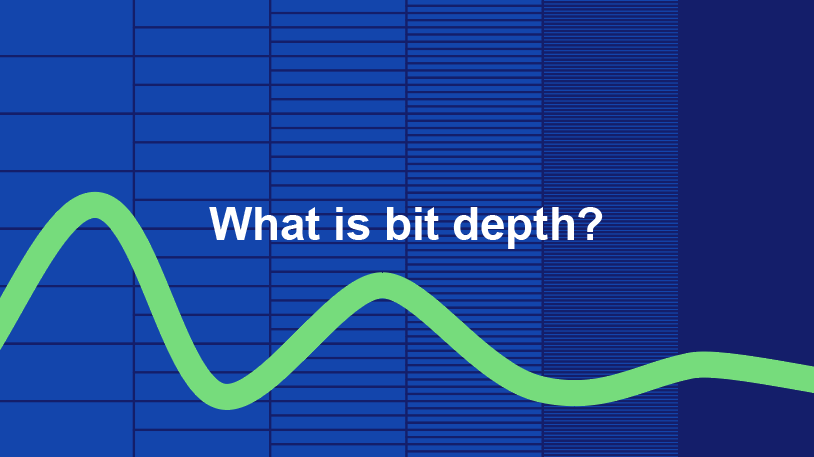
Audio bit depth refers to the number of bits used to represent the amplitude of an audio signal at each sample point. In simpler terms, it determines the dynamic range of digital audio. A higher bit depth allows for a more detailed representation of sound, capturing subtle nuances and minimizing quantization noise.
Imagine bit depth as a measurement of how finely audio is divided into individual steps. For instance, a 16-bit audio recording has 65,536 possible amplitude levels, while a 24-bit recording offers a staggering 16,777,216 levels. This increased granularity results in smoother, more accurate sound reproduction.

Understanding Bit Depth in Audio

To grasp the significance of bit depth, consider it as the shades of color in a painting. A higher bit depth provides a broader palette of colors, allowing for a more accurate depiction of the original image. Similarly, in audio, a greater bit depth captures a wider range of volume levels, preserving the subtleties of a musical performance or the nuances of a voice.
In practical terms, when you listen to music or a podcast, a higher bit depth ensures that you can hear the softest whispers and the loudest drum hits without distortion or loss of detail. It’s like having a more precise lens to view the sonic landscape.

Audio Resolution and Bit Depth

Bit depth and audio resolution are closely linked. Audio resolution refers to the level of detail and accuracy in an audio recording. Bit depth plays a pivotal role in determining this resolution. Think of it as the difference between watching a video in standard definition versus high definition. A higher bit depth offers a more lifelike and faithful representation of sound.
When recording or listening to music, you’ll often encounter terms like “16-bit” or “24-bit.” These numbers indicate the bit depth of the audio, with 24-bit audio being the gold standard for high-quality recordings. It’s akin to having a sharper, more detailed image in photography.

Now, let’s explore more facets of bit depth in audio.

Importance of Bit Depth in Sound

Bit depth is paramount in the world of sound because it directly impacts audio fidelity and the ability to reproduce music or voice accurately. It ensures that every subtle nuance, from the softest piano notes to the powerful guitar riffs, is faithfully captured and played back with precision.
Consider this: when recording a classical piano performance, the pianist’s delicate touch on the keys is as vital as the thunderous crescendos. A higher bit depth preserves the intricate dynamics, making you feel as if you are sitting in the concert hall, immersed in the music.

Bit depth is the foundation of audio quality, and understanding its role can help you appreciate the importance of using higher bit depths in audio production and playback.

How Bit Depth Affects Audio Quality

The impact of bit depth on audio quality is akin to the role of paint quality in a masterpiece. Just as a skilled artist requires high-quality pigments for a vivid painting, audio engineers rely on a greater bit depth for lifelike and rich audio recordings.
A lower bit depth might result in noticeable “stepping” or quantization noise, especially in quiet passages of a recording. This noise can be distracting and diminish the overall listening experience. On the other hand, a higher bit depth provides a smooth, natural curve to the audio waveform, minimizing these artifacts and delivering pristine sound.

Consider your favorite music track—the artist’s emotions, the resonance of instruments, and the atmosphere of the recording venue. All these subtleties are better preserved and conveyed through higher bit depth, elevating your listening experience to a new level.

Bit Depth in Digital Audio

In the digital realm, bit depth plays a pivotal role in the accuracy of audio representation. Think of it as pixels in a high-resolution photograph; more pixels mean finer details. Similarly, a higher bit depth translates to a more accurate depiction of sound.
In applications like digital audio workstations (DAWs) and music players, you often have the option to choose between different bit depths for your audio projects. Opting for a higher bit depth can lead to more professional-sounding results, particularly in the realms of music production, film scoring, and sound design.

Bit Depth vs. Sample Rate

While bit depth and sample rate are both critical aspects of digital audio, they serve different purposes. Bit depth determines the accuracy of amplitude representation, while sample rate governs how often the audio waveform is sampled per second.
Picture bit depth as the color depth in a photograph and sample rate as the frames per second in a video. A higher bit depth allows for greater tonal accuracy, while a higher sample rate captures more audio snapshots per second, preserving high-frequency content.

In many scenarios, a balanced approach between bit depth and sample rate is essential to achieve optimal audio quality. The synergy between these two factors ensures that audio recordings faithfully capture the richness and subtleties of the original source.

Bit Depth in Music Production

For music producers, bit depth is a critical consideration when working on audio projects. It influences the quality of sound recordings and the ability to manipulate audio during the production process.
When mixing and mastering music, a higher bit depth provides ample headroom for processing audio without introducing artifacts or degrading quality. This allows producers to apply effects, equalization, and compression with greater precision.

Additionally, when releasing music, opting for a higher bit depth ensures that your audience experiences the full depth and nuance of your compositions, whether they’re listening through high-end headphones or a powerful sound system.

16-Bit vs. 24-Bit Audio

The choice between 16-bit and 24-bit audio often arises when considering audio quality and storage requirements. A 16-bit audio file occupies less space compared to a 24-bit file, but it also has limitations in capturing subtle audio details.
16-bit audio is akin to a compact camera with limited resolution, suitable for casual snapshots. In contrast, 24-bit audio offers the quality of a professional DSLR camera, capturing a broader dynamic range and preserving the finer nuances of sound.

When deciding between the two, it’s essential to consider the specific use case. For audiophiles, professional audio production, and high-end sound systems, 24-bit audio is the preferred choice for its ability to deliver an immersive and faithful listening experience.

Bit Depth for Audio Recording

In the realm of audio recording, selecting the appropriate bit depth is a pivotal decision. It directly affects the quality and flexibility of the recorded material, whether you’re tracking vocals, instruments, or ambient sounds.
Recording at a higher bit depth, such as 24-bit, provides audio engineers with a safety net during the recording process. It allows them to capture a wide dynamic range without the risk of clipping or distortion. This is particularly valuable when dealing with unpredictable elements in live recordings or capturing the subtleties of acoustic instruments.

In essence, bit depth choice during audio recording is like choosing the canvas size for a painting. A larger canvas provides more room for creativity and detail, and a higher bit depth offers greater sonic canvas for audio professionals.

Final Words

In the realm of audio, bit depth serves as the bedrock of quality and fidelity. It determines how faithfully sound is captured, preserved, and reproduced. Understanding the importance of bit depth allows you to appreciate the nuances in your favorite music, the clarity in podcasts, and the immersive soundscapes in movies.
Whether you’re an aspiring musician, an audio engineer, or simply a passionate listener, recognizing the role of bit depth in audio enriches your experience. It’s the difference between seeing the world in black and white and experiencing it in full color.

So, the next time you enjoy your favorite song or immerse yourself in a cinematic adventure, remember that bit depth is the silent hero behind the scenes, ensuring that every sonic detail reaches your ears with precision and clarity.