Synthesis Filter Bank in MP3 Decoding


Free Download Mp4Gain
picture

Synthesis Filter Bank in MP3 Decoding
Synthesis Filter Bank in MP3 Decoding

Let’s talk about synthesis filter bank in MP3 decoding

When we decode an MP3 file, the synthesis filter bank plays a critical role in converting compressed audio data back into audible sound. I’ve spent years exploring this technology, and I can confidently say it’s both fascinating and misunderstood. Imagine trying to rebuild a demolished house with precision—each brick representing a tiny fraction of a second of sound. That’s what the synthesis filter bank does. It takes fragmented, transformed audio data and reconstructs it into a continuous waveform we can hear.

The brilliance of this process lies in how it combines mathematical precision with auditory perception. MP3 encoding heavily compresses audio, throwing away less perceptible frequencies. When decoding, the synthesis filter bank reassembles these fragments using the modified discrete cosine transform (MDCT) and polyphase filter banks. It’s like using puzzle pieces to recreate a beautiful picture—though some pieces might be missing, our brain fills in the gaps seamlessly.

How does the synthesis filter bank work?

The synthesis filter bank uses mathematical models to transform frequency-domain data back into the time domain. This step is crucial because our ears perceive sound as continuous waves. Without this conversion, the audio would be a chaotic mess of numbers.

One analogy I often use is thinking about it like translating a book written in a coded language back into English. Each step must be precise, or the meaning is lost. In MP3 decoding, the input is frequency-domain data, which has been compressed using psychoacoustic principles. The synthesis filter bank uses the inverse MDCT to process these chunks of data, followed by a polyphase reconstruction to create the time-domain audio signal. It’s a bit like baking a cake—each ingredient (frequency component) must be carefully measured and combined to achieve the desired result.

Why is the synthesis filter bank so efficient?

The efficiency of the synthesis filter bank lies in its ability to reconstruct sound with minimal computational resources. During decoding, it splits the task into manageable steps, reducing the strain on processors. This efficiency has been critical in enabling MP3 technology to flourish, especially on early devices with limited processing power.

I like to think of it as assembling IKEA furniture with a clear instruction manual. The process is streamlined to avoid wasted effort, ensuring everything fits together perfectly. The synthesis filter bank applies overlapping windows during reconstruction, which smooths transitions between segments and reduces artifacts. This efficiency allows MP3 players, smartphones, and even tiny embedded systems to handle complex audio decoding.

Key components of the synthesis filter bank

Understanding the synthesis filter bank requires breaking it down into its main components. Each plays a distinct role in ensuring high-quality audio reproduction.

Inverse Modified Discrete Cosine Transform (IMDCT)

The IMDCT reverses the frequency transformation applied during encoding. It takes blocks of frequency-domain data and converts them into overlapping time-domain samples. Think of it as unrolling a tightly wound scroll to reveal its contents.

Polyphase Reconstruction

Polyphase reconstruction is where the magic happens. It combines overlapping audio segments into a seamless waveform. This process uses filters to ensure smooth transitions and minimizes errors. It’s like stitching together fabric pieces to create a flawless quilt.

Windowing Functions

Windowing functions are applied to reduce edge artifacts during decoding. These functions shape each audio block, ensuring they blend smoothly. Imagine using sandpaper to smooth the edges of a wooden sculpture; windowing has a similar purpose in audio reconstruction.

Challenges in synthesis filter bank decoding

Decoding MP3 files is not without its challenges. One major hurdle is handling compressed audio with missing data. The synthesis filter bank must gracefully reconstruct the waveform despite these gaps.

Imagine trying to complete a jigsaw puzzle with a few pieces missing. The filter bank relies on redundancy and psychoacoustic principles to fill in the gaps, ensuring the final audio sounds natural. Timing synchronization is another critical challenge. The synthesis filter bank must align segments perfectly to avoid audible artifacts like clicks or pops.

Applications of the synthesis filter bank

The synthesis filter bank isn’t limited to MP3 decoding; it has broader applications in audio and signal processing. It’s used in various audio codecs like AAC and OGG, each adapted to meet specific needs. This versatility showcases its importance in modern technology.

For instance, in telecommunication systems, synthesis filter banks help compress voice signals for efficient transmission. They also play a role in hearing aids, reconstructing sound to enhance speech intelligibility for the hearing impaired. It’s like giving someone a pair of glasses for their ears, allowing them to experience sound clearly.

Why does the synthesis filter bank matter?

The synthesis filter bank is vital because it bridges the gap between compact digital audio files and the rich, immersive sound we experience. Without it, MP3 decoding would be impossible. It’s the unsung hero that ensures our favorite songs sound as good as they do.

I often explain it using the analogy of a translator at the United Nations. The synthesis filter bank takes data that computers understand and translates it into audio that resonates with us emotionally. Its precision and efficiency make it indispensable in the digital age.

Latest words on synthesis filter bank in MP3 decoding

Mastering the synthesis filter bank reveals the ingenuity behind MP3 technology. It’s a testament to how far we’ve come in optimizing audio compression and reproduction. While newer codecs like AAC have emerged, the principles of the synthesis filter bank remain foundational. For anyone delving into audio processing, understanding this technology is essential.

For anyone working with MP3 files or other audio formats, tools like Mp4Gain can enhance the quality and consistency of your audio, making it a reliable choice for all your playback needs.

FAQs About Synthesis Filter Bank in MP3 Decoding

What is a synthesis filter bank in MP3 decoding?

A synthesis filter bank is a key component in MP3 decoding that reconstructs compressed frequency-domain audio data into time-domain waveforms. This process ensures the audio is ready for playback, turning fragmented data into seamless sound.

Why is the synthesis filter bank important in MP3 decoding?

The synthesis filter bank is crucial because it ensures accurate and efficient reconstruction of audio signals. Without it, the compressed MP3 data would not translate into the continuous sound waves that our ears can perceive.

How does the synthesis filter bank work?

The synthesis filter bank uses inverse mathematical transformations like the Inverse Modified Discrete Cosine Transform (IMDCT) and polyphase reconstruction to convert frequency-domain data back into a time-domain audio signal.

What are the main components of the synthesis filter bank?

The main components include the IMDCT, polyphase reconstruction, and windowing functions. These work together to process and combine audio data for smooth playback, minimizing artifacts and maintaining quality.

What challenges does the synthesis filter bank face in MP3 decoding?

Challenges include handling missing data in compressed files and ensuring precise timing synchronization. These factors are critical to avoid audible distortions like clicks or pops during playback.

Is the synthesis filter bank used in other codecs besides MP3?

Yes, the synthesis filter bank is also used in other codecs like AAC and OGG. It’s a versatile technology applied in various fields, including telecommunication systems and hearing aids, to process and enhance audio signals.

Why does the synthesis filter bank use overlapping windows?

Overlapping windows are used to smooth the transitions between audio segments. This minimizes discontinuities and prevents unwanted artifacts, ensuring high-quality audio reconstruction.

Comments:

I found this article really helpful. The analogy about rebuilding a house made the concept of synthesis filter banks so much clearer to me. Great job explaining something so technical!

Thanks for breaking this down! I’ve always wondered how MP3 decoding works, and this article finally made it make sense. I’d love more detail on the polyphase reconstruction step, though.

This was an awesome read. I’m new to audio engineering, and understanding the synthesis filter bank has been a challenge. This article was super detailed but still easy to follow!

It’s amazing how you compared it to baking a cake or building a puzzle. I think those analogies really helped me understand. I’ve read other articles, but none explained it this way.

Good article, but it feels like some parts went over my head. Could you maybe include diagrams or visuals in the future?

Finally, an article that explains synthesis filter banks without making me feel dumb! I really appreciated the real-world examples and simple language.

I’ve been trying to decode audio files myself and was struggling with the technical parts. This really cleared up a lot of confusion. Thanks for the detailed explanations!

Awesome work on this! I had no idea the synthesis filter bank was such a crucial part of MP3 decoding. You should write about how this compares to modern audio codecs.

I’ve been looking for an article like this for ages! You made the subject understandable even for someone like me who isn’t a tech person. Much appreciated.

This article had some great info, but I wish you had touched on how the synthesis filter bank impacts audio quality directly. Still a good read, though.

Wow, I learned so much about MP3 decoding today! The part about handling missing data was super interesting. Keep up the great work!

I never realized how much effort goes into decoding an MP3 file. The synthesis filter bank is more complicated than I imagined. Thanks for explaining it so well.

Great explanation, but I was wondering if you could include examples of devices or applications where synthesis filter banks are used outside of MP3s?

This article is very insightful, but I feel like some parts could use more depth. Still, you did a great job explaining the basics.


Free Download Mp4Gain
picture


Mp4Gain Main Window
picture


Mp4Gain Features
picture


Free Download Mp4Gain
picture

Dequantization in MP3 Decoding

Dequantization in MP3 Decoding

Dequantization in MP3 Decoding

Let’s talk about Dequantization in MP3 Decoding

Dequantization in MP3 decoding is one of those steps that makes an enormous difference in audio quality. Every time we listen to an MP3, dequantization brings back some of the original sound detail that was lost during compression. In simple terms, it’s the process of transforming the compressed data in MP3 files into something our ears recognize as rich, layered audio. With dequantization, the MP3 decoder works hard to reconstruct these audio layers, giving us the best listening experience possible from a compact file.

Understanding MP3 Compression and Quantization

Compression in MP3 files is about reducing file size without losing too much sound quality. This involves a process called quantization, where certain sound details are minimized to save space. Imagine trying to draw a detailed landscape with just a few crayons; you’d have to leave out some details. Quantization does something similar with audio data, simplifying it so the file takes up less room. Dequantization, then, becomes necessary to fill in those gaps, recreating as much of the original sound as possible.

The Role of Psychoacoustics in MP3 Compression

Psychoacoustics is crucial in MP3 compression because it focuses on what we actually hear and don’t hear. By understanding the way human hearing works, especially our thresholds for different sound frequencies, MP3 encoding can cut out “inaudible” sounds. Think of it as noise reduction—if you’re in a busy cafe, your brain filters out certain background sounds. Psychoacoustics in MP3 compression applies similar principles to save space, and during dequantization, the decoder brings back as much detail as possible within the file’s limits.

How Dequantization Works in MP3 Decoding

Dequantization is all about reversing quantization. When an MP3 is played, the decoder uses algorithms to reassign values to the compressed data. Imagine reading a book where words are replaced with abbreviations to save space. As you read, you mentally “fill in” the missing words. Similarly, dequantization works to “fill in” sound details, making the music sound fuller and closer to the original recording.

Steps in the MP3 Decoding Process

MP3 decoding involves a series of steps that transform compressed data into audible sound. Here’s a simplified breakdown:

  • Parsing the file structure: Identifying data frames and headers in the MP3 file.
  • Decompression: Expanding the data to make it usable for audio playback.
  • Dequantization: Applying algorithms to approximate the original sound frequencies.
  • Reconstruction of frequency bands: Grouping frequencies to recreate the audio spectrum.
  • Output as audible sound: Sending the reconstructed sound data to your speakers or headphones.

Each of these steps, especially dequantization, plays a key role in delivering a recognizable and pleasant sound experience.

Challenges in Dequantization

One of the biggest challenges in dequantization is balancing quality and efficiency. High-quality dequantization demands advanced algorithms that require more processing power. Think of it like zooming into a photo and seeing pixel details; more clarity requires more resources. Dequantization has to work within the limitations of MP3’s compact size and bitrate, which limits how precisely it can reconstruct the original sound.

Dequantization and Bitrate: What’s the Connection?

The bitrate of an MP3 affects dequantization because it determines the level of detail in the compressed data. Higher bitrates mean more detailed data, allowing the dequantization process to restore sound more accurately. A higher bitrate is like taking a high-resolution photo; you get more clarity and detail. Lower bitrates make dequantization harder, as there’s less information to work with, similar to trying to make a low-res image look sharp.

Frequency Bands and Dequantization

Dequantization often focuses on specific frequency bands to bring back detail. MP3 files divide sound into frequency bands, allowing the decoder to prioritize certain ranges. Low frequencies, like bass, are typically easier to reconstruct, while high frequencies might lose more detail. The dequantization process restores these bands to make the sound feel richer and fuller, even within the constraints of MP3 compression.

Impact of Dequantization on Audio Quality

The impact of dequantization is clear when you compare MP3s at different bitrates. Low-quality MP3s sound “flat” because they lack the dequantization power to restore full sound detail. Higher-bitrate MP3s benefit from a more effective dequantization process, resulting in clearer, more vibrant audio. So, dequantization doesn’t just enhance sound; it’s essential for making MP3 files enjoyable to listen to.

Advantages of Effective Dequantization

Effective dequantization enhances the MP3 listening experience significantly. Here’s what it brings:

  • Improved sound clarity: Bringing out details lost during compression.
  • Enhanced depth in audio: Creating a more layered sound experience.
  • Better frequency balance: Ensuring bass, mid, and treble are well represented.

Dequantization is a small but powerful step that makes MP3s sound closer to the original recording, even in a compressed format.

Limitations of Dequantization in MP3 Decoding

Dequantization has its limitations, especially at low bitrates. When there’s minimal data to work with, even the best algorithms can’t fully restore sound detail. Think of it as trying to “un-squash” a squashed item—the original shape is partly lost. For audiophiles, these limitations mean that MP3s may never quite match the quality of lossless formats, although high-bitrate MP3s come close.

How Modern Technology Improves Dequantization

Advancements in digital processing have allowed for improved dequantization techniques. Some newer MP3 decoders use machine learning to predict and restore lost sound detail. Imagine having a super-advanced “spell checker” for audio, which can fill in the gaps more accurately. These developments help bring MP3s closer to CD-quality sound, which is great news for casual listeners and audiophiles alike.

Choosing the Right Bitrate for Optimal Dequantization

Selecting the right bitrate is crucial for effective dequantization. A higher bitrate allows for more detailed restoration of sound quality. Here’s a quick guide:

  • 128 kbps: Basic quality, less effective dequantization, noticeable quality loss.
  • 192 kbps: Better quality, sufficient for most listeners.
  • 320 kbps: Excellent quality, near-CD quality with high dequantization detail.

For the best balance of file size and sound quality, I recommend 192 kbps or higher, especially for music.

Dequantization in Comparison with Lossless Formats

MP3s rely on dequantization, but lossless formats like WAV don’t require it. With a lossless format, all original sound data is preserved, so there’s no need to reconstruct details. Think of it as the difference between a high-quality print and an original painting. Dequantization works to make MP3s as close to lossless as possible, but there’s always some quality trade-off in compressed formats.

Common Myths About Dequantization in MP3s

There’s a lot of misinformation about dequantization and MP3s. Let’s clear up a few myths:

  • MP3s always sound bad: High-bitrate MP3s with good dequantization can sound excellent.
  • Dequantization makes MP3s lossless: Dequantization restores detail, but MP3s are still lossy.
  • Low-bitrate MP3s are fine for any use: They’re best for casual listening, not critical audio work.

Understanding these myths helps set realistic expectations about MP3 quality and dequantization.

Latest words on Dequantization in MP3 Decoding

Dequantization is essential in MP3 decoding, turning compressed data into the sounds we recognize and enjoy. Through this process, MP3s can offer a high-quality listening experience that’s also efficient in terms of file size. While MP3s will never be completely lossless, a well-chosen bitrate and effective dequantization can bring them surprisingly close. For anyone looking to maximize their audio experience, understanding dequantization and choosing the right bitrate makes a world of difference. To further improve MP3 quality, Mp4Gain offers tools that help in optimizing audio clarity and balance, making it a solid choice for enhancing your MP3 files.

Frequently Asked Questions about Dequantization in MP3 Decoding

What is dequantization in MP3 decoding?

Dequantization is a crucial step in MP3 decoding, where the compressed audio data is processed to approximate the original sound. During compression, some audio details are minimized to save space; dequantization aims to restore as much of this lost detail as possible, enhancing audio quality for the listener.

How does dequantization affect sound quality in MP3s?

Dequantization plays a key role in MP3 sound quality by recreating some of the audio layers that were lost during compression. This process can make the audio sound clearer and more vibrant, especially at higher bitrates, where there is more data for the dequantization algorithm to work with.

Why is quantization used in MP3 encoding?

Quantization in MP3 encoding is used to reduce the file size by simplifying some audio details that are less likely to be noticed by human ears. This helps keep MP3s compact, allowing more storage and faster streaming, but it also means that dequantization is necessary during playback to attempt to recreate some of the lost audio depth.

Does a higher bitrate improve dequantization quality?

Yes, a higher bitrate generally leads to better dequantization results because there is more audio data available to work with. Higher bitrates provide more detailed information, allowing the dequantization process to recreate a fuller, more detailed sound. For best results, bitrates of 192 kbps or higher are recommended.

What role does psychoacoustics play in MP3 compression?

Psychoacoustics is used in MP3 compression to identify and remove audio details that are less perceivable to human ears. By focusing on what listeners actually notice, MP3 encoding saves space without drastically impacting perceived quality. Dequantization later works to restore as much of the audible range as possible during playback.

Can dequantization make MP3 files sound like lossless audio?

While dequantization significantly improves MP3 sound quality, it does not make MP3s equivalent to lossless audio formats. MP3s remain “lossy” by nature, meaning that some audio data is permanently discarded. Dequantization helps MP3s sound closer to the original recording, but for the most accurate sound, lossless formats like WAV or FLAC are preferred.

What bitrate should I use to ensure good dequantization quality in my MP3s?

To achieve the best dequantization results, a bitrate of 192 kbps or higher is recommended. Higher bitrates provide more data for the dequantization process, resulting in clearer and more detailed audio. Lower bitrates may lead to noticeable quality loss, particularly in complex music tracks.

Comments:

I always wondered what dequantization really meant in MP3 files. Super interesting, I feel like I can really hear the difference now!

This article cleared up a lot for me! Still, I’d like to understand more about how dequantization differs between audio formats.

Great read! Never thought so much work goes into decoding an MP3. This explains why higher

bitrates sound way better!

Wow, didn’t know dequantization had such an impact. Can you explain more about how frequency bands affect it?

I knew MP3s were lossy, but this article gave me a new appreciation for how much detail they can actually retain. Thanks for breaking it down!

Finally an article that explains this stuff in a way that’s easy to understand! I’m definitely switching to 320 kbps MP3s after this.

I’m still a little confused about the difference between MP3s and lossless files after dequantization. Could you go into that a bit more?

Been listening to MP3s for years and never thought about this. It’s amazing how much detail goes into decoding. Loved the real-life examples!

This info on psychoacoustics was a game-changer for me. Makes so much sense why we can’t hear the difference sometimes. Great article!

Good explanation but still think there’s more depth to cover on MP3 artifacts. Would love to read about it in future articles!

Really good breakdown of dequantization. Feels like I learned a lot more than I expected from this. Thanks for making it so understandable!

I never thought about choosing bitrate based on dequantization! Switching my whole library to 320 kbps now.

This article was amazing! Not many go into dequantization like this. I still wonder if it could be better than lossless someday though.

MP3 decoding algorithm.Part 2

MP3 decoding algorithm.Part 2

MP3 decoding algorithm

Synchronization and error checking include header information decoding module.

MP3 decoding algorithm


After the main control module starts to work, the main control module passes the data buffer of the bit stream to the synchronization and error checking module. This module includes two functions, namely header information decoding and frame decoding Side information decoding, scale factor decoding and Huffman decoding are performed according to your information, and the obtained results are obtained after of inverse quantization, stereo decoding, alias reduction, IMDCT, frequency inversion, and synthetic polyphase filtering. of the left and right channels is then placed in the output buffer by the main control module and sent to the sound playback device (in short, it’s very complicated).

2. Main control module
The main task of the main control module is to operate the input and output buffers and to call other modules to work together. Among them, the input and output buffers are provided by the DSP control module interface.

The data in the input buffer is the original mp3 compressed data stream, and the DSP control module provides a buffer larger than the maximum possible frame length each time it is concatenated to form a new buffer.

The data stored in the output buffer is the decoded PCM data, which represents the amplitude of the sound. It consists of a fixed-length buffer. Calling the DSP control module’s interface function returns the main pointer. After the output buffer is filled, interrupt processing is called to send to the audio ADC chip (DAC stereo audio and ADC audio) connected to the I2S interface. DirectDrive headphone amplifier) ​​to output analog sound.

3. Synchronization and error detection
The error detection and synchronization module is mainly used to find the position of the data frame in the bit stream and decode the frame header, CRC check code and frame side information from this position, and the decoding results are used for subsequent scaling factors. Decoder module and Huffman decoder module. The main data format of the Mpeg1 layer 3 stream is shown in the following figure:

Master Data Flowchart

Among them, granule0 and granule1 represent granularity group 1 and granularity group 2 in one frame, channel0 and channel1 represent two channels in one granularity group, scalefactor is the quantized value of scale factor is the quantized Huffman encoding value , which splits into For large values ​​and count1 1 value area

CRC check: expression is X16+X15+X2+1

3.1 Frame synchronization
The purpose of frame synchronization is to find out the position of the frame header in the bit stream. According to ISO 1172-3, the MPEG1 frame header is 12 bits “1111 1111 1111”, and the two adjacent frame headers are separated by equally spaced bytes.

MP3 decoding algorithm.

MP3 decoding algorithm.

MP3 decoding algorithm

If you are interested in audio and video technology, you can subscribe to my Video Player and Audio and Video Basics topics.

MP3 decoding algorithm

1: Introduction to the general structure of the MP3 codec
MP3 decoding process

Look dumbfounded, right? There are many concepts here that need to be explained one by one.

Bitstream: Bitstream is a content distribution protocol. It uses an efficient software distribution system and peer-to-peer technology to share large files (such as a movie or TV show) and allows each user to provide upload services as a network redistribution node. (Because no professional has studied this content, I will interpret it as a datum for now, and the internal content will have time to discuss.)

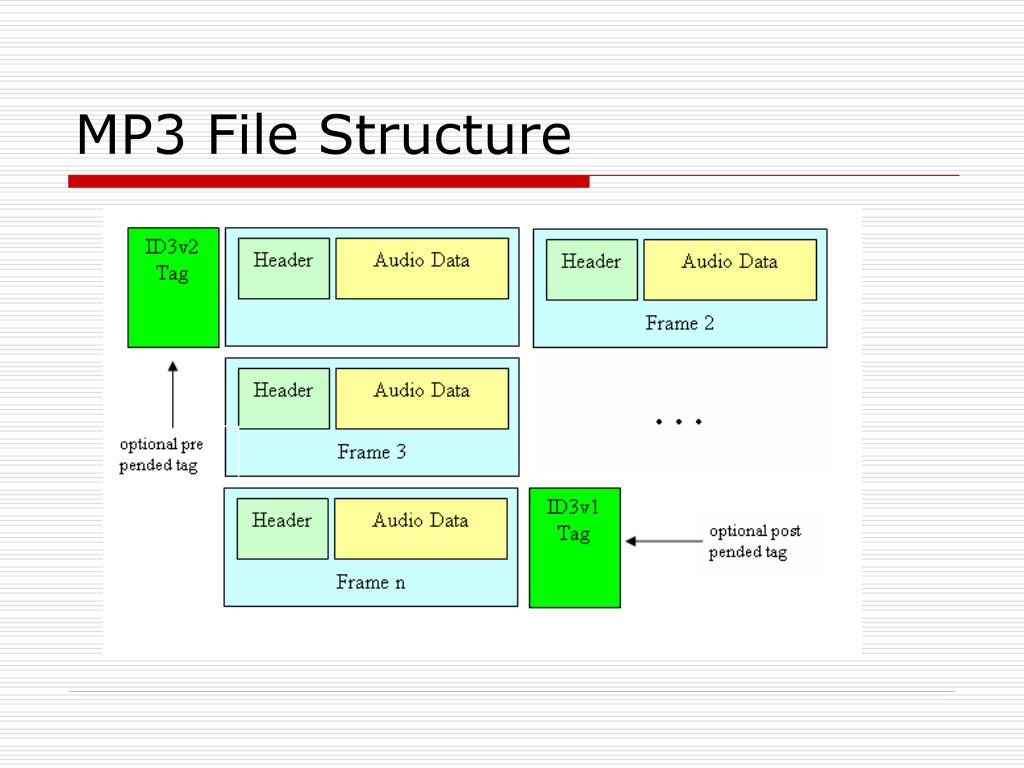
Synchronization and error checking – The transmission and synchronization of mp3 data streams are based on frames. A frame is the smallest format unit of MP3, it can no longer be divided. The header of each frame contains basic information about the current frame, including timing information. The composition of the sync information is ‘1’ which contains 12 consecutive bits. The first step in the mp3 video decoding job is to synchronize the decoder with the input data stream. After starting the decoder, it can be done by looking for 12 consecutive bits of ‘1’s in the data. Once the synchronization information is obtained, the subsequent frame header information is: frame header information, which includes information such as sampling rate, padding bits, and bit rate.

Huffman decoding: You can understand it this way, I do a one to one correspondence between different data through a table and use this corresponding code to represent the original information, then the number with high frequency, I use the shortest possible code to represent Numbers that appear less frequently are represented by longer codes. This reduces the amount of content that the information represents. And after transmission, it can be restored according to this comparison code. Probably the beginning is this.

Reverse quantization is the reverse of the quantization process. If you want to understand this, you need to learn the quantization process.

IMDCT: IMDCT is the abbreviation, the full name is: Inverse Modified Discrete Cosine Transform (Inverse Modified Discrete Cosine Transform). In MP3, this algorithm must be used to transform the input data from the frequency domain to the cosine domain and perform compensation operations on the subband filtering. The inverse quantized signal is transformed using the inverse discrete cosine transform formula.

The Conversion Program Described In The MP3 Format.

The Conversion Program Described In The MP3 Format.

mp3 decoding

Today, most of the records that people listen to almost every day are made in the form of the ubiquitous MP3 files, as they are the most common and popular format for storing sound information in terms of.

MP3 DECODING

Now, the nature of this type of data, the codec itself, and the history of coding principles will be discussed. There will also be practical tips on how to convert MP3 files of a different type to another format or create MP3 files, other than that. This is very simple, however, subject to the use of special procedures.

WHAT IS THE MP3 FORMAT?
To date, only a few consider the fact that a voice is in this format. Basically, if you’re not into the nature of audio coding principles, all I can say is that you’re compressing audio information.

MP3 format

Monetized by optAd360

Previously, the basic format for storing music files was WAV. This information takes up too much space on the hard drive, and over time this type of data has become quite inconvenient. In particular, it refers to those times when music began to actively reside on the Internet. That’s when, and audio compression is necessary to reduce the size of the source material. In fact, if we convert the WAV format to MP3, the space saving becomes immediately apparent (the track needs 10 times less space, plus the structure of the new format is described like this, you can even enter some information about the track, for example , the name of the artist, song, album, year of release, and also put some basic technical characteristics of the audio).

Convert MP3 files

It is set to a specific text field in the file structure, called an ID3 tag, after completing all the information that can be displayed in the player window.

HISTORY

In today’s world there are many disagreements about who exactly creates this type of data. Although the MP3 format is accepted, so to speak, a more general concept of MPEG, established by the company Moving Picture Experts Group, the development of the actual encoding technology in MP3 is the Fraunhofer Institute group, which first proposed the The Lame MP3 encoder that uses the codec Who is, is the first criterion in this regard.

WAV to MP3

This was in the mid-90s, however, then this audio (MP3 file) could only be played with the help of a software player, so the new technology was widely adopted until then. It has released the first home player and the portable player is only used as a single at the beginning of this standard. However, it now has many competitors. It is only linked to the rationale for encoding, by which the amount of starting material can be reduced.

ENCODING AND COMPRESSION OF THE MAIN SOUND.
During this process, when the source material is translated into MP3 format, the most important thing: not all cuts are recognized by the human ear at the domestic level. Generally speaking, the track will have a standard sample rate of 44,100 Hz with a bit rate of 320 kbit/s and 128 kbit/s; it’s hard to see the difference in sound. This is why certain characteristics of the audio are reduced during the compression process.

The difference can only be perceived by people’s already sensitive ears or by using sounds from specialized programs. In fact, hardly anyone in the studio works in compressed MP3 format. He’s only involved in the final stages of mastering and post-production, when all tracks need to align quantity to normalize which areas to release to release the full album. Stop after this.

BASIC SOUND CHARACTERISTICS

As we all know, any audio material has several main parameters that determine its sound quality. And here the MP3 format is not an exception. The most important characteristics of the considered sampling frequency (the most common standard 44.1 kHz), the bit rate (accepted values ​​for the basic standard of 128 kbit/s) and the sound mode (mono, stereo, 5.1 surround , 6.1 or 7.1). In general, the latter option is not always considered, and the focus for determining any quality tracking is much more than the first two features.

Analysis of the MP3 decoding algorithm principle. Part 2

Analysis of the MP3 decoding algorithm principle. Part 2

Mp3 Decoding

Synchronization and error checking includes header information decoding module.

MP3 Decoding

After the main control module starts to work, the main control module transfers the data buffer of the bit stream to the synchronization and error checking module. This module includes two functions, namely header information decoding and frame decoding Side information decoding, scale factor decoding and Huffman decoding are performed according to your information, and the obtained results are obtained after of inverse quantization, stereo decoding, alias reduction, IMDCT, frequency inversion, and synthetic polyphase filtering. of the left and right channels is put into the output buffer by the main control module and sent to the sound playback device (in short, it’s very complicated).

2. Main control module
The main task of the main control module is to operate the input and output buffers and to call other modules to work together. Among them, the input and output buffers are provided by the DSP control module interface.

The data in the input buffer is the original mp3 compressed data stream. The DSP control module provides a buffer larger than the maximum possible frame length at a time. This buffer is the same as the data after the last offset (must be less than one frame) concatenated to form a new buffer.

The data stored in the output buffer is the decoded PCM data, which represents the amplitude of the sound. It consists of a fixed-length buffer. Calling the DSP control module’s interface function returns the main pointer. After the output buffer is filled, interrupt processing is called to output it to the audio ADC chip ( stereo audio DAC and audio ADC) connected to the I2S interface. DirectDrive headphone amplifier) ​​to output analog sound.

3. Synchronization and error detection
The error detection and synchronization module is mainly used to find the position of the data frame in the bit stream and decode the frame header, CRC check code and frame side information from this position, and the decoding results are used for subsequent scaling factors. Decoder module and Huffman decoder module.

Analysis of the MP3 decoding algorithm principle.

Analysis of the MP3 decoding algorithm principle.

mp3 decoding

If you are interested in audio and video technology, you can subscribe to my Video Player and Audio and Video Basics topics.

MP3 DECODING

1: Introduction to the general structure of the MP3 codec
MP3 decoding process

Look dumbfounded, right? There are many concepts here that need to be explained one by one.

Bitstream: Bitstream is a content distribution protocol. It uses an efficient software distribution system and peer-to-peer technology to share large files (such as a movie or TV show) and allows each user to provide upload services as a network redistribution node. (Because no professional has studied this content, I will interpret it as a datum for now, and the internal content will have time to discuss.)

Synchronization and error checking – The transmission and synchronization of mp3 data streams are based on frames. A frame is the smallest format unit of MP3, it can no longer be divided. The header of each frame contains basic information about the current frame, including timing information. The timing information consists of ‘1’s containing 12 consecutive bits. The first step in the mp3 video decoding job is to synchronize the decoder with the input data stream. After starting the decoder, it can be done by looking for 12 consecutive bits of ‘1’s in the data. Once the synchronization information is obtained, the subsequent frame header information is: frame header information, which includes information such as sampling rate, padding bits, and bit rate.

Huffman decoding: You can understand it this way, I do a one to one correspondence between different data through a table and use this corresponding code to represent the original information, then the number with high frequency, I use the shortest possible code to represent Numbers that appear less frequently are represented by longer codes. This reduces the amount of content that the information represents. And after transmission, it can be restored according to this comparison code. Probably the beginning is this.

Reverse quantization is the reverse of the quantization process. If you want to understand this, you need to learn the quantization process.

The relationship between frequency, bit rate, bit rate and sound quality of MP3 Part 2

The relationship between frequency, bit rate, bit rate and sound quality of MP3 Part 2

MP3

What is the difference in MP3 sound quality of various compression ratios/compression modes?

Mp3

What are some basic principles? How about the sound quality of other formats like APE/WMA/etc?
Speaking of mp3, I am afraid no one will say that they have never heard of it. Even if you are not an mp3 user, there are ubiquitous advertisements, advertising activities in the city, discussions between friends and the Internet. Rich resources, these always give you a little impression, right? For trendy youngsters, especially friends who like music and friends who like digital devices, mp3 is probably a word that should be talked about every day, but what is mp3, how to determine mp3 sound quality and what is good or How can I listen to high quality mp3? ? ? I think the following article can help you solve many doubts.
Across current mp3 users, the generally accepted standard for production is eac recording + lame compression. Those who are experienced in such production process will figure out some tricks and use different parameter and parameter settings for different music. The compression ratio varies from the standard 128 kbps to the maximum of 320 kbps, but what is the difference and the difference in effect between these bit rates? ? How is the most suitable compression ratio, which one should be better for cbr and vbr etc. These topics are often discussed by everyone. Let me share with you some of my feelings.
The repertoire selected for this test is the first track of Bach’s “Grandenburg Concerto”, performed by the Munich Bach Orchestra, eac track capture software, cd’ex compression software, fooba2000 v0.8 playback software and listening earphones are er6 from Intech and e3c from Shure. Because the classical repertoire has a lot of detail, the band is large, and the requirements for all aspects of sound quality are relatively high, so it can clearly reflect the difference in detail between different processing methods.
I first grabbed the track with rac, and then used the lame mp3 encoder (vision 1.92 engine 3.92) engine in the cd’ex software to process the wav file. I tried the lick parameters one by one to choose a good effect:
The first thread priority parameter selects the highest and lowest respectively. When other parameters are equal, the compression comparison shows that the degree of thread priority has no effect on the sound. The generated files are all the same size, and the comparison sounds the same, so these parameters have no effect on the sound quality.
The second parameter is the version, which can be selected between mpegI, mpegII and mpegII.V. Similarly, the other parameters are determined and these three options are used to compress three times. After listening, although the file sizes of the three methods are all the same, but the actual listening feeling of mpegI is better. The mid-low frequency compression ratio is a bit smaller, but the high frequency distortion is a bit more. It is more suitable for listening to human voice and pop music. It is also good to use mpegI type to listen to classical music, the sound background is better, but if it is solo music with a lot of mid and high frequencies like violin, it is recommended to use mpegII.v type, which will have better results.
The third parameter is the most important, which is the bit rate. Choosing it directly affects the size and listening experience of your mp3 file. The higher the compression ratio, the higher the distortion, and the lower the compression ratio, the lower the distortion, but how do we find one for ourselves? What is the acceptable balance between the two? This requires careful exploration in the experiment. Considering that the sound quality of low bitrate files is not suitable for playing music, the minimum set is 128kbps, and four fixed bitrate files of 128, 192, 256 and 320 are used for comparison. and try.
The compression ratio of 128 kbps is still relatively rough, and the high-frequency part is highly distorted after compression. It sounds hollow, wrinkled, rough, and there are often flickering sounds. Misunderstanding, the compressed volume of a 3 minute 39 piece of music is 3414kb, although the volume is not large, the sound is not satisfactory, and there is a relatively large flaw.
192kbps bitrate compression effect is much better than 128.

The relationship between MP3 frequency, bit rate, bit rate and sound quality

The relationship between MP3 frequency, bit rate, bit rate and sound quality

mp3

Each song is ripped from a CD, converted to a WAV file, and then converted to MP3 using software.

Mp3

So it should be a sample rate of 44100 KHz. Unless yours is not a song, but is recorded as a WAV file, and another sample rate is selected during recording.
The main factor that affects the sound quality of MP3 is the bit rate. Now the best is 320K CBR (fixed bit rate) and VBR (variable bit rate), VBR files are a bit smaller than CBR. 192K VBR is the most popular on the Internet, which can meet the requirements of both sound quality and file size, but I usually use CD to rip tracks or download APE (lossless compression, which can be restored to WAV file) and then convert it to 320K VBR.
Final reminder: MP3 transcoding is distorted and this distortion cannot be reversed. That is, if you convert MP3 to WAV sound quality, the file size increases dozen times, but the sound quality remains the same as MP3 sound quality.
If you want to hear low distortion, it’s better to listen to a CD or download APE.
First of all, sound quality is a very subjective thing!
It is often said that the sound quality is good, one means that the degree of reproduction is good, that is, the smaller the difference with the recording, the better; As for mp3, mp3 is a compressed format, the higher the bitrate, the less compression and less loss of detail, that is, the higher the bitrate, the closer to the original sound. But sound quality is also related to your output device, such as a good mp3 player and a good pair of headphones, all of which will help your listening quality!
So, if you want to improve sound quality, you can also start from the above perspectives and not overemphasize any one of them. When you have higher requirements for sound quality, you can give up mp3 and directly switch to stop CD. The CD carries waveform files, which are completely lossless in sound quality, which will give better results.
If you want to reduce distortion, the only way is to increase the bit rate. It is best to use variable bit rate (VBR) compression to produce mp3 files, which can strike a balance between maximum fidelity and minimum file size.
Finally, if you want completely lossless sound quality, you should still use audio files in a lossless compression format or an uncompressed file format. How good is the sound quality in MP3 format?

What is the mp3 decoded into?

What is the mp3 decoded into?

mp3 decoding

1. Introduction to MP3:

mp3 decoding

The full name of MP3 is MPEG 1 audio layer 3, of which the MPEG (Moving Picture Experts Group) standards include video and audio standards.
, of which MPEG-1, MPEG-2, MPEG-2 AAC and MPEG-4 audio standards have been formulated.
MPEG-1 and MPEG-2 standards use the same family of audio codecs: Layer 1, Layer 2, Layer 3. It is divided according to compression quality
and the complexity of encoding, corresponding to MP1, MP2, MP3, three types of sound files, and uses different levels
encoding for different purposes. The higher the level of MPEG audio encoding, the more complex the encoder and the higher the compression rate.
A new feature of MPEG-2 is the use of low sample rate expansion to reduce data throughput, and another feature is multi-channel expansion. , which increases the number of main channels to 5 .
All three layers of MPEG Audio Layer 1, Layer 2, and Layer 3 use the same filter bank, bitstream structure, and header information, and the sampling rate is
32KHz, 44.1KHz, 48KHz
Layer 1 is designed for DCC (digital compact cassette) compressed digital tape, 384 kbps data stream; compression ratio 4:1;
Layer 2 trade-offs between complexity and performance, data throughput drops to 256kbps-192kbps; compression ratio 6:1-8:1;
Layer 3 is designed for low data traffic from the start, the data traffic is 128kbps-112kbps, and the compression ratio is as high as 10:1-12:1;
Layer 3 adds the MDCT transform, making its frequency resolution 18 times that of Layer 2. Layer 3 also uses
entropy coding, which is similar to MPEG video, to reduce redundant information. The vast majority of MP3s use the MPEG-1 standard.
MP3 audio quality depends on its bit rate and sample rate, as well as the quality of the encoder. Typical MP3 speeds are between
128 and 320 kb per second (problem here). The sample rate also has three frequencies: 32, 44.1 and 48 kHz. The most common is to use the
CD sample rate: 44.1 kHz. The commonly used encoder is LAME, which fully follows the LGPL MP3 encoder and has good speed and sound quality.
MP3 uses a lossy compression method for audio signals. In order to reduce the degree of sound distortion, MP3 adopts “sensory coding technology”, that is,
discards data that is not important to the human ear in pulse code modulation (PCM) Audio data Higher compression ratio, i.e. the file
audio , and then the noise level is filtered out with a filter, and then each remaining bit is spread out and organized by quantization, and finally
a higher compression ratio is formed .MP3 files, so that compressed files can achieve sound effects closer to the original sound source during playback.
3. MP3 encoding and decoding process
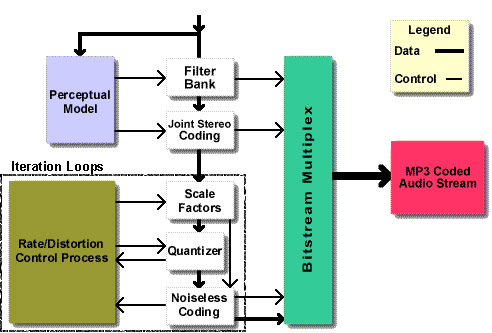
MP3 audio compression consists of two parts: encoding and decoding. Encoding converts the data in a WAV file into a highly compressed bitstream, and decoding takes the bitstream and reconstructs it into a WAV file. MP3 uses perceptual audio coding (Perceptual Audio Coding) this distortion algorithm. The frequency range of sound perceived by the human ear is 20 Hz to 20 kHz. MP3 cuts out a lot of redundant signals and irrelevant signals. The encoder transforms the original sound into the frequency domain through a mixed filter bank and uses a psychoacoustic model. to estimate that it may be only The perceived noise level is quantized and converted to Huffman coding to form an MP3 bitstream. The decoder is much simpler, its task is to extract the sound signal from the encoded spectral line components through inverse quantization and inverse transformation.
MP3 decoding can be divided into 9 processes in general: bitstream analysis, Huffman encoding, inverse quantization processing, stereo processing, spectral rearrangement, anti-aliasing processing, IMDCT transformation, subband synthesis, PCM output.
Briefly describe the MP3 compression process: Sound is an analog signal, and sound is sampled, quantized, and encoded to obtain PCM data.