Synthesis Filter Bank in MP3 Decoding


Free Download Mp4Gain
picture

Synthesis Filter Bank in MP3 Decoding
Synthesis Filter Bank in MP3 Decoding

Let’s talk about synthesis filter bank in MP3 decoding

When we decode an MP3 file, the synthesis filter bank plays a critical role in converting compressed audio data back into audible sound. I’ve spent years exploring this technology, and I can confidently say it’s both fascinating and misunderstood. Imagine trying to rebuild a demolished house with precision—each brick representing a tiny fraction of a second of sound. That’s what the synthesis filter bank does. It takes fragmented, transformed audio data and reconstructs it into a continuous waveform we can hear.

The brilliance of this process lies in how it combines mathematical precision with auditory perception. MP3 encoding heavily compresses audio, throwing away less perceptible frequencies. When decoding, the synthesis filter bank reassembles these fragments using the modified discrete cosine transform (MDCT) and polyphase filter banks. It’s like using puzzle pieces to recreate a beautiful picture—though some pieces might be missing, our brain fills in the gaps seamlessly.

How does the synthesis filter bank work?

The synthesis filter bank uses mathematical models to transform frequency-domain data back into the time domain. This step is crucial because our ears perceive sound as continuous waves. Without this conversion, the audio would be a chaotic mess of numbers.

One analogy I often use is thinking about it like translating a book written in a coded language back into English. Each step must be precise, or the meaning is lost. In MP3 decoding, the input is frequency-domain data, which has been compressed using psychoacoustic principles. The synthesis filter bank uses the inverse MDCT to process these chunks of data, followed by a polyphase reconstruction to create the time-domain audio signal. It’s a bit like baking a cake—each ingredient (frequency component) must be carefully measured and combined to achieve the desired result.

Why is the synthesis filter bank so efficient?

The efficiency of the synthesis filter bank lies in its ability to reconstruct sound with minimal computational resources. During decoding, it splits the task into manageable steps, reducing the strain on processors. This efficiency has been critical in enabling MP3 technology to flourish, especially on early devices with limited processing power.

I like to think of it as assembling IKEA furniture with a clear instruction manual. The process is streamlined to avoid wasted effort, ensuring everything fits together perfectly. The synthesis filter bank applies overlapping windows during reconstruction, which smooths transitions between segments and reduces artifacts. This efficiency allows MP3 players, smartphones, and even tiny embedded systems to handle complex audio decoding.

Key components of the synthesis filter bank

Understanding the synthesis filter bank requires breaking it down into its main components. Each plays a distinct role in ensuring high-quality audio reproduction.

Inverse Modified Discrete Cosine Transform (IMDCT)

The IMDCT reverses the frequency transformation applied during encoding. It takes blocks of frequency-domain data and converts them into overlapping time-domain samples. Think of it as unrolling a tightly wound scroll to reveal its contents.

Polyphase Reconstruction

Polyphase reconstruction is where the magic happens. It combines overlapping audio segments into a seamless waveform. This process uses filters to ensure smooth transitions and minimizes errors. It’s like stitching together fabric pieces to create a flawless quilt.

Windowing Functions

Windowing functions are applied to reduce edge artifacts during decoding. These functions shape each audio block, ensuring they blend smoothly. Imagine using sandpaper to smooth the edges of a wooden sculpture; windowing has a similar purpose in audio reconstruction.

Challenges in synthesis filter bank decoding

Decoding MP3 files is not without its challenges. One major hurdle is handling compressed audio with missing data. The synthesis filter bank must gracefully reconstruct the waveform despite these gaps.

Imagine trying to complete a jigsaw puzzle with a few pieces missing. The filter bank relies on redundancy and psychoacoustic principles to fill in the gaps, ensuring the final audio sounds natural. Timing synchronization is another critical challenge. The synthesis filter bank must align segments perfectly to avoid audible artifacts like clicks or pops.

Applications of the synthesis filter bank

The synthesis filter bank isn’t limited to MP3 decoding; it has broader applications in audio and signal processing. It’s used in various audio codecs like AAC and OGG, each adapted to meet specific needs. This versatility showcases its importance in modern technology.

For instance, in telecommunication systems, synthesis filter banks help compress voice signals for efficient transmission. They also play a role in hearing aids, reconstructing sound to enhance speech intelligibility for the hearing impaired. It’s like giving someone a pair of glasses for their ears, allowing them to experience sound clearly.

Why does the synthesis filter bank matter?

The synthesis filter bank is vital because it bridges the gap between compact digital audio files and the rich, immersive sound we experience. Without it, MP3 decoding would be impossible. It’s the unsung hero that ensures our favorite songs sound as good as they do.

I often explain it using the analogy of a translator at the United Nations. The synthesis filter bank takes data that computers understand and translates it into audio that resonates with us emotionally. Its precision and efficiency make it indispensable in the digital age.

Latest words on synthesis filter bank in MP3 decoding

Mastering the synthesis filter bank reveals the ingenuity behind MP3 technology. It’s a testament to how far we’ve come in optimizing audio compression and reproduction. While newer codecs like AAC have emerged, the principles of the synthesis filter bank remain foundational. For anyone delving into audio processing, understanding this technology is essential.

For anyone working with MP3 files or other audio formats, tools like Mp4Gain can enhance the quality and consistency of your audio, making it a reliable choice for all your playback needs.

FAQs About Synthesis Filter Bank in MP3 Decoding

What is a synthesis filter bank in MP3 decoding?

A synthesis filter bank is a key component in MP3 decoding that reconstructs compressed frequency-domain audio data into time-domain waveforms. This process ensures the audio is ready for playback, turning fragmented data into seamless sound.

Why is the synthesis filter bank important in MP3 decoding?

The synthesis filter bank is crucial because it ensures accurate and efficient reconstruction of audio signals. Without it, the compressed MP3 data would not translate into the continuous sound waves that our ears can perceive.

How does the synthesis filter bank work?

The synthesis filter bank uses inverse mathematical transformations like the Inverse Modified Discrete Cosine Transform (IMDCT) and polyphase reconstruction to convert frequency-domain data back into a time-domain audio signal.

What are the main components of the synthesis filter bank?

The main components include the IMDCT, polyphase reconstruction, and windowing functions. These work together to process and combine audio data for smooth playback, minimizing artifacts and maintaining quality.

What challenges does the synthesis filter bank face in MP3 decoding?

Challenges include handling missing data in compressed files and ensuring precise timing synchronization. These factors are critical to avoid audible distortions like clicks or pops during playback.

Is the synthesis filter bank used in other codecs besides MP3?

Yes, the synthesis filter bank is also used in other codecs like AAC and OGG. It’s a versatile technology applied in various fields, including telecommunication systems and hearing aids, to process and enhance audio signals.

Why does the synthesis filter bank use overlapping windows?

Overlapping windows are used to smooth the transitions between audio segments. This minimizes discontinuities and prevents unwanted artifacts, ensuring high-quality audio reconstruction.

Comments:

I found this article really helpful. The analogy about rebuilding a house made the concept of synthesis filter banks so much clearer to me. Great job explaining something so technical!

Thanks for breaking this down! I’ve always wondered how MP3 decoding works, and this article finally made it make sense. I’d love more detail on the polyphase reconstruction step, though.

This was an awesome read. I’m new to audio engineering, and understanding the synthesis filter bank has been a challenge. This article was super detailed but still easy to follow!

It’s amazing how you compared it to baking a cake or building a puzzle. I think those analogies really helped me understand. I’ve read other articles, but none explained it this way.

Good article, but it feels like some parts went over my head. Could you maybe include diagrams or visuals in the future?

Finally, an article that explains synthesis filter banks without making me feel dumb! I really appreciated the real-world examples and simple language.

I’ve been trying to decode audio files myself and was struggling with the technical parts. This really cleared up a lot of confusion. Thanks for the detailed explanations!

Awesome work on this! I had no idea the synthesis filter bank was such a crucial part of MP3 decoding. You should write about how this compares to modern audio codecs.

I’ve been looking for an article like this for ages! You made the subject understandable even for someone like me who isn’t a tech person. Much appreciated.

This article had some great info, but I wish you had touched on how the synthesis filter bank impacts audio quality directly. Still a good read, though.

Wow, I learned so much about MP3 decoding today! The part about handling missing data was super interesting. Keep up the great work!

I never realized how much effort goes into decoding an MP3 file. The synthesis filter bank is more complicated than I imagined. Thanks for explaining it so well.

Great explanation, but I was wondering if you could include examples of devices or applications where synthesis filter banks are used outside of MP3s?

This article is very insightful, but I feel like some parts could use more depth. Still, you did a great job explaining the basics.


Free Download Mp4Gain
picture


Mp4Gain Main Window
picture


Mp4Gain Features
picture


Free Download Mp4Gain
picture

Perceptual Entropy in MP3 Compression

Perceptual Entropy in MP3 Compression

Perceptual Entropy in MP3 Compression

Let’s talk about perceptual entropy in MP3 compression

When we think of compressing audio files, the concept of perceptual entropy often comes up. In simple terms, perceptual entropy is the key to making MP3 files smaller without making them sound lower in quality. As a specialist in audio technology, I’ve spent years examining how different methods can reduce file size while keeping what the listener actually hears intact. Perceptual entropy is central to that process because it helps us decide what data is essential and what isn’t. Let’s dive into the science behind perceptual entropy in MP3s, and I’ll show you how it all works, using some real-life examples to make it easier to understand.

What is perceptual entropy?

Perceptual entropy is a measure of how complex or unpredictable an audio signal is to the human ear. It’s like understanding which parts of a song your brain considers crucial and which it doesn’t mind losing in compression. In the world of audio engineering, we refer to this as perceptual coding, a technique that allows us to remove certain parts of an audio signal that are less noticeable. The MP3 format uses this principle extensively, focusing on parts of the audio that the human ear is sensitive to while discarding less crucial data. This is why an MP3 can be much smaller in size yet still sound almost identical to the original recording.

How does perceptual entropy impact MP3 compression?

The role of perceptual entropy in MP3 compression is all about making smart choices. Imagine you’re packing for a trip but have limited luggage space. You’ll prioritize essentials over less-needed items. Similarly, perceptual entropy allows MP3 compression algorithms to determine which audio elements should stay and which can go. This focus on essential audio content lets us create smaller files without sacrificing perceived quality, a process made possible by decades of research into how our ears and brains process sound.

Why does perceptual entropy matter to listeners?

Perceptual entropy is crucial because it directly affects how we experience sound. When you listen to an MP3, perceptual entropy is why you still hear most details despite heavy compression. Without this concept, audio files would either be too large to store easily or sound hollow and distorted after compression. As someone who works with audio files daily, I can attest that perceptual entropy lets us enjoy high-quality audio while using minimal storage space, a huge win for consumers and professionals alike.

The role of psychoacoustics in perceptual entropy

Psychoacoustics is the study of how we perceive sound, and it’s the science behind perceptual entropy. Our ears don’t hear every frequency equally; some are more noticeable than others. For instance, a whisper in a quiet room is clear, but it would be lost in a noisy crowd. This concept applies to MP3 compression. By understanding psychoacoustics, we can identify parts of audio that the brain will ignore or mask in favor of other sounds. This approach allows us to apply perceptual entropy principles, reducing the data we need to store while maintaining audio quality.

Examples of perceptual masking in everyday life

Perceptual masking is something we experience daily. Think about driving in traffic with the radio on. While you might hear the music, the car horns and engine noises in the background don’t affect your ability to understand the song. Perceptual entropy relies on this same masking effect to compress audio files. By removing sounds that are masked by louder or more prominent sounds, MP3 files become more manageable without losing important audio details. This technique is the cornerstone of how MP3s achieve efficient, high-quality compression.

How MP3 compression algorithms use perceptual entropy

MP3 compression algorithms, such as those based on the Layer 3 format, leverage perceptual entropy by dividing audio data into critical and non-critical components. When encoding a file, the algorithm focuses on the parts that carry the most perceptual weight, ignoring data the ear is less likely to notice. This step-by-step filtering process allows the MP3 to retain audio fidelity while keeping file size minimal. From my experience working with MP3s, understanding how these algorithms work has been invaluable in optimizing both storage and sound quality.

The balance between file size and sound quality

Finding a balance between file size and sound quality is a challenge that perceptual entropy addresses. As we compress an audio file, there’s always a risk of degrading its quality. However, by focusing on perceptual entropy, MP3 technology allows us to keep the parts of audio that matter most while trimming away excess. The result is a smaller, high-quality audio file that meets both storage and listening standards. For anyone who’s ever struggled with storage space but still wants great sound, perceptual entropy is the hero behind the scenes making that possible.

Challenges and limitations of perceptual entropy in MP3s

Despite its benefits, perceptual entropy has limitations, especially when it comes to complex sounds like orchestras or high-definition audio. With very intricate music, some nuances can be lost because the algorithm may discard data deemed “unimportant.” As an audio expert, I’ve seen how this can sometimes result in a slightly artificial sound when listening closely. However, most listeners rarely notice these changes, proving that perceptual entropy is highly effective in everyday audio scenarios, though not flawless.

Comparing perceptual entropy in MP3 vs. other audio formats

While MP3 is the most well-known format that uses perceptual entropy, other formats like AAC and OGG Vorbis also rely on similar principles. However, each format applies perceptual entropy differently. In my experience, AAC generally provides better sound quality at similar bitrates, while OGG Vorbis offers more flexibility for open-source projects. Comparing these formats helps us appreciate the unique strengths and weaknesses of MP3 compression. Understanding these differences is essential for selecting the right format for specific needs.

Applications of perceptual entropy beyond MP3s

Perceptual entropy is not exclusive to MP3s; it also applies to video and image compression. For example, in JPEG images, certain colors or details that are less noticeable to the human eye can be removed without affecting the perceived quality. In video compression, perceptual entropy helps reduce data by focusing on high-visibility frames while discarding redundant or low-impact pixels. This cross-media application shows how powerful perceptual entropy is in digital media, making it an essential concept across various types of files beyond just audio.

Latest words on perceptual entropy in MP3 compression

Perceptual entropy revolutionizes how we experience digital audio, enabling us to store and share music with minimal data loss. MP3 compression is all about balancing sound quality with file size, and perceptual entropy is the science that makes it happen. By focusing on the sounds that matter most to our ears, we get smaller files that still deliver excellent audio quality. Whether we’re saving space on our devices or streaming online, perceptual entropy continues to shape the way we enjoy digital sound. For those who want a reliable solution for enhancing and normalizing their MP3s, Mp4Gain offers a great tool to fine-tune audio without compromising quality, allowing even better use of the principles behind perceptual entropy.

Comments:

JamesV45: Wow, this article is exactly what I needed! I’ve always wondered how MP3s manage to stay small but still sound great. Now I know perceptual entropy is the reason behind it. Thanks for such an in-depth explanation!

SoundGeek29: This really cleared up a lot of things for me. I always thought compressing audio would ruin the quality, but now I see how the tech makes it work. Really appreciate the details and the examples, made it super easy to get.

AudioFanatic: Amazing article, but I’d love to see more about how other formats like FLAC compare. This got me thinking about what format is really the best. Thanks!

M4db3atz: Man, this is a goldmine of info. So many people don’t even know what perceptual entropy is. Thanks for explaining it in a way even non-audio folks can understand. Keep it up!

SarahJ: I feel like I actually understand MP3s better now. I didn’t know there was so much science behind it, but it makes sense now why MP3s don’t sound bad even when compressed. Appreciate the clear explanations!

DigitalListener: The examples made this so much easier to get. Never thought of perceptual entropy this way. I wish more articles explained it like this. Thanks a ton!

Lucas_P: I agree with everyone, this article is top-notch! I’m no expert, but now I feel like I actually understand what makes MP3s work. Great job making a complex topic easy to understand.

MikeSoundTech: I’m working with sound files all the time, and this article just made so much sense to me. The perceptual entropy concept explains so much about why MP3s are still relevant. Would be interested to see more about how this applies to other file types, though.

AnnaTheAudioNerd: This was awesome to read! I’ve always felt like audio compression was kind of a mystery, but now I feel like I get it. The real-life examples helped a lot. Wish there was even more detail, though!

JohnnyT: Dang, never thought I’d find myself reading a whole article about perceptual entropy, but this was actually really interesting. Learned a ton. Thanks for keeping it simple!

ZenSound: This article is spot on! Perceptual entropy is such an overlooked part of compression. The science behind MP3s really comes alive here. Thanks for such a thorough breakdown.

AudioKing87: Loved it! Now I can explain to my friends why MP3s don’t sound bad even when they’re super small. Thanks for putting this in plain language!

NickLoud: Interesting read! I’d heard of perceptual coding before, but this gave me a way better understanding of how it works with MP3s. Makes me want to learn even more about audio compression.

SweetSoundWave: Honestly, this is one of the best articles on audio compression I’ve come across. It’s clear, detailed, and actually useful. More articles like this, please!

Jenna_M: Thanks for writing this up! I’m doing a project on audio formats, and this article is exactly what I needed. The section on psychoacoustics and perceptual entropy was especially helpful!

Understanding Lossy Audio Compression

Understanding Lossy Audio Compression

Lossy Audio Compression

Audio compression is a critical component of modern audio production. It allows for the reduction of file sizes while maintaining an acceptable level of sound quality. Lossy audio compression is a popular method that achieves this by removing non-essential information from an audio file. In this article, we will dive deep into the technical details of lossy audio compression and explore its advantages and disadvantages, as well as the impact it has on audio quality.

Lossy Audio Compression

The Technical Basics of Lossy Audio Compression

Lossy audio compression works by removing information that is deemed non-essential to the human ear. This information is often in the form of high-frequency sounds or sounds that are below the threshold of human hearing. Lossy compression achieves this by analyzing the audio file and creating a model of the sounds that the human ear can and cannot hear. This model is then used to remove the non-essential information from the audio file.

There are several popular lossy audio compression formats and codecs, including MP3, AAC, and Ogg Vorbis. Each of these formats has its own strengths and weaknesses, and choosing the right one depends on the specific needs of the user.

The Trade-offs of Lossy Audio Compression

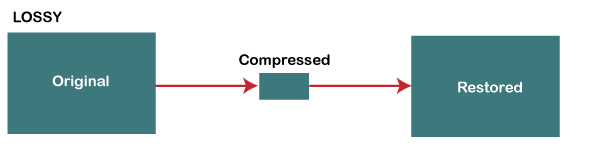
While lossy compression is an effective way to reduce file sizes, it does come with some trade-offs. The most significant trade-off is the loss of audio quality. As non-essential information is removed from the audio file, it can result in a loss of dynamic range and a decrease in overall sound quality. However, the degree of quality loss is often subjective and depends on the specific requirements of the user.

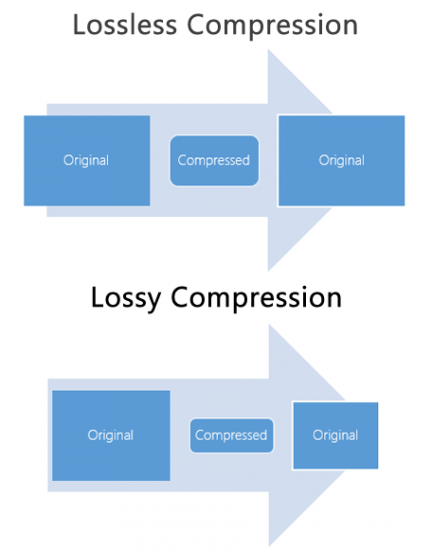
When comparing lossy and lossless compression formats, file size is often a significant factor. Lossy compression generally results in much smaller file sizes than lossless compression, but at the cost of some audio quality loss. However, the size difference between the two formats can be significant, making lossy compression a practical solution for many users.

Advanced Techniques for Lossy Audio Compression

Advanced techniques are available for lossy audio compression that can help to improve audio quality while still achieving significant file size reduction. Perceptual coding is one such technique that uses psychoacoustic models to analyze the audio and remove non-essential information in a way that minimizes the impact on sound quality. Another technique involves the use of metadata, which can help to provide additional information about the audio file that can be used to improve compression.

Best Practices for Lossy Audio Compression

There are several best practices that can be followed to achieve the best results when compressing audio files using a lossy format. Some of these practices include choosing the right codec for the specific needs of the user, ensuring that the encoding settings are appropriate for the file being compressed, and avoiding the use of excessive compression, which can result in a loss of sound quality. Additionally, it is important to avoid common mistakes when compressing audio files, such as encoding at too low of a bit rate or not checking the final output for artifacts or distortion.

Psychoacoustic Models
Psychoacoustic models are mathematical models that simulate the way that the human ear processes sound. They are used in perceptual coding to identify which audio signals can be safely removed without causing a noticeable loss in audio quality.

Psychoacoustic models take into account factors such as frequency masking, temporal masking, and the sensitivity of the human ear to different types of audio signals. They can also take into account more complex factors such as the interaction between different audio signals.

Metadata
Metadata is data that is embedded in an audio file and provides additional information about the audio content. In the context of lossy audio compression, metadata can be used to improve the compression process by providing additional information about the audio content.

One common use of metadata in lossy audio compression is to provide information about the target device or playback environment. For example, metadata can provide information about the type of headphones or speakers that the audio file is intended to be played through. This information can be used by perceptual coders to optimize the compression process for the target device or playback environment.

Another common use of metadata in lossy audio compression is to provide information about the audio content itself. For example, metadata can provide information about the genre, tempo, and key of a song. This information can be used to optimize the compression process for the specific characteristics of the audio content.

Best Practices for Lossy Audio Compression
To achieve the best results in lossy audio compression, there are several best practices that should be followed. These include:

  • Use the highest quality compression settings available
  • Use a well-supported and widely-used compression format
  • Use a lossless format for archiving and backup purposes
  • Avoid excessive compression, as this can lead to noticeable audio artifacts
  • Take into account the intended playback environment when compressing audio files
  • Include appropriate metadata to provide additional information about the audio content

Common Mistakes to Avoid
When compressing audio files, there are several common mistakes that should be avoided. These include:

  • Using excessively low compression settings, as this can lead to a noticeable loss in audio quality
  • Using an unsupported or proprietary compression format, as this can lead to compatibility issues
  • Not taking into account the intended playback environment, which can lead to suboptimal compression settings
  • Not including appropriate metadata, which can make it difficult to organize and manage large collections of audio files
  • Using excessive compression, as this can lead to noticeable audio artifacts
    1. Explanation of Audio Compression and Lossy Audio Compression

Audio compression is the process of reducing the size of an audio file without significantly degrading the quality of the sound. Compression is necessary in the world of digital audio because it allows for more efficient storage and transmission of audio files. Without compression, audio files would be prohibitively large, making it difficult to store and share them over the internet.

Lossy audio compression is a specific type of audio compression that achieves a high degree of compression by discarding some of the audio data. This means that when you compress an audio file using a lossy compression algorithm, some of the data is permanently lost, and the resulting file is of lower quality than the original. Lossy compression is used widely because it allows for much higher compression ratios than lossless compression, making it more practical for everyday use.

    1. Importance of Audio Compression in Modern Audio Production

Audio compression is an essential tool in modern audio production. The ability to compress audio files allows for more efficient use of storage space and bandwidth, which are essential resources in the world of digital media. Audio compression also makes it possible to stream high-quality audio over the internet, which has revolutionized the way we consume music and other audio content.

However, it’s important to remember that audio compression is not without its downsides. Lossy compression, in particular, can have a significant impact on the quality of the audio, and it’s essential to understand the trade-offs involved when choosing a compression format and level of compression.

    1. The Technical Basics of Lossy Audio Compression

At its most basic level, lossy audio compression works by analyzing the audio file and discarding information that is deemed unnecessary for human perception. This information can include sounds that are too quiet to hear, or frequencies that are outside the range of human hearing. By discarding this information, the compression algorithm can significantly reduce the size of the audio file while still retaining much of the original sound quality.

The specific techniques used in lossy audio compression can vary, but most algorithms use some combination of frequency masking, quantization, and other mathematical techniques to achieve compression. The result is a smaller file size that can be easily stored or transmitted, but with some loss of audio quality.

    1. The Most Commonly Used Lossy Audio Compression Formats and Codecs

There are many different lossy audio compression formats and codecs available, each with its own strengths and weaknesses. Some of the most commonly used formats and codecs include:

    • MP3 – one of the most widely used audio compression formats, with a high degree of compatibility and a good balance between file size and sound quality
    • AAC – a newer format that is widely used for streaming audio and has a better sound quality than MP3 at the same bitrate
    • OGG – an open-source format that is popular for internet radio and streaming
    • WMA – a format developed by Microsoft that is commonly used for streaming and downloading audio files from the internet
    • FLAC – a lossless audio compression format that is capable of compressing audio files without any loss of quality, but with larger file sizes than lossy formats

The Fascinating History of Lossy Compression

Lossy compression is a method of data compression that reduces the size of a file by discarding information that is deemed to be unnecessary. This technique has been used for decades in various fields, including image, audio, and video processing, to make files smaller and easier to share or store.

The first significant work on lossy image compression was done in the early 1970s by a group of researchers at the University of Southern California. They developed the first image compression algorithm, called the discrete cosine transform (DCT), which is still used today in the popular JPEG image format.

In the 1980s, the Moving Pictures Experts Group (MPEG) was established to develop standards for digital video compression. They introduced the MPEG-1 and MPEG-2 video formats, which became widely adopted in the industry. The success of these formats led to the creation of newer standards, such as MPEG-4 and H.264, which are still used in modern video streaming services.

Lossy compression has also been essential for audio processing. In the late 1980s, the MP3 format was developed by the Fraunhofer Society in Germany, which used a perceptual coding algorithm to remove information that the human ear cannot detect. MP3 quickly became the standard for digital music distribution, leading to the creation of newer formats such as AAC and OGG Vorbis.

However, lossy compression is not without its drawbacks. Because it removes data, it can lead to a loss of quality, especially if the compression is too aggressive. This can result in artifacts or distortions in the processed image, audio, or video.

Despite these limitations, lossy compression remains an important tool in the modern digital world. It allows for more efficient storage and sharing of multimedia content and has revolutionized industries such as music, film, and photography. As technology continues to evolve, it’s likely that new and more efficient lossy compression techniques will be developed, further enhancing the way we share and consume digital content.