Lossy vs Lossless Data Representation in MP3


Free Download Mp4Gain
picture

Lossy vs Lossless Data Representation in MP3

Let’s talk about lossy vs lossless data representation in MP3

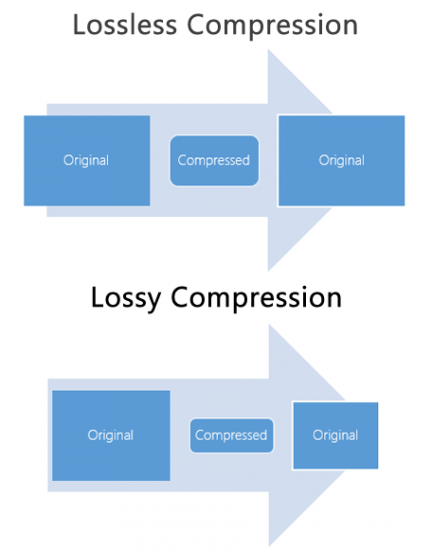
When we discuss MP3 audio, one of the most debated topics is the difference between lossy and lossless data representation. As someone who has spent years studying audio formats, I’ve encountered countless situations where understanding these differences made all the difference. Lossy compression is designed to reduce file size by removing data that is considered less perceptible to the human ear. On the other hand, lossless compression preserves every bit of audio information, even though the file sizes are larger.

Imagine a high-quality photograph being compressed for storage. If you save it as a smaller file, some details—like subtle textures—might get blurred or lost entirely. This is similar to lossy compression in MP3. Lossless compression is like folding a large map so you can carry it in your pocket and then unfolding it to reveal every detail when you need it. Both have unique applications, and choosing between them depends on your priorities, like audio quality or storage capacity.

What is lossy data representation?

Lossy data representation is all about efficiency. It works by removing audio data that our ears might not notice is missing. The MP3 format uses psychoacoustic models to determine which sounds are less critical based on how we perceive audio. For example, if two sounds are playing at the same time and one is much louder, the quieter sound might be eliminated during lossy compression.

I’ve tested this extensively in my studio. A typical MP3 file compressed at 128 kbps sounds clear to many listeners, but if you pay close attention with high-end headphones, subtle details like background reverb or high-frequency harmonics might be missing. That’s because lossy compression prioritizes reducing file size over preserving every nuance of the original audio.

How does lossless data representation work?

Lossless compression, on the other hand, doesn’t remove any data. Instead, it uses algorithms to reduce file size without losing any information. Think of it like packing a suitcase more efficiently without leaving anything behind. Formats like FLAC or WAV are excellent examples of lossless audio compression.

In practice, I’ve noticed that lossless audio sounds identical to the original recording. If you’re working on music production or you’re an audiophile, lossless compression is essential because it ensures that no detail is compromised. However, this comes with a trade-off: lossless files are much larger, sometimes five to ten times the size of lossy MP3s.

When is lossy compression useful?

Lossy compression shines in situations where storage space or bandwidth is limited. Streaming platforms like Spotify and YouTube rely heavily on lossy formats to deliver music and video efficiently to millions of users. If you’re commuting and streaming over a mobile network, you might not notice the slight reduction in quality compared to a lossless file.

I’ve also seen its impact in file sharing. Back when we used CDs and flash drives to transfer files, lossy MP3s were a lifesaver. A single gigabyte of storage could hold hundreds of songs, making it convenient for music lovers.

  • Streaming platforms benefit from smaller file sizes.
  • Ideal for casual listening on standard devices.
  • Allows faster downloads and less buffering during playback.

Why is lossless compression preferred by professionals?

Lossless compression is often the gold standard for professionals in music and sound design. In my studio, I always work with lossless files during production. This ensures that the final product retains every detail when mastered. Imagine painting a masterpiece—if you start with a high-resolution canvas, every brushstroke stands out.

When archiving music or creating remixes, lossless files are invaluable because they preserve all the nuances of the original track. Even though these files require more storage, the quality is well worth the investment for critical applications.

  • Perfect for audio editing and production.
  • Essential for preserving original recordings.
  • Provides unmatched audio clarity and detail.

How does MP3 manage lossy compression so effectively?

MP3 stands out for its clever use of perceptual coding. It takes advantage of the way our brains process sound, removing data that we’re unlikely to notice. This includes masking, where a loud sound can make nearby quieter sounds inaudible. By focusing on what we can actually hear, MP3 files achieve impressive compression ratios.

I’ve tested MP3 encoding on various devices and noticed how it maintains quality despite reducing file size. For example, a three-minute song might shrink from 30 MB in WAV format to just 3 MB as an MP3 at 128 kbps. This balance between quality and size is why MP3 became the dominant audio format for decades.

What are the limitations of lossy MP3 files?

While MP3 files are convenient, they come with drawbacks. High levels of compression can introduce audible artifacts like ringing or a hollow sound. These issues become more noticeable on high-end audio systems or when editing the files further.

For instance, I’ve encountered situations where a client wanted to enhance the bass in an MP3 track. Because some low-frequency data had already been removed during compression, boosting the bass revealed unwanted distortions. This limitation makes lossy MP3s less suitable for professional applications.

Which is better for everyday use?

The choice between lossy and lossless depends on your needs. If you’re streaming music on a smartphone or sharing files quickly, lossy MP3s are the practical option. They sound great on most headphones and speakers, especially in everyday environments like a car or gym.

However, if you’re a music enthusiast with a high-quality audio setup, you’ll likely notice the difference in a lossless file. I always recommend lossless formats for anyone who values audio fidelity or plans to archive their music collection for future use.

Latest words on lossy vs lossless data representation in MP3

In the debate between lossy and lossless, there’s no one-size-fits-all answer. Each has its place depending on the context. As someone deeply immersed in audio production, I’ve seen firsthand how lossy MP3s revolutionized the way we consume music. But I also recognize the unmatched quality of lossless formats for critical applications.

If you’re serious about audio quality and want to optimize your files for both lossy and lossless use cases, tools like Mp4Gain can make the process seamless.

FAQs about Lossy vs Lossless Data Representation in MP3

What is lossy compression in MP3?

Lossy compression reduces file size by removing less noticeable audio data, using perceptual models to maintain acceptable quality.

How does lossless audio differ from lossy audio?

Lossless audio retains all original data for perfect fidelity, while lossy audio sacrifices some data for smaller file sizes.

Why is MP3 considered lossy?

MP3 uses lossy compression to reduce file size by removing inaudible or less noticeable parts of the audio.

Can you hear the difference between lossy and lossless files?

On high-end audio systems, the differences are noticeable, especially in the finer details and dynamic range of lossless files.

Are lossless files always better than lossy?

Lossless files offer better quality but require more storage. Lossy files are better for casual use due to their smaller size.

What is the main advantage of lossy compression?

The main advantage is significantly smaller file sizes, making it ideal for streaming and portable devices.

Do streaming platforms use lossy or lossless formats?

Most platforms use lossy formats to optimize streaming efficiency, but some offer lossless options for premium users.

Why do audiophiles prefer lossless formats?

Audiophiles prefer lossless formats for their superior sound quality and faithful reproduction of original recordings.

Is MP3 still relevant in 2025?

Yes, MP3 remains popular due to its compatibility and efficiency, despite newer formats offering better quality at smaller sizes.

What’s the best tool to convert files between lossy and lossless formats?

Mp4Gain is a great tool for optimizing and converting audio files while maintaining the best quality for any format.

Comments:

Finally, someone explained lossy and lossless in a way I can understand. Great article, very useful!

Wait, so if I rip my CDs to MP3, am I losing quality? I feel like I need a better explanation of what actually gets lost!

This was super helpful. I was confused about lossy vs lossless, especially for archiving my vinyl collection.

I think lossless is overkill for most people, but this article gave me a new appreciation for why it matters. Thanks!

Why don’t more streaming platforms offer lossless as a default? I’d love better sound quality without needing expensive gear.

Great write-up! One question though, how does lossy compression handle live recordings? Are they more affected?

Honestly, I didn’t think I’d notice the difference, but after trying lossless, it’s hard to go back. Thanks for explaining this so clearly!

Can you do a follow-up article on how to best optimize files for lossless storage? I’m trying to build a music archive!

I like how you used examples to explain complex stuff. Made it much easier to follow.

This is the most in-depth guide I’ve read. Still, I’d love more tips on managing file sizes without sacrificing too much quality.


Free Download Mp4Gain
picture


Mp4Gain Main Window
picture


Mp4Gain Features
picture


Free Download Mp4Gain
picture

Understanding Lossy Audio Compression

Understanding Lossy Audio Compression

Lossy Audio Compression

Audio compression is a critical component of modern audio production. It allows for the reduction of file sizes while maintaining an acceptable level of sound quality. Lossy audio compression is a popular method that achieves this by removing non-essential information from an audio file. In this article, we will dive deep into the technical details of lossy audio compression and explore its advantages and disadvantages, as well as the impact it has on audio quality.

Lossy Audio Compression

The Technical Basics of Lossy Audio Compression

Lossy audio compression works by removing information that is deemed non-essential to the human ear. This information is often in the form of high-frequency sounds or sounds that are below the threshold of human hearing. Lossy compression achieves this by analyzing the audio file and creating a model of the sounds that the human ear can and cannot hear. This model is then used to remove the non-essential information from the audio file.

There are several popular lossy audio compression formats and codecs, including MP3, AAC, and Ogg Vorbis. Each of these formats has its own strengths and weaknesses, and choosing the right one depends on the specific needs of the user.

The Trade-offs of Lossy Audio Compression

While lossy compression is an effective way to reduce file sizes, it does come with some trade-offs. The most significant trade-off is the loss of audio quality. As non-essential information is removed from the audio file, it can result in a loss of dynamic range and a decrease in overall sound quality. However, the degree of quality loss is often subjective and depends on the specific requirements of the user.

When comparing lossy and lossless compression formats, file size is often a significant factor. Lossy compression generally results in much smaller file sizes than lossless compression, but at the cost of some audio quality loss. However, the size difference between the two formats can be significant, making lossy compression a practical solution for many users.

Advanced Techniques for Lossy Audio Compression

Advanced techniques are available for lossy audio compression that can help to improve audio quality while still achieving significant file size reduction. Perceptual coding is one such technique that uses psychoacoustic models to analyze the audio and remove non-essential information in a way that minimizes the impact on sound quality. Another technique involves the use of metadata, which can help to provide additional information about the audio file that can be used to improve compression.

Best Practices for Lossy Audio Compression

There are several best practices that can be followed to achieve the best results when compressing audio files using a lossy format. Some of these practices include choosing the right codec for the specific needs of the user, ensuring that the encoding settings are appropriate for the file being compressed, and avoiding the use of excessive compression, which can result in a loss of sound quality. Additionally, it is important to avoid common mistakes when compressing audio files, such as encoding at too low of a bit rate or not checking the final output for artifacts or distortion.

Psychoacoustic Models
Psychoacoustic models are mathematical models that simulate the way that the human ear processes sound. They are used in perceptual coding to identify which audio signals can be safely removed without causing a noticeable loss in audio quality.

Psychoacoustic models take into account factors such as frequency masking, temporal masking, and the sensitivity of the human ear to different types of audio signals. They can also take into account more complex factors such as the interaction between different audio signals.

Metadata
Metadata is data that is embedded in an audio file and provides additional information about the audio content. In the context of lossy audio compression, metadata can be used to improve the compression process by providing additional information about the audio content.

One common use of metadata in lossy audio compression is to provide information about the target device or playback environment. For example, metadata can provide information about the type of headphones or speakers that the audio file is intended to be played through. This information can be used by perceptual coders to optimize the compression process for the target device or playback environment.

Another common use of metadata in lossy audio compression is to provide information about the audio content itself. For example, metadata can provide information about the genre, tempo, and key of a song. This information can be used to optimize the compression process for the specific characteristics of the audio content.

Best Practices for Lossy Audio Compression
To achieve the best results in lossy audio compression, there are several best practices that should be followed. These include:

  • Use the highest quality compression settings available
  • Use a well-supported and widely-used compression format
  • Use a lossless format for archiving and backup purposes
  • Avoid excessive compression, as this can lead to noticeable audio artifacts
  • Take into account the intended playback environment when compressing audio files
  • Include appropriate metadata to provide additional information about the audio content

Common Mistakes to Avoid
When compressing audio files, there are several common mistakes that should be avoided. These include:

  • Using excessively low compression settings, as this can lead to a noticeable loss in audio quality
  • Using an unsupported or proprietary compression format, as this can lead to compatibility issues
  • Not taking into account the intended playback environment, which can lead to suboptimal compression settings
  • Not including appropriate metadata, which can make it difficult to organize and manage large collections of audio files
  • Using excessive compression, as this can lead to noticeable audio artifacts
    1. Explanation of Audio Compression and Lossy Audio Compression

Audio compression is the process of reducing the size of an audio file without significantly degrading the quality of the sound. Compression is necessary in the world of digital audio because it allows for more efficient storage and transmission of audio files. Without compression, audio files would be prohibitively large, making it difficult to store and share them over the internet.

Lossy audio compression is a specific type of audio compression that achieves a high degree of compression by discarding some of the audio data. This means that when you compress an audio file using a lossy compression algorithm, some of the data is permanently lost, and the resulting file is of lower quality than the original. Lossy compression is used widely because it allows for much higher compression ratios than lossless compression, making it more practical for everyday use.

    1. Importance of Audio Compression in Modern Audio Production

Audio compression is an essential tool in modern audio production. The ability to compress audio files allows for more efficient use of storage space and bandwidth, which are essential resources in the world of digital media. Audio compression also makes it possible to stream high-quality audio over the internet, which has revolutionized the way we consume music and other audio content.

However, it’s important to remember that audio compression is not without its downsides. Lossy compression, in particular, can have a significant impact on the quality of the audio, and it’s essential to understand the trade-offs involved when choosing a compression format and level of compression.

    1. The Technical Basics of Lossy Audio Compression

At its most basic level, lossy audio compression works by analyzing the audio file and discarding information that is deemed unnecessary for human perception. This information can include sounds that are too quiet to hear, or frequencies that are outside the range of human hearing. By discarding this information, the compression algorithm can significantly reduce the size of the audio file while still retaining much of the original sound quality.

The specific techniques used in lossy audio compression can vary, but most algorithms use some combination of frequency masking, quantization, and other mathematical techniques to achieve compression. The result is a smaller file size that can be easily stored or transmitted, but with some loss of audio quality.

    1. The Most Commonly Used Lossy Audio Compression Formats and Codecs

There are many different lossy audio compression formats and codecs available, each with its own strengths and weaknesses. Some of the most commonly used formats and codecs include:

    • MP3 – one of the most widely used audio compression formats, with a high degree of compatibility and a good balance between file size and sound quality
    • AAC – a newer format that is widely used for streaming audio and has a better sound quality than MP3 at the same bitrate
    • OGG – an open-source format that is popular for internet radio and streaming
    • WMA – a format developed by Microsoft that is commonly used for streaming and downloading audio files from the internet
    • FLAC – a lossless audio compression format that is capable of compressing audio files without any loss of quality, but with larger file sizes than lossy formats

The Fascinating History of Lossy Compression

Lossy compression is a method of data compression that reduces the size of a file by discarding information that is deemed to be unnecessary. This technique has been used for decades in various fields, including image, audio, and video processing, to make files smaller and easier to share or store.

The first significant work on lossy image compression was done in the early 1970s by a group of researchers at the University of Southern California. They developed the first image compression algorithm, called the discrete cosine transform (DCT), which is still used today in the popular JPEG image format.

In the 1980s, the Moving Pictures Experts Group (MPEG) was established to develop standards for digital video compression. They introduced the MPEG-1 and MPEG-2 video formats, which became widely adopted in the industry. The success of these formats led to the creation of newer standards, such as MPEG-4 and H.264, which are still used in modern video streaming services.

Lossy compression has also been essential for audio processing. In the late 1980s, the MP3 format was developed by the Fraunhofer Society in Germany, which used a perceptual coding algorithm to remove information that the human ear cannot detect. MP3 quickly became the standard for digital music distribution, leading to the creation of newer formats such as AAC and OGG Vorbis.

However, lossy compression is not without its drawbacks. Because it removes data, it can lead to a loss of quality, especially if the compression is too aggressive. This can result in artifacts or distortions in the processed image, audio, or video.

Despite these limitations, lossy compression remains an important tool in the modern digital world. It allows for more efficient storage and sharing of multimedia content and has revolutionized industries such as music, film, and photography. As technology continues to evolve, it’s likely that new and more efficient lossy compression techniques will be developed, further enhancing the way we share and consume digital content.

What is music compression

Initially computers recorded the songs known as wav. This format does not have any compression, later we will explain what we mean by the well-known word compression.


we said that when using the wav format, computers a large part of their hard drives to be able to store even if it were a few songs especially if we remember times were very small which equation that each song a very large space time the computers had very little capacity hard of storage we found computer could store only a few songs.
but very soon this began to bother users because although the computer was perfectly capable of playing Sony record good quality on the impractical facts to listen to music because of the low storage capacity the large size each song.
and now we will get into the subject of compression, it is based on algorithms to reduce each song without losing much quality. It is obvious when compressing one gets rid of certain information, for example redundant information, that is, information is repeated and that therefore one can do without it without losing quality because important information is not being lost.
Thus, MP3 format arises, which bases its compression to eliminate information that is not audible for the human ear, therefore getting rid of that information is not perceptible to the human ear, so the song will sound the same compressed as uncompressed. It is the reason why MP3 format was immediately successful because it records songs the tenth part of space on the computer disk and yet they will sound practically the same, which even allowed one of these files to be sent to another user on another computer MP3 which would have been impossible to do practically with the wav format given the enormous space that each song occupied.

Obviously this generated that fashion will soon begin exchanging song files the world which came to change completely in which the music industry works and worked.