Lossy vs Lossless Data Representation in MP3


Free Download Mp4Gain
picture

Lossy vs Lossless Data Representation in MP3
Let’s talk about lossy vs lossless data representation in MP3

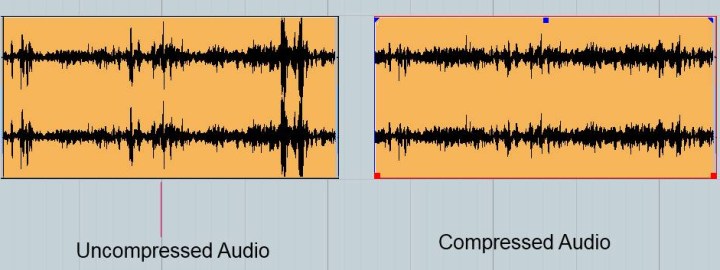
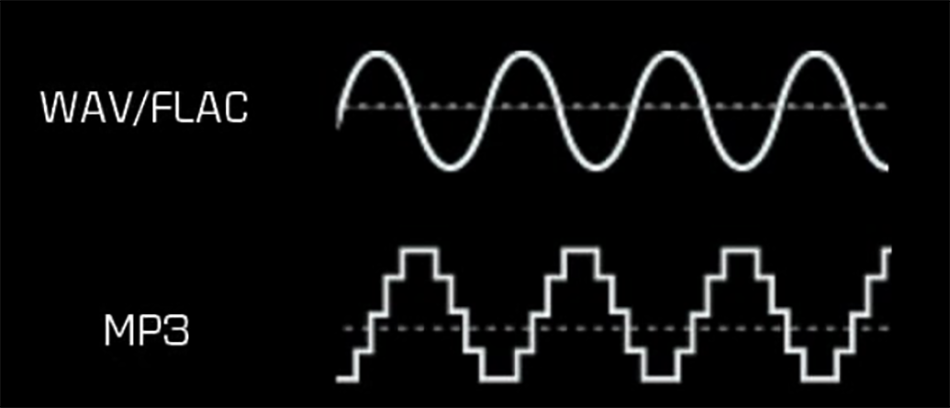
When we discuss MP3 audio, one of the most debated topics is the difference between lossy and lossless data representation. As someone who has spent years studying audio formats, I’ve encountered countless situations where understanding these differences made all the difference. Lossy compression is designed to reduce file size by removing data that is considered less perceptible to the human ear. On the other hand, lossless compression preserves every bit of audio information, even though the file sizes are larger.

Imagine a high-quality photograph being compressed for storage. If you save it as a smaller file, some details—like subtle textures—might get blurred or lost entirely. This is similar to lossy compression in MP3. Lossless compression is like folding a large map so you can carry it in your pocket and then unfolding it to reveal every detail when you need it. Both have unique applications, and choosing between them depends on your priorities, like audio quality or storage capacity.

What is lossy data representation?

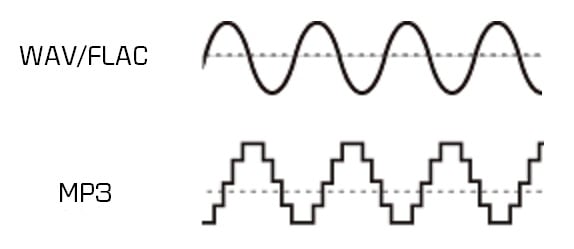
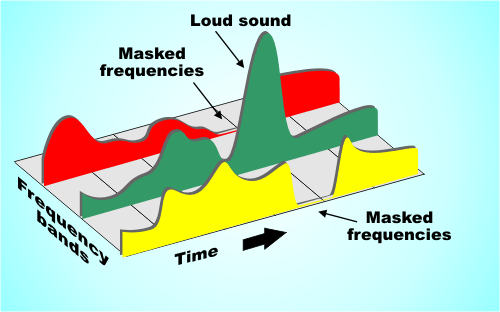
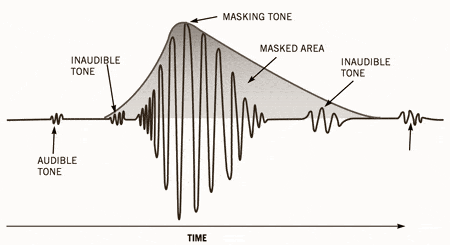
Lossy data representation is all about efficiency. It works by removing audio data that our ears might not notice is missing. The MP3 format uses psychoacoustic models to determine which sounds are less critical based on how we perceive audio. For example, if two sounds are playing at the same time and one is much louder, the quieter sound might be eliminated during lossy compression.

I’ve tested this extensively in my studio. A typical MP3 file compressed at 128 kbps sounds clear to many listeners, but if you pay close attention with high-end headphones, subtle details like background reverb or high-frequency harmonics might be missing. That’s because lossy compression prioritizes reducing file size over preserving every nuance of the original audio.

How does lossless data representation work?

Lossless compression, on the other hand, doesn’t remove any data. Instead, it uses algorithms to reduce file size without losing any information. Think of it like packing a suitcase more efficiently without leaving anything behind. Formats like FLAC or WAV are excellent examples of lossless audio compression.

In practice, I’ve noticed that lossless audio sounds identical to the original recording. If you’re working on music production or you’re an audiophile, lossless compression is essential because it ensures that no detail is compromised. However, this comes with a trade-off: lossless files are much larger, sometimes five to ten times the size of lossy MP3s.

When is lossy compression useful?

Lossy compression shines in situations where storage space or bandwidth is limited. Streaming platforms like Spotify and YouTube rely heavily on lossy formats to deliver music and video efficiently to millions of users. If you’re commuting and streaming over a mobile network, you might not notice the slight reduction in quality compared to a lossless file.

I’ve also seen its impact in file sharing. Back when we used CDs and flash drives to transfer files, lossy MP3s were a lifesaver. A single gigabyte of storage could hold hundreds of songs, making it convenient for music lovers.

  • Streaming platforms benefit from smaller file sizes.
  • Ideal for casual listening on standard devices.
  • Allows faster downloads and less buffering during playback.

Why is lossless compression preferred by professionals?

Lossless compression is often the gold standard for professionals in music and sound design. In my studio, I always work with lossless files during production. This ensures that the final product retains every detail when mastered. Imagine painting a masterpiece—if you start with a high-resolution canvas, every brushstroke stands out.

When archiving music or creating remixes, lossless files are invaluable because they preserve all the nuances of the original track. Even though these files require more storage, the quality is well worth the investment for critical applications.

  • Perfect for audio editing and production.
  • Essential for preserving original recordings.
  • Provides unmatched audio clarity and detail.

How does MP3 manage lossy compression so effectively?

MP3 stands out for its clever use of perceptual coding. It takes advantage of the way our brains process sound, removing data that we’re unlikely to notice. This includes masking, where a loud sound can make nearby quieter sounds inaudible. By focusing on what we can actually hear, MP3 files achieve impressive compression ratios.

I’ve tested MP3 encoding on various devices and noticed how it maintains quality despite reducing file size. For example, a three-minute song might shrink from 30 MB in WAV format to just 3 MB as an MP3 at 128 kbps. This balance between quality and size is why MP3 became the dominant audio format for decades.

What are the limitations of lossy MP3 files?

While MP3 files are convenient, they come with drawbacks. High levels of compression can introduce audible artifacts like ringing or a hollow sound. These issues become more noticeable on high-end audio systems or when editing the files further.

For instance, I’ve encountered situations where a client wanted to enhance the bass in an MP3 track. Because some low-frequency data had already been removed during compression, boosting the bass revealed unwanted distortions. This limitation makes lossy MP3s less suitable for professional applications.

Which is better for everyday use?

The choice between lossy and lossless depends on your needs. If you’re streaming music on a smartphone or sharing files quickly, lossy MP3s are the practical option. They sound great on most headphones and speakers, especially in everyday environments like a car or gym.

However, if you’re a music enthusiast with a high-quality audio setup, you’ll likely notice the difference in a lossless file. I always recommend lossless formats for anyone who values audio fidelity or plans to archive their music collection for future use.

Latest words on lossy vs lossless data representation in MP3

In the debate between lossy and lossless, there’s no one-size-fits-all answer. Each has its place depending on the context. As someone deeply immersed in audio production, I’ve seen firsthand how lossy MP3s revolutionized the way we consume music. But I also recognize the unmatched quality of lossless formats for critical applications.

If you’re serious about audio quality and want to optimize your files for both lossy and lossless use cases, tools like Mp4Gain can make the process seamless.

FAQs about Lossy vs Lossless Data Representation in MP3

What is lossy compression in MP3?

Lossy compression reduces file size by removing less noticeable audio data, using perceptual models to maintain acceptable quality.

How does lossless audio differ from lossy audio?

Lossless audio retains all original data for perfect fidelity, while lossy audio sacrifices some data for smaller file sizes.

Why is MP3 considered lossy?

MP3 uses lossy compression to reduce file size by removing inaudible or less noticeable parts of the audio.

Can you hear the difference between lossy and lossless files?

On high-end audio systems, the differences are noticeable, especially in the finer details and dynamic range of lossless files.

Are lossless files always better than lossy?

Lossless files offer better quality but require more storage. Lossy files are better for casual use due to their smaller size.

What is the main advantage of lossy compression?

The main advantage is significantly smaller file sizes, making it ideal for streaming and portable devices.

Do streaming platforms use lossy or lossless formats?

Most platforms use lossy formats to optimize streaming efficiency, but some offer lossless options for premium users.

Why do audiophiles prefer lossless formats?

Audiophiles prefer lossless formats for their superior sound quality and faithful reproduction of original recordings.

Is MP3 still relevant in 2025?

Yes, MP3 remains popular due to its compatibility and efficiency, despite newer formats offering better quality at smaller sizes.

What’s the best tool to convert files between lossy and lossless formats?

Mp4Gain is a great tool for optimizing and converting audio files while maintaining the best quality for any format.

Comments:

Finally, someone explained lossy and lossless in a way I can understand. Great article, very useful!

Wait, so if I rip my CDs to MP3, am I losing quality? I feel like I need a better explanation of what actually gets lost!

This was super helpful. I was confused about lossy vs lossless, especially for archiving my vinyl collection.

I think lossless is overkill for most people, but this article gave me a new appreciation for why it matters. Thanks!

Why don’t more streaming platforms offer lossless as a default? I’d love better sound quality without needing expensive gear.

Great write-up! One question though, how does lossy compression handle live recordings? Are they more affected?

Honestly, I didn’t think I’d notice the difference, but after trying lossless, it’s hard to go back. Thanks for explaining this so clearly!

Can you do a follow-up article on how to best optimize files for lossless storage? I’m trying to build a music archive!

I like how you used examples to explain complex stuff. Made it much easier to follow.

This is the most in-depth guide I’ve read. Still, I’d love more tips on managing file sizes without sacrificing too much quality.


Free Download Mp4Gain
picture


Mp4Gain Main Window
picture


Mp4Gain Features
picture


Free Download Mp4Gain
picture

Low-Pass Filtering in MP3 Compression

Low-Pass Filtering in MP3 Compression

Low-Pass Filtering in MP3 Compression

Let’s talk about low-pass filtering in MP3 compression

Low-pass filtering is an essential part of MP3 compression, letting us reduce file sizes without sacrificing too much sound quality. It works by cutting off high frequencies that aren’t as noticeable to our ears, which keeps the sound clearer while making the data much lighter. From my experience, low-pass filtering in MP3s is like removing extra details from a painting. If you look from far away, you wouldn’t notice the tiny strokes missing; instead, you still see the full picture. This article will explain how low-pass filtering works, why it’s so effective, and how it impacts what we hear.

Understanding Low-Pass Filtering

Low-pass filtering removes the high-frequency sounds that the human ear often can’t detect well, especially in a noisy environment or at lower volume. In MP3s, this helps cut down on file sizes since we’re only encoding the sound details that matter most. Imagine you’re listening to music in a crowded place – you’re likely focusing on the bass or vocals rather than tiny, high-pitched sounds in the background. MP3 compression replicates this effect, removing unimportant details so the file is efficient.

How Low-Pass Filtering Works in MP3 Compression

Low-pass filtering works by setting a specific cutoff frequency, often around 16 kHz or lower in MP3 compression, and removing sounds above it. These frequencies aren’t vital for a song’s core experience, so cutting them out helps compress the audio without major quality loss. Think of it like simplifying a picture by using fewer colors or shades; the main parts of the image are still clear, but with less detail. This process saves storage and allows faster streaming, which is especially handy on mobile devices.

The Role of Psychoacoustics in Low-Pass Filtering

Psychoacoustics is the science of how we perceive sound, and it’s central to MP3 compression. Certain sounds are masked by others, and higher frequencies can be covered by more dominant tones. By using psychoacoustic principles, MP3 compression focuses on frequencies that listeners pay the most attention to, allowing high-frequency sounds to be removed without a noticeable impact. This technique makes MP3s much more efficient because it only keeps the parts of sound that our brain cares about.

Benefits of Low-Pass Filtering in MP3 Compression

Low-pass filtering offers multiple benefits that help make MP3s one of the most popular audio formats. These advantages include smaller file sizes, faster downloads, and better streaming quality. For example:

  • Reduced File Size: By cutting high frequencies, MP3 files become smaller and easier to store.
  • Faster Streaming: Lower data requirements mean songs load and play quicker online.
  • Enhanced Compatibility: Smaller files are easier for various devices to play, making MP3s widely accessible.

Impact on Audio Quality

Some people might worry that low-pass filtering removes too much sound, but most listeners won’t notice the missing high frequencies. High-quality headphones or audio systems may reveal a difference, but for everyday use, the effect is minimal. In my experience, casual listeners rarely detect the filtering, especially if the bitrate is high. However, if you’re an audiophile or using high-end equipment, you may notice a slight reduction in brightness or clarity.

Low-Pass Filtering Frequency Choices

The cutoff frequency in MP3 compression is typically adjustable, letting engineers decide how much detail to keep. Lower bitrates often use lower cutoffs to save more space, while higher bitrates may retain frequencies up to 20 kHz. This flexibility is one reason why MP3s can range from decent to near-CD quality, depending on the chosen compression settings. Adjusting the cutoff can make a big difference – at a lower cutoff, you save more space, but at the expense of some audio clarity.

Differences Between Low-Pass Filtering and Other Filters

Unlike high-pass or band-pass filters, low-pass filters are specifically used to remove high frequencies. High-pass filters do the opposite, cutting off lower frequencies to focus on treble sounds. Band-pass filters allow a specific range of frequencies through while blocking everything outside it. Low-pass filtering is the best option for MP3 compression because high frequencies are less crucial for sound recognition and perception.

Challenges of Using Low-Pass Filtering in MP3s

While low-pass filtering is effective, it comes with its challenges. One downside is that high-end detail can be lost, especially at low bitrates. In my experience, some listeners may feel that certain musical instruments, like cymbals or flutes, lack their “crispness” after compression. Managing these trade-offs is essential in achieving a balance between file size and quality.

Why Low-Pass Filtering Works Well with MP3’s Lossy Compression

Low-pass filtering aligns well with MP3’s lossy compression because both approaches aim to reduce file size while preserving key audio details. Lossy compression works by discarding sounds our ears are unlikely to miss, so low-pass filtering is a natural match. It allows MP3s to achieve high levels of compression without making the audio sound hollow or incomplete.

Examples of Low-Pass Filtering in Everyday Life

Low-pass filtering isn’t just for MP3s; it’s used in various fields, from radio transmission to photography. For instance, walkie-talkies often use low-pass filtering to eliminate background noise, making conversations clearer. Similarly, some digital cameras use filters to remove excessive color details that could affect image quality. These examples show how filtering focuses on essential information, leaving out unnecessary noise or detail.

Optimizing Low-Pass Filtering for Different Bitrates

The efficiency of low-pass filtering depends on bitrate. Higher bitrates preserve more high frequencies, which can enhance sound quality, especially on detailed audio systems. Lower bitrates prioritize data savings, which may result in a lower cutoff frequency. When I’m optimizing for quality, I often choose a higher bitrate to preserve more detail, but for mobile or streaming, a lower bitrate works fine.

Comparing Low-Pass Filtering in MP3 and Other Audio Formats

Different audio formats handle frequencies in various ways. For example, AAC and OGG Vorbis use advanced psychoacoustic models, which sometimes retain higher frequencies better than MP3s. However, MP3 remains the most universal format due to its balance of compatibility, size, and acceptable quality. Comparing MP3 to lossless formats like FLAC shows the limits of lossy compression, but for casual listening, MP3 with low-pass filtering is usually enough.

Latest words on low-pass filtering in MP3 compression

Low-pass filtering is a powerful tool in MP3 compression, keeping files light without cutting down on the most important sounds. It effectively reduces unnecessary data, making MP3s smaller and more accessible while keeping music enjoyable. From my perspective, low-pass filtering is the reason why MP3s continue to be relevant today. While other formats offer higher quality, the balance of size, compatibility, and efficiency keeps MP3 in the mainstream. For anyone looking to make their music files more manageable, tools like Mp4Gain can provide a simple solution to adjust quality and compression settings, ensuring the best listening experience.

Comments:

Awesome article! I never understood how MP3 compression worked until now. The whole concept of low-pass filtering is so cool. Thanks for breaking it down!

Wait, so does this mean high frequencies are basically “cut out” to save space? That’s insane. I always wondered why some MP3s sounded flat compared to CDs. Great explanation!

Nice read! I’m not super tech-savvy, but this helped me understand why MP3s are so popular despite the newer formats. It’s like a tiny miracle how they can compress so much.

Interesting stuff! But does this mean that higher bitrates don’t need low-pass filtering? Would love to read more about that!

This is super helpful! I’ve been compressing my audio files, but didn’t realize how important low-pass filtering is for file size. Thanks!

I love music production and this made so much sense! Low-pass filtering for compression is like mixing where you cut out unneeded frequencies. Really good stuff here.

Good explanation, but I’d like a bit more info on how low-pass compares in different audio formats. Maybe a follow-up?

I get it now! It’s like simplifying an image by removing colors you wouldn’t even see from far away. Such a helpful analogy!

Didn’t know that MP3 files cut out high frequencies! This might explain why some of my music doesn’t sound as “bright” as CDs. Great article!

I think I finally understand the tech behind MP3s. It’s really amazing what can be done to reduce file size without losing too much quality

. Very clear explanation.

Thanks for the breakdown! It’s amazing how far compression has come. I’m always looking for ways to make my files smaller, and this definitely helps.

This is gold! I’m studying audio engineering and low-pass filtering was a bit of a mystery. Thanks for making it easy to understand.

Interesting article. I wonder how this affects streaming quality. Might have to do more reading about it. Thanks for the intro!

MP3 vs Lossless

MP3 vs Lossless

MP3 vs Lossless
MP3 vs Lossless
MP3 vs Lossless
MP3 vs Lossless

Meta Description: Discover the difference between MP3 and lossless audio formats and understand which one suits your listening preferences.

Introduction

Music is an essential part of our lives. It can evoke emotions, motivate us, and even help us relax. The format we listen to music in can have a significant impact on our listening experience. Two of the most popular audio formats are MP3 and lossless. While MP3 is widely used, lossless audio formats are gaining popularity. This article will explore the differences between MP3 and lossless audio formats and help you understand which one is best for your listening preferences.

MP3 vs Lossless: What’s the Difference?

MP3 is a compressed audio format that reduces the file size of audio recordings while maintaining reasonable sound quality. Lossless audio formats, on the other hand, preserve the audio quality of the original recording. Let’s delve deeper into the differences between MP3 and lossless audio formats.

Compression

MP3 audio files are compressed to reduce the file size. This compression results in some data loss, which affects the audio quality. Lossless audio formats, such as FLAC or ALAC, compress audio files without losing any data. This compression is possible due to the fact that these audio formats eliminate redundancy in audio data.

Audio Quality

MP3 audio files have a lower audio quality than lossless audio formats. The audio quality is reduced due to data compression. Lossless audio formats maintain the audio quality of the original recording, making them a better choice for audiophiles and music enthusiasts who want the best possible sound quality.

File Size

MP3 files are significantly smaller in size than lossless audio formats. This small size makes MP3 files easy to share and store, making them a popular choice for digital music distribution. Lossless audio formats, on the other hand, are larger in size, which makes them more challenging to share and store.

Compatibility

MP3 audio files are compatible with a wide range of devices and media players, making them an accessible audio format. Lossless audio formats, on the other hand, have limited compatibility and require specialized software or hardware to play them.

Head-to-Head Comparison: MP3 vs Lossless

Let’s compare MP3 and lossless audio formats head-to-head based on the following factors:

Audio Quality: MP3 compresses audio data, which results in reduced audio quality. Lossless audio formats preserve the audio quality of the original recording.

File Size: MP3 files are significantly smaller in size than lossless audio formats.

Compatibility: MP3 files are compatible with a wide range of devices and media players. Lossless audio formats have limited compatibility and require specialized software or hardware to play them.

Portability: MP3 files are easy to share and store due to their small size. Lossless audio formats are larger in size, making them more challenging to share and store.

Ease of Use: MP3 files are easy to use and require no specialized software or hardware. Lossless audio formats require specialized software or hardware to play them.

Based on the above comparison, MP3 audio files are an excellent choice for those who value portability and ease of use, while lossless audio formats are a better choice for audiophiles who value audio quality over file size.

FAQs

Q: Is MP3 audio quality good enough? A: MP3 audio quality is good enough for most casual listeners. However, audiophiles and music enthusiasts may prefer lossless audio formats for their superior audio quality.

Q: Are lossless audio formats worth the larger file size? A: Lossless audio formats are worth the larger file size for audiophiles and music enthusiasts who value audio quality over file size.

Q: Converting MP3 to Lossless Audio Formats

It is possible to convert MP3 files to lossless audio formats like FLAC or ALAC. However, this conversion does not improve the audio quality of the original MP3 file. The converted file will have the same audio quality as the original MP3 file. Converting an MP3 file to a lossless format only increases the file size and does not improve the audio quality.

Choosing the Right Audio Format for You

When choosing between MP3 and lossless audio formats, it is essential to consider your listening preferences. If you value portability and ease of use, MP3 is the way to go. MP3 files are compatible with a wide range of devices and media players and have a small file size, making them easy to share and store. However, if you are an audiophile or music enthusiast who values audio quality over file size, lossless audio formats like FLAC or ALAC are the way to go. These formats preserve the audio quality of the original recording and provide a superior listening experience.

Conclusion

In conclusion, the choice between MP3 and lossless audio formats ultimately depends on your listening preferences. MP3 files are excellent for those who value portability and ease of use, while lossless audio formats are the better choice for those who prioritize audio quality over file size. Regardless of which format you choose, music is a universal language that brings people together and enhances our lives in countless ways.

What is the difference between MP3 and lossless sound quality?

What is the difference between MP3 and lossless sound quality?

MP3 LOSSLESS
MP3 LOSSLESS


Is it possible to distinguish Mp3 quality from CD Quality?


mp3 lossless
mp3 lossless


Although the sound quality of a CD does not reach the true hearing limit of the human ear, it is impossible for most people to tell the difference between a CD and a higher sampling rate, so everyone assumes that the CD sound quality is 44.1 kHz can be converted to lossless sound quality.

In the past, the capacity of storage media was not large. To store more music and make it easier to stream, we used to compress large CD audio files. High frequency and low volume sounds are removed to achieve the purpose of reducing file size. Similar formats include 3GP, M4A, AA3, WMA, etc.

With the development of the Internet and storage media, the size of audio files is no longer important, so lossless compression has gradually become popular. Common formats are APE, FLAC, etc., which are similar to the beginning of ZIP compressed files, compress audio files AND packed, the final file size is basically only half of the original CD file. Here it is emphasized that the WAV format we often say is a waveform record file, which uses uncompressed PCM encoding, which is also a relatively large WAV file. 44.1 kHz 16-bit WAV audio can also be considered uncompressed. Lossless sound quality.

Since different devices support different audio compression formats, we often need to transcode, and each transcode will cause some loss in audio. For example: If you convert MP3 to lossless format, you can only achieve the sound quality of the original MP3 file. This lossless can also be called false lossless. This is the case for most lossless music provided by music portals.

I have been recording for many years and have used speakers ranging from tens of thousands to millions of dollars. Why do I rarely use speakers under 10,000 yuan? Because speakers under 10,000 yuan cannot be used as monitors. I advise everyone not to charge money for listening to music on music portals for lossless sound quality. Untrained ears will not be able to hear the difference between true and false without loss. For normal ears, MP3 with a bit rate of 320 kbps is already the best.

What is the difference between MP3 and lossless sound quality?

What is the difference between MP3 and lossless sound quality?

Mp3 Lossless
Mp3 Lossless

Now, many people think that it is impossible to listen to MP3, so they search for lossless music everywhere on the Internet.

Mp3 Lossless
Mp3 Lossless

So what is the difference between lossless music and MP3? What about the various lossless music formats?

A few days ago, a friend of mine bought a Porsche sports car and then came to ask me for lossless sound quality music. I told him there was no need to play MP3s, but people weren’t happy. The sound in the car was fine. Playing MP3 is a loss of audio.

Now there are many music websites that give lossless to the myth, but do you know what lossless is? What is the difference between lossless music and ordinary MP3? Today I come to talk to you about those things that have no losses.

I remember when Apple held the Iphone4 conference, it came up with a definition: retina display. In short, it has been replaced by a high resolution screen with pixels that exceed the recognition limit of the human eye since the Iphone4. I must say that Mr. Qiao’s trick is very good, he defines a word that everyone can accept and makes Apple mobile phones sell all over the world.

However, the same concept is much older in the world of acoustics. Sound is a type of energy wave. After the experimental research of countless generations of ancestors, it is believed that 40 kHz is a value that can well restore the sound heard by the human ear. Later, for various commercial reasons, some record companies defined the sample rate of CDs at 44.1 kHz, which they considered to be the “retina display” that the ears could hear. Later, 44.1 kHz brought innumerable problems to subsequent generations, because it is not an integer and cannot be divided and multiplied simply by performing SRC sampling, so early Inter defined the output sample rate of the sound card as 48 kHz to save problem. , which creates a sample rate conversion problem that all sound engineers hate

Mp3 (an audio encoding method) Part 3

Mp3 (an audio encoding method) Part 3

MP3 ENCODING

To generate bit-compliant (Layer 1.Layer 2.Layer 3) MPEGAudio files, ISO MPEG Audio committee members developed reference simulation software in C called ISO 11172-5.

MP3 ENCODING

It can demonstrate the first real-time DSP-based hardware decoding of compressed audio on some non-real-time operating systems. Various other MPEG audio was developed in real time for digital broadcasting (DAB radio and DVB TV) for consumer receivers and set-top boxes.
Later on July 7, 1994, Fraunhofer-Gesellschaft released the first MP3 encoder called l3enc.
The Fraunhofer development team selected the .mp3 extension on July 14, 1995 (previously the extension was .bit). Using Winplay3 (released September 9, 1995), the first real-time software MP3 player, many people were able to encode and play MP3 files on their own personal computers. Since hard drives at the time were relatively small (such as 500MB), this technology was essential for storing entertainment music on computers.
MP2, MP3 and Internet
In October 1993, MP2 (MPEG-1 Audio Layer 2) files appeared on the Internet and were often played by Xing MPEG Audio Player and later MAPlay developed by Tobias Bading for Unix. MAPplay was first released on February 22, 1994 and ported to the Microsoft Windows platform.
The only MP2 encoder products at first were Xing Encoder and CDDA2WAV, a CD ripper that converts audio tracks from CDs to WAV format.
Often considered the father of the online music revolution, the Internet Underground Music Archive (IUMA) was the first hi-fi music site on the Internet, with thousands of licensed MP2 recordings before MP3 and the web became popular. .
From the first half of 1995 to the end of the 1990s, MP3 began to flourish on the Internet. MP3’s popularity is largely due to the success of companies and software packages such as Winamp released by Nullsoft in 1997 and Napster released by Napster in 1999, and they are mutually reinforcing. These programs make it easy for normal users to play, create, share and collect MP3 files.
The debate about sharing MP3 files between peers has spread rapidly in recent years, mainly because compression makes file sharing possible, uncompressed files are too large to share. Since MP3 files are widely spread over the Internet, Napster has been sued by some of the major record labels to protect their copyright (see Copyright).
Commercial online music distribution services, such as the iTunes Music Store, often choose other proprietary or DRM-enabled music file formats to control and limit the use of digital music. Formats that support DRM are used to protect copyrighted material from copyright infringement, but most protection mechanisms can be broken in some way. Computer experts can use these methods to generate unlocked files that can be freely copied. One notable exception is Microsoft’s Windows Media Audio 10 format, which has yet to be cracked. If a compressed audio file is desired, the recorded audio stream must be compressed and the sound quality will be degraded.
streaming audio quality
Because MP3 is a lossy compression format, it offers a variety of options for different “bit rates,” that is, the number of encoded data bits needed to represent the audio per second. Typical speeds are between 128 kbps and 320 kbps (kbit/s). In contrast, the uncompressed audio bitrate on a CD is 1411.2 kbps (16 bits/sample × 44100 samples/sec × 2 channels).
MP3 files encoded with lower bit rates generally play at a lower quality. If you use too low a bitrate, “compression artifact” (sounds not present in the original recording) will appear during playback. A good example of compression noise is the sound of compressed cheering; due to its randomness and sharp changes, encoder errors are more pronounced and sound like echoes.

Mp3 (an audio encoding method) Part 2

Mp3 (an audio encoding method) Part 2

mp3 3ncoding

MPEG-1 Audio Layer 2 encoding began as a digital audio broadcast (DAB) managed by Egon Meier-Engelen at the German Deutsche Forschungs- und Versuchsanstalt für Luft- und Raumfahrt (later known as Deutsches Zentrum für Luft- und Raumfahrt, German Space Center). )draft.

mp3 encoding

This project is funded by the European Union as a EUREKA research project, and its name is commonly known as EU-147. The study period for EU-147 was from 1987 to 1994.
2. By 1991, two proposals had emerged: Musicam (called Layer 2) and ASPEC (Adaptive Spectrum Sensing Entropy Coding). The Musicam method proposed by Philips of the Netherlands, CCETT of France, and the Institut für Rundfunktechnik of Germany was chosen due to its simplicity, error robustness, and lower computational effort in high-quality compression. The Musicam format based on subband coding is a key factor in determining the MPEG audio compression format (sample rate, frame structure, header, sample points per frame). This technology and its design philosophy are fully integrated into the definition of ISO MPEG Audio Layer I, II and later Layer III (MP3) formats. The standard was developed by Leon van de Kerkhof (Layer I) and Gerhard Stoll (Layer II) under the auspices of Prof. Mussmann (University of Hannover).
3. A working group consisting of Leon Van de Kerkhof from the Netherlands, Gerhard Stoll from Germany, Yves-François Dehery from France and Karlheinz Brandenburg from Germany absorbed design ideas from Musicam and ASPEC and added their own design ideas to develop an MP3. MP3 can achieve MP2 sound quality from 192 kbit/s to 128 kbit/s.
4. All of these algorithms eventually became part of the first group of MPEG standards, MPEG-1, in 1992, resulting in the international standard ISO/IEC 11172-3 published in 1993. Further work on MPEG audio was eventually became part of the MPEG-2 standard, a second group of MPEG standards developed in 1994, officially known as ISO/IEC 13818-3, first published in 1995.
5. The compression efficiency of the encoder is generally defined by the bit rate, because the compression rate depends on the number of bits (: in: bit depth) and the sampling rate of the input signal. However, there are often products that use CD parameters (44.1 kHz, two channels, 16 bits per channel, or 2×16 bits) as the compression ratio reference, and the compression ratio using this reference is usually higher, which which also shows that the compression ratio is very important for lossy compression problems.
6. Karlheinz Brandenburg used Suzanne Vega’s song Tom’s Diner on CD to test MP3 compression algorithms. This song is used because the song’s smooth and simple melody makes it easier to hear glitches in the compressed format during playback. Some jokingly refer to Suzanne Vega as “the mother of MP3”. Some more serious and critical audio extracts (glockenspiel, triangle, accordion…) from the EBU V3/SQAM reference CD are used by professional audio engineers to assess the subjective perceived quality of the MPEG audio format.

Mp3 (an audio encoding method)

Mp3 (an audio encoding method)

Mp3 encxoding

MP3 is an audio compression technology, its full name is Moving Picture Experts Group Audio Layer III, called MP3.

mp3 encoding

It is designed to drastically reduce the amount of audio data. Using MPEG Audio Layer 3 technology, music is compressed into a smaller capacity file with a compression ratio of 1:10 or even 1:12, and for most users, playback quality is not as good as the original uncompressed. audio Significant decrease. It was invented and standardized in 1991 by a group of engineers at the Fraunhofer-Gesellschaft research organization in Erlangen, Germany. Music stored in the form of MP3 is called MP3 music, and a machine that can play MP3 music is called an MP3 player.

Motion Picture Expert Compression Standard Audio Layer 3 foreign name Moving Picture Expert Group Audio Layer III research organization Fraunhofer-Gesellschaft type audio coding advantage Drastically reduce the amount of audio data defect sound quality loss
content
1 Features
2 story
▪ origin
▪ go to the masses
3 audio quality
4 patent issues
transmission characteristics
MP3 converts the time-domain waveform signal to a frequency-domain signal by taking advantage of the human ear’s insensitivity to high-frequency sound signals and splits it into multiple frequency bands, using different compression rates. for different frequency bands and increasing the compression ratio for high frequencies (even ignoring the signal) Use a small compression ratio for low frequency signals to ensure that the signal is not distorted. In this way, it is equivalent to discarding the high-frequency sound that is basically inaudible to the human ear [1], keeping only the audible low-frequency part, thus compressing the sound with a compression ratio of 1:10 or even 1: 12. Because the full name of this compression method is called MPEG Audio Player3, people call it MP3 for short.
According to the MPEG specification, AAC (Advanced Audio Coding) in MPEG-4 will be the next generation of the MP3 format.
Compared to CD, FLAC and APE lossless compression formats, the sound quality of the highest parameter MP3 (320 Kbps) is not much different.
MP3 players are dying
When they first came out, MP3 players were at the forefront of the digital revolution. However, sales of iPods and other MP3 players in the UK fell sharply in 2012 as consumers turned to other digital products such as smartphones.
In 2012, sales of MP3 players in the UK market were £110m ($178m), just 29% of the £381m in 2011, according to market research firm Mintel. Mintel expects total MP3 player sales in the UK market to halve by 2017. In the worst case scenario, total MP3 player sales in the UK market will be just 25 million dollars five years later. [23]
1. MP3 is a data compression format;
2. Discards pulse code modulation (PCM) audio data that is not important to the human ear (similar to JPEG is a lossy image compression), resulting in a much smaller file size;
3. MP3 audio can be compressed according to different bit rates, providing a variety of trade-offs between data size and sound quality. The MP3 format uses a mixed conversion mechanism to convert audio domain signals. time in frequency domain signals;
4. 32 band polyphase integral filter (PQF);
Modified discrete cosine filter (MDCT) of 5, 36 or 12 taps; each subband size can be independently selected between 0…1 and 2…31;
6. MP3 not only has extensive client software support, but also has a lot of hardware support, such as portable media players (referring to MP3 players), DVD and CD players, outgoing calls