Mp3 (an audio encoding method) Part 3


Free Download Mp4Gain
picture

Mp3 (an audio encoding method) Part 3
MP3 ENCODING

To generate bit-compliant (Layer 1.Layer 2.Layer 3) MPEGAudio files, ISO MPEG Audio committee members developed reference simulation software in C called ISO 11172-5.

MP3 ENCODING

It can demonstrate the first real-time DSP-based hardware decoding of compressed audio on some non-real-time operating systems. Various other MPEG audio was developed in real time for digital broadcasting (DAB radio and DVB TV) for consumer receivers and set-top boxes.
Later on July 7, 1994, Fraunhofer-Gesellschaft released the first MP3 encoder called l3enc.
The Fraunhofer development team selected the .mp3 extension on July 14, 1995 (previously the extension was .bit). Using Winplay3 (released September 9, 1995), the first real-time software MP3 player, many people were able to encode and play MP3 files on their own personal computers. Since hard drives at the time were relatively small (such as 500MB), this technology was essential for storing entertainment music on computers.
MP2, MP3 and Internet
In October 1993, MP2 (MPEG-1 Audio Layer 2) files appeared on the Internet and were often played by Xing MPEG Audio Player and later MAPlay developed by Tobias Bading for Unix. MAPplay was first released on February 22, 1994 and ported to the Microsoft Windows platform.
The only MP2 encoder products at first were Xing Encoder and CDDA2WAV, a CD ripper that converts audio tracks from CDs to WAV format.
Often considered the father of the online music revolution, the Internet Underground Music Archive (IUMA) was the first hi-fi music site on the Internet, with thousands of licensed MP2 recordings before MP3 and the web became popular. .
From the first half of 1995 to the end of the 1990s, MP3 began to flourish on the Internet. MP3’s popularity is largely due to the success of companies and software packages such as Winamp released by Nullsoft in 1997 and Napster released by Napster in 1999, and they are mutually reinforcing. These programs make it easy for normal users to play, create, share and collect MP3 files.
The debate about sharing MP3 files between peers has spread rapidly in recent years, mainly because compression makes file sharing possible, uncompressed files are too large to share. Since MP3 files are widely spread over the Internet, Napster has been sued by some of the major record labels to protect their copyright (see Copyright).
Commercial online music distribution services, such as the iTunes Music Store, often choose other proprietary or DRM-enabled music file formats to control and limit the use of digital music. Formats that support DRM are used to protect copyrighted material from copyright infringement, but most protection mechanisms can be broken in some way. Computer experts can use these methods to generate unlocked files that can be freely copied. One notable exception is Microsoft’s Windows Media Audio 10 format, which has yet to be cracked. If a compressed audio file is desired, the recorded audio stream must be compressed and the sound quality will be degraded.
streaming audio quality
Because MP3 is a lossy compression format, it offers a variety of options for different “bit rates,” that is, the number of encoded data bits needed to represent the audio per second. Typical speeds are between 128 kbps and 320 kbps (kbit/s). In contrast, the uncompressed audio bitrate on a CD is 1411.2 kbps (16 bits/sample × 44100 samples/sec × 2 channels).
MP3 files encoded with lower bit rates generally play at a lower quality. If you use too low a bitrate, “compression artifact” (sounds not present in the original recording) will appear during playback. A good example of compression noise is the sound of compressed cheering; due to its randomness and sharp changes, encoder errors are more pronounced and sound like echoes.


Free Download Mp4Gain
picture


Mp4Gain Main Window
picture


Mp4Gain Features
picture


Free Download Mp4Gain
picture

Mp3 (an audio encoding method) Part 2

Mp3 (an audio encoding method) Part 2

mp3 3ncoding

MPEG-1 Audio Layer 2 encoding began as a digital audio broadcast (DAB) managed by Egon Meier-Engelen at the German Deutsche Forschungs- und Versuchsanstalt für Luft- und Raumfahrt (later known as Deutsches Zentrum für Luft- und Raumfahrt, German Space Center). )draft.

mp3 encoding

This project is funded by the European Union as a EUREKA research project, and its name is commonly known as EU-147. The study period for EU-147 was from 1987 to 1994.
2. By 1991, two proposals had emerged: Musicam (called Layer 2) and ASPEC (Adaptive Spectrum Sensing Entropy Coding). The Musicam method proposed by Philips of the Netherlands, CCETT of France, and the Institut für Rundfunktechnik of Germany was chosen due to its simplicity, error robustness, and lower computational effort in high-quality compression. The Musicam format based on subband coding is a key factor in determining the MPEG audio compression format (sample rate, frame structure, header, sample points per frame). This technology and its design philosophy are fully integrated into the definition of ISO MPEG Audio Layer I, II and later Layer III (MP3) formats. The standard was developed by Leon van de Kerkhof (Layer I) and Gerhard Stoll (Layer II) under the auspices of Prof. Mussmann (University of Hannover).
3. A working group consisting of Leon Van de Kerkhof from the Netherlands, Gerhard Stoll from Germany, Yves-François Dehery from France and Karlheinz Brandenburg from Germany absorbed design ideas from Musicam and ASPEC and added their own design ideas to develop an MP3. MP3 can achieve MP2 sound quality from 192 kbit/s to 128 kbit/s.
4. All of these algorithms eventually became part of the first group of MPEG standards, MPEG-1, in 1992, resulting in the international standard ISO/IEC 11172-3 published in 1993. Further work on MPEG audio was eventually became part of the MPEG-2 standard, a second group of MPEG standards developed in 1994, officially known as ISO/IEC 13818-3, first published in 1995.
5. The compression efficiency of the encoder is generally defined by the bit rate, because the compression rate depends on the number of bits (: in: bit depth) and the sampling rate of the input signal. However, there are often products that use CD parameters (44.1 kHz, two channels, 16 bits per channel, or 2×16 bits) as the compression ratio reference, and the compression ratio using this reference is usually higher, which which also shows that the compression ratio is very important for lossy compression problems.
6. Karlheinz Brandenburg used Suzanne Vega’s song Tom’s Diner on CD to test MP3 compression algorithms. This song is used because the song’s smooth and simple melody makes it easier to hear glitches in the compressed format during playback. Some jokingly refer to Suzanne Vega as “the mother of MP3”. Some more serious and critical audio extracts (glockenspiel, triangle, accordion…) from the EBU V3/SQAM reference CD are used by professional audio engineers to assess the subjective perceived quality of the MPEG audio format.

Mp3 (an audio encoding method)

Mp3 (an audio encoding method)

Mp3 encxoding

MP3 is an audio compression technology, its full name is Moving Picture Experts Group Audio Layer III, called MP3.

mp3 encoding

It is designed to drastically reduce the amount of audio data. Using MPEG Audio Layer 3 technology, music is compressed into a smaller capacity file with a compression ratio of 1:10 or even 1:12, and for most users, playback quality is not as good as the original uncompressed. audio Significant decrease. It was invented and standardized in 1991 by a group of engineers at the Fraunhofer-Gesellschaft research organization in Erlangen, Germany. Music stored in the form of MP3 is called MP3 music, and a machine that can play MP3 music is called an MP3 player.

Motion Picture Expert Compression Standard Audio Layer 3 foreign name Moving Picture Expert Group Audio Layer III research organization Fraunhofer-Gesellschaft type audio coding advantage Drastically reduce the amount of audio data defect sound quality loss
content
1 Features
2 story
▪ origin
▪ go to the masses
3 audio quality
4 patent issues
transmission characteristics
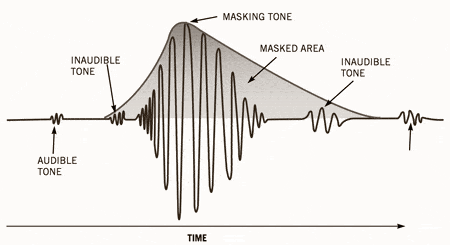
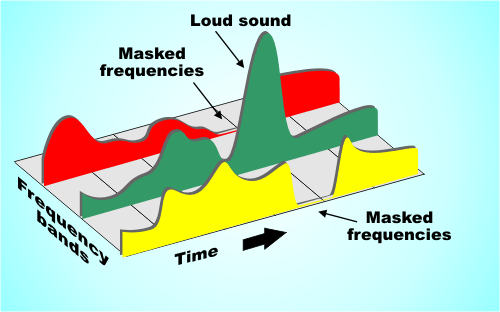
MP3 converts the time-domain waveform signal to a frequency-domain signal by taking advantage of the human ear’s insensitivity to high-frequency sound signals and splits it into multiple frequency bands, using different compression rates. for different frequency bands and increasing the compression ratio for high frequencies (even ignoring the signal) Use a small compression ratio for low frequency signals to ensure that the signal is not distorted. In this way, it is equivalent to discarding the high-frequency sound that is basically inaudible to the human ear [1], keeping only the audible low-frequency part, thus compressing the sound with a compression ratio of 1:10 or even 1: 12. Because the full name of this compression method is called MPEG Audio Player3, people call it MP3 for short.
According to the MPEG specification, AAC (Advanced Audio Coding) in MPEG-4 will be the next generation of the MP3 format.
Compared to CD, FLAC and APE lossless compression formats, the sound quality of the highest parameter MP3 (320 Kbps) is not much different.
MP3 players are dying
When they first came out, MP3 players were at the forefront of the digital revolution. However, sales of iPods and other MP3 players in the UK fell sharply in 2012 as consumers turned to other digital products such as smartphones.
In 2012, sales of MP3 players in the UK market were £110m ($178m), just 29% of the £381m in 2011, according to market research firm Mintel. Mintel expects total MP3 player sales in the UK market to halve by 2017. In the worst case scenario, total MP3 player sales in the UK market will be just 25 million dollars five years later. [23]
1. MP3 is a data compression format;
2. Discards pulse code modulation (PCM) audio data that is not important to the human ear (similar to JPEG is a lossy image compression), resulting in a much smaller file size;
3. MP3 audio can be compressed according to different bit rates, providing a variety of trade-offs between data size and sound quality. The MP3 format uses a mixed conversion mechanism to convert audio domain signals. time in frequency domain signals;
4. 32 band polyphase integral filter (PQF);
Modified discrete cosine filter (MDCT) of 5, 36 or 12 taps; each subband size can be independently selected between 0…1 and 2…31;
6. MP3 not only has extensive client software support, but also has a lot of hardware support, such as portable media players (referring to MP3 players), DVD and CD players, outgoing calls

What differentiates MP3 from AAC? Part 3

What differentiates MP3 from AAC? Part 3

AAC or MP3

WAV audio file

M4A vs MP3

WAV is a waveform audio format. This is a high-quality audio file that is often used like a CD. WAV files are not compressed and therefore take up more disk space than MP3 or AAC.

Because WAV files are not compressed (called a “lossless” format), they contain more data, resulting in a better, more subtle, and more detailed sound. A WAV file typically requires 10MB of audio per minute. By comparison, MP3 takes up about 1 MB per minute.

WAV files are supported by Apple devices, but are not commonly used except by audiophiles.

WMA audio file
WMA stands for Windows Media Audio. This is a file type popularized by Microsoft Corporation who invented it. It is the default format used by Windows Media Player on Mac and PC. It competes with MP3 and AAC formats and offers compression and file sizes similar to those formats. Not compatible with iPhone and iPad.

AIFF audio file
AIFF stands for Audio Interchange File Format. Another uncompressed audio format, AIFF, was invented by Apple in the late 1980s. Like WAV, it takes up about 10MB of storage space per minute of music. Because it does not compress audio, AIFF is a higher quality format preferred by audiophiles and musicians. Because it was invented by Apple, it is compatible with Apple devices.

Apple Lossless Audio File
Another Apple invention, the Apple Lossless Audio Codec (ALAC), is the successor to AIFF. Released in 2004, it was originally a proprietary format. Apple made it open source in 2011. Apple Lossless balances smaller file sizes with better sound quality. Its files are typically about 50% smaller than uncompressed files, but with less sound quality loss than MP3 or AAC.

FLAC audio file
Free Lossless Audio Codec) is an open source audio format popular with audiophiles. You can reduce the file size by 50-60% without degrading the audio quality too much. FLAC is not supported on iTunes or iOS devices, but will work with other software installed on your device.

What differentiates MP3 from AAC? Part 2

What differentiates MP3 from AAC? Part 2

AAC vs MP3

How MP3 works with Apple Music and iTunes

AAC Vs. MP3

MP3 is probably the most popular digital audio format on the web, but it’s not available on Apple Music’s iTunes store or in this format (more on that in the next section). Still, mp3 is compatible with Apple Music, iTunes, and all iOS devices like iPhone and iPad. You can get MP3 files from:

Digital download store.
Rip songs from CDs, depending on the music conversion settings.
Many music file sharing services.​
All about AAC audio files
AAC stands for Advanced Audio Coding. It is a type of digital audio file that has been promoted as the successor to MP3. AAC generally provides higher quality sound than MP3 while using the same amount of disk space (or less).

Many people think that AAC is Apple’s proprietary format, but this is incorrect. AAC was developed by a group of companies that includes AT&T Bell Labs, Dolby, Nokia, and Sony. While Apple has embraced AAC music, AAC files can actually be played on many non-Apple devices, including phones running Google’s Android operating system, game consoles, and more.

How does the CAA work?
AAC is a lossy file format, just like MP3. To compress CD-quality audio into a file that takes up less storage space, data that will no longer affect the listening experience is typically removed at the high and low end. So AAC files don’t sound exactly the same as CD-quality files, but they generally sound good enough that most people won’t know the difference.

Like MP3, the quality of AAC files is measured by their bit rate. Common AAC bit rates include 128 kbps, 192 kbps, and 256 kbps.

How AAC works with Apple Music and iTunes
Apple has adopted AAC as its preferred audio file format. All songs streamed or downloaded from Apple Music, or sold on the iTunes store, are in AAC format. All AAC files provided by Apple are encoded at 256 kbps.

Other types of audio files supported by iPhone, iPad and Mac
While MP3 and AAC are the most popular audio files on iPhone, iPad, Mac, and other Apple products, they’re not the only ones that work. Let’s take a look at other widely used Apple supported audio formats.

What differentiates MP3 from AAC?

What differentiates MP3 from AAC?

AAC Vs. MP3

People often call any music file “MP3”, but that’s not accurate.

AAC vs MP3 320

MP3 is a specific type of audio file and not all digital audio files are MP3s. If you use an iPhone or other Apple device, chances are most of your music isn’t MP3.

So what kind of files are your digital songs? This article details the MP3 file type, the more advanced AAC format used by Apple, and some other common audio file types that can be used with or without iPhone and iPod.

What is mp3 and how does mp3 work?
MP3 is an acronym for MPEG-2 Audio Layer 3. It is a digital media standard devised by the Moving Picture Experts Group (MPEG), an industry group that creates technical standards.

Songs saved in MP3 format take up less space than songs saved in CD-quality audio formats like WAV (more on that later). They do this by compressing the data in the song. Compressing a song to MP3 requires removing parts of the file that don’t affect the listening experience, usually the loudest and quietest end of the audio. Because some data has been removed, and because the sound of MP3 is not the same as the CD-quality version, MP3 is called a “lossy” compression format. has led some audiophiles to criticize mp3 for impairing the listening experience, even though many can’t tell the difference.

Because mp3s are compressed, more mp3 files can be stored in the same amount of space than files using a lossless compression format. In general, MP3s take up 10% of the space of a CD-quality audio file. So if the CD quality version of a song is 10MB, the MP3 version is about 1MB (this can vary depending on your taste) Audio Encoding Settings

).​
Understanding bitrate and MP3
The audio quality of MP3s (and all digital music files) is measured by their bitrate. A higher bitrate means the file has more data and MP3s sound better. The most common bit rates are 128 kps, 192 kbps, and 256 kbps.

MP3 comes in two bit rates: constant bit rate (CBR) and variable bit rate (VBR). Many modern mp3s use VBR, which works by encoding parts of the song at a lower bit rate and at a higher bit rate. . smaller file. For example, a song with only one instrument is simpler and can be encoded at a lower bit rate. Parts of a song with more complex instruments require less compression to capture the full range. By changing the bitrate, the overall sound quality of the MP3 can be kept at a high level, while the file size can be further reduced.

Mp3: Audio Bitrate Calculator

Mp3: Audio Bitrate Calculator

bit rate mp3

Audio File Size Calculator Streaming Bitrate Calculator.

mp3 bit rate

Get the recommended high and low bitrate settings related to your network setup Audio Bitrate and File Size Calculator If the size of that audio file seems like a mystery, this is the tool you need to calculate the audio file size. The first part of the calculator calculates the bitrate of the uncompressed audio (for example, the size of the WAVE or BWF file). The second part calculates the file size for a given bit rate.
Audio Bitrate and File Size Calculator The Bitrate Calculator allows you to calculate the exact bitrate used to encode audio and video to achieve your desired file size. 3ivx MPEG-4 5.0 is the estimated audio size! Uncompressed audio bit rate. Per second: 48,000 24-bit samples; uncompressed bitrate for 1 channel:

Audio Bitrate and File Size Calculator, Audio Bitrate and File Size Calculator If the size of your audio files seems like a mystery, here are the tools you need to calculate your audio file size .

The first part of the calculator calculates the bitrate of the uncompressed audio (for example, the size of the WAVE or BWF file). The second part calculates the file size for a given bit rate. The Bitrate Calculator allows you to calculate the exact bitrate used to encode audio and video to achieve your desired file size. 3ivx MPEG-4 5.0 is a

Bitrate calculator estimates audio size! Uncompressed audio bit rate. Per second: 48,000 24-bit samples; 1-Channel Uncompressed Bitrate: In a simplified way, bitrate refers to the number of bits that can be transmitted or received per second. Bitrate is used to encode the number of bits into.
Bitrate Calculator The Bitrate Calculator allows you to calculate the exact bitrate used to encode audio and video to achieve the desired file size. 3ivx MPEG-4 5.0 is the estimated audio size! Uncompressed audio bit rate.

Per second: 48,000 24-bit samples; uncompressed bitrate for 1 channel:
Get the bitrate or bit depth of an audio wav file In simple terms, bitrate is the number of bits per second that can be transmitted or received. The bit rate is used to encode the number of bits. If the size of the audio file seems like a mystery, this is the tool you need to calculate the size of the audio file. The first part of the calculator counts bits.

Get the bitrate or bit depth of an audio wav file to estimate the size of the audio! Uncompressed audio bit rate. Per second: 48,000 24-bit samples; 1-Channel Uncompressed Bitrate: In a simplified way, bitrate refers to the number of bits that can be transmitted or received per second. Bitrate is used to encode the number of bits into.
Audio Bitrate Calculator – Inaudible Discussion If audio file size seems like a mystery, this is the tool you need to calculate audio file size.

The first part of the calculator calculates the bit rate for the DVB-S2, DVB-S2X and DVB-S standards, calculates the bit rate and bandwidth, the net bit rate, up to 32 APSK.

Audio Bitrate Calculator – Inaudible Discussion Put simply, bitrate refers to the number of bits per second that can be transmitted or received. The bit rate is used to encode the number of bits.

If the size of the audio file seems like a mystery, this is the tool you need to calculate the size of the audio file. The first part of the calculator counts bits.

44.1kHz PCM

44.1kHz PCM

PCM

In our experience, 16-bit and 44.1 kHz provide the best audio quality you can experience.

PCM

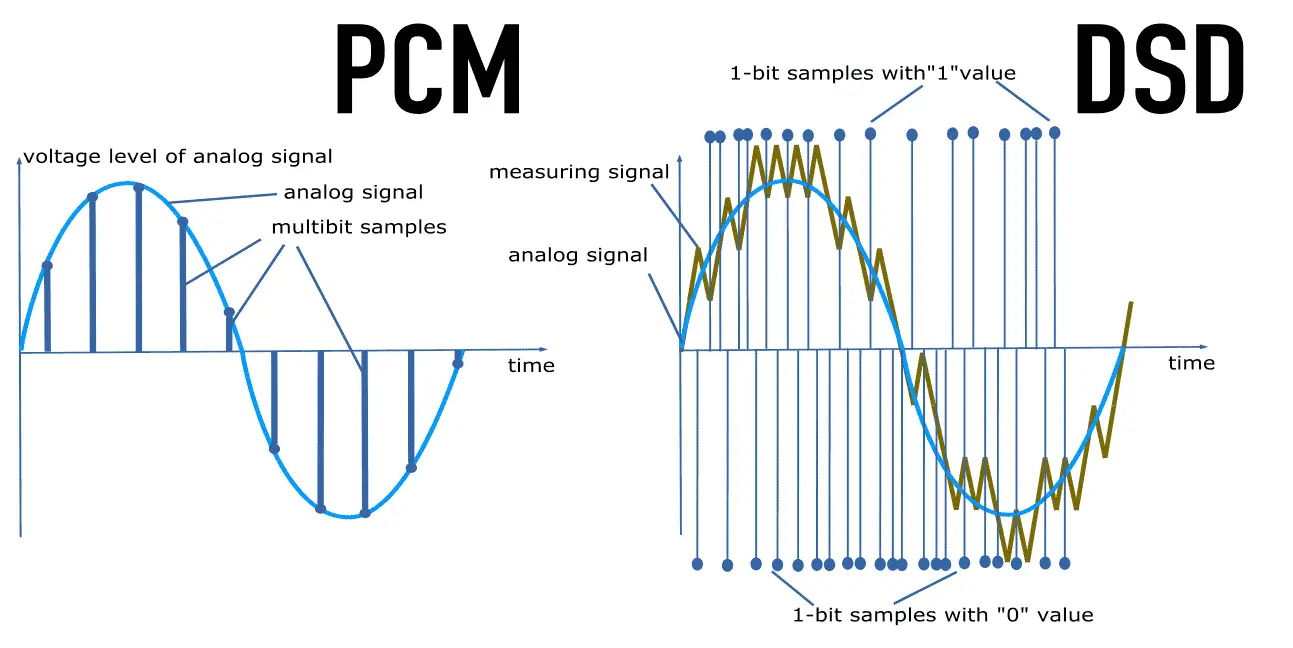
Anything beyond that format tends to waste disk capacity, since the 44.1 kHz HD sample rate originated with PCM adapters in the late 1970s that recorded digital audio onto video tape, especially the Sony PCM-1600 introduced in 1979 and introduced in this series It has flourished in later models. This became the basis for Compact Disc Digital Audio (CD-DA) as defined in the 1980 Red Book standard. In other words, the digital audio standard for CD audio is 44.1 kHz/16 bits. PCM Audio and Home Theater PCM is used for CD, DVD, Blu-ray and other digital audio applications. When used in surround sound applications, it is often called Linear Pulse Code Modulation (LPCM). The reason for this is that in the past, computer sound cards could only handle 48kHz PCM data, so the 44.1kHz PCM data had to be resampled, which would consume processing power. So the CD-ROM drive has an audio cable that feeds the analog audio to the sound card for playback, avoiding the need for resampling.

The 44.1 kHz sample rate originated with PCM adapters in the late 1970s that recorded digital audio to videotape, notably the Sony PCM-1600 introduced in 1979, and carried over to later models of the Serie. This became the basis for Compact Disc Digital Audio (CD-DA) as defined in the 1980 Red Book standard. In other words, the digital audio standard for CD audio is 44.1 kHz/16 bits. PCM Audio and Home Theater PCM is used for CD, DVD, Blu-ray and other digital audio applications. When used in surround sound applications, it is often called Linear Pulse Code Modulation (LPCM). The reason for this is that, in the past, computer sound cards could only handle 48kHz PCM data, so the 44.1kHz PCM data had to be resampled, which would consume processing power. . So the CD-ROM drive has an audio cable that feeds the analog audio to the sound card for playback, avoiding the need for resampling. Pulse Code Modulation (PCM) or 44.1 kHz used on CD. Some devices may use a 96kHz or 192kHz sample rate, but the advantage is that

In other words, the digital audio standard for CD audio is 44.1 kHz/16 bits. PCM Audio and Home Theater PCM is used for CD, DVD, Blu-ray and other digital audio applications. When used in surround sound applications, it is often called Linear Pulse Code Modulation (LPCM). The reason for this is that, in the past, computer sound cards could only handle 48kHz PCM data, so the 44.1kHz PCM data had to be resampled, which would consume processing power. . So the CD-ROM drive has an audio cable that feeds the analog audio to the sound card for playback, avoiding the need for resampling.

What is bit rate? Knowledge of the MP3 audio format.

What is bit rate? Knowledge of the MP3 audio format.

MP3 Bitrate

Digital audio formats are audio signals that are recorded, processed, and reproduced in digital form.

mp3 bit rate


The emergence of digital audio formats is to meet the needs of high-fidelity playback, storage and transmission. Simply put, early analog audio formats had issues with playback distortion and glitches due to media wear. Since the advent of the CD, digital format audio files have become popular, but another problem has arisen: the limitation of the storage volume, and the CD still has the phenomenon of wear. Saving to hard drive (relatively longer storage time) is not a good solution when storage media (mainly hard drives) are still expensive at the time. The rise of the Internet has created a requirement for long-distance file transmission. Under the restriction of bandwidth, the demand to reduce file size has become more intense. All this has led to the generation of lossy compressed digital audio formats from external factors!

In terms of internal factors, with the improvement of computer operation and coding capabilities, the progress of various acoustic psychological models has promoted the emergence of various lossy compressed digital audio formats. Some of the most commonly used audio formats in MP3 players are briefly introduced below: MP3 (CBR, VBR, ABR), WMA, WAV, ADPCM, and the emerging audio formats AAC, ASF, and OGG.

Before introducing various digital audio formats, let’s first clarify a concept: bitrate.

In the field of computing, all information is digitized. Bit is the smallest unit of data in a computer, it refers to a number of 0 or 1, which is a mathematical binary number, a “0” or “1” , is a bit. For example, when we say a 2-digit number, it means that it is a two-digit binary number, and there are 4 combinations of “00”, “01”, “10” and “11”, which represent 0, “11” in decimal respectively. 1, 2 and 3 are four numbers.

Bit rate, let’s see this, you don’t need radio quality to compare MP3 quality

Bit rate, let’s see this, you don’t need radio quality to compare MP3 quality

MP3 Quality

Bit rate refers to the number of bits transmitted per second, and the unit is bps (Bit per second). The higher the bit rate, the higher the data transmission.

MP3 Quality

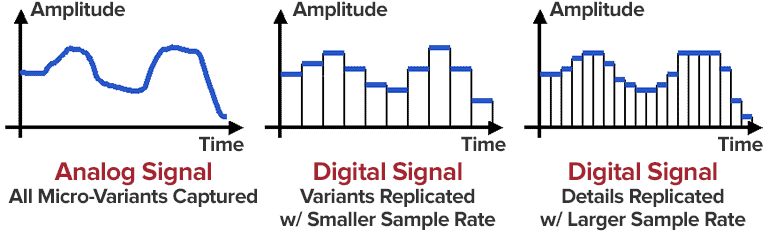
The bit rate in sound refers to the sampling rate of the conversion of digital sound from analog to digital format. The higher the sampling rate, the better the quality of the restored sound. The bit rate (bit rate) principle in video is the same as in sound, which refers to the sample rate converted from analog signal to digital signal.

Bitrate refers to the sampling precision (quantization precision) of converting digital sound from analog to digital format, that is, the number of bits per sample of sound. The higher the sampling precision (quantization precision), the better the quality of the restored sound.
Bit rate is a benchmark indicator of the compression efficiency of digital music. Bit rate indicates the rate of bps (bit per second, bits per second) transmitted per unit of time (1 second). The unit is usually kbps (1000 bits per second in colloquial terms). The bit rate of digital music on CD is 1411.2 kbps (that is, to burn 1 second of CD music, 1411.2 × 1000 data bits are required), the high BIT RATE of the digital music file music means that it should be processed in a unit of time (1 second) The amount of data (BIT) is large, which means that the sound quality of the music file is good. However, when the BITRATE is high, the file size increases, which will occupy a large amount of memory capacity. they are 32-256 Kbps. Of course, the wider the rate, the better, but 320 Kbps is the highest level at the moment.