MP3 File Structure Analysis Part 2


Free Download Mp4Gain
picture

MP3 File Structure Analysis Part 2

mp3

Sounds in nature are very complex and waveforms are extremely complex.

Mp3

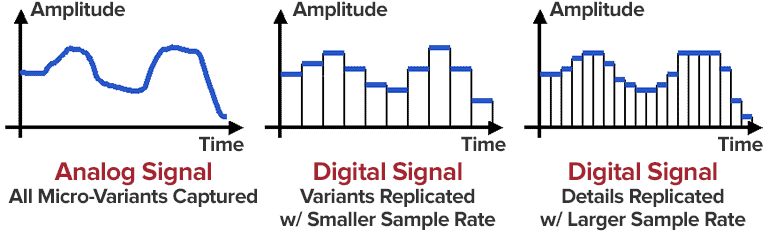
Usually we use pulse code modulation coding, that is, PCM coding. PCM converts continuously changing analog signals into digital codes through three steps of sampling, quantizing, and encoding.

u Decode:

Reverse encoding process

1.1.2 Brief introduction of MP3
The full name of MP3 is MPEG Audio Layer 3. It is an efficient computer audio coding scheme. It converts audio files into smaller files with a .mp3 extension with a higher compression ratio, essentially maintaining the sound quality of the source file. MP3 is part of the ISO/MPEG standard,

The ISO/MPEG standard describes audio compression using a high performance perceptual coding scheme. This standard has been continuously updated to meet the pursuit of “high quality and low quality”. Three audio codec schemes, MPEG Layer1, Layer2 and Layer3, have been formed, respectively, corresponding to the three sound files MP1, MP2 and MP3

MPEG (Moving Picture Experts Group) is a group of moving picture experts under ISO. The MPEG standard it specifies is widely used in various multimedia. The MPEG standard includes video and audio standards. Audio standards have developed MPEG-1, MPEG -2, MPEG-2 ACC, MPEG-4. The MPEG-1 and MPEG-2 standards use the same family of Layer1, 2, 3 audio codecs, and most MP3s use the MPEG1 standard.

MP3 audio compression consists of two parts: encoding and decoding. Encoding is the process of converting the original signal to a level signal, and decoding is the reverse process. MP3 uses the PerceptualAudio Coding distortion algorithm. The frequency range of sound perceived by the human ear is 20 Hz to 20 kHz. MP3 cuts out a lot of redundant signals and irrelevant signals. The encoder transforms the original sound into the frequency domain through a mixed filter bank and uses a psychoacoustic model. to estimate that it may be only The perceived noise level is quantized and converted to Huffman coding to form an MP3 bit stream. The decoder is much simpler, its task is to extract the sound signal from the encoded spectral line components through inverse quantization and inverse transformation.

MP3 file data consists of multiple frames, and a frame is the smallest unit of an MP3 file. Each frame, in turn, consists of a frame header, additional information, and sound data. The playback time of each frame is 0.026 seconds and its duration varies with the bit rate. Some MP3 files have extra bytes at the end that contain description information for non-audio data.


Free Download Mp4Gain
picture


Mp4Gain Main Window
picture


Mp4Gain Features
picture


Free Download Mp4Gain
picture

MP3 file structure analysis

MP3 file structure analysis

MP3 FORMAT

ü ID3:

mp3 format


Usually located in several bytes at the beginning or end of an mp3 file, it records the singer, title, album name, era, style, and other mp3 file information.

ID3 is divided into two versions, the V1 ID3 version is fixed at the end of the 128-word file section, it begins with the TAG character, if there is no ID3V1 information, it is considered that there is no ID3V1 information, the V2 ID3 version is found. at the beginning of mp3 and the length is variable.

ü Sampling rate:

The number of samples extracted from a continuous signal to form a discrete signal per second. It is expressed in Hertz (Hz). Sampling rate refers to the sampling frequency when converting an analog signal to a digital signal, i.e. how many points are sampled per unit of time. The higher the sample rate, the more realistic and natural the sound will be. On today’s major capture cards, the sample rate is generally divided into three levels: 22.05 KHz, 44.1 KHz, and 48 KHz. 22.05 KHz can only achieve the sound quality of FM radio, and 44.1 KHz is the theoretical limit of CD sound quality, and 48 KHz is more accurate.

ü Bit rate:

Bit rate refers to the number of bits (bits) transmitted per second. The unit is bps (bit per second). The higher the bit rate, the more information transmitted. In the audio and video fields, bit rate often translates to bit rate. The bit rate indicates how many bits per second the encoded (compressed) audio and video data should represent, and a bit is the smallest unit in binary. 0 or 1. The relationship between bitrate and audio and video compression is simply that the higher the bitrate, the better the quality of the audio and video, but the larger the encoded file; if the bitrate is lower, the situation is just the opposite.

Bit rate = sample rate * number of samples * number of channels

ü Bitrate/Stream/Bitrate:

It refers to the data stream used by audio and video files in a unit of time. The popular understanding is the sample rate, which is the most important part of quality control in audio and video encoding. Generally, the units we use are Kb/s and Mb/s. . Generally speaking, the higher the code stream, the lower the compression ratio and the higher the quality. The higher the code stream, the higher the sampling rate per unit time, the higher the data stream, the higher the accuracy, and the closer the processed file is to the original file.

ü Code:

From the point of view of information theory, the data that describes the source of information is the sum of the redundancy of information and data, namely: data = information + data redundancy. The audio signal has correlation in the time domain and the frequency domain, that is, there is data redundancy. Taking audio as the source, the essence of audio encoding is to reduce redundancy in the audio.

Mp3 (an audio encoding method) Part 3

Mp3 (an audio encoding method) Part 3

MP3 ENCODING

To generate bit-compliant (Layer 1.Layer 2.Layer 3) MPEGAudio files, ISO MPEG Audio committee members developed reference simulation software in C called ISO 11172-5.

MP3 ENCODING

It can demonstrate the first real-time DSP-based hardware decoding of compressed audio on some non-real-time operating systems. Various other MPEG audio was developed in real time for digital broadcasting (DAB radio and DVB TV) for consumer receivers and set-top boxes.
Later on July 7, 1994, Fraunhofer-Gesellschaft released the first MP3 encoder called l3enc.
The Fraunhofer development team selected the .mp3 extension on July 14, 1995 (previously the extension was .bit). Using Winplay3 (released September 9, 1995), the first real-time software MP3 player, many people were able to encode and play MP3 files on their own personal computers. Since hard drives at the time were relatively small (such as 500MB), this technology was essential for storing entertainment music on computers.
MP2, MP3 and Internet
In October 1993, MP2 (MPEG-1 Audio Layer 2) files appeared on the Internet and were often played by Xing MPEG Audio Player and later MAPlay developed by Tobias Bading for Unix. MAPplay was first released on February 22, 1994 and ported to the Microsoft Windows platform.
The only MP2 encoder products at first were Xing Encoder and CDDA2WAV, a CD ripper that converts audio tracks from CDs to WAV format.
Often considered the father of the online music revolution, the Internet Underground Music Archive (IUMA) was the first hi-fi music site on the Internet, with thousands of licensed MP2 recordings before MP3 and the web became popular. .
From the first half of 1995 to the end of the 1990s, MP3 began to flourish on the Internet. MP3’s popularity is largely due to the success of companies and software packages such as Winamp released by Nullsoft in 1997 and Napster released by Napster in 1999, and they are mutually reinforcing. These programs make it easy for normal users to play, create, share and collect MP3 files.
The debate about sharing MP3 files between peers has spread rapidly in recent years, mainly because compression makes file sharing possible, uncompressed files are too large to share. Since MP3 files are widely spread over the Internet, Napster has been sued by some of the major record labels to protect their copyright (see Copyright).
Commercial online music distribution services, such as the iTunes Music Store, often choose other proprietary or DRM-enabled music file formats to control and limit the use of digital music. Formats that support DRM are used to protect copyrighted material from copyright infringement, but most protection mechanisms can be broken in some way. Computer experts can use these methods to generate unlocked files that can be freely copied. One notable exception is Microsoft’s Windows Media Audio 10 format, which has yet to be cracked. If a compressed audio file is desired, the recorded audio stream must be compressed and the sound quality will be degraded.
streaming audio quality
Because MP3 is a lossy compression format, it offers a variety of options for different “bit rates,” that is, the number of encoded data bits needed to represent the audio per second. Typical speeds are between 128 kbps and 320 kbps (kbit/s). In contrast, the uncompressed audio bitrate on a CD is 1411.2 kbps (16 bits/sample × 44100 samples/sec × 2 channels).
MP3 files encoded with lower bit rates generally play at a lower quality. If you use too low a bitrate, “compression artifact” (sounds not present in the original recording) will appear during playback. A good example of compression noise is the sound of compressed cheering; due to its randomness and sharp changes, encoder errors are more pronounced and sound like echoes.

Mp3 (an audio encoding method) Part 2

Mp3 (an audio encoding method) Part 2

mp3 3ncoding

MPEG-1 Audio Layer 2 encoding began as a digital audio broadcast (DAB) managed by Egon Meier-Engelen at the German Deutsche Forschungs- und Versuchsanstalt für Luft- und Raumfahrt (later known as Deutsches Zentrum für Luft- und Raumfahrt, German Space Center). )draft.

mp3 encoding

This project is funded by the European Union as a EUREKA research project, and its name is commonly known as EU-147. The study period for EU-147 was from 1987 to 1994.
2. By 1991, two proposals had emerged: Musicam (called Layer 2) and ASPEC (Adaptive Spectrum Sensing Entropy Coding). The Musicam method proposed by Philips of the Netherlands, CCETT of France, and the Institut für Rundfunktechnik of Germany was chosen due to its simplicity, error robustness, and lower computational effort in high-quality compression. The Musicam format based on subband coding is a key factor in determining the MPEG audio compression format (sample rate, frame structure, header, sample points per frame). This technology and its design philosophy are fully integrated into the definition of ISO MPEG Audio Layer I, II and later Layer III (MP3) formats. The standard was developed by Leon van de Kerkhof (Layer I) and Gerhard Stoll (Layer II) under the auspices of Prof. Mussmann (University of Hannover).
3. A working group consisting of Leon Van de Kerkhof from the Netherlands, Gerhard Stoll from Germany, Yves-François Dehery from France and Karlheinz Brandenburg from Germany absorbed design ideas from Musicam and ASPEC and added their own design ideas to develop an MP3. MP3 can achieve MP2 sound quality from 192 kbit/s to 128 kbit/s.
4. All of these algorithms eventually became part of the first group of MPEG standards, MPEG-1, in 1992, resulting in the international standard ISO/IEC 11172-3 published in 1993. Further work on MPEG audio was eventually became part of the MPEG-2 standard, a second group of MPEG standards developed in 1994, officially known as ISO/IEC 13818-3, first published in 1995.
5. The compression efficiency of the encoder is generally defined by the bit rate, because the compression rate depends on the number of bits (: in: bit depth) and the sampling rate of the input signal. However, there are often products that use CD parameters (44.1 kHz, two channels, 16 bits per channel, or 2×16 bits) as the compression ratio reference, and the compression ratio using this reference is usually higher, which which also shows that the compression ratio is very important for lossy compression problems.
6. Karlheinz Brandenburg used Suzanne Vega’s song Tom’s Diner on CD to test MP3 compression algorithms. This song is used because the song’s smooth and simple melody makes it easier to hear glitches in the compressed format during playback. Some jokingly refer to Suzanne Vega as “the mother of MP3”. Some more serious and critical audio extracts (glockenspiel, triangle, accordion…) from the EBU V3/SQAM reference CD are used by professional audio engineers to assess the subjective perceived quality of the MPEG audio format.

Mp3 (an audio encoding method)

Mp3 (an audio encoding method)

Mp3 encxoding

MP3 is an audio compression technology, its full name is Moving Picture Experts Group Audio Layer III, called MP3.

mp3 encoding

It is designed to drastically reduce the amount of audio data. Using MPEG Audio Layer 3 technology, music is compressed into a smaller capacity file with a compression ratio of 1:10 or even 1:12, and for most users, playback quality is not as good as the original uncompressed. audio Significant decrease. It was invented and standardized in 1991 by a group of engineers at the Fraunhofer-Gesellschaft research organization in Erlangen, Germany. Music stored in the form of MP3 is called MP3 music, and a machine that can play MP3 music is called an MP3 player.

Motion Picture Expert Compression Standard Audio Layer 3 foreign name Moving Picture Expert Group Audio Layer III research organization Fraunhofer-Gesellschaft type audio coding advantage Drastically reduce the amount of audio data defect sound quality loss
content
1 Features
2 story
▪ origin
▪ go to the masses
3 audio quality
4 patent issues
transmission characteristics
MP3 converts the time-domain waveform signal to a frequency-domain signal by taking advantage of the human ear’s insensitivity to high-frequency sound signals and splits it into multiple frequency bands, using different compression rates. for different frequency bands and increasing the compression ratio for high frequencies (even ignoring the signal) Use a small compression ratio for low frequency signals to ensure that the signal is not distorted. In this way, it is equivalent to discarding the high-frequency sound that is basically inaudible to the human ear [1], keeping only the audible low-frequency part, thus compressing the sound with a compression ratio of 1:10 or even 1: 12. Because the full name of this compression method is called MPEG Audio Player3, people call it MP3 for short.
According to the MPEG specification, AAC (Advanced Audio Coding) in MPEG-4 will be the next generation of the MP3 format.
Compared to CD, FLAC and APE lossless compression formats, the sound quality of the highest parameter MP3 (320 Kbps) is not much different.
MP3 players are dying
When they first came out, MP3 players were at the forefront of the digital revolution. However, sales of iPods and other MP3 players in the UK fell sharply in 2012 as consumers turned to other digital products such as smartphones.
In 2012, sales of MP3 players in the UK market were £110m ($178m), just 29% of the £381m in 2011, according to market research firm Mintel. Mintel expects total MP3 player sales in the UK market to halve by 2017. In the worst case scenario, total MP3 player sales in the UK market will be just 25 million dollars five years later. [23]
1. MP3 is a data compression format;
2. Discards pulse code modulation (PCM) audio data that is not important to the human ear (similar to JPEG is a lossy image compression), resulting in a much smaller file size;
3. MP3 audio can be compressed according to different bit rates, providing a variety of trade-offs between data size and sound quality. The MP3 format uses a mixed conversion mechanism to convert audio domain signals. time in frequency domain signals;
4. 32 band polyphase integral filter (PQF);
Modified discrete cosine filter (MDCT) of 5, 36 or 12 taps; each subband size can be independently selected between 0…1 and 2…31;
6. MP3 not only has extensive client software support, but also has a lot of hardware support, such as portable media players (referring to MP3 players), DVD and CD players, outgoing calls

ENCODING PRINCIPLES OF THE MP3 FORMAT.

ENCODING PRINCIPLES OF THE MP3 FORMAT.

Mp3 Encoding

Mp3, or fully MPEG-1, 2 and 2.5 Layer 3, is one of the most popular and widespread standards for storing audio data.

MP3 ENCODING

In this article, we will not delve into the history of creation and further development, but will consider the basic principles of the standard and examples of its implementation.

The mp3 standard does not establish a specific compression algorithm to “encode” the source data, but rather describes the essence of the possible methods.

The quality of the result obtained depends on the modification of the algorithm used, embedded in any encoding program of the “codec”, and on the quality of the original audio data.

There are 3 most common modifications of the mp3 format, which differ in the compression ratio parameters of the original audio data.

Name
Modification of the rule
Data rate per second (bit rate) Possible sample rates
MPEG-1 layer 3
32 – 320 kbps 32000 Hz
44100 Hz
48000 Hz
MPEG-2 Layer 3 16 – 160 kbps 16000 Hz
22050 Hz
24000 Hz
MPEG-2.5 Layer 3 8 – up to 160 kbps 8000 Hz
11025 Hz

Processing begins with dividing the original audio signal into equal time intervals: equal frames, for example 0.05 or 0.26 seconds, after which each frame is analyzed and compressed according to general or individual parameters based on the data of the previous and next frames.

Most of the compression algorithms used are based on the perceptual characteristics of the human ear. Let’s consider the main options, which, as a rule, are applied in a complex way.

It is worth starting with the fact that, by ear, the average person is capable of perceiving a frequency range of approximately 10 Hz to 20,000 Hz. With growth, changes occur in the hearing aid and, for most, the sensitivity the higher frequency range decreases, as a result of which, in some mp3 modifications, during compression, all frequencies above 16000 hertz are cut off, which can significantly reduce the amount of information.

Audio recordings can be encoded in stereo (a surround sound effect that uses separate channels for the left and right speakers) or mono (the opposite of stereo). In mp3 format, different tracks are not recorded for each of your speakers, but information about the differences between the left and right channels.

In acoustics, there is a concept like “harmonics”, these are the frequencies of the “sounds” that sound together with the main and most prominent tone. For example, when hitting a drum, the loudest sound will be the tone and the minor, weaker, will be the harmonics.

After such a loud sound, the so-called “period of deafness” occurs, during a period of duration in which a person’s hearing practically does not respond to changes.

If in the intervals of the “deafness period”, remove all frequencies, then the errors of perception, will practically not allow to notice their absence, because of this, during compression, the weakest harmonics are cut off, located close to the most sounds. strong: tones.

A method is used to replace the near peak values ​​of the signal “peaks” (in terms of volume) with an average value.

There is a concept as bit rate: this is a value that characterizes the number of transmitted bits of information “units” during a period of time, usually one second.
The higher the bit rate, the better the audio detail will be, as long as the original, uncompressed audio data is of high quality.

As you can guess, digital formats consist of certain code sequences, in other words of sequences 0 and 1.
To save space, frequent joins within a file are assigned unique identifiers that replace long sequences.

Thanks to such complex influences, it is possible to compress the original audio signal into one of the popular formats with loss of quality – the mp3 format.

Various experiments have been carried out many times in order to reveal how significant the differences are before and after compression in mp3. As tests have shown, differences, some similar moments were not always possible, quickly and to distinguish, even when reproduced on equipment with higher fidelity.

For those who have never had the opportunity to directly compare the original and compressed audio recording, in most cases it will take some time or even find obvious differences.

MP3 ENCODING

MP3 ENCODING

Mp3 encoding

The first step in encoding by the user is to specify a bit rate. This indicates the quality and at the same time the storage requirement of an MP3 file.

MP3 encoding

COMPRESSION RATES

With most recording programs, the quality of an MP3 file can be freely selected before recording begins. According to the Fraunhofer Institute, the CD quality of an MP3 file is a bit rate of 112 to 128 kbit per second, other measurements put CD quality at up to 160 kbit per second. However, the most used and sufficient for most listeners is 128 kbit.

In comparison, a corresponding CD quality for Layer 1 is 384 kbit / s and 256 kbit / s for Layer 2. A wave file works with a 1.4 Mbit / s bit rate and therefore works with roughly the same space requirements. as a CD audio track (CDA).

74 or 80 minutes of music can be put on a CD (depending on the size of the sound carrier), in MP3 format with a bit rate of 128 kbit / s, 11.5 or 12.4 hours would be possible.

PSYCHOACOUSTICS

MP3 audio compression relies on filtering out unnecessary information. Psychoacoustics is a science that deals with the perception of sound by the human ear.

Eg: You are in a disco. Loud music blasts through huge speakers and you try to talk to each other. This is almost impossible unless you yell. In acoustics, this is called masking. To eliminate masking, the sound level of speech should be raised to such an extent that the interfering signal (in this case music) no longer covers it.

Processes like this belong to the fundamental areas of psychoacoustics.

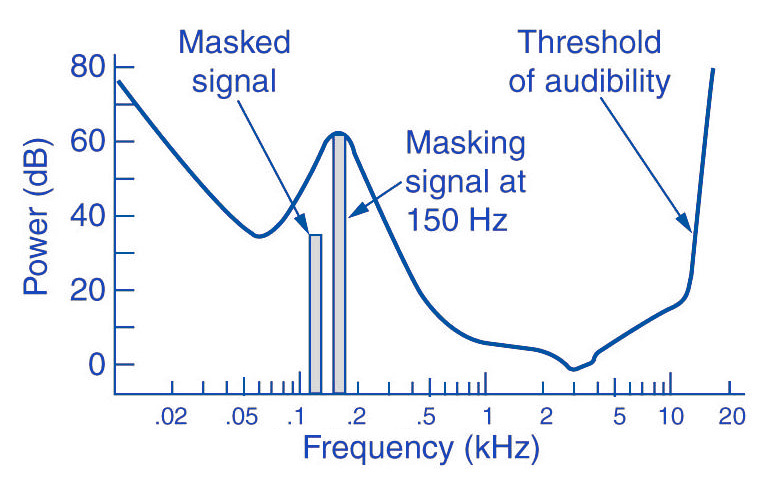
Tones below this threshold are not heard and therefore become noise during MP3 recording (skipped).

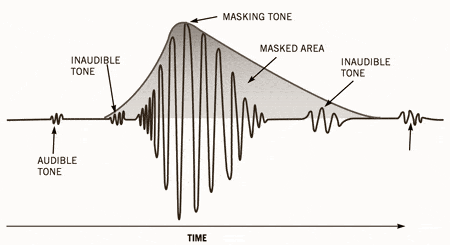
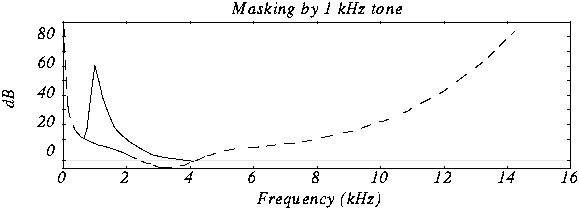
The overlays work as follows: you have, for example (picture 2) a tone with 1 kHz (1) and another tone with 1.1 kHz, which is approximately 18 dB lower (2). The second shade is completely superimposed on the first. This also works for other weaker tones (see Fig. 2). Another tone with a frequency of 2 kHz, which is also 18 dB quieter than the first, would not overlap because it is just outside the threshold of the first tone.

Noise can be another compression option for MP3 recording. The fact that when a sound is digitized it cannot be sampled at an infinite frequency, a noise imperceptible to the human ear (quantization noise) is generated. It is used as a model for the MPEG audio layer and thus increases the noise around a tone. Above all, loud and short tones mask a certain range in the frequency range before and after themselves where the weakest signals would not be audible. With MP3 encoding, the noise level increases in this area, as if digitized at a lower resolution.

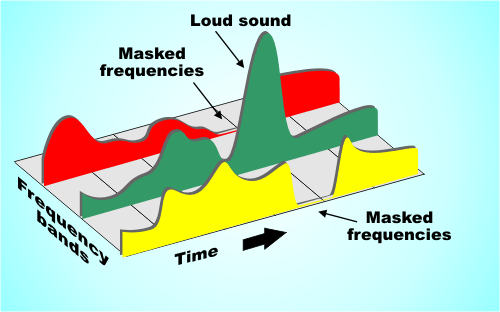
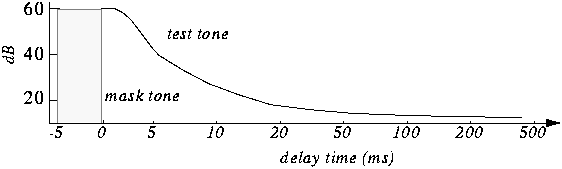
There is also masking in the temporal area: hearing needs a so-called “recovery time” for loud and quiet noises until it is fully functional again. This is especially noticeable with strong, short, and rapidly rising tones. After a delay of about 5 ms, the hearing threshold drops again and after about 200 ms it reaches the normal level, the so-called resting hearing threshold. This effect is called post-masking. The effect of pre-masking is less important, but even more impressive: it is based on the fact that the brain processes loud sounds more quickly than soft ones. To some extent, the strong impulse outweighs the silent one on the way to the brain. This results in a pre-masking time of up to 20 ms.

The above psychoacoustic algorithm is used in the following steps:
– Audio information is divided into subbands
– Subbands are reduced
– 16-bit samples are generated
– Samples are compressed
– Compressed samples are combined into blocks
– Coding according to Huffmann Procedure
: summary in tables

DIVIDED INTO SUBBANDS

Depending on the frequency of the acoustic information, it is divided into 32 subbands. The bands are of different sizes due to adaptation to the human ear according to a psychoacoustic model.

The division is done with the help of a polyphase filter. This means that the samples are decimated and filtered simultaneously.

In layers 1 and 2, the bands were the same size with a bandwidth of 625 Hz each. The reason for this division is to provide the algorithm with a better target.

SUBBAND ​​REDUCTION

The MP3 encoder now examines each of the subbands according to the psychoacoustic model for expendable frequencies. Here, the masking threshold is determined, then the subbands whose level is below this masking function are removed. Another reason for dropping an entire sub-band could be that it is inaudible due to the pitch, similar to a dog’s whistle.

CONVERSION INTO 16-BIT SAMPLES

The frequency bands are sampled and converted to 16-bit samples. Tones are broken down into digital signals and further processed as numerical values. The sample rate determines the length of the sample intervals. However, neither the measurement of the amplitude nor the size of the sampling intervals can be infinitely precise. For this reason, with analog-digital conversion, a value is rounded between two sample points. This results in rounding errors that are noted in what is known as quantization noise. This can be kept inaudible using the highest possible resolution: with 8-bit, a maximum of 256 levels can be displayed, with 12-bit and 4096 and with 16-bit 65536 individual steps, so that noise is not heard.

However, some samples are also digitized with a lower sample rate. In the eighth subband, for example, there is a tone with 1 kHz and 60 dB. The MPEG audio encoder now calculates the masking threshold and recognizes that it is 36dB lower. The acceptable signal-to-noise ratio here is 24 dB, which corresponds to a 4-bit resolution, since the two values ​​are directly related. Leaving one bit out of resolution increases the noise level by 6dB. Since an audio CD is generally digitized with 16 bits, considerable data reduction can be applied here.

SAMPLE COMPRESSION

The next step is to compress the samples further. However, this process no longer has anything to do with the original shades. From here on, compression is only data-driven.

Each sample consists of 16 bits, but not all of them are absolutely necessary to represent a level. For example, leading zeros can be omitted. If, for example, the value 0000011101010101 is obtained for a sample, the algorithm truncates the result to 11101010101. To reconstruct the original 16 bits from this information, the decoder needs two pieces of information: the scale factor and the bit allocation. The scale factor indicates where the remaining bits of the sample were in their original state. The bit mapping contains the information about how many bits are left in the sample, since you can no longer calculate with a fixed 16-bit number. However, if you were to store these values ​​individually for each sample, you wouldn’t gain much,

GROUPING THE SAMPLES

The 16-bit samples that were just created are now combined into blocks. There are two different block lengths for this purpose: the short blocks with twelve samples and the long blocks with 36 samples.

Long blocks are used for low frequencies. However, long blocks would not allow sufficient resolution at higher frequencies; short blocks are used here. In the so-called mixed block mode, long blocks are used for the two frequency bands with the lowest frequencies. For the remaining 30 frequency bands, it is the turn of the short blocks. This mode allows better frequency resolution in the low frequencies without paying tribute to the sampling frequency in the high frequencies.

HUFFMANN CODING

The last step in MP3 compression is Huffmann encoding. This algorithm is also used, for example, in packaging programs such as WinZip. The frequency of certain values ​​is important here. However, the subbands are organized in advance. Subbands with lower frequencies tend to contain significantly more values ​​than those with high frequencies. The subbands are divided into three groups according to their frequency. Each area has its own Huffmann tree (Fig. 3) to achieve the optimal compression factor.

As a first step, the encoder excludes high frequencies; encoding is not necessary here, as its size can be derived from those of the other two regions. The mid-frequency range is treated as is, and the low frequencies are again divided into three regions, each of which is assigned its own Huffmann tree. The appearance of a Huffmann tree is stored in the MP3 file.

The structure of a Huffmann tree works as follows: frequently occurring values ​​are given a short sequence of bits, while rare values ​​are given a long one, so the algorithm first determines the distribution of values ​​within the data to be compressed.

To determine what is known as the Huffman tree, you start with the two rarest values. They are assigned a “0” or a “1”. The two values ​​are summarized, in the order that they are now represented by the sum of their frequency. The same is true for the next two rarer values. This process ends when only one value remains. The result of this procedure is a tree structure. The encoding is based on this structure. Each branch on the left receives a 0, each branch on the right is identified by a “1”. In our little example, the least common would be

Value 4 represented by the sequence of bits 010. The most common value 6, on the other hand, is assigned a simple 1.

FRAMEWORK SUMMARY

The result of the above compression is summarized in so-called frames. Each of these frames contains 1152 samples (32 subbands x 36 samples). A frame consists of a header, a checksum check, the actual audio data, and in certain circumstances a so-called bit repository. Such a deposit arises when the samples within the frame can be compressed in such a way that the full theoretical number of bits in a frame is not required. The encoder can fall back on these buckets if the available bits are insufficient for a subsequent frame. A distinction must be made between two terms: frame size and frame length.

The size of the frame is determined by the number of samples and is constant within a layer. In Layer 1 format, this is always 384 samples per frame, in Layers 2 and 3 1152 per frame. However, the length of the frame may differ at Layer 3 due to the change in bit rate or the pool of unfilled bits. The frame also contains the aforementioned information about the scale factor and bit allocation to be able to reconstruct all the samples again.

A file header, as it is known from other file formats, does not exist in an MP3 file. In the case of an image file, a header would contain information about the entire image (e.g. size, color depth, resolution


MP3 COMPRESSION

MP3 COMPRESSION

To achieve such a dramatic reduction in the number of bits required to transmit an MP audio signal, use different techniques. These techniques include those based on perceptual coding and others such as byte reservation, stereo assembly or Huffman codes. Percentage coding consists of removing all the information that goes into the audio signal that the human ear is not capable of detecting. We will now describe them:

PERCEPTUAL CODING

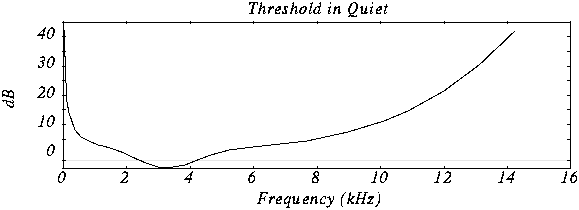
Minimum hearing threshold The ear’s minimum hearing threshold is the power below which a tone at a given frequency is not capable of being detected by the ear. This threshold is non-linear. As we see in the figure, which represents the Fletcher and Mundson law, the frequencies in which we hear best are those between 2 and 5 Khz. Therefore frequencies outside that band are not totally essential since they will hardly be perceived. Therefore it is possible to remove the content of the audio signal outside these frequencies.

As we can see in the drawing, the range in which a lower power is needed for the tone to be heard is between 2 and 4 Khz.

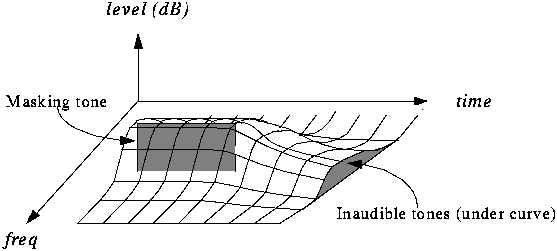
The masking effect This effect consists in that, when an audio signal has a tone at a given frequency, it produces a masking effect at the frequencies close to it, so that if at these nearby frequencies the signal does not exceed a certain power threshold cannot be heard and therefore it is not necessary to encode them. The form that this power threshold will take according to the position of the tone or the masking tones is what is called the psychoacoustic model, which as the name itself indicates is a perception model that tries to emulate the perception of the human ear.

In this graph we can see how if we put a tone at 1 Khz of 60 dB (masking tone) and then we put another tone at, for example 1.1 Khz and we vary the frequency of this, it is not possible to detect the presence of this second tone until its power exceeds the threshold presented in the figure.

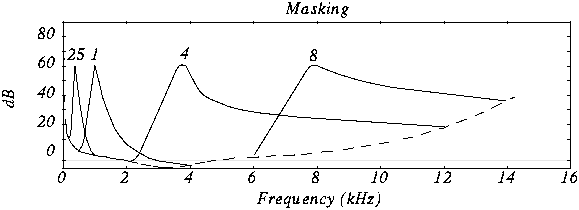
In this case we see various masking tones and the resulting new hearing thresholds. In MP3, what is done is to divide the spectrum to be transmitted (that is, between 2 and 5 Khz) into frequency subbands, so that the power of the subband is evaluated and the masking threshold is created in the nearby subbands. Nearby subbands that exceed that power threshold are coded and those that do not exceed it are not coded.

Furthermore, the masking is not only in appearance but also in time as we can see in the figure.

The byte reserve: Often, some passages of a musical piece cannot be encoded at the same rate without altering the quality of the music. MP · then uses a small byte reservation that acts as a buffer using the capacity of passages that can be encoded at a lower rate in the given stream.
The stereo assembly In the case of a stereo signal, the MP3 format can use a few more tools to further compress the data.
Intensity stereo (IS) The human ear is not able to locate with complete certainty the spatial origin of sounds for very high or very low frequencies. This technique takes advantage of this, recording some frequencies as a monophonic signal, so that a minimum of spatial content is subtracted from the sound.
Mid / Side (M / S) Stereo When the left and right channels are similar then a middle channel (L + R) and a side channel (LR) are created, which are encoded instead of encoding the left channel on one side and the right for another. In this way it is possible to reduce the transmitted data using fewer bits for the lateral channel. Then during playback the MP3 decoder will reconstruct the left and right channels.

Huffman Coding: This coding technique is used at the end of the whole process. It works by creating variable-length codes, so that the symbols that appear in the bitstream most likely have shorter codes. The translation between symbols and codes is done using a table. Each code has a unique prefix so that the codes can be decoded correctly despite their variable length. This type of coding allows on average to reduce by 20% the amount of data to be transmitted. It is an ideal complement to perceptual coding since, during great polyphonies, perceptual coding is very efficient since many sounds are masked, but nevertheless little information is identical and Huffman’s algorithm becomes inefficient. During pure sounds there are few masking effects, but Huffman encoding is very efficient since digitized sound contains many repeating bytes.