Low-latency modes in MP3 and MP4


Free Download Mp4Gain
picture

Low-latency modes in MP3 and MP4
Low-latency modes in MP3 and MP4

Let’s talk about low-latency modes in MP3 and MP4

Low-latency modes in MP3 and MP4 are vital for streaming, gaming, and live communication. As an audio and video expert, I’ve worked extensively with these technologies, and I can tell you that reducing delays while maintaining quality is key. For example, if you’re playing a live-streamed concert or attending a virtual meeting, even a slight lag can ruin the experience. Low-latency modes solve this problem by minimizing the time it takes for audio and video to process, encode, and deliver.

Think of latency like waiting in line at a store. Without optimization, each step—deciding what to buy, paying, and getting your receipt—adds up. Low-latency modes speed up these steps, ensuring everything happens in near real-time. Formats like MP3 and MP4 achieve this using advanced encoding techniques that prioritize fast delivery without sacrificing clarity. Whether it’s listening to music over Bluetooth or watching a live sports event, low-latency modes make everything seamless.

How MP3 achieves low latency

MP3 is a pioneer in digital audio compression, and its low-latency modes are a testament to its versatility. One way MP3 achieves this is by reducing the size of audio frames during encoding. Smaller frames mean less data to process and transmit, which translates to quicker playback. This is especially important in scenarios like voice calls, where immediate response times are critical.

Another feature that enhances MP3’s low-latency performance is its constant bitrate (CBR) encoding. Unlike variable bitrate (VBR), which adjusts based on the complexity of the audio, CBR maintains a steady flow of data. This predictability ensures minimal delay, making it ideal for live audio streaming or broadcasting.

In my experience, MP3’s low-latency modes shine when used with hardware optimized for quick decoding, such as modern Bluetooth codecs. For example, when testing MP3 files on wireless earbuds designed for gaming, the difference in audio delay was night and day compared to standard settings.

How MP4 handles low latency

MP4 is synonymous with high-quality video, but its low-latency capabilities are equally impressive. Unlike MP3, which focuses solely on audio, MP4 combines audio and video streams into a single container format. Low-latency MP4 achieves its speed by breaking video into smaller segments and using technologies like fragmented MP4 (fMP4). This allows data to be streamed incrementally, so playback can start before the entire file is downloaded.

Adaptive bitrate streaming, a common feature in MP4, further enhances low latency. By dynamically adjusting the video quality based on your internet connection, it ensures smooth playback without buffering. This is crucial for platforms like YouTube Live or Zoom, where interruptions are unacceptable.

One example I always share is how low-latency MP4 revolutionized online education during live webinars. Instead of waiting for long buffering times, educators could interact with students in real time, ensuring a smoother learning experience.

Real-world applications of low-latency modes

Low-latency modes in MP3 and MP4 aren’t just technical achievements; they’re everyday essentials. Consider the gaming industry, where even a half-second delay can mean the difference between winning and losing. Low-latency MP4 ensures that live streams of esports matches are delivered without lag, keeping players and fans fully immersed.

In telemedicine, low-latency MP3 allows doctors to communicate with patients seamlessly, regardless of location. I once consulted for a telehealth provider who used low-latency audio to ensure that consultations felt as natural as in-person visits. The difference was remarkable, especially in critical situations like remote surgeries.

Even in casual scenarios, like watching a live concert on your phone, low-latency MP3 and MP4 modes enhance the experience. It’s like being in the front row, without the delays that make virtual events feel disconnected.

Challenges in implementing low-latency modes

While low-latency modes are transformative, they come with challenges. Encoding and decoding speed require significant computational power, which can strain older devices. Additionally, achieving low latency often involves sacrificing some compression efficiency, leading to larger file sizes.

Network stability is another hurdle. Even the best low-latency settings can falter if your internet connection isn’t reliable. To address this, advanced buffering techniques and error correction algorithms are used, but they add complexity to the process.

From my perspective, the key is balancing latency with quality. For instance, when encoding MP4 videos for live events, I prioritize low-latency settings but ensure the resolution is sufficient to keep viewers engaged.

Latest words on low-latency modes in MP3 and MP4

Low-latency modes in MP3 and MP4 are crucial for creating seamless digital experiences. Whether it’s a virtual meeting, a live concert, or an online gaming session, these technologies ensure real-time interaction without sacrificing quality. While challenges like device compatibility and network stability remain, advancements in encoding and streaming continue to push the boundaries.

If you’re looking for a way to optimize your audio and video files, tools like Mp4Gain can help you fine-tune latency settings for the best performance. By leveraging low-latency modes, you can ensure that your content meets the high expectations of today’s digital audience.

FAQ about Low-latency modes in MP3 and MP4

What is low latency in audio and video?

Low latency refers to minimizing the delay between when data is sent and when it is received and played back. It is crucial for real-time applications like live streaming and gaming.

How does MP3 achieve low latency?

MP3 achieves low latency through small frame sizes and constant bitrate encoding, which reduce processing time and ensure quick playback.

Why is low latency important in MP4?

Low latency in MP4 ensures smooth playback during live streaming by reducing buffering and enabling real-time interaction.

What is fragmented MP4 (fMP4)?

Fragmented MP4 is a variation of the MP4 format that breaks video into smaller segments, allowing for faster streaming and lower latency.

Can low-latency MP3 be used for Bluetooth audio?

Yes, low-latency MP3 is commonly used in Bluetooth audio devices to reduce delays in playback, especially for gaming and video applications.

What challenges exist with low-latency modes?

Challenges include higher computational demands, larger file sizes, and dependence on stable network conditions.

How does adaptive bitrate streaming help MP4?

Adaptive bitrate streaming adjusts video quality dynamically based on network conditions, reducing latency and buffering issues.

Are there specific codecs for low latency?

Yes, codecs like AAC-LC and HEVC are optimized for low latency in both audio and video encoding.

Can low-latency modes work on all devices?

Low-latency modes depend on device compatibility and processing power, which can vary between older and newer devices.

What industries rely on low-latency modes?

Industries like gaming, telemedicine, education, and live broadcasting depend heavily on low-latency modes for smooth operation.

Comments:

Low-latency MP4 saved my life during online classes last semester! Finally, no lag between the professor’s voice and the slides. Amazing article!

Can someone explain if low-latency MP3 settings work on older devices? My phone always lags during live streams!

This is so detailed, thank you! I didn’t know fragmented MP4 could improve live streams so much. Learned a lot!

Is there any guide for setting up low latency for gaming? I always have sound delays with my Bluetooth headset.

Finally, someone explains low latency in terms I can actually understand. Love the examples with live concerts!

Great info, but could you add more about how to optimize MP4 for low latency on home networks? That’s where I struggle most.

I’ve been trying to reduce lag during Zoom meetings for ages. Glad I found this article, it makes everything so clear.

Why don’t more people talk about how important codecs are? This explains so much. Thanks for the insight!


Free Download Mp4Gain
picture


Mp4Gain Main Window
picture


Mp4Gain Features
picture


Free Download Mp4Gain
picture

Psychoacoustic Model 1 vs Model 2 in MP3

Psychoacoustic Model 1 vs Model 2 in MP3

Let’s talk about Psychoacoustic Model 1 vs Model 2 in MP3

Psychoacoustic models revolutionized audio compression, but what makes Model 1 and Model 2 so distinct? Both rely on how the human ear perceives sound, but each takes a different approach to optimize MP3 file size and audio quality. Let me explain their differences, advantages, and real-world applications based on my experience in the field.

Understanding Psychoacoustic Principles in Audio Compression

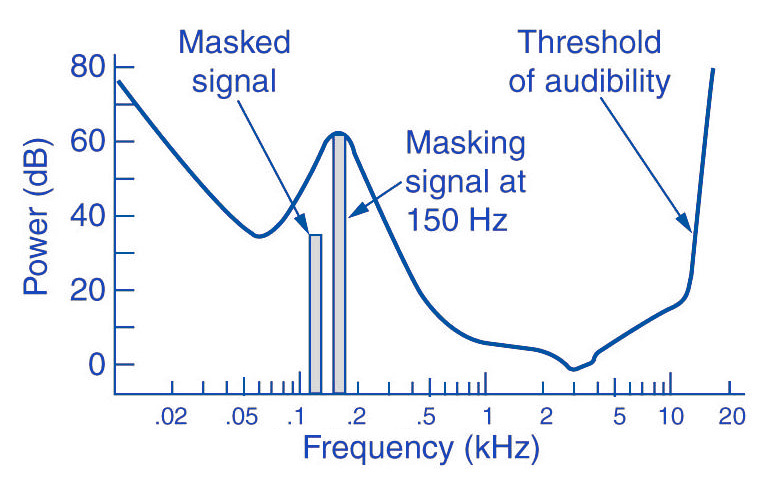
The foundation of psychoacoustics lies in masking—how louder sounds can hide quieter ones from human perception. Imagine a roaring waterfall; you won’t hear a whisper next to it. MP3 encoding exploits this principle, removing inaudible sounds to reduce file sizes without noticeable quality loss. Model 1 and Model 2 implement these principles differently, targeting specific use cases and performance goals.

What Defines Psychoacoustic Model 1?

Model 1 serves as the simpler, faster option in MP3 encoding. It uses a single masking threshold across the frequency spectrum, prioritizing efficiency over precision. For example, it works well for real-time audio applications like streaming or live broadcasting, where speed is critical. However, its broad-brush approach can sometimes sacrifice audio fidelity in complex recordings.

  • Focuses on speed rather than intricate frequency analysis
  • Uses a single global masking threshold
  • Ideal for less demanding audio scenarios

What Makes Psychoacoustic Model 2 More Advanced?

Model 2 dives deeper into the nuances of human hearing, applying individual masking thresholds to smaller frequency bands. Think of it as using a magnifying glass to examine every detail of a painting, rather than looking at it from afar. This precision results in better sound quality, particularly for complex audio tracks with overlapping instruments or vocals.

  • Analyzes audio in finer frequency bands
  • Produces higher fidelity at the cost of processing time
  • Preferred for offline encoding where quality is paramount

Key Differences Between the Two Models

Model 1 and Model 2 might sound similar, but their performance in practical scenarios sets them apart. From my experience, choosing between them depends on your priorities: speed or quality. Let’s break down their primary distinctions:

Processing Speed

Model 1 shines in real-time applications due to its simplicity. On the other hand, Model 2’s detailed analysis requires more processing power and time, making it ideal for post-production.

Audio Quality

While Model 1 can handle straightforward audio tracks, it struggles with complex arrangements. Model 2, with its granular approach, ensures clarity and richness in every note.

File Size Efficiency

Both models reduce file sizes effectively, but Model 2 achieves better results in retaining audio detail, especially at lower bitrates.

Real-World Applications of Model 1

In my experience, Model 1’s simplicity makes it a go-to for live streaming and podcasts. These scenarios demand quick encoding to keep up with real-time audio. For example, a live sports broadcast often uses Model 1 because the focus is on immediate delivery, not studio-quality sound.

Real-World Applications of Model 2

When producing high-quality MP3 tracks for music albums or professional video soundtracks, Model 2 becomes indispensable. I’ve used it for mixing intricate audio projects, where every instrument needs to be heard clearly. Its precision ensures the final product resonates with every listener.

Deciding Which Model to Use

The choice between Model 1 and Model 2 often boils down to your project’s requirements. If you’re aiming for speed, like in a live podcast, Model 1 is your best bet. For those working on audio with complex arrangements, Model 2 offers the superior quality needed to make an impact.

Latest Words on Psychoacoustic Model 1 vs Model 2 in MP3

Understanding the differences between Model 1 and Model 2 allows you to choose the right tool for the job. Whether it’s the speed of Model 1 or the detail of Model 2, both have unique strengths tailored to specific audio needs. When precision matters, tools like Mp4Gain ensure you get the best results with your chosen model.

Psychoacoustic Model 1 vs Model 2 in MP3: FAQ

What is the main difference between Psychoacoustic Model 1 and Model 2 in MP3 encoding?

The main difference lies in their approach to audio analysis. Model 1 uses a single global masking threshold, focusing on speed and efficiency, while Model 2 applies individual masking thresholds to smaller frequency bands for higher audio fidelity.

Which psychoacoustic model should I use for live streaming?

For live streaming, Psychoacoustic Model 1 is the better choice because it prioritizes speed and real-time processing, ensuring low latency without compromising essential audio quality.

Why does Model 2 provide better audio quality than Model 1?

Model 2 analyzes audio with more precision by dividing it into smaller frequency bands and applying specific masking thresholds. This detailed approach preserves subtle audio details, making it ideal for complex tracks and professional audio applications.

Is there a noticeable difference in file size between Model 1 and Model 2?

Both models reduce file size effectively, but Model 2 may produce slightly larger files due to its emphasis on preserving intricate audio details, especially at lower bitrates.

Can Psychoacoustic Model 2 handle all types of audio better than Model 1?

While Model 2 excels in preserving audio quality for complex tracks, Model 1 might outperform it in simple audio scenarios or when speed is critical. Choosing the right model depends on the specific audio requirements.

How does masking work in psychoacoustic models?

Masking relies on the human ear’s inability to perceive quieter sounds in the presence of louder ones. Psychoacoustic models remove these inaudible sounds during encoding, reducing file size without noticeable quality loss.

Which model should I choose for high-quality music production?

Psychoacoustic Model 2 is better suited for high-quality music production due to its ability to preserve subtle audio details and maintain clarity across complex arrangements.

Does using Model 2 significantly increase encoding time?

Yes, Model 2 requires more processing time due to its detailed frequency analysis. This makes it less suitable for real-time applications but ideal for offline encoding tasks.

Can I switch between Model 1 and Model 2 easily?

Yes, most MP3 encoders allow users to choose between Model 1 and Model 2 depending on their encoding needs. Switching is typically a matter of selecting the preferred model in the encoder settings.

How does choosing the right model impact the listening experience?

Selecting the appropriate model ensures a balance between file size and audio quality. For critical listening, Model 2 delivers superior results, while Model 1 is sufficient for casual playback or real-time scenarios.

Comments:

I never knew there were two psychoacoustic models for MP3! This really explains why some files sound better than others. Thanks for breaking it down.

This article was super helpful, but I wish there were more examples of how Model 2 handles classical music specifically. Can you dive deeper into that?

Wow, I always wondered why some MP3s take longer to encode. It makes sense now. Great explanation!

Love the clarity here. I’ve been using Model 1 for years but might switch to Model 2 for better quality on my mixes.

I still don’t quite get how masking thresholds work. Can you maybe use a simpler analogy for that?

This was so detailed! I’ve been searching for an explanation like this forever. Great for both beginners and pros.

Really liked the real-world applications section. It’s rare to find such practical advice in tech articles.

Great read! I’m just starting in audio production, and this gave me a clear picture of what I need for my projects.

Could you also explain how these models compare to other audio compression techniques like AAC?

My takeaway is that Model 1 is like a quick fix, but Model 2 is where the magic happens. Fantastic insight!

Thanks for the article! It’s amazing how much detail Model 2 can capture. I’m convinced to use it for my next project.

Does this apply to all MP3 encoders? I’ve noticed differences between tools when encoding the same audio file.

It’s nice to see such a well-rounded explanation of these concepts. The masking analogy really hit home for me.

I didn’t know MP3 had so much going on behind the scenes. This was a real eye-opener. Thanks for sharing!

I’m blown away by how detailed this is. Most articles just skim over these topics, but this one really delivers.

Encoding an mp3

Encoding an mp3

encoding mp3

What is masking

mp3 encoding

The lossy MP3 audio compression algorithm uses a limitation of human hearing perception called auditory masking. In 1894, the American physicist Alfred M. Mayer reported that a tone could be made inaudible by another tone of a lower frequency. In 1959, Richard Amer described a complete set of auditory curves related to this phenomenon. Between 1967 and 1974, Eberhard Zwicker worked on tuning and masking critical frequency bands, which in turn built on the fundamental research of Harvey Fletcher and his collaborators at Bell Labs in this area. Perceptual coding was first used to compress speech coding with Linear Prediction Coding (LPC), which has its origins in the works Fuminada Itakura (Nagoya University) and Shuji Saito (from Nippon Telegraph and Telephone) in 1966. In 1978, Bishnu S. Atal and Manfred R. Schroeder of Bell Labs proposed an LPC speech codec called adaptive predictive coding. , which used a psychoacoustic coding algorithm using the masking properties of the human ear. Schroeder and Atal’s further optimization with J.L. Hall was later described in a 1979 article. In the same year M.A. Krasner proposed a psychoacoustic masking codec, which published and produced hardware for speech (not used to compress musical bits), but the publication of its results in a relatively obscure technical report from the Lincoln Laboratory did not immediately influence the mainstream of the development of psychoacoustic codecs. The Discrete Cosine Transform (DCT), a type of transform coding for lossy compression, proposed by Nasir Ahmed in 1972, was developed by Ahmed with T. Natarajan and KR Rao in 1973; published their results in 1974. This led to the development of the Modified Discrete Cosine Transform (MDCT) proposed by JP Princen, AW Johnson, and AB Bradley in 1987 after earlier work by Princen and Bradley in 1986. MDCT later became the main body of the MP3 algorithm. Ernst Terhardt et al. Built an algorithm that describes auditory masking with high precision in 1982. This work adds to many reports by authors dating back to Fletcher, as well as work that originally defined critical ratios and critical bandwidth. In 1985, Atal and Schroeder introduced Code Excited Linear Prediction (CELP), an LPC-based perceptual speech coding auditory masking algorithm that achieved a significant degree of data compression for its time. IEEE peer-reviewed journal “Favorite Communications” reported on a wide variety of audio compression algorithms (mainly perceptual) in 1988. The February 1988 issue of Voice Coding for Communication reported on a wide range of audio compression algorithms bit-based established and operational. technologies, some of which use auditory masking as part of their core design, and some of which show real-time hardware implementations. – https://ru.qaz.wiki/wiki/MP3

MP3 COMPRESSION

MP3 COMPRESSION

To achieve such a dramatic reduction in the number of bits required to transmit an MP audio signal, use different techniques. These techniques include those based on perceptual coding and others such as byte reservation, stereo assembly or Huffman codes. Percentage coding consists of removing all the information that goes into the audio signal that the human ear is not capable of detecting. We will now describe them:

PERCEPTUAL CODING

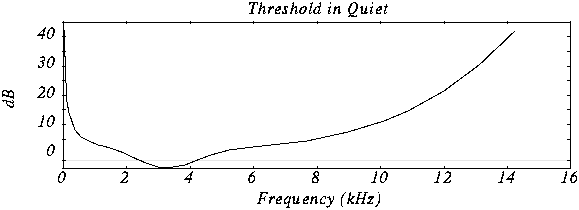
Minimum hearing threshold The ear’s minimum hearing threshold is the power below which a tone at a given frequency is not capable of being detected by the ear. This threshold is non-linear. As we see in the figure, which represents the Fletcher and Mundson law, the frequencies in which we hear best are those between 2 and 5 Khz. Therefore frequencies outside that band are not totally essential since they will hardly be perceived. Therefore it is possible to remove the content of the audio signal outside these frequencies.

As we can see in the drawing, the range in which a lower power is needed for the tone to be heard is between 2 and 4 Khz.

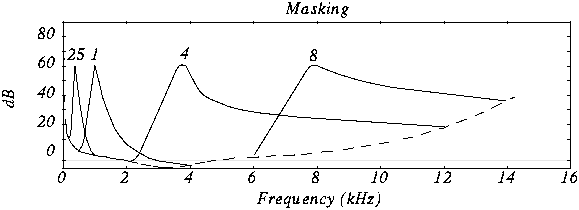
The masking effect This effect consists in that, when an audio signal has a tone at a given frequency, it produces a masking effect at the frequencies close to it, so that if at these nearby frequencies the signal does not exceed a certain power threshold cannot be heard and therefore it is not necessary to encode them. The form that this power threshold will take according to the position of the tone or the masking tones is what is called the psychoacoustic model, which as the name itself indicates is a perception model that tries to emulate the perception of the human ear.

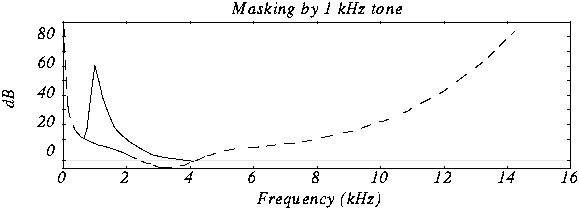
In this graph we can see how if we put a tone at 1 Khz of 60 dB (masking tone) and then we put another tone at, for example 1.1 Khz and we vary the frequency of this, it is not possible to detect the presence of this second tone until its power exceeds the threshold presented in the figure.

In this case we see various masking tones and the resulting new hearing thresholds. In MP3, what is done is to divide the spectrum to be transmitted (that is, between 2 and 5 Khz) into frequency subbands, so that the power of the subband is evaluated and the masking threshold is created in the nearby subbands. Nearby subbands that exceed that power threshold are coded and those that do not exceed it are not coded.

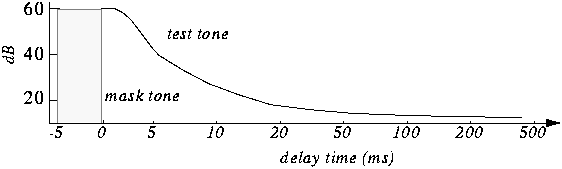
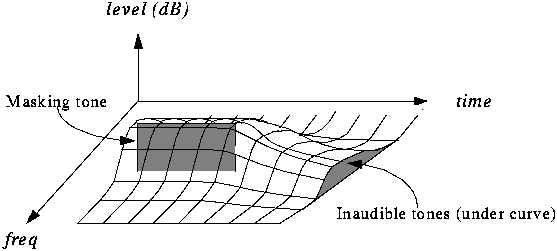
Furthermore, the masking is not only in appearance but also in time as we can see in the figure.

The byte reserve: Often, some passages of a musical piece cannot be encoded at the same rate without altering the quality of the music. MP · then uses a small byte reservation that acts as a buffer using the capacity of passages that can be encoded at a lower rate in the given stream.
The stereo assembly In the case of a stereo signal, the MP3 format can use a few more tools to further compress the data.
Intensity stereo (IS) The human ear is not able to locate with complete certainty the spatial origin of sounds for very high or very low frequencies. This technique takes advantage of this, recording some frequencies as a monophonic signal, so that a minimum of spatial content is subtracted from the sound.
Mid / Side (M / S) Stereo When the left and right channels are similar then a middle channel (L + R) and a side channel (LR) are created, which are encoded instead of encoding the left channel on one side and the right for another. In this way it is possible to reduce the transmitted data using fewer bits for the lateral channel. Then during playback the MP3 decoder will reconstruct the left and right channels.

Huffman Coding: This coding technique is used at the end of the whole process. It works by creating variable-length codes, so that the symbols that appear in the bitstream most likely have shorter codes. The translation between symbols and codes is done using a table. Each code has a unique prefix so that the codes can be decoded correctly despite their variable length. This type of coding allows on average to reduce by 20% the amount of data to be transmitted. It is an ideal complement to perceptual coding since, during great polyphonies, perceptual coding is very efficient since many sounds are masked, but nevertheless little information is identical and Huffman’s algorithm becomes inefficient. During pure sounds there are few masking effects, but Huffman encoding is very efficient since digitized sound contains many repeating bytes.