3GP Normalizer


Free Download Mp4Gain
picture

3GP Normalizer

3GP Normalizer
3GP Normalizer
3GP Normalizer
3GP Normalizer

3GP file normalization

3GP file normalization is a vital process that ensures consistent audio and video quality in 3GP format files. By applying normalization, the volume levels are adjusted, resulting in a balanced and optimized playback experience for 3GP files.

How to normalize 3GP files

If you want to normalize your 3GP files, there are various methods available. You can use dedicated video editing software that offers normalization features or employ specialized audio tools to adjust the audio levels. Both options allow you to achieve a consistent volume across your 3GP files.

Benefits of normalizing 3GP files

Normalizing 3GP files offers several benefits. Firstly, it ensures that the audio levels in your videos are balanced, eliminating any sudden volume changes that may occur during playback. Normalization also enhances the overall viewing experience by providing a consistent audio level, making it easier to understand dialogue and enjoy the accompanying soundtrack. Additionally, normalized 3GP files are optimized for sharing and distribution, ensuring that your audience receives a consistent viewing experience.

Best practices for 3GP normalization

When normalizing 3GP files, it’s important to follow some best practices. Firstly, it’s recommended to work with a high-quality source file to ensure optimal results. Additionally, carefully monitor the audio levels during the normalization process to avoid introducing distortion or clipping. It’s also essential to preview the normalized files on different devices and playback environments to ensure they sound as intended.

Common misconceptions about 3GP normalization

There are a few misconceptions surrounding 3GP normalization that need clarification. One misconception is that normalization can fix all audio issues, such as background noise or audio artifacts. However, normalization primarily focuses on adjusting volume levels and does not address other audio quality problems. It’s important to note that excessive normalization can lead to a loss of dynamic range, so it’s crucial to apply normalization conservatively.

Preserving video quality during 3GP normalization

During the 3GP normalization process, it’s important to preserve the video quality as well. While the primary goal is to adjust the audio levels, any changes made to the video should not compromise its visual integrity. Choose a normalization method that maintains the original video resolution, frame rate, and other visual attributes to ensure a seamless viewing experience.

Future-proofing your 3GP files with normalization

Normalization plays a significant role in future-proofing your 3GP files. As technology advances and new playback devices emerge, normalized files ensure compatibility and consistent viewing experiences. By normalizing your 3GP files, you can be confident that they will look and sound great on various platforms, both now and in the future.

Summary

3GP normalization is a vital process that adjusts the audio levels in 3GP files to ensure a consistent viewing experience. By normalizing your 3GP files, you can eliminate volume inconsistencies and optimize the audio quality. Following best practices, such as using high-quality source files and monitoring the audio levels, is essential for successful normalization. Preserve the video quality during the process and future-proof your 3GP files by embracing normalization. Enjoy a seamless viewing experience across different devices and platforms with properly normalized 3GP files.


Free Download Mp4Gain
picture


Mp4Gain Main Window
picture


Mp4Gain Features
picture


Free Download Mp4Gain
picture

What is the 3GP format?

On the internet, you keep stumbling across new formats in the form of video formats, audio formats, image formats, or certain file formats. The list of formatting completions can probably go on indefinitely as new ones are added all the time.

3GP FORMAT

Clips in 3GP format A video format has been around for a while, however, not all video players can play this format, we are talking about the 3gp format, you often get this format when you download a movie from mobile phone or recorded it on your mobile phone yourself.

3gp audio format

3gp is a container format

The 3gp format is a container format, which means that there are several existing formats in this “container”, which are “formed” into a new one. The 3gp format is a container composed of an AMR, AMR-WB, or AAC-LC audio track and an MPEG-4 Part 2, H.263 or H.264 video track. It is worth mentioning that the H.264 video track is not compatible with all mobile phones, so it is less common to find a container that contains this video track.

Typical properties of this mobile phone video format
The 3gp format has some typical properties: on the one hand, a mobile phone movie in this format is mostly a low resolution one, the highest average resolution is 320 x 240 px. Of course, the highest average resolution! At the lower end of average resolutions, it’s about 128 x 96 px, which shows that this format is best suited for displaying videos on a cell phone or smartphone.

No special software is required to play a 3gp video on a commercially available computer, only a 3gp video player must be installed or a codec must be implemented for using 3gp clips.

Another option is to convert the clip to another common format, such as converting it to MPEG format. Windows Media Player can play this format without any problems, so there should be no problem watching the movie from mobile phone.

3GP: 3gp format characteristics


specs

3GP is defined in the ETSI 3GPP technical specifications. 3GP is a required file format for video and associated word / audio media types and timed text in ETSI and 3GPP technical specifications for IP multimedia subsystem (IMS), multimedia messaging service (MMS), multicast / multimedia streaming service ( MBMS)) and transparent end-to-end Streaming Service (PSS) packet switching.

3GP

3G2 is defined in the 3GPP2 technical specification.

Technical details

The relationships between the ISO Base Media Format file format, the MP4 file format, the 3GPP file format, and the 3GPP2 file format. Based on the 3GPP2 technical specification published on May 18, 2007.
The 3GP and 3G2 file formats are structurally based on the ISO core multimedia file format defined in ISO / IEC 14496-12 – MPEG-4 Part 12, but earlier versions of the 3GP file format did not use some of its features. . 3GP and 3G2 are container formats similar to MPEG-4 Part 14 (MP4), which is also based on MPEG-4 Part 12. The 3GP and 3G2 file formats were designed to reduce storage and bandwidth requirements to accommodate cellphones . They are good for low-end smartphones for fast, free streaming.

3GP

3GP and 3G2 are similar standards, but with some differences:

The 3GPP file format is designed for GSM-based phones and can have the file extension of .3gp
The 3GPP2 file format is designed for CDMA-based phones and can have the file extension .3g2
Some mobile phones use the .mp4 extension for 3GP video.

3GP

The 3GP file format stores video streams like MPEG-4 Part 2, H.263 or MPEG-4 Part 10 (AVC / H.264) and audio streams like AMR-NB, AMR-WB, AMR-WB +, AAC-LC, HE-AACaacPlus v1 or advanced (v2 HE-AAC). 3GPP allowed the use of AMR and H.263 codecs in the ISO base file support format (MPEG-4 Part 12), because 3GPP specified the use of voice templates and fields in the ISO base media file format, as well as the definition of new boxes to which codecs refer. These extensions were registered by the registration authorities for code points in the ISO basic multimedia file format (“MP4 family” files). For MPEG-4 media specific information storage in 3GP file, 3GP specification refers to MP4 and AVC file format, which is also based on ISO base multimedia file format. The MP4 and AVC file format specifications describe the use of MPEG-4 content in the ISO base multimedia file format.

A 3GP file is always big-endian, it stores and transfers the most significant bytes first.

3G2

The 3G2 file format can store the same video streams and most of the audio streams used in the 3GP file format. Additionally, 3G2 stores audio streams as EVRC, EVRC-B, EVRC-WB, 13K (QCELP), SMV or VMR-WB, which was specified by 3GPP2 for use in ISO base multimedia file format. The 3G2 specification also defined some enhancements to the 3GPP timed text. The 3G2 file format does not store advanced audio streams aacPlus (HE-AAC v2) and AMR-WB +. For storing MPEG-4 media (AAC audio, MPEG-4 Part 2 video, MPEG-4 Part 10 – H.264 / AVC) in 3G2 files, the 3G2 specification refers to the MP4 file format and the specific format of AVC file, which describes the use of these contents in the ISO base multimedia file format. For storing H.263 and AMR content, the 3G2 specification refers to the 3GP file format specification.

device holder

Most 3G-capable mobile phones support 3GP video recording and playback (memory, maximum file size for playback and recording, and resolution limits exist and vary).
Some newer / higher-end phones without 3G capabilities can also play and record in this format (again, with such limitations).
Imported audio from CDs to a PlayStation 3 when configured to encode MPEG-4 AAC copies on USB devices in 3GP format.
The Nintendo DSi and Nintendo 3DS family support .3gp on an SD card.
Apple iDevices used to support files for playback only as pass-through files, so there are no editing options, but since iOS 9 files mean this format has been deprecated, they have to be manually converted to H.264.

What is the 3GP format? All about 3gp

Not long ago, watching video files on our mobile phones was a challenge. The slow Internet connection and the large size of the multimedia file make viewing it on our Smartphones really annoying – and that’s why the 3GP file was born.

What is 3GP?

3GP3GP or technically known as 3GPP file format, is a multimedia-based format and developed by Third Generation Partnership Project or 3GPP. That is why it was given this popular 3GP name. The 3GP (Third Generation Partnership Project) is the result of cooperation between various companies and telecommunications associations worldwide. 3GP is also the best answer to the problems that people have in viewing multimedia files on their smartphones that are enabled with 3G.

3gp format

Specifically designed for mobile phones, 3GP is a simplified version of MP4. Compared to the bulky and PC-based MP4 format, 3GP is smaller than making it more convenient to watch videos on mobile devices. There are two types of 3GP format; The first is 3GP with a .3GP file extension and the second is 3G2 that carries the .3G2 extension.

Fun facts about 3GP

3GP was made to reduce broadband utilization and storage requirements in mobile phones.
Although this format is made for 3G phones, a 3G gadget is not required to enable it before viewing the file.
3GP files are made for GSM-based phones, while 3G2 is used for CDMA-based phones.
A 3GP file includes text that can be opened using Notepad or any other text editor.
It is not possible to manually change the .3gp file extension to any other format, for this you need a real conversion of the file format.
2G and 4G phones are compatible with 3GP playback.

3gp

Pros:

The main advantage of the 3GP format is that it is its small size. This especially benefits users who usually save and view video files on their Smartphones. And due to its small size, uploading or downloading a video in 3GP format will only take a few seconds or minutes, depending on the size of the file.

Cons:

Since 3GPs compress video and audio transmission in a single file, video resolution and quality also decreases. Compared to other formats, users may notice a big difference in audio quality, screen resolution, playback time and all others.

3GP compatible devices

As mentioned at the beginning, all 3G-capable mobile phones can support 3GP files. Similarly, Smartphones enabled with 2G and 4G, but with some limitations. The maximum size for playing a file depends on the gadget’s memory. But on computers and laptops, all 3GP files can be played according to the installed media player.

PlayStation 3 also supports 3GP, which will play the imported audio from the CD that is configured to decode the MPEG-4 AAC format. On the other hand, Nintendo DSi also supports 3GP files saved on the SD card. When transferring 3GP files, we advise you to use removable storage devices, such as USB sticks and memory cards.

How to play 3GP files?

3gp players

Media player logo Windows Media Player – this Microsoft media player is preset and can play 3GP. Although, you need to install software such as Haali Media Splitter and FFDShow.

Media player classicMedia Player Classic – another alternative would be the free Media Player Classic software. It is an attenuated version of the aforementioned software that can play 3GP files.

QuickTime player logoQuickTime – for Mac users, QuickTime can be used to open 3GP. More recent versions do not need additional codecs to be installed, although in most cases some complementary types might be required.

VLC player logoVLC Media Player – another free software on the list that can play 3GP files is the VLC player. This program is compatible with 3GP and AAC audio, but unfortunately it cannot decode 3GP with AMR audio.

What is a codec? Audio and video compression


Check our codecs and containers guide to not confuse you anymore. Learn what formats suit you.

Has it happened to you that you download a video file and then you can’t use it on your player? Or that you finally finish editing your video clip and it takes years to upload to the Internet? You might think it’s a problem with your file. You are not in error, only that the question is more specific: it is the codec and container you are using.

Perhaps they are somewhat strange terms, but they are gaining more and more publicity due to the growing online video and audiovisual production community. So if you plan to start your career as a youtuber, take into account the information, because if you end up with a final video with a weight of 1 GB it will not be fun to wait for it to upload…

In this guide we will explain what each of these elements consists of and how they work. We will talk about both: video and audio.

What is a codec?

Those who are dedicated to video editing know very well that storage space can be a problem. It is better to have the material you record in its original format, but most of the time this implies a considerable amount of GB of space. For example, if you record an hour of content with a high-definition camera you may need … up to 410 GB! This is complicated to keep it, much more if you want to transmit to other media. It is here that the subject gets interesting.

The term codec refers to the process of compression and decompression of video or audio. It is a tool that encodes the video through algorithms and converts it into information. This way you can decrease the file size.

The choice of codec depends on different factors. You should take into account mainly the means of reproduction for the final product. However, coding is not enough for reproduction, it is also necessary to “package” the information to be able to present it. We are talking about containers.

What are those containers?

Suppose you just finished editing a video. The final file contains both images and audio, so you need a way to display it just as you prepared it. This “package” is basically what many refer to when they talk about the format of a file. Then, a container can accept different codecs, while players can use certain containers. For example, the VLC player accepts almost all containers.

Lossless and lossless codecs (lossy and lossless)

There are different types of compression, as we will see later. However, all of them can be divided into two categories: with or without loss. Loss of what? Quality. For example, in the case of audio files, it is not the same to listen to a song in FLAC (Free Lossless Audio Codec) format to one in MP3 (MPEG Audio Layer III). The first is coded in such a way that almost no information is lost at the time of compression, that is, fidelity is maintained.

The same goes for the video. When you want to save storage space, files with loss are compressed, that is, lossy. This makes them much easier to manage. However, it is inevitable to deal with the loss of data and, therefore, fidelity of the image or audio. On the other hand, when you want to maintain the highest possible quality and you have no problem of space, compressors are used without loss or lossless. Again, it all depends on the purpose of your file.

Digital video formats: how to differentiate them

As with text documents, photographs or audios, digital video is available in different formats or extensions.

In this sense, today we find DVD and Blu-Ray, although some of us still keep in an old VHS closet and maybe some Betacam.

But a second meaning or meaning of video formats refers to their encoding, since in digital video, as with a computer program, any file is written in a certain code.

In videos, the code influences image quality, sound quality, whether or not it includes subtitles and, especially, the relationship between quality and file size.

Thus, today we consume digital audiovisual content through physical discs (DVD, Blu-Ray), through streaming and through IPTV (Internet television), but we also handle digital video files, especially for content that we generate ourselves.

Next we will review the most common digital video formats that we can find, what is their origin and what benefits they offer. I apologize in advance for the gibberish of acronyms.

AVI

We start with the most popular format that we will find. Video files with an .AVI extension have their origin in a format that was launched in 1992 and is so popular that most smart TVs, DVD / Blu-Ray players, video game consoles and operating systems play it.

AVI is an acronym for Audio Video Interleave and not many know that it was created by Microsoft as a digital alternative without dependence on a physical format such as the then popular DVD.

Among its advantages, it allows you to include several audio channels and host content generated with different codecs (AC3 or MP3 for audio, DivX or Xvid for video), which can be an advantage but also an inconvenience with which players.

MP4

MP4 or MPEG-4 is one of the most modern formats, launched in 1998 as a standard for playing video and audio in a single digital file.

MPEG stands for Moving Picture Experts Group, the expert group that has established digital audio and video standards and was formed by two international organizations, the ISO (International Organization for Standardization) and the IEC (International Electrotechnical Commission).

In summary, the MPEG and MPEG-2 format were launched in 1993 and 1995 respectively as standards for encoding digital audio and video. To understand each other, any DVD offers its audiovisual content in MPEG-2.

MP4 also supports several audio channels, but has the advantage of allowing more image and sound quality in a less heavy file, as it compresses data better. Apple, for example, opts for this format and derivatives for its iTunes content.

Related to MP4 we can find M4V (video) or M4A (audio).

MKV

The MKV video format is an open format, free to pay rights, and whose full name is Matroska, like traditional Russian dolls.

MKV saw the light at the end of 2002 and has become popular thanks to the fact that within a single MKV file we can store, together with the audio channel, several channels or audio tracks and several subtitle tracks.

Like MP4, it offers very good audio and video quality in a small space. And as a curiosity, the WebM format that allows you to integrate online video via HTML, is inspired by Matroska.

FLV

The FLV or Flash Video format was created by Macromedia, and subsequently acquired by Adobe. This format is usually found as an FLV or SWF extension.

Like the other Flash content, FLV videos are designed for online playback from the browser through Adobe Flash Player.

As we saw in a previous article, Flash will stop developing in 2020, although we still find pages that use it.

MOV

I said before that Apple is currently betting on MP4 (and AAC) to facilitate multimedia content. But its star format for many years was MOV.

MOV, from QuickTime Movie, is also called QuickTime File Format, and today it is still the default format of QuickTime, the macOS video player.

This format can also be found in many digital video cameras, since it offers very good quality

Audio quality: Bitrate in MP3 files

In many cases, the term Bitrate is used, which is the bit rate per second that a multimedia file (Audio or Video) has. Currently the MP3 music format is one of the most widespread (Although there are currently other more current formats such as OGG Vorbis, AAC, Flac, Monkey Audio, …) however the audio quality is variable, this is due to the characteristics with which the MP3 in question has been compressed, including:

Mode: It can be of two types mainly:

Mono: With a single channel (The right and left channel go together, not separated which gives worse audio quality).

Stereo: Two channels (Right and Left, improve audio quality).

Sampling frequency:

Audio CDs use 44,100 Hz (22,050 Hz per channel), although there are higher frequencies such as 48,000 Hz used in DVDs and lower, the higher the frequency, the higher the quality.
Bits: Audio CDs have 16 Bits (Although MP3 can be compressed at a lower quality such as 8 Bits).
Bitrate (Bit Rate per second): Audio CDs have about 1,400 Kbps (44100 Hz * 16 Bits * 2 channels), meaning that an Audio CD would have a bitrate of 1,400 Kbps (In MP3 format the maximum Bitrate is 320 Kbps, however, it is assumed that an MP3 with a 128 Kbps Bitrate has a quality similar to CD, although in many cases to achieve a quality similar to CD it is necessary to use a Bitrate of 192 Kbps, and to obtain CD quality it is necessary use 256 Kbps or 320 Kbps).

Some of the most common Bitrates are:

8 Kbps Mono: Telephone Sound.
16 Kbps Mono: Better quality than shortwave.
32 Kbps Mono: Better quality than AM.
64 Kbps Stereo: Better quality than FM.
112 – 128 Kbps: Quality close to CD.
160 Kbps: Quality closer to CD.
192 Kbps: Virtually CD quality.
256 Kbps: Quality CD practically undisputed from an original CD.
320 Kbps: CD quality.

Coding method: It can be of two types:

VBR (Variable Bit Rate, Bit Rate Variable): Encodes the file in MP3 with a variable Bitrate.
CBR (Constant Bit Rate, Constant Bit Rate): Encodes the MP3 file with a fixed Bitrate.

In addition, another factor that influences the encoding of the MP3 file is the CODEC (Encoder-Decoder) used, one of the most common and the best result is LAME (Lame Ain’t an MP3 Encoder) which is also free.

One point to keep in mind is that if we recompress an MP3 file that originally has a 128 Kbps bitrate and convert them to 192 Kbps for example, audio quality is not really gained because the MP3 format has some quality loss (MP3 is a loss algorithm, also called lossy). which has occurred when converting the original file (Ex: CD Audio or a 320 Kbps MP3 to a 128 Kbps MP3) so this recompression does not make much sense since we will not gain in audio quality (As they say where there is no one can not get) and the only thing we will achieve in any case is to increase the initial size of the file.

The opposite case (Recompress a 320 Kbps MP3 file for example at 192 Kbps) if it makes some sense because in this case although we lose some audio quality we reduce the weight (Kilobytes or Megabytes) of each MP3 file somewhat.


In conclusion, it can be said that if we need to encode / compress an MP3 file with good quality, the “ideal” would be to do so:

To be able to start from an Audio CD, although an MP3 at 320 or 256 Kbps could also be valid for a recompression of the file.
In stereo mode (With two channels, right and left).
With at least 44100 Khz sampling rate and 16 Bits.
With a minimum bitrate of 192 Kbps or at most 256 Kbps (Using 320 Kbps would give higher quality but also increase the file size considerably).
Use the LAME Codec (Lame Ain’t an MP3 Encoder).

Audio normalization

Audio normalization

audio normalization

The normalization of the audio level is something that is achieved by applying a constant and maintained amount of gain, in volume, to an audio recording to bring the average peak amplitude to a desired level that has been previously defined. To which the same amount of gain is applied to the entire range, the signal-to-noise ratio generally does not change. Normalization differs from dynamic range compression, which applies different levels of gain to a recording so that the amplitude is within a minimum and maximum range. Standardization is one of the most common functions provided by a digital audio workstation.

Peak normalization

One type of normalization is peak normalization, in which the gain is changed to bring the highest PCM value or the highest peak of an analog signal to a given level.1

Since it only searches for the highest level, it does not take into account the apparent volume of the content. As such, peak normalization is generally used to change the volume in such a way as to ensure optimum use of the distribution medium in the mastering stage of a recording. loudness normalization.

Normalization of loudness

Another type of normalization is based on a loudness measure, in which the gain is changed to bring the average amplitude to an objective level. This average may be a simple measurement of average power, such as the RMS value, or it may be a measure of the loudness perceived by humans, such as that offered by ReplayGain.

Depending on the dynamic range of the content and the target level, the normalization of the loudness can lead to peaks that exceed the limits of the recording medium. Some software has the option of using dynamic range compression to avoid saturation when this happens. In this situation, the signal-to-noise ratio is altered.

volume booster

Modern Audio Normalization

Currently Mp4Gain uses an audio normalizationn that is more similar to that used in modern recording studios or live music group recitals.

It is a normalization of volume focused from a new perspective.

Under this new paradigm, not only does it achieve that all songs have the gain of loudness at the best possible level, but it also achieves that each instrument and / or voice obtains a level of gain that makes it audible. Achieve an optimized level of volume gain normalization.

There is no other normalizer in the market that obtains this level of result. People with training in hearing listening can easily notice the difference., very similar to that obtained with expensive hardware in radio stations or in recording studios or in recital consoles, combining limiters, modern compressors and other processors.
All these results that offer expensive hardware equipment, Mp4Gain does for a few dollars.

In fact, the opposite result is achieved than that achieved with masking, because with masking, which is a method used to compress music, you can no longer perceive some sounds that are behind a more audible sound, that is what is called masking, which leads to the loss of audio quality.

Mp4Gain manages to highlight hidden instruments and sounds, performing an audio normalization by frequency bands to achieve this.

That is why we say that Mp4Gain achieves the same results as those obtained through a series of hardware equipment (limiters, compressors, normalizers, etc.) that are very expensive, while Mp4Gain costs only a few dollars.

Digital Audio – Beginners guide

The Cost of a High Sampling Rate

Although it is true that high sampling rates produce better sound quality … that comes at a price.

That price translates into:

Higher processing load.
Less number of tracks.
Heavier audio files.
So you always give something in return. Professional studies can support higher sampling rates because they use better equipment.

But for most home studios, people often find that the standard 48 kHz configuration is the best.

Following…

4. Bit Depth

In order to understand what bit depth is, we first have to know what bits are.

A bit (or binary digit) is a single unit of binary code, with a value of 1 or 0.

The more bits, the more possible combinations. For example…

As you can see in the diagram below, 4 bits allow a total of 16 combinations.

4 bits

When used to encode information, each of these numbers is assigned a specific value.

As the number of bits increases, the possible values ​​grow exponentially.

4 Bits = 16 possible values
8 Bits = 256 possible values
16 Bits = 16,536 possible values
24 Bits = 16,777,215 possible values
With the bit depth in the digital audio, each value is assigned a specific amplitude of the waveform.

The greater the bit depth, the greater the volume increase between high and low … and a greater dynamic range in the recording.

A good rule of thumb is: for every extra bit, the dynamic range increases by 6dB.

For example:

4 Bits = 24 dB
8 Bits = 48 dB
16 Bits = 96 dB
24 Bits = 144 dB
In the end, what this means is that… the greater the bit depth, the less noise.

Because by adding more processing margin (or headroom), the useful signal (at the high end of the spectrum) can be recorded higher above the background noise (at the low end of the spectrum).

small vs large bit depths

Following…

5. Quantization Noise

Impressive that a 24-bit recording can result in almost 17 million possible values, right?

However, that remains much less than the infinite number of possible values ​​that exist in an analog signal.

Therefore, in almost all samples, the actual value is somewhere between two possible values. The solution of the converter is simply to round it or “quantify” it to the nearest value.

The resulting distortion, known as quantization noise, takes place in 2 phases of the recording process:

at the beginning, during the A / D conversion, and
at the end, during mastering
With mastering, the sampling frequency / bit depth of the final track is usually reduced by converting to the final digital format (CD, mp3, etc.).

When that happens, some of the information is erased and “re-quantized”, generating more distortion in the sound.

The most frequent solution to deal with this problem is …

6. Dither

When reducing a 24-bit file to 16 bits, the screen is used to mask much of the resulting distortion …

Adding a low level of “random noise” to the audio signal.

As it can be difficult to visualize the concept in audio, to explain it, we usually turn to the popular analogy of the screen plot.

Is that how it works:

When a color photo is converted to black and white, a mathematical estimate is made to determine if each color pixel should be “quantized” in a black pixel, or a white one …

As is the case when digital audio samples are quantized.

As you can see in this picture, the “before” photo is pretty bad, right?

dither

But with the plot …

a small number of white pixels are randomly distributed in black parts, and …
a small number of black pixels are randomly distributed in white parts …
By adding that “random noise” to the image, the “after” photo looks much better. Well, the screen in the audio works very similarly.

Following…

7. Latency

The GREAT PROBLEM of current digital studies is the amount of latency that accumulates in the signal chain, especially with DAWs.

With all the calculations that are processed, the audio signal takes time to leave the system between a few milliseconds and a few DOCENAS of milliseconds.

Between 0-11 ms of latency – it is short enough, so a normal person does not notice it.
Between 11-22 ms – an annoying delay is heard which it is difficult to get used to.
More than 22 ms – there is so much delay that it is impossible to play or sing at tempo with the track.
In a normal digital signal chain there are usually 4 phases that contribute to the total latency:

A / D conversion
DAW Buffer
Delay of the Plugins
A / D conversion
The A / D and D / A conversion are the least harmful, contributing to total latency with less than 5 ms.

But nevertheless…

The DAW buffer and certain plugins (including compressors and virtual instruments) can add up to 20, 30 or 40 ms or

Beginner’s Guide to Digital Audio for Recording Music

62c-digital audio When recording at home began to become popular …

It happened for a simple reason:

The analog equipment of the past decades was being slowly but inexorably replaced …

For a new generation of audio interfaces and other digital equipment that was cheaper and easier to use.

And that trend has continued since then.

Today … digital audio is the standard in almost all studios, both professional and amateur.

However, surprisingly, there are few people who really understand what it is about.

So let’s see what it is about:

1. The Rise of the Digital Age

binary code Although digital audio is the standard in today’s music …

It has not always been that way.

Originally, music information only existed as sound waves in the air.

Then, as technology progressed, people discovered new ways to convert that information to other formats, including:

notes on a page
electrical signals inside a cable
radio waves in the atmosphere
relief on vinyl records
But in the end, with the rise of computers, digital audio ended up being the dominant format in the music production industry, since it allowed copying and transporting songs in a simple and free way.

And the device that made all that possible was … the digital converter.

Let’s see how they work …

2. Digital Converters

In recording studios there are 2 types of digital converters:

Those that are an independent device, which are normally seen in more advanced studies, or …
Those that are integrated into the audio interfaces, which are usually seen in home studios.
To convert the audio to binary code, they take tens of thousands of samples (samples) per second to make an “approximate” image of the analog waveform.

The image is not accurate because in the intervals between samples, the converter basically has to guess what is happening.

Digital waveform

As you can see in the diagram, in which:

the red line is the analog signal, and …
the black line is the conversion …
The results are not perfect, but they are good enough to generate excellent sound quality.

How excellent? That depends largely on …

3. Sample Rate

Check out this image:

sample rate diagram

As you can see…

When taking more samples per second, the highest sampling rate:

Collect more real information,
Go less to the estimate, and
It generates a much more accurate image of the analog signal.
Logically, the end result is … better sound quality.

Let’s talk about specific data:

Normal sampling frequencies in professional audio range around:

44.1 kHz (audio CD)
48 kHz
88.2 kHz
96 kHz
192 kHz
The minimum of 44.1kHz is due to a mathematical principle known as …

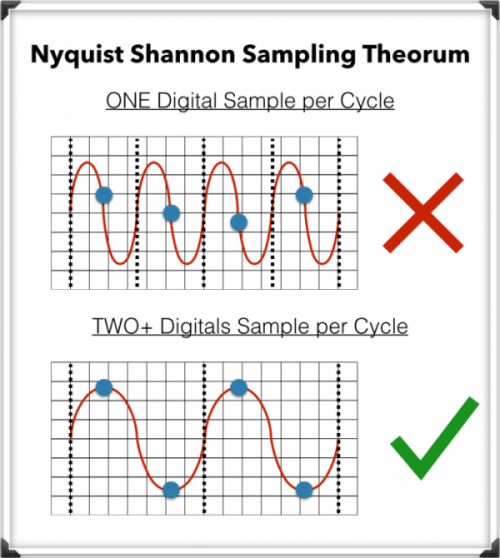
The Nyquist-Shannon Sampling Theorem

To record digital audio accurately, converters have to capture the entire human listening spectrum, which is between 20Hz – 20kHz.

According to the Nyquist-Shannon Sampling Theorem …

To capture a specific frequency, at least 2 samples are needed for each cycle … to measure both the upper and lower points of the sound wave.

That means that recording frequencies of up to 20kHz require a sampling rate of 40kHz or more, which explains why the audio CDs are just above that minimum, at 44.1kHz.