Volume Booster


Free Download Mp4Gain
picture

Volume Booster

Volume Booster

Let’s talk about Volume Booster

I’ve spent years working with audio, and let me tell you, the quest for louder sound is a constant. Think of it like trying to get a bigger splash in a pool. You can jump higher (increase the gain), but sometimes you just need more water (a higher volume level). That’s where a volume booster comes in. In my experience, from boosting quiet recordings of birdsong to pumping up the volume on movie dialogue, these tools are invaluable.

A volume booster is like a magnifying glass for sound. It takes existing audio and amplifies it, making it louder. There are different types, from simple sliders in media players to dedicated software and apps. I remember trying to hear a faint recording of a lecture, and a simple volume booster made all the difference. But choosing the right one depends on your needs.

Understanding Volume and Gain

Volume and gain are often confused, but they are distinct. Imagine a faucet. The volume is the total amount of water coming out, while the gain is how much you’ve opened the tap. A volume booster increases the overall “water flow” of your audio.

What is Volume?

Volume is the perceived loudness of a sound. It’s what you adjust with the volume knob on your phone or stereo.

What is Gain?

Gain is the amplification applied to a signal. Think of the amplifier in a guitar rig—it boosts the signal from the guitar, increasing its volume.

Different Types of Volume Boosters

Volume boosters come in various forms, each with its strengths and weaknesses. From software for your computer to apps for your phone, there’s a booster for every situation. I’ve used them all, from simple browser extensions for quick boosts to professional software for detailed audio editing.

Software Boosters

Software boosters are installed on your computer and offer more control over the boosting process.

App Boosters

App boosters are perfect for mobile devices, allowing you to quickly adjust the volume on the go.

Browser Extensions

Browser extensions offer a convenient way to boost the volume of online content.

How Volume Boosters Work

Volume boosters essentially increase the amplitude of the audio signal. Think of a swing. A small push creates a small swing (low volume). A bigger push creates a bigger swing (higher volume). The booster provides that bigger push.

Digital Signal Processing

Volume boosters use digital signal processing (DSP) to manipulate the audio. It’s like adjusting the recipe of a cake – changing the ingredients (audio data) to get a different outcome (louder sound).

Amplification

The core function of a volume booster is amplification – increasing the amplitude of the audio signal. I’ve used this to make quiet dialogues in movies audible without blasting the sound effects.

Safe Volume Limits

While boosting volume can be helpful, it’s crucial to be mindful of safe listening levels. Think of your ears like delicate flowers. Too much sun (loud noise) can damage them.

Protecting Your Hearing

Prolonged exposure to loud sounds can cause permanent hearing damage. Like overwatering a plant, too much volume can be harmful.

Choosing the Right Volume Booster

Selecting the right volume booster depends on your specific needs and devices. From enhancing music to making online videos louder, different tools excel in different areas.

Consider Your Needs

What are you trying to boost? Music, movies, podcasts? Different boosters offer various features and levels of control.

Device Compatibility

Make sure the booster is compatible with your device (computer, phone, etc.).

Benefits of Using a Volume Booster

Volume boosters offer a range of benefits, from improving the audibility of quiet audio to enhancing your overall listening experience. I’ve used them to make soft-spoken narrators in audiobooks clearer and to enjoy podcasts in noisy environments.

Improved Audio Clarity

Boosting the volume can make quiet sounds more audible and improve clarity.

Enhanced Listening Experience

A volume booster can transform a weak audio signal into a richer, more enjoyable experience.

FAQ about Volume Booster

What are the benefits of using a volume amplifier?

A volume amplifier can improve clarity in quiet audio and enhance the overall listening experience, especially for soft sounds or in noisy environments.

How do volume boosters differ from equalizers?

Volume boosters increase overall loudness, while equalizers adjust specific frequency bands to balance sound. It’s like adjusting the overall volume versus fine-tuning individual instruments in a band.

Can volume boosters damage my speakers?

Excessively boosting volume can distort audio and potentially damage speakers if they are pushed beyond their limits. Think of it like overfilling a balloon; too much air and it can burst.

Are volume boosters safe for headphones?

Similar to speakers, boosting volume too much can strain headphone drivers and potentially damage your hearing if listened to at high volumes for extended periods.

What are some common uses for a volume increaser?

Volume increasers can be useful for improving the audibility of quiet dialogues in movies, making online videos easier to hear, or enhancing music playback on devices with low volume output.

How can I boost volume without distortion?

Avoid extreme boosting. Gradual increases are less likely to cause distortion. It’s like adding spices to food; a little at a time is better than a sudden dump.

What’s the difference between a volume booster and a sound amplifier?

The terms are often used interchangeably. Generally, “volume booster” refers to software or apps, while “sound amplifier” can include physical devices as well.

Can I use a volume maximizer on live audio?

Yes, volume maximizers can be used in live settings, often as part of a mixing console or sound system to optimize audio levels. However, careful adjustments are essential to avoid feedback and distortion.

div>

What’s the best volume booster for my phone?

Many volume booster apps are available for smartphones. The best one depends on your device’s operating system and your specific needs. User reviews and ratings can help you choose.

Can a volume booster improve the quality of a low-quality recording?

While a volume booster can make a quiet recording louder, it won’t necessarily improve the underlying audio quality. It’s like zooming in on a blurry picture – it gets bigger, but not clearer.

Latest words on Volume Booster

From boosting quiet podcasts to enhancing music, volume boosters have become an essential tool in my audio toolkit. Just like a good pair of glasses improves your vision, a volume booster clarifies and enhances your audio experience. Remember to use them responsibly to protect your hearing and avoid damaging your equipment. For a reliable and user-friendly solution, Mp4Gain is a great option.

Comments:

Wow, this is a goldmine of info! I always wondered about the difference between volume and gain. Thanks for clearing that up! – AudioNewbie

Great article! I’ve been looking for a way to boost the volume on my laptop without distorting the sound. Any specific software recommendations? – SoundSeeker

Super helpful explanation of how volume boosters work. I used to think they were magic, but now I actually understand the science behind it! – TechieTom

I’ve been having trouble hearing dialogue in movies, and this article gave me some great ideas. Gotta try a volume booster app! – MovieFanatic

This is the best explanation I’ve found on volume boosters. Thanks for sharing your expertise! – AudiophileAnnie

I’m a musician and I’m always looking for ways to improve my audio. This article is bookmarked! – GuitarGuyGreg

This was really insightful. I’m a podcaster, and I’m definitely going to explore some of these volume boosting tools. – PodcastProPatty

Learned a ton from this article! Thanks for the tips on safe listening levels. – EarCareEddie

I have some old recordings that are really quiet. I’m hoping a volume booster can help make them listenable again. – MemoryLaneMike


Free Download Mp4Gain
picture


Mp4Gain Main Window
picture


Mp4Gain Features
picture


Free Download Mp4Gain
picture

Does bitrate influence? A 320 kbps Mp3 sounds better than a 128 kbps one?

Much has been speculated about the bitrate. Most people do not understand clearly what it is. A few understand, but almost nobody knows if a file with 320 kbps really sounds different or better than the same file but with 128 kbps.

The easiest way is to test:

The first is at 128 kbps

Now let’s hear the 320 kbps option

Notice the difference? In case the note is because it was encoded using the Mp4Gain.
Normally it is almost impercentible, but using a good encoder you get to notice some subtle difference.

It should be taken into account that at higher kbps, if there is a higher quality – although it is not always noticeable – and will always use more disk space.

Therefore it is not the best option to say “all my mp3s will be 320 kbps”, unless the space does not mean any problem at all.

How MP3 files work

The MP3 movement is one of the most incredible phenomena that the music industry has ever seen. Unlike other similar phenomena, such as the introduction of cassette tape or CD, MP3 technology did not start with the industry, but with a huge audience of music lovers on the Internet. The digital MP3 music format has had, and will continue to have a great impact on how people collect, listen and distribute the music.

If you have wondered how MP3 files work, or simply want to know what uses can be given, read on. This article will give some features of this popular sound format.

MP3 format

If you know something about how CD’s work, then you know how they store music. A CD stores a song in the form of digital information. The data on a CD uses a decompressed high resolution format. This is what happens when a CD is created:

The music is sampled (fractionated) 44,100 times per second. Each of these parts has a size of 16 bits.
Pieces of these fractions or “samples” are taken from the left and right channels in a stereo system.
With a simple formula we realize how great a single song can be.

Fractions * bits * channels = X bits per second

In our case it would be 44,100 for 16 bits per 2 channels, which would give us 1,411,200 bits per second. 1.4 million bits per second equals 176,000 bytes per second. If the average of a song is 3 minutes, then the average of a song on a CD is 32 million bytes of space. That is a lot of space for a song, and it is especially great if we consider that we are downloading music with a 56K Modem, which will take us a few hours.

The MP3 format is a compression system for music. This format allows you to reduce the number of bytes in a song without damaging the sound quality. The goal of the MP3 format is to compress a CD quality song without letting you see the difference. With MP3, a 32 MB song from a CD, compresses up to 3 MB. This allows you to download a song in minutes instead of hours, and store hundreds of songs on your computer’s hard drive.

Compression and quality

Is it possible to compress a song without damaging the quality? To perform this compression, the use of algorithms is needed, in the same way that we use them to compress other formats, such as graphics, text files, applications, etc. A very popular algorithm for compressing sound is the “perceptual noise shaping” technique. This algorithm uses characteristics of the human ear such as:

There are certain sounds that the human ear cannot hear.
There are certain sounds that the human ear hears better than others.
Its there are two sounds playing at the same time, we can hear the one that is louder, and not the lowest.
Using factors like these, certain parts of the song can be eliminated without significantly damaging the quality of the song for the listener. When you have created the MP3 file, what you have is music with a quality close to that of a conventional CD. It doesn’t sound exactly the same because some things have been removed, but it’s very close.

Using the MP3 format

The MP3 movement – consisting of the MP3 format itself and the ability of websites to distribute it – have done several things in the music world:

It has made it easy for anyone to distribute music at a low cost, or even for free.
It has made accessing music simple and instant.
He has taught people to manipulate music on a computer.
One of the strengths of this format is the ability to edit, create and modify music files thanks to powerful computer software tools. Thanks to these tools, it is extremely easy for anyone:

Download an MP3 file from a website and play it instantly.
Transform or “rip” a song from a CD, to the MP3 format, and listen to it later.
Record a song yourself, convert it to MP3, and make it available to everyone on the Internet.
Convert MP3 files into CD files and make your own audio CD’s with MP3 files downloaded from the Internet.
Have thousands of hours of music stored on one or more hard drives.
Upload MP3 files to portable players and listen to them wherever you want.
To do all this, all you need is a computer with a sound card, speakers, an Internet connection, a CD / DVD player / recorder, and an MP3 player.

What it is and how to perform a volume normalization on your MP3


What it is and how to perform a volume normalization on your MP3

Have you ever heard the term audio normalization, without being sure of what it meant? As a lover of music and technology, I also encountered such a doubt many years ago. Basically, giving a short definition, it is about the standardization of the volume, or rather, of the audio spectrum with respect to other subjects, usually of the same disc.

And that, to put it more simply, is the equalization of the volume of the different tracks on a disc. The reasons are many, and usually if the tracks are extracted from the same job they already have the same volume and gain, but what happens if we want to make a mixtape? For example, we decided to make a compilation called The Best 100 Rock Songs in History. Surely have songs from The Beatles or The Rolling Stones, and therefore from different albums. Depending on the year, type of mastering, etc. etc., we can end up with a CD that contains many different volumes, something that can be annoying when listening. That is just one of the reasons to normalize our MP3 collection.

There are add-ons for players that allow us to normalize on the fly. In fact we can say that programs like Spotify already do this by means of the option to equalize volume of all the songs, however the application that I present below allows us to permanently normalize modifying MP3 files and many other formats, both audio and Of video..

This is Mp4Gain, which stands out for its simplicity of use and is presented under an interface that is ideal to understand exactly what a normalization is and see the before and after. When we open the application we find a window in which we have a grid, which will be populated when we add files or folders, and a keypad with various options.

How do we normalize? Simply change the gain through the specific menu for this.

By pressing OK the application will start working and save our files with the same gain, so it is ideal that before doing the first tests we make a backup. It must also be taken into account that it is an operation that can take time, something that depends on the speed of our processor, the number of issues to normalize and also the size and quality of them.

Audio normalization

Audio normalization

audio normalization

The normalization of the audio level is something that is achieved by applying a constant and maintained amount of gain, in volume, to an audio recording to bring the average peak amplitude to a desired level that has been previously defined. To which the same amount of gain is applied to the entire range, the signal-to-noise ratio generally does not change. Normalization differs from dynamic range compression, which applies different levels of gain to a recording so that the amplitude is within a minimum and maximum range. Standardization is one of the most common functions provided by a digital audio workstation.

Peak normalization

One type of normalization is peak normalization, in which the gain is changed to bring the highest PCM value or the highest peak of an analog signal to a given level.1

Since it only searches for the highest level, it does not take into account the apparent volume of the content. As such, peak normalization is generally used to change the volume in such a way as to ensure optimum use of the distribution medium in the mastering stage of a recording. loudness normalization.

Normalization of loudness

Another type of normalization is based on a loudness measure, in which the gain is changed to bring the average amplitude to an objective level. This average may be a simple measurement of average power, such as the RMS value, or it may be a measure of the loudness perceived by humans, such as that offered by ReplayGain.

Depending on the dynamic range of the content and the target level, the normalization of the loudness can lead to peaks that exceed the limits of the recording medium. Some software has the option of using dynamic range compression to avoid saturation when this happens. In this situation, the signal-to-noise ratio is altered.

volume booster

Modern Audio Normalization

Currently Mp4Gain uses an audio normalizationn that is more similar to that used in modern recording studios or live music group recitals.

It is a normalization of volume focused from a new perspective.

Under this new paradigm, not only does it achieve that all songs have the gain of loudness at the best possible level, but it also achieves that each instrument and / or voice obtains a level of gain that makes it audible. Achieve an optimized level of volume gain normalization.

There is no other normalizer in the market that obtains this level of result. People with training in hearing listening can easily notice the difference., very similar to that obtained with expensive hardware in radio stations or in recording studios or in recital consoles, combining limiters, modern compressors and other processors.
All these results that offer expensive hardware equipment, Mp4Gain does for a few dollars.

In fact, the opposite result is achieved than that achieved with masking, because with masking, which is a method used to compress music, you can no longer perceive some sounds that are behind a more audible sound, that is what is called masking, which leads to the loss of audio quality.

Mp4Gain manages to highlight hidden instruments and sounds, performing an audio normalization by frequency bands to achieve this.

That is why we say that Mp4Gain achieves the same results as those obtained through a series of hardware equipment (limiters, compressors, normalizers, etc.) that are very expensive, while Mp4Gain costs only a few dollars.

Digital Audio – Beginners guide

The Cost of a High Sampling Rate

Although it is true that high sampling rates produce better sound quality … that comes at a price.

That price translates into:

Higher processing load.
Less number of tracks.
Heavier audio files.
So you always give something in return. Professional studies can support higher sampling rates because they use better equipment.

But for most home studios, people often find that the standard 48 kHz configuration is the best.

Following…

4. Bit Depth

In order to understand what bit depth is, we first have to know what bits are.

A bit (or binary digit) is a single unit of binary code, with a value of 1 or 0.

The more bits, the more possible combinations. For example…

As you can see in the diagram below, 4 bits allow a total of 16 combinations.

4 bits

When used to encode information, each of these numbers is assigned a specific value.

As the number of bits increases, the possible values ​​grow exponentially.

4 Bits = 16 possible values
8 Bits = 256 possible values
16 Bits = 16,536 possible values
24 Bits = 16,777,215 possible values
With the bit depth in the digital audio, each value is assigned a specific amplitude of the waveform.

The greater the bit depth, the greater the volume increase between high and low … and a greater dynamic range in the recording.

A good rule of thumb is: for every extra bit, the dynamic range increases by 6dB.

For example:

4 Bits = 24 dB
8 Bits = 48 dB
16 Bits = 96 dB
24 Bits = 144 dB
In the end, what this means is that… the greater the bit depth, the less noise.

Because by adding more processing margin (or headroom), the useful signal (at the high end of the spectrum) can be recorded higher above the background noise (at the low end of the spectrum).

small vs large bit depths

Following…

5. Quantization Noise

Impressive that a 24-bit recording can result in almost 17 million possible values, right?

However, that remains much less than the infinite number of possible values ​​that exist in an analog signal.

Therefore, in almost all samples, the actual value is somewhere between two possible values. The solution of the converter is simply to round it or “quantify” it to the nearest value.

The resulting distortion, known as quantization noise, takes place in 2 phases of the recording process:

at the beginning, during the A / D conversion, and
at the end, during mastering
With mastering, the sampling frequency / bit depth of the final track is usually reduced by converting to the final digital format (CD, mp3, etc.).

When that happens, some of the information is erased and “re-quantized”, generating more distortion in the sound.

The most frequent solution to deal with this problem is …

6. Dither

When reducing a 24-bit file to 16 bits, the screen is used to mask much of the resulting distortion …

Adding a low level of “random noise” to the audio signal.

As it can be difficult to visualize the concept in audio, to explain it, we usually turn to the popular analogy of the screen plot.

Is that how it works:

When a color photo is converted to black and white, a mathematical estimate is made to determine if each color pixel should be “quantized” in a black pixel, or a white one …

As is the case when digital audio samples are quantized.

As you can see in this picture, the “before” photo is pretty bad, right?

dither

But with the plot …

a small number of white pixels are randomly distributed in black parts, and …
a small number of black pixels are randomly distributed in white parts …
By adding that “random noise” to the image, the “after” photo looks much better. Well, the screen in the audio works very similarly.

Following…

7. Latency

The GREAT PROBLEM of current digital studies is the amount of latency that accumulates in the signal chain, especially with DAWs.

With all the calculations that are processed, the audio signal takes time to leave the system between a few milliseconds and a few DOCENAS of milliseconds.

Between 0-11 ms of latency – it is short enough, so a normal person does not notice it.
Between 11-22 ms – an annoying delay is heard which it is difficult to get used to.
More than 22 ms – there is so much delay that it is impossible to play or sing at tempo with the track.
In a normal digital signal chain there are usually 4 phases that contribute to the total latency:

A / D conversion
DAW Buffer
Delay of the Plugins
A / D conversion
The A / D and D / A conversion are the least harmful, contributing to total latency with less than 5 ms.

But nevertheless…

The DAW buffer and certain plugins (including compressors and virtual instruments) can add up to 20, 30 or 40 ms or

Beginner’s Guide to Digital Audio for Recording Music

62c-digital audio When recording at home began to become popular …

It happened for a simple reason:

The analog equipment of the past decades was being slowly but inexorably replaced …

For a new generation of audio interfaces and other digital equipment that was cheaper and easier to use.

And that trend has continued since then.

Today … digital audio is the standard in almost all studios, both professional and amateur.

However, surprisingly, there are few people who really understand what it is about.

So let’s see what it is about:

1. The Rise of the Digital Age

binary code Although digital audio is the standard in today’s music …

It has not always been that way.

Originally, music information only existed as sound waves in the air.

Then, as technology progressed, people discovered new ways to convert that information to other formats, including:

notes on a page
electrical signals inside a cable
radio waves in the atmosphere
relief on vinyl records
But in the end, with the rise of computers, digital audio ended up being the dominant format in the music production industry, since it allowed copying and transporting songs in a simple and free way.

And the device that made all that possible was … the digital converter.

Let’s see how they work …

2. Digital Converters

In recording studios there are 2 types of digital converters:

Those that are an independent device, which are normally seen in more advanced studies, or …
Those that are integrated into the audio interfaces, which are usually seen in home studios.
To convert the audio to binary code, they take tens of thousands of samples (samples) per second to make an “approximate” image of the analog waveform.

The image is not accurate because in the intervals between samples, the converter basically has to guess what is happening.

Digital waveform

As you can see in the diagram, in which:

the red line is the analog signal, and …
the black line is the conversion …
The results are not perfect, but they are good enough to generate excellent sound quality.

How excellent? That depends largely on …

3. Sample Rate

Check out this image:

sample rate diagram

As you can see…

When taking more samples per second, the highest sampling rate:

Collect more real information,
Go less to the estimate, and
It generates a much more accurate image of the analog signal.
Logically, the end result is … better sound quality.

Let’s talk about specific data:

Normal sampling frequencies in professional audio range around:

44.1 kHz (audio CD)
48 kHz
88.2 kHz
96 kHz
192 kHz
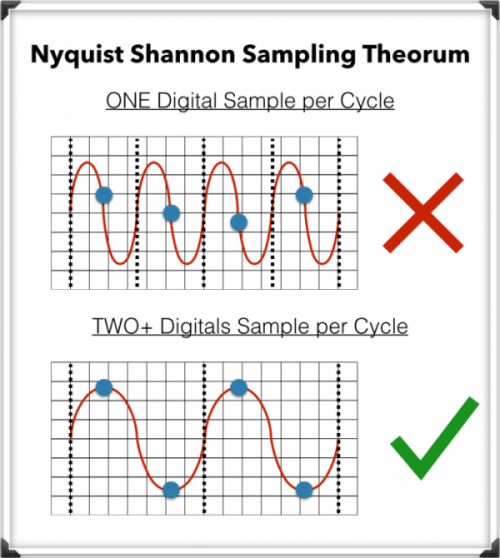
The minimum of 44.1kHz is due to a mathematical principle known as …

The Nyquist-Shannon Sampling Theorem

To record digital audio accurately, converters have to capture the entire human listening spectrum, which is between 20Hz – 20kHz.

According to the Nyquist-Shannon Sampling Theorem …

To capture a specific frequency, at least 2 samples are needed for each cycle … to measure both the upper and lower points of the sound wave.

That means that recording frequencies of up to 20kHz require a sampling rate of 40kHz or more, which explains why the audio CDs are just above that minimum, at 44.1kHz.

What is an audio compressor.

In the field of professional sound, a compressor is an electronic sound processor designed to reduce the dynamic range of the signal without noticing its presence too much. This task is done by reducing the system gain, when the signal exceeds a certain threshold.

Traditionally, compressors have been electronic equipment with one or two rack units, but software versions of them have appeared for some years.

A compressor acts in such a way that it attenuates the electrical signal by a certain amount (normally measured in decibels) and from a certain input level. The objective is to ensure that the resulting dynamic excursion is lower than the original, to protect certain equipment against possible signal peaks or, if it is a saturated sound, to try to hide the error.

Reasons to compress a signal

-Control the energy of the signal: The human ear is very sensitive, so the compression must be smooth and subtle so as not to capture it. This type of compression is used when there is a signal in which the intensity varies, so it is compressed to achieve a more constant signal within the values ​​assigned to it.

-Control the peak level of the signal: Often the equipment is limited, so the amplifiers can saturate and therefore be damaged. In this case the compression is used to control the signal and thus protect the equipment.

-Reduce the dynamic range of the signal: By attenuating the peaks of a signal, we reduce its dynamic range. Many devices are limited by the peaks, and this allows the RMS level of the signal to be raised.

Compressor Uses

In the field of music, its use ranges from applications for musical recordings to live sound. For example, it is often used to add more glued to the sound, an effect that is achieved by compressing the signal to subsequently apply a gain to the output of the device, which usually conceals possible interpretation failures by the artist, at least as Dynamic control refers. A compressor is highly recommended (and with certain musical styles, indispensable) for when using an electric bass. The slapping effect (hitting the strings with the finger) produces extremely high output peaks (20 dB or 10 times more than normal), which at low output levels generate distortion, and at high volumes (as in recitals) they can cause serious damage to the amplifier, and even the speaker (an excess of “excursion” can cause the speaker to tear from its suspension). Even in the (theoretical) case of a musical system with an infinite dynamic range, the difference, auditory speaking, using or not the compressor is imperceptible. Its use is also very frequent in voices, since not all singers use the appropriate technique so the signal level varies constantly.

-It is widely used in broadcasting, to improve the speaker’s diction.
-Compress during mastering improves the sound definition of the final mix.
-To protect the equipment (speakers).

CBR and VBR What are they and what is the difference?


Both acronyms correspond to two coding modes used for audio and video and their meaning is as follows:

CBR (Constant Bit Rate): Constant bit rate.
VBR (Variable Bit Rate): Variable bit rate.
Constant bit rate
In CBR mode, the bit rate per second that will be used in the coding process is set numerically and this will be maintained constantly for the entire duration of the audio or video clip.

Variable bit rate

When we use VBR, an average of the bit rate per second that will be used in the coding process is established numerically and this, according to analysis of the characteristics of each image frame, varies decreasing and increasing according to the information needs that occur during the audio or video clip.

Which of the two is recommended to use?
The use of one method or another depends fundamentally on two factors that cannot be analyzed separately since they are co-dependent:

The intended quality
available capacity

Let’s say we are going to make a video compilation on a double layer DVD with the capacity to store 8.5 GB. The video clips are in HD (720p) and although the figures that will be used for the example cannot be precise because they depend on the type of compression used, we will assume that in total, putting together all the clips we add 10 minutes.

The result of the compilation made in VBR to the standard commonly used for this quality (6-8 Mbit / s), would only be occupying 0.7GB of the total capacity of the disk, then then, according to our capacity budget, we can still increase the bit rate to increase the amount of information and consequently the image quality.

In this specific case, we could use the CBR mode to the maximum quality that the software / hardware that we are using allows us to increase and increase the bit rate for example to 9 Mbit / s, thus maintaining a constant good quality at all times of the film without any risk that the disc is not enough to record the total 10 minutes.

Returning to the example, suppose now that instead of 10 minutes, our clips total 90 minutes. Beforehand, we know that the 8.5GB disk will not be enough to hold that amount of information at constant maximum quality and that is when we use the VBR mode to compile.

Modality of one and two passes

The VBR mode can be configured in one or two pass mode and this refers to the fact that if we choose 1 pass, each image frame will be analyzed in fractions of a second (on the fly) and according to the information obtained, the rate of bits to apply during a certain number of frames in the sequence. This method encodes more quickly but sometimes, you get to notice the variations in image quality because in some way, the program tries to “guess” the behavior of the pixels during the following frames and when it varies unexpectedly in a cut of scene, sudden color variations or an increase in the action of the image, the bit rate applied is lower than required.

In the 2-pass mode, the first one dedicated exclusively to image analysis, then the software makes a budget and applies during the second pass the bit rate variation with much better result and virtually imperceptible quality transitions. When the scenes are relatively stable and static, the bit rate decreases and when variations in the intensity of brightness, colors or the action on the screen intensify, the bit rate increases. In this way, the coding program makes an optimal distribution by subtracting information where it is not necessary and adding it where the image requires it to finally be able to make the highest quality compilation in less capacity.

Explanation of advanced mp3 conversion settings


In this article we are going to address the audio coding settings that affect the sound quality. Understanding how conversion settings work can help you select the optimal sound coding properties in terms of file size relative to sound quality.

What is the bit rate?

The bit rate is the amount of data consumed to transmit the audio sequence per unit of time. For example, a bit rate of 128 kbps (kilobits per second) means that a second sound is encoded with 128,000 bits (1 byte = 8 bits). If you convert this into kilobytes, a second of sound occupies about 16 KB.

Therefore, the higher the bit rate of a track, the more space it will occupy on the computer. However, with the same format, a higher bit rate allows you to record the best quality sound. For example, if you convert an audio CD to MP3, the 256 kbps bit rate will provide much better sound quality than the 64 kbps bit rate.

Because today’s hard disk space is relatively cheap, it is recommended to convert to MP3 with a bit rate of at least 192 kbps or higher.

The bit rate can also be classified as constant or variable.

The difference between constant bit rate (CBR) and variable bit rate (VBR)

The constant bit rate means that the encoding of each audio segment consumes a constant amount of bits. However, the structure of the sound may be different, and the coding of a segment of silence requires much less bits than the coding of a segment of intense sound. Unlike the constant bit rate, the variable bit rate adjusts the quality of the coding at various intervals. Thus, intervals that are simple in terms of coding will use a lower bit rate, while more complex intervals will be coded with a higher bit rate. The use of a variable bit rate allows for better sound quality without increasing the file size.

What is the sampling frequency?

This term is used in the conversion of analog signal to digital form and defines the number of samples (signal level sample measurements) per second needed to convert a signal.

CBR vs VBR – which one to choose?

When you are going to pass a music CD to MP3 or AAC format you will have seen two different encoding options, the CBR and the VBR. Do you know the diference?

► The best turntables of 2019: purchase, configuration and more
CBR (Constant bitrate) encoding

CBR is a type of encoding in which a fixed bit rate is always used, so if we encode a song at 192 Kbps, the resulting file will have a bitrate of 192 Kbps for the entire duration of the song.

It is the speed at which data is processed or transferred.
It is usually measured in seconds and the most common units are:
Kb / s or Kbps (remember that the lower case “b” is bits, not bytes).
Mb / s or Mbps.
Also called: bitrate, bit-rate and BR.
The main advantage of using CBR is that the coding is a bit faster (compared to VBR). However, the resulting files are not as well optimized in size and quality.


CBR coding also has another advantage and we know in advance the transfer rate we need. For example, if we set a bitrate of 300 Kbps, we already know that with a 320 Kbps connection we will be able to transmit the data without suffering cuts, so it is usually used in real-time transmissions or streaming.

VBR encoding (bitrate variable)

VBR is an encoding method that allows a variable bit rate, this means that the bitrate of an audio file can increase or decrease dynamically depending on the complexity of the sound.

If the music is very simple or there is silence for a few seconds the bitrate can go down and then go back up in the more complex areas of a song.