
Digital sounds and analog sound
With the advance of science and technology, both the transmission and recording of analog sounds and images have undergone major changes in recent years. The introduction of digital techniques allows you to do many more things, with greater advantages and more versatility than with analog technology.
Many of the devices that we know today as digital, first receive or capture the signals in analogue form and then convert them into digital signals. This is the case, for example, of CD and DVD players, the modem used by computers for the reception / transmission of data, digital cameras and video cameras, mobile or cell phones, etc.
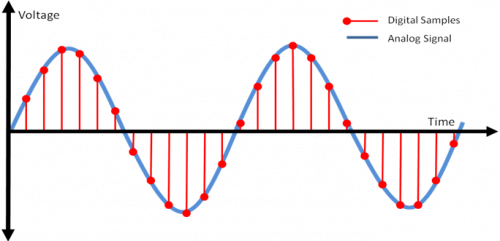
To perform the conversion, these devices use, as an intermediate element, a device called analog-digital converter or ADC (Analogic to Digital Converter), which first receives the electrical signals in the form of an analog sine wave (such as the one provided by the microphone) and It then converts them into digital signals, encoded in binary numerical values, that is, in “zeros” and “ones” (0 – 1).
1. Sound or acoustic wave (voice, music, effects, etc.). 2. Microphone 3. Analog sine wave that is <obtained after the microphone converts the sounds into audio-frequency electrical signals. 4. ADC (Analogic to Digital Converter – Digital Analog Converter). 5. Digital signal formed by zeros and <ones (0 – 1), obtained after the analog signal is processed by the ADC. 6. Output of the <digitized audio signal, ready to be recorded.
In digital cameras and video cameras, as well as in scanners, there is a sensor called CCD (Charge Coupled Device) or, failing that, a CMOS sensor (Complementary Metal Oxide Semiconductor – Semiconductor complementary metal oxide ), which are responsible for converting the images they receive into analog electrical signals.
In that case, as with the microphone, an ADC is responsible for converting those analog signals into digital image signals, so that they can be stored as such in a videotape, on the device’s memory card, or in any other Digital storage device, for later viewing.
The reverse conversion, from digital to analog, is strictly necessary, because the analog sound is the only audible, that is, the only one that recognizes our sense of hearing. Similarly, the analog electrical impulses are the only ones capable of moving the cone of a loudspeaker or loudspeaker to reproduce the original sounds again, which cannot be done by the electrical impulses of “1” and “0” of the binary or digital code. Therefore, to make the coding of the digital sounds audible by the loudspeaker (s), it is necessary to convert them back into analog electrical signals, with their corresponding variations in voltages or voltages.


