How to get all your mp3s to have the same volume level?


Free Download Mp4Gain
picture

How to get all your mp3s to have the same volume level?

MP3 Normalizer

The question is clear but can be expressed in many ways:

mp3 volume level equalizer

-How do I get my mp3s to have the same volume?
-How to make all your mp3s have the same level of dbs (decibels)?
-How do I make sure that all my mp3s have a similar volume and there are no drops or increases in volume?
-How to get my mp3 to play at the same volume level?

-Volume level equalizer?

And so, I could continue writing many of the questions that come to us at Mp4Gain and that basically mean the same thing, but people have some difficulty expressing exactly what they need or want.

Because basically what they are looking for is that the different mp3s have the same sound… that they sound at a similar volume to each other.

That can be called normalize, although some people use the word “compress sound volume” even though it has its own difference… but we understand what they mean.

And the answer is simple: use Mp4Gain.

Mp4Gain offers various options (from Replay Gain to audio volume compression) to give you what you are looking for. It is by far the most advanced normalizer, although it is very simple to use.

In general terms you will only need to download the program, load your music or videos (Mp4Gain normalizes many audio and video formats and can do it in batch mode even if you use different formats) and click “NORMALIZE” and that’s it.

You don’t even need to understand what a decibel is or understand anything, just load your files and click on it and you already have the volume level problem solved.


Free Download Mp4Gain
picture


Mp4Gain Main Window
picture


Mp4Gain Features
picture


Free Download Mp4Gain
picture

What is the MP3 compression principle?

What is the MP3 compression principle?

Mp3 Volume Booster

In fact, there are many audio compression technologies and MP3 compression technology is not the best.

Volume Booster

But now it seems that it is still mainstream.
Musical signals have many redundant components, including spacing and information that the human ear cannot distinguish (such as weak signals mixed with a strong background). The CD sound is not compressed and uses a fixed sampling frequency of 44.1 kHz, which can ensure good playback of maximum dynamic music. Of course, the amount of data is the same where the amount of information is less, so there is a possibility of compression. The audio bandwidth of 20 ~ 20 kHz (upper CD player can be extended up to 2 Hz) has become the current music standard. To reduce sound distortion, MP3 adopts an encoding algorithm called “sensory encoding technology”: the audio file first undergoes spectral analysis during encoding, and then the noise level is reduced by filter, and then the remaining components are quantized by quantization The bits are scattered and arranged, and finally an MP3 file with a higher compression ratio is formed, and the compressed file can achieve a sound effect closer to the original sound source during playback . Although it is a lossy compression, its biggest advantage is very little sound distortion in exchange for a higher compression ratio. And now MP3 adopts a variable compression ratio (VBR) compression technology similar to Dolby AC-3. The sampling compression ratio depends on the amount of information in the music, and the masking effect of the human ear is used to reduce redundant data.

Mp3 Increase Volume Part 3

Mp3 Increase Volume Part 3

Increase MP3 Volume

In the two previous parts about Mp3 Volume Increaser, we have seen how and why it is necessary to normalize the volume of audio and video files (something that only Mp4Gain can do) and for them we have begun to delve into how the compression.

Increase MP3 Volume

Audio compression algorithms

coding

Audio compression technology refers to the application of suitable digital signal processing technology to the original digital audio signal stream (PCM encoding), without losing the amount of useful information, or under the condition that the loss introduced be insignificant, reduce (compress) its code rate, and also called compression encoding. It must have a corresponding inverse transform, called decompression or decoding. Audio signals can introduce a great deal of noise and some distortion after passing through a codec system.

1. Redundant audio signal information
Digital audio signals, if transmitted directly without compression, would consume a large amount of bandwidth. For example, if the sample rate of a two-channel digital audio set is 44.1 KHz and each sample value is quantized to 16 bits, its code rate is:

2*44.1kHz*16bit = 1.411Mbit/s

Such a large bandwidth will bring a lot of difficulties for signal transmission and processing, so the audio data must be processed with audio compression technology to transmit audio data effectively.

Digital audio compression coding compresses the audio data signal as much as possible on the premise of ensuring that the signal is not audibly distorted. Digital audio compression coding is implemented by removing redundant components in sound signals. So-called redundant components refer to signals in the audio that cannot be perceived by the human ear and do not help determine the timbre, pitch, and other information of the sound.

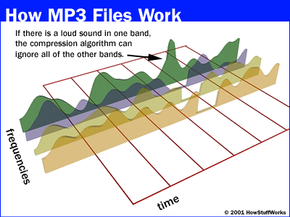
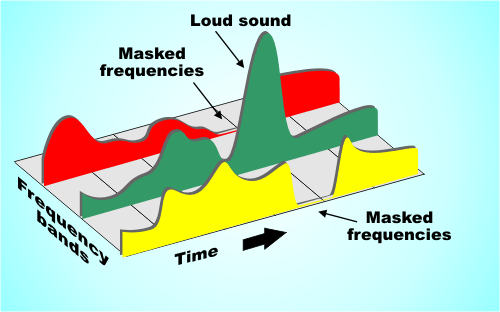
Redundant signals include audio signals outside the range of human hearing and masked audio signals. For example, the frequency range of the sound signal that can be perceived by the human ear is 20 Hz to 20 KHz, and frequencies other than this frequency cannot be detected by the human ear and may be considered as redundant signals. In addition, according to the physiological and psychoacoustic phenomena of the human ear, when a strong signal and a weak signal exist at the same time, the weak signal will be masked by the strong signal and cannot be heard, so the weak signal can be regarded as a redundant signal. Do not send. This is the masking effect of human hearing, which is mainly manifested in the spectral masking effect and the time-domain masking effect, which are presented as follows:

1.1 Spectral masking effect
After the sound energy of a frequency is lower than a certain threshold, the human ear will not hear it, and this threshold is called the minimum audible threshold. When there is another sound with higher energy, the threshold value close to the frequency of the sound will increase considerably.

Mp3 Increase Volume Part 2

Mp3 Increase Volume Part 2

mp3 increase volume

We talked in the previous chapter about the need to achieve an mp3 volume increaser, although the volume increaser is not limited to mp3s in Mp4Gain. You can actually achieve a volume increaser in all major audio and video formats.

mp3 increase volume

To better understand, we were talking about and analyzing how the compression of an audio file works.

Quantification encoding. Quantization encoding uses a three-layer iterative loop model for bit allocation and quantization. These three layers include: frame loop, outer loop, and inner loop. The frame loop resets all iterative variables, calculates the maximum number of bits that can be provided to each data slice, and then calls the external iterative model; the outer iterative model first uses the inner iterative model, which quantizes the input vector by incrementing The size of the quantization step allows the quantized output to be encoded within a certain bit limit. Huffman coding has a limit on the maximum quantization value, so it is necessary to judge whether all quantization values ​​exceed the limit. If it exceeds the limit, the inner iteration loop must increase the size of the quantization step and quantize again. Then determine the number of Huffman encoding bits such that the number of occupied bits is less than the maximum number of bits that can be provided by each encoding section computed by the frame cycle; otherwise, the size of the quantization step must be increased for requantization. When the quantization meets the requirements, store the final scale factor value, exit the outer loop, and compute the number of bits used to store each data section in the frame loop.

Mp3 Increase Volume

Mp3 Increase Volume

mp3 increase volume

First we need to understand how an mp3 works, how it compresses the original wav to a tenth of its size, to understand why we always need to normalize all the volumes of the different mp3s.

increase mp3 volume

Mp3 Increase Volume

A wav saves a lot of information, including information that humans cannot hear, also redundant information and ends up taking up a lot of space on the hard drive or on flash drives.

This has generated from the beginning the need to ensure that the different mp3s have a constant or similar volume when comparing some mp3s with others.

This currently with Mp4Gain can be applied to the most used audio and video formats.

Let’s understand a little how the compression of an mp3 works:

MP3 encoding is mainly composed of 3 main functional modules, including hybrid filter bank (subband filter and MDCT), psychoacoustic model, quantization encoding (bit mapping and bit factoring, and Huffman encoding).
1. Hybrid filter bank. This part includes two parts of the subband filter bank and MDCT. Subband filterbank encoding completes the mapping of the sampled signal from time domain to frequency domain and decomposes the specified audio signal into 32 subbands through the bandpass filterbank for output. All 32 subbands output by the subband filter bank have the same bandwidth, while the critical bandwidth derived from the psychoacoustic model is not. Therefore, to match each scaling factor band for encoding to the critical band, it is necessary to transform subband signals into MDCTs. Once the output of the subband filter bank is sent to the MDCT filter bank, each bank is subdivided into 18 frequency lines, resulting in a total of 576 frequency lines. Next, the number of bits allocated to the 576 spectral lines is determined using the signal-to-mask ratio of the computed subband signals in the psychoacoustic model.

2. Psychoacoustic models. The psychoacoustic model takes advantage of the masking effect of the human auditory system to remove a large number of irrelevant signals, in order to achieve the effect of compressing the audio data. To accurately calculate the masking threshold, the signal is required to have better resolution in the frequency domain, so the signal is Fourier transformed before using the psychoacoustic model. MPEG-I provides two psychoacoustic models. The first model is easy to compute and provides adequate accuracy when encoding at high bit rates. The second model is more complex and is generally used when encoding at lower bit rates. Psychoacoustic model II is generally used in MP3 encoding. The purpose of the psychoacoustic model is to find the masking threshold value of each subband and use it to control the quantization process. The implementation process of the psychoacoustic model generally consists of first using FFT to obtain the spectral characteristics of the signal and find the tonal components (some called musical components) and the non-tonal components (or noise components) at each frequency point according to the spectral features; The curve determines the masking domain value of each tonal component and non-pitch component at other frequency points; finally, the general masking domain of each frequency point is obtained and converted to the coding subband. For noise generated after quantization of the spectral value emitted by the subband filter bank, if the noise can be controlled below the masking threshold, the final compressed data decoded result may be indistinguishable from the original signal. The masking ability of a given signal depends on its frequency and loudness, so the end result of the psychoacoustic model is the signal-to-mask ratio (signal to mask ratio), which is the ratio of the intensity of the signal and masking. limit.

MP3 files at the same volume and with the same audio quality.

Now, on all people’s computers, one thing that is not lacking is music in the form of mp3 files.
These mp3 files come from very different sources, some may be derived from “ripping” some CDs, others are downloaded from the Internet or from P2P programs, or have been received by some friends.

Normalize Audio

Over time, everyone has their music collection made of mp3 files that are certainly different from each other in quality and volume.
By playing a random playlist with the media player, you can listen to music at lower volume levels than others and with different audio quality.

We are certainly talking about subtleties, these differences in quality and volume, in most cases, even if perceived, it does not bother.
However, this problem can be easily corrected by setting all mp3 files to the same volume and sound quality.

Volume Normalizer

Normalizing the audio of two tracks or two songs becomes useful even if you need to combine them into a single mp3 file or if you want to create a video presentation with a soundtrack.

MP4Gain normalizes the volume of multiple audio and multiple music tracks by analyzing mp3 files and other formats to determine how much each volume should be corrected.

The operation is really simple and within everyone’s reach, also because Mp4Gain can also be downloaded easily.
First of all, after installing it, add the complete files or folders inside it by pressing the respective buttons.
The next step is to analyze the traces that, after a brief process, will result in an optimal volume level for combining songs and mp3 files.
The default value recommended by MP4Gain is 89.0 dB; Other programs choose 92.0 dB, but since the software works differently, it is always advisable to use the default values, especially if you are not experienced in sound techniques (in that case, more professional software will probably be used).
Analysis of the audio tracks highlights deviations from that value of 89.0 which is detected as the “normal” target volume.

Once the analysis process is complete, you can click the Normalize button and apply the suggested changes to the volume levels for each individual track. Thus,
MP4Gain should be used easily and without complications, managing to improve the problem of the different music volume levels of a collection of MP3 files, without compromising their quality.

Does bitrate influence? A 320 kbps Mp3 sounds better than a 128 kbps one?

Much has been speculated about the bitrate. Most people do not understand clearly what it is. A few understand, but almost nobody knows if a file with 320 kbps really sounds different or better than the same file but with 128 kbps.

The easiest way is to test:

The first is at 128 kbps

Now let’s hear the 320 kbps option

Notice the difference? In case the note is because it was encoded using the Mp4Gain.
Normally it is almost impercentible, but using a good encoder you get to notice some subtle difference.

It should be taken into account that at higher kbps, if there is a higher quality – although it is not always noticeable – and will always use more disk space.

Therefore it is not the best option to say “all my mp3s will be 320 kbps”, unless the space does not mean any problem at all.

How MP3 files work

The MP3 movement is one of the most incredible phenomena that the music industry has ever seen. Unlike other similar phenomena, such as the introduction of cassette tape or CD, MP3 technology did not start with the industry, but with a huge audience of music lovers on the Internet. The digital MP3 music format has had, and will continue to have a great impact on how people collect, listen and distribute the music.

If you have wondered how MP3 files work, or simply want to know what uses can be given, read on. This article will give some features of this popular sound format.

MP3 format

If you know something about how CD’s work, then you know how they store music. A CD stores a song in the form of digital information. The data on a CD uses a decompressed high resolution format. This is what happens when a CD is created:

The music is sampled (fractionated) 44,100 times per second. Each of these parts has a size of 16 bits.
Pieces of these fractions or “samples” are taken from the left and right channels in a stereo system.
With a simple formula we realize how great a single song can be.

Fractions * bits * channels = X bits per second

In our case it would be 44,100 for 16 bits per 2 channels, which would give us 1,411,200 bits per second. 1.4 million bits per second equals 176,000 bytes per second. If the average of a song is 3 minutes, then the average of a song on a CD is 32 million bytes of space. That is a lot of space for a song, and it is especially great if we consider that we are downloading music with a 56K Modem, which will take us a few hours.

The MP3 format is a compression system for music. This format allows you to reduce the number of bytes in a song without damaging the sound quality. The goal of the MP3 format is to compress a CD quality song without letting you see the difference. With MP3, a 32 MB song from a CD, compresses up to 3 MB. This allows you to download a song in minutes instead of hours, and store hundreds of songs on your computer’s hard drive.

Compression and quality

Is it possible to compress a song without damaging the quality? To perform this compression, the use of algorithms is needed, in the same way that we use them to compress other formats, such as graphics, text files, applications, etc. A very popular algorithm for compressing sound is the “perceptual noise shaping” technique. This algorithm uses characteristics of the human ear such as:

There are certain sounds that the human ear cannot hear.
There are certain sounds that the human ear hears better than others.
Its there are two sounds playing at the same time, we can hear the one that is louder, and not the lowest.
Using factors like these, certain parts of the song can be eliminated without significantly damaging the quality of the song for the listener. When you have created the MP3 file, what you have is music with a quality close to that of a conventional CD. It doesn’t sound exactly the same because some things have been removed, but it’s very close.

Using the MP3 format

The MP3 movement – consisting of the MP3 format itself and the ability of websites to distribute it – have done several things in the music world:

It has made it easy for anyone to distribute music at a low cost, or even for free.
It has made accessing music simple and instant.
He has taught people to manipulate music on a computer.
One of the strengths of this format is the ability to edit, create and modify music files thanks to powerful computer software tools. Thanks to these tools, it is extremely easy for anyone:

Download an MP3 file from a website and play it instantly.
Transform or “rip” a song from a CD, to the MP3 format, and listen to it later.
Record a song yourself, convert it to MP3, and make it available to everyone on the Internet.
Convert MP3 files into CD files and make your own audio CD’s with MP3 files downloaded from the Internet.
Have thousands of hours of music stored on one or more hard drives.
Upload MP3 files to portable players and listen to them wherever you want.
To do all this, all you need is a computer with a sound card, speakers, an Internet connection, a CD / DVD player / recorder, and an MP3 player.


What it is and how to perform a volume normalization on your MP3


What it is and how to perform a volume normalization on your MP3

Have you ever heard the term audio normalization, without being sure of what it meant? As a lover of music and technology, I also encountered such a doubt many years ago. Basically, giving a short definition, it is about the standardization of the volume, or rather, of the audio spectrum with respect to other subjects, usually of the same disc.

And that, to put it more simply, is the equalization of the volume of the different tracks on a disc. The reasons are many, and usually if the tracks are extracted from the same job they already have the same volume and gain, but what happens if we want to make a mixtape? For example, we decided to make a compilation called The Best 100 Rock Songs in History. Surely have songs from The Beatles or The Rolling Stones, and therefore from different albums. Depending on the year, type of mastering, etc. etc., we can end up with a CD that contains many different volumes, something that can be annoying when listening. That is just one of the reasons to normalize our MP3 collection.

There are add-ons for players that allow us to normalize on the fly. In fact we can say that programs like Spotify already do this by means of the option to equalize volume of all the songs, however the application that I present below allows us to permanently normalize modifying MP3 files and many other formats, both audio and Of video..

This is Mp4Gain, which stands out for its simplicity of use and is presented under an interface that is ideal to understand exactly what a normalization is and see the before and after. When we open the application we find a window in which we have a grid, which will be populated when we add files or folders, and a keypad with various options.

How do we normalize? Simply change the gain through the specific menu for this.

By pressing OK the application will start working and save our files with the same gain, so it is ideal that before doing the first tests we make a backup. It must also be taken into account that it is an operation that can take time, something that depends on the speed of our processor, the number of issues to normalize and also the size and quality of them.

Audio normalization

Audio normalization

audio normalization

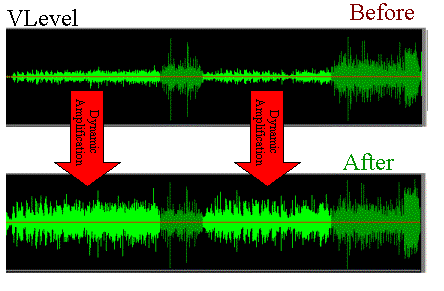
The normalization of the audio level is something that is achieved by applying a constant and maintained amount of gain, in volume, to an audio recording to bring the average peak amplitude to a desired level that has been previously defined. To which the same amount of gain is applied to the entire range, the signal-to-noise ratio generally does not change. Normalization differs from dynamic range compression, which applies different levels of gain to a recording so that the amplitude is within a minimum and maximum range. Standardization is one of the most common functions provided by a digital audio workstation.

Peak normalization

One type of normalization is peak normalization, in which the gain is changed to bring the highest PCM value or the highest peak of an analog signal to a given level.1

Since it only searches for the highest level, it does not take into account the apparent volume of the content. As such, peak normalization is generally used to change the volume in such a way as to ensure optimum use of the distribution medium in the mastering stage of a recording. loudness normalization.

Normalization of loudness

Another type of normalization is based on a loudness measure, in which the gain is changed to bring the average amplitude to an objective level. This average may be a simple measurement of average power, such as the RMS value, or it may be a measure of the loudness perceived by humans, such as that offered by ReplayGain.

Depending on the dynamic range of the content and the target level, the normalization of the loudness can lead to peaks that exceed the limits of the recording medium. Some software has the option of using dynamic range compression to avoid saturation when this happens. In this situation, the signal-to-noise ratio is altered.

volume booster

Modern Audio Normalization

Currently Mp4Gain uses an audio normalizationn that is more similar to that used in modern recording studios or live music group recitals.

It is a normalization of volume focused from a new perspective.

Under this new paradigm, not only does it achieve that all songs have the gain of loudness at the best possible level, but it also achieves that each instrument and / or voice obtains a level of gain that makes it audible. Achieve an optimized level of volume gain normalization.

There is no other normalizer in the market that obtains this level of result. People with training in hearing listening can easily notice the difference., very similar to that obtained with expensive hardware in radio stations or in recording studios or in recital consoles, combining limiters, modern compressors and other processors.
All these results that offer expensive hardware equipment, Mp4Gain does for a few dollars.

In fact, the opposite result is achieved than that achieved with masking, because with masking, which is a method used to compress music, you can no longer perceive some sounds that are behind a more audible sound, that is what is called masking, which leads to the loss of audio quality.

Mp4Gain manages to highlight hidden instruments and sounds, performing an audio normalization by frequency bands to achieve this.

That is why we say that Mp4Gain achieves the same results as those obtained through a series of hardware equipment (limiters, compressors, normalizers, etc.) that are very expensive, while Mp4Gain costs only a few dollars.