Volume enhancer software


Free Download Mp4Gain
picture

Volume enhancer software

Volume Enhancer Software

super loud speaker

Volume Enhancer Software

Mp4Gain offering Volume Booster – Loud Sound & Equalizer is a powerful app to boost loud volume on windows, boost volume of amplifiers and headphones.

Volume booster and extra sound speaker help boost volume, music, loudspeaker, audio and sound. Make all the sounds in your audio or video file louder. It works with movies, audiobooks, music, and games.

πŸ“£πŸŽΊ Volume booster and equalizer to improve the quality of your music and amplify the bass. This max volume booster for windows helps you adjust sound effects with 5/10 band equalizer, bass booster, stereo surround effect, sound booster! 🌟🎈

πŸš€Volume booster and loud sound speakers

*Max volume booster with up to 200% boost capacity
* increases
effectively sound for all media such as music, video and games
*Additional volume booster for headphones and external speakers and Bluetooth

Virtualizer Booster
* Bass boost for headphones
* Stereo surround sound effects
* 3D virtualizer effects
* Boost or amplify the bass of the music to the desired level
* Make media files produce quality sound in digital surround sound

🎻 Powerful equalizer and sound effects

* 10 band equalizer for Windows
* Satisfy picky musical tastes: 31Hz, 62Hz, 125Hz, 250Hz, 500Hz, 1khz, 2khz, 4khz, 8khz, 16khz * More
20 equalizers for your choice: Normal, Heavy, Rock, Dance, Flat, Jazz, Pop, Hip Hop, Folk, R&B and many more

πŸ’₯More features
β˜† Volume and loudness booster
β˜† Bass Booster & Bass Booster β˜†
colorful visual spectrum
β˜† Media volume control
β˜† Simple music controls: Play/Pause, next/previous song
β˜† Beautiful and simple interface
β˜† Runs in the background
β˜† No Booster root required

volume and equalizer Designed for music lovers to optimize their music listening experience. Volume booster is capable of boosting phone volume higher than system default. Whether you are listening to music, playing games, watching movies or watching videos. πŸ”₯πŸ’―
Just download volume booster and super loud speaker free to start a new way of music! πŸŽ‰πŸŽŠDisclaimer

: use at your own risk.
Playing audio at a high volume, especially for long periods of time, can damage your speakers and/or damage your hearing. We recommend that you gradually increase the volume to obtain a suitable volume. By installing this app, you agree that you will not hold its developer responsible for any damage to hardware or hearing, and that you use this app at your own risk.



Free Download Mp4Gain
picture


Mp4Gain Main Window
picture


Mp4Gain Features
picture


Free Download Mp4Gain
picture

Volume Enhancer for Windows

Volume Enhancer for Windows

Volume Enhancer

FAQ

Volume Enhancer


volume enhancer, which is better

A volume enhancer must be able to balance the volume level and loudness of various audio and -if possible- video formats. Mp4Gain is the best to achieve it.

volume enhancer for windows?

Mp4 Gain works on windows and is definitely the most powerful volume enhancer that exists and the most modern and up-to-date.

Volume Enhancer

The obvious question is, why would you want to boost the volume of audio or video files?

It is evident that when you have various audio or video files, in one or more formats, when you play them, you perceive a noticeable difference in the volume level of all or several of them, which makes us manually adjust each song or video with the knob of volume.

This manual adjustment of the volume level or lodness is the most primitive method. Even if you are in your car listening, it is totally inconvenient to have to do it manually every time.

That is why people are constantly looking for a solution. Mp4Gain is the solution, because it is the only one that can enhance the volume of various audio and other video formats (it can also extract the audio from a video and convert it to any audio format) and can convert between formats very easily and with very good results. Mp4Gain is the best Windows normalizer.

But also, after normalizing them with Mp4Gain they sound better, precisely because the algorithm is better and more up-to-date. It no longer works just like Mp3Gain, but has gone several steps further, adapting to modern times, where many different devices are used, with high qualities, to play music.

And the same is offered for videos, of the main formats. You can also convert videos from one format to another or convert a video to high-quality audio.

Additionally, we find in Mp4Gain very useful functionalities such as an equalizer to give more brightness and deeper and more powerful basses, also the possibility of modifying the pitch keeping the tempo or vice versa, etc.

In conclusion, if someone wants to improve the power of the audio or video volume (volume enhancer) and generally improve the sound and the “presence” of the sound, Mp4Gain is the answer they were looking for.


What is the MP3 compression principle?

What is the MP3 compression principle?

Mp3 Volume Booster

In fact, there are many audio compression technologies and MP3 compression technology is not the best.

Volume Booster

But now it seems that it is still mainstream.
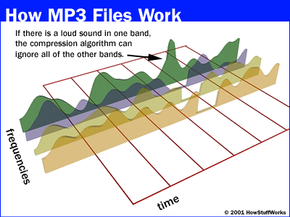
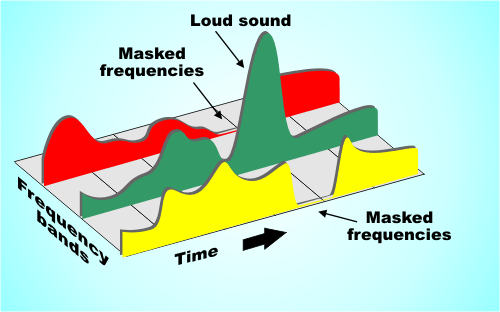
Musical signals have many redundant components, including spacing and information that the human ear cannot distinguish (such as weak signals mixed with a strong background). The CD sound is not compressed and uses a fixed sampling frequency of 44.1 kHz, which can ensure good playback of maximum dynamic music. Of course, the amount of data is the same where the amount of information is less, so there is a possibility of compression. The audio bandwidth of 20 ~ 20 kHz (upper CD player can be extended up to 2 Hz) has become the current music standard. To reduce sound distortion, MP3 adopts an encoding algorithm called “sensory encoding technology”: the audio file first undergoes spectral analysis during encoding, and then the noise level is reduced by filter, and then the remaining components are quantized by quantization The bits are scattered and arranged, and finally an MP3 file with a higher compression ratio is formed, and the compressed file can achieve a sound effect closer to the original sound source during playback . Although it is a lossy compression, its biggest advantage is very little sound distortion in exchange for a higher compression ratio. And now MP3 adopts a variable compression ratio (VBR) compression technology similar to Dolby AC-3. The sampling compression ratio depends on the amount of information in the music, and the masking effect of the human ear is used to reduce redundant data.

Volume Enhancer

Volume Enhancer

Volume Enhancer

When you have a good amount of mp3s or in any other format, you always wonder how you can improve the quality of the audio, as well as standardize the volume level.

volume enhancer

Mp3 Volume Enhancer

Although we are going to refer to mp3, this applies to many other formats since Mp4Gain is capable of compressing and converting into many audio and video formats and also normalizes the volume to standardize it so that they all have a sound or sound similar to each other. .

The operational part is very simple, since it will suffice to load one or more files in any format (Flac, OGG, mp3, m4a, etc) and convert them to any other. If you want (and it is recommended) at the same time, you can normalize the volume of all of them so that they sound at a fairly even volume level.

Audio & Video Volume Enhancer

As we already mentioned, Mp4Gain can operate simultaneously on audio and video files, managing to do volume enhancer on all of them one after another.

We can even choose to have them all, say, converted to Flac or any other format. Or each one can be processed and after normalizing its volume, a final file can be obtained from each one in the original format that the original file had.
As you will see, Mp4Gain is very versatile and allows us to choose exactly how we want it to work and it is very easy to operate, it does not need a learning curve.