Increase MP3 Volume


Free Download Mp4Gain
picture

Turn Up the Volume on an MP3: The Ultimate Guide

Increase MP3 Volume
Increase MP3 Volume
Increase MP3 Volume
Increase MP3 Volume

3 Shortcuts to Increase MP3 Volume – Easily and Quickly

Increase MP3 Volume with These Simple Steps

Are you tired of listening to your favorite songs on your MP3 player but not being able to hear them clearly? The solution is simple: turn up the volume on your MP3 player! In this article, we will show you how to increase the volume on your MP3 player so you can enjoy your music to the fullest.

The first step to increasing the volume on your MP3 player is to check the volume settings on your device. Make sure that the volume is turned all the way up to its maximum level. If the volume is not at its maximum level, turn it up and see if that solves the problem.

If turning up the volume on your device does not solve the problem, you can try using an audio editing software like MP4Gain to boost the volume of your MP3 files. MP4Gain is a powerful audio normalization software that allows you to adjust the volume of your audio files to a desired level without losing quality.

Boost MP3 Volume with MP4Gain

Using MP4Gain is simple. First, download and install the software on your Windows computer. Once installed, open the software and drag and drop your MP3 files into the program. Next, select the desired volume level and click “Apply Gain.” MP4Gain will automatically normalize the volume of your MP3 files to the desired level.

Amplify MP3 Volume: Tips and Tricks

If you do not want to use software to boost the volume of your MP3 files, there are a few tips and tricks you can try. One simple solution is to use headphones or external speakers to amplify the sound. You can also try adjusting the equalizer settings on your device to boost the volume.

Another tip is to make sure that your MP3 files are encoded at a high bit rate. MP3 files encoded at a higher bit rate tend to sound better and have a higher volume than those encoded at a lower bit rate. Additionally, you can try compressing your MP3 files to make them louder.

Raise MP3 Volume: Conclusion

In conclusion, turning up the volume on your MP3 player is a simple solution to enhance your listening experience. If increasing the volume on your device does not solve the problem, using an audio editing software like MP4Gain can help boost the volume of your MP3 files. By following these tips and tricks, you can enjoy your favorite songs at a higher volume and with better quality.

Final words: Don’t let low volume ruin your listening experience. Use these simple steps and tips to turn up the volume on your MP3 player and enjoy your music to the fullest.

Keywords: MP3 volume, increase volume on MP3, boost volume on MP3, MP3 volume booster, how to make MP3 louder, MP3 player volume, how to increase volume on MP3 player, MP3 volume increaser, MP3 volume enhancer, how to amplify MP3 volume, raise MP3 volume, how to adjust MP3 volume, MP3 sound booster, MP3 volume normalization, how to turn up volume on MP3 player, how to make MP3 sound louder, MP3 sound enhancer, best MP3 volume booster, MP3 volume control, how to increase volume of MP3 file, MP3 gain, how to increase MP3 sound quality, how to make MP3 louder without distortion, MP3 volume increase software,



Free Download Mp4Gain
picture


Mp4Gain Main Window
picture


Mp4Gain Features
picture


Free Download Mp4Gain
picture

Enhance MP3 Volume

Enhance MP3 Volume with the Right Tools

Enhance MP3 Volume
Enhance MP3 Volume

MP3 audio files are among the most popular audio formats around the world. They’re easy to share, lightweight, and relatively small in size, making them the preferred option for many digital music fans. Despite their popularity, however, MP3 files have one major drawback: they often lack dynamic range. That is, they don’t have enough volume to be heard clearly over other audio sources in the same space.

Enhance MP3 Volume
Enhance MP3 Volume

This can be a real problem if you’re trying to listen to an MP3 file in a noisy environment. Fortunately, there are a few ways to enhance MP3 volume and make your music more audible. In this article, we’ll look at some of the best tools and techniques for boosting MP3 volume and improving your listening experience.

Using Equalizers to Enhance MP3 Volume

An equalizer (or EQ) is a sound processing tool that adjusts the frequency response of an audio signal. Equalizers are commonly used to boost the bass and treble frequencies of a signal, but they can also be used to boost the overall volume of an audio signal. Depending on the EQ settings you choose, you can use an equalizer to boost the volume of an MP3 file without making it sound distorted or over-compressed.

Most audio editing software, like Audacity, comes with an equalizer that you can use to tweak the volume of your MP3 files. All you need to do is open the equalizer and adjust the levels until you’re happy with the sound. It’s also worth noting that you can use an equalizer if you’re streaming music online. Many streaming services, such as Spotify and Pandora, have their own built-in equalizers that you can use to boost the volume of your music.

Using Audio Enhancers to Enhance MP3 Volume

Another way to boost the volume of an MP3 file is to use an audio enhancer. Audio enhancers are specialized software programs that can boost the volume of audio signals without making them sound distorted or over-compressed. Many audio enhancers also come with their own set of sound-shaping tools, such as EQs, compressors, and limiters, that you can use to further tweak the sound of your MP3 files.

Conclusion

Enhancing the volume of MP3 files doesn’t have to be a complicated process. With the right tools and techniques, you can easily boost the volume of your music without making it sound distorted or over-compressed. For the best results, we recommend using Mp4Gain, a powerful audio enhancer that can help you get the most out of your MP3 files.

What is the MP3 compression principle?

What is the MP3 compression principle?

Mp3 Volume Booster

In fact, there are many audio compression technologies and MP3 compression technology is not the best.

Volume Booster

But now it seems that it is still mainstream.
Musical signals have many redundant components, including spacing and information that the human ear cannot distinguish (such as weak signals mixed with a strong background). The CD sound is not compressed and uses a fixed sampling frequency of 44.1 kHz, which can ensure good playback of maximum dynamic music. Of course, the amount of data is the same where the amount of information is less, so there is a possibility of compression. The audio bandwidth of 20 ~ 20 kHz (upper CD player can be extended up to 2 Hz) has become the current music standard. To reduce sound distortion, MP3 adopts an encoding algorithm called “sensory encoding technology”: the audio file first undergoes spectral analysis during encoding, and then the noise level is reduced by filter, and then the remaining components are quantized by quantization The bits are scattered and arranged, and finally an MP3 file with a higher compression ratio is formed, and the compressed file can achieve a sound effect closer to the original sound source during playback . Although it is a lossy compression, its biggest advantage is very little sound distortion in exchange for a higher compression ratio. And now MP3 adopts a variable compression ratio (VBR) compression technology similar to Dolby AC-3. The sampling compression ratio depends on the amount of information in the music, and the masking effect of the human ear is used to reduce redundant data.

Mp3 Increase Volume Part 3

Mp3 Increase Volume Part 3

Increase MP3 Volume

In the two previous parts about Mp3 Volume Increaser, we have seen how and why it is necessary to normalize the volume of audio and video files (something that only Mp4Gain can do) and for them we have begun to delve into how the compression.

Increase MP3 Volume

Audio compression algorithms

coding

Audio compression technology refers to the application of suitable digital signal processing technology to the original digital audio signal stream (PCM encoding), without losing the amount of useful information, or under the condition that the loss introduced be insignificant, reduce (compress) its code rate, and also called compression encoding. It must have a corresponding inverse transform, called decompression or decoding. Audio signals can introduce a great deal of noise and some distortion after passing through a codec system.

1. Redundant audio signal information
Digital audio signals, if transmitted directly without compression, would consume a large amount of bandwidth. For example, if the sample rate of a two-channel digital audio set is 44.1 KHz and each sample value is quantized to 16 bits, its code rate is:

2*44.1kHz*16bit = 1.411Mbit/s

Such a large bandwidth will bring a lot of difficulties for signal transmission and processing, so the audio data must be processed with audio compression technology to transmit audio data effectively.

Digital audio compression coding compresses the audio data signal as much as possible on the premise of ensuring that the signal is not audibly distorted. Digital audio compression coding is implemented by removing redundant components in sound signals. So-called redundant components refer to signals in the audio that cannot be perceived by the human ear and do not help determine the timbre, pitch, and other information of the sound.

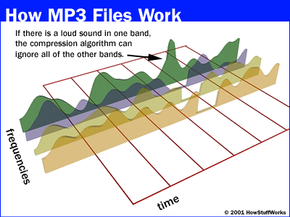
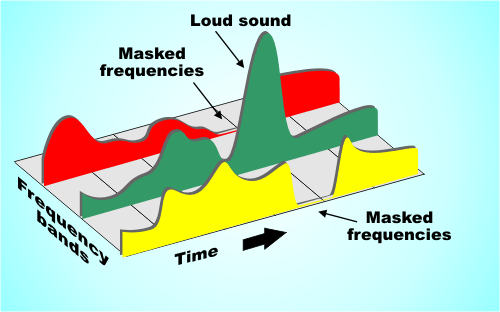
Redundant signals include audio signals outside the range of human hearing and masked audio signals. For example, the frequency range of the sound signal that can be perceived by the human ear is 20 Hz to 20 KHz, and frequencies other than this frequency cannot be detected by the human ear and may be considered as redundant signals. In addition, according to the physiological and psychoacoustic phenomena of the human ear, when a strong signal and a weak signal exist at the same time, the weak signal will be masked by the strong signal and cannot be heard, so the weak signal can be regarded as a redundant signal. Do not send. This is the masking effect of human hearing, which is mainly manifested in the spectral masking effect and the time-domain masking effect, which are presented as follows:

1.1 Spectral masking effect
After the sound energy of a frequency is lower than a certain threshold, the human ear will not hear it, and this threshold is called the minimum audible threshold. When there is another sound with higher energy, the threshold value close to the frequency of the sound will increase considerably.

Mp3 Increase Volume Part 2

Mp3 Increase Volume Part 2

mp3 increase volume

We talked in the previous chapter about the need to achieve an mp3 volume increaser, although the volume increaser is not limited to mp3s in Mp4Gain. You can actually achieve a volume increaser in all major audio and video formats.

mp3 increase volume

To better understand, we were talking about and analyzing how the compression of an audio file works.

Quantification encoding. Quantization encoding uses a three-layer iterative loop model for bit allocation and quantization. These three layers include: frame loop, outer loop, and inner loop. The frame loop resets all iterative variables, calculates the maximum number of bits that can be provided to each data slice, and then calls the external iterative model; the outer iterative model first uses the inner iterative model, which quantizes the input vector by incrementing The size of the quantization step allows the quantized output to be encoded within a certain bit limit. Huffman coding has a limit on the maximum quantization value, so it is necessary to judge whether all quantization values ​​exceed the limit. If it exceeds the limit, the inner iteration loop must increase the size of the quantization step and quantize again. Then determine the number of Huffman encoding bits such that the number of occupied bits is less than the maximum number of bits that can be provided by each encoding section computed by the frame cycle; otherwise, the size of the quantization step must be increased for requantization. When the quantization meets the requirements, store the final scale factor value, exit the outer loop, and compute the number of bits used to store each data section in the frame loop.

Mp3 Increase Volume

Mp3 Increase Volume

mp3 increase volume

First we need to understand how an mp3 works, how it compresses the original wav to a tenth of its size, to understand why we always need to normalize all the volumes of the different mp3s.

increase mp3 volume

Mp3 Increase Volume

A wav saves a lot of information, including information that humans cannot hear, also redundant information and ends up taking up a lot of space on the hard drive or on flash drives.

This has generated from the beginning the need to ensure that the different mp3s have a constant or similar volume when comparing some mp3s with others.

This currently with Mp4Gain can be applied to the most used audio and video formats.

Let’s understand a little how the compression of an mp3 works:

MP3 encoding is mainly composed of 3 main functional modules, including hybrid filter bank (subband filter and MDCT), psychoacoustic model, quantization encoding (bit mapping and bit factoring, and Huffman encoding).
1. Hybrid filter bank. This part includes two parts of the subband filter bank and MDCT. Subband filterbank encoding completes the mapping of the sampled signal from time domain to frequency domain and decomposes the specified audio signal into 32 subbands through the bandpass filterbank for output. All 32 subbands output by the subband filter bank have the same bandwidth, while the critical bandwidth derived from the psychoacoustic model is not. Therefore, to match each scaling factor band for encoding to the critical band, it is necessary to transform subband signals into MDCTs. Once the output of the subband filter bank is sent to the MDCT filter bank, each bank is subdivided into 18 frequency lines, resulting in a total of 576 frequency lines. Next, the number of bits allocated to the 576 spectral lines is determined using the signal-to-mask ratio of the computed subband signals in the psychoacoustic model.

2. Psychoacoustic models. The psychoacoustic model takes advantage of the masking effect of the human auditory system to remove a large number of irrelevant signals, in order to achieve the effect of compressing the audio data. To accurately calculate the masking threshold, the signal is required to have better resolution in the frequency domain, so the signal is Fourier transformed before using the psychoacoustic model. MPEG-I provides two psychoacoustic models. The first model is easy to compute and provides adequate accuracy when encoding at high bit rates. The second model is more complex and is generally used when encoding at lower bit rates. Psychoacoustic model II is generally used in MP3 encoding. The purpose of the psychoacoustic model is to find the masking threshold value of each subband and use it to control the quantization process. The implementation process of the psychoacoustic model generally consists of first using FFT to obtain the spectral characteristics of the signal and find the tonal components (some called musical components) and the non-tonal components (or noise components) at each frequency point according to the spectral features; The curve determines the masking domain value of each tonal component and non-pitch component at other frequency points; finally, the general masking domain of each frequency point is obtained and converted to the coding subband. For noise generated after quantization of the spectral value emitted by the subband filter bank, if the noise can be controlled below the masking threshold, the final compressed data decoded result may be indistinguishable from the original signal. The masking ability of a given signal depends on its frequency and loudness, so the end result of the psychoacoustic model is the signal-to-mask ratio (signal to mask ratio), which is the ratio of the intensity of the signal and masking. limit.