Increase MP3 Volume


Free Download Mp4Gain
picture

Turn Up the Volume on an MP3: The Ultimate Guide

Increase MP3 Volume
Increase MP3 Volume
Increase MP3 Volume
Increase MP3 Volume

3 Shortcuts to Increase MP3 Volume – Easily and Quickly

Increase MP3 Volume with These Simple Steps

Are you tired of listening to your favorite songs on your MP3 player but not being able to hear them clearly? The solution is simple: turn up the volume on your MP3 player! In this article, we will show you how to increase the volume on your MP3 player so you can enjoy your music to the fullest.

The first step to increasing the volume on your MP3 player is to check the volume settings on your device. Make sure that the volume is turned all the way up to its maximum level. If the volume is not at its maximum level, turn it up and see if that solves the problem.

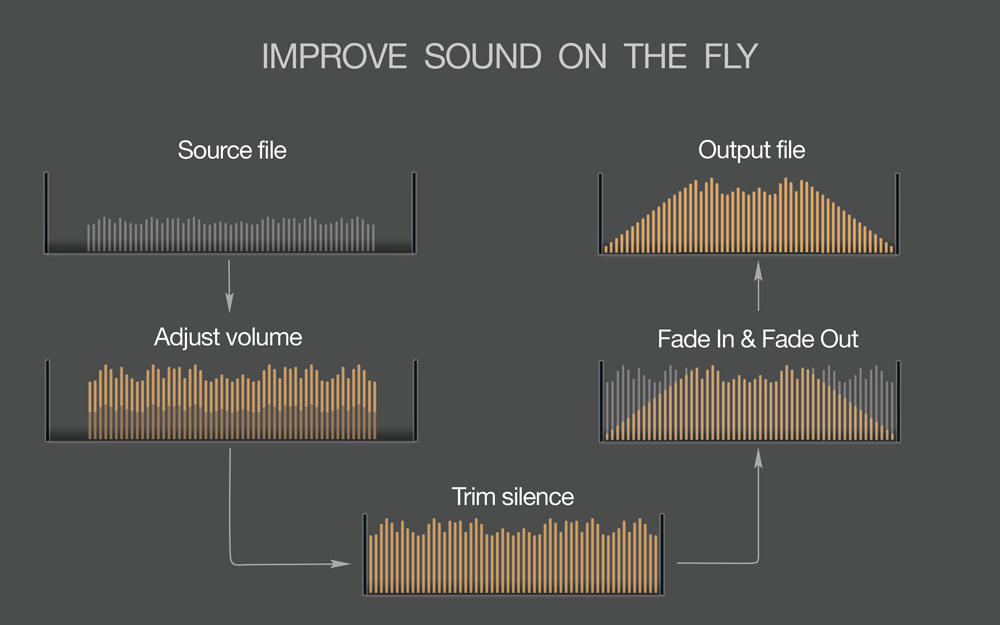
If turning up the volume on your device does not solve the problem, you can try using an audio editing software like MP4Gain to boost the volume of your MP3 files. MP4Gain is a powerful audio normalization software that allows you to adjust the volume of your audio files to a desired level without losing quality.

Boost MP3 Volume with MP4Gain

Using MP4Gain is simple. First, download and install the software on your Windows computer. Once installed, open the software and drag and drop your MP3 files into the program. Next, select the desired volume level and click “Apply Gain.” MP4Gain will automatically normalize the volume of your MP3 files to the desired level.

Amplify MP3 Volume: Tips and Tricks

If you do not want to use software to boost the volume of your MP3 files, there are a few tips and tricks you can try. One simple solution is to use headphones or external speakers to amplify the sound. You can also try adjusting the equalizer settings on your device to boost the volume.

Another tip is to make sure that your MP3 files are encoded at a high bit rate. MP3 files encoded at a higher bit rate tend to sound better and have a higher volume than those encoded at a lower bit rate. Additionally, you can try compressing your MP3 files to make them louder.

Raise MP3 Volume: Conclusion

In conclusion, turning up the volume on your MP3 player is a simple solution to enhance your listening experience. If increasing the volume on your device does not solve the problem, using an audio editing software like MP4Gain can help boost the volume of your MP3 files. By following these tips and tricks, you can enjoy your favorite songs at a higher volume and with better quality.

Final words: Don’t let low volume ruin your listening experience. Use these simple steps and tips to turn up the volume on your MP3 player and enjoy your music to the fullest.

Keywords: MP3 volume, increase volume on MP3, boost volume on MP3, MP3 volume booster, how to make MP3 louder, MP3 player volume, how to increase volume on MP3 player, MP3 volume increaser, MP3 volume enhancer, how to amplify MP3 volume, raise MP3 volume, how to adjust MP3 volume, MP3 sound booster, MP3 volume normalization, how to turn up volume on MP3 player, how to make MP3 sound louder, MP3 sound enhancer, best MP3 volume booster, MP3 volume control, how to increase volume of MP3 file, MP3 gain, how to increase MP3 sound quality, how to make MP3 louder without distortion, MP3 volume increase software,



Free Download Mp4Gain
picture


Mp4Gain Main Window
picture


Mp4Gain Features
picture


Free Download Mp4Gain
picture

Improving MP3 Sound

How to Enhance the Sound Quality of an MP3 File

Improving MP3 Sound
Improving MP3 Sound
Improving MP3 Sound
Improving MP3 Sound

Tips for Improving MP3 Sound

Improving the sound quality of an MP3 file can be a tricky task, but it is definitely possible with the right tools and techniques. As a music enthusiast, I have spent countless hours trying to find the best practices for enhancing the sound quality of my mp3 files. In this article, I will share with you some of the tips and techniques that I have found to be the most effective.

MP3 Sound Improvement

One of the most effective ways to improve the sound quality of an mp3 file is to use a high-quality audio editor like mp4gain. This software allows you to adjust the levels of your mp3 file and normalize the volume to ensure that it sounds great on any device. Additionally, mp4gain can convert your mp3 file to other popular audio formats like WAV, FLAC, and OGG, which can further improve the sound quality.

Another way to improve the sound quality of your mp3 files is to use a high-quality audio player. A good audio player will allow you to adjust the sound settings to your liking, including bass and treble levels, as well as any other sound enhancements that you prefer.

Mp3 Sound Editing

If you want to take your mp3 sound editing to the next level, consider using an equalizer. An equalizer allows you to adjust the levels of specific frequencies in your mp3 file, which can have a dramatic impact on the overall sound quality. With an equalizer, you can boost the bass or treble, or make any other adjustments that you feel are necessary.

Another important aspect of mp3 sound editing is to remove any unwanted noise or distortion from the file. This can be done using various noise reduction tools that are available in most audio editing software. By removing any unwanted noise or distortion, you can greatly improve the overall sound quality of your mp3 file.

Best Practices for Improving MP3 Sound

In addition to the tips and techniques outlined above, there are some best practices that you should keep in mind when trying to improve the sound quality of your mp3 files. Firstly, make sure that you are using high-quality source files. If your original source file is of poor quality, no amount of editing or processing will be able to fix it.

Secondly, always listen to your mp3 file on multiple devices to ensure that it sounds good across different platforms. What sounds great on your computer may not sound as good on your phone or portable music player.

Lastly, don’t be afraid to experiment with different settings and techniques to find what works best for you. Improving the sound quality of your mp3 files is an ongoing process, but with the right tools and techniques, you can achieve great results.

Final Words

Improving the sound quality of your mp3 files may seem like a daunting task, but it is definitely worth the effort. With the tips and techniques outlined in this article, you can take your mp3 sound editing to the next level and enjoy your music to the fullest.

Keywords: mp3 file sound improvement, enhance mp3 sound quality, best mp3 sound editing tools, mp3 sound optimization, how to improve sound quality of mp3 files, mp3 sound correction, mp3 file sound enhancement, mp3 sound equalization, mp3 sound mastering, mp3 sound normalization, mp3 sound effects,

Make MP3 Louder

Make MP3 Louder

Make MP3 Louder
Make MP3 Louder
Make MP3 Louder
Make MP3 Louder

Increase MP3 Volume with MP4Gain

As a music lover, it’s frustrating when your favorite MP3 files are too quiet. You want to listen to them loudly without damaging your ears, but how can you make MP3 louder? The answer is MP4Gain. This Windows-based software can normalize and amplify the volume of your MP3 files without any loss in quality. With just a few clicks, you can increase the volume of your MP3s and enjoy them at the perfect volume.

Amplify MP3 Sound with Simple Steps

You don’t need to be an audio expert to make your MP3 files louder. With MP4Gain, it’s a simple process that anyone can do. After installing the software, just drag and drop your MP3 files into the program. MP4Gain will analyze and normalize the volume of each file, so they all sound at the same level. Then, you can amplify the volume to your desired level, and save the files. It’s that easy!

Make MP3 Louder Online with These Tips

If you don’t want to install software on your computer, you can make your MP3 files louder online. There are many websites that offer this service, but be careful as some of them can reduce the quality of your audio. Look for a reliable and trustworthy website that can amplify the volume without any loss in quality. Also, keep in mind that online tools may have limitations, and the results may not be as good as with dedicated software like MP4Gain.

How to Make MP3 Louder: Tips and Tricks

Aside from using software or online tools, there are some tips and tricks that you can use to make your MP3 files louder. For example, you can use an equalizer to boost the volume of certain frequencies. You can also try compressing the file, which can make the quieter parts louder while keeping the louder parts unchanged. However, keep in mind that these techniques may not work for all MP3 files, and you may still need to use dedicated software like MP4Gain to achieve the desired results.

Boost MP3 Volume: Conclusion

In conclusion, if you’re looking to make your MP3 files louder, MP4Gain is the ultimate solution. It’s easy to use, affordable, and can provide great results. Whether you’re a music lover, a podcaster, or a video creator, having your MP3 files at the perfect volume is essential. Don’t settle for quiet MP3s anymore, boost their volume with MP4Gain!