Audio Equalization Filters


Free Download Mp4Gain
picture

Audio Equalization Filters

Audio Equalization Filters

Audio Equalization Filters Explained

Audio equalization filters are like the control knobs on a sound system, allowing you to fine-tune and shape the audio output to your liking. Imagine them as the equalizer settings on your music player or car stereo. These filters work by adjusting the intensity of different frequency ranges within an audio signal. It’s akin to adjusting the bass, midrange, and treble levels on your home stereo system to achieve the perfect sound balance.

For instance, if you’re listening to music and the bass is overwhelming, you can use equalization filters to reduce the bass frequencies and create a more balanced and enjoyable listening experience. Conversely, if you want to emphasize the vocals in a podcast, you can boost the midrange frequencies to make the voice clearer.

Audio equalization filters are essential tools in the world of sound engineering and music production. They allow professionals to shape and enhance audio quality in recordings, live performances, and various audio applications.

Importance of Audio Equalization

As a seasoned audio engineer, I can attest to the critical role that audio equalization plays in creating high-quality audio content. It’s like being a chef who uses different seasonings to bring out the flavors in a dish. Properly applied equalization enhances the sonic characteristics of audio, making it sound cleaner, more balanced, and more appealing to the ears.

Consider a live concert scenario where you have a mix of instruments and vocals. Without proper equalization, the sound may become muddied and unclear. By using equalization filters, you can isolate and emphasize specific frequencies, making the guitar sound crisp, the vocals shine, and the drums punchy.

Audio equalization is not limited to music alone; it extends to podcasts, films, gaming, and even phone calls. Imagine watching a movie where the dialogue is drowned out by background noise. Skilled audio engineers use equalization to reduce unwanted noise and ensure that the dialogue is clear and intelligible.

Types of Audio Equalization Filters

Audio equalization filters come in various types, each designed for specific purposes. Think of them as different brushes for an artist, each suited for a particular style of painting. Here are some common types of equalization filters:

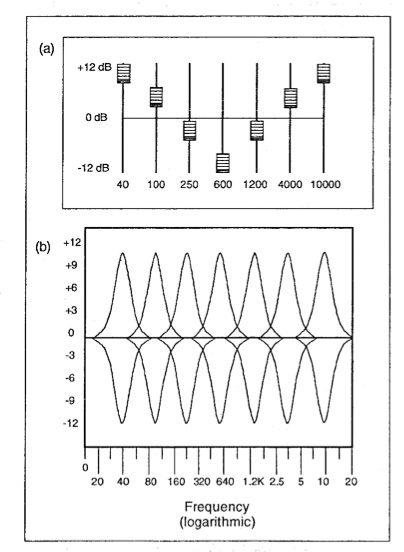
Graphic Equalizers: These are like multi-colored paint palettes, allowing you to adjust a set of fixed frequency bands. They are user-friendly and often found on consumer audio devices.

Parametric Equalizers: Parametric equalizers are like precision tools for audio professionals. They allow you to adjust not only the frequency bands but also the bandwidth (Q) and gain with great precision.

Shelving Equalizers: Imagine these as specialized brushes for broad strokes. Shelving equalizers are used to boost or cut all frequencies above or below a certain point, useful for adjusting bass or treble.

Notch Filters: These are like erasers for unwanted sounds. Notch filters target and eliminate specific frequencies, ideal for removing unwanted hums, buzzes, or feedback.

High-Pass and Low-Pass Filters: High-pass filters allow high frequencies to pass while attenuating low frequencies, while low-pass filters do the opposite. They are like sieves that filter out unwanted elements in audio.

Understanding when and how to use these different types of equalization filters is crucial for achieving the desired audio quality in various scenarios, from music production to live sound reinforcement.

Common Questions About Audio Equalization Filters

When it comes to audio equalization filters, many questions arise, much like curious minds seeking answers. Let’s address some common queries:

1. What’s the best equalization setting for music?

Equalization settings depend on personal preferences and the audio source. There’s no one-size-fits-all answer. Experiment and adjust to suit your taste.
2. Can equalization fix poor-quality recordings?

While equalization can improve audio quality to some extent, it can’t completely salvage a poorly recorded source. Quality in, quality out still applies.
3. Are expensive equalizer plugins better than free ones?

Not necessarily. The effectiveness of an equalizer depends on its features and your skill in using it. Free plugins can be excellent if used correctly.

Mastering Audio Equalization Techniques

Mastering audio equalization is like becoming a skilled painter, capable of creating stunning visuals on a canvas. To excel in this art, you need to practice, experiment, and learn from experience. Start with simple adjustments and gradually delve into more complex equalization techniques.

Consider the analogy of a chef crafting a signature dish. Just as a chef refines their recipe through trial and error, audio engineers refine their equalization techniques by actively listening, experimenting with different filters, and paying attention to detail.

Remember that context matters. Equalization for a rock concert differs from equalization for a classical orchestra recording. It’s crucial to understand the specific requirements of each audio project and tailor your equalization accordingly.

Advanced Applications of Equalization Filters

Advanced applications of equalization filters are like pushing the boundaries of artistic expression. As you become more proficient, you can use equalization creatively. Imagine being a sculptor who can carve intricate details into their work.

For instance, you can use equalization to create unique sound effects in films, simulate vintage audio characteristics, or shape the sonic identity of a musical genre. It’s akin to an artist using various brush strokes and techniques to evoke different emotions in their paintings.

Additionally, advanced equalization techniques involve dynamic equalization, where the filter settings change in real-time based on the audio input. This dynamic approach is like choreographing a dance, where the moves adapt to the music’s rhythm and intensity.

In conclusion, audio equalization filters are powerful tools in the hands of skilled audio professionals. They enable us to shape sound, enhance quality, and create captivating auditory experiences across a wide range of media and applications. Much like artists refining their craft, mastering the art of audio equalization takes time and dedication, but the results are music to the ears.



Free Download Mp4Gain
picture


Mp4Gain Main Window
picture


Mp4Gain Features
picture


Free Download Mp4Gain
picture

Mp3 Sound Booster

Boosting MP3 Sound Quality and Loudness

Mp3 Sound Booster
Mp3 Sound Booster
Mp3 Sound Booster
Mp3 Sound Booster

Mp3 Sound Booster

In today’s digital age, where music and audio are an integral part of our lives, it’s crucial to ensure that our MP3 files sound their best. Whether you’re a casual listener or an audiophile seeking perfection, this comprehensive guide is here to help you master the art of enhancing MP3 sound quality. I’m an audio expert, and I’ll take you on a journey through various techniques and strategies to elevate your MP3 listening experience.

The Importance of Quality MP3 Sound

Before we dive into the nitty-gritty details of improving MP3 sound, let’s first understand why it matters. MP3 is one of the most popular audio formats, known for its compatibility and convenience. However, the sound quality of MP3 files can vary widely, depending on factors like compression, source material, and encoding settings.

Factors Affecting MP3 Sound Quality

To achieve the best MP3 sound quality, you need to consider several key factors:

Bitrate

The bitrate determines the amount of data used to represent audio. Higher bitrates generally result in better sound quality but larger file sizes.

Compression

MP3 files are compressed to reduce their size. Understanding the balance between compression and quality is essential.

Source Material

The quality of the original audio source greatly influences the final MP3 sound. Starting with high-quality recordings is crucial.

Encoding Settings

Adjusting parameters during encoding, such as sample rate and stereo mode, can impact sound quality significantly.

Techniques for Enhancing MP3 Sound Quality

Now that we’ve established the importance of quality MP3 sound, let’s explore various techniques and strategies to enhance it. Whether you’re dealing with older low-bitrate MP3s or you want to optimize your new downloads, these methods will help you achieve the best possible sound.

1. Bitrate Selection

The choice of bitrate plays a fundamental role in MP3 sound quality. Higher bitrates, such as 320 kbps, preserve more audio details, resulting in clearer and more immersive sound. However, they also lead to larger file sizes, so you should strike a balance based on your storage capacity and listening preferences.

2. Source Material Enhancement

Improving MP3 sound quality starts with the source material. If you have control over the recording process, use high-quality microphones, eliminate background noise, and ensure proper mixing and mastering techniques are employed. Starting with a pristine source will yield better MP3s.

3. Proper Encoding Settings

When converting audio to MP3 format, it’s crucial to choose the right encoding settings. Opt for a higher sample rate (e.g., 44.1 kHz or 48 kHz) and stereo mode for richer sound. Experiment with different settings to find the sweet spot for your audio.

4. Noise Reduction

If your MP3s suffer from background noise or artifacts, consider using noise reduction software. This can help eliminate unwanted hisses, clicks, and pops, resulting in a cleaner listening experience.

5. Equalization (EQ)

Using an equalizer allows you to adjust the balance of frequencies in your MP3s. You can enhance bass, boost treble, or make other custom adjustments to tailor the sound to your preferences.

6. Volume Normalization

Normalization ensures consistent volume levels across your MP3 library. This prevents sudden volume jumps between tracks, providing a more enjoyable listening experience.

7. High-Quality Playback Devices

Investing in high-quality headphones or speakers can make a significant difference in how you perceive MP3 sound. Look for devices with accurate sound reproduction and comfortable fit for extended listening sessions.

8. Room Acoustics

If you primarily listen to MP3s in a room, consider optimizing the acoustics. Simple changes like adding acoustic panels or rearranging furniture can reduce reflections and enhance sound quality.

9. Lossless Formats

Consider archiving your favorite music in lossless formats like FLAC or WAV for the utmost audio fidelity. While these formats result in larger file sizes, they preserve audio quality without compression.

10. Regular Maintenance

Maintaining your MP3 library is essential. Periodically check for corrupted files, update metadata, and back up your collection to prevent data loss.

Final Words

Enhancing the sound quality of your MP3 files is a rewarding endeavor for any music lover. By understanding the factors influencing sound quality and employing the right techniques, you can elevate your MP3 listening experience to new heights. Whether you’re a casual listener or an audiophile, these strategies will help you make the most of your digital music collection. Remember, the quest for perfect sound is a journey, so enjoy every moment of it. Happy listening!

Mp3 Audio Booster

Mp3 Audio Booster

Mp3 Audio Booster
Mp3 Audio Booster
Mp3 Audio Booster
Mp3 Audio Booster

Boosting Audio in MP3 Files: A Comprehensive Guide

Volume Enhancement

When it comes to enhancing the audio in your MP3 files, one of the most common goals is to boost the volume. Whether you’re listening to music or podcasts, having a low volume can be frustrating. Boosting the volume of your MP3 files can make your listening experience more enjoyable. To do this, you can use various software tools that allow you to increase the volume level of your audio files. However, be cautious not to overdo it, as excessive volume boosting can result in distortion.

Equalization

Equalization, often referred to as EQ, is another essential aspect of audio enhancement. EQ allows you to adjust the balance of frequencies in your MP3 files. You can boost or cut specific frequency ranges to make the audio sound more balanced and tailored to your preferences. For instance, you can increase the bass frequencies for a richer, deeper sound or adjust the treble for sharper clarity. Many audio editing software packages offer built-in EQ tools, making it easy to fine-tune your MP3 files.

Bass Boost

If you’re a fan of deep, thumping bass, then bass boost is the keyword you need to explore. Bass boost techniques enhance the low-frequency elements of your MP3 audio, giving it a more pronounced and impactful bass response. This can be particularly useful when listening to genres like hip-hop or electronic music, where a powerful bassline is essential for the overall experience. Remember, though, to use bass boost in moderation, as excessive bass can overwhelm other elements of the audio.

Treble Adjustment

On the opposite end of the spectrum, we have treble adjustment. This allows you to fine-tune the higher-frequency components of your MP3 files. Adjusting the treble can make vocals and instrumentals sound crisper and more detailed. It’s an effective way to improve the clarity of audio, especially for genres like classical music or podcasts where articulate speech is crucial.

Sound Quality Improvement

Enhancing sound quality is a broader goal that encompasses various techniques. You can improve sound quality by eliminating background noise, reducing distortion, and ensuring that your MP3 files are encoded at a high bit rate. Sound quality improvement aims to make your audio as clear and pristine as possible, providing an enjoyable listening experience without any distractions.

Noise Reduction

Noise reduction techniques come in handy when your MP3 files contain unwanted background noise, such as hiss, hum, or static. Noise reduction software can analyze the audio and remove or reduce these unwanted sounds, resulting in cleaner and more enjoyable listening.

Audio Amplification

Audio amplification involves increasing the overall loudness of your MP3 files without compromising audio quality. It’s a subtle form of volume enhancement that can make a significant difference in the perceived loudness of your audio.

Audio Enhancement Tools

There are various specialized audio enhancement tools available that cater to specific needs. These tools often come with a range of features, from advanced equalization to noise reduction, allowing you to tailor your MP3 audio to your liking.

Audio Editing Software

If you’re looking for comprehensive control over your MP3 files, consider using audio editing software. These powerful programs provide a wide array of tools for enhancing and customizing your audio, from adjusting volume and equalization to adding effects and transitions.

Amplify MP3 Files

Amplify MP3 files” is a straightforward keyword that directly addresses the task at hand. Amplifying your MP3 files is the process of increasing their volume, and there are various methods and tools available to achieve this.

In conclusion, enhancing the audio in your MP3 files can greatly enhance your listening experience. Whether you’re looking to boost the volume, fine-tune the frequencies, or improve overall sound quality, there are numerous tools and techniques at your disposal. Experiment with these keywords and explore the various options to tailor your MP3 audio to your preferences.

Final Words
Remember that while these techniques can significantly improve your audio, it’s essential to use them judiciously and maintain a balance between enhancement and maintaining the integrity of the original audio.

Wav Volume Booster

Wav Volume Booster

Wav Volume Booster
Wav Volume Booster
Wav Volume Booster
Wav Volume Booster


Amplify Your Audio: Wav Volume Booster

Are your favorite songs or podcasts sounding a bit lackluster? It happens to the best of us. Sometimes, you just need that extra oomph in your audio. That’s where a “Wav Volume Booster” comes into play.

Audio Amplification

Audio amplification, at its core, is about making your audio louder. It’s like giving your music or recordings a power-up, ensuring that every sound reaches your ears with greater intensity. Imagine listening to your favorite song, and every beat and note hits you with a more pronounced impact. That’s the magic of audio amplification.

Sound Enhancement

Sound enhancement is all about taking your audio experience to the next level. It’s like adding a touch of magic to your sound files. With a Wav Volume Booster, you can enhance the clarity and richness of your audio, making it more enjoyable to listen to. Whether you’re a music enthusiast, a podcaster, or a gamer, sound enhancement tools are your ticket to a more immersive experience. Mp4Gain is the best option.

Volume Boosting Tools

Volume boosting tools are essential for those moments when you need to turn up the volume. They allow you to increase the sound levels of your audio files without distorting them. It’s like having a control panel for your audio, where you can fine-tune the volume to your liking. These tools are especially handy when you’re dealing with soft-spoken dialogues in movies or videos.

Mp4Gain is the most advacend Volume Boosting tool.

Audio Wave Amplitude

Understanding audio wave amplitude is key to mastering the art of sound. When you boost the volume, you’re essentially making the audio waves taller. This increase in amplitude results in a louder sound. Think of it as stretching a rubber band – the more you stretch it, the louder the snap. It’s a fundamental concept in audio engineering, and it’s what powers the Wav Volume Booster.

Increasing Sound Levels

Sometimes, the default sound levels on your devices just don’t cut it. That’s when you need to take matters into your own hands and increase the sound levels. A Wav Volume Booster gives you the freedom to crank up the volume on your favorite music or videos, ensuring that nothing gets lost in the background noise.

Audio Enhancement Software

Audio enhancement software, like the Wav Volume Booster, is a game-changer for anyone who values high-quality sound. These tools are designed to refine and optimize audio, making it sound better than ever. Whether you’re an audiophile or just someone who enjoys good music, audio enhancement software Mp4Gain is a must-have in your toolkit.

Boosting Wav Files

Wav files are known for their excellent audio quality, but sometimes, you still want more. Boosting Wav files with a dedicated tool can take your audio to new heights. You’ll be amazed at how much clarity and depth you can add to your audio recordings, making them sound like they were professionally mastered.

Improving Audio Clarity

Clarity is the hallmark of great audio. No one wants to strain their ears trying to catch every word or note. With a Wav Volume Booster, you can improve the clarity of your audio, making it crystal clear even in noisy environments. It’s like having a personal audio engineer at your disposal.

Louder Sound Output

In a world filled with distractions, having a louder sound output can make all the difference. Whether you’re watching a movie with friends, gaming online, or simply enjoying your favorite tunes, a Wav Volume Booster ensures that your audio stands out. Say goodbye to constantly adjusting the volume – with a boost, your sound will be loud and clear.
Final Words:
So, there you have it – the world of Wav Volume Boosters and audio enhancement. These tools have the power to transform your audio experience, making it more immersive, enjoyable, and crystal clear. Whether you’re an audio enthusiast or just someone who loves a good beat, consider adding a Wav Volume Booster to your arsenal of audio gadgets.


MP4 audio enhancement

MP4 audio enhancement

MP4 audio enhancement

Are you tired of watching MP4 videos with poor audio quality? Well, you’re not alone. Many of us have come across videos that have great visuals but lackluster sound. In this article, we’ll delve into the world of MP4 audio enhancement and explore various methods to improve the sound in your MP4 files.

Audio quality improvement

When it comes to MP4 audio enhancement, the first step is to focus on improving the overall audio quality. This can be achieved by using specialized software that can analyze and enhance the audio in your videos. These tools often come with features like noise reduction, equalization, and audio normalization, all of which can significantly enhance the clarity and richness of the sound.

MP4 audio enhancement software

There are several dedicated MP4 audio enhancement software options available in the market. These programs are designed to cater to both beginners and professionals. They offer a user-friendly interface and a wide range of audio enhancement tools, making it easy to adjust audio levels, remove background noise, and fine-tune the audio to perfection.

Enhance audio in MP4 files

Enhancing audio in MP4 files requires a keen ear and the right tools. You can manually adjust the audio settings, such as volume, equalization, and balance, using video editing software. Additionally, you can use audio enhancement plugins or filters to target specific issues like unwanted background noise or distorted audio.

Audio enhancement tools

There’s a treasure trove of audio enhancement tools available online, both free and paid. These tools often come with pre-configured settings for different types of audio issues, making it easier for users to enhance their MP4 audio without extensive knowledge of audio engineering.

MP4 audio editing

If you’re a perfectionist and want complete control over your MP4 audio, consider diving into audio editing. Software like Adobe Audition or Audacity allows you to get down to the nitty-gritty details of your audio, enabling you to remove imperfections, enhance clarity, and fine-tune every aspect of your sound.

Improve sound in MP4 videos

Enhancing the sound in your MP4 videos not only improves the viewing experience but also adds a professional touch to your content. With the right techniques and tools at your disposal, you can make your videos stand out with exceptional audio quality.

Audio enhancement techniques

Audio enhancement isn’t just about turning up the volume; it’s about using various techniques to polish and refine the audio. Techniques like equalization, compression, and reverb can be employed strategically to make your audio shine.

MP4 audio cleanup

Sometimes, MP4 files come with unwanted noise or artifacts that can be distracting. Audio cleanup tools can help you identify and remove these issues, leaving you with clean and crisp sound that complements your video perfectly.

Audio enhancement plugins

Plugins are like magic wands for audio enhancement. They can be integrated into your video editing software to provide specialized audio processing capabilities. Whether you need to reduce background noise or add special effects, there’s likely a plugin that can do the job.

Enhance audio clarity in MP4

Clarity is key when it comes to audio enhancement. Enhancing the clarity of your MP4 audio ensures that every word is heard crystal clear, making your videos more engaging and professional.

Final Words

In a world where multimedia content is king, MP4 audio enhancement is a valuable skill to have. With the right tools and techniques, you can elevate your videos to a whole new level of audio quality, captivating your audience and leaving a lasting impression.

Raise Audio Volume

Raise Audio Volume

Raise Audio Volume
Raise Audio Volume
Raise Audio Volume
Raise Audio Volume


Are you tired of straining to hear your favorite music or videos because the audio volume is too low? I’ve been there too, and in this guide, we’ll explore effective ways to raise audio volume and enjoy your content at a more comfortable level.

Boost Sound Levels

One of the simplest ways to increase the volume of your audio is to boost the sound levels on your device. Most smartphones, laptops, and tablets have volume controls that allow you to raise the volume. However, keep in mind that this may not be sufficient for extremely low-volume content.

If you find that boosting the device volume isn’t enough, consider using external speakers or headphones with built-in amplifiers. These can significantly enhance the audio and make it louder without causing distortion.

Increase Audio Loudness

Sometimes, audio recordings or videos come with naturally low loudness levels. To increase audio loudness, you can use audio editing software. These programs allow you to adjust the volume levels of your audio files without compromising quality.

Additionally, pay attention to the source of your audio. Some platforms and apps have volume normalization features that can help maintain consistent loudness across different tracks.

Amplify Sound Volume

Amplifying sound volume is crucial when you want to make sure every detail in your audio is crystal clear. Consider using dedicated sound amplification software or apps. These tools are designed to boost audio volume while minimizing any potential distortion.

Another tip is to check the equalizer settings on your audio playback device. Adjusting the equalizer can help emphasize specific frequency ranges, making the audio more pronounced and enjoyable.

Enhance Audio Intensity

When you’re seeking to enhance audio intensity, it’s about more than just making it louder. It’s about improving the overall listening experience. Let’s explore some effective ways to achieve this.

Raise Volume Level

One of the most straightforward ways to enhance audio intensity is to raise the volume level on your device. Whether you’re listening to music, watching a movie, or playing games, turning up the volume can provide a more immersive experience.

Keep in mind that excessively high volume levels can damage your hearing, so it’s essential to find a balance that’s both enjoyable and safe.

Improve Audio Clarity

Enhancing audio intensity isn’t just about making it louder; it’s also about improving clarity. This can be achieved by using high-quality headphones or speakers that reproduce audio accurately.

Additionally, consider investing in audio enhancement software. These tools can help reduce background noise and sharpen the details in the audio, resulting in a more intense and enjoyable listening experience.

Augment Sound Amplitude

To augment sound amplitude effectively, you need to explore the capabilities of your audio equipment. High-end speakers and headphones are designed to deliver powerful and intense audio experiences. Investing in quality audio gear can make a significant difference in how you perceive sound intensity.

Moreover, you can fine-tune the sound on your devices by adjusting the audio settings. Experiment with different equalizer presets to find the one that enhances the intensity of your preferred audio content.

Maximize Audio Strength

Maximizing audio strength goes beyond simply cranking up the volume. It’s about optimizing the audio experience for maximum impact. Let’s delve into some strategies to achieve this.

Elevate Audio Decibels

When you’re looking to maximize audio strength, elevating audio decibels is a crucial step. High-quality headphones and speakers can handle higher decibel levels without distortion, providing a more robust audio experience.

Additionally, consider using software or hardware amplifiers to boost audio strength without sacrificing quality. These tools can help you achieve the perfect balance between loudness and clarity.

Heighten Sound Power

To heighten sound power, you need to explore the capabilities of your audio playback devices fully. High-end speakers and headphones are designed to deliver powerful sound, ensuring that every detail in your audio is pronounced.

Furthermore, experimenting with different audio enhancement settings on your devices can also contribute to heightened sound power. Adjusting the bass, treble, and equalizer settings can significantly impact the overall strength of the audio.

Enhance Audio Impact

When it comes to maximizing audio strength, enhancing audio impact is key. This involves fine-tuning your audio settings to emphasize the most critical elements of the sound, whether it’s the bass in music or the dialogue in a movie.

Consider using audio enhancement software or apps that offer customizable presets for different types of content. These presets can help you achieve the desired audio impact for your specific preferences.

These methods should help you maximize the strength and impact of your audio, ensuring a more immersive and enjoyable listening experience.

What is a signal-to-noise ratio in audio?

What is a signal-to-noise ratio in audio?

signal-to-noise ratio audio

Understanding the Basics of Audio Quality

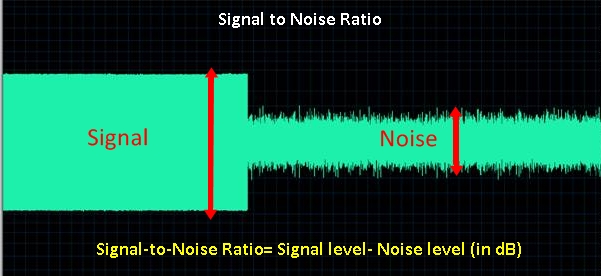
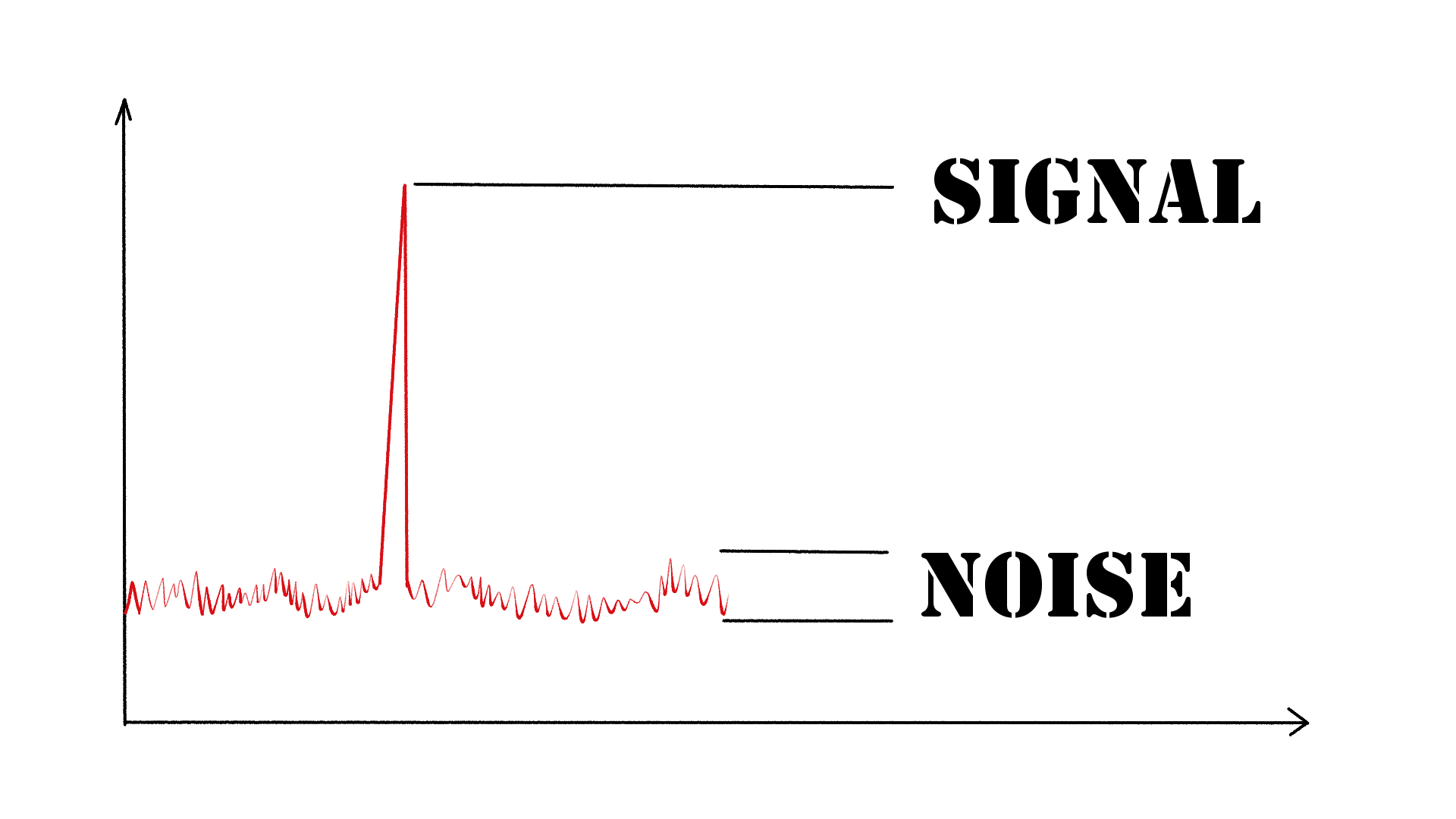
As an audio engineer, I have come across many questions about audio quality, and one of the most common ones is “What is a signal-to-noise ratio in audio?” In simple terms, the signal-to-noise ratio (SNR) is the difference between the desired audio signal and the background noise. A high SNR means that the desired signal is much stronger than the noise, resulting in better audio quality.
When it comes to audio quality, there are many factors to consider, such as audio processing, normalization, compression, dynamics, and distortion. Each of these factors can affect the SNR and, therefore, the overall audio quality. For example, audio normalization can help to increase the SNR by adjusting the volume levels of the audio signal, while audio compression can reduce the dynamic range of the audio signal, resulting in a more consistent SNR.

The Importance of Audio Normalization

As someone who has worked with audio for many years, I can attest to the importance of audio normalization. Normalization is the process of adjusting the volume levels of an audio signal to a standard level, which can help to improve the SNR and overall audio quality.
One of the benefits of audio normalization is that it can help to prevent distortion in the audio signal. When an audio signal is too loud, it can cause distortion, which can be heard as a buzzing or crackling sound. By normalizing the audio signal, you can ensure that it is at a safe and consistent volume level, which can help to prevent distortion and improve the overall audio quality.

The Role of Audio Compression in Audio Quality

Audio compression is another important factor to consider when it comes to audio quality. Compression is the process of reducing the dynamic range of an audio signal, which can help to make it sound more consistent and balanced.
One of the benefits of audio compression is that it can help to improve the SNR by reducing the background noise in the audio signal. However, it is important to use compression carefully, as too much compression can result in a loss of detail and dynamics in the audio signal. As with all aspects of audio engineering, finding the right balance is key to achieving the best possible audio quality.
Final Words:
In conclusion, understanding the basics of audio quality is essential for anyone working with audio. Whether you are an audio engineer, musician, or just someone who enjoys listening to music, knowing about factors such as SNR, normalization, compression, dynamics, and distortion can help you to achieve the best possible audio quality. And if you are looking for a solution to improve your audio quality, consider using mp4gain, a powerful and easy-to-use audio normalizer and converter that can help you to achieve consistent and high-quality audio.

audio quality, signal-to-noise ratio, audio engineering, audio processing, audio normalization, audio compression, audio dynamics, audio distortion, audio editing, audio software, audio plugins, audio effects, audio mixing, audio mastering, audio recording, audio equipment, audio cables, audio interfaces, audio monitors, audio speakers, audio headphones, audio formats, mp3, mp4, wav, flac, aac, ogg, audio bitrate, audio frequency, audio spectrum, audio waveform, audio visualization, audio analysis, audio restoration, audio repair, audio enhancement, audio improvement, audio tips, audio tricks, audio tutorials, audio guides, audio blogs, audio forums, audio community, audio enthusiasts, audio professionals, music production, sound design, sound effects, soundtracks, soundscapes, sound libraries, sound samples, soundfonts, sound packs, sound kits, sound engineering, sound recording, sound mixing, sound mastering, sound equipment, sound cables, sound interfaces, sound monitors, sound speakers, sound headphones, sound formats, sound bitrate, sound frequency, sound spectrum, sound waveform, sound visualization, sound analysis, sound restoration, sound repair, sound enhancement, sound improvement, sound tips, sound tricks, sound tutorials, sound guides, sound blogs, sound forums, sound community, sound enthusiasts, sound professionals.

Improving MP3 Sound

How to Enhance the Sound Quality of an MP3 File

Improving MP3 Sound
Improving MP3 Sound
Improving MP3 Sound
Improving MP3 Sound

Tips for Improving MP3 Sound

Improving the sound quality of an MP3 file can be a tricky task, but it is definitely possible with the right tools and techniques. As a music enthusiast, I have spent countless hours trying to find the best practices for enhancing the sound quality of my mp3 files. In this article, I will share with you some of the tips and techniques that I have found to be the most effective.

MP3 Sound Improvement

One of the most effective ways to improve the sound quality of an mp3 file is to use a high-quality audio editor like mp4gain. This software allows you to adjust the levels of your mp3 file and normalize the volume to ensure that it sounds great on any device. Additionally, mp4gain can convert your mp3 file to other popular audio formats like WAV, FLAC, and OGG, which can further improve the sound quality.

Another way to improve the sound quality of your mp3 files is to use a high-quality audio player. A good audio player will allow you to adjust the sound settings to your liking, including bass and treble levels, as well as any other sound enhancements that you prefer.

Mp3 Sound Editing

If you want to take your mp3 sound editing to the next level, consider using an equalizer. An equalizer allows you to adjust the levels of specific frequencies in your mp3 file, which can have a dramatic impact on the overall sound quality. With an equalizer, you can boost the bass or treble, or make any other adjustments that you feel are necessary.

Another important aspect of mp3 sound editing is to remove any unwanted noise or distortion from the file. This can be done using various noise reduction tools that are available in most audio editing software. By removing any unwanted noise or distortion, you can greatly improve the overall sound quality of your mp3 file.

Best Practices for Improving MP3 Sound

In addition to the tips and techniques outlined above, there are some best practices that you should keep in mind when trying to improve the sound quality of your mp3 files. Firstly, make sure that you are using high-quality source files. If your original source file is of poor quality, no amount of editing or processing will be able to fix it.

Secondly, always listen to your mp3 file on multiple devices to ensure that it sounds good across different platforms. What sounds great on your computer may not sound as good on your phone or portable music player.

Lastly, don’t be afraid to experiment with different settings and techniques to find what works best for you. Improving the sound quality of your mp3 files is an ongoing process, but with the right tools and techniques, you can achieve great results.

Final Words

Improving the sound quality of your mp3 files may seem like a daunting task, but it is definitely worth the effort. With the tips and techniques outlined in this article, you can take your mp3 sound editing to the next level and enjoy your music to the fullest.

Keywords: mp3 file sound improvement, enhance mp3 sound quality, best mp3 sound editing tools, mp3 sound optimization, how to improve sound quality of mp3 files, mp3 sound correction, mp3 file sound enhancement, mp3 sound equalization, mp3 sound mastering, mp3 sound normalization, mp3 sound effects,