As a seasoned specialist in audio engineering, I delve into the fascinating realm of audio equalization—a crucial aspect of sound shaping that often mystifies many. The top Google results merely scratch the surface, and today, I aim to provide you with a comprehensive guide that not only clarifies the fundamentals but also goes beyond the conventional wisdom.
Understanding the Basics
Let’s start with the basics. Audio equalization, commonly known as EQ, is the process of adjusting the balance between different frequency components of an audio signal. Picture it as a chef refining the flavors in a dish; in audio, we’re refining the sonic spectrum. The key frequencies—bass, midrange, and treble—act as the ingredients in our sonic recipe.
The Frequency Spectrum
**Bass:** Think of it as the foundation, like the deep notes of a booming drum.
**Midrange:** This is where most vocals and instruments thrive, akin to the heart of a melody.
**Treble:** Imagine the sparkle of cymbals or the crispness of high-pitched strings.
By grasping this analogy, you’re well on your way to mastering the art of audio equalization.
Let’s Talk about EQ Techniques
Now that we’ve laid the groundwork, let’s explore some advanced equalization techniques that the typical Google results might not delve into.
Dynamic Equalization
Dynamic equalization adapts to the audio signal in real-time, responding dynamically to changes in volume or frequency content. It’s like having an intelligent assistant adjusting the levels on the fly, ensuring a consistent and polished sound experience, much like a live concert adapts to the energy of the crowd.
Linear Phase EQ
Linear Phase EQ is like a surgeon’s precision knife. Unlike traditional EQ, it minimizes phase shifts, preserving the integrity of the original audio waveform. Think of it as a high-definition TV for your ears, offering pristine clarity without distortion.
The Art of Parametric EQ
Parametric EQ empowers you with surgical precision, allowing you to pinpoint and adjust specific frequencies. Imagine it as an artist’s palette, where each knob represents a color on the sonic canvas. This technique provides unparalleled control, letting you sculpt the audio landscape to perfection.
Let’s Talk about Room Acoustics
Now, let’s step into the real world—your living room. Room acoustics play a pivotal role in how you perceive sound. Just as a well-designed theater enhances the movie-watching experience, optimizing your room’s acoustics ensures that the audio equalization efforts shine.
Bass Traps and Diffusers
Ever noticed booming bass or echoes in your room? Bass traps and diffusers are like interior decorators for sound. Bass traps absorb excess low frequencies, while diffusers scatter sound waves, creating a balanced acoustic environment akin to a concert hall.
The Future of Audio Equalization
As we conclude our journey into the science of audio equalization, it’s essential to peek into the future. Emerging technologies, such as AI-driven EQ algorithms, promise even more personalized and immersive audio experiences. Just as your smartphone adapts to your preferences, future audio systems may tailor the sonic landscape to your unique tastes.
Latest Words on Audio Equalization
As the digital landscape evolves, so does the science of audio equalization. Staying updated on the latest advancements ensures that your audio setup remains at the forefront of sonic excellence. Remember, the journey to audio perfection is ongoing, and with each new discovery, we uncover more layers of the intricate tapestry that is sound.
Comments:
This article really opened my eyes to the art behind audio equalization. I never thought of it like adjusting flavors in a dish, but it makes so much sense now. Kudos!
Could you provide more examples of dynamic equalization in real-life scenarios? I’m intrigued by the concept and would love to understand it better.
Great read! The analogies used here make complex concepts easy to grasp. I’d love to see more articles breaking down technical topics in this way.
This article left me wanting more details on linear phase EQ. Are there any specific situations where it outshines traditional EQ, and how do I apply it in my own projects?
As a musician, I appreciate the room acoustics section. It’s often overlooked, but it makes a massive difference. Would love to see more tips on optimizing home studios for better sound!
Thanks for shedding light on the future of audio equalization. Exciting times ahead! Can’t wait to see how AI-driven EQ will revolutionize our listening experiences.
I’m a newbie in audio, and this article was a fantastic starting point. It’s written in a way that even beginners like me can understand. Looking forward to exploring more!
Impressive insights! The comparisons to real-life situations really make the concepts stick. Keep up the excellent work!
Are there any specific brands or tools you recommend for implementing dynamic equalization? I’d love to experiment with it in my home setup.
Bravo! This article not only educated me but also sparked my curiosity. Looking forward to more articles from this source!
Could you dive deeper into the science behind room acoustics? I’m fascinated by how the physical space affects sound, and I want to optimize my studio further.
This article made me appreciate the intricacies of audio engineering. It’s like a backstage pass to the world of sound manipulation. More, please!
Any tips for someone just starting with audio production? This article provided a solid foundation, and I’m hungry for more knowledge!
Volume Control for MP3 FilesVolume Control for MP3 Files
Let’s Talk About Volume Control for MP3 Files
As a specialist with extensive experience in audio technology, I’m here to provide you with a comprehensive guide to volume control for MP3 files. Whether you’re a music enthusiast, a content creator, or simply someone looking to optimize your MP3 audio, understanding how to control and adjust volume is crucial. I’ll delve deep into this topic, offering insights, tips, and techniques that go beyond the standard knowledge. Let’s explore this essential aspect of managing your audio files.
Volume Control for MP3 Files
Understanding the Basics of MP3 Files
Before we dive into volume control, let’s first understand the basics of MP3 files. MP3, short for MPEG-1 Audio Layer 3, is a widely used audio compression format. It’s known for its high-quality sound and small file size, making it ideal for various applications. MP3 files are commonly used for music, podcasts, audiobooks, and more. To adjust their volume effectively, it’s essential to grasp the underlying technology.
The Role of Bitrate in Audio Quality
One crucial aspect of MP3 files is the bitrate, which directly affects audio quality. Bitrate refers to the amount of data processed per unit of time, typically measured in kilobits per second (kbps). A higher bitrate results in better sound quality but larger file sizes, while a lower bitrate compromises quality but reduces file size. When adjusting volume, you should consider the original bitrate of your MP3 files, as altering it can impact sound clarity.
Volume Control Techniques
Now, let’s explore various volume control techniques that you can use to enhance your MP3 files. It’s not just about making audio louder or softer; it’s about achieving the perfect balance for your specific needs:
Equalization (EQ): Adjusting the balance between different frequency bands to enhance the overall sound quality. For example, boosting the bass for a booming effect or adjusting the treble for crisper vocals.
Normalization: Ensuring that the loudest parts of the audio are at an optimal level, preventing distortion or overly quiet sections.
Compression: Reducing the dynamic range of audio to make softer sounds louder and louder sounds softer, creating a more consistent volume throughout the file.
Choosing the Right Software for Volume Control
When it comes to adjusting the volume of your MP3 files, the choice of software is critical. While there are various software options available, not all are created equal. One of the most effective tools I recommend is MP4Gain. It offers a user-friendly interface and a range of features to fine-tune your audio to perfection. With MP4Gain, you can normalize, equalize, and adjust the volume of your MP3 files effortlessly.
MP3 Volume Control Best Practices
Here are some best practices to ensure that your volume adjustments are successful:
Backup Your Files: Before making any volume changes, always create backups of your original MP3 files to avoid irreversible alterations.
Test on Different Devices: Play your adjusted MP3 files on various devices to ensure they sound good everywhere, from headphones to car stereos.
Listen Cautiously: Pay close attention to the audio quality and make gradual adjustments to achieve the desired results.
Additional Tips and Tricks
Now, let’s take a deeper dive and explore some advanced tips and tricks for volume control that many articles miss:
Metadata Editing
Did you know that adjusting metadata can impact how your MP3 files are played back? By specifying volume-related metadata tags, you can control how media players handle your audio. For example, you can set the “replay gain” tag, which instructs media players to adjust the volume automatically.
Batch Processing
If you have a large collection of MP3 files, batch processing can save you a tremendous amount of time. Look for software that allows you to adjust the volume of multiple files simultaneously. This is incredibly handy for content creators and music libraries.
Presets for Different Genres
Creating volume presets for different music genres can be a game-changer. For instance, you can have separate settings for rock, classical, and hip-hop. This ensures that your audio always sounds its best, no matter the genre.
Latest Words on MP3 Volume Control
As we wrap up this comprehensive guide, it’s crucial to mention that the world of audio technology is continually evolving. New software and techniques for volume control are emerging, offering even more precise control over your MP3 files. Staying up to date with the latest advancements in this field will help you maintain the highest audio quality for your collection.
Comments:
Comment 1: I’ve been struggling with audio quality in my podcasts, and this article provided valuable insights. Thanks!
Comment 2: Can you share more details on how to set volume presets for different music genres? I’d love to learn more about this.
Comment 3: I’ve used MP4Gain, and it’s made a world of difference in my music library. Highly recommended!
Comment 4: This article has been a great help in understanding the technical aspects of MP3 volume control. I appreciate the expert insights.
Comment 5: I wish there was more information on how to edit metadata tags for volume control. Can you expand on this topic?
Comment 6: As a content creator, batch processing has been a time-saver for me. It’s fantastic to see this mentioned here.
Comment 7: I’ve been looking for an article like this for a long time. Thanks for sharing these expert tips on MP3 volume control.
Comment 8: I love how you’ve explained complex concepts in a simple and relatable way. This article is a gem for audio enthusiasts like me.
Comment 9: Can you recommend some alternatives to MP4Gain for volume control? I’d like to explore different options.
Comment 10: This article is a must-read for anyone dealing with audio files. It’s packed with practical advice and expert knowledge.
Optimizing Psychoacoustic Models for MP3 Compression at Low Bitrates
Psychoacoustic Models for MP3
Let’s Talk About MP3 Compression and Psychoacoustic Models
As a specialist with years of experience in audio compression, I want to take you on a journey through the intricate world of optimizing psychoacoustic models for MP3 compression, especially at low bitrates. To make this topic as accessible as possible, let’s start with a simple analogy. Think of your car’s engine. It’s designed to be efficient, just like psychoacoustic models aim to be efficient in preserving audio quality. In this article, I’ll show you how psychoacoustic models achieve this.
The Role of Psychoacoustic Models in Audio Compression
Psychoacoustic Models for MP3
Psychoacoustic models are like the selective focus setting on a camera. Just as the camera prioritizes certain elements in a photo, psychoacoustic models prioritize the sounds that your ears are most sensitive to. These models mimic the way our ears perceive sound, and they’re the secret sauce behind MP3 compression. They analyze audio to figure out what we won’t notice if it’s removed. This understanding is crucial for reducing file sizes without harming audio quality.
Challenges of Low Bitrate MP3 Compression
Now, let’s talk about the challenges. Imagine a tightrope walker trying to maintain balance. At low bitrates, MP3 compression faces a similar balancing act. The goal is to keep audio quality while reducing the file size. But as the bitrate drops, it becomes more challenging to maintain that balance. This is where optimizing psychoacoustic models becomes essential.
Understanding the MP3 Compression Process
To understand how psychoacoustic models fit into MP3 compression, think of a recipe with specific ingredients. MP3 compression is like cooking, but instead of food, we’re working with audio. Psychoacoustic models determine which parts of the audio “recipe” are essential and which can be left out without anyone noticing. It’s all about making smart choices in the compression process.
Optimizing Psychoacoustic Models for Low Bitrates
Optimizing psychoacoustic models is a bit like tuning your car’s engine for fuel efficiency. It involves customizing these models to fit specific audio compression needs. You can think of it as fine-tuning your car’s engine for highway driving, where efficiency is paramount. Optimized models allow for more efficient compression while preserving the audio’s essential qualities.
Psychoacoustic Model Parameters and Their Impact
Within psychoacoustic models, there are various parameters that can be adjusted. Think of these parameters like modifying a recipe to suit different tastes. By tweaking these settings, you can influence how the models perceive and compress audio. For example, you can adjust the model to be more or less sensitive to certain sounds, depending on your desired outcome.
The Art of Balancing Audio Quality and Compression
Now, let me share my personal experience. Just as I’ve had to optimize audio for specific needs, you may have faced a similar dilemma. It’s an art to balance audio quality and compression efficiently. Psychoacoustic models are the tools that help us strike that balance. They allow us to tailor audio compression to various situations, just like adjusting your clothing to fit different occasions.
Latest Words on Psychoacoustic Model Optimization
To wrap things up, optimizing psychoacoustic models for MP3 compression at low bitrates is a fine art. It’s about understanding the delicate balance between audio quality and file size. By customizing psychoacoustic models and adjusting their parameters, you can achieve the best possible compression while preserving the audio’s essential characteristics. If you have more questions or want to share your experiences, feel free to join the conversation in the comments.
Comments:
Wow, I never knew audio compression was so much like tuning a car engine. Great article!
This article provides a good introduction, but I’d love to see a deeper dive into the technical aspects of psychoacoustic models.
Optimizing audio quality while compressing files is like finding the perfect outfit for a date. It’s all about making the right impression!
I’ve been struggling with low-bitrate audio files for my podcasts. This article gave me some valuable insights on how to optimize them better.
Psychoacoustic models are fascinating! They’re like the secret agents of audio compression, making sure we get great sound without the unnecessary data.
I’ve always wondered how MP3 compression works behind the scenes. This article clarified it for me, thanks!
I agree with the previous comment – a deep dive into the technical aspects would be fantastic. I’d love to learn more!
Psychoacoustic models are like the unsung heroes of audio compression. They do the heavy lifting to keep our files small and our sound great.
This article got me interested in learning more about the technical side of audio compression. I never thought it could be so intriguing!
Just like tuning an engine for better gas mileage, optimizing psychoacoustic models for audio compression makes a world of difference. Great analogy!
In today’s digital age, where music and audio are an integral part of our lives, it’s crucial to ensure that our MP3 files sound their best. Whether you’re a casual listener or an audiophile seeking perfection, this comprehensive guide is here to help you master the art of enhancing MP3 sound quality. I’m an audio expert, and I’ll take you on a journey through various techniques and strategies to elevate your MP3 listening experience.
The Importance of Quality MP3 Sound
Before we dive into the nitty-gritty details of improving MP3 sound, let’s first understand why it matters. MP3 is one of the most popular audio formats, known for its compatibility and convenience. However, the sound quality of MP3 files can vary widely, depending on factors like compression, source material, and encoding settings.
Factors Affecting MP3 Sound Quality
To achieve the best MP3 sound quality, you need to consider several key factors:
Bitrate
The bitrate determines the amount of data used to represent audio. Higher bitrates generally result in better sound quality but larger file sizes.
Compression
MP3 files are compressed to reduce their size. Understanding the balance between compression and quality is essential.
Source Material
The quality of the original audio source greatly influences the final MP3 sound. Starting with high-quality recordings is crucial.
Encoding Settings
Adjusting parameters during encoding, such as sample rate and stereo mode, can impact sound quality significantly.
Techniques for Enhancing MP3 Sound Quality
Now that we’ve established the importance of quality MP3 sound, let’s explore various techniques and strategies to enhance it. Whether you’re dealing with older low-bitrate MP3s or you want to optimize your new downloads, these methods will help you achieve the best possible sound.
1. Bitrate Selection
The choice of bitrate plays a fundamental role in MP3 sound quality. Higher bitrates, such as 320 kbps, preserve more audio details, resulting in clearer and more immersive sound. However, they also lead to larger file sizes, so you should strike a balance based on your storage capacity and listening preferences.
2. Source Material Enhancement
Improving MP3 sound quality starts with the source material. If you have control over the recording process, use high-quality microphones, eliminate background noise, and ensure proper mixing and mastering techniques are employed. Starting with a pristine source will yield better MP3s.
3. Proper Encoding Settings
When converting audio to MP3 format, it’s crucial to choose the right encoding settings. Opt for a higher sample rate (e.g., 44.1 kHz or 48 kHz) and stereo mode for richer sound. Experiment with different settings to find the sweet spot for your audio.
4. Noise Reduction
If your MP3s suffer from background noise or artifacts, consider using noise reduction software. This can help eliminate unwanted hisses, clicks, and pops, resulting in a cleaner listening experience.
5. Equalization (EQ)
Using an equalizer allows you to adjust the balance of frequencies in your MP3s. You can enhance bass, boost treble, or make other custom adjustments to tailor the sound to your preferences.
6. Volume Normalization
Normalization ensures consistent volume levels across your MP3 library. This prevents sudden volume jumps between tracks, providing a more enjoyable listening experience.
7. High-Quality Playback Devices
Investing in high-quality headphones or speakers can make a significant difference in how you perceive MP3 sound. Look for devices with accurate sound reproduction and comfortable fit for extended listening sessions.
8. Room Acoustics
If you primarily listen to MP3s in a room, consider optimizing the acoustics. Simple changes like adding acoustic panels or rearranging furniture can reduce reflections and enhance sound quality.
9. Lossless Formats
Consider archiving your favorite music in lossless formats like FLAC or WAV for the utmost audio fidelity. While these formats result in larger file sizes, they preserve audio quality without compression.
10. Regular Maintenance
Maintaining your MP3 library is essential. Periodically check for corrupted files, update metadata, and back up your collection to prevent data loss.
Final Words
Enhancing the sound quality of your MP3 files is a rewarding endeavor for any music lover. By understanding the factors influencing sound quality and employing the right techniques, you can elevate your MP3 listening experience to new heights. Whether you’re a casual listener or an audiophile, these strategies will help you make the most of your digital music collection. Remember, the quest for perfect sound is a journey, so enjoy every moment of it. Happy listening!
Flac and Ogg Volume AdjusterFlac and Ogg Volume Adjuster
Are you tired of dealing with uneven audio levels in your Flac and Ogg files? Well, you’re not alone. Many audio enthusiasts and professionals often face the challenge of maintaining consistent sound quality across their collections. In this article, I’ll delve into the world of Flac and Ogg volume adjustment and explore various methods to tackle this issue effectively.
Audio File Format Adjustments
Before we dive into volume adjustments, it’s crucial to understand the nature of Flac and Ogg audio formats. Flac, short for Free Lossless Audio Codec, and Ogg Vorbis are popular choices for storing high-quality audio. Flac provides lossless compression, preserving audio quality without sacrificing file size, while Ogg is known for its open-source nature and efficient compression.
Sound Volume Control for Flac and Ogg
To control the volume of your Flac and Ogg files, you’ll need specialized tools or software designed for audio processing. These tools allow you to adjust the volume levels without compromising the overall audio quality. Keep in mind that it’s essential to maintain a balance between amplifying the audio and preventing distortion.
Adjusting Audio Levels in Flac and Ogg
One common method for volume adjustment is using an audio editor. These editors offer precise control over the audio, enabling you to increase or decrease the volume as needed. It’s important to preview the changes and make incremental adjustments to achieve the desired result.
Whether you’re a music enthusiast or a professional sound engineer, the ability to adjust volume levels in Flac and Ogg files is invaluable. By understanding the intricacies of these audio formats and utilizing the right tools, you can ensure a consistent and enjoyable listening experience.
Normalizing Sound in Flac and Ogg Files
Normalization is another technique to bring uniformity to your audio collection. This process adjusts the volume of each file to a standard level, eliminating extreme variations. Normalization algorithms analyze the audio content and adjust the gain accordingly, making it ideal for batch processing large libraries.
Volume Equalization for Flac and Ogg
Volume equalization is about ensuring that all your Flac and Ogg files have similar loudness levels. This technique is essential when you’re creating playlists or organizing audio for playback. Volume equalization tools use various methods to balance the audio, providing a seamless listening experience.
Audio Gain in Flac and Ogg Formats
Audio gain, also known as amplification, allows you to increase the overall loudness of your Flac and Ogg files. This can be particularly useful if you have older recordings or content with low volume levels. However, it’s crucial to exercise caution and avoid over-amplification, which can lead to distortion.
Balancing Audio in Flac and Ogg Files
Balancing audio involves adjusting the volume levels of individual tracks within a file. This is handy when dealing with live recordings or albums where tracks may have varying loudness. Balancing tools provide a means to fine-tune each track’s volume to create a consistent listening experience.
Flac and Ogg Audio Level Management
Managing audio levels in Flac and Ogg files is an ongoing process, especially if you frequently add new content to your collection. Regularly reviewing and adjusting volume levels ensures that your audio library remains enjoyable and free from sudden volume spikes or drops.
Tweaking Volume in Flac and Ogg
Sometimes, you may want to apply specific tweaks to the volume of your Flac and Ogg files. This could involve emphasizing certain frequencies or applying dynamic range compression to enhance the audio quality. Experimenting with these tweaks can lead to a more personalized listening experience.
Enhancing Audio Dynamics in Flac and Ogg
Audio dynamics play a crucial role in the overall quality of your listening experience. Adjusting volume levels in Flac and Ogg files can help bring out the nuances in your music. By carefully managing audio dynamics, you can ensure that every note and sound is delivered with precision and clarity.
Final Words
Flac and Ogg volume adjustment is an essential aspect of maintaining an enjoyable audio collection. Whether you’re a music enthusiast or a professional, understanding the tools and techniques available can significantly enhance your listening experience. With the right approach, you can achieve balanced and consistent audio quality in your Flac and Ogg files.
Boost the Volume of Lossy Audio FilesBoost the Volume of Lossy Audio Files
Amplify Sound in Lossy Audio Files
When it comes to enhancing the audio quality of your favorite songs or podcasts, you might find yourself dealing with lossy audio files. These files, while space-efficient, often suffer from reduced sound quality. Fortunately, there are ways to amplify the sound in lossy audio files, giving your listening experience a significant boost.
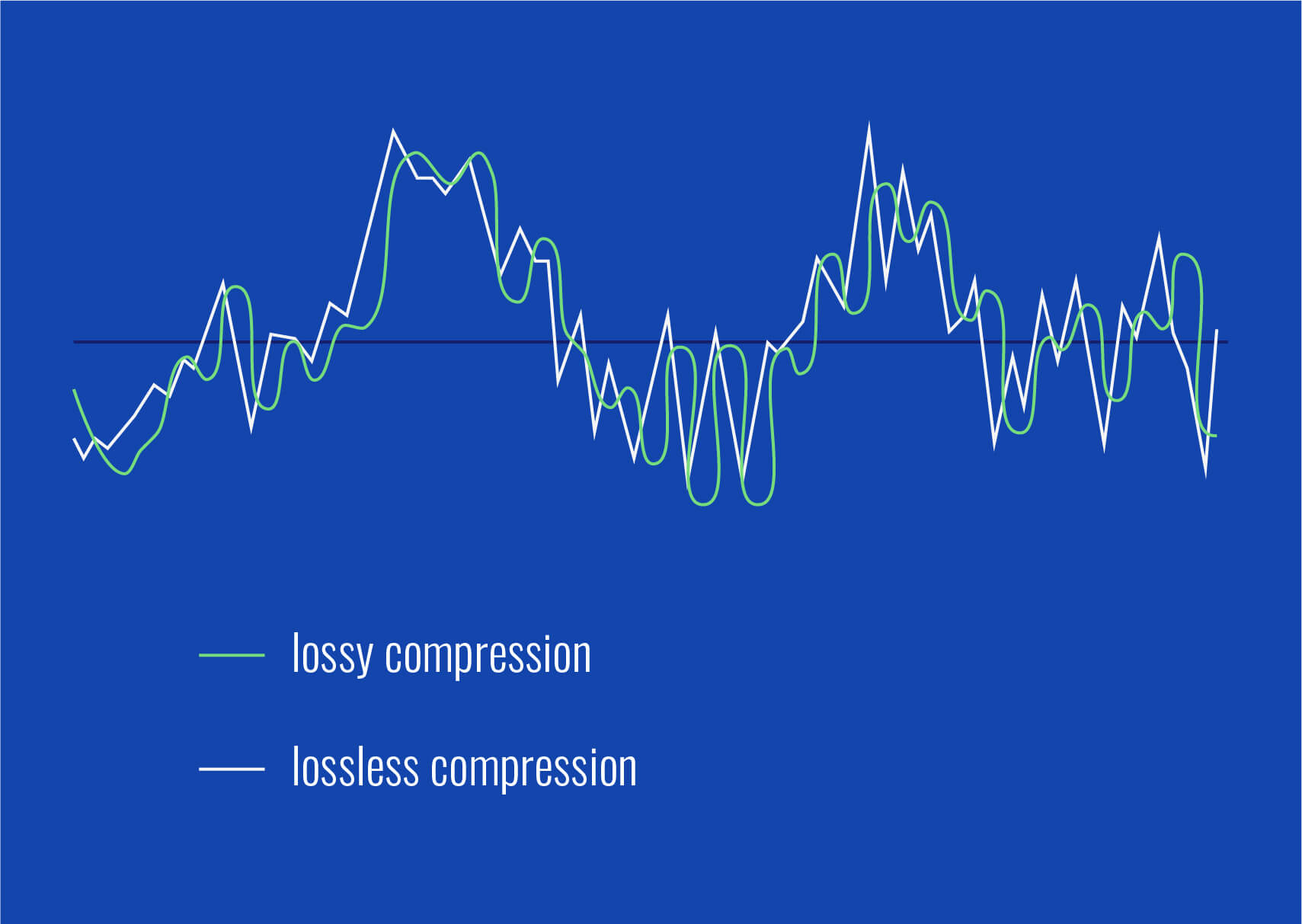
Lossy audio formats, such as MP3, AAC, or OGG, are designed to compress audio data to save storage space. However, this compression can lead to a loss of audio detail and a decrease in overall volume. To address this, you can use audio editing software to amplify the sound. By carefully adjusting the volume levels, you can make the audio more prominent and enjoyable. Just be cautious not to overdo it, as excessive amplification can lead to distortion.
Another effective way to amplify sound in lossy audio files is to use specialized audio processing tools. These tools often come with built-in volume normalization features that can help you increase the loudness while maintaining the audio’s quality. Whether you’re an aspiring musician, a podcast enthusiast, or simply looking to improve your music collection, amplifying sound in lossy audio files can breathe new life into your audio content.
Increase Volume of Compressed Audio
Compressed audio files have become the norm in today’s digital world due to their convenience and storage efficiency. However, one common drawback of these files is that they often lack the volume and punch of their uncompressed counterparts. If you’re wondering how to increase the volume of compressed audio, you’re in the right place.
To boost the volume of compressed audio files, you can start by using audio editing software. Most audio editing programs allow you to adjust the volume levels of individual tracks or sections of a file. Simply open your desired audio file in the software, locate the volume control, and gradually increase it until you achieve the desired loudness. Be cautious not to push the volume too high, as this can result in distortion and a loss of audio quality.
Additionally, consider using dynamic range compression (DRC) techniques. DRC helps balance the loud and quiet parts of an audio file, making it sound more consistent in volume. This technique is particularly useful when dealing with audio files that have uneven loudness levels. With the right adjustments, you can bring out the nuances in your compressed audio while maintaining clarity and preventing clipping.
By employing these techniques, you can effectively increase the volume of your compressed audio files, making them sound more vibrant and engaging.
Audio Volume Enhancement Techniques
Audio volume enhancement techniques are essential tools for anyone looking to improve the sound quality of their audio files, especially those in lossy formats. These techniques involve various methods to make audio files sound louder and more impactful.
One common technique is equalization, which allows you to adjust the balance of frequencies in your audio. By boosting certain frequency ranges, you can make your audio files sound fuller and more vibrant. This is particularly helpful for restoring lost detail in lossy audio files.
Another technique is the use of audio limiters and compressors. These tools help control the dynamic range of your audio, ensuring that loud parts aren’t too overpowering and quiet parts are audible. They can help you achieve a consistent and balanced volume throughout your audio file.
Additionally, you can explore mastering techniques. Mastering involves fine-tuning the overall sound of an audio file, including volume optimization. Professional mastering engineers use specialized software and hardware to enhance the loudness, clarity, and overall quality of audio recordings.
Enhance Audio Loudness in Lossy Formats
Enhancing audio loudness in lossy formats requires a combination of technical expertise and the right tools. Lossy formats like MP3 or AAC often sacrifice audio quality for smaller file sizes, which can result in lower volume levels. Here’s how you can address this issue effectively.
First, consider using audio editing software with volume normalization features. These features analyze the audio file and adjust the volume levels to ensure consistent loudness. This is particularly useful when dealing with a collection of lossy audio files with varying loudness levels.
Furthermore, explore dynamic range compression (DRC) to balance the audio’s dynamics. DRC reduces the difference between the loudest and quietest parts of an audio file, making it sound more uniform in volume. However, be cautious not to apply excessive compression, as it can lead to an unnatural and compressed sound.
Lastly, if you have a specific audio file that needs a volume boost, you can manually adjust the volume using your preferred audio editing software. Keep in mind that raising the volume too much may introduce distortion, so it’s crucial to find the right balance to enhance the loudness while preserving audio quality.
By utilizing these techniques, you can effectively enhance the audio loudness of your lossy format files and enjoy a more immersive listening experience.
Raise the Volume of Low-Quality Audio
Dealing with low-quality audio can be frustrating, especially when the volume is barely audible. Whether it’s an old recording or a poorly encoded audio file, there are ways to raise the volume and salvage the listening experience.
One approach is to use audio restoration software. These tools are designed to improve the quality of audio recordings, including boosting the volume. They often come with noise reduction features, which can help reduce background noise and further enhance the clarity of your audio.
Another option is to employ audio equalization. By adjusting the equalizer settings, you can emphasize the frequencies that are most critical for clarity and volume. Boosting the mid-range frequencies, for example, can make the vocals and instruments more prominent, resulting in a perceptible increase in volume.
If you have access to the original source of the audio, consider re-recording it or obtaining a higher-quality version. This approach eliminates the limitations of the existing low-quality audio file and ensures a better listening experience.
In summary, raising the volume of low-quality audio involves a combination of software tools and, when possible, improving the source material. These steps can help you enjoy clearer and louder audio, even from initially subpar recordings.
Boosting Sound Levels in Lossy Files
Boosting sound levels in lossy audio files is a common requirement for those looking to enhance their audio experience. Lossy formats, while efficient, often compromise on audio quality, resulting in lower volume levels. Here’s how you can effectively increase the sound levels in such files.
One of the simplest methods is to use audio editing software. Most audio editors provide volume adjustment controls that allow you to raise the volume of your lossy audio files. When doing this, be cautious not to push the volume too high, as it can lead to distortion and a loss of audio fidelity.
Additionally, you can explore the use of audio amplification plugins or tools. These specialized software options are designed to boost the loudness of audio files while minimizing the risk of distortion. They often come with presets and fine-tuning options to ensure optimal results.
When boosting sound levels, it’s essential to consider the intended playback environment. Different platforms and devices may have varying volume levels, so aim for a balance that ensures your audio remains clear and enjoyable across different systems.
By following these techniques and experimenting with volume adjustments, you can effectively boost sound levels in your lossy audio files and enjoy an improved listening experience.
Improving Audio Clarity in Compressed Formats
Improving audio clarity in compressed formats, such as MP3 or AAC, is a pursuit for audiophiles and music enthusiasts alike. While these formats offer excellent compression, they can sometimes sacrifice audio quality. Let’s explore how to enhance audio clarity in such files.
One approach is to use high-quality audio conversion tools. These tools can help you convert your compressed audio files into a lossless format, such as FLAC. Once in a lossless format, you can make edits and enhancements without further loss of audio quality. After the improvements, you can convert the file back to a compressed format with improved clarity.
Another technique involves applying equalization to your audio files. By fine-tuning the frequency balance, you can emphasize certain audio elements, such as vocals or instruments, and reduce any muddiness. This can result in clearer and more defined audio, even in compressed formats.
Furthermore, consider using noise reduction software to eliminate background noise and artifacts that may be present in your compressed audio. Reducing these unwanted elements can significantly enhance audio clarity.
Finally, if you have access to the original, uncompressed source of the audio, consider re-encoding it into a higher-quality compressed format. This can provide better clarity while still maintaining a smaller file size compared to lossless formats.
Enhancing audio clarity in compressed formats requires a combination of technical tools and careful adjustments. By experimenting with these techniques, you can achieve remarkable improvements in audio quality.
Loudness Enhancement for Lossy Audio
Loudness enhancement for lossy audio files can make a world of difference in your listening experience. Lossy formats, known for their space-saving benefits, often suffer from lower perceived volume levels. Here’s how you can effectively enhance the loudness of your lossy audio files.
One of the simplest methods is to use an audio player with built-in equalization settings. These settings allow you to boost specific frequency ranges, making the audio sound louder and more impactful. Experiment with different equalizer presets until you find the one that works best for your audio.
Another technique is to employ audio normalization. Many audio editing software tools provide normalization features that adjust the volume of your audio files to a consistent level. This ensures that all tracks play back at a similar loudness, enhancing the overall listening experience.
If you’re looking for a more advanced solution, consider using audio mastering techniques. Mastering involves fine-tuning the audio’s overall quality, including loudness optimization. Professional mastering engineers use specialized equipment and software to achieve the perfect balance of loudness and clarity.
Lastly, be mindful of the playback device you’re using. Some devices have built-in sound enhancements or equalization settings that can further enhance loudness. Experiment with these settings to find the right balance for your preferences.
By implementing these loudness enhancement techniques, you can breathe new life into your lossy audio files and enjoy them at a higher volume without sacrificing quality.
How to Make Quiet Audio Louder
Have you ever encountered audio that’s so quiet you strain to hear it even when you max out your volume controls? Learning how to make quiet audio louder is a valuable skill that can transform your listening experience.
One straightforward method is to use audio editing software. Open the quiet audio file in your chosen software and locate the volume adjustment controls. Gradually increase the volume until it reaches a comfortable level. Keep an eye on the audio waveform to ensure it doesn’t clip, which can result in distortion.
Another technique involves the use of audio normalization. This process analyzes the audio file and adjusts its volume to a consistent level, making quiet parts more audible without causing loud parts to become overly aggressive. Audio normalization is especially useful when you have multiple audio files with varying loudness levels.
Consider employing dynamic range compression (DRC) as well. DRC helps balance the dynamics of your audio, ensuring that the quietest parts are audible without overpowering the louder segments. However, use DRC judiciously to maintain natural audio quality.
Additionally, explore specialized audio enhancement software or plugins designed specifically for increasing the loudness of quiet audio. These tools often offer advanced algorithms to maximize loudness while minimizing distortion.
By mastering these techniques, you can effectively make quiet audio louder, bringing back the enjoyment in your audio content.
Audio Volume Optimization for Lossy Formats
Audio volume optimization for lossy formats is a crucial step to enhance the quality of your compressed audio files. These formats, while convenient, can suffer from reduced loudness. Let’s delve into the strategies for achieving audio volume optimization.
One method is to use audio editing software with volume adjustment capabilities. Open your lossy audio file in the software and increase the volume to your preferred level. Ensure that you maintain a balance between loudness and audio quality to prevent distortion.
Additionally, explore the use of volume normalization tools available in audio editing software. These tools analyze the audio and automatically adjust the volume to a consistent level. This is particularly useful when you have a collection of lossy audio files with varying loudness levels.
Dynamic range compression (DRC) is another technique to consider. DRC helps level out the loud and quiet parts of an audio file, resulting in a more uniform volume. However, exercise caution to avoid over-compression, which can lead to an unnatural sound.
Lastly, when exporting your audio, choose a higher bit rate if possible. This can improve the overall audio quality and contribute to better volume levels in lossy formats.
By applying these strategies for audio volume optimization, you can enjoy your favorite music and podcasts in lossy formats at a higher volume with improved clarity.
Final Words
In conclusion, whether you’re dealing with lossy audio files, compressed formats, or quiet audio, there are various techniques to boost volume and enhance your listening experience. Experiment with different methods, and remember to strike a balance between loudness and audio quality to achieve the best results. By mastering these techniques, you can enjoy your audio content at its fullest potential.
Audio normalization is a crucial process in the world of audio production. It involves adjusting the volume levels of audio tracks to ensure a consistent and balanced listening experience. Whether you’re a music producer, a filmmaker, or a podcaster, the need to normalize audio tracks frequently arises to deliver high-quality content.
Normalize audio files
When you normalize audio files, you’re essentially making sure that the loudest and softest parts of your track are brought to a consistent level. This means that no part of your audio will be too quiet or too loud, allowing your listeners to enjoy a seamless experience without constantly adjusting the volume.
Audio track leveling
Audio track leveling is the process of ensuring that all the individual tracks in your audio project have a similar volume level. This is particularly important in music production, where you want all instruments and vocals to blend harmoniously without any one element overpowering the others.
Audio track equalization
Equalization (EQ) is another aspect of audio track optimization. While normalization focuses on overall volume levels, EQ allows you to fine-tune the frequency balance of your tracks. By adjusting the EQ settings, you can enhance the clarity and presence of different elements in your audio, such as vocals, instruments, or ambient sounds.
Soundtrack volume adjustment
In the world of film and video production, soundtrack volume adjustment plays a vital role. You want the dialogue, background music, and sound effects to be well-balanced to create an immersive cinematic experience. Normalizing the audio tracks ensures that viewers won’t have to constantly adjust their volume settings to hear the dialogue clearly.
Audio track enhancement
Audio track enhancement goes beyond normalization. It involves using various audio processing techniques to improve the overall quality of your tracks. This can include reducing background noise, adding special effects, or applying dynamic processing to make the audio more engaging.
Audio track optimization
Optimizing audio tracks is a comprehensive approach to ensuring the best possible sound quality. It combines normalization, equalization, and other audio processing techniques to create audio that sounds professional and polished.
Normalize sound in tracks
Normalizing sound in tracks is particularly useful when working with multiple audio sources or recordings that have inconsistent volume levels. It guarantees that all tracks will blend seamlessly and sound cohesive when played together.
Track audio balancing
Track audio balancing is an essential skill for mixing and mastering engineers. It involves adjusting the volume levels of individual tracks within a multitrack recording to achieve a well-balanced and harmonious final mix.
Track audio improvement
Audio improvement is the ultimate goal when working with audio tracks. It’s about taking the raw audio material and transforming it into something that sounds exceptional. This may involve not only normalization but also editing, effects, and creativity to make the audio truly stand out.
Final Words
Normalizing audio tracks is just one step in the journey of audio production and enhancement. Whether you’re an aspiring musician, a filmmaker, or a content creator, understanding how to effectively normalize and optimize audio tracks is essential for delivering a top-notch listening experience to your audience.










Comments:
This article really opened my eyes to the art behind audio equalization. I never thought of it like adjusting flavors in a dish, but it makes so much sense now. Kudos!
Could you provide more examples of dynamic equalization in real-life scenarios? I’m intrigued by the concept and would love to understand it better.
Great read! The analogies used here make complex concepts easy to grasp. I’d love to see more articles breaking down technical topics in this way.
This article left me wanting more details on linear phase EQ. Are there any specific situations where it outshines traditional EQ, and how do I apply it in my own projects?
As a musician, I appreciate the room acoustics section. It’s often overlooked, but it makes a massive difference. Would love to see more tips on optimizing home studios for better sound!
Thanks for shedding light on the future of audio equalization. Exciting times ahead! Can’t wait to see how AI-driven EQ will revolutionize our listening experiences.
I’m a newbie in audio, and this article was a fantastic starting point. It’s written in a way that even beginners like me can understand. Looking forward to exploring more!
Impressive insights! The comparisons to real-life situations really make the concepts stick. Keep up the excellent work!
Are there any specific brands or tools you recommend for implementing dynamic equalization? I’d love to experiment with it in my home setup.
Bravo! This article not only educated me but also sparked my curiosity. Looking forward to more articles from this source!
Could you dive deeper into the science behind room acoustics? I’m fascinated by how the physical space affects sound, and I want to optimize my studio further.
This article made me appreciate the intricacies of audio engineering. It’s like a backstage pass to the world of sound manipulation. More, please!
Any tips for someone just starting with audio production? This article provided a solid foundation, and I’m hungry for more knowledge!