Sound Leveling


Free Download Mp4Gain
picture

Sound Leveling

Sound Leveling

Let’s talk about Sound Leveling

Sound leveling is like having a perfect balance on a seesaw. In my years working with audio, I’ve seen firsthand how jarring uneven audio can be. Think about listening to a music album where one song is whisper-quiet and the next blasts your eardrums. That’s where sound leveling comes in. It creates a consistent listening experience, so you don’t have to constantly fiddle with the volume. Sound leveling smooths out the sonic rollercoaster, making everything a pleasant and predictable ride.

Why Sound Leveling Matters

Sound leveling is crucial for a smooth and enjoyable listening experience. It’s the difference between a bumpy dirt road and a freshly paved highway for your ears. I’ve used it to create professional-sounding podcasts, even out audio in home movies, and make music compilations flow seamlessly.

How Sound Leveling Works

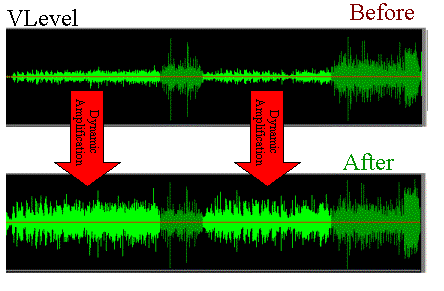
Sound leveling analyzes audio and adjusts the volume to achieve a consistent target loudness. Think of it as a sculptor chipping away at a block of stone (the audio) to create a smooth, even surface (consistent volume).

Peak Normalization

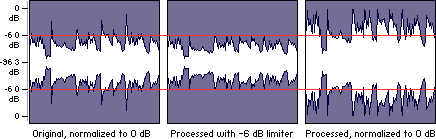
Peak normalization adjusts the audio so the loudest peak reaches a target level. It’s like trimming the tallest branches of a tree to make it a uniform height.

Loudness Normalization

Loudness normalization considers the perceived loudness of the audio, not just the peaks. This method takes into account how our ears perceive sound, resulting in a more natural and balanced result. I find this particularly useful for dialogue-heavy content, ensuring voices are always clear.

Different Sound Leveling Techniques

There are several ways to achieve sound leveling, each with its advantages and disadvantages. Over the years, I’ve experimented with various methods, and each has its place depending on the type of audio.

ReplayGain

ReplayGain is a standard that embeds metadata in audio files to inform players how to adjust the volume. It’s like attaching instructions to a piece of furniture for easy assembly.

Normalization

Normalization is a process that adjusts the overall gain of an audio file. It’s similar to adjusting the brightness of a photo to achieve a consistent look.

Compression

Compression reduces the dynamic range, making quieter parts louder and louder parts quieter. Think of it as squeezing a sponge – the overall size changes, but the shape becomes more uniform.

Sound Leveling in Different Media

Sound leveling plays a vital role in various media, from music and movies to podcasts and broadcasts. I’ve worked on projects across these mediums, and consistent sound levels are always key.

Music

Sound leveling ensures consistent volume across tracks on an album.

Movies and TV

It balances dialogue, music, and sound effects for a cohesive experience.

Podcasts and Broadcasts

Sound leveling creates a professional and engaging listening experience.

Benefits of Sound Leveling

Sound leveling offers numerous benefits, from a more enjoyable listening experience to increased accessibility and professional-sounding results. I’ve seen it transform messy audio projects into polished, professional pieces.

Consistent Volume

No more sudden jumps in volume or quiet passages.

Improved Clarity

Dialogue and other important sounds become more distinct.

Enhanced Accessibility

Sound leveling can make audio easier to understand for people with hearing impairments.

Common Sound Leveling Mistakes

While sound leveling is a powerful tool, there are some common pitfalls to avoid. I’ve learned these through experience, and avoiding them can significantly improve your results.

Over-Compression

Over-compressing audio can make it sound flat and lifeless. It’s like over-mixing a cake batter – it loses its texture and becomes dense.

Ignoring Perceived Loudness

Focusing solely on peak levels can result in an unnatural and unbalanced sound.

Incorrect Target Levels

Choosing the wrong target level can lead to either too quiet or too loud audio.

FAQ about Sound Leveling

What is sound leveling used for?

Sound leveling creates consistent volume across audio tracks or within a single track, preventing jarring volume fluctuations.

How does sound leveling work?

It analyzes audio loudness and adjusts quieter sections up or louder sections down to achieve a uniform volume.

What’s the difference between peak and loudness normalization?

Peak normalization adjusts to the highest peak, while loudness normalization adjusts to the perceived loudness, which is often more natural.

Why is sound leveling important for podcasts?

It ensures a professional and consistent listening experience, preventing listeners from constantly adjusting their volume.

How can I sound level my music collection?

Many audio editing programs and dedicated tools can analyze and adjust the volume of your music library.

What are the benefits of audio leveling?

Benefits include consistent volume, improved clarity, enhanced accessibility, and a more professional sound.

Can sound leveling damage my audio?

Sound leveling itself doesn’t damage audio, but over-compression can lead to a flat and lifeless sound.

What is ReplayGain?

ReplayGain is a standard that embeds metadata in audio files, telling compatible players how to adjust playback volume for consistent loudness.

How do I choose the right target loudness level?

The ideal target loudness depends on the intended playback medium and listening environment. Research recommended levels for different platforms.

Is sound leveling the same as volume boosting?

Not exactly. While boosting increases overall volume, sound leveling aims for a consistent volume across a track or album, sometimes lowering peaks and raising valleys.

Latest words on Sound Leveling

Sound leveling has become an indispensable tool in my audio work. It brings a level of polish and professionalism that is hard to achieve otherwise. From creating smooth-sounding podcasts to mastering music, the benefits are immense. Remember to focus on perceived loudness and avoid over-compression for the best results. Mp4Gain can be a valuable asset for effective sound leveling.

Comments:

This article is a lifesaver! I’ve been struggling with uneven volume in my podcasts, and now I finally understand how to fix it. Thanks! – PodcastPete

Great explanation of sound leveling! I used to think all songs were supposed to be at the same volume, but now I get the nuances. – MusicManMike

Super helpful article! I’m going to try using ReplayGain on my music library. – AudiophileAlice

I make video tutorials, and this article gave me some great tips on how to balance my audio. – VideoVikki

Thanks for explaining the different sound leveling techniques. I’m going to experiment and see what works best for me. – SoundExplorerSteve

This article cleared up so many of my questions about sound leveling. I’m definitely going to recommend this to my fellow audio enthusiasts. – AudioGuruAmy

I’ve been using compression for sound leveling, but I think I’ve been overdoing it. Thanks for the tips on avoiding over-compression. – MixingMasterMatt

Wow, I never knew sound leveling was so important. I’m definitely going to start paying more attention to it in my audio projects. – SoundNewbieNancy

This was a fantastic read! Sound leveling is something I’ve always struggled with, but this article made it so much clearer. – LevelingLarry

Great job explaining how sound leveling works in different media. I learned a lot! – MediaMavenMary


Free Download Mp4Gain
picture


Mp4Gain Main Window
picture


Mp4Gain Features
picture


Free Download Mp4Gain
picture

Normalize audio tracks

Normalize audio tracks

Normalize audio tracks

Audio normalization is a crucial process in the world of audio production. It involves adjusting the volume levels of audio tracks to ensure a consistent and balanced listening experience. Whether you’re a music producer, a filmmaker, or a podcaster, the need to normalize audio tracks frequently arises to deliver high-quality content.

Normalize audio files

When you normalize audio files, you’re essentially making sure that the loudest and softest parts of your track are brought to a consistent level. This means that no part of your audio will be too quiet or too loud, allowing your listeners to enjoy a seamless experience without constantly adjusting the volume.

Audio track leveling

Audio track leveling is the process of ensuring that all the individual tracks in your audio project have a similar volume level. This is particularly important in music production, where you want all instruments and vocals to blend harmoniously without any one element overpowering the others.

Audio track equalization

Equalization (EQ) is another aspect of audio track optimization. While normalization focuses on overall volume levels, EQ allows you to fine-tune the frequency balance of your tracks. By adjusting the EQ settings, you can enhance the clarity and presence of different elements in your audio, such as vocals, instruments, or ambient sounds.

Soundtrack volume adjustment

In the world of film and video production, soundtrack volume adjustment plays a vital role. You want the dialogue, background music, and sound effects to be well-balanced to create an immersive cinematic experience. Normalizing the audio tracks ensures that viewers won’t have to constantly adjust their volume settings to hear the dialogue clearly.

Audio track enhancement

Audio track enhancement goes beyond normalization. It involves using various audio processing techniques to improve the overall quality of your tracks. This can include reducing background noise, adding special effects, or applying dynamic processing to make the audio more engaging.

Audio track optimization

Optimizing audio tracks is a comprehensive approach to ensuring the best possible sound quality. It combines normalization, equalization, and other audio processing techniques to create audio that sounds professional and polished.

Normalize sound in tracks

Normalizing sound in tracks is particularly useful when working with multiple audio sources or recordings that have inconsistent volume levels. It guarantees that all tracks will blend seamlessly and sound cohesive when played together.

Track audio balancing

Track audio balancing is an essential skill for mixing and mastering engineers. It involves adjusting the volume levels of individual tracks within a multitrack recording to achieve a well-balanced and harmonious final mix.

Track audio improvement

Audio improvement is the ultimate goal when working with audio tracks. It’s about taking the raw audio material and transforming it into something that sounds exceptional. This may involve not only normalization but also editing, effects, and creativity to make the audio truly stand out.

Final Words

Normalizing audio tracks is just one step in the journey of audio production and enhancement. Whether you’re an aspiring musician, a filmmaker, or a content creator, understanding how to effectively normalize and optimize audio tracks is essential for delivering a top-notch listening experience to your audience.

Sound level, volume, normalization

Sound level, volume, normalization

Normalize Audio

This article provides a brief explanation of the terms Sound Volume, Sound Level, Normalize, Gain, and some others, and their relationship and use in relation to the Digispot broadcast automation system.

Volume normalization

Sound level
The term sound level refers to the amplitude level of the sound signal. With regard to a programming item, MDB item, or another piece of sound, we are talking about the peak (maximum) signal level in the entire piece. This level is measured in units of dBFS and is almost always negative. This level is important because it depends on how much the level can be increased, and therefore the volume of the sound, without exceeding the theoretical threshold of 0 dBFS.

The signal level indicators are intended for visual observation of the current signal level in real level.

A diagram of the signal level change over time is called a signalgram and is used to display phonograms and other sound elements in various windows of the Digispot system, for example, the splice editing window, when editing audio, etc.

In the Digispot system, the maximum level of the programming item and CDM is calculated once and stored for later use, eg for normalization.
The determination of the peak signal is combined with the simultaneous determination of its loudness, these values ​​are always calculated together.

True sound level
The term True Sound Level refers to the hypothetical amplitude level of an analog sound signal, which is an interpolation of an existing digitized soundtrack. The difference with just “Level” is that when sampling, the sample points on the time axis may not reach the maximum points of the analog signal. For example, if we have a sinusoidal signal with a frequency of 11025 Hz and we digitize it with a frequency of 44100, then the peak value of the digitized phonogram level can have a value from -3dBFS to 0dBFS, depending on the phase shift of the point of sampling on the time axis. enter the sign. At higher signal frequencies, the peaks can be further underestimated.

ITU-R BS.1770-3 (Annex 2) defines the algorithm to calculate the “True Peak Level”. The proposed procedure is reduced to increasing the sampling frequency 4 times and filtering, then the maximum amplitude is found from the interpolation of the signal obtained.

In the Digispot system, the peak indicators in the editor, property windows, and splices have the ability to display the actual sound level.

Sound volume
Loudness is an estimate of the intensity with which the listener perceives the material. This value is calculated using a special algorithm that takes into account the perception of human sound, developed by ITU \ ITU-BS.1770.

Loudness is measured in LUFS units, which are physically identical to decibels. The volume is directly related to the level of the signal: the higher the level of the signal, the higher its volume.
Numerically, this relationship is linear: if the signal level increases by 6 dB, the volume will also increase by 6 LU. (To be mathematically precise, the relationship is not linear, but for most practical applications, the deviation from the linear relationship can be neglected.)

The loudness control in real time is carried out by volume indicators, there are two of them: M – Momentary and S – Short term, they differ in the measurement intervals: 0.4 sec and 3 sec, respectively.

To evaluate the loudness of a range of sound, a special technique has been developed that calculates the value of the loudness of the range, denoted by the value I and called integrated loudness. This is the value you refer to when talking about the loudness of a programming item or MDL.

In the Digispot system, the integral loudness of the programming item and MDB is calculated once and stored for later use, eg for normalization.

In Russia, the methodology for measuring the volume of programs is determined by the order of the Federal Antimonopoly Service of May 22, 2015 No. 374/15. The loudness of the programs is regulated by Federal Law 338.

Relationships between digital audio peak level, actual peak level, volume, and notation
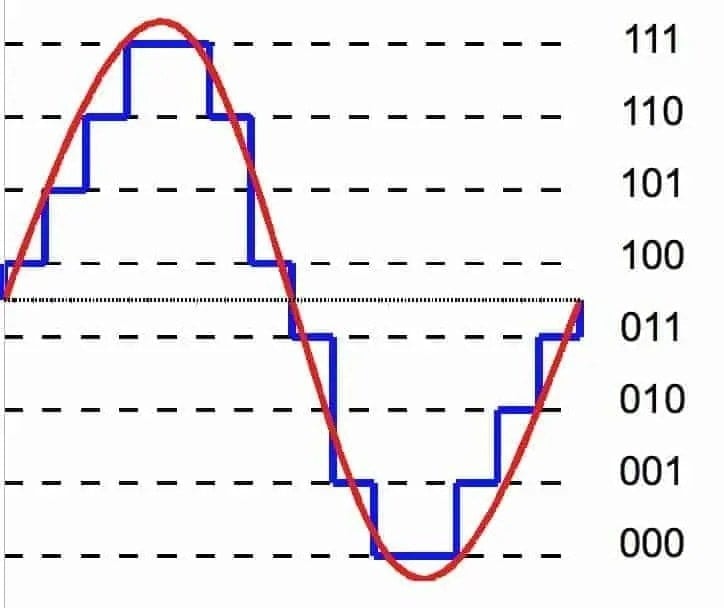
When talking about the signal level (more precisely, the peak level), the notation dBFS – dB Full Scale is used. This scale has a 0dB point tied to the full range of the signal represented in the bit width used. For example, with 16-bit audio samples, the representable values ​​are -32768 to +32767, so the signal level value in dBFS is calculated as 20 lg (s / 32768), where s is the value of the sample in this representation or the maximum absolute value of the samples in the interval of interest.

Increase Mp4 Volume


Increase Mp4 Volume

Until recently it was very difficult or impossible to find software that normalize the volume of video in mp4 format.

Options existed almost exclusively to normalize audio files, basically MP3 format.

But think normalize the volume of video files, it was almost a dream, elusive.

Mp4Gain is the ideal answer to this need. If you necesiuta normalize the volume of a Mp4, he found the right program.

But it is not only there, there are many other video formats that can be normalized by the Mp4Gain and even many audio formats. In resuymen, almost all important and known audio and / or video formats, they can be normalized by the Mp4Gain, which is a very modern program (and very inexpensive, only $ 40 with upgrades for life!) And extremely efficient.