Loudness Normalization: Making Your Music Sound Balanced


Free Download Mp4Gain
picture

Loudness Normalization: Making Your Music Sound Balanced

Loudness Normalization

Have you ever noticed that some songs are louder than others? Sometimes, you have to turn up the volume to hear a soft song, and then turn it down again when a loud song comes on. This can be annoying, but it’s actually a problem that can be solved with something called “loudness normalization.”

Loudness Normalization

What is Loudness Normalization?

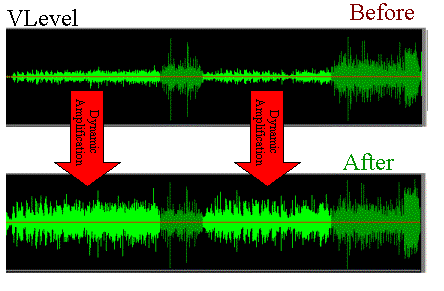
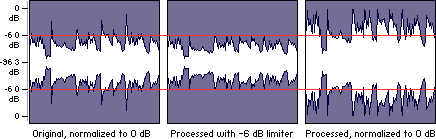
Loudness normalization is a process that evens out the volume of different songs or audio tracks. It makes sure that they all have a similar volume level, so you don’t have to adjust your volume settings constantly. It’s a common technique used in the music industry, where songs from different sources need to be combined into one album or playlist.

Why is Loudness Normalization Important?

There are a few reasons why loudness normalization is important:

  • Consistency: When all of your songs are at a similar volume level, you can listen to your music without having to adjust the volume constantly. This makes for a better listening experience.
  • Preventing Damage to Your Ears: If a song suddenly plays at a much louder volume, it can be harmful to your ears. Loudness normalization prevents this by keeping the volume level consistent.
  • Making Your Music Sound Better: By evening out the volume levels, you can hear all the details in your music. This is especially important when listening to music with headphones, where imbalances in volume can be even more noticeable.

How is Loudness Normalization Done?

Loudness normalization can be done manually by adjusting the volume levels of each individual song, but this is time-consuming and can be difficult to get right. Instead, many people use software that can automatically adjust the volume levels for them. This software analyzes the audio file and adjusts the volume levels so that they are all similar.

One popular software that can do this is Mp4Gain. It’s easy to use and can normalize the volume levels of many different audio file formats. Mp4Gain analyzes the loudness of each audio file and then adjusts the volume levels to make them all similar. This can be done with just a few clicks of a button.

Conclusion

Loudness normalization is an important technique for anyone who wants to listen to music without constantly adjusting the volume. It ensures consistency and can make your music sound better. If you want to easily normalize the volume levels of your audio files, then Mp4Gain is the best solution for you.


Free Download Mp4Gain
picture


Mp4Gain Main Window
picture


Mp4Gain Features
picture


Free Download Mp4Gain
picture

Loudness normalization

Loudness normalization

Loudness Normalization

When you have a lot of mp3 files, you often look for loudness normalization.

Loudness Normalization

What usually happens is that we have mp3s (although Mp4Gain can do Loudness normalization of many other audio and video formats!!) that have been created with different settings, for example different bit rates… which causes them to have a loudness different and that is annoying to the ear.

Many times we have been collecting mp3s from different sources, finding one here and another there and over time we have managed to have a good collection that is worth thinking about, but we have a problem: the loudness differs between different music or video files.

And this has generated that we desperately need to find a solution.

Mp4Gain is the result of many years of experience and is definitely the best normalizer out there, I have no doubt.

Even for very advanced users, it offers different settings to adjust exactly what you are looking for. Pewreo if you are a common user, you will not need anything, just load the song or video (you can normalize one or hundreds at the same time) and click a button, it’s that simple.

Sound level, volume, normalization

Sound level, volume, normalization

Normalize Audio

This article provides a brief explanation of the terms Sound Volume, Sound Level, Normalize, Gain, and some others, and their relationship and use in relation to the Digispot broadcast automation system.

Volume normalization

Sound level
The term sound level refers to the amplitude level of the sound signal. With regard to a programming item, MDB item, or another piece of sound, we are talking about the peak (maximum) signal level in the entire piece. This level is measured in units of dBFS and is almost always negative. This level is important because it depends on how much the level can be increased, and therefore the volume of the sound, without exceeding the theoretical threshold of 0 dBFS.

The signal level indicators are intended for visual observation of the current signal level in real level.

A diagram of the signal level change over time is called a signalgram and is used to display phonograms and other sound elements in various windows of the Digispot system, for example, the splice editing window, when editing audio, etc.

In the Digispot system, the maximum level of the programming item and CDM is calculated once and stored for later use, eg for normalization.
The determination of the peak signal is combined with the simultaneous determination of its loudness, these values ​​are always calculated together.

True sound level
The term True Sound Level refers to the hypothetical amplitude level of an analog sound signal, which is an interpolation of an existing digitized soundtrack. The difference with just “Level” is that when sampling, the sample points on the time axis may not reach the maximum points of the analog signal. For example, if we have a sinusoidal signal with a frequency of 11025 Hz and we digitize it with a frequency of 44100, then the peak value of the digitized phonogram level can have a value from -3dBFS to 0dBFS, depending on the phase shift of the point of sampling on the time axis. enter the sign. At higher signal frequencies, the peaks can be further underestimated.

ITU-R BS.1770-3 (Annex 2) defines the algorithm to calculate the “True Peak Level”. The proposed procedure is reduced to increasing the sampling frequency 4 times and filtering, then the maximum amplitude is found from the interpolation of the signal obtained.

In the Digispot system, the peak indicators in the editor, property windows, and splices have the ability to display the actual sound level.

Sound volume
Loudness is an estimate of the intensity with which the listener perceives the material. This value is calculated using a special algorithm that takes into account the perception of human sound, developed by ITU \ ITU-BS.1770.

Loudness is measured in LUFS units, which are physically identical to decibels. The volume is directly related to the level of the signal: the higher the level of the signal, the higher its volume.
Numerically, this relationship is linear: if the signal level increases by 6 dB, the volume will also increase by 6 LU. (To be mathematically precise, the relationship is not linear, but for most practical applications, the deviation from the linear relationship can be neglected.)

The loudness control in real time is carried out by volume indicators, there are two of them: M – Momentary and S – Short term, they differ in the measurement intervals: 0.4 sec and 3 sec, respectively.

To evaluate the loudness of a range of sound, a special technique has been developed that calculates the value of the loudness of the range, denoted by the value I and called integrated loudness. This is the value you refer to when talking about the loudness of a programming item or MDL.

In the Digispot system, the integral loudness of the programming item and MDB is calculated once and stored for later use, eg for normalization.

In Russia, the methodology for measuring the volume of programs is determined by the order of the Federal Antimonopoly Service of May 22, 2015 No. 374/15. The loudness of the programs is regulated by Federal Law 338.

Relationships between digital audio peak level, actual peak level, volume, and notation
When talking about the signal level (more precisely, the peak level), the notation dBFS – dB Full Scale is used. This scale has a 0dB point tied to the full range of the signal represented in the bit width used. For example, with 16-bit audio samples, the representable values ​​are -32768 to +32767, so the signal level value in dBFS is calculated as 20 lg (s / 32768), where s is the value of the sample in this representation or the maximum absolute value of the samples in the interval of interest.