Loudness Equalization Tool: What It Is and How It Works

Loudness Equalization Tool: What It Is and How It Works

Loudness Equalization

If you’ve ever listened to music or watched a movie and had to constantly adjust the volume because some parts were too loud while others were too quiet, you’ll understand the frustration of trying to find that perfect balance. This is where a loudness equalization tool comes in handy.

What is Loudness Equalization?

Loudness Equalization

Loudness equalization is a feature that helps to balance the volume of audio playback on your device. It works by automatically adjusting the loudness of the audio so that it is consistent across all content, whether it’s a song, movie, or podcast.

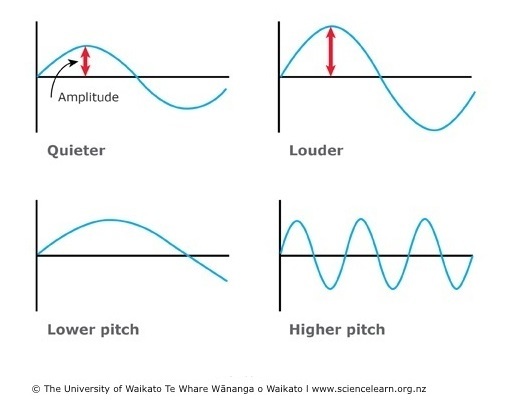
The technology behind loudness equalization is based on the principles of dynamic range compression, which reduces the difference between the loudest and quietest parts of an audio signal. This means that soft sounds are amplified while loud sounds are reduced to create a more balanced and consistent volume level.

How Does Loudness Equalization Work?

Loudness equalization is typically implemented as a software tool, either built into the operating system or as a third-party application. When enabled, it analyzes the incoming audio and applies an automatic gain control (AGC) to even out the volume.

Some loudness equalization tools allow you to customize the amount of compression applied to the audio, giving you greater control over the balance between loud and quiet parts of the content.

Why Use Loudness Equalization?

The main benefit of using a loudness equalization tool is that it eliminates the need to manually adjust the volume as you listen to different types of content. This is particularly useful when watching movies or TV shows, where the sound can vary widely between action scenes and quieter dialogue.

By using a loudness equalization tool, you can enjoy a more consistent and balanced listening experience, without having to constantly fiddle with the volume controls.

Mp4Gain: The Best Solution for Loudness Equalization

If you’re looking for a high-quality loudness equalization tool, Mp4Gain is the best solution available. This powerful software is designed to analyze and normalize the volume of all your audio and video files, so that you can enjoy a consistent listening experience across all your devices.

With Mp4Gain, you can adjust the volume levels of your music, movies, and podcasts with just a few clicks. It also supports a wide range of file formats, including MP3, AAC, FLAC, and more.

So if you’re tired of constantly adjusting the volume as you listen to your favorite content, try Mp4Gain and experience the benefits of loudness equalization for yourself.

What is Loudness Correction?

What is Loudness Correction?

Loudness Correction
Loudness Correction

Loudness correction is a process used to adjust the volume of audio files. This can be especially important for music, videos, and other audio content that is meant to be listened to on different devices.

Loudness Correction
Loudness Correction

Why do we need Loudness Correction?

Have you ever noticed that some music or videos sound louder or quieter than others even when played at the same volume on your device? This is because different audio files have different loudness levels. Loudness correction helps to standardize these levels, making sure that all of your audio content sounds consistent and easy to listen to, no matter where you play it.

How does Loudness Correction work?

Loudness correction works by analyzing the audio file and determining its average loudness level. It then adjusts the volume of the audio file so that it matches a desired loudness level, known as the target loudness. This can be done automatically or manually, depending on the tool being used.

Once the correction process is complete, the audio file should sound the same volume as other audio files with similar content, making it easier to listen to and enjoy.

Benefits of Loudness Correction

There are several benefits of using loudness correction on your audio files, including:

  • Improved audio quality: By standardizing the loudness levels of your audio files, you can ensure that your audio content sounds clear and consistent, regardless of the device it’s played on.
  • Reduced listener fatigue: If you listen to audio content with widely varying loudness levels, it can be tiring and even painful over time. Loudness correction helps to eliminate these fluctuations, making it easier and more enjoyable to listen to your audio content for longer periods of time.
  • Enhanced user experience: By making your audio content more consistent and easy to listen to, you can improve the overall user experience for your listeners and viewers, making them more likely to return for more.

Conclusion

Loudness correction is a powerful tool for improving the quality and consistency of your audio files. Whether you’re creating music, videos, or other audio content, loudness correction can help to ensure that your work sounds its best, no matter where it’s played.

If you’re looking for the best solution for loudness correction, look no further than Mp4Gain.

Loudness equalizer – Boost Audio

Loudness equalizer – Boost Audio

loudness equalizer
loudness equalizer

In this era where the main consumption is multimedia, it is really a basic need to be able to achieve that all our multimedia files have a similar loudness, without ups and downs, that does not force us to manually control the volume knob.

Loudness equalizer
Loudness equalizer

Mp4Gain is obviously the most advanced normalizer, the most powerful and the one that gives the best results.

Practically it could be said that with Mp4Gain we can achieve the same results as with very expensive equipment used in broadcasting. In fact, many television channels and radio stations F.M. are using Mp4Gain.

Mp4Gain can, if you want, use the well-known Replay Gain or it can use its own very efficient algorithms that obtain very good results in volume gain and loudness control.

Mp4Gain is the most recognized and prestigious program in everything related to managing the loudness equalizer.

It can improve the loudness of audio and video files, in their main formats and can also extract the audio from the video, convert for example an mp4 into an mp3 with the highest quality.

Loudness normalization

Loudness normalization

Loudness Normalization

When you have a lot of mp3 files, you often look for loudness normalization.

Loudness Normalization

What usually happens is that we have mp3s (although Mp4Gain can do Loudness normalization of many other audio and video formats!!) that have been created with different settings, for example different bit rates… which causes them to have a loudness different and that is annoying to the ear.

Many times we have been collecting mp3s from different sources, finding one here and another there and over time we have managed to have a good collection that is worth thinking about, but we have a problem: the loudness differs between different music or video files.

And this has generated that we desperately need to find a solution.

Mp4Gain is the result of many years of experience and is definitely the best normalizer out there, I have no doubt.

Even for very advanced users, it offers different settings to adjust exactly what you are looking for. Pewreo if you are a common user, you will not need anything, just load the song or video (you can normalize one or hundreds at the same time) and click a button, it’s that simple.

Loudness equalizer

Loudness equalizer

Loudness equalizer

Equalizing the volume or loudness of a song or a video is something that all of us who usually save mp3s, mp4s, flac, etc. we usually and want to do.

Loudness equalizer

Why do we want to achieve Loudness equalizer?

In the first place, because normally we have obtained our mp3, mp4, etc. files from very different places. and that implies that they have been encoded with very different bitrates and configurations.

Encoding with different bit rates affects the volume level

Certainly, as this subtitle points out, we could say that using different parameters such as bit rate mainly, but also others, often affects the volume level.

With which we will understand that obtaining numerous audio or video files from different sources will force us later to perform a normalization of the volume level or Loudness equalizer to be able to adjust the volume level or loudness and keep our files the same.

Mp4Gain is the perfect solution with which we will be able to equalize the loudness of our music or videos, achieving that when playing them there are no sudden changes but that they all sound harmonically at the same volume level and with a very similar sound, pleasantly similar.