How to Measure Loudness of Audio Files?

Measuring the loudness of an audio file is an essential aspect of audio engineering. In this article, we will explore the various methods and techniques used to measure the loudness of audio files.
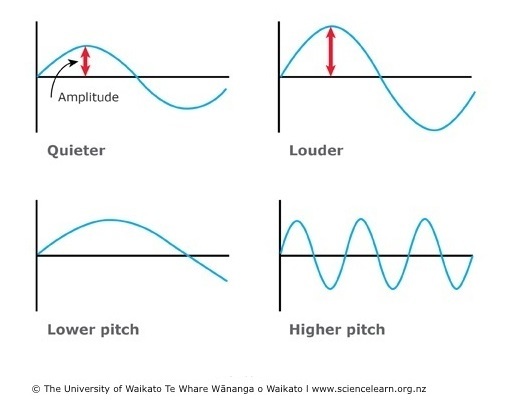
What is Loudness?
Loudness is a subjective perception of the intensity of sound. It is not the same as sound pressure level, which is a physical measurement of the pressure of sound waves. Loudness depends on various factors such as frequency, duration, and context.
Why Measure Loudness?
Measuring the loudness of an audio file is crucial to ensure that it is suitable for its intended purpose. For example, if you are producing music for radio, you need to ensure that the loudness level is within the range specified by the broadcasting standards. If the loudness level is too high or too low, it can result in a poor listening experience for the audience.
Methods of Measuring Loudness
-
Peak Level Metering
Peak level metering measures the highest level of sound in an audio file. It is a simple and straightforward method of measuring loudness, but it does not take into account the overall loudness perception of the audio file.
-
Root Mean Square (RMS) Metering
RMS metering calculates the average power of the audio signal. It provides a more accurate measurement of loudness than peak level metering, as it takes into account the entire audio signal. However, it still does not consider the subjective perception of loudness.
-
ITU-R BS.1770-4
ITU-R BS.1770-4 is a standard method of measuring loudness that takes into account the human perception of loudness. It measures loudness using a combination of RMS and other factors such as frequency weighting and gating. It is the most widely used method of measuring loudness and is used in broadcasting, music production, and other industries.
-
EbU R 128
EbU R 128 is a European Broadcasting Union (EBU) standard for measuring loudness that is similar to ITU-R BS.1770-4. It also takes into account the subjective perception of loudness and uses a combination of RMS and other factors to measure loudness.
Conclusion
Measuring the loudness of an audio file is essential to ensure that it is suitable for its intended purpose. There are various methods of measuring loudness, including peak level metering, RMS metering, ITU-R BS.1770-4, and EbU R 128. Each method has its advantages and disadvantages, and the choice of method depends on the specific application.
Ultimately, it is essential to ensure that the loudness of your audio files is appropriate for their intended use. If you are looking for a tool to help you measure and adjust the loudness of your audio files, you may want to check out MP4Gain.