Maximize Sound Quality: The Ultimate Mp3 Normalization Guide


Free Download Mp4Gain
picture

Maximize Sound Quality: The Ultimate Mp3 Normalization Guide

Mp3 Normalizer
Mp3 Normalizer


Let’s Learn About Mp3 Normalizer: An Overview

Mp3 Normalizer
Mp3 Normalizer

Explanation of What Mp3 Normalization Is

Before diving into the specifics of Mp3 normalization, let’s take a moment to understand how sound works. Sound is a physical phenomenon that is created by vibrations that travel through a medium, such as air, and are picked up by our ears. Our ears then convert these vibrations into electrical signals that our brains interpret as sound.

When it comes to recording sound, we use microphones to capture these vibrations and convert them into an electrical signal that can be stored and played back. In the past, recordings were made on physical media, such as vinyl records or cassette tapes. Nowadays, however, most recordings are made digitally.

When sound is recorded digitally, it is captured as a series of numbers that represent the amplitude of the sound wave at different points in time. These numbers are then stored as a digital file, such as an Mp3. The amplitude of a sound wave determines its volume, with larger amplitudes producing louder sounds.

So, what is Mp3 normalization? In simple terms, Mp3 normalization is the process of adjusting the volume of an Mp3 file so that it plays at a consistent level. This can be achieved by adjusting the amplitude of the sound wave so that it does not exceed a certain level, known as the normalization level.

Importance of Normalizing Mp3 Files for Optimal Listening Experience

Now that we understand what Mp3 normalization is, let’s explore why it is important. Have you ever experienced the frustration of having to constantly adjust the volume while listening to music? Perhaps you turn up the volume to hear a quiet part of a song, only to be blasted by a loud part a few moments later.

By normalizing Mp3 files, we can avoid these volume fluctuations and ensure a consistent listening experience. Normalizing also helps to prevent distortion, which can occur when the volume of a sound wave is too high and clips the top or bottom of the waveform.

Brief Overview of the Benefits of Mp3 Normalization

  • Consistent volume levels for a better listening experience
  • Prevention of distortion
  • Ability to match the volume of different songs or recordings

In summary, Mp3 normalization is the process of adjusting the volume of an Mp3 file to ensure a consistent listening experience. It can help prevent volume fluctuations and distortion, and allows us to match the volume levels of different songs or recordings. In the following sections, we will explore Mp3 normalization in more detail and provide tips for achieving optimal results.

Before we dive into the different types of Mp3 normalization, it’s important to understand the basics of audio normalization. In essence, audio normalization refers to the process of adjusting the volume of an audio file to a standardized level, usually measured in decibels (dB).

One common method of measuring the level of an audio file is using root mean square (RMS) amplitude. RMS is a mathematical formula that calculates the average power of an audio signal. Essentially, RMS measures the amount of energy in an audio signal over a period of time, which helps determine the overall loudness of the audio file.

Decibels (dB) are another common unit of measurement for sound volume. Decibels are a logarithmic scale that measures the ratio between the sound pressure level of an audio signal and a reference level. This means that every 10 dB increase represents a tenfold increase in the sound pressure level. For example, an audio file with a volume level of 70 dB is ten times louder than an audio file with a volume level of 60 dB.

Another important unit of measurement for audio normalization is Loudness Units Relative to Full Scale (LUFS). Unlike decibels, which are based on the sound pressure level of an audio signal, LUFS measures the perceived loudness of an audio signal, taking into account the human ear’s sensitivity to different frequencies.

When it comes to normalizing audio, it’s important to measure the level of sound accurately. This is because different audio files can have different volume levels, and normalizing them to the same level ensures consistency and eliminates the need to adjust the volume manually when playing back a playlist of audio files.

Normalization is typically achieved through a process called gain adjustment, which involves increasing or decreasing the amplitude of an audio signal. This can be done manually or with the help of software. There are various types of normalization, such as peak normalization, RMS normalization, and true peak normalization, each with its own advantages and disadvantages.

Definition of Mp3 Normalization

Simply put, Mp3 normalization is the process of adjusting the volume of an Mp3 audio file to a standardized level. This is done to ensure consistency of volume levels across multiple audio files, particularly in cases where an Mp3 audio file has a different volume level than other files in a playlist or album.

How Mp3 Normalization Works

The process of Mp3 normalization typically involves analyzing the audio file to determine its peak level or RMS amplitude. This information is then used to adjust the volume of the audio file to a target level, usually measured in dB or LUFS.

One important thing to note is that Mp3 normalization is a lossy process. This means that the audio quality may be slightly reduced after normalization, particularly if the audio file is heavily compressed or if the normalization is performed at a high level. However, in most cases, the reduction in audio quality is negligible and the benefits of normalization outweigh the potential drawbacks.

Explanation of the Different Types of Normalization

There are several types of normalization that can be used for Mp3 audio files, each with its own advantages and disadvantages:

  • Peak normalization: This method adjusts the volume of an audio file so that its loudest peak is at a target level, usually 0 dB. However, this method doesn’t take into account the overall loudness of the file, so it may not be the most effective method for achieving consistency across multiple files.
  • RMS normalization: This method adjusts the volume of an audio file based on its RMS amplitude, which gives a more accurate measure of the file’s overall loudness. This method is generally considered to be more effective than peak normalization for achieving consistency across multiple files.
  • True peak normalization: This method takes into account inter-sample peaks, which can occur when digital audio is converted to an analog signal. By accounting for these peaks, true peak normalization can prevent clipping and distortion in the final output.

Advantages of Using Mp3 Normalization for Your Audio Files

Using Mp3 normalization has several advantages, including:

  • Consistency: Normalizing your audio files to a standardized level ensures that they will all have the same volume level, which can be particularly helpful when playing back a playlist or album.
  • Improved listening experience: When audio files are at a consistent volume level, listeners won’t need to constantly adjust the volume when switching between files.
  • Protection from clipping: Clipping occurs when an audio signal exceeds the maximum level that can be represented by the digital system. Mp3 normalization can help prevent clipping by reducing the overall volume of the audio file.
  • Better compression: Normalizing an audio file can improve its compression efficiency, resulting in a smaller file size without sacrificing quality.

Overall, Mp3 normalization is an effective way to ensure consistent volume levels across multiple audio files, resulting in a better listening experience for the audience. By understanding the different types of normalization and the units of measurement involved, audio professionals and enthusiasts can effectively optimize their audio files for various applications.

Normalization with Audio Compression

Normalization with audio compression is a method that combines normalization and audio compression to ensure that there are no passages of low volume. This method is commonly used in radio stations, television channels, and live concerts, where the aim is to make sure that all sounds, from the lead singer’s whisper to the sound of the drums, are clearly heard by the audience.

For example, let’s say you have an audio file of a live concert. The volume levels of the different instruments and vocals may vary throughout the recording. If you normalize the file without compression, the volume of the quieter parts may increase, but the louder parts may become too loud and distorted. However, by using audio compression, you can ensure that the volume of the entire recording is consistent and that no parts are too loud or too quiet.

Replay Gain

Replay Gain is a method of audio normalization that adjusts the volume levels of an audio file to a consistent level without altering the dynamic range. Unlike audio compression, Replay Gain does not compress or expand the audio’s dynamic range, which preserves the original sound quality of the recording.

Replay Gain analyzes the audio file’s volume levels and applies a gain adjustment to bring the overall volume to a specified target level. The adjustment is applied uniformly across the entire file, which helps to maintain the audio’s balance and clarity.

For example, if you have an audio file with a very quiet intro and a very loud chorus, Replay Gain will adjust the volume of the entire file to a target level, ensuring that the intro and chorus are both at an optimal volume level without distorting the dynamic range of the recording.

Replay Gain can be especially useful for creating consistent playback levels across different audio tracks in a playlist, as well as for reducing the need to constantly adjust the volume during playback.

Converting Audio and Video Formats

Mp4Gain can also be used as a format converter, allowing you to convert audio and video files from one format to another. This can be useful if you have a file that is not compatible with your media player or if you want to reduce the file size.

Extracting Audio from Video

If you have a video file with an audio track that you want to use separately, Mp4Gain can also extract the audio from the video file and save it as a separate audio file.

Common mistakes to avoid when normalizing audio files

When normalizing audio files, there are some common mistakes that you should avoid:

  • Normalization with too much audio compression: Too much audio compression can make your audio sound unnatural and distorted.
  • Normalization with too little audio compression: Too little audio compression may result in inconsistent volume levels and passages of low volume.
  • Normalization with incorrect settings: Make sure to choose the right normalization settings for your audio file to ensure optimal sound quality.

How to test your audio files after normalization to ensure optimal sound quality

After normalizing your audio files, it is important to test them to ensure optimal sound quality. You can do this by:

  • Listening to the file: Listen to the normalized filewith different audio devices, such as headphones, speakers, or car audio systems, to make sure it sounds good on all of them.
  • Checking the waveform: Use a waveform viewer to check the waveform of the normalized audio file. The waveform should be consistent and not have any clipping or distortion.
  • Comparing with the original file: Compare the normalized file with the original file to make sure that the changes made during normalization do not negatively affect the quality of the audio.

V. Conclusion

Mp4Gain is a versatile software that can help you improve the sound quality of your audio and video files. Whether you need to normalize the volume levels of your audio files, convert audio or video formats, or extract audio from video files, Mp4Gain has got you covered. With its user-friendly interface and powerful features, Mp4Gain is a great tool for anyone who wants to achieve optimal sound quality for their media files.

By using the tips and tricks mentioned in this article, you can ensure that your audio files are normalized correctly and sound great on any device. Remember to avoid common mistakes when normalizing

The Benefits of Mp3 Normalization: Final Thoughts

Overall, Mp3 normalization is an effective way to improve the quality of your audio files. By adjusting the volume levels to a consistent and optimal level, you can enhance the listening experience and avoid the need to constantly adjust the volume.

However, not all normalization software is created equal. While there are many options available, Mp4Gain is a modern normalizer that is designed to provide consistent, high-quality sound across a variety of devices and listening environments.

In today’s world, many people listen to music on their smartphones, tablets, and computers, often with headphones or earbuds. Additionally, many headphones have noise-cancelling features, while others do not. The headphones that cancel outside noise work by using a microphone to detect the sound waves and creating an opposite sound wave to cancel it out. This can affect the sound quality of the music and make it difficult to achieve consistent volume levels. Some headphones also have a frequency response curve that can make certain frequencies louder or quieter, which can also affect the sound quality of the music.

With Mp4Gain, you can rest assured that your music will sound great no matter where you listen to it. The software is designed to adjust the volume levels while maintaining the dynamic range of the original recording and taking into account the frequency response curve of the headphones, so that the music sounds just as good on a phone as it does on a high-end stereo system.

Whether you’re listening in a noisy environment or a quiet one, with or without noise-cancelling headphones, Mp4Gain’s normalization process will ensure that the sound is consistent and optimal. So why wait? Start normalizing your Mp3 files with Mp4Gain today and experience the difference in sound quality!

udio files, choose the right normalization settings, and test your files after normalization to ensure optimal sound quality.

Try out Mp4Gain today and experience the difference in sound quality for yourself!


Free Download Mp4Gain
picture


Mp4Gain Main Window
picture


Mp4Gain Features
picture


Free Download Mp4Gain
picture

The Loudness War: Exploring Audio Volume in Popular Music

The Loudness War: Exploring Audio Volume in Popular Music

Loudness War
Loudness War

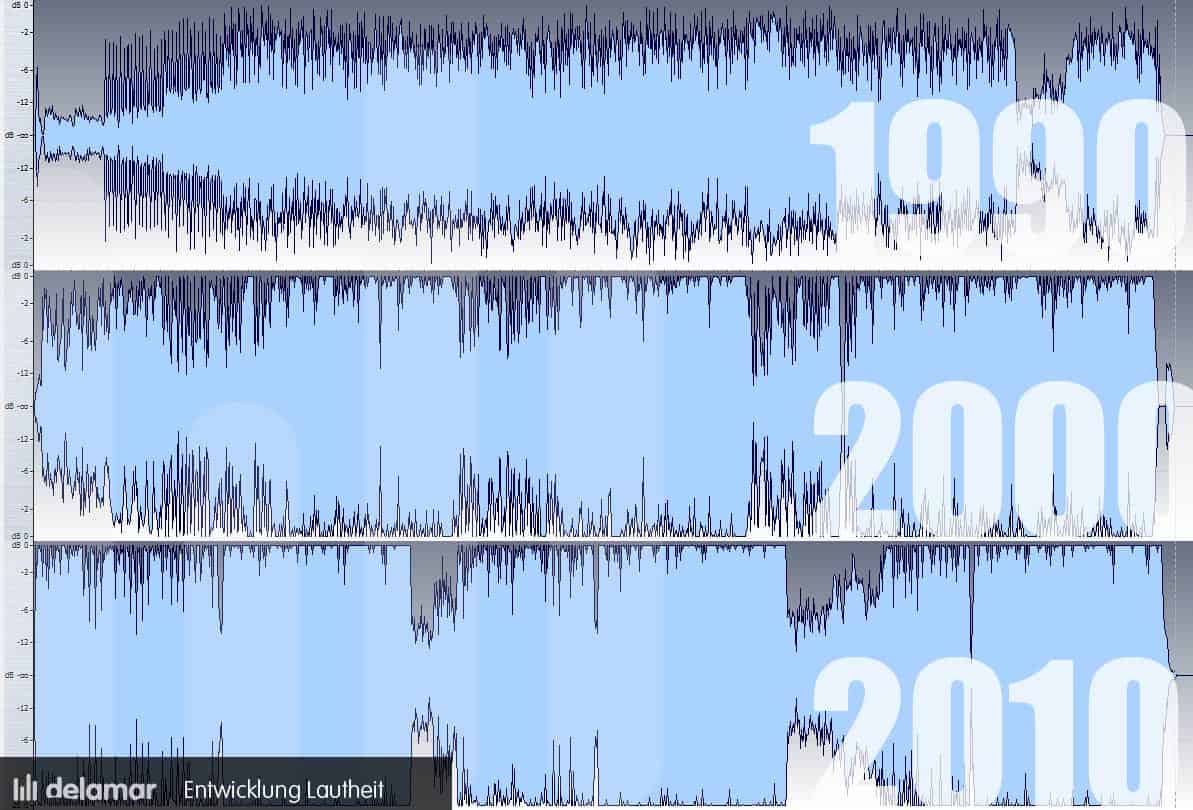
Music is an art form that has been evolving for centuries. One aspect of music that has seen significant changes over the years is its volume. The “Loudness War” is a term used to describe the increasing trend of music being mixed and mastered at higher volumes, often resulting in distortion and reduced dynamic range.

Loudness War
Loudness War

The “Loudness War”: A Brief History of Audio Volume in Popular Music

The Loudness War can be traced back to the introduction of the compact disc (CD) in the 1980s. With the CD, it became possible to digitally manipulate the volume of music during the mastering process. This led to a competition among music producers to make their recordings louder than their competitors. The trend continued with the rise of digital music formats and the popularity of streaming services.

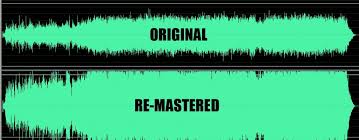
However, the quest for loudness came at a cost. With music being mixed and mastered at increasingly high volumes, the dynamic range of the music was reduced, leading to a loss of detail and a “brick wall” effect where everything sounded equally loud.

Is Louder Always Better? The Controversy Surrounding High Volume Audio

The Loudness War has been a topic of controversy in the music industry. While some argue that louder music sounds better and more impactful, others point out that excessive loudness can cause listener fatigue and damage to hearing. In fact, the World Health Organization has warned that listening to music at high volumes for extended periods of time can cause hearing loss.

Moreover, music mixed and mastered at high volumes can lose its depth and texture. It can also cause distortion, where certain parts of the music become harsh and unpleasant to listen to.

From Vinyl to Streaming: How Technology Has Influenced the Loudness War

Advancements in technology have played a significant role in the Loudness War. With the introduction of the CD, music producers gained the ability to digitally manipulate the volume of their recordings. The rise of digital music formats and streaming services further fueled the trend towards high volume music.

However, technology has also provided a solution to the problem it created. With the advent of loudness normalization, streaming services like Spotify and Apple Music have taken steps to address the Loudness War. Loudness normalization ensures that music is played back at a consistent volume level, regardless of how it was mixed and mastered.

The Effects of High Volume Audio on Music Perception and Listening Experience

Research has shown that high volume audio can affect our perception of music. When music is mixed and mastered at high volumes, it can create a sense of excitement and intensity, leading listeners to perceive it as more enjoyable. However, excessive loudness can also cause listener fatigue, reducing the overall listening experience.

Moreover, music mixed and mastered at high volumes can also affect our emotional response to the music. When dynamic range is reduced, the music can sound less expressive and less impactful.

Seeking Balance: How the Music Industry is Addressing the Loudness War

As the negative effects of the Loudness War have become more apparent, the music industry has taken steps to address the issue. Many music producers have started to prioritize dynamic range and avoid excessive loudness. Additionally, streaming services have implemented loudness normalization to ensure a consistent listening experience for their users.

However, there is still work to be done. While some music genres have embraced dynamic range, others continue to prioritize loudness. This is particularly true for electronic dance music and hip hop, where loudness is often considered a defining characteristic of the genre.

What are Decibels?

Decibels are a unit of measurement used to describe the intensity of sound. The decibel scale is logarithmic, meaning that a sound that is twice as loud as another sound is not 2 decibels louder, but rather 10 decibels louder. The human ear can detect sounds ranging from 0 decibels (the threshold of hearing) to 140 decibels (the threshold of pain).

When it comes to music, most experts agree that a safe listening level is around 85 decibels. However, many live concerts and nightclubs can reach volumes of 100 decibels or higher. Prolonged exposure to sound at these levels can cause permanent hearing damage.

But how do decibels relate to music specifically? When a song is mixed and mastered, the volume is often measured in decibels. A song that is mixed and mastered at a high volume, say -6 decibels, will be louder than a song mixed at a lower volume, say -12 decibels. While this can make the song sound more exciting and intense, it can also lead to distortion and listener fatigue.

The Dynamics of Music

Dynamics in music refer to the difference between the quietest and loudest parts of a song. A song with a wide dynamic range will have quiet, intimate moments and loud, powerful moments. Dynamic range is an important aspect of music as it allows for a more expressive and emotional experience.

The Loudness War has had a significant impact on dynamic range in music. When songs are mixed and mastered at high volumes, the dynamic range is reduced, leading to a loss of detail and impact. This has led many music producers to prioritize dynamic range in their recordings, in order to create a more immersive listening experience.

  • Conclusion

The Loudness War is a topic of ongoing debate in the music industry. While some argue that louder music sounds better, others point out that excessive loudness can have negative effects on the listening experience. As technology continues to evolve, the music industry will need to find a balance between volume and dynamic range in order to create the most enjoyable and expressive music possible.

Through loudness normalization and a renewed focus on dynamic range, the music industry is taking steps to address the issue. By understanding the impact of high volume audio on music perception and listening experience, we can ensure that music remains a source of enjoyment and inspiration for years to come.

Loudness Normalization: Making Your Music Sound Balanced

Loudness Normalization: Making Your Music Sound Balanced

Loudness Normalization

Have you ever noticed that some songs are louder than others? Sometimes, you have to turn up the volume to hear a soft song, and then turn it down again when a loud song comes on. This can be annoying, but it’s actually a problem that can be solved with something called “loudness normalization.”

Loudness Normalization

What is Loudness Normalization?

Loudness normalization is a process that evens out the volume of different songs or audio tracks. It makes sure that they all have a similar volume level, so you don’t have to adjust your volume settings constantly. It’s a common technique used in the music industry, where songs from different sources need to be combined into one album or playlist.

Why is Loudness Normalization Important?

There are a few reasons why loudness normalization is important:

  • Consistency: When all of your songs are at a similar volume level, you can listen to your music without having to adjust the volume constantly. This makes for a better listening experience.
  • Preventing Damage to Your Ears: If a song suddenly plays at a much louder volume, it can be harmful to your ears. Loudness normalization prevents this by keeping the volume level consistent.
  • Making Your Music Sound Better: By evening out the volume levels, you can hear all the details in your music. This is especially important when listening to music with headphones, where imbalances in volume can be even more noticeable.

How is Loudness Normalization Done?

Loudness normalization can be done manually by adjusting the volume levels of each individual song, but this is time-consuming and can be difficult to get right. Instead, many people use software that can automatically adjust the volume levels for them. This software analyzes the audio file and adjusts the volume levels so that they are all similar.

One popular software that can do this is Mp4Gain. It’s easy to use and can normalize the volume levels of many different audio file formats. Mp4Gain analyzes the loudness of each audio file and then adjusts the volume levels to make them all similar. This can be done with just a few clicks of a button.

Conclusion

Loudness normalization is an important technique for anyone who wants to listen to music without constantly adjusting the volume. It ensures consistency and can make your music sound better. If you want to easily normalize the volume levels of your audio files, then Mp4Gain is the best solution for you.

What is Loudness Correction?

What is Loudness Correction?

Loudness Correction
Loudness Correction

Loudness correction is a process used to adjust the volume of audio files. This can be especially important for music, videos, and other audio content that is meant to be listened to on different devices.

Loudness Correction
Loudness Correction

Why do we need Loudness Correction?

Have you ever noticed that some music or videos sound louder or quieter than others even when played at the same volume on your device? This is because different audio files have different loudness levels. Loudness correction helps to standardize these levels, making sure that all of your audio content sounds consistent and easy to listen to, no matter where you play it.

How does Loudness Correction work?

Loudness correction works by analyzing the audio file and determining its average loudness level. It then adjusts the volume of the audio file so that it matches a desired loudness level, known as the target loudness. This can be done automatically or manually, depending on the tool being used.

Once the correction process is complete, the audio file should sound the same volume as other audio files with similar content, making it easier to listen to and enjoy.

Benefits of Loudness Correction

There are several benefits of using loudness correction on your audio files, including:

  • Improved audio quality: By standardizing the loudness levels of your audio files, you can ensure that your audio content sounds clear and consistent, regardless of the device it’s played on.
  • Reduced listener fatigue: If you listen to audio content with widely varying loudness levels, it can be tiring and even painful over time. Loudness correction helps to eliminate these fluctuations, making it easier and more enjoyable to listen to your audio content for longer periods of time.
  • Enhanced user experience: By making your audio content more consistent and easy to listen to, you can improve the overall user experience for your listeners and viewers, making them more likely to return for more.

Conclusion

Loudness correction is a powerful tool for improving the quality and consistency of your audio files. Whether you’re creating music, videos, or other audio content, loudness correction can help to ensure that your work sounds its best, no matter where it’s played.

If you’re looking for the best solution for loudness correction, look no further than Mp4Gain.

Let’s talk about “musical dynamics” and “musical loudness” Part 2

Let’s talk about “musical dynamics” and “musical loudness” Part 2

Loudness

The two brief examples above are to tell you that frequency content, sound pressure, and sound duration will affect people’s perception of sound volume.

Loudness

That is why it is said that “loudness tends to human subjective perception”.

Since the volume is the subjective perception of people, how to quantify it?

To quantify “loudness”, the first thing you need to look at is the relationship between the frequency and the loudness of the human ear. There are two pictures below, you can read them carefully for reference:

Looking at the two images above, you will clearly see that the human ear and the human brain are not an organ that flattens the receiving frequency. It will not develop here. For the basis of loudness quantization, see the second image, there is a unit called “fon”. The phon unit is an attempt to quantize loudness. We take a 1kHz signal as an example, and it can be perceived at a volume of 40dB at 1kHz, so it is 40phon. Based on this, another unit is called a sone, 1 sone = 40phon. Both are units that attempt to quantify volume.

The international organization will be the ITU and the EBU…etc. The characteristics of the human ear, the psychoacoustics of the human brain, etc., all factors that affect loudness perception are considered together, and these factors are calculated through complicated mathematical calculations Define and standardize the reasonable loudness range for ” sound reproduction” only after statistically significant results have been obtained. Those interested can search: “ITU-R 1770 and ITU-R 1771”.

Should the rules be followed?

Of course continue! In fact, there is such a problem in Taiwan. Not to mention music, only the fourth channel and MOD, the sound level of each channel is different! The scariest thing is switching from the movie station to the shopping channel and often still being scared by the sudden volume of the shopping channel. Even radio shows have this kind of situation.

Here, you can go to Google again: “Volume War Loudness War”. All this is commonplace. This article is mainly to introduce the definition and specification of loudness.

Effects of loudness specifications

Although ITU, EBU, ISO, ANSI and other organizations have introduced loudness specifications, major music and video streaming platforms still have their own standards. However, the standards of the main platforms will continue to be around the specifications, and there will be no big or outside. When it comes to the audiovisual industry, it will generally affect these things:

Music streaming platforms: Records must meet loudness specifications at time of release

Video streaming platforms: Loudness specifications must be met when movies are released

Let’s talk about “musical dynamics” and “musical sonority”

Let’s talk about “musical dynamics” and “musical sonority”

Loudness

Where does the music we listen to come from?

Loudness

Before we talk about it, it is necessary to quickly talk about the disc creation process. In principle, it can be divided into three parts: the initial stage, the intermediate stage and the later stage.

First stage: compose, arrange

Middle term: recording, mixing

Post: post mastering, distribution, marketing

Whether a piece of music is good or not can be determined at the initial stage of the arrangement. Then there is the recording. The recording process can be finding real musicians to record the sound of real instruments, or completing the melody required by the arrangement through software instruments. Then find a singer or singers to sing… and so on. This process is called recording.

The “balance” of a song is not only achieving the balance of the melody in the arrangement, on the other hand, it is leaning on the mix to make the recorded elements a harmony in listening and frequency, it is also usually necessary to coordinate It depends on where the track goes, or what the producer wants. After all, the purpose of a song or album is to become a commercial release, and the post-production and embellishment processes that need to be done are necessary.

Usually the post-mastering process will be done last. After the entire album’s timbre direction, volume adjustment and minor flaws etc. are fixed, the final mastering will be uploaded according to the loudness specifications required by each streaming platform. .

Quantify the volume and intensity of what we hear

Sometimes people equate loudness with loudness. Actually the two are different. They are different and at the same time influence each other.

Loudness can be quantified, in simple terms, it is our most used “decibel dB”. Volume, on the other hand, tends to be subjectively perceived by people. how to say? Different 75-decibel musical signals are sent out at a time, and everyone has different feelings about its loudness and volume.

Because loudness is related to three things: frequency content, duration, and sound pressure.

We played a 1000 Hz test signal for three minutes at a sound pressure of 80 decibels. Your perception of the volume of this signal will be very different from playing it for 10 seconds or 30 seconds.

Let us take two singers as an example, one of them has a more evident timbre in the mid-high frequency band, and the other has a more evident mid-low frequency band, they sing the same song, and they sing with the same key and similar sound pressure, generally in the mid-high frequency band. The sound of the sound will feel stronger.

Loudness normalization

Loudness normalization

Loudness Normalization

When you have a lot of mp3 files, you often look for loudness normalization.

Loudness Normalization

What usually happens is that we have mp3s (although Mp4Gain can do Loudness normalization of many other audio and video formats!!) that have been created with different settings, for example different bit rates… which causes them to have a loudness different and that is annoying to the ear.

Many times we have been collecting mp3s from different sources, finding one here and another there and over time we have managed to have a good collection that is worth thinking about, but we have a problem: the loudness differs between different music or video files.

And this has generated that we desperately need to find a solution.

Mp4Gain is the result of many years of experience and is definitely the best normalizer out there, I have no doubt.

Even for very advanced users, it offers different settings to adjust exactly what you are looking for. Pewreo if you are a common user, you will not need anything, just load the song or video (you can normalize one or hundreds at the same time) and click a button, it’s that simple.