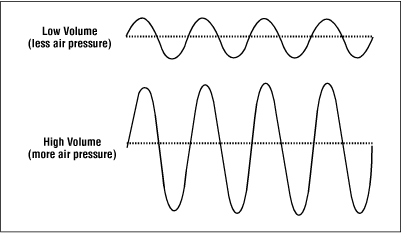
Loudness Normalization: Making Your Music Sound Balanced


Free Download Mp4Gain
picture

Loudness Normalization: Making Your Music Sound Balanced

Loudness Normalization

Have you ever noticed that some songs are louder than others? Sometimes, you have to turn up the volume to hear a soft song, and then turn it down again when a loud song comes on. This can be annoying, but it’s actually a problem that can be solved with something called “loudness normalization.”

Loudness Normalization

What is Loudness Normalization?

Loudness normalization is a process that evens out the volume of different songs or audio tracks. It makes sure that they all have a similar volume level, so you don’t have to adjust your volume settings constantly. It’s a common technique used in the music industry, where songs from different sources need to be combined into one album or playlist.

Why is Loudness Normalization Important?

There are a few reasons why loudness normalization is important:

  • Consistency: When all of your songs are at a similar volume level, you can listen to your music without having to adjust the volume constantly. This makes for a better listening experience.
  • Preventing Damage to Your Ears: If a song suddenly plays at a much louder volume, it can be harmful to your ears. Loudness normalization prevents this by keeping the volume level consistent.
  • Making Your Music Sound Better: By evening out the volume levels, you can hear all the details in your music. This is especially important when listening to music with headphones, where imbalances in volume can be even more noticeable.

How is Loudness Normalization Done?

Loudness normalization can be done manually by adjusting the volume levels of each individual song, but this is time-consuming and can be difficult to get right. Instead, many people use software that can automatically adjust the volume levels for them. This software analyzes the audio file and adjusts the volume levels so that they are all similar.

One popular software that can do this is Mp4Gain. It’s easy to use and can normalize the volume levels of many different audio file formats. Mp4Gain analyzes the loudness of each audio file and then adjusts the volume levels to make them all similar. This can be done with just a few clicks of a button.

Conclusion

Loudness normalization is an important technique for anyone who wants to listen to music without constantly adjusting the volume. It ensures consistency and can make your music sound better. If you want to easily normalize the volume levels of your audio files, then Mp4Gain is the best solution for you.


Free Download Mp4Gain
picture


Mp4Gain Main Window
picture


Mp4Gain Features
picture


Free Download Mp4Gain
picture

Understanding Audio Normalization

Understanding Audio Normalization

Audio Normalization
Audio Normalization

Audio normalization is the process of adjusting the loudness of an audio recording to a standard level. The goal is to ensure that all audio files have a consistent volume, making them easier to listen to and preventing ear fatigue. In this article, we will explore the different types of audio normalization and how they work.

Audio Normalization
Audio Normalization

Peak Normalization

Peak normalization is the process of adjusting the peak amplitude of an audio recording to a certain level. The peak amplitude is the highest point in the audio signal, and it is measured in decibels (dB). The goal of peak normalization is to ensure that all audio files have the same peak amplitude, making them easier to listen to and preventing ear fatigue.

Peak normalization is typically used for digital audio files, such as MP3 and WAV files. These files are usually stored in a digital format that allows for easy manipulation of the audio data. However, peak normalization can also be applied to analog audio recordings, such as cassette tapes or vinyl records.

RMS Normalization

RMS normalization is the process of adjusting the root mean square (RMS) level of an audio recording to a certain level. The RMS level is a measure of the average power of an audio signal, and it is measured in decibels (dB). The goal of RMS normalization is to ensure that all audio files have the same RMS level, making them easier to listen to and preventing ear fatigue.

RMS normalization is typically used for digital audio files, such as MP3 and WAV files. However, it can also be applied to analog audio recordings, such as cassette tapes or vinyl records.

RMS normalization is often considered to be a more accurate method of normalizing audio than peak normalization because it takes into account the average power of the audio signal, rather than just the peak amplitude.

Loudness Normalization

Loudness normalization is the process of adjusting the loudness of an audio recording to a certain level. The loudness of an audio recording is measured in loudness units (LU). The goal of loudness normalization is to ensure that all audio files have the same loudness, making them easier to listen to and preventing ear fatigue.

Loudness normalization is typically used for broadcast audio, such as television and radio. Loudness normalization is required by many countries to ensure that the audio levels of all broadcast programs are consistent, making them easier to listen to and preventing ear fatigue.

Loudness normalization is often considered to be a more accurate method of normalizing audio than peak or RMS normalization because it takes into account the perceived loudness of the audio signal, rather than just the peak amplitude or RMS level.

Conclusion

Normalizing audio is an important process for ensuring that all audio files have a consistent volume, making them easier to listen to and preventing ear fatigue. There are several different types of audio normalization, including peak normalization, RMS normalization, and loudness normalization. Each method has its own advantages and disadvantages and is best suited for different types of audio.

When it comes to audio normalization, one solution that stands out is Mp4Gain. It is a software that allows you to normalize your audio files in a quick and efficient way. It can be used to normalize a single audio file or multiple files at once. It also supports a wide range of audio file formats, including MP3, WAV, and more. Furthermore, Mp4Gain is user-friendly and easy to navigate, making it a great option for both professional and casual users.

In conclusion, audio normalization is a crucial process for ensuring that all audio files have a consistent volume, making them easier to listen to and preventing ear fatigue. There are several different types of audio normalization, including peak normalization, RMS normalization, and loudness normalization. Each method has its own advantages and disadvantages and is best suited for different types of audio. Mp4Gain is a powerful and easy-to-use software that can help you normalize your audio files quickly and efficiently.

Let’s talk about “musical dynamics” and “musical loudness” Part 2

Let’s talk about “musical dynamics” and “musical loudness” Part 2

Loudness

The two brief examples above are to tell you that frequency content, sound pressure, and sound duration will affect people’s perception of sound volume.

Loudness

That is why it is said that “loudness tends to human subjective perception”.

Since the volume is the subjective perception of people, how to quantify it?

To quantify “loudness”, the first thing you need to look at is the relationship between the frequency and the loudness of the human ear. There are two pictures below, you can read them carefully for reference:

Looking at the two images above, you will clearly see that the human ear and the human brain are not an organ that flattens the receiving frequency. It will not develop here. For the basis of loudness quantization, see the second image, there is a unit called “fon”. The phon unit is an attempt to quantize loudness. We take a 1kHz signal as an example, and it can be perceived at a volume of 40dB at 1kHz, so it is 40phon. Based on this, another unit is called a sone, 1 sone = 40phon. Both are units that attempt to quantify volume.

The international organization will be the ITU and the EBU…etc. The characteristics of the human ear, the psychoacoustics of the human brain, etc., all factors that affect loudness perception are considered together, and these factors are calculated through complicated mathematical calculations Define and standardize the reasonable loudness range for ” sound reproduction” only after statistically significant results have been obtained. Those interested can search: “ITU-R 1770 and ITU-R 1771”.

Should the rules be followed?

Of course continue! In fact, there is such a problem in Taiwan. Not to mention music, only the fourth channel and MOD, the sound level of each channel is different! The scariest thing is switching from the movie station to the shopping channel and often still being scared by the sudden volume of the shopping channel. Even radio shows have this kind of situation.

Here, you can go to Google again: “Volume War Loudness War”. All this is commonplace. This article is mainly to introduce the definition and specification of loudness.

Effects of loudness specifications

Although ITU, EBU, ISO, ANSI and other organizations have introduced loudness specifications, major music and video streaming platforms still have their own standards. However, the standards of the main platforms will continue to be around the specifications, and there will be no big or outside. When it comes to the audiovisual industry, it will generally affect these things:

Music streaming platforms: Records must meet loudness specifications at time of release

Video streaming platforms: Loudness specifications must be met when movies are released

Let’s talk about “musical dynamics” and “musical sonority”

Let’s talk about “musical dynamics” and “musical sonority”

Loudness

Where does the music we listen to come from?

Loudness

Before we talk about it, it is necessary to quickly talk about the disc creation process. In principle, it can be divided into three parts: the initial stage, the intermediate stage and the later stage.

First stage: compose, arrange

Middle term: recording, mixing

Post: post mastering, distribution, marketing

Whether a piece of music is good or not can be determined at the initial stage of the arrangement. Then there is the recording. The recording process can be finding real musicians to record the sound of real instruments, or completing the melody required by the arrangement through software instruments. Then find a singer or singers to sing… and so on. This process is called recording.

The “balance” of a song is not only achieving the balance of the melody in the arrangement, on the other hand, it is leaning on the mix to make the recorded elements a harmony in listening and frequency, it is also usually necessary to coordinate It depends on where the track goes, or what the producer wants. After all, the purpose of a song or album is to become a commercial release, and the post-production and embellishment processes that need to be done are necessary.

Usually the post-mastering process will be done last. After the entire album’s timbre direction, volume adjustment and minor flaws etc. are fixed, the final mastering will be uploaded according to the loudness specifications required by each streaming platform. .

Quantify the volume and intensity of what we hear

Sometimes people equate loudness with loudness. Actually the two are different. They are different and at the same time influence each other.

Loudness can be quantified, in simple terms, it is our most used “decibel dB”. Volume, on the other hand, tends to be subjectively perceived by people. how to say? Different 75-decibel musical signals are sent out at a time, and everyone has different feelings about its loudness and volume.

Because loudness is related to three things: frequency content, duration, and sound pressure.

We played a 1000 Hz test signal for three minutes at a sound pressure of 80 decibels. Your perception of the volume of this signal will be very different from playing it for 10 seconds or 30 seconds.

Let us take two singers as an example, one of them has a more evident timbre in the mid-high frequency band, and the other has a more evident mid-low frequency band, they sing the same song, and they sing with the same key and similar sound pressure, generally in the mid-high frequency band. The sound of the sound will feel stronger.

Loudness normalization

Loudness normalization

Loudness Normalization

When you have a lot of mp3 files, you often look for loudness normalization.

Loudness Normalization

What usually happens is that we have mp3s (although Mp4Gain can do Loudness normalization of many other audio and video formats!!) that have been created with different settings, for example different bit rates… which causes them to have a loudness different and that is annoying to the ear.

Many times we have been collecting mp3s from different sources, finding one here and another there and over time we have managed to have a good collection that is worth thinking about, but we have a problem: the loudness differs between different music or video files.

And this has generated that we desperately need to find a solution.

Mp4Gain is the result of many years of experience and is definitely the best normalizer out there, I have no doubt.

Even for very advanced users, it offers different settings to adjust exactly what you are looking for. Pewreo if you are a common user, you will not need anything, just load the song or video (you can normalize one or hundreds at the same time) and click a button, it’s that simple.

Loudness Normalization: Why is it necessary to Normalize the loudness of an audio or a video?

Loudness Normalization: Why is it necessary to Normalize the loudness of an audio or a video?

Loudness

The war of volume or loudness war.

Already in the 1940s and in later decades, in the middle of the vinyl record era, a volume war was experienced.

The goal was to make a song sound louder on the radio, louder than other songs and louder than advertising.

Sure, the limitations of vinyl didn’t allow the ability to indiscriminately increase volume to be possible.

Loudness normalization

But with the advent of CDs and digital music it was possible to push the loudness of a song to the max. The situation is that the digitization of the audio allowed it to be manipulated quite precisely, achieving dynamic normalizations that actually ended the dynamics of the music and then played all the time at maximum volume.

By the 90s, groups like Red Hot Chilli Peppersm and their album Californication took this war of loudness to levels rarely seen.

But why did they do that?

Some research on human hearing showed that people did not find that a song sounded better if it had louder loudness.

Every artist, every producer, and every hardware manufacturer has figured out a way to make their production sound louder, louder.

Digitally many limiters and compressors pointed in that direction and made a lot of music sound almost to the point of distortion.

Each one wanted their music to stand out, among other things for being louder and having a greater sound, a higher volume level.

If to this recipe we add the appearance of the mp3 and a great variety of encoders, and also that ordinary people did not understand the effect that the bit rate could produce, then many mp3s with different qualities were generated.

The possibility of sharing these mp3s filled people with mp3s that each had very different sounds. Both for its production and for its coding.

Then a new need appeared: normalize the music to avoid these disparities in loudness, in the volume of the songs.

The holy grail of normalization had to be found.

Many ideas were found, many experiments. The situation matured and certain products like Mp3Doctor and Mp4Gain matured to the point where they actually managed to find the solution: a dynamic standardization that will work well with today’s advanced player equipment.

Then Mp4Gain made the leap, achieving that even videos could not be normalized.

Audio could already be normalized in its main formats (mp34, aac, ogg, floac, etc) with Mp3Doctor, but Mp4Gain added the possibility of these dynamic normalization to video in its main formats (mp4, 3gp, flv, avi, etc. )

Audio normalization for beginners

What’s more annoying when listening to music is that you have to manipulate the volume control for every song that plays. If you have a computer, a tool allows you to uniformize the atmosphere from track to track while the songs are playing. This is called normalization. Three main means are used to achieve this result more or less effectively.

Audio normalization

Normalization through detection of maximum volume

The player or audio processing software analyzes the sound of the track and detects the highest amplitude. If it is less than the maximum gain value that is imposed, the signal is automatically boosted by the number of decibels required to reach and reach this value in all samples on the track. If the highest amplitude is equal to or greater than the maximum gain value, nothing is done.

Normalization

This method has only one advantage: the avoidance of saturation. However, the drawbacks are many.

This form of normalization cannot be applied in real time, as it is assumed that the maximum signal value is known in advance, which is hardly the case with live audio sources (playback or recording). Also, this type of normalization turns out to be totally ineffective when the overall sound of the song is low, but interrupted by small ridges that can be parasitic. When these peaks reach or exceed the maximum gain value, nothing happens and the overall sound is always reduced, especially if these peaks last only a few fractions of a second.

Normalization in detecting maximum volume is almost never used by reading software. Many audio processing software or even audio CD burning offers this option, such as Audacity and Nero.

Normalization by medium volume detection

Here, the player or audio processing software analyzes the sound of the track and does not detect the highest amplitude, but the average amplitude of the signal. Thus, the volume of the song will automatically increase or decrease by the number of decibels required to reach the imposed value, as appropriate.

Also known as RMS, this method has the advantage that the sound is fairly accurately balanced from one song to another, even if there are sharp peaks in the volume.

However, normal normalization of volume detection, like the previous method, cannot be applied in real time and is ipso facto unsuitable for live audio sources. In addition, saturation can occur if the imposed value to be achieved is not sufficient. It is recommended to use normalization values ​​small enough to avoid this problem as much as possible.

Many reading software programs use this normalization mode, but they all work better or worse than the others. .

Sound compression / modern normalization

The mp4gain audio processing  software performs the audio signal analysis, analysis that will lead to increase or decrease the volume of certain areas of the signal according to a complete set of fairly complex parameters inherent in the signal itself. Ultimately, the loud sounds will be attenuated, the weak sounds will improve when multiple presets are reached.

This is the best normalization method if the sound processing values ​​are well established, in which case the sound volume becomes very constant and without saturation, regardless of the source and signal type, in real time or No

However, this type of normalization requires some processing power from the processor. Although the results achieved are much more professional and the only ones that really achieve what the 2020 ear is looking for. Mp4Gain has the most efficient response to normalize audio, either from audio files of the most popular formats or from video files, including the most commonly used formats.

What exactly is normalizing?

Music is distinguished by what is often called “dynamic” and which refers to the changes (more or less abrupt) of the “effort” with which certain notes or passages are interpreted.
Whether it is an instrument or the voice.

singer

Any vocal performance that has been considered virtuous, in general terms, will have a dynamic that goes from very soft passages, almost whispered, to intense passages, with a high volume, singing at full voice.

At the time when vinyl existed as the option to listen to music, it was not felt (at least it went almost unnoticed) the fact of noticeable differences between the loudness or the volume of a song.

It was with the advent of digitization and the possibility of its variants (opting for different bitrates, sample rates, bitdepths, etc.) that this difference became very evident.

And with the appearance of mp3 and its distribution or exchange, at the same time that winamp and distribution lists arose, when it was inevitable and it was even started to look for solutions.

Napster

These first ones were based on the sound peaks and their results were very inefficient.

Returning to the mention of the mp3, situations such as masking (where information is removed) further marked the problem of differences in volume.

Then began to use the RMS that rather mediates the average power that the song had, more than the peaks.

Initially, it was enough to put a slower reaction level to the volume meter, to have a more general idea and less impacted by the volume peaks.

And so, the way of listening to music and considering what normalization was evolved.

Finally it appears to be somewhat closer to a mixture of a volume limiter and a compressor.

What is a volume limiter? It is a hardware (although lately there are also limiters in software version) that ensures that no peak exceeds a maximum limit.

A compressor, on the other hand, is a device or software that is used to “compact” the volume, preventing the parts with the lowest volume from being too low and at the same time preventing the high parts from exceeding a range that has been assigned. We would say that the compressor dampens the increases and decreases in volume.

To this we can add an equalization that differentiates the bands and treats them differently both in the limitation and in the compression. Each frequency band has a different treatment in the Mp4gain and that produces a very efficient result. It is NOT the only improvement offered by Mp4Gain, but this is described here. In other articles we will deal with other differences.

Mp4Gain is the best normalizer of 2020 and this is clear when using it.

Audio Level normalization

The audio levels of the material produced in a radio station
In general, in radio they do not tend to stay within standardized levels for their audio editions (spots), it is not necessary to know much about levels, since an audio processor compresses and limits everything on air.
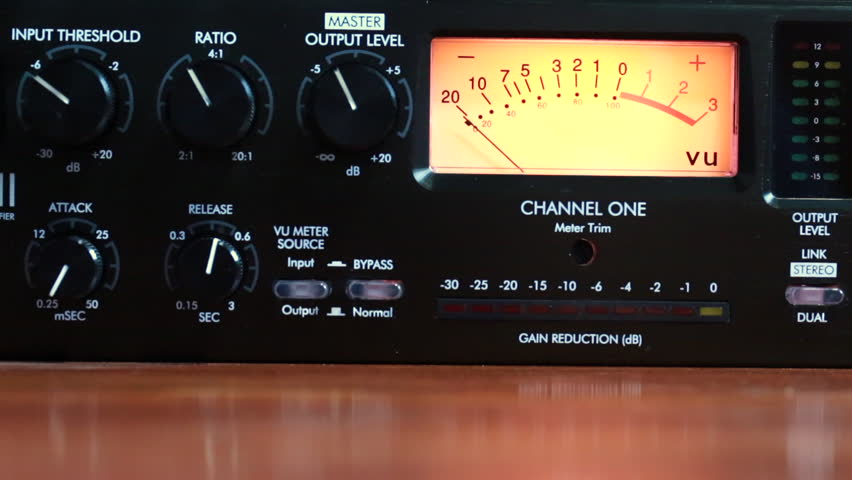
Radio Studio Compressor

The console operator does not understand anything about dynamic range, something that has no practical use in the air. And this is how many radios work with adjustments that “work” in the air by trial and error, and not always with the most demanding criteria. successful.

Dynamic range compression

Level normalization

In radio, an editor does not know or manage any level convention, so it could be said that level normalization is not widely used. However, a good professional practice would be that all the material generated by a station “sounds” at the same level. Not to the air, because to the air if it is transmitted normalized or compressed and limited, but inside the station. And for this, there are two ways:

The material is processed “by ear” by comparison.
An RMS value is defined and all publishers normalize their mixes to that average level.

Regarding the first point, differences of up to +/- 2 dB will be absolutely acceptable. But a very common vice is to overcompress the edits, or sometimes the voices, seeking to hear the compact and aggressive sound of the FM on studio monitoring. That sound should be determined on-air by the streaming processor, not the publisher. Editors generally abuse processes like Normalize RMS (Sound Forge) and “maximizers”; Wave Hammer (Sound Forge / Vegas) Ultramaximizer and L1 (Waves). Ideally, how much to “squeeze” the dynamics of the edited material should be a function of the type of processor the radio has. At this point it is possible to clarify a fairly common confusion: STANDARDIZATION has nothing to do with making an audio sound “strong” or “powerful”. Using normalization for that purpose is a beginner’s mistake.

The second option is the most accurate way of working -although this precision is not necessary- normalizing all the editions to a given RMS value. This does not impact the sound in the air but it does the internal prolixity of the station. RMS is not an accurate measurement of loudness or “volume”, but for what you need in radio it is enough.

The streaming audio processor knows nothing about the level of the audio file. The processor receives an audio level from the console and works accordingly. What affects the behavior of the processor is the dynamics of the material, if it has dynamics or is super-compressed / limited.

Normal working values

The level at which operator-editors generate material has two well-defined extremes to avoid: very high levels of compression / cliping and excessively low material (less than 24 dB RMS). When we talk about level, we must be clear about the differences between peak level and average level.

PEAK level

Regarding the peak level, the logical maximum limit is digital cliping. Needless to say, a cliping mix is ​​unacceptable.
It is advisable that the maximum peak level is not 0 dBfs, as this will generate overshoot cliping in the D / A converters and especially if the compressed material (MP3) is exported.
An appropriate value for the material on a radio is maximum peak – 1dBfs (the recommendation if using mp3 compression is -3 dBfs). But this does not mean that it should be -1 dB. If no peak reaches the established maximum it is not a problem as long as the material complies with the appropriate working level. The peak level does not matter, but in general the signal will always reach the maximum peak level.

Listening level (RMS)

The “listening level” or mix level is determined by the RMS or “average” value of the material. This is true even if the publisher has never measured the RMS value of their audios. In general the radio editor “compresses”, “maximizes” or -conception error by- “normalizes” your edits “so that they sound”. And in that “so that they sound”, it is taking the cuts to a certain value.

The question that arises is what should that value be? How much should the final mix “squeeze”? The final value should not be a value that generates excessive compression, as this is the task of the transmission processor. How to compress is a topic of discussion for another article, since it is fine spinning and the radios in general do not take into account these aspects. In general lines we will say:

If the radio has a simple analog processor, type M31 or Solidyne 362, they will perform better with material that has a more compact sound (more compression).
If the station has a high-end digital processor, and especially if it works with a highly processed sound in the air, it is not recommended or necessary to excessively maximize the material generated by the station, because these audio equipment respond better when the material is origin is not over compressed.


But what if the file level is very low? It depends. Depending on the PC-Console connection, the operator typically has at least 15 dB of gain range for level correction from the PC. In turn, if the level is low with the fader on, the AGC of the processor has between 10 and 20 dB more correction to compensate the level in the air. But if the file were generated too low, it could fall outside the operator / processor correction range and go low on air.

GENERAL AND ELEMENTARY CONCLUSIONS:

Different materials generated in the radio must sound at the same level, either by ear or measured RMS.
It should not be overcompressed, much less cliping.
The peak level should not exceed -1 dB.
It should not be too low as it may fall outside the processor’s AGC / operator correction ranges.

Put in values:

RMS values ​​between -16 to -13 dB RMS are acceptable.
Values ​​between -13 and -10 dB RMS generally indicate strong compression.
Values ​​less than -10 dB RMS indicate excessive compression, not recommended as it generates a very loud but “muffled” sound that cannot be “improved” by the air processor.


Normalization of an audio file.

Normalization of an audio file.

Normalization is used to increase or decrease the level of the song as a whole, so that its maximum volume peaks assume the indicated level.

Loudness Normalization

For example, if the maximum intensity points of the song are -3 dB (therefore well below 0, which should represent the maximum before distortion), normalizing to 0 dB means increasing the level of the entire song so that these peaks reach 0 dB.

This is the typical normalization of the peaks.

There is also RMS normalization (which takes into account not the peaks but the actual average level of the song).

Audio Normalization

AUDIO CDs, which have good dynamic possibilities (various intensity tones, from pianissimo to fortissimo), are generally recorded so that the maximum volume points are at 0 dB.

Normalizing your WAV recordings can be helpful in adjusting them to the average level of a CD in case they are too low (because you had been careful in level during recording) but one important thing to note:

Normalization of this type alters the original dynamics, that is, the reciprocal relationships between weak and strong sounds.

Although all levels are raised by the same amount, the relationship between 2 levels changes (small mathematical example:
2/5 = 0.4 ma (2 + 1) / (5 + 1) = 0.5 …

The result is that the weaker sounds, after abrupt normalization, sound much louder and those that were already playing only sound a little louder … altering the dynamic relationships that had been envisioned by those who originally recorded the music and making the sound output to lose depth.

Some types of music, generally already deficient dynamics (rock, metal, etc.) since the excursions between the minimum and maximum volume are almost never very consistent, are more “normalizable” without problems, while the genres in which there may be Large Dynamic excursions (classical music or music with passages from pianissimi to fortissimi) are more problematic.

In addition, it is necessary to take into account that if you normalize a large wav file that contains many songs (not yet divided) there can still be, even in genres with little dynamics, substantial differences, in this case between one song and another and not between different points of the same song.

So a light normalization can do and is actually used (to raise the level of the part), but it would be better to make sure you don’t need it (recording from the beginning with a good level) or at least not have too much. remember, however, that the dynamics are somewhat flattened.

Normalize with Mp4Gain

This software is capable (it is the only one that can do this) of normalizing the main audio and video formats and its standardization algorithm is by far the most efficient and the one that produces the best results.
For this reason it is used by musicians, radio broadcasters, universities, television stations, producers, etc.